brake light CHEVROLET CORVETTE 2020 User Guide
[x] Cancel search | Manufacturer: CHEVROLET, Model Year: 2020, Model line: CORVETTE, Model: CHEVROLET CORVETTE 2020Pages: 336, PDF Size: 5.21 MB
Page 166 of 336
Chevrolet Corvette Owner Manual (GMNA-Localizing-U.S./Canada/Mexico-
12470550) - 2020 - CRC - 4/23/20
Driving and Operating 165
Ignition Positions
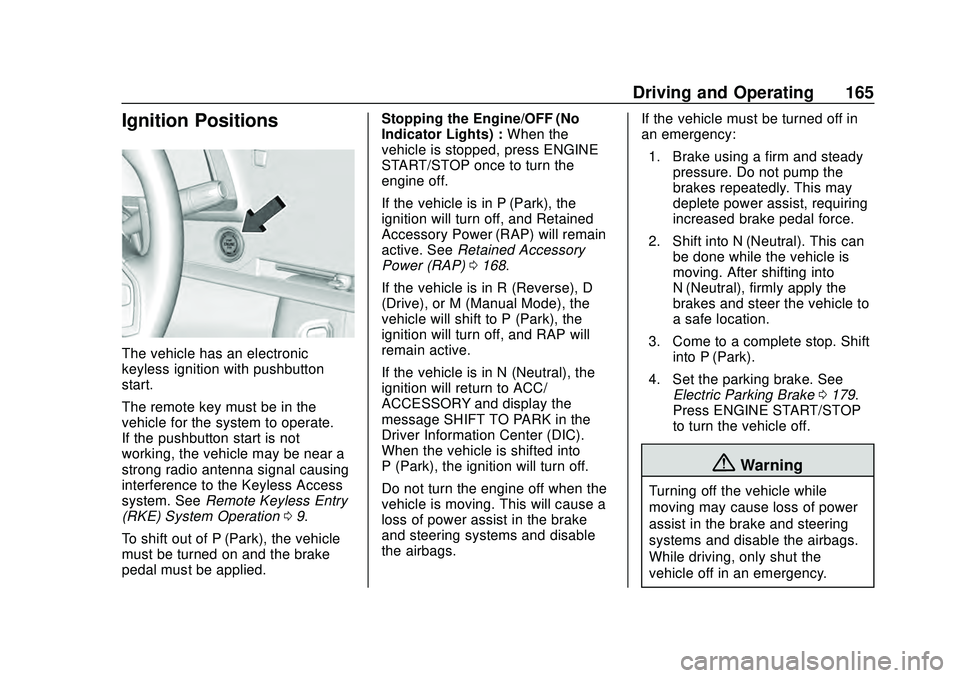
The vehicle has an electronic
keyless ignition with pushbutton
start.
The remote key must be in the
vehicle for the system to operate.
If the pushbutton start is not
working, the vehicle may be near a
strong radio antenna signal causing
interference to the Keyless Access
system. SeeRemote Keyless Entry
(RKE) System Operation 09.
To shift out of P (Park), the vehicle
must be turned on and the brake
pedal must be applied. Stopping the Engine/OFF (No
Indicator Lights) :
When the
vehicle is stopped, press ENGINE
START/STOP once to turn the
engine off.
If the vehicle is in P (Park), the
ignition will turn off, and Retained
Accessory Power (RAP) will remain
active. See Retained Accessory
Power (RAP) 0168.
If the vehicle is in R (Reverse), D
(Drive), or M (Manual Mode), the
vehicle will shift to P (Park), the
ignition will turn off, and RAP will
remain active.
If the vehicle is in N (Neutral), the
ignition will return to ACC/
ACCESSORY and display the
message SHIFT TO PARK in the
Driver Information Center (DIC).
When the vehicle is shifted into
P (Park), the ignition will turn off.
Do not turn the engine off when the
vehicle is moving. This will cause a
loss of power assist in the brake
and steering systems and disable
the airbags. If the vehicle must be turned off in
an emergency:
1. Brake using a firm and steady pressure. Do not pump the
brakes repeatedly. This may
deplete power assist, requiring
increased brake pedal force.
2. Shift into N (Neutral). This can be done while the vehicle is
moving. After shifting into
N (Neutral), firmly apply the
brakes and steer the vehicle to
a safe location.
3. Come to a complete stop. Shift into P (Park).
4. Set the parking brake. See Electric Parking Brake 0179.
Press ENGINE START/STOP
to turn the vehicle off.
{Warning
Turning off the vehicle while
moving may cause loss of power
assist in the brake and steering
systems and disable the airbags.
While driving, only shut the
vehicle off in an emergency.
Page 167 of 336
Chevrolet Corvette Owner Manual (GMNA-Localizing-U.S./Canada/Mexico-
12470550) - 2020 - CRC - 4/23/20
166 Driving and Operating
If the vehicle cannot be pulled over
and must be turned off while driving,
press and hold ENGINE START/
STOP for more than two seconds,
or press twice within five seconds.
ACC/ACCESSORY (Amber
Indicator Light) :This mode allows
the use of some electrical
accessories when the engine is off.
With the ignition off, pressing the
button one time without the brake
pedal applied will place the ignition
in ACC/ACCESSORY.
The ignition will switch from ACC/
ACCESSORY to off after
five minutes to prevent battery
rundown.
ON/RUN/START (Green Indicator
Light) : This mode is for driving and
starting. With the ignition off and the
brake pedal applied, pressing the
button once will place the ignition in
ON/RUN/START. Once engine
cranking begins, release the button.
Engine cranking will continue until
the engine starts. See Starting the
Engine 0166. The ignition will then
remain in ON/RUN. Service Mode
This power mode is available for
service and diagnostics, and to
verify the proper operation of the
malfunction indicator lamp as may
be required for emission inspection
purposes. With the vehicle off and
the brake pedal not applied,
pressing and holding ENGINE
START/STOP for more than
five seconds will place the vehicle in
Service Mode. The instruments and
audio systems will operate as they
do in ON/RUN, but the vehicle will
not be able to be driven. The engine
will not start in Service Mode. Press
ENGINE START/STOP again to turn
the vehicle off.
Starting the Engine
Caution
If you add electrical parts or
accessories, you could change
the way the engine operates. Any
resulting damage would not be
(Continued)
Caution (Continued)
covered by the vehicle warranty.
SeeAdd-On Electrical Equipment
0 208.
Caution
Do not try to shift to P (Park) if the
vehicle is moving. If you do, you
could damage the transmission.
Shift to P (Park) only when the
vehicle is stopped.
Place the transmission in P (Park)
or N (Neutral). To restart the vehicle
when it is already moving, use
N (Neutral) only.
Starting the Vehicle
The remote key must be inside the
vehicle for the ignition to work.
Cell phone chargers can interfere
with the operation of the Keyless
Access system. Battery chargers
should not be plugged in when
starting or turning off the engine.
Page 180 of 336
Chevrolet Corvette Owner Manual (GMNA-Localizing-U.S./Canada/Mexico-
12470550) - 2020 - CRC - 4/23/20
Driving and Operating 179
Brakes
Electric Brake Boost
Vehicles equipped with electric
brake boost have hydraulic brake
circuits that are electronically
controlled when the brake pedal is
applied during normal operation.
The system performs routine tests
and turns off within a few minutes
after the vehicle is shutdown. Noise
may be heard during this time. If the
brake pedal is pressed during the
tests or when the electric brake
boost system is off, a noticeable
change in pedal force and travel
may be felt. This is normal.
Antilock Brake
System (ABS)
The Antilock Brake System (ABS)
helps prevent a braking skid and
maintain steering while
braking hard.
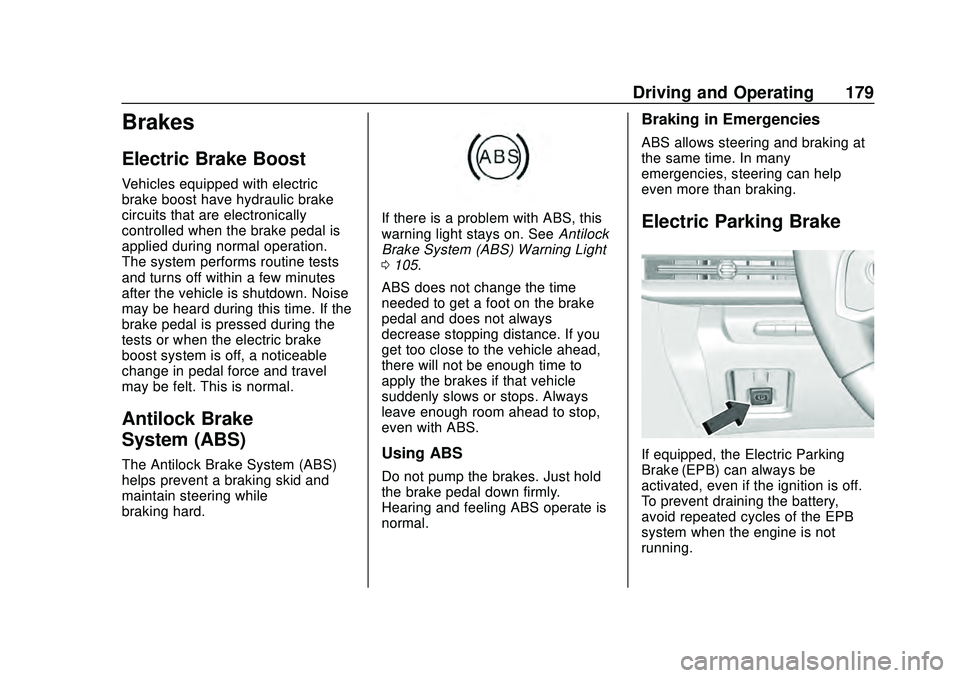
If there is a problem with ABS, this
warning light stays on. SeeAntilock
Brake System (ABS) Warning Light
0 105.
ABS does not change the time
needed to get a foot on the brake
pedal and does not always
decrease stopping distance. If you
get too close to the vehicle ahead,
there will not be enough time to
apply the brakes if that vehicle
suddenly slows or stops. Always
leave enough room ahead to stop,
even with ABS.
Using ABS
Do not pump the brakes. Just hold
the brake pedal down firmly.
Hearing and feeling ABS operate is
normal.
Braking in Emergencies
ABS allows steering and braking at
the same time. In many
emergencies, steering can help
even more than braking.
Electric Parking Brake
If equipped, the Electric Parking
Brake (EPB) can always be
activated, even if the ignition is off.
To prevent draining the battery,
avoid repeated cycles of the EPB
system when the engine is not
running.
Page 181 of 336
Chevrolet Corvette Owner Manual (GMNA-Localizing-U.S./Canada/Mexico-
12470550) - 2020 - CRC - 4/23/20
180 Driving and Operating
The system has aYElectric
Parking Brake light, and a
8Service
Parking Brake light. See Electric
Parking Brake Light 0104 and
Service Electric Parking Brake Light
0 105.
Before leaving the vehicle, check for
the
Ylight to ensure that the
parking brake is applied.
EPB Apply
To apply the EPB:
1. Be sure the vehicle is at a complete stop.
2. Press the EPB switch momentarily.
The
Ylight will flash and then stay
on once the EPB is fully applied.
If the
Ylight flashes continuously,
then the EPB is only partially
applied or there is a problem with
the EPB. A DIC message will
display. Release the EPB and try to
apply it again. If the light does not
come on, or keeps flashing, have the vehicle serviced. Do not drive
the vehicle if the
Ylight is flashing.
See your dealer.
If the
8light is on, press the EPB
switch and hold it. Continue to hold
the switch until the
Ylight remains
on. If the
8light remains on, see
your dealer.
If the EPB is applied while the
vehicle is moving, the vehicle will
decelerate as long as the switch is
pressed. If the switch is pressed
until the vehicle comes to a stop,
the EPB will remain applied.
The vehicle may automatically apply
the EPB in some situations when
the vehicle is not moving. This is
normal, and is done to periodically
check the correct operation of the
EPB system.
If the EPB fails to apply, block the
rear wheels to prevent vehicle
movement.
EPB Release
To release the EPB: 1. Turn the ignition on or to ACC/
ACCESSORY.
2. Apply and hold the brake pedal.
3. Press the EPB switch momentarily.
The EPB is released when the
Y
light is off.
If the
8light is on, release the EPB
by pressing and holding the EPB
switch. Continue to hold the switch
until the
Ylight is off. If either light
stays on after release is attempted,
see your dealer.
Caution
Driving with the parking brake on
can overheat the brake system
and cause premature wear or
damage to brake system parts.
Make sure that the parking brake
is fully released and the brake
warning light is off before driving.
Page 183 of 336

Chevrolet Corvette Owner Manual (GMNA-Localizing-U.S./Canada/Mexico-
12470550) - 2020 - CRC - 4/23/20
182 Driving and Operating
Ride Control Systems
Traction Control/
Electronic Stability
Control
The vehicle has a Traction Control
System (TCS) and a StabiliTrak/
Electronic Stability Control (ESC)
system. These systems help limit
wheel spin and assist the driver in
maintaining control, especially on
slippery road conditions.
TCS activates if it senses that the
rear wheels are spinning too much
or are beginning to lose traction.
When this happens, TCS applies
the brakes to the spinning wheel
and reduces engine power (by
closing the throttle and managing
engine spark) to limit wheel spin.
StabiliTrak/ESC activates when the
vehicle senses a difference between
the intended path and the direction
the vehicle is actually traveling.
StabiliTrak/ESC selectively applies
braking pressure to any one of thevehicle wheel brakes to assist the
driver in keeping the vehicle on the
intended path.
If cruise control is being used when
TCS begins to limit wheel spin, the
cruise control will automatically
disengage. Cruise control may be
reengaged when road conditions
allow. See
Cruise Control 0196.
If the driver disables TCS, cruise
control will disengage. Cruise
control will also be disabled if
Performance Traction Management
(PTM) is selected, or if StabiliTrak is
turned off.
Both systems come on
automatically when the vehicle is
started and begins to move. The
systems may be heard or felt while
they are operating or while
performing diagnostic checks. This
is normal and does not mean there
is a problem with the vehicle.
It is recommended to leave both
systems on for normal driving
conditions, but it may be necessary
to turn TCS off if the vehicle gets
stuck in sand, mud, ice, or snow. See
If the Vehicle Is Stuck 0159
and “Turning the Systems Off and
On” later in this section.
The indicator light for both systems
is in the instrument cluster. This
light will:
.
Flash when TCS is limiting
wheel spin
. Flash when StabiliTrak/ESC is
activated
. Flash when ABS is active
. Turn on and stay on when either
system is not working
If either system fails to turn on or to
activate, a message displays in the
Driver Information Center (DIC), and
dcomes on and stays on to
indicate that the system is inactive
and is not assisting the driver in
Page 184 of 336
Chevrolet Corvette Owner Manual (GMNA-Localizing-U.S./Canada/Mexico-
12470550) - 2020 - CRC - 4/23/20
Driving and Operating 183
maintaining control. The vehicle is
safe to drive, but driving should be
adjusted accordingly.
If
dcomes on and stays on:
1. Stop the vehicle.
2. Turn the engine off and wait 15 seconds.
3. Start the engine.
Drive the vehicle. If
dcomes on and
stays on, the vehicle may need
more time to diagnose the problem.
If the condition persists, see your
dealer.
Turning the Systems Off
and On
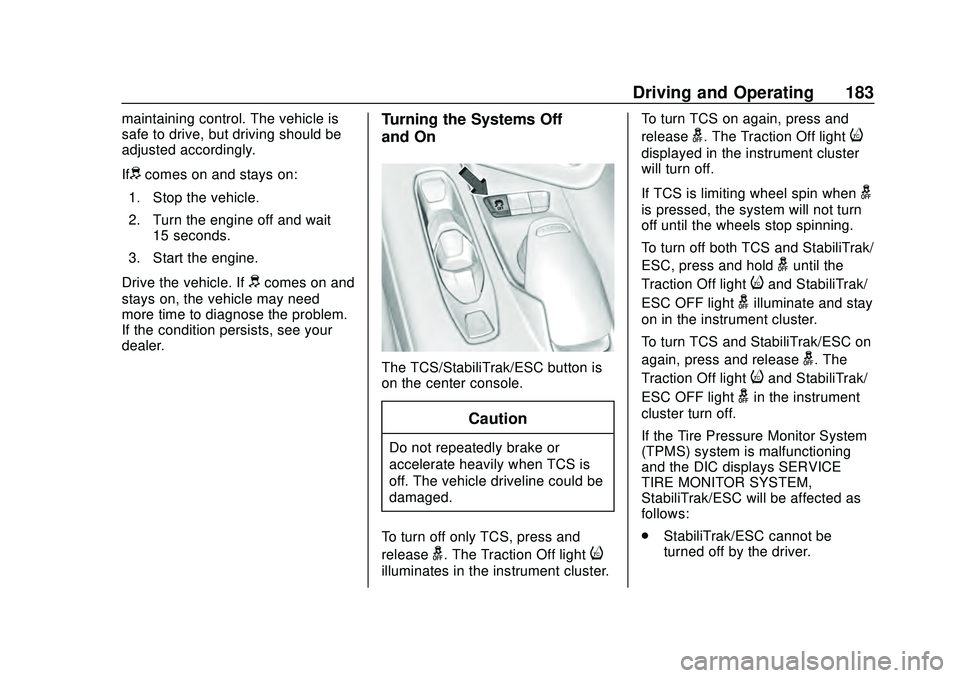
The TCS/StabiliTrak/ESC button is
on the center console.
Caution
Do not repeatedly brake or
accelerate heavily when TCS is
off. The vehicle driveline could be
damaged.
To turn off only TCS, press and
release
g. The Traction Off lighti
illuminates in the instrument cluster. To turn TCS on again, press and
release
g. The Traction Off lighti
displayed in the instrument cluster
will turn off.
If TCS is limiting wheel spin when
g
is pressed, the system will not turn
off until the wheels stop spinning.
To turn off both TCS and StabiliTrak/
ESC, press and hold
guntil the
Traction Off light
iand StabiliTrak/
ESC OFF light
gilluminate and stay
on in the instrument cluster.
To turn TCS and StabiliTrak/ESC on
again, press and release
g. The
Traction Off light
iand StabiliTrak/
ESC OFF light
gin the instrument
cluster turn off.
If the Tire Pressure Monitor System
(TPMS) system is malfunctioning
and the DIC displays SERVICE
TIRE MONITOR SYSTEM,
StabiliTrak/ESC will be affected as
follows:
. StabiliTrak/ESC cannot be
turned off by the driver.
Page 195 of 336
Chevrolet Corvette Owner Manual (GMNA-Localizing-U.S./Canada/Mexico-
12470550) - 2020 - CRC - 4/23/20
194 Driving and Operating
.Requires more driving skill than
mode 2.
. StabiliTrak/ESC is on and more
engine power is available than in
mode 2.
PTM Mode 4 –Sport 2
. For use by drivers who are
familiar with the track.
. Dry conditions only.
. Requires more driving skill than
modes 2 or 3.
. StabiliTrak/ESC is off and
available engine power is the
same as mode 3.
PTM Mode 5 –Race
. For use by experienced drivers
who are familiar with the track.
. Dry conditions only.
. Requires more driving skill than
in other modes.
. StabiliTrak/ESC is off and
engine power is available for
maximum cornering speed. Press and releasegto turn off PTM
and return to the TCS and
StabiliTrak/ESC systems. The
traction off light
iand StabiliTrak
Off light
gwill go out.
Launch Control (Sport and
Track Mode Only)
A Launch Control feature is
available, within Competitive Driving
Mode or PTM, on all vehicles to
allow the driver to achieve high
levels of vehicle acceleration in a
straight line. Launch Control is a
form of TCS that manages tire spin,
and transmissions clutch, while
launching the vehicle. This feature
is intended for use during closed
course race events where
consistent zero to 60 and quarter
mile times are desirable.
Launch Control is only available
when the following criteria are met:
. Competitive Driving Mode or any
of the PTM Modes are selected
(if equipped).
. The vehicle is not moving. .
The wheels and steering wheel
are pointing straight.
Launching the Vehicle
. Ensure the vehicle is in
Competitive Driving Mode or any
of the PTM modes.
. The brake pedal must be firmly
pressed to the floor, equivalent
to a panic brake event.
. While maintaining the brake
pedal, the accelerator pedal is
rapidly applied to wide open
throttle. (If the vehicle rolls due
to wide open throttle, release the
throttle, press the brake pedal
more firmly, and re-apply the
accelerator to wide open
throttle.)
The Launch Control feature will
initially limit engine speed as the
driver rapidly applies the accelerator
pedal to wide open throttle. Allow
the engine rpm’ s to stabilize.
A smooth, quick release of the
brake pedal, while maintaining the
fully pressed accelerator pedal, will
manage tire slip and transmissions
Page 199 of 336
Chevrolet Corvette Owner Manual (GMNA-Localizing-U.S./Canada/Mexico-
12470550) - 2020 - CRC - 4/23/20
198 Driving and Operating
While pressing the accelerator pedal
or shortly following the release to
override cruise control, briefly
pressing SET–will result in cruise
set to the current vehicle speed.
Using Cruise Control on Hills
How well the cruise control works
on hills depends upon the vehicle
speed, load, and the steepness of
the hills. When going up steep hills,
you may have to step on the
accelerator pedal to maintain your
speed. When going downhill, you
may have to brake or shift to a lower
gear to keep your speed down.
If the brake pedal is applied, cruise
control will disengage. Cruise Control in Manual Paddle
Shift Gear Selection
When the vehicle is in M (Manual
Mode) and the manual paddle shift
controls are not being used, cruise
control operates in the same
manner as D (Drive).
When the vehicle is in M (Manual
Mode) and the manual paddle shift
controls are being used, cruise
control operates as follows:
.
If cruise control is active and a
gear is selected with the manual
paddle shift controls, the vehicle
speed is maintained in the driver
selected gear and will not
automatically upshift or
downshift the transmission while
the driver ’s gear selection is
active.
. If driving in hilly terrain, cruise
control may not be able to
maintain vehicle speed if an
upshift or downshift is not
selected by the driver. While
driving on hilly terrain and cruise
control is active with a manual
paddle shift gear selection, the
driver must select the proper gear for the terrain or select D
(Drive) on the shifter for full
automatic transmission
operation.
Ending Cruise Control
. Step lightly on the brake pedal.
. Shift the transmission to
N (Neutral).
. Press
*.
. To turn off cruise control,
press
1.
Erasing Speed Memory
The cruise control set speed is
erased from memory if
1is pressed
or if the ignition is turned off.
Page 210 of 336
Chevrolet Corvette Owner Manual (GMNA-Localizing-U.S./Canada/Mexico-
12470550) - 2020 - CRC - 4/23/20
Vehicle Care 209
Vehicle Care
General Information
General Information . . . . . . . . . . 210
California Proposition65 Warning . . . . . . . . . . . . . . . . . 210
California Perchlorate Materials Requirements . . . . . . . . . . . . . . . 211
Accessories and Modifications . . . . . . . . . . . . . . . . 211
Lifting the Vehicle . . . . . . . . . . . . . 211
Vehicle Checks
Doing Your Own Service Work . . . . . . . . . . . . . . . 213
Underhood Compartment Overview . . . . . . . . . . . . . . . . . . . . 214
Engine Compartment Overview . . . . . . . . . . . . . . . . . . . . 215
Engine Oil . . . . . . . . . . . . . . . . . . . . 218
Engine Oil Life System . . . . . . . 221
Dual Clutch Transmission Fluid . . . . . . . . . . . . . . . . . . . . . . . . 222
Dual Clutch Transmission Fluid Life System . . . . . . . . . . . . . . . . . 223
Engine Air Filter Life System . . . . . . . . . . . . . . . . . . . . . . 224
Engine Air Cleaner/Filter . . . . . . 224
Cooling System . . . . . . . . . . . . . . 226 Engine Overheating . . . . . . . . . . 230
Washer Fluid . . . . . . . . . . . . . . . . . 231
Brakes . . . . . . . . . . . . . . . . . . . . . . . 232
Brake Fluid . . . . . . . . . . . . . . . . . . . 233
Battery - North America . . . . . . 234
Park Brake and P (Park)
Mechanism Check . . . . . . . . . . 235
Wiper Blade Replacement . . . . 236
Windshield Replacement . . . . . 236
Gas Strut(s) . . . . . . . . . . . . . . . . . . 237
Headlamp Aiming
Front Headlamp Aiming . . . . . . 238
Bulb Replacement
LED Lighting . . . . . . . . . . . . . . . . . 238
Electrical System
Electrical System Overload . . . 239
Fuses and Circuit Breakers . . . 239
Instrument Panel Fuse Block . . . . . . . . . . . . . . . . . . . . . . . . 239
Rear Compartment Fuse Block . . . . . . . . . . . . . . . . . . . . . . . . 242
Wheels and Tires
Tires . . . . . . . . . . . . . . . . . . . . . . . . . . 245
All-Season Tires . . . . . . . . . . . . . . 246
Winter Tires . . . . . . . . . . . . . . . . . . 247
Run-Flat Tires . . . . . . . . . . . . . . . . 247
Low-Profile Tires . . . . . . . . . . . . . 248
Summer Tires . . . . . . . . . . . . . . . . 248 Tire Sidewall Labeling . . . . . . . . 249
Tire Designations . . . . . . . . . . . . . 250
Tire Terminology and
Definitions . . . . . . . . . . . . . . . . . . 251
Tire Pressure . . . . . . . . . . . . . . . . . 253
Tire Pressure for High-Speed
Operation . . . . . . . . . . . . . . . . . . . 254
Tire Pressure Monitor System . . . . . . . . . . . . . . . . . . . . . . 255
Tire Pressure Monitor Operation . . . . . . . . . . . . . . . . . . . 256
Tire Inspection . . . . . . . . . . . . . . . . 259
Tire Rotation . . . . . . . . . . . . . . . . . 259
When It Is Time for New Tires . . . . . . . . . . . . . . . . . . . . . . . . 260
Buying New Tires . . . . . . . . . . . . . 261
Different Size Tires and Wheels . . . . . . . . . . . . . . . . . . . . . . 262
Uniform Tire Quality Grading . . . . . . . . . . . . . . . . . . . . . 263
Wheel Alignment and Tire Balance . . . . . . . . . . . . . . . . . . . . . 264
Wheel Replacement . . . . . . . . . . 265
Tire Chains . . . . . . . . . . . . . . . . . . . 266
If a Tire Goes Flat . . . . . . . . . . . . 267Jump Starting
Jump Starting - North America . . . . . . . . . . . . . . . . . . . . . 267
Page 235 of 336
Chevrolet Corvette Owner Manual (GMNA-Localizing-U.S./Canada/Mexico-
12470550) - 2020 - CRC - 4/23/20
234 Vehicle Care
when new brake linings are
installed. Add or remove fluid, as
necessary, only when work is done
on the brake hydraulic system.
Caution
If too much brake fluid is added,
the brake fluid can spill and cause
vehicle damage, including
damage to electrical components
and surfaces. Add brake fluid only
when work is done on the brake
hydraulic system.
When the brake fluid falls to a low
level, the brake warning light comes
on. See Brake System Warning
Light 0104.
Brake fluid absorbs water over time
which degrades the effectiveness of
the brake fluid. Replace brake fluid
at the specified intervals to prevent
increased stopping distance. See
Maintenance Schedule 0286. What to Add
Use only GM approved DOT 4
brake fluid from a clean, sealed
container. See
Recommended
Fluids and Lubricants 0295.{Warning
The wrong or contaminated brake
fluid could result in damage to the
brake system. This could result in
the loss of braking leading to a
possible injury. Always use the
proper GM approved brake fluid.
Caution
If brake fluid is spilled on the
vehicle's painted surfaces, the
paint finish can be damaged.
Immediately wash off any painted
surface.
Battery - North America
The original equipment battery is
maintenance free. Do not remove
the cap and do not add fluid.
Refer to the replacement number on
the original battery label when a
new battery is needed. For battery
replacement, see your dealer.
{Warning
WARNING: Battery posts,
terminals, and related
accessories contain lead and lead
compounds, chemicals known to
the State of California to cause
cancer and birth defects or other
reproductive harm. Batteries also
contain other chemicals known to
the State of California to cause
cancer. WASH HANDS AFTER
HANDLING. For more information
go to www.P65Warnings.ca.gov/
passenger-vehicle.
See California Proposition
65 Warning 0210 and the back
cover.