brake CHEVROLET CORVETTE 2020 Owner's Manual
[x] Cancel search | Manufacturer: CHEVROLET, Model Year: 2020, Model line: CORVETTE, Model: CHEVROLET CORVETTE 2020Pages: 336, PDF Size: 5.21 MB
Page 5 of 336
Chevrolet Corvette Owner Manual (GMNA-Localizing-U.S./Canada/Mexico-
12470550) - 2020 - CRC - 4/23/20
4 Introduction
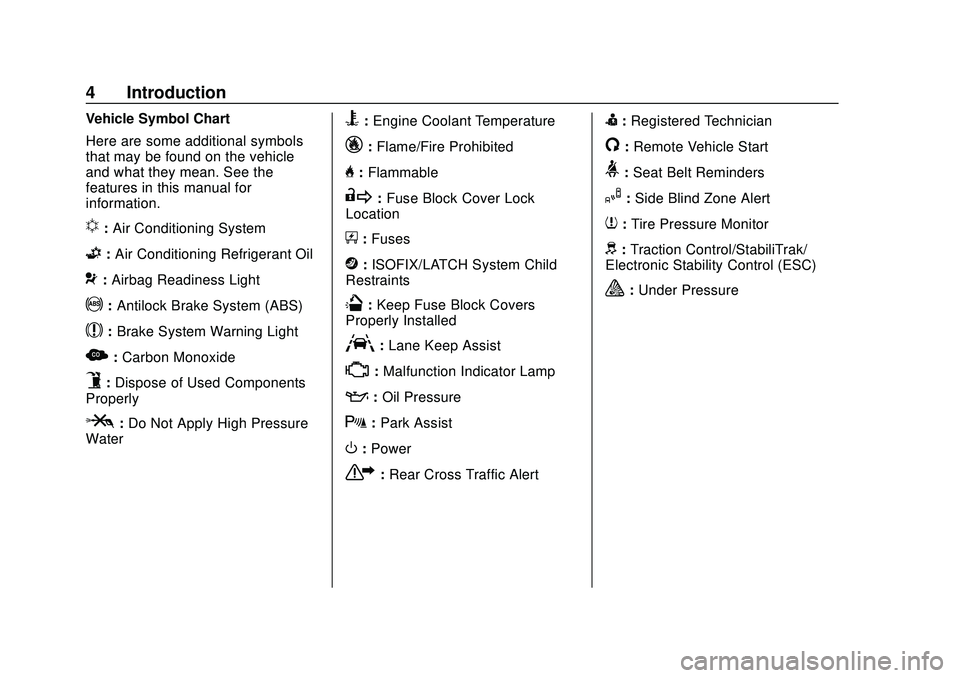
Vehicle Symbol Chart
Here are some additional symbols
that may be found on the vehicle
and what they mean. See the
features in this manual for
information.
u:Air Conditioning System
G: Air Conditioning Refrigerant Oil
9:Airbag Readiness Light
!: Antilock Brake System (ABS)
$:Brake System Warning Light
z:Carbon Monoxide
9:Dispose of Used Components
Properly
P: Do Not Apply High Pressure
Water
B: Engine Coolant Temperature
_: Flame/Fire Prohibited
H:Flammable
R:Fuse Block Cover Lock
Location
+: Fuses
j:ISOFIX/LATCH System Child
Restraints
Q: Keep Fuse Block Covers
Properly Installed
A: Lane Keep Assist
*: Malfunction Indicator Lamp
::Oil Pressure
X:Park Assist
O:Power
7:Rear Cross Traffic Alert
I:Registered Technician
/:Remote Vehicle Start
>:Seat Belt Reminders
I: Side Blind Zone Alert
7:Tire Pressure Monitor
d:Traction Control/StabiliTrak/
Electronic Stability Control (ESC)
a: Under Pressure
Page 7 of 336
Chevrolet Corvette Owner Manual (GMNA-Localizing-U.S./Canada/Mexico-
12470550) - 2020 - CRC - 4/23/20
6 Introduction
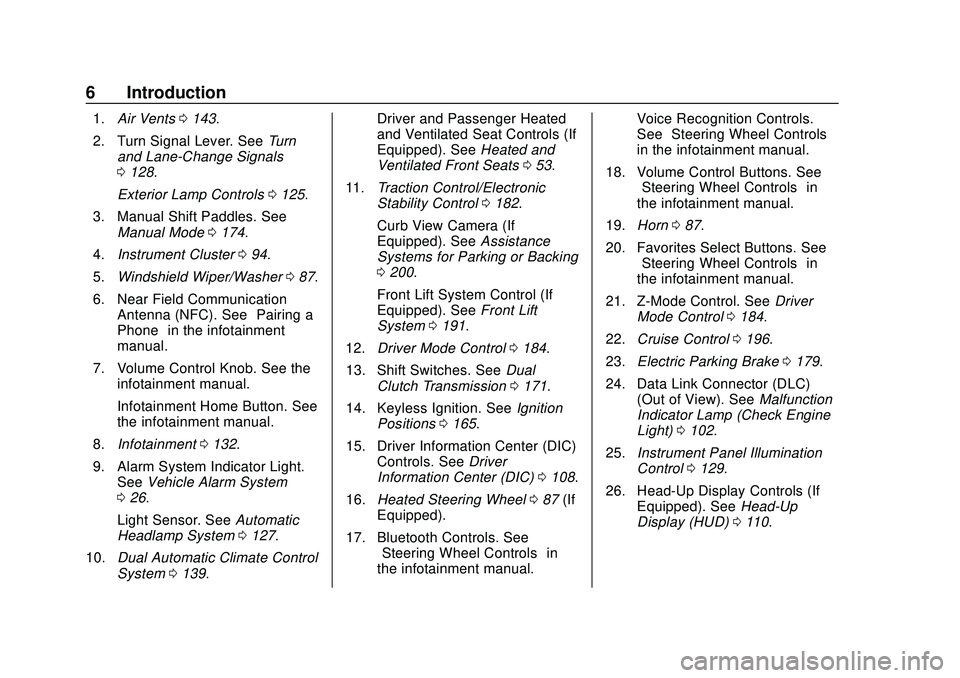
1.Air Vents 0143.
2. Turn Signal Lever. See Turn
and Lane-Change Signals
0 128.
Exterior Lamp Controls 0125.
3. Manual Shift Paddles. See Manual Mode 0174.
4. Instrument Cluster 094.
5. Windshield Wiper/Washer 087.
6. Near Field Communication Antenna (NFC). See “Pairing a
Phone” in the infotainment
manual.
7. Volume Control Knob. See the infotainment manual.
Infotainment Home Button. See
the infotainment manual.
8. Infotainment 0132.
9. Alarm System Indicator Light. See Vehicle Alarm System
0 26.
Light Sensor. See Automatic
Headlamp System 0127.
10. Dual Automatic Climate Control
System 0139. Driver and Passenger Heated
and Ventilated Seat Controls (If
Equipped). See
Heated and
Ventilated Front Seats 053.
11. Traction Control/Electronic
Stability Control 0182.
Curb View Camera (If
Equipped). See Assistance
Systems for Parking or Backing
0 200.
Front Lift System Control (If
Equipped). See Front Lift
System 0191.
12. Driver Mode Control 0184.
13. Shift Switches. See Dual
Clutch Transmission 0171.
14. Keyless Ignition. See Ignition
Positions 0165.
15. Driver Information Center (DIC) Controls. See Driver
Information Center (DIC) 0108.
16. Heated Steering Wheel 087 (If
Equipped).
17. Bluetooth Controls. See “Steering Wheel Controls” in
the infotainment manual. Voice Recognition Controls.
See
“Steering Wheel Controls”
in the infotainment manual.
18. Volume Control Buttons. See “Steering Wheel Controls” in
the infotainment manual.
19. Horn 087.
20. Favorites Select Buttons. See “Steering Wheel Controls” in
the infotainment manual.
21. Z-Mode Control. See Driver
Mode Control 0184.
22. Cruise Control 0196.
23. Electric Parking Brake 0179.
24. Data Link Connector (DLC) (Out of View). See Malfunction
Indicator Lamp (Check Engine
Light) 0102.
25. Instrument Panel Illumination
Control 0129.
26. Head-Up Display Controls (If Equipped). See Head-Up
Display (HUD) 0110.
Page 11 of 336
Chevrolet Corvette Owner Manual (GMNA-Localizing-U.S./Canada/Mexico-
12470550) - 2020 - CRC - 4/23/20
10 Keys, Doors, and Windows
If equipped with remote window
operation, press
Iand hold for
three seconds to remotely open the
windows, if enabled. See Vehicle
Personalization 0116.
See Folding Mirrors 030.
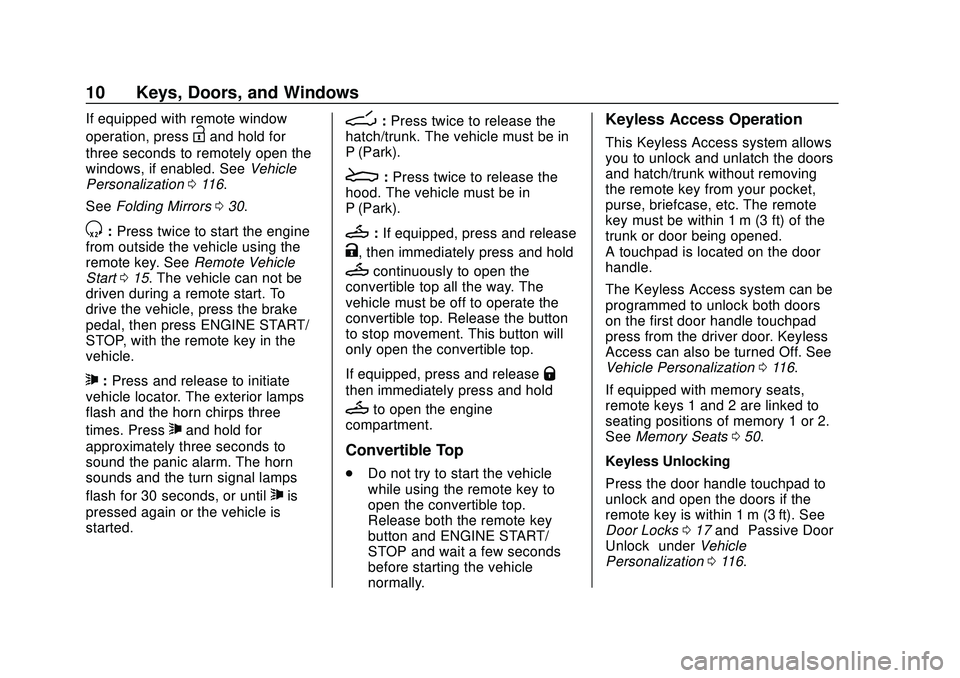
S:Press twice to start the engine
from outside the vehicle using the
remote key. See Remote Vehicle
Start 015. The vehicle can not be
driven during a remote start. To
drive the vehicle, press the brake
pedal, then press ENGINE START/
STOP, with the remote key in the
vehicle.
7: Press and release to initiate
vehicle locator. The exterior lamps
flash and the horn chirps three
times. Press
7and hold for
approximately three seconds to
sound the panic alarm. The horn
sounds and the turn signal lamps
flash for 30 seconds, or until
7is
pressed again or the vehicle is
started.
D: Press twice to release the
hatch/trunk. The vehicle must be in
P (Park).
E: Press twice to release the
hood. The vehicle must be in
P (Park).
M: If equipped, press and release
K, then immediately press and hold
Mcontinuously to open the
convertible top all the way. The
vehicle must be off to operate the
convertible top. Release the button
to stop movement. This button will
only open the convertible top.
If equipped, press and release
Q
then immediately press and hold
Mto open the engine
compartment.
Convertible Top
. Do not try to start the vehicle
while using the remote key to
open the convertible top.
Release both the remote key
button and ENGINE START/
STOP and wait a few seconds
before starting the vehicle
normally.
Keyless Access Operation
This Keyless Access system allows
you to unlock and unlatch the doors
and hatch/trunk without removing
the remote key from your pocket,
purse, briefcase, etc. The remote
key must be within 1 m (3 ft) of the
trunk or door being opened.
A touchpad is located on the door
handle.
The Keyless Access system can be
programmed to unlock both doors
on the first door handle touchpad
press from the driver door. Keyless
Access can also be turned Off. See
Vehicle Personalization 0116.
If equipped with memory seats,
remote keys 1 and 2 are linked to
seating positions of memory 1 or 2.
See Memory Seats 050.
Keyless Unlocking
Press the door handle touchpad to
unlock and open the doors if the
remote key is within 1 m (3 ft). See
Door Locks 017 and “Passive Door
Unlock” underVehicle
Personalization 0116.
Page 14 of 336
Chevrolet Corvette Owner Manual (GMNA-Localizing-U.S./Canada/Mexico-
12470550) - 2020 - CRC - 4/23/20
Keys, Doors, and Windows 13
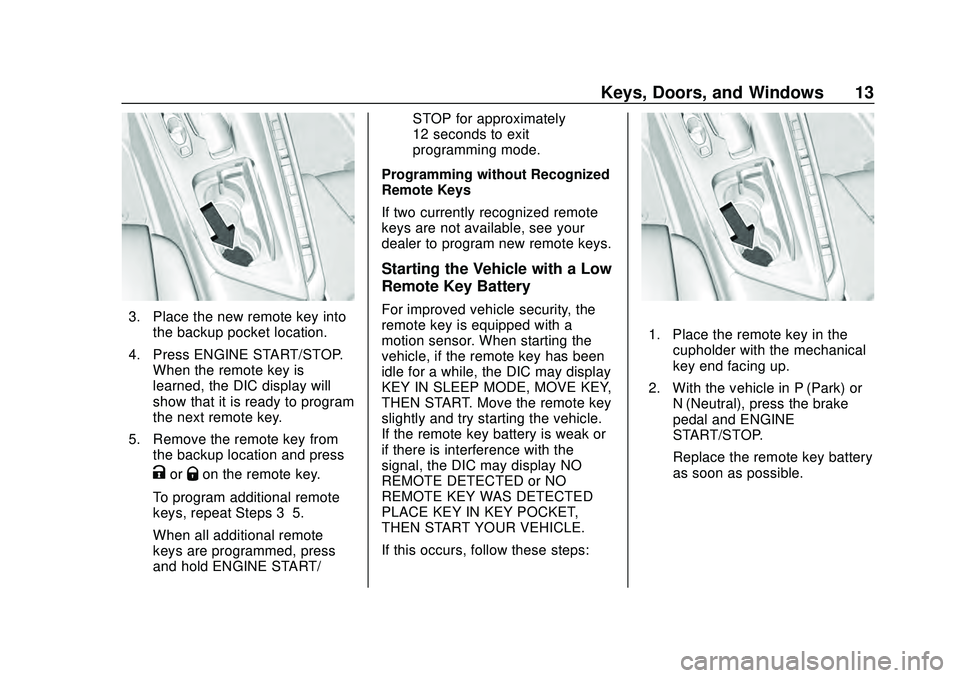
3. Place the new remote key intothe backup pocket location.
4. Press ENGINE START/STOP. When the remote key is
learned, the DIC display will
show that it is ready to program
the next remote key.
5. Remove the remote key from the backup location and press
KorQon the remote key.
To program additional remote
keys, repeat Steps 3–5.
When all additional remote
keys are programmed, press
and hold ENGINE START/ STOP for approximately
12 seconds to exit
programming mode.
Programming without Recognized
Remote Keys
If two currently recognized remote
keys are not available, see your
dealer to program new remote keys.
Starting the Vehicle with a Low
Remote Key Battery
For improved vehicle security, the
remote key is equipped with a
motion sensor. When starting the
vehicle, if the remote key has been
idle for a while, the DIC may display
KEY IN SLEEP MODE, MOVE KEY,
THEN START. Move the remote key
slightly and try starting the vehicle.
If the remote key battery is weak or
if there is interference with the
signal, the DIC may display NO
REMOTE DETECTED or NO
REMOTE KEY WAS DETECTED
PLACE KEY IN KEY POCKET,
THEN START YOUR VEHICLE.
If this occurs, follow these steps:
1. Place the remote key in the cupholder with the mechanical
key end facing up.
2. With the vehicle in P (Park) or N (Neutral), press the brake
pedal and ENGINE
START/STOP.
Replace the remote key battery
as soon as possible.
Page 17 of 336
Chevrolet Corvette Owner Manual (GMNA-Localizing-U.S./Canada/Mexico-
12470550) - 2020 - CRC - 4/23/20
16 Keys, Doors, and Windows
Other conditions can affect the
performance of the remote key. See
Remote Keyless Entry (RKE)
System09.
You have a total of 30 minutes of
engine running time. The maximum
run time of a single start is
15 minutes, and it will shut off
automatically. You could do three
10 minute starts if you manually
shut off after 10 minutes. The last
10 minute start would shut off
automatically as your total
30 minutes will have been used.
Starting the Engine Using Remote
Start
1. Press
Stwice on the remote
key. The turn signal lamps will
flash. The lamps flash to
confirm the request to remote
start the vehicle has been
received. During the remote
start, the doors will be locked
and the parking lamps will
remain on as long as the
engine is running. 2. The engine will shut off after
15 minutes or after the
remainder of the 30 minute
total running time is used,
unless you stop the remote
start before engine running has
completed or the ignition is
turned on.
3. Press the brake pedal and turn the ignition on to drive the
vehicle.
Total Engine Run Time
Remote start can be used for up to
30 minutes of total engine run time.
After two remote starts of
15 minutes, or multiple shorter time
starts totaling 30 minutes have been
used, the vehicle's ignition must be
turned on and then off before the
remote start can be used again.
Canceling a Remote Start
To cancel a remote start, do any of
the following:
. Press
S. The parking lamps will
turn off. .
Turn on the hazard warning
flashers.
. Turn the vehicle on and then
back off.
Conditions in Which Remote Start
Will Not Work
The remote start will not operate if
any of the following occur:
. The ignition is in any mode other
than off.
. A remote key is in the vehicle.
. The hatch/trunk is not closed.
. The convertible top is not fully
open or closed.
. The tonneau cover is not closed.
. The hazard warning flashers
are on.
. There is an emission control
system malfunction.
. The engine coolant temperature
is too high.
. The oil pressure is low.
. The 30 minutes of engine run
time have been used.
Page 21 of 336
Chevrolet Corvette Owner Manual (GMNA-Localizing-U.S./Canada/Mexico-
12470550) - 2020 - CRC - 4/23/20
20 Keys, Doors, and Windows
mechanical key halfway around in
the cylinder and repeat the reset
procedure.
Delayed Locking
This feature delays the actual
locking of the doors until
five seconds after all doors are
closed.
When
Qis pressed on the power
door lock switch with the door open,
a chime will sound three times
indicating that delayed locking is
active.
The doors will then lock
automatically five seconds after all
doors are closed. If a door is
reopened before five seconds have
elapsed, the five-second timer will
reset once all the doors are closed
again.
Press
Qon the door lock switch
again, or press
Qon the remote
key, to override this feature and lock
the doors immediately. Delayed locking can be
programmed. See
Vehicle
Personalization 0116.
Automatic Door Locks
The doors will lock automatically
when all doors are closed, the
ignition is on, and the vehicle is
shifted out of P (Park).
To unlock the doors:
.
Press
Kon a power door lock
switch.
. Shift the transmission into
P (Park).
If a vehicle door is unlocked and
then opened and closed, the doors
will lock either when your foot is
removed from the brake or the
vehicle speed becomes faster than
13 km/h (8 mph).
Automatic door locking cannot be
disabled. Automatic door unlocking
can be programmed. See Vehicle
Personalization 0116.
Lockout Protection
If the ignition is on or in ACC/
ACCESSORY and the power door
lock switch is pressed with the
driver door open, all the doors will
lock and only the driver door will
unlock.
If the vehicle is off and locking is
requested while a door is open,
when all doors are closed the
vehicle will check for remote keys
inside. If a remote key is detected
and the number of remote keys
inside has not reduced, the driver
door will unlock and the horn will
chirp three times.
Lockout Protection can be manually
overridden with the driver door open
by pressing and holding
Qon the
power door lock switch.
Page 23 of 336
Chevrolet Corvette Owner Manual (GMNA-Localizing-U.S./Canada/Mexico-
12470550) - 2020 - CRC - 4/23/20
22 Keys, Doors, and Windows
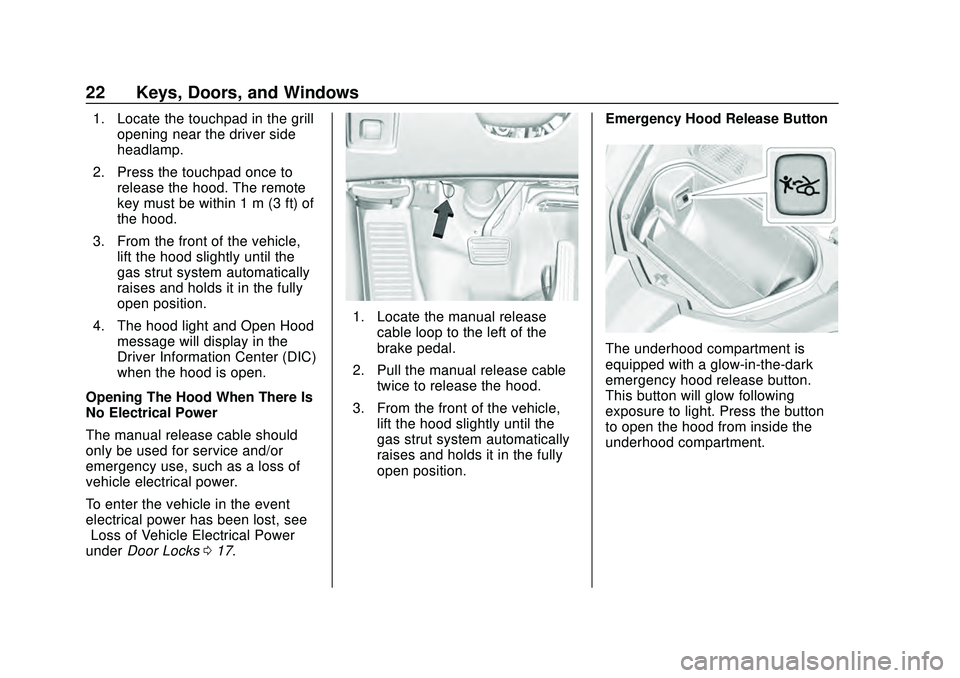
1. Locate the touchpad in the grillopening near the driver side
headlamp.
2. Press the touchpad once to release the hood. The remote
key must be within 1 m (3 ft) of
the hood.
3. From the front of the vehicle, lift the hood slightly until the
gas strut system automatically
raises and holds it in the fully
open position.
4. The hood light and Open Hood message will display in the
Driver Information Center (DIC)
when the hood is open.
Opening The Hood When There Is
No Electrical Power
The manual release cable should
only be used for service and/or
emergency use, such as a loss of
vehicle electrical power.
To enter the vehicle in the event
electrical power has been lost, see
“Loss of Vehicle Electrical Power”
under Door Locks 017.
1. Locate the manual release
cable loop to the left of the
brake pedal.
2. Pull the manual release cable twice to release the hood.
3. From the front of the vehicle, lift the hood slightly until the
gas strut system automatically
raises and holds it in the fully
open position. Emergency Hood Release Button
The underhood compartment is
equipped with a glow-in-the-dark
emergency hood release button.
This button will glow following
exposure to light. Press the button
to open the hood from inside the
underhood compartment.
Page 39 of 336
Chevrolet Corvette Owner Manual (GMNA-Localizing-U.S./Canada/Mexico-
12470550) - 2020 - CRC - 4/23/20
38 Keys, Doors, and Windows
Removing the Roof Panel
{Warning
Do not remove a roof panel while
the vehicle is moving. The panel
could fall into the vehicle and
strike an occupant and cause you
to lose control. It could also fly off
and strike another vehicle.
Remove the roof panel only when
the vehicle is parked.
It may be necessary to have help
removing the roof panel.
To remove: 1. Shift transmission into P (Park).
2. Turn the ignition off and set the parking brake.
3. Lower both sun visors.
4. Open the rear hatch/trunk and remove any items that may
interfere with proper storage of
the roof panel.
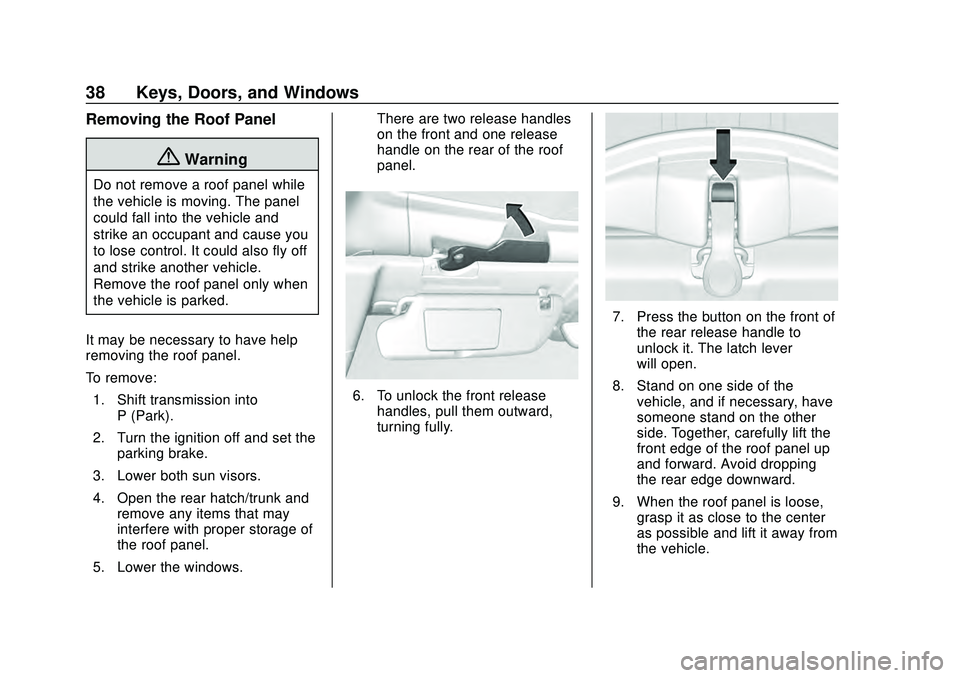
5. Lower the windows. There are two release handles
on the front and one release
handle on the rear of the roof
panel.
6. To unlock the front release
handles, pull them outward,
turning fully.
7. Press the button on the front ofthe rear release handle to
unlock it. The latch lever
will open.
8. Stand on one side of the vehicle, and if necessary, have
someone stand on the other
side. Together, carefully lift the
front edge of the roof panel up
and forward. Avoid dropping
the rear edge downward.
9. When the roof panel is loose, grasp it as close to the center
as possible and lift it away from
the vehicle.
Page 41 of 336
Chevrolet Corvette Owner Manual (GMNA-Localizing-U.S./Canada/Mexico-
12470550) - 2020 - CRC - 4/23/20
40 Keys, Doors, and Windows
{Warning
Do not push from the sides of the
roof panel when seating the panel
into the upper receivers for
storage. Pushing from the sides
may result in injury from pinched
fingers. Only push along the top
edge of the roof panel.
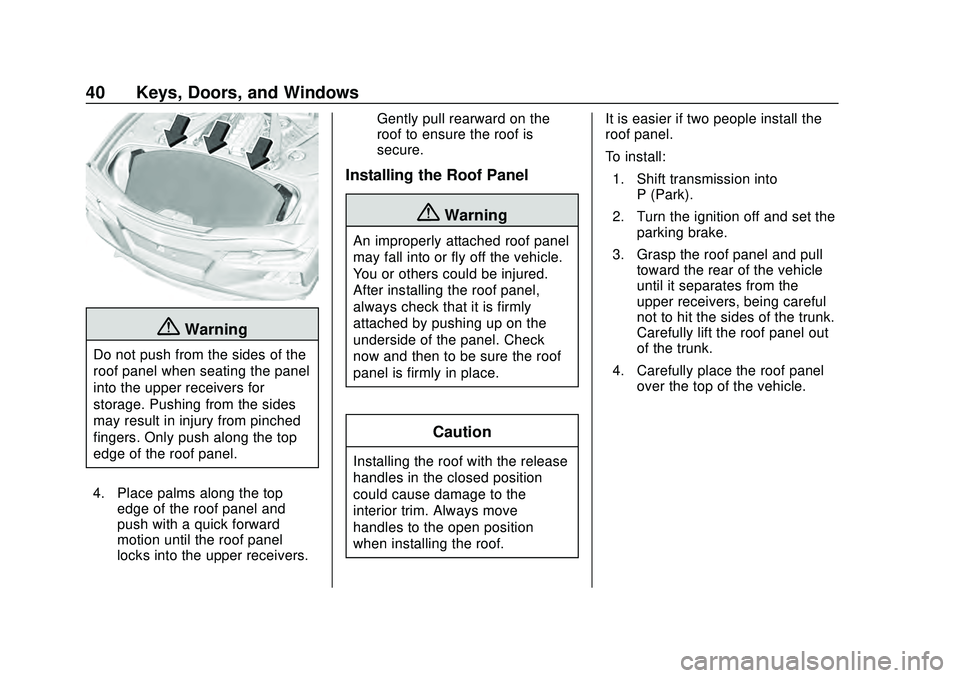
4. Place palms along the top edge of the roof panel and
push with a quick forward
motion until the roof panel
locks into the upper receivers. Gently pull rearward on the
roof to ensure the roof is
secure.
Installing the Roof Panel
{Warning
An improperly attached roof panel
may fall into or fly off the vehicle.
You or others could be injured.
After installing the roof panel,
always check that it is firmly
attached by pushing up on the
underside of the panel. Check
now and then to be sure the roof
panel is firmly in place.
Caution
Installing the roof with the release
handles in the closed position
could cause damage to the
interior trim. Always move
handles to the open position
when installing the roof.
It is easier if two people install the
roof panel.
To install:
1. Shift transmission into P (Park).
2. Turn the ignition off and set the parking brake.
3. Grasp the roof panel and pull toward the rear of the vehicle
until it separates from the
upper receivers, being careful
not to hit the sides of the trunk.
Carefully lift the roof panel out
of the trunk.
4. Carefully place the roof panel over the top of the vehicle.
Page 68 of 336
Chevrolet Corvette Owner Manual (GMNA-Localizing-U.S./Canada/Mexico-
12470550) - 2020 - CRC - 4/23/20
Seats and Restraints 67
{Warning
When an airbag inflates, there
may be dust in the air. This dust
could cause breathing problems
for people with a history of
asthma or other breathing trouble.
To avoid this, everyone in the
vehicle should get out as soon as
it is safe to do so. If you have
breathing problems but cannot
get out of the vehicle after an
airbag inflates, then get fresh air
by opening a window or a door.
If you experience breathing
problems following an airbag
deployment, you should seek
medical attention.
The vehicle has a feature that may
automatically unlock the doors, turn
on the interior lamps and hazard
warning flashers after the airbags
inflate. The feature may also
activate, without airbag inflation,
after an event that exceeds a
predetermined threshold. After turning the ignition off and then
on again, the fuel system will return
to normal operation; the doors can
be locked, the interior lamps can be
turned off, and the hazard warning
flashers can be turned off using the
controls for those features. If any of
these systems are damaged in the
crash they may not operate as
normal.
{Warning
A crash severe enough to inflate
the airbags may have also
damaged important functions in
the vehicle, such as the fuel
system, brake and steering
systems, etc. Even if the vehicle
appears to be drivable after a
moderate crash, there may be
concealed damage that could
make it difficult to safely operate
the vehicle.
Use caution if you should attempt
to restart the engine after a crash
has occurred.
In many crashes severe enough to
inflate the airbag, windshields are
broken by vehicle deformation.
Additional windshield breakage may
also occur from the front outboard
passenger airbag.
.
Airbags are designed to inflate
only once. After an airbag
inflates, you will need some new
parts for the airbag system.
If you do not get them, the
airbag system will not be there
to help protect you in another
crash. A new system will include
airbag modules and possibly
other parts. The service manual
for the vehicle covers the need
to replace other parts.
. The vehicle has a crash sensing
and diagnostic module which
records information after a
crash. See Vehicle Data
Recording and Privacy 0314
and
Event Data Recorders 0314.
. Let only qualified technicians
work on the airbag system.
Improper service can mean that