display CHEVROLET CORVETTE 2021 Owner's Manual
[x] Cancel search | Manufacturer: CHEVROLET, Model Year: 2021, Model line: CORVETTE, Model: CHEVROLET CORVETTE 2021Pages: 338, PDF Size: 6.56 MB
Page 197 of 338
Chevrolet Corvette Owner Manual (GMNA-Localizing-U.S./Canada/Mexico-
14622938) - 2021 - CRC - 2/10/21
196 Driving and Operating
Shifting Into Park
{Warning
It is dangerous to get out of the vehicle
if the vehicle is not in P (Park) with the
parking brake set. The vehicle can roll.
Do not leave the vehicle when the engine
is running. If you have left the engine
running, the vehicle can move suddenly.
You or others could be injured. To be
sure the vehicle will not move, even
when you are on fairly level ground,
always set the parking brake and shift to
P (Park).
To shift into P (Park): 1. Hold the brake pedal down and set the parking brake. See Electric Parking Brake
0 205.
2. Press the P (Park) switch on the center console. See Dual Clutch Transmission
0 198.
3. Press ENGINE START/STOP to turn the engine off.
If the vehicle is shifted into P (Park) on a
hill, the Electric Parking Brake (EPB) may
apply automatically. The EPB may not release when the EPB switch is used. The
EPB should automatically release when the
vehicle is shifted out of P (Park).Leaving the Vehicle with the Engine
Running
{Warning
It can be dangerous to leave the vehicle
with the engine running. It could
overheat and catch fire.
It is dangerous to get out of the vehicle
if the vehicle is not in P (Park) with the
parking brake firmly set. The vehicle
can roll.
Do not leave the vehicle when the engine
is running. If you have left the engine
running, the vehicle can move suddenly.
You or others could be injured. To be
sure the vehicle will not move, even
when you are on fairly level ground,
always set the parking brake and shift to
P (Park).
If you have to leave the vehicle with the
engine running, be sure the vehicle is in
P (Park) and the parking brake is set before
you leave it.
Shifting out of Park
This vehicle is equipped with an
electronically controlled transmission.
If the vehicle has a battery with low
voltage, try charging or jump starting the
battery. See Jump Starting - North America
0 278.
To shift out of P (Park): 1. Ensure the engine is running.
2. Apply the brake pedal.
3. Press or pull the desired switch on the center console. For N (Neutral) press and
hold the N (Neutral) switch until the N
indicator illuminates red.
The P indicator will turn white and the gear
indicator on the shift switch will turn red
when the vehicle is no longer in P (Park).
If the vehicle cannot shift from P (Park), a
Driver Information Center (DIC) message will
display. See your dealer for service.
Page 198 of 338
Chevrolet Corvette Owner Manual (GMNA-Localizing-U.S./Canada/Mexico-
14622938) - 2021 - CRC - 2/10/21
Driving and Operating 197
Parking over Things That Burn
{Warning
Things that can burn could touch hot
exhaust parts under the vehicle and
ignite. Do not park over papers, leaves,
dry grass, or other things that can burn.
Active Fuel Management
This vehicle's engine may be equipped with
Active Fuel Management, which allows the
engine to operate on either all or half of its
cylinders, depending on the driving
conditions.
When less power is required, such as
cruising at a constant vehicle speed, the
system will operate in the half cylinder
mode, allowing the vehicle to achieve better
fuel economy. When greater power
demands are required, such as accelerating
from a stop, passing, or merging onto a
highway, the system will maintain
full-cylinder operation.
If the vehicle has an Active Fuel
Management indicator, see Driver
Information Center (DIC) for more
information on using this display.
Extended Parking
It is best not to park with the vehicle
running. If the vehicle is left running, be
sure it will not move and there is adequate
ventilation.
SeeShifting Into Park 0196 and
Engine Exhaust 0197.
If the vehicle is left parked and running with
the remote key outside the vehicle, it will
continue to run for up to 15 minutes.
If the vehicle is left parked and running with
the remote key inside the vehicle, it will
continue to run for up to 30 minutes.
The vehicle could turn off sooner if it is
parked on a hill, due to lack of
available fuel.
The timer will reset if the vehicle is taken
out of P (Park) while it is running.
Engine Exhaust
{
Warning
Engine exhaust contains carbon monoxide
(CO), which cannot be seen or smelled.
Exposure to CO can cause
unconsciousness and even death.
Exhaust may enter the vehicle if:
.The vehicle idles in areas with poor
ventilation (parking garages, tunnels,
deep snow that may block underbody
airflow or tail pipes).
.The exhaust smells or sounds strange
or different.
.The exhaust system leaks due to
corrosion or damage.
.The vehicle exhaust system has been
modified, damaged, or improperly
repaired.
.There are holes or openings in the
vehicle body from damage or
aftermarket modifications that are not
completely sealed. (Continued)
Page 199 of 338
Chevrolet Corvette Owner Manual (GMNA-Localizing-U.S./Canada/Mexico-
14622938) - 2021 - CRC - 2/10/21
198 Driving and Operating
Warning (Continued)
If unusual fumes are detected or if it is
suspected that exhaust is coming into the
vehicle:
.Drive it only with the windows
completely down.
.Have the vehicle repaired immediately.
Never park the vehicle with the engine
running in an enclosed area such as a
garage or a building that has no fresh air
ventilation.
{Warning
To prevent exhaust gases from entering
the vehicle and heat from damaging the
vehicle, the engine cover and all fluid fill
plugs must be secured before closing the
tonneau cover (convertible only) and
operating the vehicle. Make sure all bolts
are torqued to GM specifications.
Running the Vehicle While Parked
It is better not to park with the engine
running. If the vehicle is left with the engine running,
follow the proper steps to be sure the
vehicle will not move. See
Shifting Into Park
0 196 and
Engine Exhaust 0197.
Dual Clutch Transmission
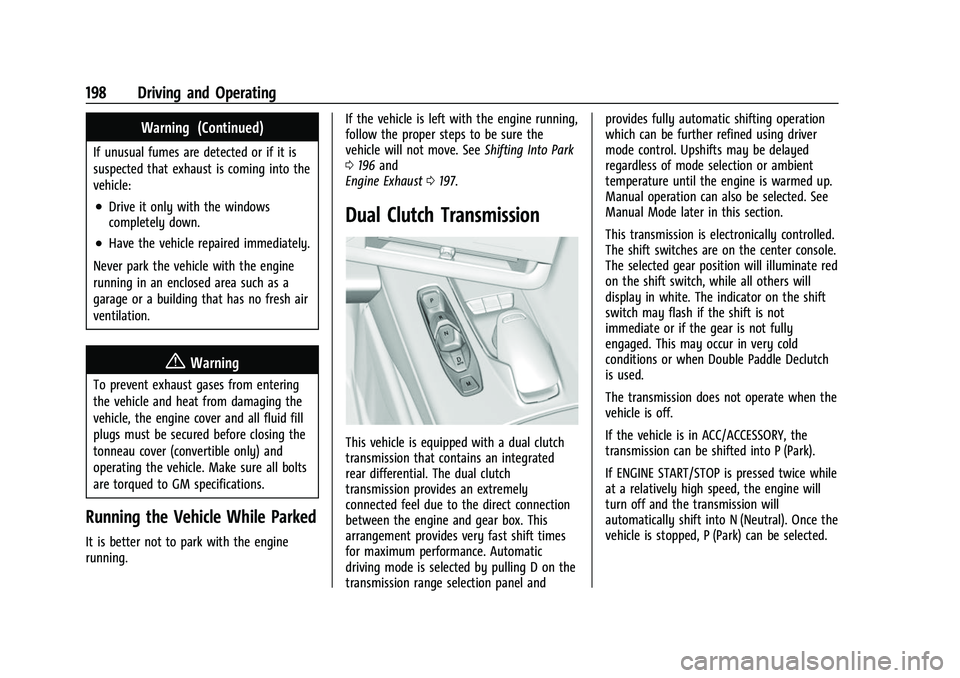
This vehicle is equipped with a dual clutch
transmission that contains an integrated
rear differential. The dual clutch
transmission provides an extremely
connected feel due to the direct connection
between the engine and gear box. This
arrangement provides very fast shift times
for maximum performance. Automatic
driving mode is selected by pulling D on the
transmission range selection panel and provides fully automatic shifting operation
which can be further refined using driver
mode control. Upshifts may be delayed
regardless of mode selection or ambient
temperature until the engine is warmed up.
Manual operation can also be selected. See
Manual Mode later in this section.
This transmission is electronically controlled.
The shift switches are on the center console.
The selected gear position will illuminate red
on the shift switch, while all others will
display in white. The indicator on the shift
switch may flash if the shift is not
immediate or if the gear is not fully
engaged. This may occur in very cold
conditions or when Double Paddle Declutch
is used.
The transmission does not operate when the
vehicle is off.
If the vehicle is in ACC/ACCESSORY, the
transmission can be shifted into P (Park).
If ENGINE START/STOP is pressed twice while
at a relatively high speed, the engine will
turn off and the transmission will
automatically shift into N (Neutral). Once the
vehicle is stopped, P (Park) can be selected.
Page 201 of 338
Chevrolet Corvette Owner Manual (GMNA-Localizing-U.S./Canada/Mexico-
14622938) - 2021 - CRC - 2/10/21
200 Driving and Operating
2. Shift into the desired gear.
Maintaining N (Neutral) with Engine Off
This vehicle includes a method of keeping
the vehicle in N (Neutral) while the engine
is off.
This method is not to be used for vehicle
towing. If the vehicle needs to be towed,
see Towing the Vehicle 0281.
Driver Remains in Vehicle : To place the
vehicle in N (Neutral) with the engine off
and the vehicle occupied:
1. Ensure the vehicle is on level ground, the engine is running and the vehicle is in
P (Park).
2. Apply the brake pedal.
3. Shift to N (Neutral).
4. Turn off the engine and release the brake pedal.
5. The indicator should continue to show N. If it does not, start the engine and
repeat Steps 2–4.
6. The vehicle will now remain in N (Neutral). Driver Leaves Vehicle :
To place the vehicle
in N (Neutral) with the engine off and the
vehicle unoccupied:
1. Ensure the vehicle is on level ground, the engine is running and the vehicle is in
P (Park).
2. Apply the brake pedal.
3. Open the door.
4. Shift to N (Neutral).
5. Turn off the engine and release the brake pedal.
6. The indicator should continue to show N. If it does not, start the engine and
repeat Steps 2–5.
7. Exit the vehicle and close the door.
8. The vehicle may automatically shift to P (Park) upon re-entry.
Caution
A transmission hot message may display
if the transmission fluid is too hot.
Driving under this condition can damage
the vehicle. Stop and idle the engine to
cool the transmission fluid. This message
clears when the transmission fluid has
cooled sufficiently. D :
This position is for normal driving.
If more power is needed for passing, press
the accelerator pedal.
If the vehicle is shifted into D (Drive) while
the speed is too high, the transmission will
get ready to engage D (Drive). Reduce the
vehicle speed, then the transmission will
engage D (Drive).
To shift into D (Drive):
1. Bring the vehicle to a complete stop.
2. Pull the D (Drive) switch on the center console.
To shift out of D (Drive): 1. Bring the vehicle to a complete stop.
2. Shift to the desired gear.
Downshifting the transmission in slippery
road conditions could result in skidding. See
“Skidding” underLoss of Control 0180.
The transmission can be shifted like a
manual transmission using the paddle shift
controls while in D (Drive). See Manual
Mode 0201.
Page 202 of 338
Chevrolet Corvette Owner Manual (GMNA-Localizing-U.S./Canada/Mexico-
14622938) - 2021 - CRC - 2/10/21
Driving and Operating 201
Caution
Spinning the tires or holding the vehicle
in one place on a hill using only the
accelerator pedal may damage the
transmission. The repair will not be
covered by the vehicle warranty. If the
vehicle is stuck, do not spin the tires.
When stopping on a hill, use the brakes
to hold the vehicle in place.
Manual Mode
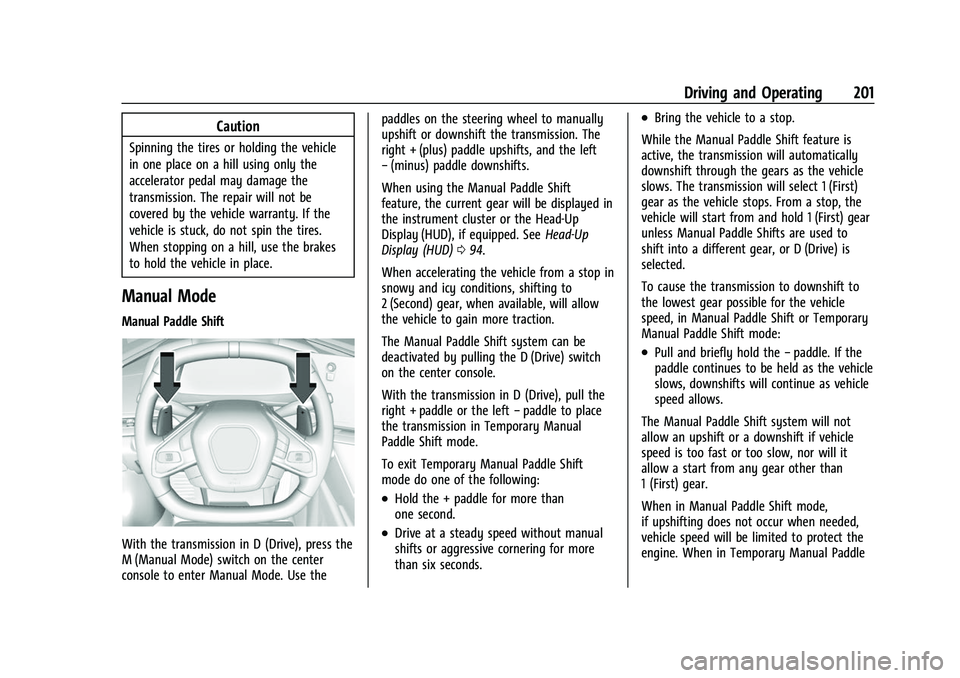
Manual Paddle Shift
With the transmission in D (Drive), press the
M (Manual Mode) switch on the center
console to enter Manual Mode. Use thepaddles on the steering wheel to manually
upshift or downshift the transmission. The
right + (plus) paddle upshifts, and the left
−
(minus) paddle downshifts.
When using the Manual Paddle Shift
feature, the current gear will be displayed in
the instrument cluster or the Head-Up
Display (HUD), if equipped. See Head-Up
Display (HUD) 094.
When accelerating the vehicle from a stop in
snowy and icy conditions, shifting to
2 (Second) gear, when available, will allow
the vehicle to gain more traction.
The Manual Paddle Shift system can be
deactivated by pulling the D (Drive) switch
on the center console.
With the transmission in D (Drive), pull the
right + paddle or the left −paddle to place
the transmission in Temporary Manual
Paddle Shift mode.
To exit Temporary Manual Paddle Shift
mode do one of the following:
.Hold the + paddle for more than
one second.
.Drive at a steady speed without manual
shifts or aggressive cornering for more
than six seconds.
.Bring the vehicle to a stop.
While the Manual Paddle Shift feature is
active, the transmission will automatically
downshift through the gears as the vehicle
slows. The transmission will select 1 (First)
gear as the vehicle stops. From a stop, the
vehicle will start from and hold 1 (First) gear
unless Manual Paddle Shifts are used to
shift into a different gear, or D (Drive) is
selected.
To cause the transmission to downshift to
the lowest gear possible for the vehicle
speed, in Manual Paddle Shift or Temporary
Manual Paddle Shift mode:
.Pull and briefly hold the −paddle. If the
paddle continues to be held as the vehicle
slows, downshifts will continue as vehicle
speed allows.
The Manual Paddle Shift system will not
allow an upshift or a downshift if vehicle
speed is too fast or too slow, nor will it
allow a start from any gear other than
1 (First) gear.
When in Manual Paddle Shift mode,
if upshifting does not occur when needed,
vehicle speed will be limited to protect the
engine. When in Temporary Manual Paddle
Page 206 of 338
Chevrolet Corvette Owner Manual (GMNA-Localizing-U.S./Canada/Mexico-
14622938) - 2021 - CRC - 2/10/21
Driving and Operating 205
Braking in Emergencies
ABS allows steering and braking at the same
time. In many emergencies, steering can
help even more than braking.
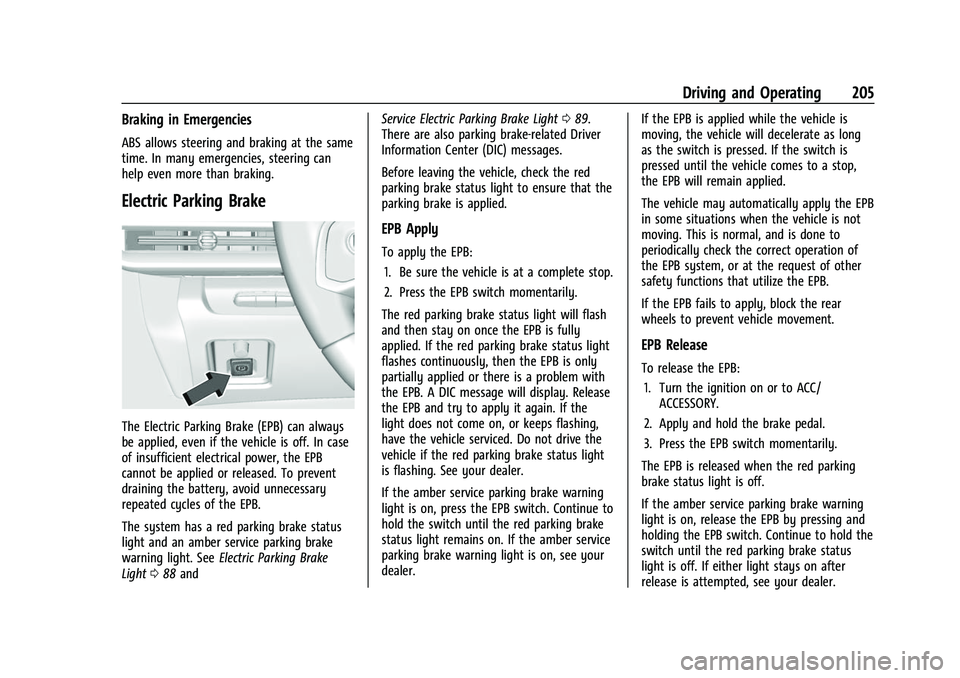
Electric Parking Brake
The Electric Parking Brake (EPB) can always
be applied, even if the vehicle is off. In case
of insufficient electrical power, the EPB
cannot be applied or released. To prevent
draining the battery, avoid unnecessary
repeated cycles of the EPB.
The system has a red parking brake status
light and an amber service parking brake
warning light. SeeElectric Parking Brake
Light 088 and Service Electric Parking Brake Light
089.
There are also parking brake-related Driver
Information Center (DIC) messages.
Before leaving the vehicle, check the red
parking brake status light to ensure that the
parking brake is applied.
EPB Apply
To apply the EPB:
1. Be sure the vehicle is at a complete stop.
2. Press the EPB switch momentarily.
The red parking brake status light will flash
and then stay on once the EPB is fully
applied. If the red parking brake status light
flashes continuously, then the EPB is only
partially applied or there is a problem with
the EPB. A DIC message will display. Release
the EPB and try to apply it again. If the
light does not come on, or keeps flashing,
have the vehicle serviced. Do not drive the
vehicle if the red parking brake status light
is flashing. See your dealer.
If the amber service parking brake warning
light is on, press the EPB switch. Continue to
hold the switch until the red parking brake
status light remains on. If the amber service
parking brake warning light is on, see your
dealer. If the EPB is applied while the vehicle is
moving, the vehicle will decelerate as long
as the switch is pressed. If the switch is
pressed until the vehicle comes to a stop,
the EPB will remain applied.
The vehicle may automatically apply the EPB
in some situations when the vehicle is not
moving. This is normal, and is done to
periodically check the correct operation of
the EPB system, or at the request of other
safety functions that utilize the EPB.
If the EPB fails to apply, block the rear
wheels to prevent vehicle movement.
EPB Release
To release the EPB:
1. Turn the ignition on or to ACC/ ACCESSORY.
2. Apply and hold the brake pedal.
3. Press the EPB switch momentarily.
The EPB is released when the red parking
brake status light is off.
If the amber service parking brake warning
light is on, release the EPB by pressing and
holding the EPB switch. Continue to hold the
switch until the red parking brake status
light is off. If either light stays on after
release is attempted, see your dealer.
Page 208 of 338
Chevrolet Corvette Owner Manual (GMNA-Localizing-U.S./Canada/Mexico-
14622938) - 2021 - CRC - 2/10/21
Driving and Operating 207
If cruise control is being used when TCS
begins to limit wheel spin, the cruise control
will automatically disengage. Cruise control
may be reengaged when road conditions
allow. SeeCruise Control 0218.
If the driver disables TCS, cruise control will
disengage. Cruise control will also be
disabled if Performance Traction
Management (PTM) is selected, or if
StabiliTrak is turned off.
Both systems come on automatically when
the vehicle is started and begins to move.
The systems may be heard or felt while
they are operating or while performing
diagnostic checks. This is normal and does
not mean there is a problem with the
vehicle.
It is recommended to leave both systems on
for normal driving conditions, but it may be
necessary to turn TCS off if the vehicle gets
stuck in sand, mud, ice, or snow. See If the
Vehicle Is Stuck 0189 and “Turning the
Systems Off and On” later in this section.
The indicator light for both systems is in the
instrument cluster. This light will:
.Flash when TCS is limiting wheel spin
.Flash when StabiliTrak/ESC is activated
.Flash when ABS is active
.Turn on and stay on when either system
is not working
If either system fails to turn on or to
activate, a message displays in the Driver
Information Center (DIC), and
=comes on
and stays on to indicate that the system is
inactive and is not assisting the driver in
maintaining control. The vehicle is safe to
drive, but driving should be adjusted
accordingly.
If
=comes on and stays on:
1. Stop the vehicle.
2. Turn the engine off and wait 15 seconds.
3. Start the engine. Drive the vehicle. If
=comes on and
stays on, the vehicle may need more time
to diagnose the problem. If the condition
persists, see your dealer.
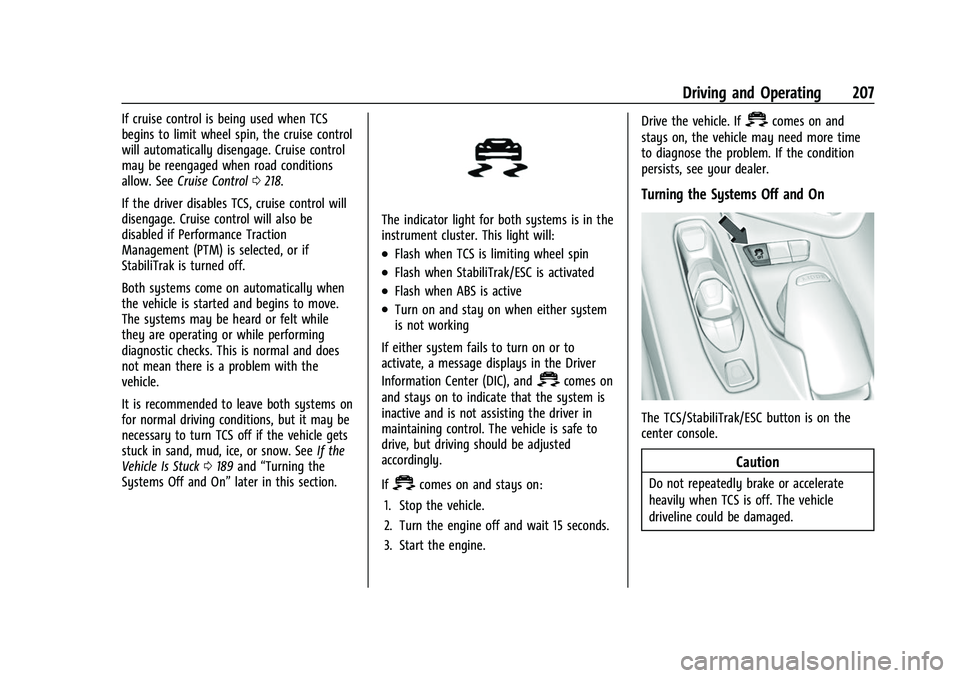
Turning the Systems Off and On
The TCS/StabiliTrak/ESC button is on the
center console.
Caution
Do not repeatedly brake or accelerate
heavily when TCS is off. The vehicle
driveline could be damaged.
Page 209 of 338
Chevrolet Corvette Owner Manual (GMNA-Localizing-U.S./Canada/Mexico-
14622938) - 2021 - CRC - 2/10/21
208 Driving and Operating
To turn off only TCS, press and release@.
The Traction Off light
iilluminates in the
instrument cluster. To turn TCS on again,
press and release
@. The Traction Off light
idisplayed in the instrument cluster will
turn off.
If TCS is limiting wheel spin when
@is
pressed, the system will not turn off until
the wheels stop spinning.
To turn off both TCS and StabiliTrak/ESC,
press and hold
@until the Traction Off
light
iand StabiliTrak/ESC OFF light@
illuminate and stay on in the instrument
cluster.
To turn TCS and StabiliTrak/ESC on again,
press and release
@. The Traction Off light
iand StabiliTrak/ESC OFF light@in the
instrument cluster turn off.
If the Tire Pressure Monitor System (TPMS)
system is malfunctioning and the DIC
displays SERVICE TIRE MONITOR SYSTEM,
StabiliTrak/ESC will be affected as follows:
.StabiliTrak/ESC cannot be turned off by
the driver.
.If StabiliTrak/ESC is off, it will be turned
on automatically.
.Competitive Driving Mode or Performance
Traction Management is unavailable.
.StabiliTrak/ESC will feel different in aiding
and maintaining directional control.
Adding accessories can affect the vehicle
performance. See Accessories and
Modifications 0231.
Hill Rollback Control
If the vehicle is in gear and inadvertently
rolls backwards, Hill Rollback Control helps
limit the rollback to a very low speed.
A noise may be heard while the vehicle
speed is actively being controlled. A Driver
Information Center (DIC) message displays
when active.
Driver Mode Control
Driver Mode Control (DMC) allows the driver
to adjust the overall driving experience to
better suit preference by selecting different
modes.
Drive mode availability and affected driver
systems are dependent upon vehicle trim
level, region, and optional features. Driver
modes may include: Weather, Tour, Sport,
and Track, along with two customizable
modes: My Mode and Z-Mode. If the vehicle is in Tour or My Mode it will
stay in that mode through future ignition
cycles. If the vehicle is in any other mode, it
will return to Tour when the vehicle is
restarted. When each mode is selected, an
indicator will come on in the instrument
cluster and stay on.
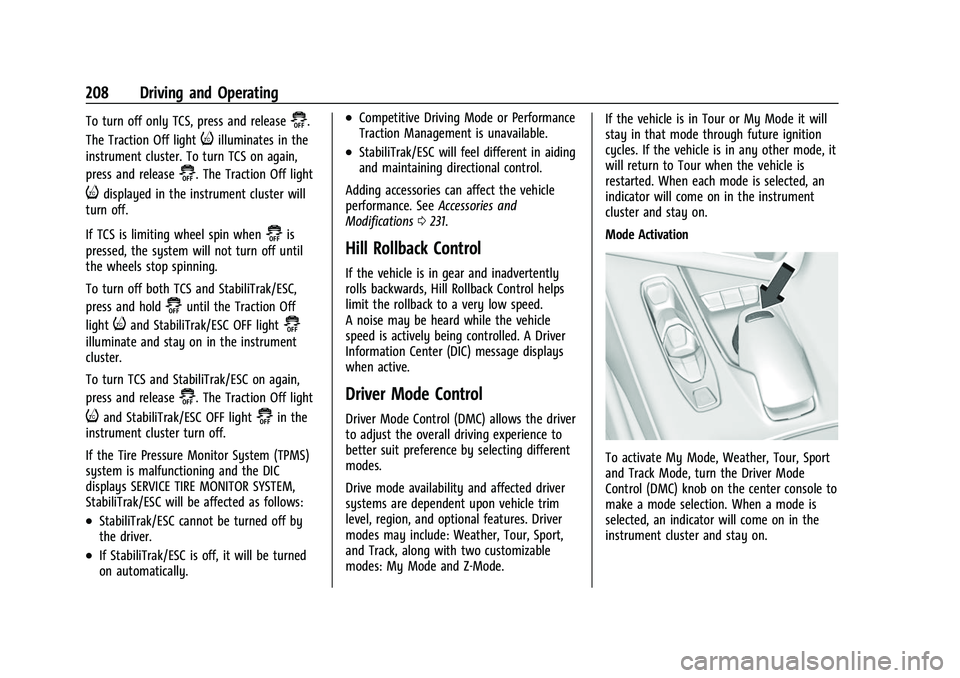
Mode Activation
To activate My Mode, Weather, Tour, Sport
and Track Mode, turn the Driver Mode
Control (DMC) knob on the center console to
make a mode selection. When a mode is
selected, an indicator will come on in the
instrument cluster and stay on.
Page 210 of 338
Chevrolet Corvette Owner Manual (GMNA-Localizing-U.S./Canada/Mexico-
14622938) - 2021 - CRC - 2/10/21
Driving and Operating 209
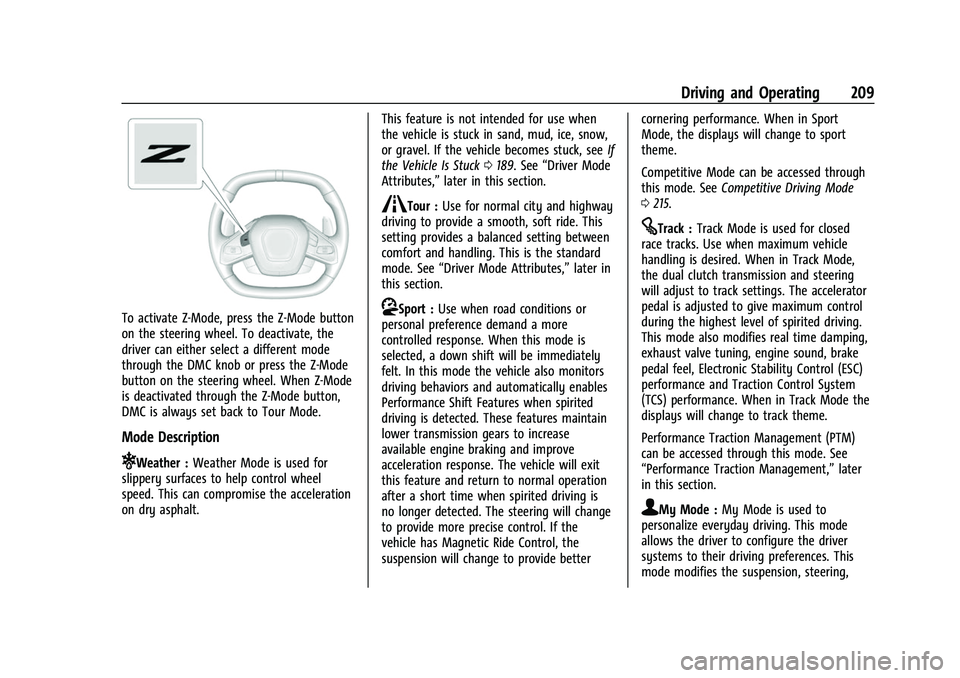
To activate Z-Mode, press the Z-Mode button
on the steering wheel. To deactivate, the
driver can either select a different mode
through the DMC knob or press the Z-Mode
button on the steering wheel. When Z-Mode
is deactivated through the Z-Mode button,
DMC is always set back to Tour Mode.
Mode Description
uWeather :Weather Mode is used for
slippery surfaces to help control wheel
speed. This can compromise the acceleration
on dry asphalt. This feature is not intended for use when
the vehicle is stuck in sand, mud, ice, snow,
or gravel. If the vehicle becomes stuck, see
If
the Vehicle Is Stuck 0189. See “Driver Mode
Attributes,” later in this section.
sTour :Use for normal city and highway
driving to provide a smooth, soft ride. This
setting provides a balanced setting between
comfort and handling. This is the standard
mode. See “Driver Mode Attributes,” later in
this section.
rSport : Use when road conditions or
personal preference demand a more
controlled response. When this mode is
selected, a down shift will be immediately
felt. In this mode the vehicle also monitors
driving behaviors and automatically enables
Performance Shift Features when spirited
driving is detected. These features maintain
lower transmission gears to increase
available engine braking and improve
acceleration response. The vehicle will exit
this feature and return to normal operation
after a short time when spirited driving is
no longer detected. The steering will change
to provide more precise control. If the
vehicle has Magnetic Ride Control, the
suspension will change to provide better cornering performance. When in Sport
Mode, the displays will change to sport
theme.
Competitive Mode can be accessed through
this mode. See
Competitive Driving Mode
0 215.
tTrack : Track Mode is used for closed
race tracks. Use when maximum vehicle
handling is desired. When in Track Mode,
the dual clutch transmission and steering
will adjust to track settings. The accelerator
pedal is adjusted to give maximum control
during the highest level of spirited driving.
This mode also modifies real time damping,
exhaust valve tuning, engine sound, brake
pedal feel, Electronic Stability Control (ESC)
performance and Traction Control System
(TCS) performance. When in Track Mode the
displays will change to track theme.
Performance Traction Management (PTM)
can be accessed through this mode. See
“Performance Traction Management,” later
in this section.
qMy Mode : My Mode is used to
personalize everyday driving. This mode
allows the driver to configure the driver
systems to their driving preferences. This
mode modifies the suspension, steering,
Page 211 of 338
Chevrolet Corvette Owner Manual (GMNA-Localizing-U.S./Canada/Mexico-
14622938) - 2021 - CRC - 2/10/21
210 Driving and Operating
pedal mapping, exhaust valve tuning, and
engine sound. My Mode will remain active
across ignition cycles.
Through the center display, the following
vehicle sub-systems may be available for
customization in this mode:
Engine Sound:Stealth, Tour, Sport, Track
Steering: Tour, Sport, Track
Suspension: Tour, Sport, Track
Brake Response: Tour, Sport, Track
For a more detailed description on how each
driver system is changed, see “Drive Mode
Customization,” later in this section.
Additionally the cluster theme can be set up
using the display menu in the cluster.vZ-Mode : Z-Mode is used to
personalize dynamic driving. This mode
allows the driver to configure the driver
systems to their own preference for
maximum handling. Z-Mode further
enhances the experience by adding
powertrain customization. This mode
modifies pedal mapping, ESC performance,
TCS performance, suspension, steering,
exhaust valve turning, and engine sound.
Through the center display, the driver can
customize multiple settings. The following
vehicle sub-systems may be available for
customization in this mode:
Engine Sound: Stealth, Tour, Sport, Track
Steering: Tour, Sport, Track Suspension:
Tour, Sport, Track
Powertrain: Tour, Sport, Track, Weather
Brake Response: Tour, Sport, Track
PTM: Off, Wet, Dry, Sport, Race 1, Race 2
For a more detailed description on how each
driver system is changed, see “Drive Mode
Customization,” later in this section. For
more information on PTM, see “Performance
Traction Management,” later in this section.
Additionally, the cluster theme can be set
up using the display menu in the cluster.