automatic transmission CHEVROLET CORVETTE 2021 User Guide
[x] Cancel search | Manufacturer: CHEVROLET, Model Year: 2021, Model line: CORVETTE, Model: CHEVROLET CORVETTE 2021Pages: 338, PDF Size: 6.56 MB
Page 201 of 338
Chevrolet Corvette Owner Manual (GMNA-Localizing-U.S./Canada/Mexico-
14622938) - 2021 - CRC - 2/10/21
200 Driving and Operating
2. Shift into the desired gear.
Maintaining N (Neutral) with Engine Off
This vehicle includes a method of keeping
the vehicle in N (Neutral) while the engine
is off.
This method is not to be used for vehicle
towing. If the vehicle needs to be towed,
see Towing the Vehicle 0281.
Driver Remains in Vehicle : To place the
vehicle in N (Neutral) with the engine off
and the vehicle occupied:
1. Ensure the vehicle is on level ground, the engine is running and the vehicle is in
P (Park).
2. Apply the brake pedal.
3. Shift to N (Neutral).
4. Turn off the engine and release the brake pedal.
5. The indicator should continue to show N. If it does not, start the engine and
repeat Steps 2–4.
6. The vehicle will now remain in N (Neutral). Driver Leaves Vehicle :
To place the vehicle
in N (Neutral) with the engine off and the
vehicle unoccupied:
1. Ensure the vehicle is on level ground, the engine is running and the vehicle is in
P (Park).
2. Apply the brake pedal.
3. Open the door.
4. Shift to N (Neutral).
5. Turn off the engine and release the brake pedal.
6. The indicator should continue to show N. If it does not, start the engine and
repeat Steps 2–5.
7. Exit the vehicle and close the door.
8. The vehicle may automatically shift to P (Park) upon re-entry.
Caution
A transmission hot message may display
if the transmission fluid is too hot.
Driving under this condition can damage
the vehicle. Stop and idle the engine to
cool the transmission fluid. This message
clears when the transmission fluid has
cooled sufficiently. D :
This position is for normal driving.
If more power is needed for passing, press
the accelerator pedal.
If the vehicle is shifted into D (Drive) while
the speed is too high, the transmission will
get ready to engage D (Drive). Reduce the
vehicle speed, then the transmission will
engage D (Drive).
To shift into D (Drive):
1. Bring the vehicle to a complete stop.
2. Pull the D (Drive) switch on the center console.
To shift out of D (Drive): 1. Bring the vehicle to a complete stop.
2. Shift to the desired gear.
Downshifting the transmission in slippery
road conditions could result in skidding. See
“Skidding” underLoss of Control 0180.
The transmission can be shifted like a
manual transmission using the paddle shift
controls while in D (Drive). See Manual
Mode 0201.
Page 202 of 338
Chevrolet Corvette Owner Manual (GMNA-Localizing-U.S./Canada/Mexico-
14622938) - 2021 - CRC - 2/10/21
Driving and Operating 201
Caution
Spinning the tires or holding the vehicle
in one place on a hill using only the
accelerator pedal may damage the
transmission. The repair will not be
covered by the vehicle warranty. If the
vehicle is stuck, do not spin the tires.
When stopping on a hill, use the brakes
to hold the vehicle in place.
Manual Mode
Manual Paddle Shift
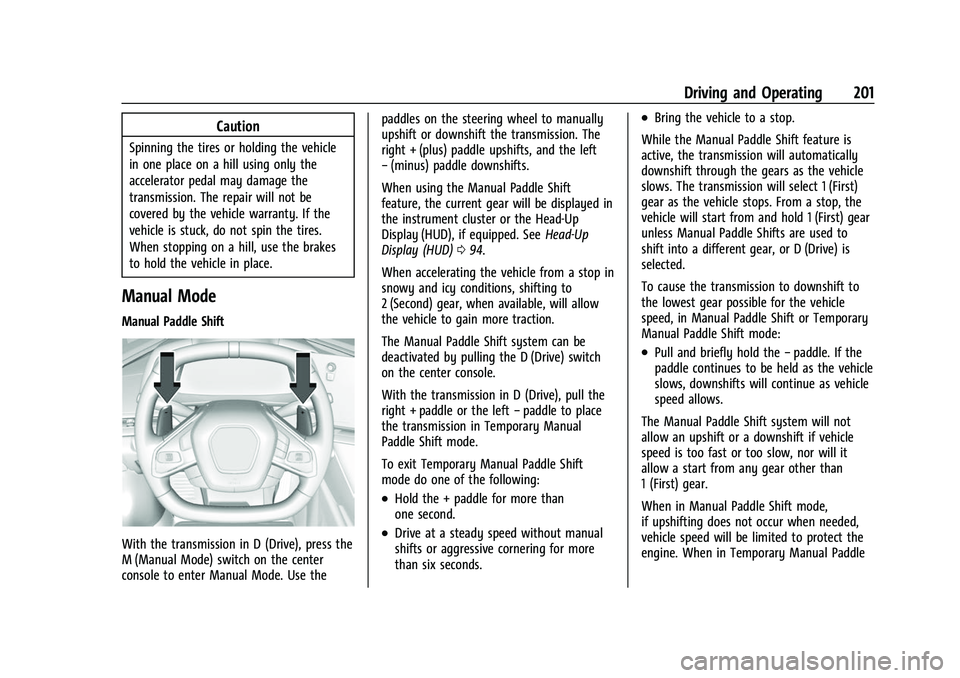
With the transmission in D (Drive), press the
M (Manual Mode) switch on the center
console to enter Manual Mode. Use thepaddles on the steering wheel to manually
upshift or downshift the transmission. The
right + (plus) paddle upshifts, and the left
−
(minus) paddle downshifts.
When using the Manual Paddle Shift
feature, the current gear will be displayed in
the instrument cluster or the Head-Up
Display (HUD), if equipped. See Head-Up
Display (HUD) 094.
When accelerating the vehicle from a stop in
snowy and icy conditions, shifting to
2 (Second) gear, when available, will allow
the vehicle to gain more traction.
The Manual Paddle Shift system can be
deactivated by pulling the D (Drive) switch
on the center console.
With the transmission in D (Drive), pull the
right + paddle or the left −paddle to place
the transmission in Temporary Manual
Paddle Shift mode.
To exit Temporary Manual Paddle Shift
mode do one of the following:
.Hold the + paddle for more than
one second.
.Drive at a steady speed without manual
shifts or aggressive cornering for more
than six seconds.
.Bring the vehicle to a stop.
While the Manual Paddle Shift feature is
active, the transmission will automatically
downshift through the gears as the vehicle
slows. The transmission will select 1 (First)
gear as the vehicle stops. From a stop, the
vehicle will start from and hold 1 (First) gear
unless Manual Paddle Shifts are used to
shift into a different gear, or D (Drive) is
selected.
To cause the transmission to downshift to
the lowest gear possible for the vehicle
speed, in Manual Paddle Shift or Temporary
Manual Paddle Shift mode:
.Pull and briefly hold the −paddle. If the
paddle continues to be held as the vehicle
slows, downshifts will continue as vehicle
speed allows.
The Manual Paddle Shift system will not
allow an upshift or a downshift if vehicle
speed is too fast or too slow, nor will it
allow a start from any gear other than
1 (First) gear.
When in Manual Paddle Shift mode,
if upshifting does not occur when needed,
vehicle speed will be limited to protect the
engine. When in Temporary Manual Paddle
Page 203 of 338
Chevrolet Corvette Owner Manual (GMNA-Localizing-U.S./Canada/Mexico-
14622938) - 2021 - CRC - 2/10/21
202 Driving and Operating
Shift mode, the transmission will
automatically upshift if the accelerator pedal
is pressed all the way to the floor.
Manual Paddle Shift can be used with cruise
control. SeeCruise Control 0218.
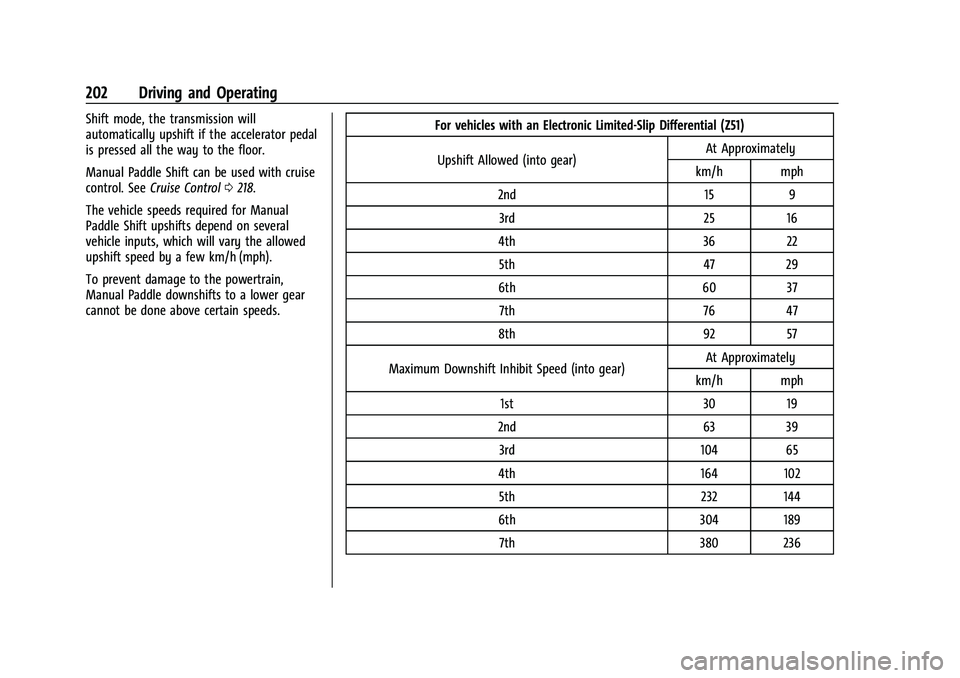
The vehicle speeds required for Manual
Paddle Shift upshifts depend on several
vehicle inputs, which will vary the allowed
upshift speed by a few km/h (mph).
To prevent damage to the powertrain,
Manual Paddle downshifts to a lower gear
cannot be done above certain speeds. For vehicles with an Electronic Limited-Slip Differential (Z51)
Upshift Allowed (into gear) At Approximately
km/h mph
2nd 15 9 3rd 25 16
4th 36 22 5th 47 29
6th 60 37 7th 76 47
8th 92 57
Maximum Downshift Inhibit Speed (into gear) At Approximately
km/h mph
1st 30 19
2nd 63 39 3rd 104 65
4th 164 102 5th 232 144
6th 304 189 7th 380 236
Page 210 of 338
Chevrolet Corvette Owner Manual (GMNA-Localizing-U.S./Canada/Mexico-
14622938) - 2021 - CRC - 2/10/21
Driving and Operating 209
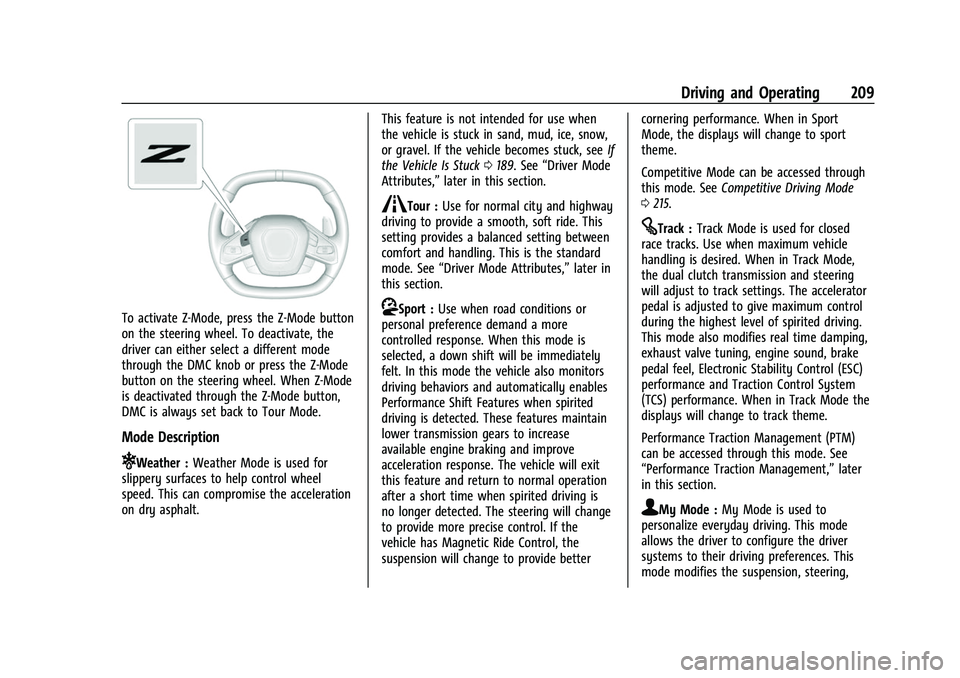
To activate Z-Mode, press the Z-Mode button
on the steering wheel. To deactivate, the
driver can either select a different mode
through the DMC knob or press the Z-Mode
button on the steering wheel. When Z-Mode
is deactivated through the Z-Mode button,
DMC is always set back to Tour Mode.
Mode Description
uWeather :Weather Mode is used for
slippery surfaces to help control wheel
speed. This can compromise the acceleration
on dry asphalt. This feature is not intended for use when
the vehicle is stuck in sand, mud, ice, snow,
or gravel. If the vehicle becomes stuck, see
If
the Vehicle Is Stuck 0189. See “Driver Mode
Attributes,” later in this section.
sTour :Use for normal city and highway
driving to provide a smooth, soft ride. This
setting provides a balanced setting between
comfort and handling. This is the standard
mode. See “Driver Mode Attributes,” later in
this section.
rSport : Use when road conditions or
personal preference demand a more
controlled response. When this mode is
selected, a down shift will be immediately
felt. In this mode the vehicle also monitors
driving behaviors and automatically enables
Performance Shift Features when spirited
driving is detected. These features maintain
lower transmission gears to increase
available engine braking and improve
acceleration response. The vehicle will exit
this feature and return to normal operation
after a short time when spirited driving is
no longer detected. The steering will change
to provide more precise control. If the
vehicle has Magnetic Ride Control, the
suspension will change to provide better cornering performance. When in Sport
Mode, the displays will change to sport
theme.
Competitive Mode can be accessed through
this mode. See
Competitive Driving Mode
0 215.
tTrack : Track Mode is used for closed
race tracks. Use when maximum vehicle
handling is desired. When in Track Mode,
the dual clutch transmission and steering
will adjust to track settings. The accelerator
pedal is adjusted to give maximum control
during the highest level of spirited driving.
This mode also modifies real time damping,
exhaust valve tuning, engine sound, brake
pedal feel, Electronic Stability Control (ESC)
performance and Traction Control System
(TCS) performance. When in Track Mode the
displays will change to track theme.
Performance Traction Management (PTM)
can be accessed through this mode. See
“Performance Traction Management,” later
in this section.
qMy Mode : My Mode is used to
personalize everyday driving. This mode
allows the driver to configure the driver
systems to their driving preferences. This
mode modifies the suspension, steering,
Page 221 of 338
Chevrolet Corvette Owner Manual (GMNA-Localizing-U.S./Canada/Mexico-
14622938) - 2021 - CRC - 2/10/21
220 Driving and Operating
Increasing Speed While Using Cruise Control
Do one of the following:
.Press and hold +RES until the desired
speed is reached, then release it.
.To increase vehicle speed in small
increments, briefly press +RES. For each
press, the vehicle goes about 1 km/h
(1 mph) faster.
Reducing Speed While Using Cruise Control
Do one of the following:
.Press and hold SET– until the desired
lower speed is reached, then release it.
.To decrease the vehicle speed in small
increments, briefly press SET–. For each
press, the vehicle goes about 1 km/h
(1 mph) slower.
Passing Another Vehicle While Using Cruise
Control
Use the accelerator pedal to increase the
vehicle speed. When you take your foot off
the pedal, the vehicle will slow down to the
previously set cruise speed.
While pressing the accelerator pedal or
shortly following the release to override
cruise control, briefly pressing SET– will
result in cruise set to the current vehicle
speed. Using Cruise Control on Hills
How well the cruise control works on hills
depends upon the vehicle speed, load, and
the steepness of the hills. When going up
steep hills, you may have to step on the
accelerator pedal to maintain your speed.
When going downhill, you may have to
brake or shift to a lower gear to keep your
speed down. If the brake pedal is applied,
cruise control will disengage.
Cruise Control in Manual Paddle Shift Gear
Selection
When the vehicle is in M (Manual Mode)
and the manual paddle shift controls are not
being used, cruise control operates in the
same manner as D (Drive).
When the vehicle is in M (Manual Mode)
and the manual paddle shift controls are
being used, cruise control operates as
follows:
.If cruise control is active and a gear is
selected with the manual paddle shift
controls, the vehicle speed is maintained
in the driver selected gear and will not
automatically upshift or downshift the
transmission while the driver’s gear
selection is active.
.If driving in hilly terrain, cruise control
may not be able to maintain vehicle
speed if an upshift or downshift is not
selected by the driver. While driving on
hilly terrain and cruise control is active
with a manual paddle shift gear selection,
the driver must select the proper gear for
the terrain or select D (Drive) on the
shifter for full automatic transmission
operation.
Ending Cruise Control
.Step lightly on the brake pedal.
.Shift the transmission to N (Neutral).
.Press*.
.To turn off cruise control, press1.
Erasing Speed Memory
The cruise control set speed is erased from
memory if
1is pressed or if the ignition is
turned off.
Driver Assistance Systems
This vehicle may have features that work
together to help avoid crashes or reduce
crash damage while driving, backing, and
parking. Read this entire section before
using these systems.
Page 266 of 338
Chevrolet Corvette Owner Manual (GMNA-Localizing-U.S./Canada/Mexico-
14622938) - 2021 - CRC - 2/10/21
Vehicle Care 265
(1) Passenger (P-Metric) Tire:The
United States version of a metric tire
sizing system. The letter "P" as the first
character in the tire size means a
passenger vehicle tire engineered to
standards set by the U.S. Tire and Rim
Association.
(2) Tire Width
:The 3-digit number
indicates the tire section width in
millimeters from sidewall to sidewall.
(3) Aspect Ratio
:A 2-digit number that
indicates the tire height-to-width
measurements. For example, if the tire
size aspect ratio is 75, as shown in
item (3) of the illustration, it would
mean that the tire's sidewall is
75 percent as high as it is wide.
(4) Construction Code
:A letter code is
used to indicate the type of ply
construction in the tire. The letter "R"
means radial ply construction; the letter
"D" means diagonal or bias ply
construction.
(5) Rim Diameter
:Diameter of the
wheel in inches. (6) Service Description
:These
characters represent the load index and
speed rating of the tire. The load index
represents the load carrying capacity a
tire is certified to carry. The speed
rating is the maximum speed a tire is
certified to carry a load.
Tire Terminology and Definitions
Air Pressure:The amount of air inside
the tire pressing outward on each
square inch of the tire. Air pressure is
expressed in kPa (kilopascal) or psi
(pounds per square inch).
Accessory Weight
:The combined
weight of optional accessories. Some
examples of optional accessories are
automatic transmission, power
windows, power seats, and air
conditioning.
Aspect Ratio
:The relationship of a
tire's height to its width.
Belt
:A rubber coated layer of cords
between the plies and the tread. Cords
may be made from steel or other
reinforcing materials. Bead
:The tire bead contains steel
wires wrapped by steel cords that hold
the tire onto the rim.
Bias Ply Tire
:A pneumatic tire in which
the plies are laid at alternate angles
less than 90 degrees to the centerline
of the tread.
Cold Tire Pressure
:The amount of air
pressure in a tire, measured in kPa
(kilopascal) or psi (pounds per square
inch) before a tire has built up heat
from driving. See Tire Pressure0267.
Curb Weight
:The weight of a motor
vehicle with standard and optional
equipment including the maximum
capacity of fuel, oil, and coolant, but
without passengers and cargo.
DOT Markings
:A code molded into the
sidewall of a tire signifying that the tire
is in compliance with the U.S.
Department of Transportation (DOT)
Motor Vehicle Safety Standards. The
DOT code includes the Tire Identification
Number (TIN), an alphanumeric
Page 281 of 338
Chevrolet Corvette Owner Manual (GMNA-Localizing-U.S./Canada/Mexico-
14622938) - 2021 - CRC - 2/10/21
280 Vehicle Care
2. Get the vehicles close enough so thejumper cables can reach, but be sure the
vehicles are not touching each other.
If they are, it could cause a ground
connection you do not want. You would
not be able to start the vehicle, and the
bad grounding could damage the
electrical systems.
To avoid the possibility of the vehicles
rolling, set the parking brake firmly on
both vehicles involved in the jump start
procedure. Put an automatic transmission
in P (Park) or a manual transmission in
Neutral before setting the parking
brakes.
Caution
If any accessories are left on or plugged
in during the jump starting procedure,
they could be damaged. The repairs
would not be covered by the vehicle
warranty. Whenever possible, turn off or
unplug all accessories on either vehicle
when jump starting.
3. Turn off the ignition on both vehicles. Unplug unnecessary accessories plugged
into the cigarette lighter or the accessory
power outlet. Turn off the radio and all lamps that are not needed. This will
avoid sparks and help save both
batteries. And it could save the radio!
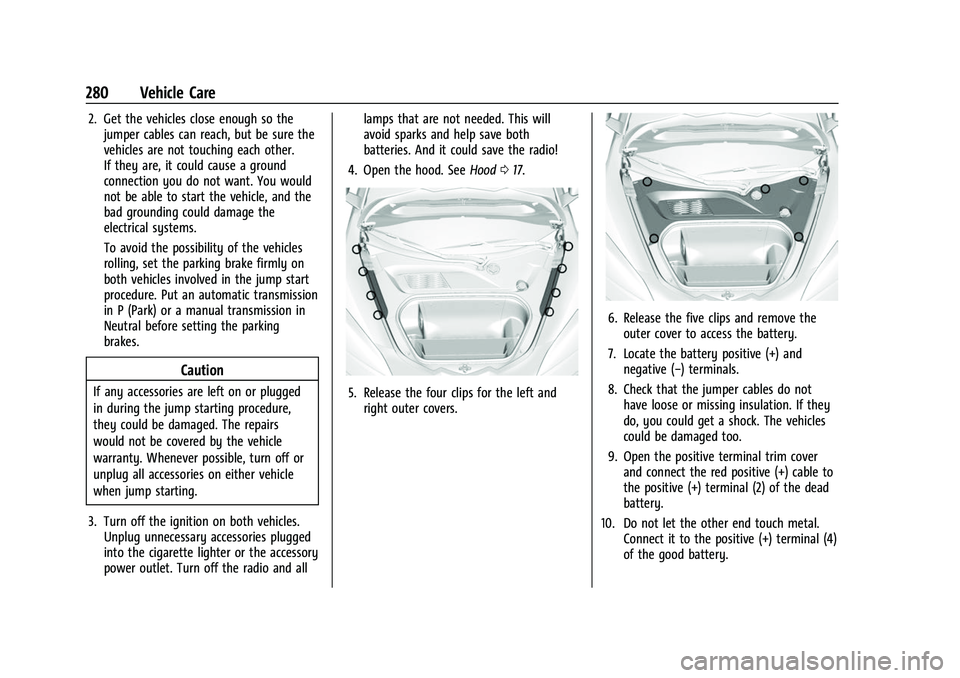
4. Open the hood. See Hood017.5. Release the four clips for the left and
right outer covers.
6. Release the five clips and remove theouter cover to access the battery.
7. Locate the battery positive (+) and negative (−) terminals.
8. Check that the jumper cables do not have loose or missing insulation. If they
do, you could get a shock. The vehicles
could be damaged too.
9. Open the positive terminal trim cover and connect the red positive (+) cable to
the positive (+) terminal (2) of the dead
battery.
10. Do not let the other end touch metal. Connect it to the positive (+) terminal (4)
of the good battery.
Page 330 of 338
Chevrolet Corvette Owner Manual (GMNA-Localizing-U.S./Canada/Mexico-
14622938) - 2021 - CRC - 2/10/21
Index 329
Control of a Vehicle . . . . . . . . . . . . . . . . . . . . . .178
ControlsSteering Wheel . . . . . . . . . . . . . . . . . . . . . . . . . 114
Convenience Net . . . . . . . . . . . . . . . . . . . . . . . . . . .72
Convertible Top . . . . . . . . . . . . . . . . . . . . . . . . . . . 34
Convex Mirrors . . . . . . . . . . . . . . . . . . . . . . . . . . . 24
Coolant Engine Temperature Gauge . . . . . . . . . . . . . 84
Cooling . . . . . . . . . . . . . . . . . . . . . . . . . . . . . . . . . . . 171
Cooling System . . . . . . . . . . . . . . . . . . . . . . . . . . 245
Courtesy Lamps . . . . . . . . . . . . . . . . . . . . . . . . . . 109
Courtesy Transportation Program . . . . . . . . . 313
Coverage Explanations . . . . . . . . . . . . . . . . . . . . 137
Cruise Control . . . . . . . . . . . . . . . . . . . . . . . . . . . .218 Light . . . . . . . . . . . . . . . . . . . . . . . . . . . . . . . . . . . . 92
Cupholders . . . . . . . . . . . . . . . . . . . . . . . . . . . . . . . 70
Customer Assistance . . . . . . . . . . . . . . . . . . . . . 310
Offices . . . . . . . . . . . . . . . . . . . . . . . . . . . . . . . . . 310
Text Telephone (TTY) Users . . . . . . . . . . . . 310
Customer Information Publications Ordering Information . . . . . 315
Customer Satisfaction Procedure . . . . . . . . . 308
Cybersecurity . . . . . . . . . . . . . . . . . . . . . . . . . . . . . 317
D
Damage Repair, Collision . . . . . . . . . . . . . . . . . .314
Danger, Warning, and Caution . . . . . . . . . . . . . .2 Data Collection
Infotainment System . . . . . . . . . . . . . . . . . . 318
OnStar . . . . . . . . . . . . . . . . . . . . . . . . . . . . . . . . . 318
Data Recorder Performance . . . . . . . . . . . . . . . . . . . . . . . . . . . 143
Data Recorders, Event . . . . . . . . . . . . . . . . . . . .318
Database Coverage Explanations . . . . . . . . . . 137
Daytime Running Lamps (DRL) . . . . . . . . . . . 107
Defensive Driving . . . . . . . . . . . . . . . . . . . . . . . . .178
Delayed Locking . . . . . . . . . . . . . . . . . . . . . . . . . . .16
Destination . . . . . . . . . . . . . . . . . . . . . . . . . . . . . . 130
Diagnostics Connected Services . . . . . . . . . . . . . . . . . . . . 326
Differential, Limited-Slip . . . . . . . . . . . . . . . . . .218
Distracted Driving . . . . . . . . . . . . . . . . . . . . . . . . . 177
Diversity Antenna System . . . . . . . . . . . . . . . . 121
Door Ajar Light . . . . . . . . . . . . . . . . . . . . . . . . . . . . . . . 92
Delayed Locking . . . . . . . . . . . . . . . . . . . . . . . . 16
Locks . . . . . . . . . . . . . . . . . . . . . . . . . . . . . . . . . . . 14
Drive Belt Routing, Engine . . . . . . . . . . . . . . . 307
Driver
Teen . . . . . . . . . . . . . . . . . . . . . . . . . . . . . . . . . . . 160
Driver Assistance Systems . . . . . . . . . . . . . . . 220
Driver Information Center (DIC) . . . . . . . . . . . 92
Driver Mode Control . . . . . . . . . . . . . . . . . . . . . 208
Driving Better Fuel Economy . . . . . . . . . . . . . . . . . . . . 177 Driving (cont'd)
Competitive . . . . . . . . . . . . . . . . . . . . . . . . . . . . 215
Defensive . . . . . . . . . . . . . . . . . . . . . . . . . . . . . . 178
Hill and Mountain Roads . . . . . . . . . . . . . . 187
If the Vehicle is Stuck . . . . . . . . . . . . . . . . . 189
Impaired . . . . . . . . . . . . . . . . . . . . . . . . . . . . . . . 178
Loss of Control . . . . . . . . . . . . . . . . . . . . . . . . 180
Off-Road Recovery . . . . . . . . . . . . . . . . . . . . . 179
Track Events and Competitive . . . . . . . . . . 180
Vehicle Load Limits . . . . . . . . . . . . . . . . . . . . 189
Wet Roads . . . . . . . . . . . . . . . . . . . . . . . . . . . . . 186
Winter . . . . . . . . . . . . . . . . . . . . . . . . . . . . . . . . . 188
Dual Automatic Climate Control System . . . . . . . . . . . . . . . . . . . . . . . . . . . . . . . . . 171
Dual Clutch Transmission . . . . . . . . . . . . . . . . 198 Manual Mode . . . . . . . . . . . . . . . . . . . . . . . . . 201
Dual Clutch Transmission Fluid . . . . . . . . . . . .241
Dual Clutch Transmission Fluid Life System . . . . . . . . . . . . . . . . . . . . . . . . . . . . . . . . 242
E
Electric Brake Boost . . . . . . . . . . . . . . . . . . . . . . 204
Electric Parking Brake . . . . . . . . . . . . . . . . . . . . 205
Electric Parking Brake Light . . . . . . . . . . . . . . . 88
Electrical Equipment, Add-On . . . . . . . . . . . . 229
Electrical SystemFuses and Circuit Breakers . . . . . . . . . . . . . 255
Instrument Panel Fuse Block . . . . . . . . . . . 256