cruise control CHEVROLET CORVETTE 2022 User Guide
[x] Cancel search | Manufacturer: CHEVROLET, Model Year: 2022, Model line: CORVETTE, Model: CHEVROLET CORVETTE 2022Pages: 338, PDF Size: 7.6 MB
Page 200 of 338
Chevrolet Corvette Owner Manual (GMNA-Localizing-U.S./Canada/Mexico-
15342622) - 2022 - CRC - 5/4/21
Driving and Operating 199
When accelerating the vehicle from a stop in
snowy and icy conditions, shifting to
2 (Second) gear, when available, will allow
the vehicle to gain more traction.
The Manual Paddle Shift system can be
deactivated by pulling the D (Drive) switch
on the center console.
With the transmission in D (Drive), pull the
right + paddle or the left−paddle to place
the transmission in Temporary Manual
Paddle Shift mode.
To exit Temporary Manual Paddle Shift
mode do one of the following:
.Hold the + paddle for more than
one second.
.Drive at a steady speed without manual
shifts or aggressive cornering for more
than seven seconds.
.Bring the vehicle to a stop. While the Manual Paddle Shift feature is
active, the transmission will automatically
downshift through the gears as the vehicle
slows. The transmission will select 1 (First)
gear as the vehicle stops. From a stop, the
vehicle will start from and hold 1 (First) gear
unless Manual Paddle Shifts are used to
shift into a different gear, or D (Drive) is
selected.
To cause the transmission to downshift to
the lowest gear possible for the vehicle
speed, in Manual Paddle Shift or Temporary
Manual Paddle Shift mode:
.Pull and briefly hold the
−paddle. If the
paddle continues to be held as the vehicle
slows, downshifts will continue as vehicle
speed allows.
The Manual Paddle Shift system will not
allow an upshift or a downshift if vehicle
speed is too fast or too slow, nor will it
allow a start from any gear other than
1 (First) gear. When in Manual Paddle Shift mode,
if upshifting does not occur when needed,
vehicle speed will be limited to protect the
engine. When in Temporary Manual Paddle
Shift mode, the transmission will
automatically upshift if the accelerator pedal
is pressed all the way to the floor.
Manual Paddle Shift can be used with cruise
control. See
Cruise Control 0216.
The vehicle speeds required for Manual
Paddle Shift upshifts depend on several
vehicle inputs, which will vary the allowed
upshift speed by a few km/h (mph).
To prevent damage to the powertrain,
Manual Paddle downshifts to a lower gear
cannot be done above certain speeds.
Page 206 of 338
Chevrolet Corvette Owner Manual (GMNA-Localizing-U.S./Canada/Mexico-
15342622) - 2022 - CRC - 5/4/21
Driving and Operating 205
Ride Control Systems
Traction Control/Electronic
Stability Control
The vehicle has a Traction Control
System (TCS) and a StabiliTrak/Electronic
Stability Control (ESC) system. These
systems help limit wheel spin and assist the
driver in maintaining control, especially on
slippery road conditions.
TCS activates if it senses that the rear
wheels are spinning too much or are
beginning to lose traction. When this
happens, TCS applies the brakes to the
spinning wheel and reduces engine power
(by closing the throttle and managing
engine spark) to limit wheel spin.
StabiliTrak/ESC activates when the vehicle
senses a difference between the intended
path and the direction the vehicle is actually
traveling. StabiliTrak/ESC selectively applies
braking pressure to any one of the vehicle
wheel brakes to assist the driver in keeping
the vehicle on the intended path.If cruise control is being used when TCS
begins to limit wheel spin, the cruise control
will automatically disengage. Cruise control
may be reengaged when road conditions
allow. See
Cruise Control 0216.
If the driver disables TCS, cruise control will
disengage. Cruise control will also be
disabled if Performance Traction
Management (PTM) is selected, or if
StabiliTrak is turned off.
Both systems come on automatically when
the vehicle is started and begins to move.
The systems may be heard or felt while
they are operating or while performing
diagnostic checks. This is normal and does
not mean there is a problem with the
vehicle.
It is recommended to leave both systems on
for normal driving conditions, but it may be
necessary to turn TCS off if the vehicle gets
stuck in sand, mud, ice, or snow. See If the
Vehicle Is Stuck 0186 and “Turning the
Systems Off and On” later in this section.
The indicator light for both systems is in the
instrument cluster. This light will:
.Flash when TCS is limiting wheel spin
.Flash when StabiliTrak/ESC is activated
.Flash when ABS is active
.Turn on and stay on when either system
is not working
If either system fails to turn on or to
activate, a message displays in the Driver
Information Center (DIC), and
=comes on
and stays on to indicate that the system is
inactive and is not assisting the driver in
maintaining control. The vehicle is safe to
drive, but driving should be adjusted
accordingly.
If
=comes on and stays on:
1. Stop the vehicle.
2. Turn the engine off and wait 15 seconds.
3. Start the engine.
Page 217 of 338
Chevrolet Corvette Owner Manual (GMNA-Localizing-U.S./Canada/Mexico-
15342622) - 2022 - CRC - 5/4/21
216 Driving and Operating
Limited-Slip Differential
(Without Z51)
The mechanical limited-slip differential can
give more traction on snow, mud, ice, sand,
or gravel. It works like a standard axle most
of the time, but when traction is low, this
feature allows the drive wheel with the
most traction to move the vehicle. See
Competitive Driving Mode0213 and
Maintenance Schedule 0292.
Limited-Slip Differential (With Z51)
The Electronic Limited-Slip Differential (eLSD)
is a hydraulically actuated clutch system
inside the transaxle. It can infinitely vary
the clutch engagement between 0 and
2250 N*m (1659 lb-ft) of breakaway torque
between the rear wheels. When necessary it
responds from open to full engagement in
fractions of a second. Smaller clutch
adjustments happen even faster. The eLSD:
.Uses the vehicle sensors and driver inputs
to determine the optimum amount of
clutch engagement for the conditions.
.Improves traction while cornering by
changing the engagement to achieve a
balance between directional control and
acceleration.
.Provides optimal engagement for
high-speed control and stability without
affecting precise steering and turn-in.
.Improves vehicle stability during spirited
driving and evasive maneuvers. It is fully
integrated with the Active Handling and
Performance Traction Management (PTM)
systems (if equipped).
There are unique calibrations based on the
Traction Control System (TCS) setting. eLSD
modes change automatically when the
traction control button is pressed. No unique
input from the driver is required.
.Mode 1 is the standard mode when the
vehicle is started. It provides a touring
calibration with an emphasis on vehicle
stability. Mode 1 is also used in PTM
Wet mode.
.Mode 2 is engaged when both TCS and
StabiliTrak are turned off. This calibration
provides more nimble corner turn-in, and
is biased for better traction out of
corners.
.Mode 3 is engaged when PTM is engaged
in Dry, Sport 1 & 2, and Race modes. This
is a nimble calibration with similar
functionality as eLSD Mode 2, however, it
is integrated to work with PTM.
.Mode 4 is engaged when TCS is selected
off, but StabiliTrak remains on. Vehicle
stability is still the priority, while allowing
for optimized traction out of corners.
Cruise Control
With cruise control, a speed of about
40 km/h (25 mph) or more can be
maintained without keeping your foot on
the accelerator. Cruise control does not work
at speeds below about 40 km/h (25 mph).
Page 218 of 338
Chevrolet Corvette Owner Manual (GMNA-Localizing-U.S./Canada/Mexico-
15342622) - 2022 - CRC - 5/4/21
Driving and Operating 217
{Warning
Cruise control can be dangerous where
you cannot drive safely at a steady
speed. Do not use cruise control on
winding roads or in heavy traffic.
Cruise control can be dangerous on
slippery roads. On such roads, fast
changes in tire traction can cause
excessive wheel slip, and you could lose
control. Do not use cruise control on
slippery roads.
If the Traction Control System (TCS) begins
to limit wheel spin while you are using
cruise control, the cruise control
automatically disengages. See Traction
Control/Electronic Stability Control 0205.
When road conditions allow for using safely
again, cruise control can be turned back on.
If the brakes are applied, cruise control
disengages.
Cruise control will disengage if either TCS or
StabiliTrak/Electronic Stability Control (ESC)
is turned off.
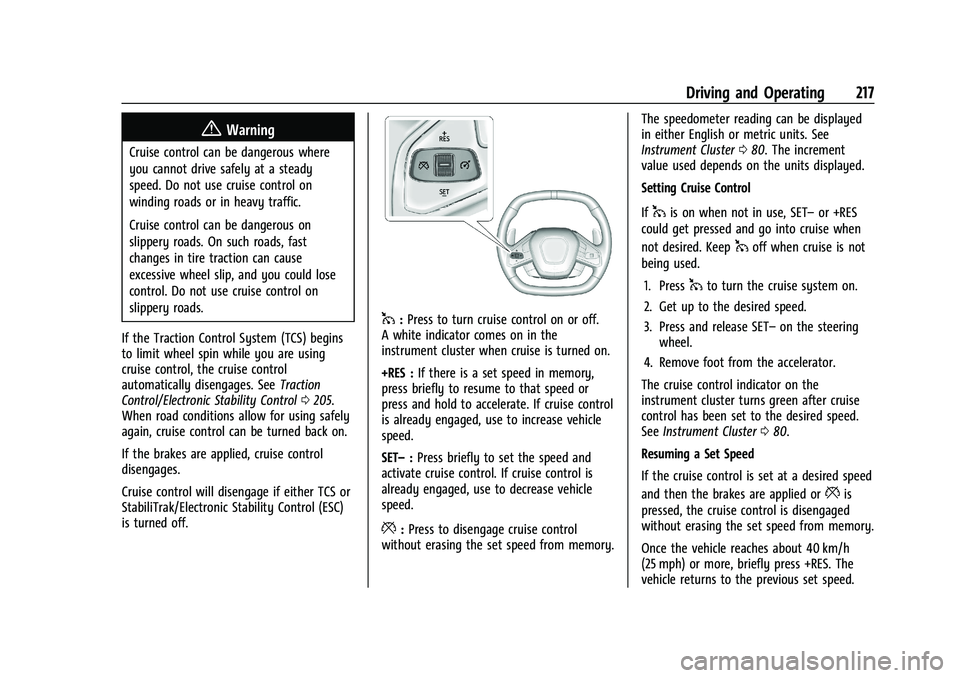
1: Press to turn cruise control on or off.
A white indicator comes on in the
instrument cluster when cruise is turned on.
+RES : If there is a set speed in memory,
press briefly to resume to that speed or
press and hold to accelerate. If cruise control
is already engaged, use to increase vehicle
speed.
SET– :Press briefly to set the speed and
activate cruise control. If cruise control is
already engaged, use to decrease vehicle
speed.
*: Press to disengage cruise control
without erasing the set speed from memory. The speedometer reading can be displayed
in either English or metric units. See
Instrument Cluster
080. The increment
value used depends on the units displayed.
Setting Cruise Control
If
1is on when not in use, SET– or +RES
could get pressed and go into cruise when
not desired. Keep
1off when cruise is not
being used.
1. Press
1to turn the cruise system on.
2. Get up to the desired speed.
3. Press and release SET– on the steering
wheel.
4. Remove foot from the accelerator.
The cruise control indicator on the
instrument cluster turns green after cruise
control has been set to the desired speed.
See Instrument Cluster 080.
Resuming a Set Speed
If the cruise control is set at a desired speed
and then the brakes are applied or
*is
pressed, the cruise control is disengaged
without erasing the set speed from memory.
Once the vehicle reaches about 40 km/h
(25 mph) or more, briefly press +RES. The
vehicle returns to the previous set speed.
Page 219 of 338
Chevrolet Corvette Owner Manual (GMNA-Localizing-U.S./Canada/Mexico-
15342622) - 2022 - CRC - 5/4/21
218 Driving and Operating
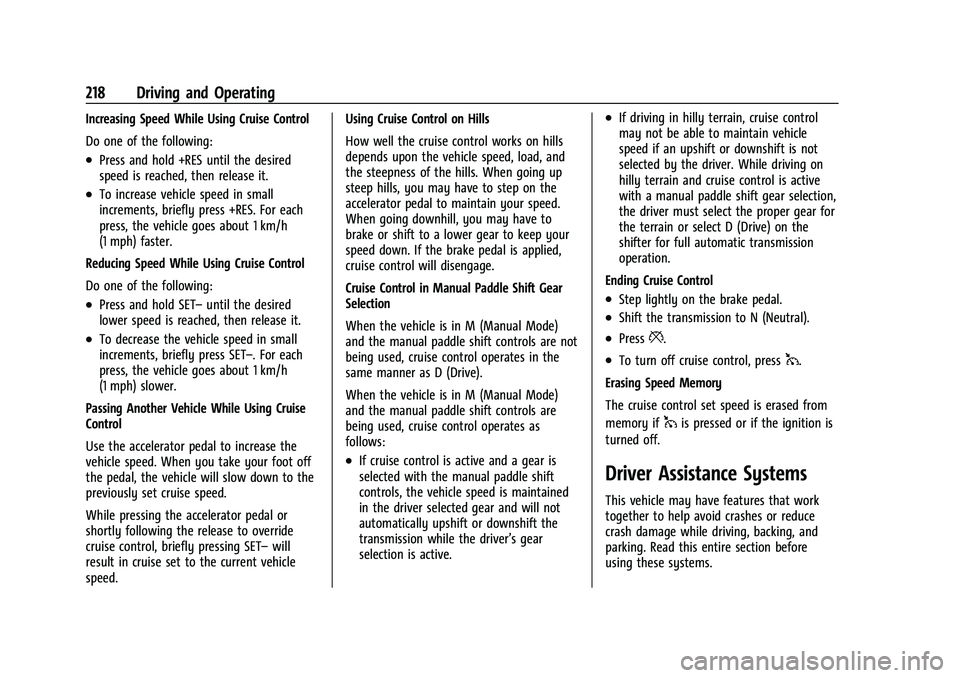
Increasing Speed While Using Cruise Control
Do one of the following:
.Press and hold +RES until the desired
speed is reached, then release it.
.To increase vehicle speed in small
increments, briefly press +RES. For each
press, the vehicle goes about 1 km/h
(1 mph) faster.
Reducing Speed While Using Cruise Control
Do one of the following:
.Press and hold SET– until the desired
lower speed is reached, then release it.
.To decrease the vehicle speed in small
increments, briefly press SET–. For each
press, the vehicle goes about 1 km/h
(1 mph) slower.
Passing Another Vehicle While Using Cruise
Control
Use the accelerator pedal to increase the
vehicle speed. When you take your foot off
the pedal, the vehicle will slow down to the
previously set cruise speed.
While pressing the accelerator pedal or
shortly following the release to override
cruise control, briefly pressing SET– will
result in cruise set to the current vehicle
speed. Using Cruise Control on Hills
How well the cruise control works on hills
depends upon the vehicle speed, load, and
the steepness of the hills. When going up
steep hills, you may have to step on the
accelerator pedal to maintain your speed.
When going downhill, you may have to
brake or shift to a lower gear to keep your
speed down. If the brake pedal is applied,
cruise control will disengage.
Cruise Control in Manual Paddle Shift Gear
Selection
When the vehicle is in M (Manual Mode)
and the manual paddle shift controls are not
being used, cruise control operates in the
same manner as D (Drive).
When the vehicle is in M (Manual Mode)
and the manual paddle shift controls are
being used, cruise control operates as
follows:
.If cruise control is active and a gear is
selected with the manual paddle shift
controls, the vehicle speed is maintained
in the driver selected gear and will not
automatically upshift or downshift the
transmission while the driver’s gear
selection is active.
.If driving in hilly terrain, cruise control
may not be able to maintain vehicle
speed if an upshift or downshift is not
selected by the driver. While driving on
hilly terrain and cruise control is active
with a manual paddle shift gear selection,
the driver must select the proper gear for
the terrain or select D (Drive) on the
shifter for full automatic transmission
operation.
Ending Cruise Control
.Step lightly on the brake pedal.
.Shift the transmission to N (Neutral).
.Press*.
.To turn off cruise control, press1.
Erasing Speed Memory
The cruise control set speed is erased from
memory if
1is pressed or if the ignition is
turned off.
Driver Assistance Systems
This vehicle may have features that work
together to help avoid crashes or reduce
crash damage while driving, backing, and
parking. Read this entire section before
using these systems.
Page 329 of 338
Chevrolet Corvette Owner Manual (GMNA-Localizing-U.S./Canada/Mexico-
15342622) - 2022 - CRC - 5/4/21
328 Index
Connected Services (cont'd)Diagnostics . . . . . . . . . . . . . . . . . . . . . . . . . . . . 325
Navigation . . . . . . . . . . . . . . . . . . . . . . . . . . . . . 323
Connections Connected Services . . . . . . . . . . . . . . . . . . . . 323
Control Hill Rollback . . . . . . . . . . . . . . . . . . . . . . . . . . . 206
Traction and Electronic Stability . . . . . . . 205
Control of a Vehicle . . . . . . . . . . . . . . . . . . . . . . 175
Controls Steering Wheel . . . . . . . . . . . . . . . . . . . . . . . . . 113
Convenience Net . . . . . . . . . . . . . . . . . . . . . . . . . . .72
Convertible Top . . . . . . . . . . . . . . . . . . . . . . . . . . . 34
Convex Mirrors . . . . . . . . . . . . . . . . . . . . . . . . . . . 24
Coolant Engine Temperature Gauge . . . . . . . . . . . . . 84
Cooling . . . . . . . . . . . . . . . . . . . . . . . . . . . . . . . . . . 168
Cooling System . . . . . . . . . . . . . . . . . . . . . . . . . . 242
Courtesy Lamps . . . . . . . . . . . . . . . . . . . . . . . . . . 108
Courtesy Transportation Program . . . . . . . . . 312
Coverage Explanations . . . . . . . . . . . . . . . . . . . . 135
Cruise Control . . . . . . . . . . . . . . . . . . . . . . . . . . . 216 Light . . . . . . . . . . . . . . . . . . . . . . . . . . . . . . . . . . . . 92
Cupholders . . . . . . . . . . . . . . . . . . . . . . . . . . . . . . . 70
Curb View Camera . . . . . . . . . . . . . . . . . . . . . . . . 221
Customer Assistance . . . . . . . . . . . . . . . . . . . . . 309 Offices . . . . . . . . . . . . . . . . . . . . . . . . . . . . . . . . . 309
Text Telephone (TTY) Users . . . . . . . . . . . . 309 Customer Information
Publications Ordering Information . . . . . 314
Customer Satisfaction Procedure . . . . . . . . . 307
Cybersecurity . . . . . . . . . . . . . . . . . . . . . . . . . . . . 316
D
Damage Repair, Collision . . . . . . . . . . . . . . . . . . 313
Danger, Warning, and Caution . . . . . . . . . . . . . .2
Data Collection Infotainment System . . . . . . . . . . . . . . . . . . . 317
OnStar . . . . . . . . . . . . . . . . . . . . . . . . . . . . . . . . . . 317
Data Recorder
Performance . . . . . . . . . . . . . . . . . . . . . . . . . . . 140
Data Recorders, Event . . . . . . . . . . . . . . . . . . . . 317
Database Coverage Explanations . . . . . . . . . . 135
Daytime Running Lamps (DRL) . . . . . . . . . . . 106
Defensive Driving . . . . . . . . . . . . . . . . . . . . . . . . . 175
Delayed Locking . . . . . . . . . . . . . . . . . . . . . . . . . . .16
Destination . . . . . . . . . . . . . . . . . . . . . . . . . . . . . . .128
Diagnostics Connected Services . . . . . . . . . . . . . . . . . . . . 325
Differential, Limited-Slip . . . . . . . . . . . . . . . . . 216
Distracted Driving . . . . . . . . . . . . . . . . . . . . . . . . .174
Diversity Antenna System . . . . . . . . . . . . . . . 120
Door Ajar Light . . . . . . . . . . . . . . . . . . . . . . . . . . . . . . . 92
Delayed Locking . . . . . . . . . . . . . . . . . . . . . . . . 16
Locks . . . . . . . . . . . . . . . . . . . . . . . . . . . . . . . . . . . . 13 Drive Belt Routing, Engine . . . . . . . . . . . . . . . 306
Driver
Teen . . . . . . . . . . . . . . . . . . . . . . . . . . . . . . . . . . . . 157
Driver Assistance Systems . . . . . . . . . . . . . . . .218
Driver Information Center (DIC) . . . . . . . . . . . 92
Driver Mode Control . . . . . . . . . . . . . . . . . . . . . 206
Driving Better Fuel Economy . . . . . . . . . . . . . . . . . . . 174
Competitive . . . . . . . . . . . . . . . . . . . . . . . . . . . . 213
Defensive . . . . . . . . . . . . . . . . . . . . . . . . . . . . . . . 175
Hill and Mountain Roads . . . . . . . . . . . . . . 184
If the Vehicle is Stuck . . . . . . . . . . . . . . . . . 186
Impaired . . . . . . . . . . . . . . . . . . . . . . . . . . . . . . . . 175
Loss of Control . . . . . . . . . . . . . . . . . . . . . . . . . 177
Off-Road Recovery . . . . . . . . . . . . . . . . . . . . . 176
Track Events and Competitive . . . . . . . . . . . 177
Vehicle Load Limits . . . . . . . . . . . . . . . . . . . . 186
Wet Roads . . . . . . . . . . . . . . . . . . . . . . . . . . . . . 183
Winter . . . . . . . . . . . . . . . . . . . . . . . . . . . . . . . . . 185
Dual Automatic Climate Control System . . . . . . . . . . . . . . . . . . . . . . . . . . . . . . . . 168
Dual Clutch Transmission . . . . . . . . . . . . . . . . 195 Manual Mode . . . . . . . . . . . . . . . . . . . . . . . . . 198
Dual Clutch Transmission Fluid . . . . . . . . . . . 238
Dual Clutch Transmission Fluid Life System . . . . . . . . . . . . . . . . . . . . . . . . . . . . . . . . 239
Page 332 of 338
Chevrolet Corvette Owner Manual (GMNA-Localizing-U.S./Canada/Mexico-
15342622) - 2022 - CRC - 5/4/21
Index 331
Lamps (cont'd)Reading . . . . . . . . . . . . . . . . . . . . . . . . . . . . . . . . 108
Lap-Shoulder Belt . . . . . . . . . . . . . . . . . . . . . . . . . 49
LATCH, Lower Anchors and Tethers for Children . . . . . . . . . . . . . . . . . . . . . . . . . . . . . . . . . 66
LED Lighting . . . . . . . . . . . . . . . . . . . . . . . . . . . . . 252
Lifting the Vehicle, Tires . . . . . . . . . . . . . . . . . 229
Light Performance Shifting . . . . . . . . . . . . . . . . . . . 89
Lighting Entry . . . . . . . . . . . . . . . . . . . . . . . . . . . . . . . . . . 109
Exit . . . . . . . . . . . . . . . . . . . . . . . . . . . . . . . . . . . . 109
Illumination Control . . . . . . . . . . . . . . . . . . . 108
LED . . . . . . . . . . . . . . . . . . . . . . . . . . . . . . . . . . . . 252
Lights Airbag Readiness . . . . . . . . . . . . . . . . . . . . . . . 85
Antilock Brake System (ABS)
Warning . . . . . . . . . . . . . . . . . . . . . . . . . . . . . . 89
Brake System Warning . . . . . . . . . . . . . . . . . 88
Charging System . . . . . . . . . . . . . . . . . . . . . . . 86
Check Engine (Malfunction Indicator) . . . . . . . . . . . . . . . . . . . . . . . . . . . . . 86
Cruise Control . . . . . . . . . . . . . . . . . . . . . . . . . . 92
Door Ajar . . . . . . . . . . . . . . . . . . . . . . . . . . . . . . . 92
Electric Parking Brake . . . . . . . . . . . . . . . . . . . 89 Lights (cont'd)
Electronic Stability Control
(ESC), Off . . . . . . . . . . . . . . . . . . . . . . . . . . . . . 90
Engine Oil Pressure . . . . . . . . . . . . . . . . . . . . . 91
Flash-to-Pass . . . . . . . . . . . . . . . . . . . . . . . . . . . 106
Front Lift System . . . . . . . . . . . . . . . . . . . . . . . 88
High-Beam On . . . . . . . . . . . . . . . . . . . . . . . . . . 92
High/Low Beam Changer . . . . . . . . . . . . . . 105
Seat Belt Reminders . . . . . . . . . . . . . . . . . . . . 84
Security . . . . . . . . . . . . . . . . . . . . . . . . . . . . . . . . . 91
Service Electric Parking Brake . . . . . . . . . . . 89
Tire Pressure . . . . . . . . . . . . . . . . . . . . . . . . . . . . 91
Traction Off . . . . . . . . . . . . . . . . . . . . . . . . . . . . . 90
Limited-Slip Differential . . . . . . . . . . . . . . . . . . 216
Locks Automatic Door . . . . . . . . . . . . . . . . . . . . . . . . . 16
Delayed Locking . . . . . . . . . . . . . . . . . . . . . . . . 16
Door . . . . . . . . . . . . . . . . . . . . . . . . . . . . . . . . . . . . . 13
Lockout Protection . . . . . . . . . . . . . . . . . . . . . . 16
Loss of Control . . . . . . . . . . . . . . . . . . . . . . . . . . . 177
Low-Profile Tires . . . . . . . . . . . . . . . . . . . . . . . . . 261
Lower Anchors and Tethers for Children (LATCH System) . . . . . . . . . . . . . . . . 66
Lumbar Adjustment . . . . . . . . . . . . . . . . . . . . . . . .41 Front Seats . . . . . . . . . . . . . . . . . . . . . . . . . . . . . 41M
MaintenanceRecords . . . . . . . . . . . . . . . . . . . . . . . . . . . . . . . . 302
Maintenance and Care Additional . . . . . . . . . . . . . . . . . . . . . . . . . . . . . 297
Maintenance Schedule . . . . . . . . . . . . . . . . . . . 292 Recommended Fluids andLubricants . . . . . . . . . . . . . . . . . . . . . . . . . . . . 300
Malfunction Indicator Lamp . . . . . . . . . . . . . . . 86
Manual Mode . . . . . . . . . . . . . . . . . . . . . . . . . . . 198
Map Data Updates . . . . . . . . . . . . . . . . . . . . . . . . 135
Maps . . . . . . . . . . . . . . . . . . . . . . . . . . . . . . . . . . . . . 127
Media Avoiding Untrusted Devices . . . . . . . . . . . . 120
Memory Seats . . . . . . . . . . . . . . . . . . . . . . . . . . . . .41
Messages Engine Power . . . . . . . . . . . . . . . . . . . . . . . . . . . 98
Vehicle . . . . . . . . . . . . . . . . . . . . . . . . . . . . . . . . . 97
Vehicle Speed . . . . . . . . . . . . . . . . . . . . . . . . . . . 98
Mirror Rear Camera . . . . . . . . . . . . . . . . . . . . . . . . . . . . 26
Mirrors Automatic Dimming . . . . . . . . . . . . . . . . . . . . 25
Automatic Dimming Rearview . . . . . . . . . . 26
Convex . . . . . . . . . . . . . . . . . . . . . . . . . . . . . . . . . 24
Folding . . . . . . . . . . . . . . . . . . . . . . . . . . . . . . . . . 24