mirror CHEVROLET CORVETTE 2022 User Guide
[x] Cancel search | Manufacturer: CHEVROLET, Model Year: 2022, Model line: CORVETTE, Model: CHEVROLET CORVETTE 2022Pages: 338, PDF Size: 7.6 MB
Page 101 of 338
Chevrolet Corvette Owner Manual (GMNA-Localizing-U.S./Canada/Mexico-
15342622) - 2022 - CRC - 5/4/21
100 Instruments and Controls
Touch Off or On.
Side Blind Zone Alert
This allows this feature to be turned on or
off. SeeSide Blind Zone Alert (SBZA) 0222.
Touch Off or On.
Rear Cross Traffic Alert
This setting specifies if an alert will display
when the vehicle detects approaching rear
cross traffic when in R (Reverse). See Rear
Cross Traffic Alert (RCTA) System 0222.
Touch Off or On.
Comfort and Convenience
Touch and the following may display:
.Chime Volume
.Reverse Tilt Mirror
.Remote Mirror Folding
Chime Volume
This setting determines the chime volume
level.
Touch the controls on the infotainment
system to adjust the volume. Reverse Tilt Mirror
When on, the driver, passenger, or both
driver and passenger outside mirrors will tilt
downward when the vehicle is shifted into
R (Reverse) to improve visibility of the
ground near the rear wheels. They may
move from their tilted position when the
vehicle is shifted out of R (Reverse) or
turned off. See
Reverse Tilt Mirrors 025.
Touch Off, On - Driver and Passenger, On -
Driver, or On - Passenger.
Remote Mirror Folding
When on, the outside mirrors will
automatically fold or unfold when the
Qor
Kon the remote key is pressed. See
Folding Mirrors 024.
Touch Off or On.
Lighting
Touch and the following may display:
.Vehicle Locator Lights
.Exit Lighting
Vehicle Locator Lights
This setting flashes the vehicle’s headlamps
and taillamps when
Kis pressed on the
remote key. Touch Off or On.
Exit Lighting
This setting specifies how long the
headlamps stay on after the vehicle is
turned off and exited.
Touch Off, 30 Seconds, 60 Seconds,
or 120 Seconds.
Power Door Locks
Touch and the following may display:
.Auto Door Unlock
.Delayed Door Lock
Auto Door Unlock
This setting allows selection of which doors
will automatically unlock when the vehicle is
shifted into P (Park).
Touch Off, All Doors, or Driver Door.
Delayed Door Lock
This setting delays the locking of the vehicle
doors.
Touch Off or On.
Remote Lock, Unlock, and Start
Touch and the following may display:
.Remote Unlock Light Feedback
Page 142 of 338
Chevrolet Corvette Owner Manual (GMNA-Localizing-U.S./Canada/Mexico-
15342622) - 2022 - CRC - 5/4/21
Infotainment System 141
microphone located behind the rear view
mirror. The PDR video and data is stored on
a removable SD card located in the SD card
reader in the glove box. The video (MP4)
can be played back in the vehicle or the SD
card can be removed and played in a PC or
on a mobile device or the file can be viewed
and analyzed within Toolbox. See Toolbox
later in this section.
The recorded data is not stored anywhere
else and is only accessible from the SD card.
To optimize PDR performance, it is
recommended that the SD card is formatted
on a regular basis. Back up all recordings on
the SD card prior to formatting. Formatting
the SD card will delete all saved recordings.
If a system error code is seen on the
display, such as "System Error Code ####",
please check the health of the SD card.
It may need to be reformatted or replaced.
If the issue persists, please see your dealer.
To begin, insert an exFAT formatted SD card,
Class 10 required, 16 GB or larger
recommended, into the glove box SD card
reader.Touch the PDR icon to access the PDR menu.
Touch the PDR tab. The options
displayed are:
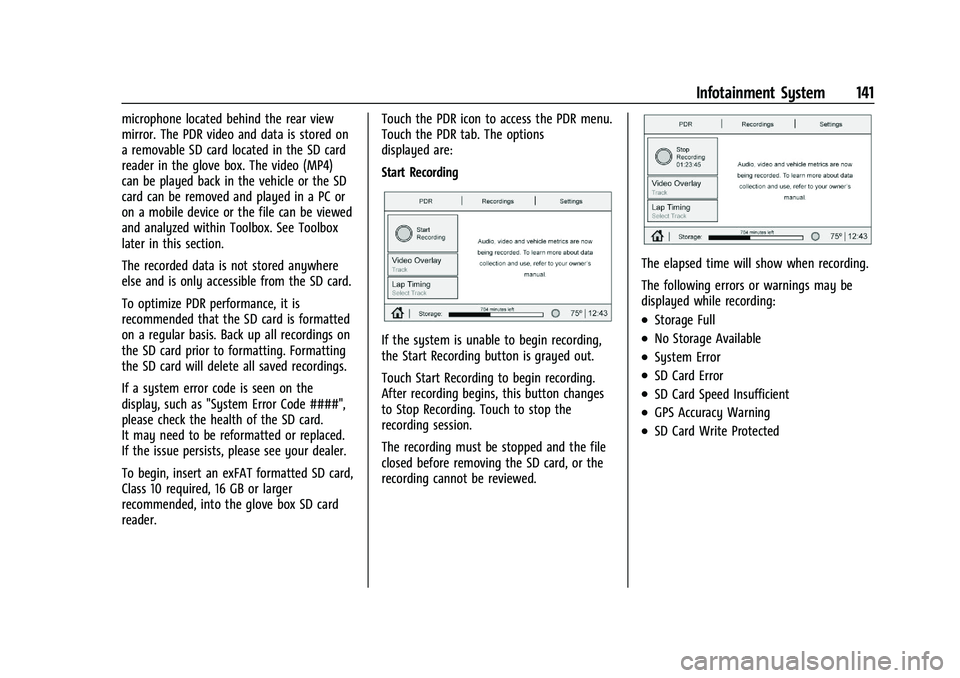
Start Recording
If the system is unable to begin recording,
the Start Recording button is grayed out.
Touch Start Recording to begin recording.
After recording begins, this button changes
to Stop Recording. Touch to stop the
recording session.
The recording must be stopped and the file
closed before removing the SD card, or the
recording cannot be reviewed.
The elapsed time will show when recording.
The following errors or warnings may be
displayed while recording:
.Storage Full
.No Storage Available
.System Error
.SD Card Error
.SD Card Speed Insufficient
.GPS Accuracy Warning
.SD Card Write Protected
Page 172 of 338
Chevrolet Corvette Owner Manual (GMNA-Localizing-U.S./Canada/Mexico-
15342622) - 2022 - CRC - 5/4/21
Climate Controls 171
If equipped with heated outside mirrors,
press
1REAR to turn them on or off. See
Heated Mirrors 025.
Caution
Using a razor blade or sharp object to
clear the inside rear window can damage
the rear window defogger. Repairs would
not be covered by the vehicle warranty.
Do not clear the inside rear window with
sharp objects.
Remote Start Climate Control Operation :
If equipped with remote start, the climate
control system may run when the vehicle is
started remotely. If equipped with heated or
ventilated seats or a heated steering wheel,
these features may come on during a
remote start. See Remote Vehicle Start 012,
Heated and Ventilated Front Seats 044, and
Heated Steering Wheel 074.
Afterblow Feature
If equipped, under certain conditions, the
fan may stay on or may turn on and off
several times after you turn off and lock the
vehicle. This is normal.
Air Vents
Use the tab on the air outlets to change the
direction of the airflow or shut the outlet.
Operation Tips
.Clear away any ice, snow, or leaves from
the air inlets at the base of the
windshield that may block the flow of air
into the vehicle.
.Clear snow off the hood to improve
visibility and help decrease moisture
drawn into the vehicle.
.Use of non-GM approved hood deflectors
may adversely affect the performance of
the system.
.Keep the areas around the base of the
infotainment display and under the seats
clear to optimize air circulation.
Maintenance
Passenger Compartment Air Filter
The passenger compartment air filter
reduces dust, pollen, and other airborne
irritants from outside air that are pulled into
the vehicle. Reductions in airflow, which
may occur more often in dusty areas,
indicate that the filter may need to be
replaced. See Maintenance Schedule 0292.
Caution
Driving without a passenger compartment
air filter in place can cause water and
small particles, like paper and leaves, to
be pulled into your climate control
system which may cause damage to it.
Make sure you always replace the old
filter with a new one.
The passenger compartment air filter is
located under the hood between the battery
and windshield. See Underhood
Compartment Overview 0231.
Page 178 of 338
Chevrolet Corvette Owner Manual (GMNA-Localizing-U.S./Canada/Mexico-
15342622) - 2022 - CRC - 5/4/21
Driving and Operating 177
The vehicle's right wheels can drop off the
edge of a road onto the shoulder while
driving. Follow these tips:1. Ease off the accelerator and then, if there is nothing in the way, steer the
vehicle so that it straddles the edge of
the pavement.
2. Turn the steering wheel about one-eighth of a turn, until the right front
tire contacts the pavement edge.
3. Turn the steering wheel to go straight down the roadway.
Loss of Control
Skidding
There are three types of skids that
correspond to the vehicle's three control
systems:
.Braking Skid —wheels are not rolling.
.Steering or Cornering Skid —too much
speed or steering in a curve causes tires
to slip and lose cornering force.
.Acceleration Skid —too much throttle
causes the driving wheels to spin. Defensive drivers avoid most skids by taking
reasonable care suited to existing conditions,
and by not overdriving those conditions. But
skids are always possible.
If the vehicle starts to slide, follow these
suggestions:
.Ease your foot off the accelerator pedal
and steer the way you want the vehicle
to go. The vehicle may straighten out. Be
ready for a second skid if it occurs.
.Slow down and adjust your driving
according to weather conditions. Stopping
distance can be longer and vehicle control
can be affected when traction is reduced
by water, snow, ice, gravel, or other
material on the road. Learn to recognize
warning clues
—such as enough water,
ice, or packed snow on the road to make
a mirrored surface —and slow down
when you have any doubt.
.Try to avoid sudden steering, acceleration,
or braking, including reducing vehicle
speed by shifting to a lower gear. Any
sudden changes could cause the tires to
slide.
Remember: Antilock brakes help avoid only
the braking skid.
Track Events and Competitive
Driving
Vehicles without Z51 package should not be
used for track events and competitive
driving.
{Danger
High-performance features are intended
for use only on closed tracks by
experienced and qualified drivers and
should not be used on public roads.
High-speed driving, aggressive cornering,
hard braking, and other high-performance
driving can be dangerous. Improper driver
inputs for the conditions may result in
loss of control of the vehicle, which could
injure or kill you or others. Always drive
safely.
Participating in track events or other
competitive driving without following the
instructions provided may affect the vehicle
warranty. See the warranty manual before
using the vehicle for racing or other
competitive driving. See Competitive Driving
Mode 0213.
Page 186 of 338
Chevrolet Corvette Owner Manual (GMNA-Localizing-U.S./Canada/Mexico-
15342622) - 2022 - CRC - 5/4/21
Driving and Operating 185
Winter Driving
Driving on Snow or IceCaution
To avoid damage to the wheels and
brake components, always clear snow and
ice from inside the wheels and
underneath the vehicle before driving.
Snow or ice between the tires and the road
creates less traction or grip, so drive
carefully. Wet ice can occur at about 0 °C
(32 °F) when freezing rain begins to fall.
Avoid driving on wet ice or in freezing rain
until roads can be treated.
For Slippery Road Driving:
.Accelerate gently. Accelerating too quickly
causes the wheels to spin and makes the
surface under the tires slick.
.Turn on Traction Control. See Traction
Control/Electronic Stability Control 0205.
.The Antilock Brake System (ABS) improves
vehicle stability during hard stops, but
the brakes should be applied sooner than
when on dry pavement. See Antilock
Brake System (ABS) 0202.
.Allow greater following distance and
watch for slippery spots. Icy patches can
occur on otherwise clear roads in shaded
areas. The surface of a curve or an
overpass can remain icy when the
surrounding roads are clear. Avoid sudden
steering maneuvers and braking while
on ice.
.Turn off cruise control.
.Turn on Weather Mode. See Driver Mode
Control 0206.
Blizzard Conditions
Stop the vehicle in a safe place and signal
for help. Stay with the vehicle unless there
is help nearby. If possible, use Roadside
Assistance. See Roadside Assistance Program
0 310. To get help and keep everyone in the
vehicle safe:
.Turn on the hazard warning flashers.
.Tie a red cloth to an outside mirror.
{Warning
Snow can trap engine exhaust under the
vehicle. This may cause exhaust gases to
get inside. Engine exhaust contains
(Continued)
Warning (Continued)
carbon monoxide (CO), which cannot be
seen or smelled. It can cause
unconsciousness and even death.
If the vehicle is stuck in snow:
.Clear snow from the base of the
vehicle, especially any blocking the
exhaust pipe.
.Open a window about 5 cm (2 in) on
the vehicle side that is away from the
wind, to bring in fresh air.
.Fully open the air outlets on or under
the instrument panel.
.Adjust the climate control system to
circulate the air inside the vehicle and
set the fan speed to the highest
setting. See“Climate Control Systems.”
For more information about CO, see
Engine Exhaust 0195.
To save fuel, run the engine for short
periods to warm the vehicle and then shut
the engine off and partially close the
window. Moving about to keep warm also
helps.
Page 221 of 338
Chevrolet Corvette Owner Manual (GMNA-Localizing-U.S./Canada/Mexico-
15342622) - 2022 - CRC - 5/4/21
220 Driving and Operating
.Front side and rear side panels
.Outside of the windshield in front of the
rearview mirror
.Rear side corner bumpers
.Rear Vision Camera above the license
plate
Radio Frequency
This vehicle may be equipped with driver
assistance systems that operate using radio
frequency. See Radio Frequency Statement
0 315.
Assistance Systems for Parking or
Backing
If equipped, the Rear Vision Camera (RVC),
Rear Park Assist (RPA), and Curb View
Camera may help the driver park or avoid
objects. Always check around the vehicle
when parking or backing.
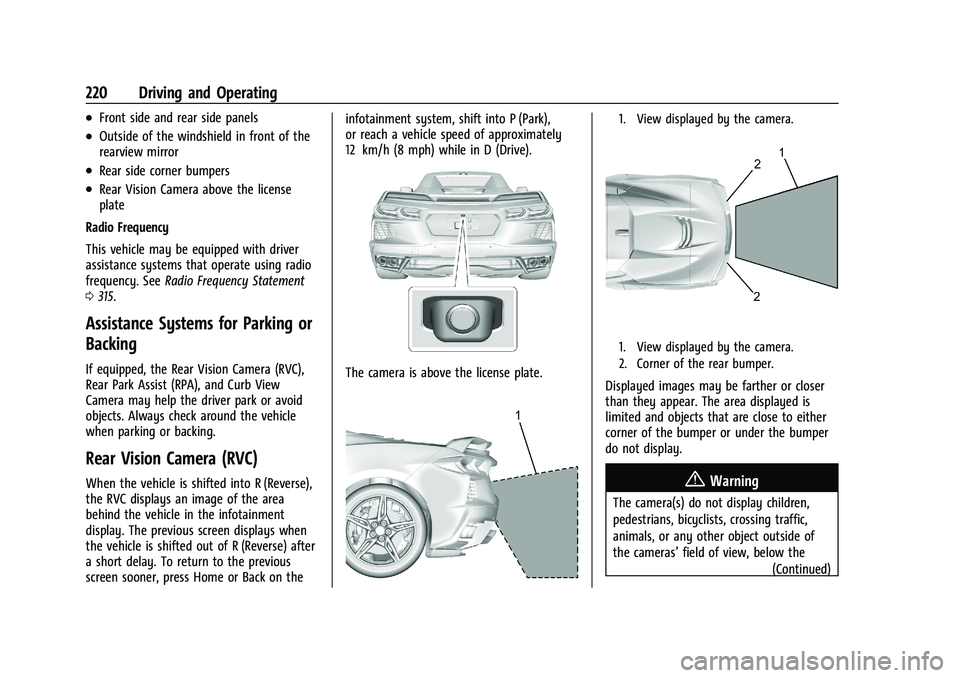
Rear Vision Camera (RVC)
When the vehicle is shifted into R (Reverse),
the RVC displays an image of the area
behind the vehicle in the infotainment
display. The previous screen displays when
the vehicle is shifted out of R (Reverse) after
a short delay. To return to the previous
screen sooner, press Home or Back on the infotainment system, shift into P (Park),
or reach a vehicle speed of approximately
12 km/h (8 mph) while in D (Drive).
The camera is above the license plate.
1. View displayed by the camera.
1. View displayed by the camera.
2. Corner of the rear bumper.
Displayed images may be farther or closer
than they appear. The area displayed is
limited and objects that are close to either
corner of the bumper or under the bumper
do not display.
{Warning
The camera(s) do not display children,
pedestrians, bicyclists, crossing traffic,
animals, or any other object outside of
the cameras’
field of view, below the
(Continued)
Page 223 of 338
Chevrolet Corvette Owner Manual (GMNA-Localizing-U.S./Canada/Mexico-
15342622) - 2022 - CRC - 5/4/21
222 Driving and Operating
Park Assist
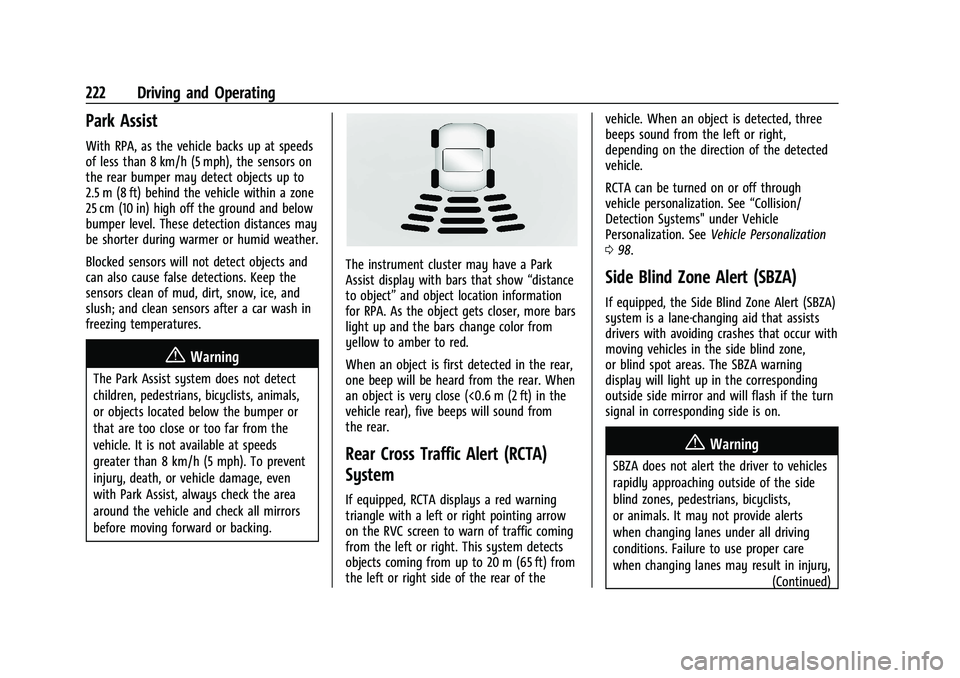
With RPA, as the vehicle backs up at speeds
of less than 8 km/h (5 mph), the sensors on
the rear bumper may detect objects up to
2.5 m (8 ft) behind the vehicle within a zone
25 cm (10 in) high off the ground and below
bumper level. These detection distances may
be shorter during warmer or humid weather.
Blocked sensors will not detect objects and
can also cause false detections. Keep the
sensors clean of mud, dirt, snow, ice, and
slush; and clean sensors after a car wash in
freezing temperatures.
{Warning
The Park Assist system does not detect
children, pedestrians, bicyclists, animals,
or objects located below the bumper or
that are too close or too far from the
vehicle. It is not available at speeds
greater than 8 km/h (5 mph). To prevent
injury, death, or vehicle damage, even
with Park Assist, always check the area
around the vehicle and check all mirrors
before moving forward or backing.
The instrument cluster may have a Park
Assist display with bars that show“distance
to object” and object location information
for RPA. As the object gets closer, more bars
light up and the bars change color from
yellow to amber to red.
When an object is first detected in the rear,
one beep will be heard from the rear. When
an object is very close (<0.6 m (2 ft) in the
vehicle rear), five beeps will sound from
the rear.
Rear Cross Traffic Alert (RCTA)
System
If equipped, RCTA displays a red warning
triangle with a left or right pointing arrow
on the RVC screen to warn of traffic coming
from the left or right. This system detects
objects coming from up to 20 m (65 ft) from
the left or right side of the rear of the vehicle. When an object is detected, three
beeps sound from the left or right,
depending on the direction of the detected
vehicle.
RCTA can be turned on or off through
vehicle personalization. See
“Collision/
Detection Systems" under Vehicle
Personalization. See Vehicle Personalization
0 98.
Side Blind Zone Alert (SBZA)
If equipped, the Side Blind Zone Alert (SBZA)
system is a lane-changing aid that assists
drivers with avoiding crashes that occur with
moving vehicles in the side blind zone,
or blind spot areas. The SBZA warning
display will light up in the corresponding
outside side mirror and will flash if the turn
signal in corresponding side is on.
{Warning
SBZA does not alert the driver to vehicles
rapidly approaching outside of the side
blind zones, pedestrians, bicyclists,
or animals. It may not provide alerts
when changing lanes under all driving
conditions. Failure to use proper care
when changing lanes may result in injury,
(Continued)
Page 224 of 338
Chevrolet Corvette Owner Manual (GMNA-Localizing-U.S./Canada/Mexico-
15342622) - 2022 - CRC - 5/4/21
Driving and Operating 223
Warning (Continued)
death, or vehicle damage. Before making
a lane change, always check mirrors,
glance over your shoulder, and use the
turn signals.
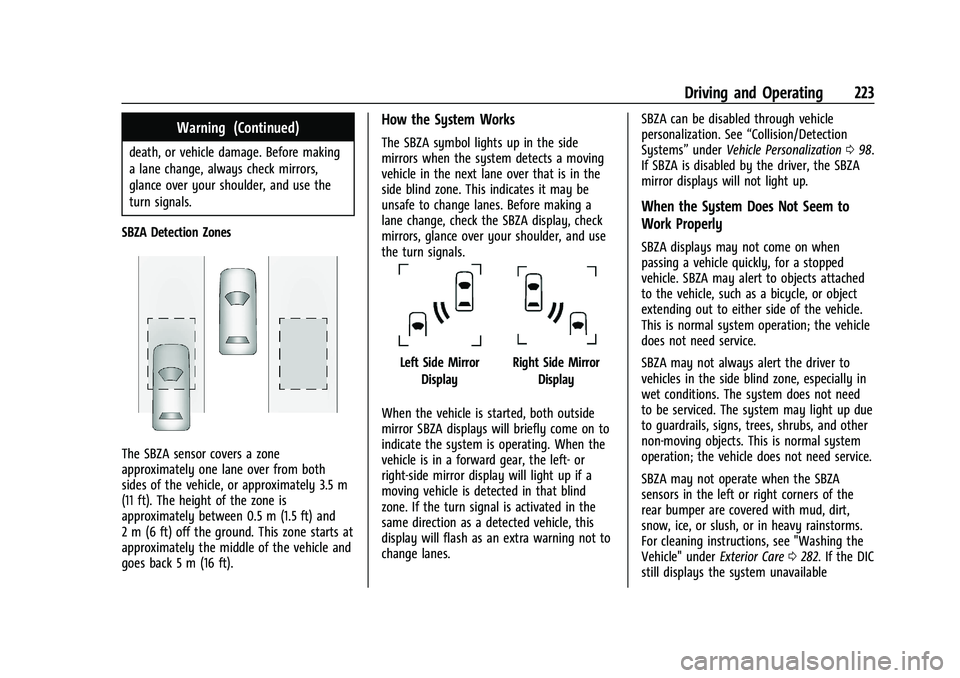
SBZA Detection Zones
The SBZA sensor covers a zone
approximately one lane over from both
sides of the vehicle, or approximately 3.5 m
(11 ft). The height of the zone is
approximately between 0.5 m (1.5 ft) and
2 m (6 ft) off the ground. This zone starts at
approximately the middle of the vehicle and
goes back 5 m (16 ft).
How the System Works
The SBZA symbol lights up in the side
mirrors when the system detects a moving
vehicle in the next lane over that is in the
side blind zone. This indicates it may be
unsafe to change lanes. Before making a
lane change, check the SBZA display, check
mirrors, glance over your shoulder, and use
the turn signals.
Left Side Mirror DisplayRight Side Mirror Display
When the vehicle is started, both outside
mirror SBZA displays will briefly come on to
indicate the system is operating. When the
vehicle is in a forward gear, the left- or
right-side mirror display will light up if a
moving vehicle is detected in that blind
zone. If the turn signal is activated in the
same direction as a detected vehicle, this
display will flash as an extra warning not to
change lanes. SBZA can be disabled through vehicle
personalization. See
“Collision/Detection
Systems” underVehicle Personalization 098.
If SBZA is disabled by the driver, the SBZA
mirror displays will not light up.
When the System Does Not Seem to
Work Properly
SBZA displays may not come on when
passing a vehicle quickly, for a stopped
vehicle. SBZA may alert to objects attached
to the vehicle, such as a bicycle, or object
extending out to either side of the vehicle.
This is normal system operation; the vehicle
does not need service.
SBZA may not always alert the driver to
vehicles in the side blind zone, especially in
wet conditions. The system does not need
to be serviced. The system may light up due
to guardrails, signs, trees, shrubs, and other
non-moving objects. This is normal system
operation; the vehicle does not need service.
SBZA may not operate when the SBZA
sensors in the left or right corners of the
rear bumper are covered with mud, dirt,
snow, ice, or slush, or in heavy rainstorms.
For cleaning instructions, see "Washing the
Vehicle" under Exterior Care0282. If the DIC
still displays the system unavailable
Page 259 of 338
Chevrolet Corvette Owner Manual (GMNA-Localizing-U.S./Canada/Mexico-
15342622) - 2022 - CRC - 5/4/21
258 Vehicle Care
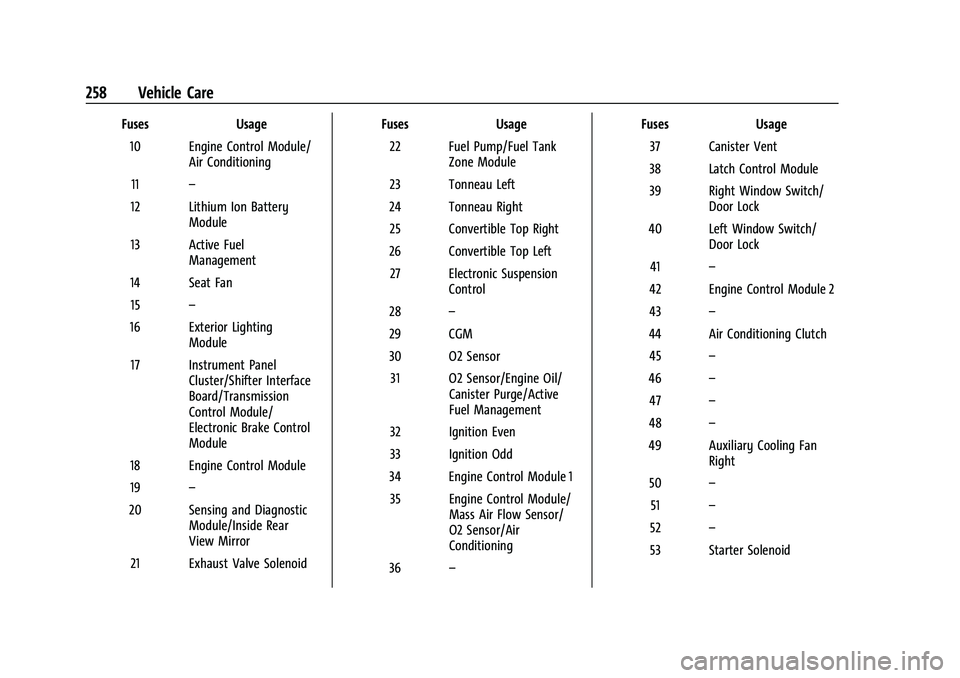
FusesUsage
10 Engine Control Module/ Air Conditioning
11 –
12 Lithium Ion Battery Module
13 Active Fuel Management
14 Seat Fan 15 –
16 Exterior Lighting Module
17 Instrument Panel Cluster/Shifter Interface
Board/Transmission
Control Module/
Electronic Brake Control
Module
18 Engine Control Module
19 –
20 Sensing and Diagnostic Module/Inside Rear
View Mirror
21 Exhaust Valve Solenoid Fuses
Usage
22 Fuel Pump/Fuel Tank Zone Module
23 Tonneau Left
24 Tonneau Right 25 Convertible Top Right
26 Convertible Top Left 27 Electronic Suspension Control
28 –
29 CGM
30 O2 Sensor 31 O2 Sensor/Engine Oil/ Canister Purge/Active
Fuel Management
32 Ignition Even
33 Ignition Odd
34 Engine Control Module 1 35 Engine Control Module/ Mass Air Flow Sensor/
O2 Sensor/Air
Conditioning
36 – Fuses
Usage
37 Canister Vent
38 Latch Control Module
39 Right Window Switch/ Door Lock
40 Left Window Switch/ Door Lock
41 –
42 Engine Control Module 2
43 –
44 Air Conditioning Clutch 45 –
46 –
47 –
48 –
49 Auxiliary Cooling Fan Right
50 –
51 –
52 –
53 Starter Solenoid
Page 328 of 338
Chevrolet Corvette Owner Manual (GMNA-Localizing-U.S./Canada/Mexico-
15342622) - 2022 - CRC - 5/4/21
Index 327
AutomaticDimming Mirrors . . . . . . . . . . . . . . . . . . . . . . . 25
Door Locks . . . . . . . . . . . . . . . . . . . . . . . . . . . . . . 16
Headlamp System . . . . . . . . . . . . . . . . . . . . . 106
Auxiliary Jack . . . . . . . . . . . . . . . . . . . . . . . . . . . . . 123
Avoiding Untrusted Media Devices . . . . . . . 120
B
Battery Exterior Lighting Battery Saver . . . . . . . . 109
Power Protection . . . . . . . . . . . . . . . . . . . . . . 109
Battery - North America . . . . . . . . . . . . 249, 276
Blade Replacement, Wiper . . . . . . . . . . . . . . . 250
Bluetooth
Overview . . . . . . . . . . . . . . . . . . . . . . . . . . 145, 146
Bluetooth Audio . . . . . . . . . . . . . . . . . . . . . . . . . . 123
Brake Electric Boost . . . . . . . . . . . . . . . . . . . . . . . . . . 202
Parking, Electric . . . . . . . . . . . . . . . . . . . . . . . . 203
System Warning Light . . . . . . . . . . . . . . . . . . 88
Brakes . . . . . . . . . . . . . . . . . . . . . . . . . . . . . . . . . . . 246
Antilock . . . . . . . . . . . . . . . . . . . . . . . . . . . . . . . . 202
Assist . . . . . . . . . . . . . . . . . . . . . . . . . . . . . . . . . . 204
Fluid . . . . . . . . . . . . . . . . . . . . . . . . . . . . . . . . . . . 248
Braking . . . . . . . . . . . . . . . . . . . . . . . . . . . . . . . . . . . 175
Break-In, New Vehicle . . . . . . . . . . . . . . . . . . . . 189
Buckle To Drive . . . . . . . . . . . . . . . . . . . . . . . . . . . 46 Bulb Replacement
Headlamp Aiming . . . . . . . . . . . . . . . . . . . . . . 252
Buying New Tires . . . . . . . . . . . . . . . . . . . . . . . . 272
C
Calibration . . . . . . . . . . . . . . . . . . . . . . . . . . . . . . . . .75
California Perchlorate MaterialsRequirements . . . . . . . . . . . . . . . . . . . . . . . . 229
California Proposition 65 Warning . . . . . . . . . . . . . . . . . . . . . . .249, 276, Back Cover
Camera Curb View . . . . . . . . . . . . . . . . . . . . . . . . . . . . . 221
Rear Vision (RVC) . . . . . . . . . . . . . . . . . . . . . . 220
Canadian Vehicle Owners . . . . . . . . . . . . . . . . . . . 1
Capacities and Specifications . . . . . . . . . . . . . 304
Carbon Monoxide Engine Exhaust . . . . . . . . . . . . . . . . . . . . . . . . 195
Hatch . . . . . . . . . . . . . . . . . . . . . . . . . . . . . . . . . . . 19
Winter Driving . . . . . . . . . . . . . . . . . . . . . . . . . 185
Cargo Tie-Downs . . . . . . . . . . . . . . . . . . . . . . . . . . . . . . 72
Caution, Danger, and Warning . . . . . . . . . . . . . .2
Center Console Storage . . . . . . . . . . . . . . . . . . . .72
Chains, Tire . . . . . . . . . . . . . . . . . . . . . . . . . . . . . . 276
Charging Wireless . . . . . . . . . . . . . . . . . . . . . . . . . . . . . . . . 77 Charging System Light . . . . . . . . . . . . . . . . . . . . 86
Check
Engine Light (Malfunction Indicator) . . . . 86
Child Restraints Infants and Young Children . . . . . . . . . . . . . 63
Lower Anchors and Tethers forChildren . . . . . . . . . . . . . . . . . . . . . . . . . . . . . . . 66
Older Children . . . . . . . . . . . . . . . . . . . . . . . . . . 62
Securing . . . . . . . . . . . . . . . . . . . . . . . . . . . . . . . . 67
Systems . . . . . . . . . . . . . . . . . . . . . . . . . . . . . . . . 65
Circuit Breakers . . . . . . . . . . . . . . . . . . . . . . . . . . 253
Cleaning
Exterior Care . . . . . . . . . . . . . . . . . . . . . . . . . . . 282
Interior Care . . . . . . . . . . . . . . . . . . . . . . . . . . . 286
Climate Control Systems Dual Automatic . . . . . . . . . . . . . . . . . . . . . . . . 168
Clock . . . . . . . . . . . . . . . . . . . . . . . . . . . . . . . . . . . . . .75
Cluster, Instrument . . . . . . . . . . . . . . . . . . . . . . . 80
Collision Damage Repair . . . . . . . . . . . . . . . . . . 313
Compartment Underhood . . . . . . . . . . . . . . . . . . . . . . . . . . . . 231
Compartments Storage . . . . . . . . . . . . . . . . . . . . . . . . . . . . . . . . . 70
Compass . . . . . . . . . . . . . . . . . . . . . . . . . . . . . . . . . . .75
Competitive Driving Mode . . . . . . . . . . . . . . . . 213
Composite Materials . . . . . . . . . . . . . . . . . . . . . 190
Connected Services Connections . . . . . . . . . . . . . . . . . . . . . . . . . . . 323