change wheel CHEVROLET CORVETTE 2022 Owner's Manual
[x] Cancel search | Manufacturer: CHEVROLET, Model Year: 2022, Model line: CORVETTE, Model: CHEVROLET CORVETTE 2022Pages: 338, PDF Size: 7.6 MB
Page 208 of 338
Chevrolet Corvette Owner Manual (GMNA-Localizing-U.S./Canada/Mexico-
15342622) - 2022 - CRC - 5/4/21
Driving and Operating 207
If the vehicle is in Tour or My Mode it will
stay in that mode through future ignition
cycles. If the vehicle is in any other mode, it
will return to Tour when the vehicle is
restarted. When each mode is selected, an
indicator will come on in the instrument
cluster and stay on.
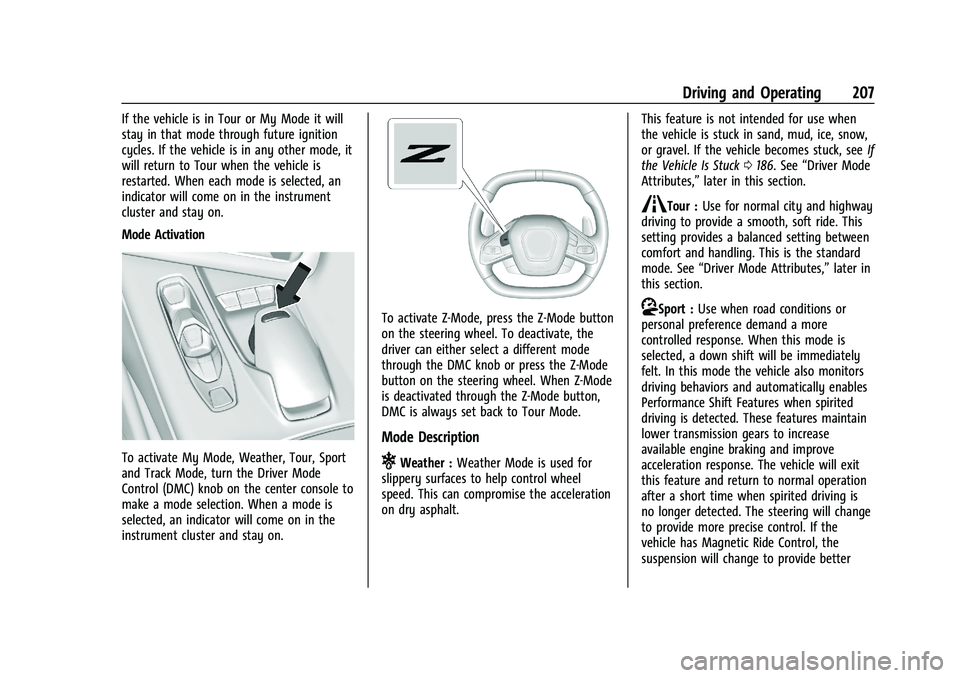
Mode Activation
To activate My Mode, Weather, Tour, Sport
and Track Mode, turn the Driver Mode
Control (DMC) knob on the center console to
make a mode selection. When a mode is
selected, an indicator will come on in the
instrument cluster and stay on.
To activate Z-Mode, press the Z-Mode button
on the steering wheel. To deactivate, the
driver can either select a different mode
through the DMC knob or press the Z-Mode
button on the steering wheel. When Z-Mode
is deactivated through the Z-Mode button,
DMC is always set back to Tour Mode.
Mode Description
uWeather :Weather Mode is used for
slippery surfaces to help control wheel
speed. This can compromise the acceleration
on dry asphalt. This feature is not intended for use when
the vehicle is stuck in sand, mud, ice, snow,
or gravel. If the vehicle becomes stuck, see
If
the Vehicle Is Stuck 0186. See “Driver Mode
Attributes,” later in this section.
sTour :Use for normal city and highway
driving to provide a smooth, soft ride. This
setting provides a balanced setting between
comfort and handling. This is the standard
mode. See “Driver Mode Attributes,” later in
this section.
rSport : Use when road conditions or
personal preference demand a more
controlled response. When this mode is
selected, a down shift will be immediately
felt. In this mode the vehicle also monitors
driving behaviors and automatically enables
Performance Shift Features when spirited
driving is detected. These features maintain
lower transmission gears to increase
available engine braking and improve
acceleration response. The vehicle will exit
this feature and return to normal operation
after a short time when spirited driving is
no longer detected. The steering will change
to provide more precise control. If the
vehicle has Magnetic Ride Control, the
suspension will change to provide better
Page 212 of 338
Chevrolet Corvette Owner Manual (GMNA-Localizing-U.S./Canada/Mexico-
15342622) - 2022 - CRC - 5/4/21
Driving and Operating 211
Driver Influenced Gear Selection:
.Aggressive driving will influence both the
upshift and downshift points in all modes.
.Criteria which have influence are: driving
mode, accelerator, brakes, lateral and
longitudinal loading.
.Changes in gear selection behavior due to
aggressive driving can include:
‐Downshifting early with higher rpm’s
during aggressive braking (i.e. entering
a corner)
‐ Altering upshifts while experiencing
lateral acceleration
‐ Not upshifting when the accelerator is
released to avoid unnecessary shifts if
the accelerator is re-applied
‐ Recognizing sporty driving and
anticipate upcoming corners with the
appropriate gear selection entering and
exiting
.Driver Modes
‐Driver influenced changes are effective
in all driving modes, however the
aggressiveness of the transmission
response will increase between Tour,
Sport, and Track Modes respectively. Active Fuel Management (engine cylinder
shuts off)
.Normal with Dual Clutch Transmission:
The engine uses 8-cylinder mode when
accelerating, but changes to 4-cylinder
mode when coasting.
Active Fuel Management is a preset of
Powertrain and cannot be modified or
changed independently.
Engine Sound
Caution
Using a stealth engine sound setting
during spirited driving will cause the
exhaust system to overheat and damage
the variable exhaust valves. Do not use
this setting when auto-crossing or driving
on high speed tracks.
If available, engine sound settings change
when the variable exhaust valves open.
Steering (Assist Effort)
Adjusts from a lighter steering feel to
reduced assist for more steering feel. Magnetic Ride Control (if equipped)
Adjusts the shock dampening firmness based
on driving conditions to improve comfort
and performance.
Drive Mode Customization
The vehicle is equipped to modify the
following vehicle settings base on vehicle
content. Through the center stack, under
Vehicle Settings, select
“Drive Mode
Customization” to customize and personalize
My Mode and/or Z-Mode.
Engine Sound:
Engine Sound adjusts the volume of engine
noise. Setting range from quietest to loudest
volume as you move from Stealth through
Track.
.Stealth, Tour, Sport, Track
Steering:
This setting adjusts the effort required to
turn the steering wheel. The steering wheel
offers better feedback but requires more
effort as you move from Tour to Track.
.Tour, Sport, Track
Page 217 of 338
Chevrolet Corvette Owner Manual (GMNA-Localizing-U.S./Canada/Mexico-
15342622) - 2022 - CRC - 5/4/21
216 Driving and Operating
Limited-Slip Differential
(Without Z51)
The mechanical limited-slip differential can
give more traction on snow, mud, ice, sand,
or gravel. It works like a standard axle most
of the time, but when traction is low, this
feature allows the drive wheel with the
most traction to move the vehicle. See
Competitive Driving Mode0213 and
Maintenance Schedule 0292.
Limited-Slip Differential (With Z51)
The Electronic Limited-Slip Differential (eLSD)
is a hydraulically actuated clutch system
inside the transaxle. It can infinitely vary
the clutch engagement between 0 and
2250 N*m (1659 lb-ft) of breakaway torque
between the rear wheels. When necessary it
responds from open to full engagement in
fractions of a second. Smaller clutch
adjustments happen even faster. The eLSD:
.Uses the vehicle sensors and driver inputs
to determine the optimum amount of
clutch engagement for the conditions.
.Improves traction while cornering by
changing the engagement to achieve a
balance between directional control and
acceleration.
.Provides optimal engagement for
high-speed control and stability without
affecting precise steering and turn-in.
.Improves vehicle stability during spirited
driving and evasive maneuvers. It is fully
integrated with the Active Handling and
Performance Traction Management (PTM)
systems (if equipped).
There are unique calibrations based on the
Traction Control System (TCS) setting. eLSD
modes change automatically when the
traction control button is pressed. No unique
input from the driver is required.
.Mode 1 is the standard mode when the
vehicle is started. It provides a touring
calibration with an emphasis on vehicle
stability. Mode 1 is also used in PTM
Wet mode.
.Mode 2 is engaged when both TCS and
StabiliTrak are turned off. This calibration
provides more nimble corner turn-in, and
is biased for better traction out of
corners.
.Mode 3 is engaged when PTM is engaged
in Dry, Sport 1 & 2, and Race modes. This
is a nimble calibration with similar
functionality as eLSD Mode 2, however, it
is integrated to work with PTM.
.Mode 4 is engaged when TCS is selected
off, but StabiliTrak remains on. Vehicle
stability is still the priority, while allowing
for optimized traction out of corners.
Cruise Control
With cruise control, a speed of about
40 km/h (25 mph) or more can be
maintained without keeping your foot on
the accelerator. Cruise control does not work
at speeds below about 40 km/h (25 mph).
Page 218 of 338
Chevrolet Corvette Owner Manual (GMNA-Localizing-U.S./Canada/Mexico-
15342622) - 2022 - CRC - 5/4/21
Driving and Operating 217
{Warning
Cruise control can be dangerous where
you cannot drive safely at a steady
speed. Do not use cruise control on
winding roads or in heavy traffic.
Cruise control can be dangerous on
slippery roads. On such roads, fast
changes in tire traction can cause
excessive wheel slip, and you could lose
control. Do not use cruise control on
slippery roads.
If the Traction Control System (TCS) begins
to limit wheel spin while you are using
cruise control, the cruise control
automatically disengages. See Traction
Control/Electronic Stability Control 0205.
When road conditions allow for using safely
again, cruise control can be turned back on.
If the brakes are applied, cruise control
disengages.
Cruise control will disengage if either TCS or
StabiliTrak/Electronic Stability Control (ESC)
is turned off.
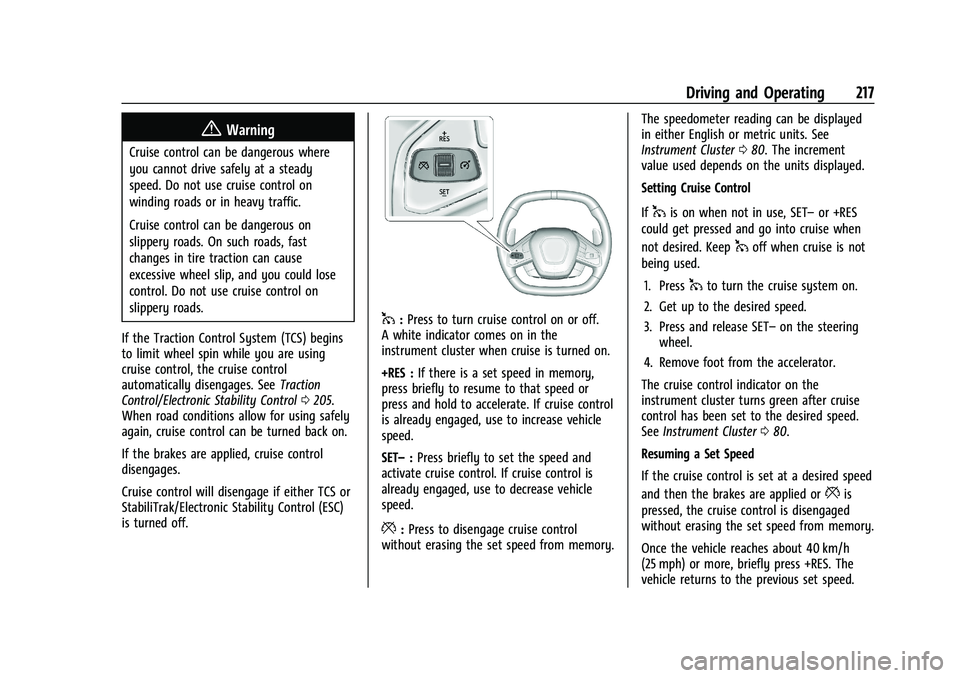
1: Press to turn cruise control on or off.
A white indicator comes on in the
instrument cluster when cruise is turned on.
+RES : If there is a set speed in memory,
press briefly to resume to that speed or
press and hold to accelerate. If cruise control
is already engaged, use to increase vehicle
speed.
SET– :Press briefly to set the speed and
activate cruise control. If cruise control is
already engaged, use to decrease vehicle
speed.
*: Press to disengage cruise control
without erasing the set speed from memory. The speedometer reading can be displayed
in either English or metric units. See
Instrument Cluster
080. The increment
value used depends on the units displayed.
Setting Cruise Control
If
1is on when not in use, SET– or +RES
could get pressed and go into cruise when
not desired. Keep
1off when cruise is not
being used.
1. Press
1to turn the cruise system on.
2. Get up to the desired speed.
3. Press and release SET– on the steering
wheel.
4. Remove foot from the accelerator.
The cruise control indicator on the
instrument cluster turns green after cruise
control has been set to the desired speed.
See Instrument Cluster 080.
Resuming a Set Speed
If the cruise control is set at a desired speed
and then the brakes are applied or
*is
pressed, the cruise control is disengaged
without erasing the set speed from memory.
Once the vehicle reaches about 40 km/h
(25 mph) or more, briefly press +RES. The
vehicle returns to the previous set speed.
Page 239 of 338
Chevrolet Corvette Owner Manual (GMNA-Localizing-U.S./Canada/Mexico-
15342622) - 2022 - CRC - 5/4/21
238 Vehicle Care
skin and nails with soap and water, or a
good hand cleaner. Wash or properly
dispose of clothing or rags containing used
engine oil. See the manufacturer's warnings
about the use and disposal of oil products.
Used oil can be a threat to the environment.
If you change your own oil, drain all the oil
from the filter before disposal. Never dispose
of oil by putting it in the trash or pouring it
on the ground, into sewers, or into streams
or bodies of water. Recycle it by taking it to
a place that collects used oil.
Engine Oil Life System
When to Change Engine Oil
This vehicle has a computer that indicates
when to change the engine oil and filter.
This is based on a combination of factors
which include engine revolutions, engine
temperature, and miles driven. Based on
driving conditions, the mileage at which an
oil change is indicated can vary
considerably. For the oil life system to work
properly, the system must be reset every
time the oil is changed.This vehicle has a racetrack-ready dry sump
engine lubrication system. This high
performance system operates differently
than a standard engine lubrication system
and requires a special procedure when
changing the engine oil and filter. See
Engine Oil
0235.
When the system has calculated that oil life
has been diminished, it indicates that an oil
change is necessary. A CHANGE ENGINE OIL
SOON message comes on. Change the oil as
soon as possible within the next 1 000 km
(600 mi). It is possible that, if driving under
the best conditions, the oil life system may
not indicate that an oil change is necessary
for up to a year. The engine oil and filter
must be changed at least once a year and,
at this time, the system must be reset. Your
dealer has trained service people who will
perform this work and reset the system.
It is also important to check the oil regularly
over the course of an oil drain interval and
keep it at the proper level.
If the system is ever reset accidentally, the
oil must be changed at 5 000 km (3,000 mi)
since the last oil change. Remember to reset
the oil life system whenever the oil is
changed.
How to Reset the Engine Oil Life System
Reset the system whenever the engine oil is
changed so that the system can calculate
the next engine oil change. To reset the
system: 1. Scroll through the DIC Info Pages menu until the remaining Engine Oil
percentage is displayed. See Driver
Information Center (DIC) 092.
2. Press and hold the thumbwheel on the DIC while the Oil Life display is active.
The oil life will change to 100%.
If the CHANGE ENGINE OIL SOON message
comes back on when the vehicle is started,
the engine oil life system has not reset.
Repeat the procedure.
Dual Clutch Transmission Fluid
How to Check Dual Clutch Transmission
Fluid
It is not necessary to check the transmission
fluid level. A transmission fluid leak is the
only reason for fluid loss. If a leak occurs,
take the vehicle to the dealer and have it
repaired as soon as possible.
Page 240 of 338
Chevrolet Corvette Owner Manual (GMNA-Localizing-U.S./Canada/Mexico-
15342622) - 2022 - CRC - 5/4/21
Vehicle Care 239
The vehicle is not equipped with a
transmission fluid level dipstick. There is a
special procedure for checking and changing
the transmission fluid. Because this
procedure is difficult, this should be done at
the dealer. Contact the dealer for additional
information or the procedure can be found
in the service manual. To purchase a service
manual, seePublication Ordering
Information 0314.
Caution
Use of the incorrect transmission fluid
may damage the vehicle, and the
damage may not be covered by the
vehicle warranty. Always use the correct
transmission fluid. See Recommended
Fluids and Lubricants 0300.
Change the fluid and filter at the proper
intervals. See Maintenance Schedule 0292.
Be sure to use the correct fluid. See
Recommended Fluids and Lubricants 0300.
Dual Clutch Transmission Fluid Life
System
When to Change the Dual Clutch
Transmission Fluid
This vehicle has a computer that indicates
when to change the transmission fluid. This
is based on a combination of factors which
include temperature and miles driven. Based
on driving conditions, the mileage at which
a fluid change is indicated can vary
considerably. For the fluid life system to
work properly, the system must be reset
every time the fluid is changed. When the
system has calculated that fluid life has
been diminished, it indicates that a fluid
change is necessary. A CHANGE
TRANSMISSION FLUID SOON message comes
on. Change the fluid as soon as possible
within the next 1 000 km (600 mi). Failure
to change transmission fluid at required
intervals could lead to suboptimal
transmission performance. Your dealer has
trained service technicians who will change
the fluid and reset the system. If the system
is ever reset accidentally, the fluid must be
changed at 72 000 km (45,000 mi) since the
last fluid change.
How to Reset the Dual Clutch
Transmission Fluid Life System
Reset the system whenever the transmission
fluid is replaced so that the system can
calculate the next transmission fluid change.
To reset:
1. Place the vehicle in P (Park).
2. Select the Oil & Fluid Life page under the Maintenance DIC menu. See Driver
Information Center (DIC) 092.
3. Press the thumbwheel under the Oil & Fluid Life page to move to the
Reset/Disable display area. Select Reset
Transmission Fluid with the thumbwheel
scroll then press the thumbwheel. Then
press Yes to confirm the reset.
4. When the Transmission Fluid Life System is successfully reset, 100% Transmission
Fluid Life will be displayed.
Engine Air Filter Life System
If equipped, this feature provides the engine
air filter’s remaining life and best timing for
a change. The timing to change an engine
air filter depends on driving and
environmental conditions.
Page 241 of 338
Chevrolet Corvette Owner Manual (GMNA-Localizing-U.S./Canada/Mexico-
15342622) - 2022 - CRC - 5/4/21
240 Vehicle Care
When to Change Engine Air Filter
When the Driver Information Center (DIC)
displays a message to replace the engine air
filter at the next oil change, follow this
timing.
When the DIC displays a message to replace
the engine air filter soon, replace the engine
air filter at the earliest convenience.
The system must be reset after the engine
air filter is changed.
If the DIC displays a message to check the
engine air filter system, see your dealer.
How to Reset Engine Air Filter Life
System
Reset the system whenever the engine air
filter is replaced so that the system can
calculate the next engine air filter change.
To reset:1. Place the vehicle in P (Park).
2. Select Air Filter Life under the Maintenance DIC menu. See Driver
Information Center (DIC) 092.
3. Press the thumbwheel under the Air Filter Life page to move to the Reset/
Disable area. Select Reset Air Filter Life with the thumbwheel scroll and then
press the thumbwheel. Then press Yes to
confirm the reset.
4. When the Engine Air Filter Life System is successfully reset, 100% Air Filter Life will
be displayed.
Engine Air Cleaner/Filter
See Engine Compartment Overview 0232 for
the location of the engine air cleaner/filter.
Caution
If water is sprayed and enters the engine
air cleaner/filter intake and housing, the
engine could be damaged. The repairs
would not be covered by the vehicle
warranty.
When to Inspect the Engine Air Cleaner/Filter
For intervals on changing and inspecting the
engine air cleaner/filter, see Maintenance
Schedule 0292.
How to Inspect/Replace the Engine Air
Cleaner/Filter
Do not start the engine or have the engine
running with the engine air cleaner/filter
housing open. Before removing the engine
air cleaner/filter, make sure that the engine air cleaner/filter housing and nearby
components are free of dirt and debris. Do
not clean the engine air cleaner/filter or
components with water or compressed air.
To inspect or replace the air cleaner/filter:
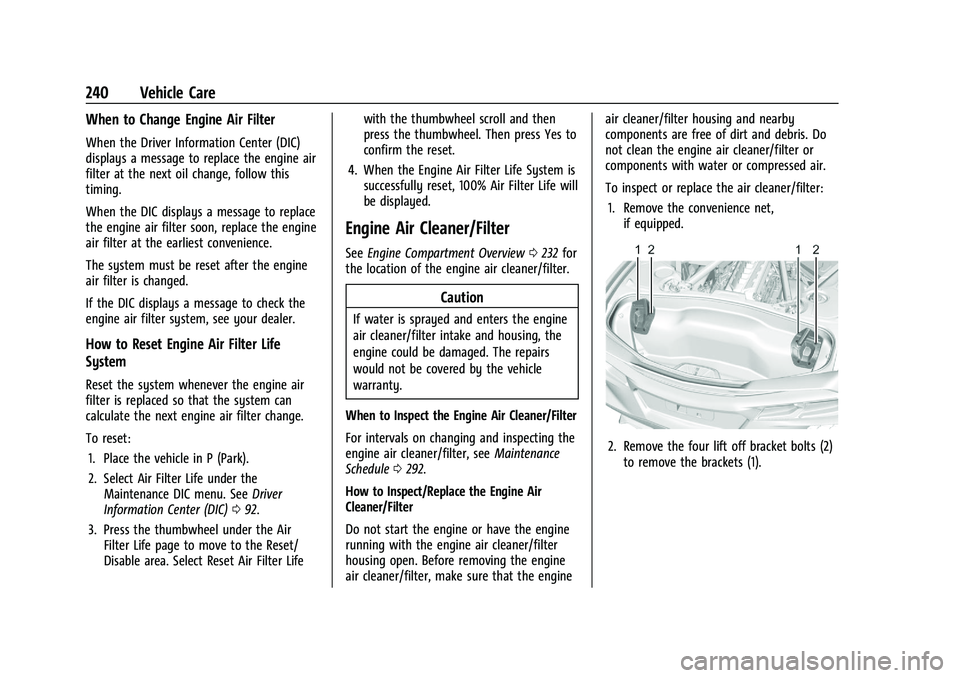
1. Remove the convenience net, if equipped.
2. Remove the four lift off bracket bolts (2)to remove the brackets (1).
Page 248 of 338
Chevrolet Corvette Owner Manual (GMNA-Localizing-U.S./Canada/Mexico-
15342622) - 2022 - CRC - 5/4/21
Vehicle Care 247
Caution
Continuing to drive with worn-out brake
linings could result in costly brake
repairs.
Properly torqued wheel nuts are necessary
to help prevent brake pulsation. When tires
are rotated, inspect brake linings for wear
and evenly tighten wheel nuts in the proper
sequence to torque specifications. See
Capacities and Specifications 0304.
Brake linings should be replaced as complete
axle sets.
Brake Squeal and Brake Dust
Some driving conditions or climates can
cause a brake squeal when the brakes are
first applied, clearing up following several
applies. This does not mean something is
wrong with the brakes.
Vehicles equipped with high performance
brake systems provide superior fade
resistance but will produce increased brake
squeal and brake dust on the wheels and
calipers as compared to standard brake
linings. This is normal. To help reduce squeal, the brake pads are
treated with an anti-squeal paste that may
need to be reapplied periodically as part of
normal vehicle maintenance. The anti-squeal
paste will dissipate over time. Also, the use
of wheel cleaners or power washers directly
on the brake calipers may remove the
anti-squeal paste from the brake pads.
It may be necessary to reapply the
anti-squeal paste if it is removed during
cleaning.
If brake squeal is excessive, the anti-squeal
paste should be reapplied. The anti-squeal
paste should always be reapplied whenever
the brake pads are removed or replaced. See
your dealer for service.Brake Pedal Travel
See your dealer if the brake pedal does not
return to normal height, or if there is a
rapid increase in pedal travel. This could be
a sign that brake service may be required.
Replacing Brake System Parts
Always replace brake system parts with
new, approved replacement parts. If this is
not done, the brakes may not work
properly. The braking performance canchange in many ways if the wrong brake
parts are installed or if parts are improperly
installed.
The Brake Fade Warning Assist system is
designed for use with the factory-installed
brake pads or GM-approved replacement
pads. If the brake pads on the vehicle need
to be replaced, use GM-approved brake pads.
If this is not done, the brake fade warning
system may not function properly.
High Performance Brake Lining Car Wash
and Extended Parking Care
If equipped with high performance brake
components, binding, clunking or pulsation
may be noticeable when first moving the
vehicle after parking in cold weather when
the brakes have been wet, such as when
driving in the rain or after a car wash. The
release clunking is normal for brakes with
high performance brake linings and does not
affect the operation of the brakes. When
driving, normal braking should allow for the
brakes to clean up and or any pulsation to
go away. Apply the brakes several times
until the binding or clunking stops. If the
vehicle is washed before long term storage,
drive it and apply the brakes several times
to thoroughly dry the brakes before storing.
Page 261 of 338
Chevrolet Corvette Owner Manual (GMNA-Localizing-U.S./Canada/Mexico-
15342622) - 2022 - CRC - 5/4/21
260 Vehicle Care
Warning (Continued)
.Improperly repaired tires can cause
a crash. Only your dealer or an
authorized tire service center
should repair, replace, dismount,
and mount the tires.
.Do not spin the tires in excess of
56 km/h (35 mph) on slippery
surfaces such as snow, mud, ice,
etc. Excessive spinning may cause
the tires to explode.
See Tire Pressure for High-Speed
Operation 0266 for inflation pressure
adjustment for high-speed driving.
All-Season Tires
This vehicle may come with all-season tires.
These tires are designed to provide good
overall performance on most road surfaces
and weather conditions. Original equipment
tires designed to GM's specific tire
performance criteria have a TPC specification
code molded onto the sidewall. Original
equipment all-season tires can be identified
by the last two characters of this TPC code,
which will be “MS.” Consider installing winter tires on the
vehicle if frequent driving on snow or
ice-covered roads is expected. All-season tires
provide adequate performance for most
winter driving conditions, but they may not
offer the same level of traction or
performance as winter tires on snow or
ice-covered roads. See
Winter Tires0260.
Winter Tires
This vehicle was not originally equipped
with winter tires. Winter tires are designed
for increased traction on snow and
ice-covered roads. Consider installing winter
tires on the vehicle if frequent driving on ice
or snow covered roads is expected. See your
dealer for details regarding winter tire
availability and proper tire selection. Also,
see Buying New Tires 0272.
With winter tires, there may be decreased
dry road traction, increased road noise, and
shorter tread life. After changing to winter
tires, be alert for changes in vehicle
handling and braking.
If using winter tires:
.Use tires of the same brand and tread
type on all four wheel positions.
.Use only radial ply tires of the same size,
load range, and speed rating as the
original equipment tires.
Winter tires with the same speed rating as
the original equipment tires may not be
available for H, V, W, Y, and ZR speed rated
tires. If winter tires with a lower speed
rating are chosen, never exceed the tire's
maximum speed capability.
Run-Flat Tires
This vehicle, when new, may have had
run-flat tires. There is no spare tire, no tire
changing equipment, and no place to store a
tire in the vehicle.
{Warning
While driving with run-flat tires at a
reduced inflation pressure, avoid making
sudden stops or severe maneuvers as the
handling capabilities of the tires will be
reduced. Driving too fast could cause loss
of control and you or others could be
injured. Do not drive over 80 km/h
(50 mph) with the tire operating at low
pressure. Drive cautiously and check the
tire pressure as soon as possible.
Page 262 of 338
Chevrolet Corvette Owner Manual (GMNA-Localizing-U.S./Canada/Mexico-
15342622) - 2022 - CRC - 5/4/21
Vehicle Care 261
Run-flat tires can be driven up to 80 km
(50 mi) at speeds less than 80 km/h
(50 mph) after a loss of inflation pressure
has occurred. There is no need to stop on
the side of the road to change the tire. The
possible driving range after a pressure loss
will vary based on the vehicle load and
driving conditions. As soon as possible,
contact the nearest authorized GM or
run-flat servicing facility for inspection and
repair or replacement.
When driving on a deflated run-flat tire,
avoid potholes and other road hazards that
could damage the tire and/or wheel beyond
repair. When a tire has been damaged, or if
driven any distance while deflated, check
with an authorized run-flat tire service
center to determine whether the tire can be
repaired or should be replaced. To maintain
the run-flat feature, all replacement tires
must be run-flat tires.
To locate the nearest GM or run-flat
servicing facility, call Customer Assistance.
Low-Profile Tires
If the vehicle has 245/35ZR19 or
305/30ZR20 size tires, they are classified
as low-profile tires.Caution
Low-profile tires are more susceptible to
damage from road hazards or curb impact
than standard profile tires. Tire and/or
wheel assembly damage can occur when
coming into contact with road hazards
like potholes, or sharp edged objects,
or when sliding into a curb. The warranty
does not cover this type of damage. Keep
tires set to the correct inflation pressure
and when possible, avoid contact with
curbs, potholes, and other road hazards.
Summer Tires
High Performance Summer Tires
This vehicle may come with 245/35ZR19 and
305/30ZR20 high performance summer tires.
These tires have a special tread and
compound that are optimized for maximum
dry and wet road performance. This special
tread and compound will have decreased
performance in cold climates, and on ice and
snow. It is recommended that winter tires
be installed on the vehicle if frequent
driving at temperatures below
approximately 5 °C (40 °F) or on ice or snow
covered roads is expected. See
Winter Tires
0 260.
Caution
High performance summer tires have
rubber compounds that lose flexibility
and may develop surface cracks in the
tread area at temperatures below −7 °C
(20 °F). Always store high performance
summer tires indoors and at
temperatures above −7 °C (20 °F) when
not in use. If the tires have been
subjected to −7 °C (20 °F) or less, let them
warm up in a heated space to at least
5 °C (40 °F) for 24 hours or more before
being installed or driving a vehicle on
which they are installed. Do not apply
heat or blow heated air directly on the
tires. Always inspect tires before use. See
Tire Inspection 0270.
Tire Sidewall Labeling
Useful information about a tire is
molded into its sidewall. The example
shows a typical passenger tire sidewall.