traction control CHEVROLET CORVETTE 2022 Owner's Manual
[x] Cancel search | Manufacturer: CHEVROLET, Model Year: 2022, Model line: CORVETTE, Model: CHEVROLET CORVETTE 2022Pages: 338, PDF Size: 7.6 MB
Page 209 of 338
Chevrolet Corvette Owner Manual (GMNA-Localizing-U.S./Canada/Mexico-
15342622) - 2022 - CRC - 5/4/21
208 Driving and Operating
cornering performance. When in Sport
Mode, the displays will change to sport
theme.
Competitive Mode can be accessed through
this mode. SeeCompetitive Driving Mode
0 213.
tTrack : Track Mode is used for closed
race tracks. Use when maximum vehicle
handling is desired. When in Track Mode,
the dual clutch transmission and steering
will adjust to track settings. The accelerator
pedal is adjusted to give maximum control
during the highest level of spirited driving.
This mode also modifies real time damping,
exhaust valve tuning, engine sound, brake
pedal feel, Electronic Stability Control (ESC)
performance and Traction Control System
(TCS) performance. When in Track Mode the
displays will change to track theme.
Performance Traction Management (PTM)
can be accessed through this mode. See
“Performance Traction Management,” later
in this section.
qMy Mode : My Mode is used to
personalize everyday driving. This mode
allows the driver to configure the driver
systems to their driving preferences. This
mode modifies the suspension, steering, pedal mapping, exhaust valve tuning, and
engine sound. My Mode will remain active
across ignition cycles.
Through the center display, the following
vehicle sub-systems may be available for
customization in this mode:
Engine Sound:
Stealth, Tour, Sport, Track
Steering: Tour, Sport, Track
Suspension: Tour, Sport, Track
Brake Response: Tour, Sport, Track
For a more detailed description on how each
driver system is changed, see “Drive Mode
Customization,” later in this section.
Additionally the cluster theme can be set up
using the display menu in the cluster.
vZ-Mode : Z-Mode is used to
personalize dynamic driving. This mode
allows the driver to configure the driver
systems to their own preference for
maximum handling. Z-Mode further
enhances the experience by adding
powertrain customization. This mode
modifies pedal mapping, ESC performance,
TCS performance, suspension, steering,
exhaust valve turning, and engine sound. Through the center display, the driver can
customize multiple settings. The following
vehicle sub-systems may be available for
customization in this mode:
Engine Sound:
Stealth, Tour, Sport, Track
Steering: Tour, Sport, Track
Suspension: Tour, Sport, Track
Powertrain: Tour, Sport, Track, Weather
Brake Response: Tour, Sport, Track
PTM: Off, Wet, Dry, Sport, Race 1, Race 2
For a more detailed description on how each
driver system is changed, see “Drive Mode
Customization,” later in this section. For
more information on PTM, see “Performance
Traction Management,” later in this section.
Additionally, the cluster theme can be set
up using the display menu in the cluster.
Page 211 of 338
Chevrolet Corvette Owner Manual (GMNA-Localizing-U.S./Canada/Mexico-
15342622) - 2022 - CRC - 5/4/21
210 Driving and Operating
Active Fuel ManagementEnabled (In 4th
– 8th gear for
mLSD vehicles) Enabled (In 4th
– 8th gear for
mLSD vehicles) Enabled (In 4th
– 8th gear) Enabled (In 5th
– 8th gear) Disable Tour, Sport,
Track (Default),Weather
Traction and Stability Control Tour Weather Tour Tour Track Tour
Performance Traction or Competitive
Driving Mode Availability Unavailable Unavailable Unavailable Comp Mode
(available)PTM
(available) PTM (available)
Engine Sound Stealth, Tour
(Default),
Sport, Track Stealth Tour Sport Track Stealth, Tour,
Sport, Track(Default)
Steering Tour (Default),
Sport, Track Tour Tour Sport Track Tour, Sport
(Default), Track
Suspension (if equipped with
Magnetic Ride) Tour (Default),
Sport, Track Tour Tour Sport Track Tour, Sport
(Default), Track
Brake Response Tour (Default),
Sport, Track Tour Tour Sport Track Tour, Sport
(Default), Track
Cluster Display
Configures the gauge cluster display for
each mode when linked (default).
The Layout Display (Theme) is a preset of
Cluster Display and cannot be modified or
changed independently. Throttle Progression
Adjusts throttle sensitivity by selecting how
quickly or slowly the throttle reacts to
input.
Throttle Progression is a preset of
Powertrain and cannot be modified or
changed independently.Transmission Shift Operation
Basic:
.Transmission upshifts and downshifts are
selected based on vehicle speed and
accelerator position to optimize comfort
and fuel economy during mild driving
conditions.
Page 213 of 338
Chevrolet Corvette Owner Manual (GMNA-Localizing-U.S./Canada/Mexico-
15342622) - 2022 - CRC - 5/4/21
212 Driving and Operating
Suspension:
This setting adjusts the firmness of the
suspension in the vehicle. Suspension adjust
stiffness of the shocks and / or springs. The
ride is more comfortable at lower settings
and is stiffer at higher settings for better
control.
.Tour, Sport, Track
Powertrain:
This setting adjusts the throttle response,
gear shifting and engine performance. An
increased throttle response enhances the
acceleration feel as you move toward Track,
but with a comfort trade-off due to more
aggressive gear shifting.
.Weather, Tour, Sport, Track
Brake Response:
This setting adjusts the brake pedal
response. Settings range from a slower
response for more comfortable driving to
the quickest response for quicker
deceleration. Brake pedal travel decreases
and caliper pressure increases as you move
from Tour to Sport. Track allows for
improved pedal precision at higher
decelerations for high performance driving.
.Tour, Sport, Track Performance Traction Management (PTM):
To activate PTM through Z-Mode, configure
Z-Mode to the desired PTM state in the
center stack (Vehicle>Settings>Drive Mode
Customization>Z-Mode). Press the Z-Mode
button once to activate Z-Mode. When PTM
is configured on, a message will appear in
the Driver Information Center (DIC)
“Z-Mode
Active —Press Again for PTM On —ESC
May be Disabled”.
To confirm, and enter PTM, press the
Z-Mode button again. The PTM state can
now be modified using the mode knob or
changing the Z Mode setting in the center
stack. Both the Z Mode and PTM indicators
will be displayed.
To cancel, press the center dismiss button
on the steering wheel (Z Mode remains
active). Selecting PTM states may modify
other Z Mode customization options.
.Off, Wet, Dry, Sport, Race 1, Race 2
Display:
This setting adjusts the cluster display
theme (this setting is only configured
through the cluster using the steering wheel
controls).
.Tour, Sport, Track, Weather (and any
informational tiles set-up).
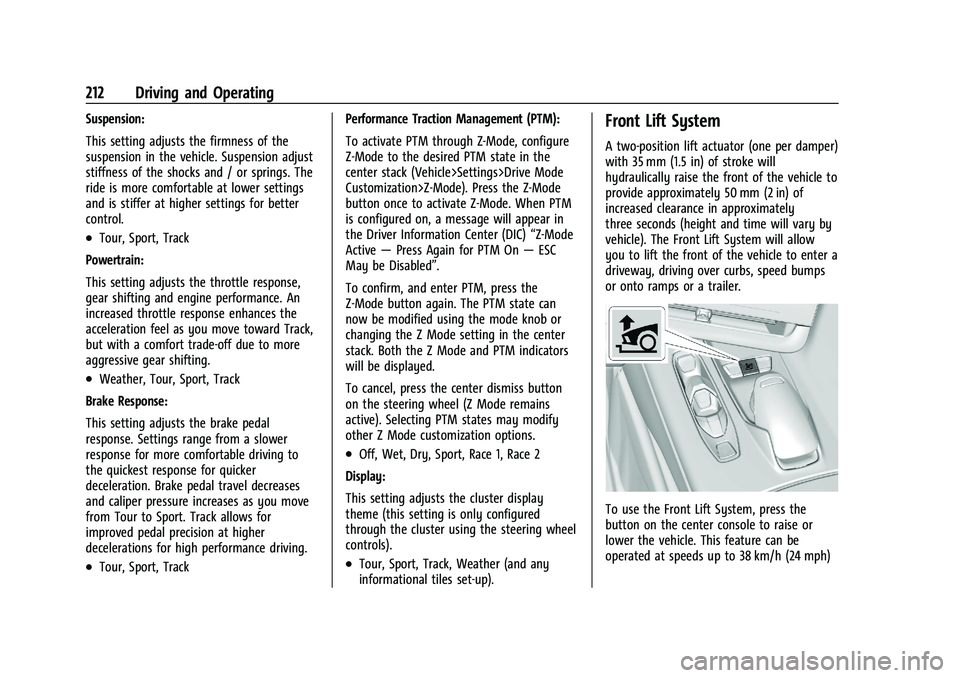
Front Lift System
A two-position lift actuator (one per damper)
with 35 mm (1.5 in) of stroke will
hydraulically raise the front of the vehicle to
provide approximately 50 mm (2 in) of
increased clearance in approximately
three seconds (height and time will vary by
vehicle). The Front Lift System will allow
you to lift the front of the vehicle to enter a
driveway, driving over curbs, speed bumps
or onto ramps or a trailer.
To use the Front Lift System, press the
button on the center console to raise or
lower the vehicle. This feature can be
operated at speeds up to 38 km/h (24 mph)
Page 214 of 338
Chevrolet Corvette Owner Manual (GMNA-Localizing-U.S./Canada/Mexico-
15342622) - 2022 - CRC - 5/4/21
Driving and Operating 213
when the engine is running. The system
functions based on the vehicle’s state or
operating mode:
.The system will not raise up when the
doors are open.
.The system can be raised or lowered by
the pushbutton, when the vehicle is in
RUN or in ACC mode.
.If the vehicle is in the raised position and
is driven at speeds above 38 km/h
(24 mph), it will automatically lower.
.If the vehicle is turned off, it will
automatically lower.
.If a vehicle door is opened during
lowering, the movement will pause for
15 seconds then continue to lower, but at
a slower rate.
The front height can be raised automatically
using GPS navigation in the vehicle. The
vehicle will automatically lift in up to 1,000
programmable locations. Once the button is
pushed, a notification will appear on the
Driver Information Center (DIC) and ask the
driver if they would like to “Remember”the
location. The driver can select this function
through the steering wheel controls, see
Steering Wheel Controls 074. The driver can
also delete stored locations for the
automatic lift. If the vehicle is raised automatically using GPS, it will
automatically lower once the vehicle is
located about 60 meters (197 feet) from the
programmed location. Drivers can disable
this function by turning off GPS location
through their vehicle Front Lift System will
still operate, but only by using the
pushbutton command, and the
“Auto Lift
Location Remembered” confirmation
message will not display.
The Front Lift System can also be used in
accessory mode. Put the vehicle in ACC/
ACCESSORY mode, then press and hold the
button on the center console for 10
consecutive seconds to automatically raise
the vehicle.
The DIC may display the message “Lift
System Unavailable” if the following occur:
.Any doors are ajar.
.The hood is open.
.The vehicle is moving over 38 km/h
(24 mph).
.Too many lift requests within a short
period. The Front Lift System should not be used to
service the vehicle. Do not place anything or
body parts under the vehicle while lifted.
See
Recommended Fluids and Lubricants
0 300.
Competitive Driving Mode
If equipped, Competitive Driving Mode,
Performance Traction Management (PTM),
and Launch Control are systems designed to
allow increased performance while
accelerating and/or cornering. This is
accomplished by regulating and optimizing
the engine, brakes, and suspension
performance. These modes are for use at a
closed course race track and are not
intended for use on public roads. They will
not compensate for driver inexperience or
lack of familiarity with a race track. Drivers
who prefer to allow the system to have
more control of the engine, brakes, and
suspension are advised to turn the normal
traction control and StabiliTrak/Electronic
Stability Control (ESC) systems on.
Page 215 of 338
Chevrolet Corvette Owner Manual (GMNA-Localizing-U.S./Canada/Mexico-
15342622) - 2022 - CRC - 5/4/21
214 Driving and Operating
Competitive Driving Mode
Competitive Driving Mode allows full engine
power while StabiliTrak/ESC helps maintain
directional control of the vehicle by selective
brake application. In this mode, the TCS is
off and Launch Control is available.
Adjust your driving style to account for the
available engine power. See“Launch
Control” later in this section.
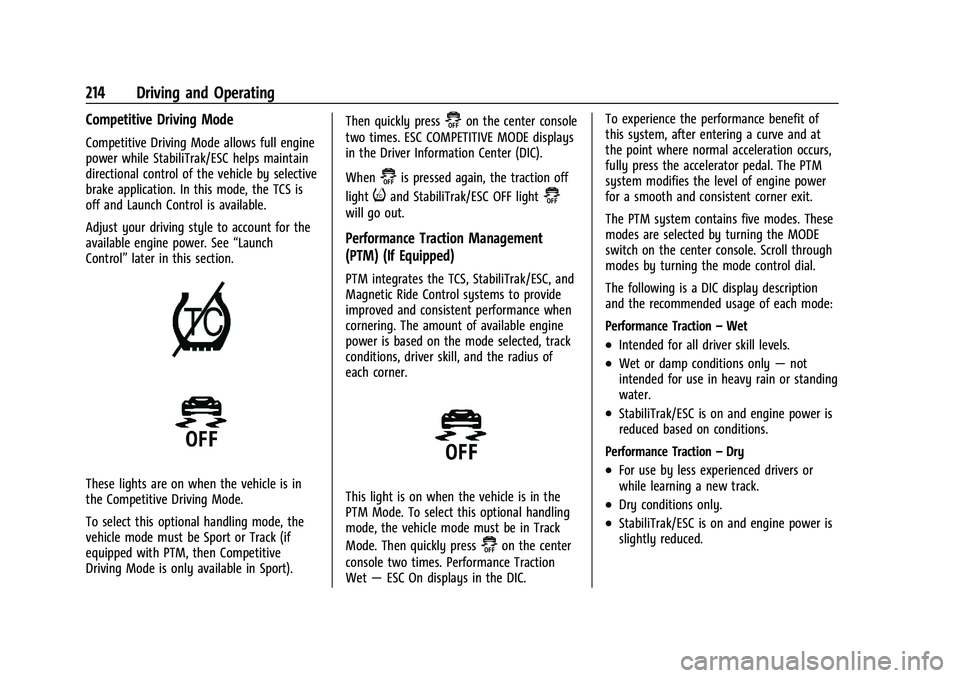
These lights are on when the vehicle is in
the Competitive Driving Mode.
To select this optional handling mode, the
vehicle mode must be Sport or Track (if
equipped with PTM, then Competitive
Driving Mode is only available in Sport). Then quickly press
@on the center console
two times. ESC COMPETITIVE MODE displays
in the Driver Information Center (DIC).
When
@is pressed again, the traction off
light
iand StabiliTrak/ESC OFF light@
will go out.
Performance Traction Management
(PTM) (If Equipped)
PTM integrates the TCS, StabiliTrak/ESC, and
Magnetic Ride Control systems to provide
improved and consistent performance when
cornering. The amount of available engine
power is based on the mode selected, track
conditions, driver skill, and the radius of
each corner.
This light is on when the vehicle is in the
PTM Mode. To select this optional handling
mode, the vehicle mode must be in Track
Mode. Then quickly press
@on the center
console two times. Performance Traction
Wet —ESC On displays in the DIC. To experience the performance benefit of
this system, after entering a curve and at
the point where normal acceleration occurs,
fully press the accelerator pedal. The PTM
system modifies the level of engine power
for a smooth and consistent corner exit.
The PTM system contains five modes. These
modes are selected by turning the MODE
switch on the center console. Scroll through
modes by turning the mode control dial.
The following is a DIC display description
and the recommended usage of each mode:
Performance Traction
–Wet
.Intended for all driver skill levels.
.Wet or damp conditions only —not
intended for use in heavy rain or standing
water.
.StabiliTrak/ESC is on and engine power is
reduced based on conditions.
Performance Traction –Dry
.For use by less experienced drivers or
while learning a new track.
.Dry conditions only.
.StabiliTrak/ESC is on and engine power is
slightly reduced.
Page 216 of 338
Chevrolet Corvette Owner Manual (GMNA-Localizing-U.S./Canada/Mexico-
15342622) - 2022 - CRC - 5/4/21
Driving and Operating 215
Performance Traction–Sport
.For use by drivers who are familiar with
the track.
.Dry conditions only.
.Requires more driving skill than
Performance Traction –Dry.
.StabiliTrak/ESC is on and more engine
power is available than in Performance
Traction –Dry.
Performance Traction –Race 1
.For use by drivers who are familiar with
the track.
.Dry conditions only.
.Requires more driving skill than
Performance Traction –Dry or
Performance Traction –Sport.
.StabiliTrak/ESC is off and available engine
power is the same as Performance
Traction –Sport.
Performance Traction –Race 2
.For use by experienced drivers who are
familiar with the track.
.Dry conditions only.
.Requires more driving skill than in other
modes.
.StabiliTrak/ESC is off and engine power is
available for maximum cornering speed. Press and release
@to turn off PTM and
return to the TCS and StabiliTrak/ESC
systems. The traction off light
iand
StabiliTrak Off light
@will go out.
Launch Control (Sport and Track
Mode Only)
A Launch Control feature is available, within
Competitive Driving Mode or PTM, on all
vehicles to allow the driver to achieve high
levels of vehicle acceleration in a straight
line. Launch Control is a form of TCS that
manages tire spin, and transmissions clutch,
while launching the vehicle. This feature is
intended for use during closed course race
events where consistent zero to
60 and quarter mile times are desirable.
Launch Control is only available when the
following criteria are met:
.Competitive Driving Mode or any of the
PTM Modes are selected (if equipped).
.The vehicle is not moving.
.The wheels and steering wheel are
pointing straight.
Launching the Vehicle
.Ensure the vehicle is in Competitive
Driving Mode or any of the PTM modes.
.The brake pedal must be firmly pressed
to the floor, equivalent to a panic brake
event.
.While maintaining the brake pedal, the
accelerator pedal is rapidly applied to
wide open throttle. (If the vehicle rolls
due to wide open throttle, release the
throttle, press the brake pedal more
firmly, and reapply the accelerator to
wide open throttle.)
The Launch Control feature will initially limit
engine speed as the driver rapidly applies
the accelerator pedal to wide open throttle.
Allow the engine RPMs to stabilize.
A smooth, quick release of the brake pedal,
while maintaining the fully pressed
accelerator pedal, will manage tire slip and
transmissions clutch. After the vehicle is
launched, the system continues in
Competitive Driving Mode or PTM.
Caution
The new vehicle break-in period should be
completed before using the launch
control feature, otherwise performance
will be limited and damage may occur to
the powertrain/engine. See New Vehicle
Break-In 0189.
Page 217 of 338
Chevrolet Corvette Owner Manual (GMNA-Localizing-U.S./Canada/Mexico-
15342622) - 2022 - CRC - 5/4/21
216 Driving and Operating
Limited-Slip Differential
(Without Z51)
The mechanical limited-slip differential can
give more traction on snow, mud, ice, sand,
or gravel. It works like a standard axle most
of the time, but when traction is low, this
feature allows the drive wheel with the
most traction to move the vehicle. See
Competitive Driving Mode0213 and
Maintenance Schedule 0292.
Limited-Slip Differential (With Z51)
The Electronic Limited-Slip Differential (eLSD)
is a hydraulically actuated clutch system
inside the transaxle. It can infinitely vary
the clutch engagement between 0 and
2250 N*m (1659 lb-ft) of breakaway torque
between the rear wheels. When necessary it
responds from open to full engagement in
fractions of a second. Smaller clutch
adjustments happen even faster. The eLSD:
.Uses the vehicle sensors and driver inputs
to determine the optimum amount of
clutch engagement for the conditions.
.Improves traction while cornering by
changing the engagement to achieve a
balance between directional control and
acceleration.
.Provides optimal engagement for
high-speed control and stability without
affecting precise steering and turn-in.
.Improves vehicle stability during spirited
driving and evasive maneuvers. It is fully
integrated with the Active Handling and
Performance Traction Management (PTM)
systems (if equipped).
There are unique calibrations based on the
Traction Control System (TCS) setting. eLSD
modes change automatically when the
traction control button is pressed. No unique
input from the driver is required.
.Mode 1 is the standard mode when the
vehicle is started. It provides a touring
calibration with an emphasis on vehicle
stability. Mode 1 is also used in PTM
Wet mode.
.Mode 2 is engaged when both TCS and
StabiliTrak are turned off. This calibration
provides more nimble corner turn-in, and
is biased for better traction out of
corners.
.Mode 3 is engaged when PTM is engaged
in Dry, Sport 1 & 2, and Race modes. This
is a nimble calibration with similar
functionality as eLSD Mode 2, however, it
is integrated to work with PTM.
.Mode 4 is engaged when TCS is selected
off, but StabiliTrak remains on. Vehicle
stability is still the priority, while allowing
for optimized traction out of corners.
Cruise Control
With cruise control, a speed of about
40 km/h (25 mph) or more can be
maintained without keeping your foot on
the accelerator. Cruise control does not work
at speeds below about 40 km/h (25 mph).
Page 218 of 338
Chevrolet Corvette Owner Manual (GMNA-Localizing-U.S./Canada/Mexico-
15342622) - 2022 - CRC - 5/4/21
Driving and Operating 217
{Warning
Cruise control can be dangerous where
you cannot drive safely at a steady
speed. Do not use cruise control on
winding roads or in heavy traffic.
Cruise control can be dangerous on
slippery roads. On such roads, fast
changes in tire traction can cause
excessive wheel slip, and you could lose
control. Do not use cruise control on
slippery roads.
If the Traction Control System (TCS) begins
to limit wheel spin while you are using
cruise control, the cruise control
automatically disengages. See Traction
Control/Electronic Stability Control 0205.
When road conditions allow for using safely
again, cruise control can be turned back on.
If the brakes are applied, cruise control
disengages.
Cruise control will disengage if either TCS or
StabiliTrak/Electronic Stability Control (ESC)
is turned off.
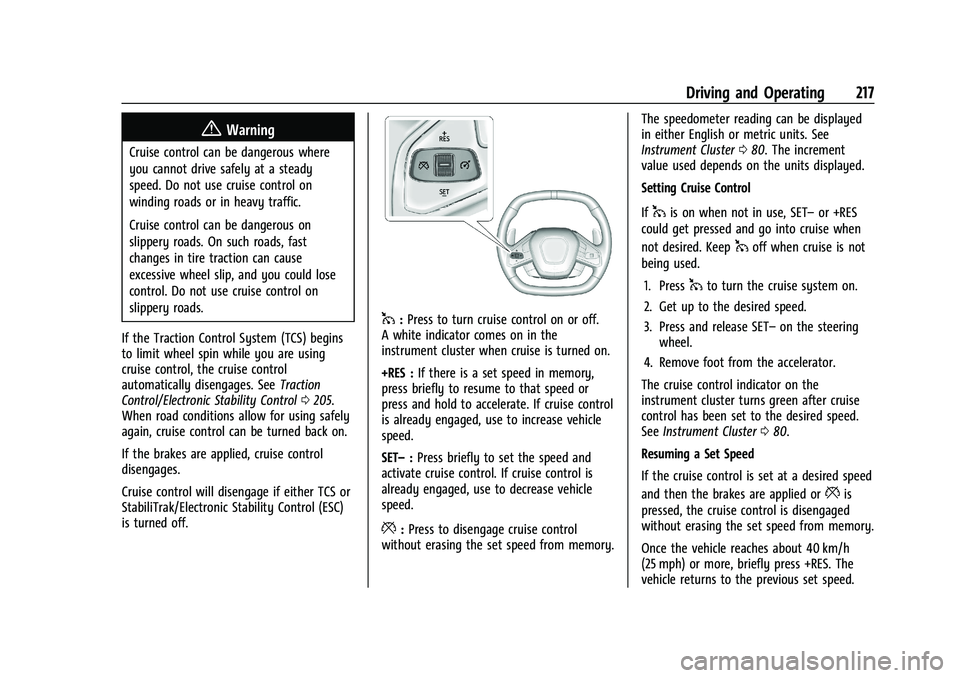
1: Press to turn cruise control on or off.
A white indicator comes on in the
instrument cluster when cruise is turned on.
+RES : If there is a set speed in memory,
press briefly to resume to that speed or
press and hold to accelerate. If cruise control
is already engaged, use to increase vehicle
speed.
SET– :Press briefly to set the speed and
activate cruise control. If cruise control is
already engaged, use to decrease vehicle
speed.
*: Press to disengage cruise control
without erasing the set speed from memory. The speedometer reading can be displayed
in either English or metric units. See
Instrument Cluster
080. The increment
value used depends on the units displayed.
Setting Cruise Control
If
1is on when not in use, SET– or +RES
could get pressed and go into cruise when
not desired. Keep
1off when cruise is not
being used.
1. Press
1to turn the cruise system on.
2. Get up to the desired speed.
3. Press and release SET– on the steering
wheel.
4. Remove foot from the accelerator.
The cruise control indicator on the
instrument cluster turns green after cruise
control has been set to the desired speed.
See Instrument Cluster 080.
Resuming a Set Speed
If the cruise control is set at a desired speed
and then the brakes are applied or
*is
pressed, the cruise control is disengaged
without erasing the set speed from memory.
Once the vehicle reaches about 40 km/h
(25 mph) or more, briefly press +RES. The
vehicle returns to the previous set speed.
Page 230 of 338
Chevrolet Corvette Owner Manual (GMNA-Localizing-U.S./Canada/Mexico-
15342622) - 2022 - CRC - 5/4/21
Vehicle Care 229
General Information
For service and parts needs, visit your
dealer. You will receive genuine GM parts
and GM-trained and supported service
people.
Genuine GM parts have one of these marks:
California Perchlorate Materials
Requirements
Certain types of automotive applications,
such as airbag initiators, seat belt
pretensioners, and lithium batteries
contained in electronic keys, may containperchlorate materials. Perchlorate Material
–
special handling may apply. See
www.dtsc.ca.gov/hazardouswaste/
perchlorate.
Accessories and Modifications
Adding non-dealer accessories or making
modifications to the vehicle can affect
vehicle performance and safety, including
such things as airbags, braking, stability,
ride and handling, emissions systems,
aerodynamics, durability, and electronic
systems like antilock brakes, traction control,
and stability control. These accessories or
modifications could even cause malfunction
or damage not covered by the vehicle
warranty.
Damage to suspension components caused
by modifying vehicle height outside of
factory settings will not be covered by the
vehicle warranty.
Damage to vehicle components resulting
from modifications or the installation or use
of non-GM certified parts, including control
module or software modifications, is not
covered under the terms of the vehicle
warranty and may affect remaining
warranty coverage for affected parts. GM Accessories are designed to complement
and function with other systems on the
vehicle. See your dealer to accessorize the
vehicle using genuine GM Accessories
installed by a dealer technician.
Also, see
Adding Equipment to the
Airbag-Equipped Vehicle 060.
Lifting the Vehicle
{Warning
Lifting a vehicle can cause an injury. The
vehicle can slip off the jack and roll over
you or other people. You and they could
be badly injured. Find a level place to lift
your vehicle. To help prevent the vehicle
from moving:
1. Set the parking brake firmly.
2. Put the transmission in P (Park).
3. Turn off the engine.
To be even more certain the vehicle will
not move, put blocks in front of and
behind the wheels.
Page 261 of 338
Chevrolet Corvette Owner Manual (GMNA-Localizing-U.S./Canada/Mexico-
15342622) - 2022 - CRC - 5/4/21
260 Vehicle Care
Warning (Continued)
.Improperly repaired tires can cause
a crash. Only your dealer or an
authorized tire service center
should repair, replace, dismount,
and mount the tires.
.Do not spin the tires in excess of
56 km/h (35 mph) on slippery
surfaces such as snow, mud, ice,
etc. Excessive spinning may cause
the tires to explode.
See Tire Pressure for High-Speed
Operation 0266 for inflation pressure
adjustment for high-speed driving.
All-Season Tires
This vehicle may come with all-season tires.
These tires are designed to provide good
overall performance on most road surfaces
and weather conditions. Original equipment
tires designed to GM's specific tire
performance criteria have a TPC specification
code molded onto the sidewall. Original
equipment all-season tires can be identified
by the last two characters of this TPC code,
which will be “MS.” Consider installing winter tires on the
vehicle if frequent driving on snow or
ice-covered roads is expected. All-season tires
provide adequate performance for most
winter driving conditions, but they may not
offer the same level of traction or
performance as winter tires on snow or
ice-covered roads. See
Winter Tires0260.
Winter Tires
This vehicle was not originally equipped
with winter tires. Winter tires are designed
for increased traction on snow and
ice-covered roads. Consider installing winter
tires on the vehicle if frequent driving on ice
or snow covered roads is expected. See your
dealer for details regarding winter tire
availability and proper tire selection. Also,
see Buying New Tires 0272.
With winter tires, there may be decreased
dry road traction, increased road noise, and
shorter tread life. After changing to winter
tires, be alert for changes in vehicle
handling and braking.
If using winter tires:
.Use tires of the same brand and tread
type on all four wheel positions.
.Use only radial ply tires of the same size,
load range, and speed rating as the
original equipment tires.
Winter tires with the same speed rating as
the original equipment tires may not be
available for H, V, W, Y, and ZR speed rated
tires. If winter tires with a lower speed
rating are chosen, never exceed the tire's
maximum speed capability.
Run-Flat Tires
This vehicle, when new, may have had
run-flat tires. There is no spare tire, no tire
changing equipment, and no place to store a
tire in the vehicle.
{Warning
While driving with run-flat tires at a
reduced inflation pressure, avoid making
sudden stops or severe maneuvers as the
handling capabilities of the tires will be
reduced. Driving too fast could cause loss
of control and you or others could be
injured. Do not drive over 80 km/h
(50 mph) with the tire operating at low
pressure. Drive cautiously and check the
tire pressure as soon as possible.