mirror CHEVROLET CORVETTE 2023 User Guide
[x] Cancel search | Manufacturer: CHEVROLET, Model Year: 2023, Model line: CORVETTE, Model: CHEVROLET CORVETTE 2023Pages: 351, PDF Size: 6.28 MB
Page 140 of 351
Chevrolet Corvette Owner Manual (GMNA-Localizing-U.S./Canada/Mexico-
16287457) - 2023 - CRC - 3/10/22
Infotainment System 139
.Comply with any notice and consent
requirements before capturing and/or
recording the voices or images of other
persons or before collecting other
personal data.
.Notify other drivers of your vehicle about
the above rules and require them to
comply.
.General Motors does not accept any
responsibility or liability in connection
with use that is not permitted.
.Law enforcement authorities may have
the right to seize video recordings and
use them as evidence of criminal/driving
offenses against you or third parties.
The PDR records video, audio, and vehicle
data. The forward facing video and cabin
audio are captured by a camera and
microphone located behind the rear view
mirror. The PDR video and data is stored on
a removable SD card located in the SD card
reader in the glove box. The video (MP4)
can be played back in the vehicle or the SD
card can be removed and played in a PC or
on a mobile device or the file can be viewed
and analyzed within Toolbox. See Toolbox
later in this section.
The recorded data is not stored anywhere
else and is only accessible from the SD card.
To optimize PDR performance, it is
recommended that the SD card is formatted
on a regular basis. Back up all recordings on
the SD card prior to formatting. Formatting
the SD card will delete all saved recordings.
If a system error code is seen on the
display, such as "System Error Code ####",
please check the health of the SD card.
It may need to be reformatted or replaced.
If the issue persists, please see your dealer.
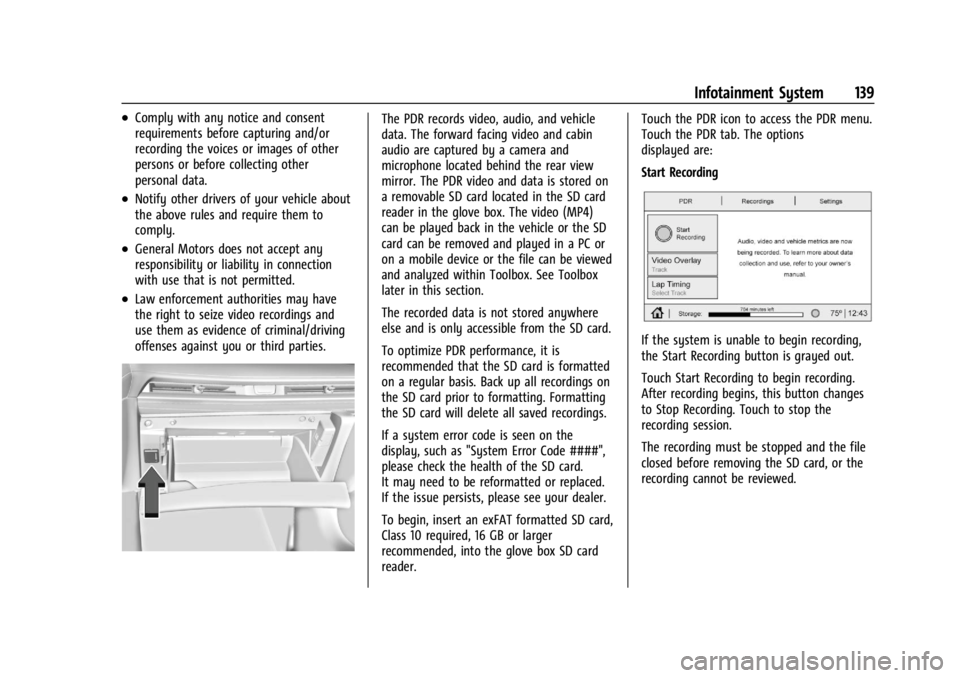
To begin, insert an exFAT formatted SD card,
Class 10 required, 16 GB or larger
recommended, into the glove box SD card
reader.Touch the PDR icon to access the PDR menu.
Touch the PDR tab. The options
displayed are:
Start Recording
If the system is unable to begin recording,
the Start Recording button is grayed out.
Touch Start Recording to begin recording.
After recording begins, this button changes
to Stop Recording. Touch to stop the
recording session.
The recording must be stopped and the file
closed before removing the SD card, or the
recording cannot be reviewed.
Page 166 of 351
Chevrolet Corvette Owner Manual (GMNA-Localizing-U.S./Canada/Mexico-
16287457) - 2023 - CRC - 3/10/22
Climate Controls 165
For automatic operation:1. Press AUTO.
2. Set the temperature. Allow the system time to stabilize. Adjust the temperature
as needed for best comfort.
Manual Operation
O:Press to turn the fan off or on.
hori:Press to increase or decrease the
fan speed.
Driver and Passenger Temperature
Controls : The temperature can be adjusted
separately for the driver and passenger.
SYNC : Press to link the passenger
temperature setting to the driver setting.
The SYNC indicator light will turn on. When
the passenger setting is adjusted, the SYNC
indicator light will turn off.
Air Delivery Mode Control : Press
Y,[,
or
zto change the direction of the airflow.
Any combination of the three controls can
be selected. An indicator light comes on in
the selected mode button.
Changing the mode cancels the automatic
operation and the system goes into manual
mode. Press AUTO to return to automatic
operation. To change the current mode, select one or
more of the following:
Y:
Air is directed to the A/C outlets.
[:Air is directed to the floor outlets,
with some air directed to the windshield,
and side window outlets.
z: Air is directed to the windshield and
side window outlets.
0MAX : Air is directed to the windshield
and the fan runs at a higher speed if not
already above a medium fan speed. This
mode overrides the previous mode selected
and clears fog or frost from the windshield
more quickly. When the control is pressed
again, the system returns to the previous
mode setting and fan speed.
For best results, clear all snow and ice from
the windshield before defrosting.
@: Press to turn on recirculation. An
indicator light comes on. Air is recirculated
to quickly cool the inside of the vehicle.
It can also be used to help reduce outside
air and odors that enter the vehicle. Avoid using recirculation for long periods of
time in cold or damp conditions. Using
recirculation in cold or damp conditions can
result in window fogging.
A/C :
Press to turn the air conditioning on
or off. An indicator light comes on to show
that the air conditioning is enabled. If the
fan is turned off, the air conditioner will not
run. The A/C light will stay on even if the
outside temperatures are below freezing.
If the A/C is turned off, the air temperature
coming through the climate control system
may be warmer than the ambient
temperature. It is recommended to use auto
climate control to maintain comfort.
Rear Window Defogger
1REAR : If equipped, press to turn the
rear window defogger on or off. An indicator
light on the button comes on to show that
the rear window defogger is on.
The rear window defogger only works when
the engine is running. The defogger can be
turned off by turning the vehicle off or to
accessory mode.
If equipped with heated outside mirrors,
press
1REAR to turn them on or off. See
Heated Mirrors 025.
Page 173 of 351
Chevrolet Corvette Owner Manual (GMNA-Localizing-U.S./Canada/Mexico-
16287457) - 2023 - CRC - 3/10/22
172 Driving and Operating
1. Ease off the accelerator and then,if there is nothing in the way, steer the
vehicle so that it straddles the edge of
the pavement.
2. Turn the steering wheel about one-eighth of a turn, until the right front
tire contacts the pavement edge.
3. Turn the steering wheel to go straight down the roadway.
Loss of Control
Skidding
There are three types of skids that
correspond to the vehicle's three control
systems:
.Braking Skid —wheels are not rolling.
.Steering or Cornering Skid —too much
speed or steering in a curve causes tires
to slip and lose cornering force.
.Acceleration Skid —too much throttle
causes the driving wheels to spin.
Defensive drivers avoid most skids by taking
reasonable care suited to existing conditions,
and by not overdriving those conditions. But
skids are always possible. If the vehicle starts to slide, follow these
suggestions:
.Ease your foot off the accelerator pedal
and steer the way you want the vehicle
to go. The vehicle may straighten out. Be
ready for a second skid if it occurs.
.Slow down and adjust your driving
according to weather conditions. Stopping
distance can be longer and vehicle control
can be affected when traction is reduced
by water, snow, ice, gravel, or other
material on the road. Learn to recognize
warning clues
—such as enough water,
ice, or packed snow on the road to make
a mirrored surface —and slow down
when you have any doubt.
.Try to avoid sudden steering, acceleration,
or braking, including reducing vehicle
speed by shifting to a lower gear. Any
sudden changes could cause the tires to
slide.
Remember: Antilock brakes help avoid only
the braking skid.
Track Events and Competitive
Driving
All Z06 models or Stingray models equipped
with Z51 performance package can be used
for track events and competitive driving. For
additional details on vehicle track
preparation, see Chevrolet.com > Corvette
Experience > Guides > Track Prep Guide.
{Danger
High-performance features are intended
for use only on closed tracks by
experienced and qualified drivers and
should not be used on public roads.
High-speed driving, aggressive cornering,
hard braking, and other high-performance
driving can be dangerous. Improper driver
inputs for the conditions may result in
loss of control of the vehicle, which could
injure or kill you or others. Always drive
safely.
Participating in track events or other
competitive driving without following the
instructions provided may affect the vehicle
warranty. See the warranty manual before
Page 186 of 351
Chevrolet Corvette Owner Manual (GMNA-Localizing-U.S./Canada/Mexico-
16287457) - 2023 - CRC - 3/10/22
Driving and Operating 185
.Allow greater following distance and
watch for slippery spots. Icy patches can
occur on otherwise clear roads in shaded
areas. The surface of a curve or an
overpass can remain icy when the
surrounding roads are clear. Avoid sudden
steering maneuvers and braking while
on ice.
.Turn off cruise control.
.Turn on Weather Mode. SeeDriver Mode
Control 0208.
Cold Weather Mode
In very low temperatures, a cold weather
message may display on the Driver
Information Center (DIC). The engine speed,
transmission shift patterns, and cabin fan
speed may operate differently to enable the
vehicle to warm up quicker. You can
manually override the cabin fan speed in
cold weather mode.
Blizzard Conditions
Stop the vehicle in a safe place and signal
for help. Stay with the vehicle unless there
is help nearby. If possible, use Roadside
Assistance. See Roadside Assistance Program
0 322. To get help and keep everyone in the
vehicle safe:
.Turn on the hazard warning flashers.
.Tie a red cloth to an outside mirror.
{Warning
Snow can trap engine exhaust under the
vehicle. This may cause exhaust gases to
get inside. Engine exhaust contains
carbon monoxide (CO), which cannot be
seen or smelled. It can cause
unconsciousness and even death.
If the vehicle is stuck in snow:
.Clear snow from the base of the
vehicle, especially any blocking the
exhaust pipe.
.Open a window about 5 cm (2 in) on
the vehicle side that is away from the
wind, to bring in fresh air.
.Fully open the air outlets on or under
the instrument panel.
.Adjust the climate control system to
circulate the air inside the vehicle and
set the fan speed to the highest
setting. See “Climate Control Systems.”
For more information about CO, see
Engine Exhaust 0194. To save fuel, run the engine for short
periods to warm the vehicle and then shut
the engine off and partially close the
window. Moving about to keep warm also
helps.
If it takes time for help to arrive, when
running the engine, push the accelerator
pedal slightly so the engine runs faster than
the idle speed. This keeps the battery
charged to restart the vehicle and to signal
for help with the headlamps. Do this as
little as possible, to save fuel.
If the Vehicle Is Stuck
Slowly and cautiously spin the wheels to
free the vehicle when stuck in sand, mud,
ice, or snow.
If stuck too severely for the traction system
to free the vehicle, turn the traction system
off and use the rocking method. See
Traction Control/Electronic Stability Control
0
206.
{Warning
If the vehicle's tires spin at high speed,
they can explode, and you or others
could be injured. The vehicle can
(Continued)
Page 223 of 351
Chevrolet Corvette Owner Manual (GMNA-Localizing-U.S./Canada/Mexico-
16287457) - 2023 - CRC - 3/10/22
222 Driving and Operating
Warning (Continued)
.Detect vehicles or objects outside the
area monitored by the system.
.Work at all driving speeds.
.Warn you or provide you with enough
time to avoid a crash.
.Work under poor visibility or bad
weather conditions.
.Work if the detection sensor is not
cleaned or is covered by ice, snow,
mud, or dirt.
.Work if the detection sensor is
covered up, such as with a sticker,
magnet, or metal plate.
.Work if the area surrounding the
detection sensor is damaged or not
properly repaired.
Complete attention is always required
while driving, and you should be ready to
take action and apply the brakes and/or
steer the vehicle to avoid crashes. Audible Alert
Some driver assistance features alert the
driver of obstacles by beeping. To view
available settings for this feature, touch the
Settings icon on the infotainment home
page. Select
“Vehicle”to display the list of
available options and select “Comfort and
Convenience”.
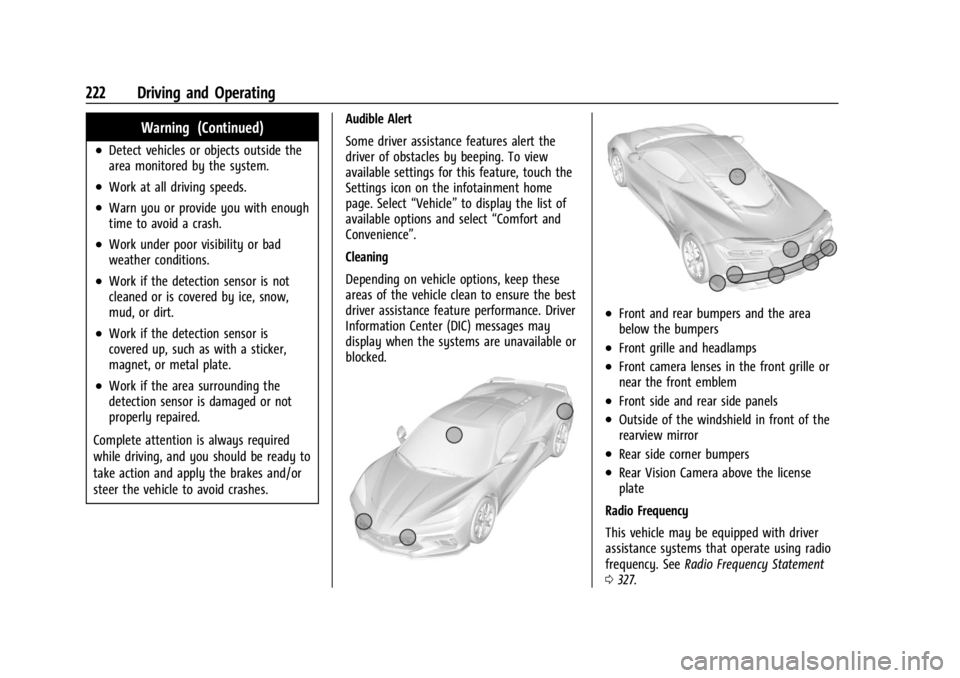
Cleaning
Depending on vehicle options, keep these
areas of the vehicle clean to ensure the best
driver assistance feature performance. Driver
Information Center (DIC) messages may
display when the systems are unavailable or
blocked.
.Front and rear bumpers and the area
below the bumpers
.Front grille and headlamps
.Front camera lenses in the front grille or
near the front emblem
.Front side and rear side panels
.Outside of the windshield in front of the
rearview mirror
.Rear side corner bumpers
.Rear Vision Camera above the license
plate
Radio Frequency
This vehicle may be equipped with driver
assistance systems that operate using radio
frequency. See Radio Frequency Statement
0 327.
Page 226 of 351
Chevrolet Corvette Owner Manual (GMNA-Localizing-U.S./Canada/Mexico-
16287457) - 2023 - CRC - 3/10/22
Driving and Operating 225
Park Assist
With RPA, as the vehicle backs up at speeds
of less than 8 km/h (5 mph), the sensors on
the rear bumper may detect objects up to
2.5 m (8 ft) behind the vehicle within a zone
25 cm (10 in) high off the ground and below
bumper level. These detection distances may
be shorter during warmer or humid weather.
Blocked sensors will not detect objects and
can also cause false detections. Keep the
sensors clean of mud, dirt, snow, ice, and
slush; and clean sensors after a car wash in
freezing temperatures.
{Warning
The Park Assist system does not detect
children, pedestrians, bicyclists, animals,
or objects located below the bumper or
that are too close or too far from the
vehicle. It is not available at speeds
greater than 8 km/h (5 mph). To prevent
injury, death, or vehicle damage, even
with Park Assist, always check the area
around the vehicle and check all mirrors
before moving forward or backing.
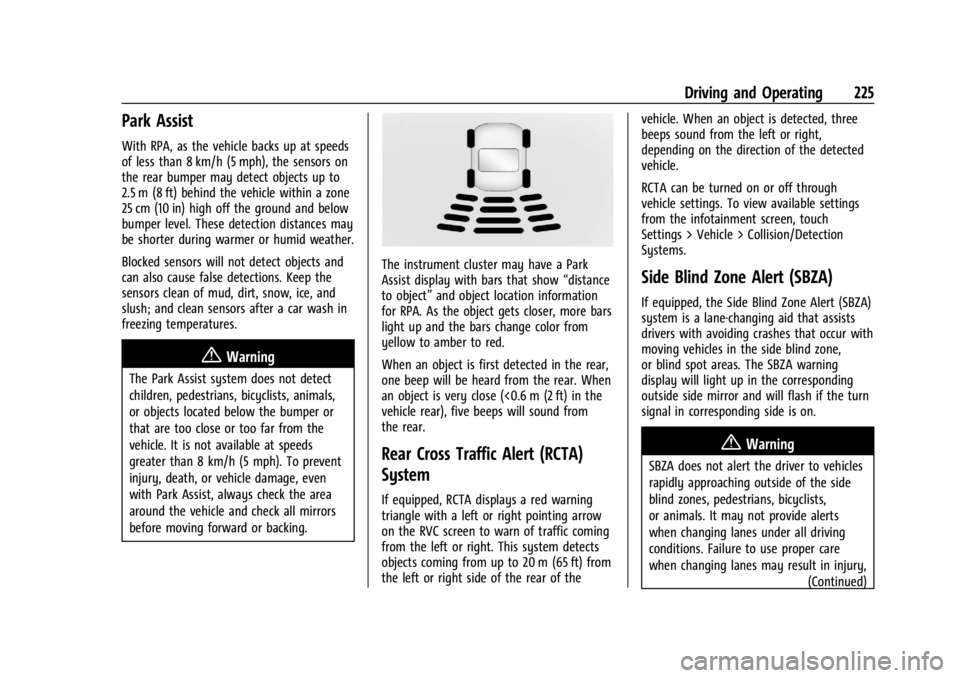
The instrument cluster may have a Park
Assist display with bars that show“distance
to object” and object location information
for RPA. As the object gets closer, more bars
light up and the bars change color from
yellow to amber to red.
When an object is first detected in the rear,
one beep will be heard from the rear. When
an object is very close (<0.6 m (2 ft) in the
vehicle rear), five beeps will sound from
the rear.
Rear Cross Traffic Alert (RCTA)
System
If equipped, RCTA displays a red warning
triangle with a left or right pointing arrow
on the RVC screen to warn of traffic coming
from the left or right. This system detects
objects coming from up to 20 m (65 ft) from
the left or right side of the rear of the vehicle. When an object is detected, three
beeps sound from the left or right,
depending on the direction of the detected
vehicle.
RCTA can be turned on or off through
vehicle settings. To view available settings
from the infotainment screen, touch
Settings > Vehicle > Collision/Detection
Systems.
Side Blind Zone Alert (SBZA)
If equipped, the Side Blind Zone Alert (SBZA)
system is a lane-changing aid that assists
drivers with avoiding crashes that occur with
moving vehicles in the side blind zone,
or blind spot areas. The SBZA warning
display will light up in the corresponding
outside side mirror and will flash if the turn
signal in corresponding side is on.
{Warning
SBZA does not alert the driver to vehicles
rapidly approaching outside of the side
blind zones, pedestrians, bicyclists,
or animals. It may not provide alerts
when changing lanes under all driving
conditions. Failure to use proper care
when changing lanes may result in injury,
(Continued)
Page 227 of 351
Chevrolet Corvette Owner Manual (GMNA-Localizing-U.S./Canada/Mexico-
16287457) - 2023 - CRC - 3/10/22
226 Driving and Operating
Warning (Continued)
death, or vehicle damage. Before making
a lane change, always check mirrors,
glance over your shoulder, and use the
turn signals.
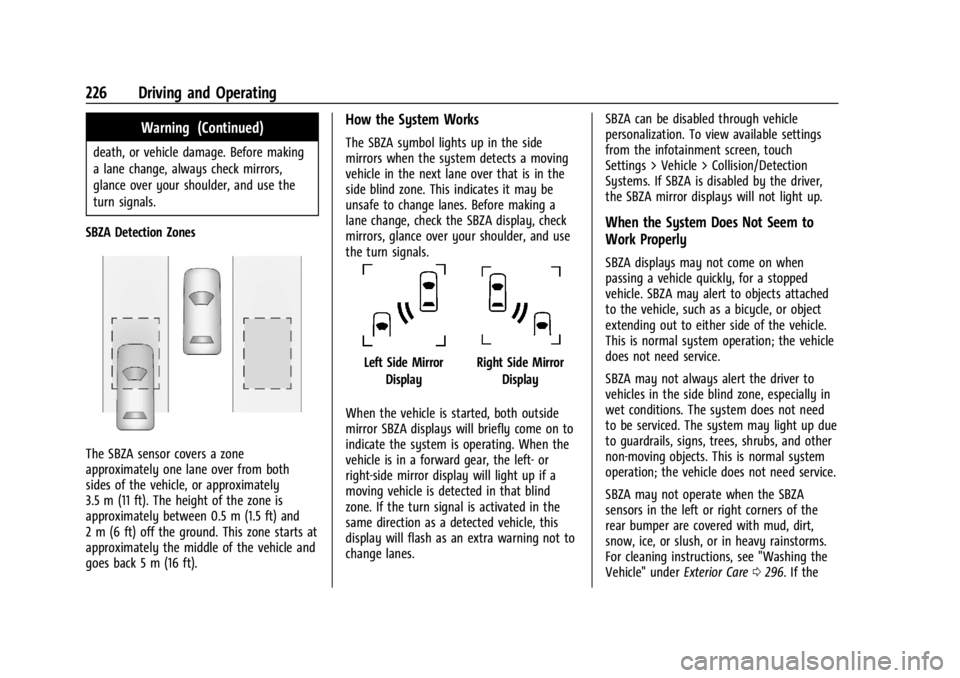
SBZA Detection Zones
The SBZA sensor covers a zone
approximately one lane over from both
sides of the vehicle, or approximately
3.5 m (11 ft). The height of the zone is
approximately between 0.5 m (1.5 ft) and
2 m (6 ft) off the ground. This zone starts at
approximately the middle of the vehicle and
goes back 5 m (16 ft).
How the System Works
The SBZA symbol lights up in the side
mirrors when the system detects a moving
vehicle in the next lane over that is in the
side blind zone. This indicates it may be
unsafe to change lanes. Before making a
lane change, check the SBZA display, check
mirrors, glance over your shoulder, and use
the turn signals.
Left Side Mirror DisplayRight Side Mirror Display
When the vehicle is started, both outside
mirror SBZA displays will briefly come on to
indicate the system is operating. When the
vehicle is in a forward gear, the left- or
right-side mirror display will light up if a
moving vehicle is detected in that blind
zone. If the turn signal is activated in the
same direction as a detected vehicle, this
display will flash as an extra warning not to
change lanes. SBZA can be disabled through vehicle
personalization. To view available settings
from the infotainment screen, touch
Settings > Vehicle > Collision/Detection
Systems. If SBZA is disabled by the driver,
the SBZA mirror displays will not light up.
When the System Does Not Seem to
Work Properly
SBZA displays may not come on when
passing a vehicle quickly, for a stopped
vehicle. SBZA may alert to objects attached
to the vehicle, such as a bicycle, or object
extending out to either side of the vehicle.
This is normal system operation; the vehicle
does not need service.
SBZA may not always alert the driver to
vehicles in the side blind zone, especially in
wet conditions. The system does not need
to be serviced. The system may light up due
to guardrails, signs, trees, shrubs, and other
non-moving objects. This is normal system
operation; the vehicle does not need service.
SBZA may not operate when the SBZA
sensors in the left or right corners of the
rear bumper are covered with mud, dirt,
snow, ice, or slush, or in heavy rainstorms.
For cleaning instructions, see "Washing the
Vehicle" under
Exterior Care0296. If the
Page 271 of 351
Chevrolet Corvette Owner Manual (GMNA-Localizing-U.S./Canada/Mexico-
16287457) - 2023 - CRC - 3/10/22
270 Vehicle Care
FusesUsage
10 Engine Control Module/ Air Conditioning
11 –
12 Lithium Ion Battery Module
13 Active Fuel Management
14 Seat Fan 15 –
16 Exterior Lighting Module
17 Instrument Panel Cluster/Shifter Interface
Board/Transmission
Control Module/
Electronic Brake Control
Module
18 Engine Control Module
19 –
20 Sensing and Diagnostic Module/Inside Rear
View Mirror
21 Exhaust Valve Solenoid Fuses
Usage
22 Fuel Pump/Fuel Tank Zone Module
23 Tonneau Left
24 Tonneau Right 25 Convertible Top Right
26 Convertible Top Left 27 Electronic Suspension Control
28 –
29 CGM
30 O2 Sensor 31 O2 Sensor/Engine Oil/ Canister Purge/Active
Fuel Management
32 Ignition Even
33 Ignition Odd
34 Engine Control Module 1 35 Engine Control Module/ Mass Air Flow Sensor/
O2 Sensor/Air
Conditioning
36 – Fuses
Usage
37 Canister Vent
38 Latch Control Module
39 Right Window Switch/ Door Lock
40 Left Window Switch/ Door Lock
41 –
42 Engine Control Module 2
43 –
44 Air Conditioning Clutch 45 –
46 –
47 –
48 –
49 Auxiliary Cooling Fan Right
50 –
51 –
52 –
53 Starter Solenoid
Page 341 of 351

Chevrolet Corvette Owner Manual (GMNA-Localizing-U.S./Canada/Mexico-
16287457) - 2023 - CRC - 3/10/22
340 Index
AutomaticDimming Mirrors . . . . . . . . . . . . . . . . . . . . . . . 25
Door Locks . . . . . . . . . . . . . . . . . . . . . . . . . . . . . . 16
Headlamp System . . . . . . . . . . . . . . . . . . . . . 103
Auxiliary Jack . . . . . . . . . . . . . . . . . . . . . . . . . . . . . . . . . . . . . 121
Avoiding Untrusted Media Devices . . . . . . . . 118
B
Battery
Exterior Lighting Battery Saver . . . . . . . . 107
Power Protection . . . . . . . . . . . . . . . . . . . . . . 106
Battery - North America . . . . . . . . . . . . 261, 290
Blade Replacement, Wiper . . . . . . . . . . . . . . . 262
Bluetooth Audio . . . . . . . . . . . . . . . . . . . . . . . . . . . . . . . . . . . 121
Overview . . . . . . . . . . . . . . . . . . . . . . . . . . . . . . 144
Brake Fluid . . . . . . . . . . . . . . . . . . . . . . . . . . . . . . . . . . . 260
Pad Life System . . . . . . . . . . . . . . . . . . . . . . . 259
System Warning Light . . . . . . . . . . . . . . . . . . 87
Brake Pad Life System . . . . . . . . . . . . . . . . . . . 259
Brakes . . . . . . . . . . . . . . . . . . . . . . . . . . . . . . . . . . . 257 Antilock . . . . . . . . . . . . . . . . . . . . . . . . . . . . . . . . 204
Brake Assist . . . . . . . . . . . . . . . . . . . . . . . . . . . 205
Electric Brake Boost . . . . . . . . . . . . . . . . . . . . 203
Electric Parking Brake . . . . . . . . . . . . . . . . . . 204
Braking . . . . . . . . . . . . . . . . . . . . . . . . . . . . . . . . . . 170 Break-In, New Vehicle . . . . . . . . . . . . . . . . . . . . 189
Buckle To Drive . . . . . . . . . . . . . . . . . . . . . . . . . . . 45
Bulb Replacement
Headlamp Aiming . . . . . . . . . . . . . . . . . . . . . . 264
Buying New Tires . . . . . . . . . . . . . . . . . . . . . . . . 285
C
Calibration Compass . . . . . . . . . . . . . . . . . . . . . . . . . . . . . . . . 74
California Perchlorate Materials Requirements . . . 232
California Proposition 65 Warning . . . . . 1, 290
Camera
Curb View . . . . . . . . . . . . . . . . . . . . . . . . . . . . . 224
Rear Vision (RVC) . . . . . . . . . . . . . . . . . . . . . . 223
Canadian Vehicle Owners . . . . . . . . . . . . . . . . . . .2
Capacities and Specifications . . . . . . . . . . . . . . 315
Carbon Monoxide Engine Exhaust . . . . . . . . . . . . . . . . . . . . . . . . 194
Hatch . . . . . . . . . . . . . . . . . . . . . . . . . . . . . . . . . . . 19
Winter Driving . . . . . . . . . . . . . . . . . . . . . . . . . 184
Cargo Tie-Downs . . . . . . . . . . . . . . . . . . . . . . . . . . . . . . . 71
Caution, Danger, and Warning . . . . . . . . . . . . . .2
Center Console Storage . . . . . . . . . . . . . . . . . . . . . . . . . . . . . . . . . . 71
Chains, Tire . . . . . . . . . . . . . . . . . . . . . . . . . . . . . . 289 Charging
System Light . . . . . . . . . . . . . . . . . . . . . . . . . . . 85
Wireless . . . . . . . . . . . . . . . . . . . . . . . . . . . . . . . . 76
Check Engine Light (Malfunction Indicator) . . . . . . . . . . . . . . . . . . . . . . . . . . . . . . . 86
Child Restraints Infants and Young Children . . . . . . . . . . . . . 62
Lower Anchors and Tethers for
Children . . . . . . . . . . . . . . . . . . . . . . . . . . . . . . . 66
Older Children . . . . . . . . . . . . . . . . . . . . . . . . . . 61
Securing . . . . . . . . . . . . . . . . . . . . . . . . . . . . . . . . 66
Systems . . . . . . . . . . . . . . . . . . . . . . . . . . . . . . . . 64
Circuit Breakers . . . . . . . . . . . . . . . . . . . . . . . . . . 266
Cleaning Exterior Care . . . . . . . . . . . . . . . . . . . . . . . . . . . 296
Interior Care . . . . . . . . . . . . . . . . . . . . . . . . . . . 301
Climate Control Systems Dual Automatic . . . . . . . . . . . . . . . . . . . . . . . . 163
Clock . . . . . . . . . . . . . . . . . . . . . . . . . . . . . . . . . . . . . 74
Cluster, Instrument . . . . . . . . . . . . . . . . . . . . . . . 79
Collision Damage Repair . . . . . . . . . . . . . . . . . 325
Compartment Underhood . . . . . . . . . . . . . . . . . . . . . . . . . . . . 234
Compartments Storage . . . . . . . . . . . . . . . . . . . . . . . . . . . . . . . . . 69
Compass . . . . . . . . . . . . . . . . . . . . . . . . . . . . . . . . . . 74
Competition Oriented Tires . . . . . . . . . . . . . . 273
Competitive Driving Mode . . . . . . . . . . . . . . . . 215
Page 342 of 351

Chevrolet Corvette Owner Manual (GMNA-Localizing-U.S./Canada/Mexico-
16287457) - 2023 - CRC - 3/10/22
Index 341
Composite Materials . . . . . . . . . . . . . . . . . . . . . 189
Connected ServicesConnections . . . . . . . . . . . . . . . . . . . . . . . . . . . 336
Diagnostics . . . . . . . . . . . . . . . . . . . . . . . . . . . . 338
Navigation . . . . . . . . . . . . . . . . . . . . . . . . . . . . . 336
Connections Connected Services . . . . . . . . . . . . . . . . . . . . 336
Control Hill Rollback . . . . . . . . . . . . . . . . . . . . . . . . . . . 208
Traction and Electronic Stability . . . . . . . 206
Control of a Vehicle . . . . . . . . . . . . . . . . . . . . . 170
Controls
Steering Wheel . . . . . . . . . . . . . . . . . . . . . . . . . 111
Convenience Net . . . . . . . . . . . . . . . . . . . . . . . . . . . 71
Convertible Top . . . . . . . . . . . . . . . . . . . . . . . . . . . .33
Convex Mirrors . . . . . . . . . . . . . . . . . . . . . . . . . . . 24
Coolant Engine Temperature Gauge . . . . . . . . . . . . . 83
Cooling . . . . . . . . . . . . . . . . . . . . . . . . . . . . . . . . . . 163
Cooling System . . . . . . . . . . . . . . . . . . . . . . . . . . 252
Courtesy Lamps . . . . . . . . . . . . . . . . . . . . . . . . . . 105
Courtesy Transportation Program . . . . . . . . 324
Coverage Explanations . . . . . . . . . . . . . . . . . . . . 133
Cruise Control . . . . . . . . . . . . . . . . . . . . . . . . . . . 219 Light . . . . . . . . . . . . . . . . . . . . . . . . . . . . . . . . . . . . 92
Cupholders . . . . . . . . . . . . . . . . . . . . . . . . . . . . . . . 69
Curb View Camera . . . . . . . . . . . . . . . . . . . . . . . 224 Customer Assistance
Offices . . . . . . . . . . . . . . . . . . . . . . . . . . . . . . . . . 321
Text Telephone (TTY) Users . . . . . . . . . . . . 321
Customer Information Publications Ordering Information . . . . . 327
Customer Satisfaction Procedure . . . . . . . . . 319
Cybersecurity . . . . . . . . . . . . . . . . . . . . . . . . . . . . 329
D
Damage Repair, Collision . . . . . . . . . . . . . . . . . 325
Danger, Warning, and Caution . . . . . . . . . . . . . .2
Dashboard . . . . . . . . . . . . . . . . . . . . . . . . . . . . . . . . . 4
Data Collection Infotainment System . . . . . . . . . . . . . . . . . . 330
OnStar . . . . . . . . . . . . . . . . . . . . . . . . . . . . . . . . . 330
Data Recorder Performance . . . . . . . . . . . . . . . . . . . . . . . . . . . 138
Data Recorders, Event . . . . . . . . . . . . . . . . . . . 329
Database Coverage Explanations . . . . . . . . . . 133
Daytime Running Lamps (DRL) . . . . . . . . . . . 103
Defensive Driving . . . . . . . . . . . . . . . . . . . . . . . . 170
Delayed Locking . . . . . . . . . . . . . . . . . . . . . . . . . . .16
Destination . . . . . . . . . . . . . . . . . . . . . . . . . . . . . . 126
Diagnostics Connected Services . . . . . . . . . . . . . . . . . . . . 338
Differential, Limited-Slip . . . . . . . . . . . . . 218, 219
Disabled Vehicle
Transporting . . . . . . . . . . . . . . . . . . . . . . . . . . . 293 Distracted Driving . . . . . . . . . . . . . . . . . . . . . . . . 169
Diversity Antenna System . . . . . . . . . . . . . . . . 118
Door
Ajar Light . . . . . . . . . . . . . . . . . . . . . . . . . . . . . . . 92
Delayed Locking . . . . . . . . . . . . . . . . . . . . . . . . 16
Locks . . . . . . . . . . . . . . . . . . . . . . . . . . . . . . . . . . . 14
Drive Belt Routing, Engine . . . . . . . . . . . . . . . .318
Driver
Assistance Systems . . . . . . . . . . . . . . . . . . . . 221
Information Center (DIC) . . . . . . . . . . . . . . . . 92
Mode Control . . . . . . . . . . . . . . . . . . . . . . . . . . 208
Mode Control Light . . . . . . . . . . . . . . . . . . . . . 90
Teen . . . . . . . . . . . . . . . . . . . . . . . . . . . . . . . . . . . 153
Driving Better Fuel Economy . . . . . . . . . . . . . . . . . . . 169
Competitive . . . . . . . . . . . . . . . . . . . . . . . . . . . . 215
Defensive . . . . . . . . . . . . . . . . . . . . . . . . . . . . . . 170
Distracted . . . . . . . . . . . . . . . . . . . . . . . . . . . . . 169
Hill and Mountain Roads . . . . . . . . . . . . . . 184
If the Vehicle is Stuck . . . . . . . . . . . . . . . . . 185
Impaired . . . . . . . . . . . . . . . . . . . . . . . . . . . . . . . 170
Loss of Control . . . . . . . . . . . . . . . . . . . . . . . . . 172
Off-Road Recovery . . . . . . . . . . . . . . . . . . . . . . 171
Track Events and Competitive . . . . . . . . . . . 172
Vehicle Load Limits . . . . . . . . . . . . . . . . . . . . 186
Wet Roads . . . . . . . . . . . . . . . . . . . . . . . . . . . . . 183
Winter . . . . . . . . . . . . . . . . . . . . . . . . . . . . . . . . . 184