steering wheel CHEVROLET CORVETTE 2023 Owner's Guide
[x] Cancel search | Manufacturer: CHEVROLET, Model Year: 2023, Model line: CORVETTE, Model: CHEVROLET CORVETTE 2023Pages: 351, PDF Size: 6.28 MB
Page 186 of 351
Chevrolet Corvette Owner Manual (GMNA-Localizing-U.S./Canada/Mexico-
16287457) - 2023 - CRC - 3/10/22
Driving and Operating 185
.Allow greater following distance and
watch for slippery spots. Icy patches can
occur on otherwise clear roads in shaded
areas. The surface of a curve or an
overpass can remain icy when the
surrounding roads are clear. Avoid sudden
steering maneuvers and braking while
on ice.
.Turn off cruise control.
.Turn on Weather Mode. SeeDriver Mode
Control 0208.
Cold Weather Mode
In very low temperatures, a cold weather
message may display on the Driver
Information Center (DIC). The engine speed,
transmission shift patterns, and cabin fan
speed may operate differently to enable the
vehicle to warm up quicker. You can
manually override the cabin fan speed in
cold weather mode.
Blizzard Conditions
Stop the vehicle in a safe place and signal
for help. Stay with the vehicle unless there
is help nearby. If possible, use Roadside
Assistance. See Roadside Assistance Program
0 322. To get help and keep everyone in the
vehicle safe:
.Turn on the hazard warning flashers.
.Tie a red cloth to an outside mirror.
{Warning
Snow can trap engine exhaust under the
vehicle. This may cause exhaust gases to
get inside. Engine exhaust contains
carbon monoxide (CO), which cannot be
seen or smelled. It can cause
unconsciousness and even death.
If the vehicle is stuck in snow:
.Clear snow from the base of the
vehicle, especially any blocking the
exhaust pipe.
.Open a window about 5 cm (2 in) on
the vehicle side that is away from the
wind, to bring in fresh air.
.Fully open the air outlets on or under
the instrument panel.
.Adjust the climate control system to
circulate the air inside the vehicle and
set the fan speed to the highest
setting. See “Climate Control Systems.”
For more information about CO, see
Engine Exhaust 0194. To save fuel, run the engine for short
periods to warm the vehicle and then shut
the engine off and partially close the
window. Moving about to keep warm also
helps.
If it takes time for help to arrive, when
running the engine, push the accelerator
pedal slightly so the engine runs faster than
the idle speed. This keeps the battery
charged to restart the vehicle and to signal
for help with the headlamps. Do this as
little as possible, to save fuel.
If the Vehicle Is Stuck
Slowly and cautiously spin the wheels to
free the vehicle when stuck in sand, mud,
ice, or snow.
If stuck too severely for the traction system
to free the vehicle, turn the traction system
off and use the rocking method. See
Traction Control/Electronic Stability Control
0
206.
{Warning
If the vehicle's tires spin at high speed,
they can explode, and you or others
could be injured. The vehicle can
(Continued)
Page 187 of 351
Chevrolet Corvette Owner Manual (GMNA-Localizing-U.S./Canada/Mexico-
16287457) - 2023 - CRC - 3/10/22
186 Driving and Operating
Warning (Continued)
overheat, causing an engine compartment
fire or other damage. Spin the wheels as
little as possible and avoid going above
56 km/h (35 mph).
Rocking the Vehicle to Get it Out
Turn the steering wheel left and right to
clear the area around the front wheels. Turn
off any traction system. Shift back and forth
between R (Reverse) and a low forward gear,
spinning the wheels as little as possible. To
prevent transmission wear, wait until the
wheels stop spinning before shifting gears.
Release the accelerator pedal while shifting,
and press lightly on the accelerator pedal
when the transmission is in gear. Slowly
spinning the wheels in the forward and
reverse directions causes a rocking motion
that could free the vehicle. If that does not
get the vehicle out after a few tries, it may
need to be towed out. If the vehicle does
need to be towed out, seeTransporting a
Disabled Vehicle 0293.
Vehicle Load Limits
It is very important to know how much
weight the vehicle can carry. This
weight is called the vehicle capacity
weight and includes the weight of all
occupants, cargo, and all
nonfactory-installed options. Two labels
on the vehicle may show how much
weight it may properly carry: the Tire
and Loading Information label and the
Certification label.
{Warning
Do not load the vehicle any heavier
than the Gross Vehicle Weight Rating
(GVWR), or either the maximum
front or rear Gross Axle Weight
Rating (GAWR). This can cause
systems to break and change the
way the vehicle handles. This could
cause loss of control and a crash.
Overloading can also reduce stopping
performance, damage the tires, and
shorten the life of the vehicle.
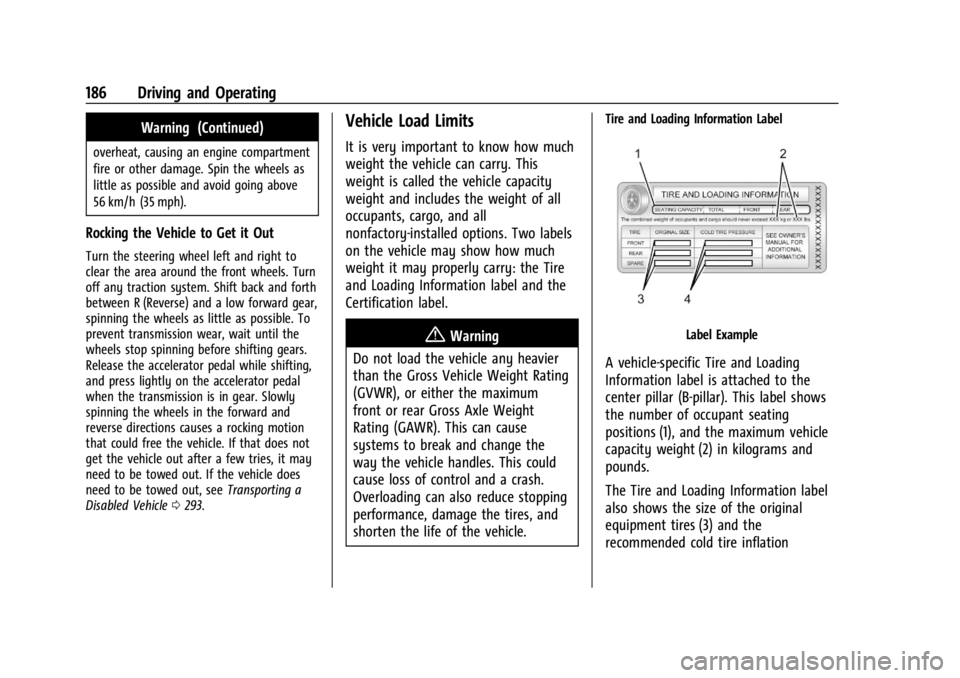
Tire and Loading Information Label
Label Example
A vehicle-specific Tire and Loading
Information label is attached to the
center pillar (B-pillar). This label shows
the number of occupant seating
positions (1), and the maximum vehicle
capacity weight (2) in kilograms and
pounds.
The Tire and Loading Information label
also shows the size of the original
equipment tires (3) and the
recommended cold tire inflation
Page 199 of 351
Chevrolet Corvette Owner Manual (GMNA-Localizing-U.S./Canada/Mexico-
16287457) - 2023 - CRC - 3/10/22
198 Driving and Operating
To shift out of D (Drive):1. Bring the vehicle to a complete stop.
2. Shift to the desired gear.
Downshifting the transmission in slippery
road conditions could result in skidding. See
“Skidding” underLoss of Control 0172.
The transmission can be shifted like a
manual transmission using the paddle shift
controls while in D (Drive). See Manual
Mode 0198.
Caution
Spinning the tires or holding the vehicle
in one place on a hill using only the
accelerator pedal may damage the
transmission. The repair will not be
covered by the vehicle warranty. If the
vehicle is stuck, do not spin the tires.
When stopping on a hill, use the brakes
to hold the vehicle in place.
Manual Mode
Manual Paddle Shift
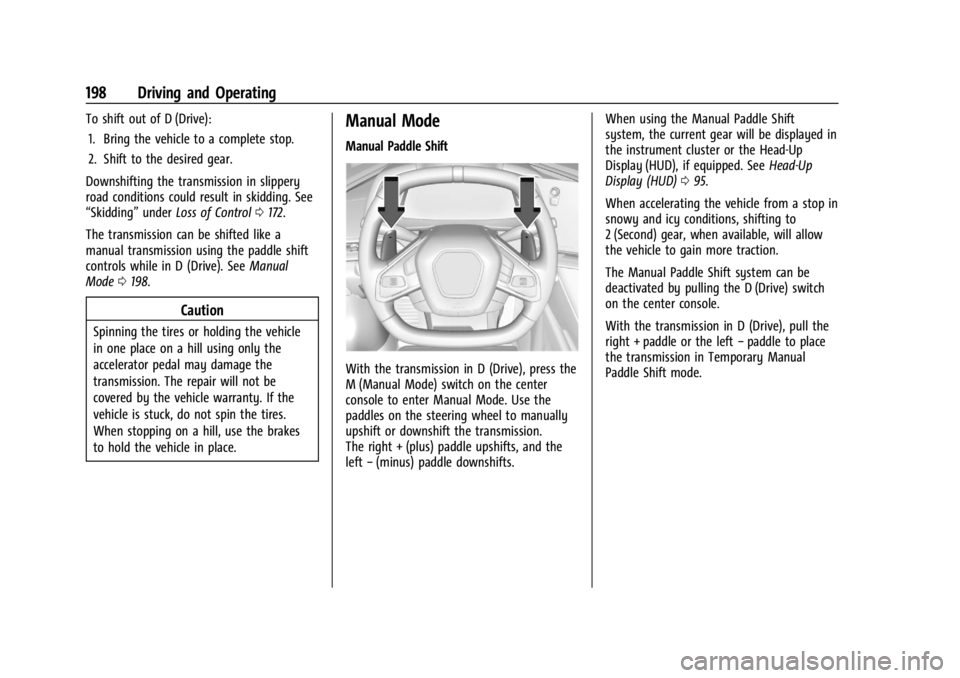
With the transmission in D (Drive), press the
M (Manual Mode) switch on the center
console to enter Manual Mode. Use the
paddles on the steering wheel to manually
upshift or downshift the transmission.
The right + (plus) paddle upshifts, and the
left −(minus) paddle downshifts. When using the Manual Paddle Shift
system, the current gear will be displayed in
the instrument cluster or the Head-Up
Display (HUD), if equipped. See
Head-Up
Display (HUD) 095.
When accelerating the vehicle from a stop in
snowy and icy conditions, shifting to
2 (Second) gear, when available, will allow
the vehicle to gain more traction.
The Manual Paddle Shift system can be
deactivated by pulling the D (Drive) switch
on the center console.
With the transmission in D (Drive), pull the
right + paddle or the left −paddle to place
the transmission in Temporary Manual
Paddle Shift mode.
Page 209 of 351
Chevrolet Corvette Owner Manual (GMNA-Localizing-U.S./Canada/Mexico-
16287457) - 2023 - CRC - 3/10/22
208 Driving and Operating
Hill Rollback Control
If the vehicle is in gear and inadvertently
rolls backwards, Hill Rollback Control helps
limit the rollback to a very low speed.
A noise may be heard while the vehicle
speed is actively being controlled. A Driver
Information Center (DIC) message displays
when active.
Driver Mode Control
Driver Mode Control (DMC) allows the driver
to adjust the overall driving experience to
better suit preference by selecting different
modes.
Drive mode availability and affected driver
systems are dependent upon vehicle trim
level, region, and optional features. Driver
modes may include: Weather, Tour, Sport,
and Track, along with two customizable
modes: My Mode and Z-Mode.
When each mode is selected, an indicator
will come on in the instrument cluster and
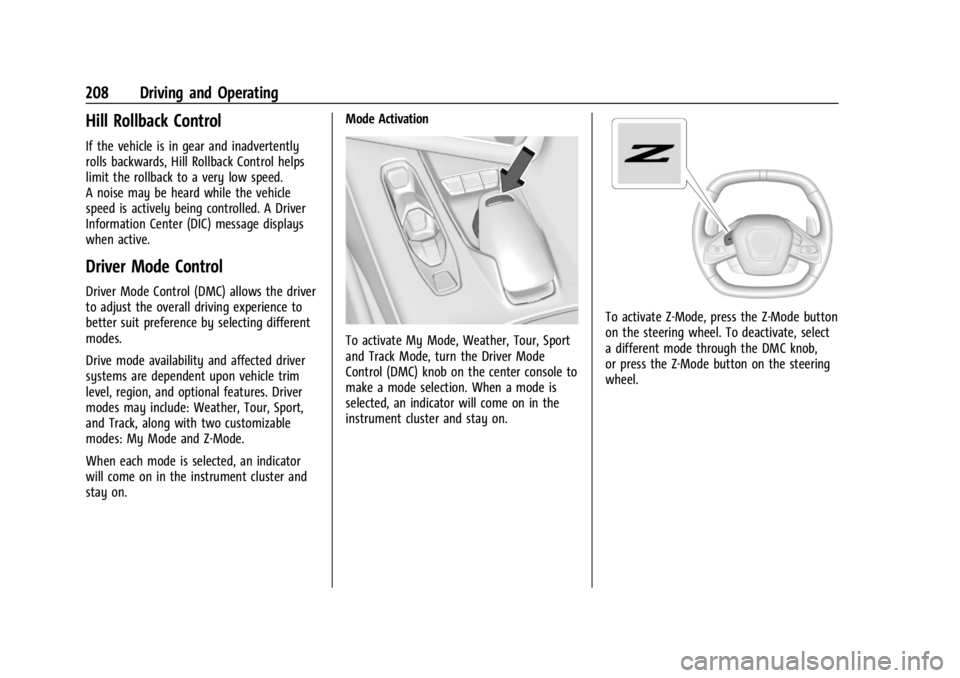
stay on.Mode Activation
To activate My Mode, Weather, Tour, Sport
and Track Mode, turn the Driver Mode
Control (DMC) knob on the center console to
make a mode selection. When a mode is
selected, an indicator will come on in the
instrument cluster and stay on.
To activate Z-Mode, press the Z-Mode button
on the steering wheel. To deactivate, select
a different mode through the DMC knob,
or press the Z-Mode button on the steering
wheel.
Page 210 of 351
Chevrolet Corvette Owner Manual (GMNA-Localizing-U.S./Canada/Mexico-
16287457) - 2023 - CRC - 3/10/22
Driving and Operating 209
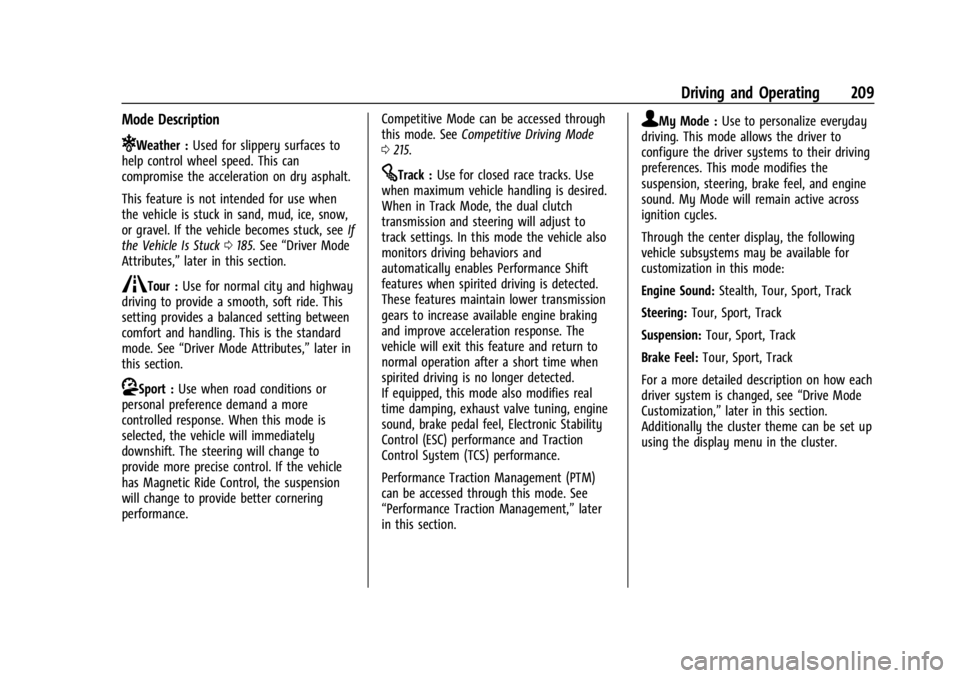
Mode Description
uWeather :Used for slippery surfaces to
help control wheel speed. This can
compromise the acceleration on dry asphalt.
This feature is not intended for use when
the vehicle is stuck in sand, mud, ice, snow,
or gravel. If the vehicle becomes stuck, see If
the Vehicle Is Stuck 0185. See “Driver Mode
Attributes,” later in this section.
sTour :Use for normal city and highway
driving to provide a smooth, soft ride. This
setting provides a balanced setting between
comfort and handling. This is the standard
mode. See “Driver Mode Attributes,” later in
this section.
rSport : Use when road conditions or
personal preference demand a more
controlled response. When this mode is
selected, the vehicle will immediately
downshift. The steering will change to
provide more precise control. If the vehicle
has Magnetic Ride Control, the suspension
will change to provide better cornering
performance. Competitive Mode can be accessed through
this mode. See
Competitive Driving Mode
0 215.
tTrack : Use for closed race tracks. Use
when maximum vehicle handling is desired.
When in Track Mode, the dual clutch
transmission and steering will adjust to
track settings. In this mode the vehicle also
monitors driving behaviors and
automatically enables Performance Shift
features when spirited driving is detected.
These features maintain lower transmission
gears to increase available engine braking
and improve acceleration response. The
vehicle will exit this feature and return to
normal operation after a short time when
spirited driving is no longer detected.
If equipped, this mode also modifies real
time damping, exhaust valve tuning, engine
sound, brake pedal feel, Electronic Stability
Control (ESC) performance and Traction
Control System (TCS) performance.
Performance Traction Management (PTM)
can be accessed through this mode. See
“Performance Traction Management,” later
in this section.
qMy Mode : Use to personalize everyday
driving. This mode allows the driver to
configure the driver systems to their driving
preferences. This mode modifies the
suspension, steering, brake feel, and engine
sound. My Mode will remain active across
ignition cycles.
Through the center display, the following
vehicle subsystems may be available for
customization in this mode:
Engine Sound: Stealth, Tour, Sport, Track
Steering: Tour, Sport, Track
Suspension: Tour, Sport, Track
Brake Feel: Tour, Sport, Track
For a more detailed description on how each
driver system is changed, see “Drive Mode
Customization,” later in this section.
Additionally the cluster theme can be set up
using the display menu in the cluster.
Page 214 of 351
Chevrolet Corvette Owner Manual (GMNA-Localizing-U.S./Canada/Mexico-
16287457) - 2023 - CRC - 3/10/22
Driving and Operating 213
Engine Sound
Caution
Using a stealth engine sound setting
during spirited driving will cause the
exhaust system to overheat and damage
the variable exhaust valves. Do not use
this setting when auto-crossing or driving
on high speed tracks.
If available, engine sound settings change
when the variable exhaust valves open.
Steering (Assist Effort)
Adjusts from a lighter steering feel to
reduced assist for more steering feel.
Magnetic Ride Control
If equipped, this feature adjusts the shock
dampening firmness based on driving
conditions to improve comfort and
performance.
Drive Mode Customization
The vehicle is equipped to modify the
following vehicle settings base on vehicle
content. Through the infotainment home
screen, select Settings > Vehicle > “Drive
Mode Customization” to customize and
personalize My Mode and/or Z-Mode. Engine Sound
Engine Sound adjusts the volume of engine
noise. Setting range from quietest to loudest
volume as you move from Stealth through
Track.
.Stealth, Tour, Sport, Track
Steering
This setting adjusts the effort required to
turn the steering wheel. The steering wheel
offers better feedback but requires more
effort as you move from Tour to Track.
.Tour, Sport, Track
Suspension
This setting adjusts the firmness of the
suspension in the vehicle. Suspension adjust
stiffness of the shocks and / or springs. The
ride is more comfortable at lower settings
and is stiffer at higher settings for better
control.
.Tour, Sport, Track Engine/Shift
This setting adjusts the throttle response,
gear shifting and engine performance. An
increased throttle response enhances the
acceleration feel as you move toward Track,
but with a comfort trade-off due to more
aggressive gear shifting.
.Weather, Tour, Sport, Track
Brake Feel
This setting adjusts the brake pedal
response. Settings range from a slower
response for more comfortable driving to
the quickest response for quicker
deceleration. Track allows for improved
pedal precision at higher decelerations for
high performance driving.
.Tour, Sport, Track
Performance Traction Management (PTM)
To activate PTM through Z-Mode, configure
Z-Mode to the desired PTM state in the
center stack (Settings > Vehicle > Drive
Mode Customization > Z-Mode). Press the
Z-Mode button once to activate Z-Mode.
When PTM is configured on, a message will
appear in the Driver Information Center
(DIC) “Z-Mode Active —Press Again for PTM
On —ESC May be Disabled.”
Page 215 of 351
Chevrolet Corvette Owner Manual (GMNA-Localizing-U.S./Canada/Mexico-
16287457) - 2023 - CRC - 3/10/22
214 Driving and Operating
To confirm, and enter PTM, press the
Z-Mode button again. The PTM state can
now be modified using the mode knob or
changing the Z-Mode setting in the center
stack. Both the Z-Mode and PTM indicators
will be displayed.
To cancel, press the center dismiss button
on the steering wheel (Z-Mode remains
active). Selecting PTM states may modify
other Z-Mode customization options.
.Off, Wet, Dry, Sport, Race 1, Race 2
Front Lift System
A two-position lift actuator (one per damper)
with 35 mm (1.5 in) of stroke will
hydraulically raise the front of the vehicle to
provide approximately 50 mm (2 in) of
increased clearance in approximately
three seconds (height and time will vary by
vehicle). The Front Lift System will allow
you to lift the front of the vehicle to enter a
driveway, driving over curbs, speed bumps
or onto ramps or a trailer.
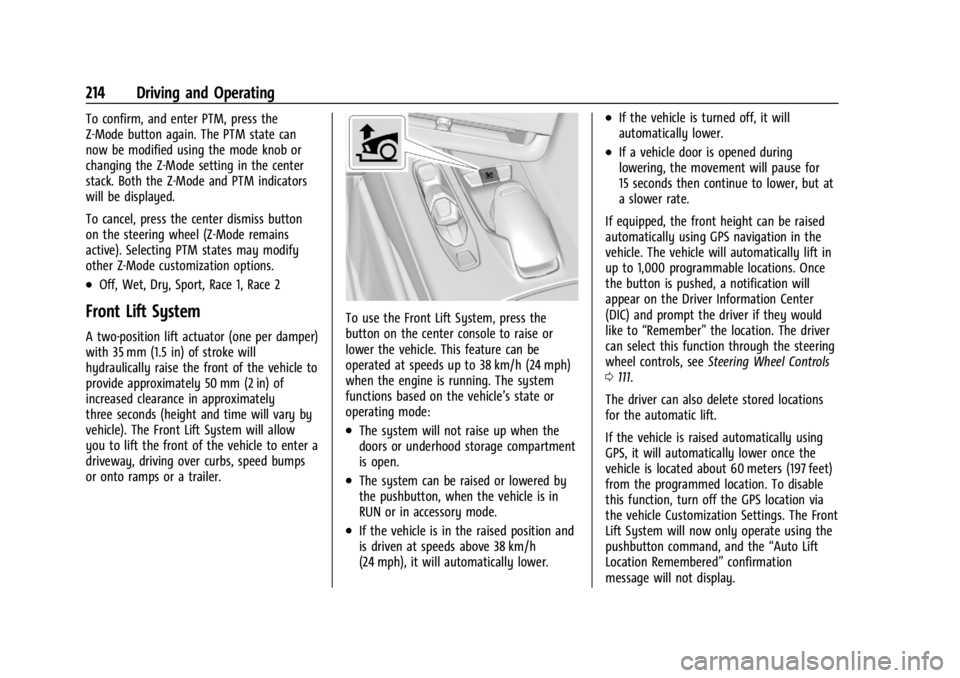
To use the Front Lift System, press the
button on the center console to raise or
lower the vehicle. This feature can be
operated at speeds up to 38 km/h (24 mph)
when the engine is running. The system
functions based on the vehicle’s state or
operating mode:
.The system will not raise up when the
doors or underhood storage compartment
is open.
.The system can be raised or lowered by
the pushbutton, when the vehicle is in
RUN or in accessory mode.
.If the vehicle is in the raised position and
is driven at speeds above 38 km/h
(24 mph), it will automatically lower.
.If the vehicle is turned off, it will
automatically lower.
.If a vehicle door is opened during
lowering, the movement will pause for
15 seconds then continue to lower, but at
a slower rate.
If equipped, the front height can be raised
automatically using GPS navigation in the
vehicle. The vehicle will automatically lift in
up to 1,000 programmable locations. Once
the button is pushed, a notification will
appear on the Driver Information Center
(DIC) and prompt the driver if they would
like to “Remember” the location. The driver
can select this function through the steering
wheel controls, see Steering Wheel Controls
0 111.
The driver can also delete stored locations
for the automatic lift.
If the vehicle is raised automatically using
GPS, it will automatically lower once the
vehicle is located about 60 meters (197 feet)
from the programmed location. To disable
this function, turn off the GPS location via
the vehicle Customization Settings. The Front
Lift System will now only operate using the
pushbutton command, and the “Auto Lift
Location Remembered” confirmation
message will not display.
Page 218 of 351
Chevrolet Corvette Owner Manual (GMNA-Localizing-U.S./Canada/Mexico-
16287457) - 2023 - CRC - 3/10/22
Driving and Operating 217
Launch Control (Sport and Track
Mode Only)
A Launch Control feature is available, within
Competitive Driving Mode or PTM, on all
vehicles to allow the driver to achieve high
levels of vehicle acceleration in a straight
line. Launch Control is a form of TCS that
manages tire spin, and transmissions clutch,
while launching the vehicle. This feature is
intended for use during closed course race
events where consistent zero to
60 and quarter mile times are desirable.
Caution
The new vehicle break-in period should be
completed before using the launch
control feature, otherwise performance
will be limited and damage may occur to
the powertrain/engine. SeeNew Vehicle
Break-In 0189.
Launch Control is only available when the
following criteria are met:
.Competitive Driving Mode or any of the
PTM Modes are selected (if equipped). See
Driver Mode Control 0208.
.The steering wheel must be straight.
.The driver door must be closed.
.The vehicle must be in D (Drive) or
M (Manual Mode).
.The parking brake must not be engaged.
Launching the Vehicle
.Ensure the vehicle is in Competitive
Driving Mode or any of the PTM modes.
.The brake pedal must be firmly pressed
to the floor, equivalent to a panic brake
event.
.While maintaining the brake pedal, the
accelerator pedal is rapidly applied to
wide open throttle. If the vehicle rolls due
to wide open throttle or engine speed
does not exceed 3,000 Revolutions Per
Minute (RPM), release the throttle, press
the brake pedal more firmly, and reapply
the accelerator to wide open throttle.
The Launch Control feature initially limits
engine speed as the driver rapidly applies
the accelerator pedal to wide open throttle.
Allow the engine RPMs to stabilize.
A smooth, quick release of the brake pedal,
while maintaining the fully pressed
accelerator pedal, will manage tire slip and
transmissions clutch. After the vehicle is
launched, the system continues in
Competitive Driving Mode or PTM.
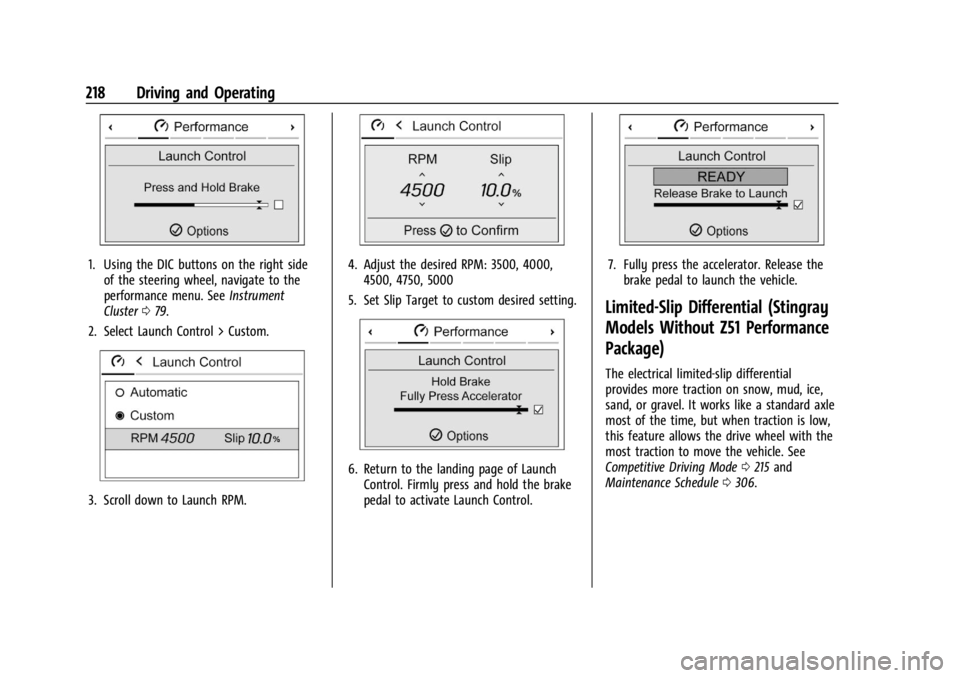
Custom Launch Control
If equipped, Custom Launch Control allows
the following parameters for Launch Control
to be modified:
.Launch RPM
.Slip Target (5%–15%)
Adjusting the Launch RPM will also change
the behavior of the transmission during the
start of the launch. The higher the Launch
RPM, the faster the clutch will be applied
resulting in greater acceleration. This
parameter can be used to match the launch
behavior to the available tire traction. If the
driving wheels spin excessively during the
launch, reduce the Launch RPM.
To adjust the Launch RPM, all of these
conditions must be met:
.Competitive Driving Mode or any of the
PTM Modes are selected (if equipped). See
Driver Mode Control 0208.
.The steering wheel must be straight.
.The driver door must be closed.
.The vehicle must be in D (Drive) or
M (Manual Mode).
.The parking brake must not be engaged.
Page 219 of 351
Chevrolet Corvette Owner Manual (GMNA-Localizing-U.S./Canada/Mexico-
16287457) - 2023 - CRC - 3/10/22
218 Driving and Operating
1. Using the DIC buttons on the right sideof the steering wheel, navigate to the
performance menu. See Instrument
Cluster 079.
2. Select Launch Control > Custom.
3. Scroll down to Launch RPM.
4. Adjust the desired RPM: 3500, 4000, 4500, 4750, 5000
5. Set Slip Target to custom desired setting.
6. Return to the landing page of Launch Control. Firmly press and hold the brake
pedal to activate Launch Control.
7. Fully press the accelerator. Release thebrake pedal to launch the vehicle.
Limited-Slip Differential (Stingray
Models Without Z51 Performance
Package)
The electrical limited-slip differential
provides more traction on snow, mud, ice,
sand, or gravel. It works like a standard axle
most of the time, but when traction is low,
this feature allows the drive wheel with the
most traction to move the vehicle. See
Competitive Driving Mode 0215 and
Maintenance Schedule 0306.
Page 220 of 351
Chevrolet Corvette Owner Manual (GMNA-Localizing-U.S./Canada/Mexico-
16287457) - 2023 - CRC - 3/10/22
Driving and Operating 219
Limited-Slip Differential (Stingray
With Z51 Performance Package
and Z06 model)
The Electrical Limited-Slip Differential (eLSD)
is a hydraulically actuated clutch system
inside the transaxle. It can infinitely vary
the clutch engagement between 0 and
2250 N*m (1659 lb-ft) of breakaway torque
between the rear wheels. When necessary it
responds from open to full engagement in
fractions of a second. Smaller clutch
adjustments happen even faster.
The eLSD:
.Uses the vehicle sensors and driver inputs
to determine the optimum amount of
clutch engagement for the conditions.
.Improves traction while cornering by
changing the engagement to achieve a
balance between directional control and
acceleration.
.Provides optimal engagement for
high-speed control and stability without
affecting precise steering and turn-in.
.Improves vehicle stability during spirited
driving and evasive maneuvers. It is fully
integrated with the Active Handling and
Performance Traction Management (PTM)
systems (if equipped).There are unique calibrations based on the
Traction Control System (TCS) setting. eLSD
modes change automatically when the
traction control button is pressed. No unique
input from the driver is required.
.Mode 1 is the standard mode when the
vehicle is started. It provides a touring
calibration with an emphasis on vehicle
stability. Mode 1 is also used in PTM
Wet mode.
.Mode 2 is engaged when both TCS and
StabiliTrak are turned off. This calibration
provides more nimble corner turn-in, and
is biased for better traction out of
corners.
.Mode 3 is engaged when PTM is engaged
in Dry, Sport 1 & 2, and Race modes. This
is a nimble calibration with similar
functionality as eLSD Mode 2, however, it
is integrated to work with PTM.
.Mode 4 is engaged when TCS is selected
off, but StabiliTrak remains on. Vehicle
stability is still the priority, while allowing
for optimized traction out of corners.
Cruise Control
With cruise control, a speed of about
40 km/h (25 mph) or more can be
maintained without keeping your foot on
the accelerator. Cruise control does not work
at speeds below about 40 km/h (25 mph).
{Warning
Cruise control can be dangerous where
you cannot drive safely at a steady
speed. Do not use cruise control on
winding roads or in heavy traffic.
Cruise control can be dangerous on
slippery roads. On such roads, fast
changes in tire traction can cause
excessive wheel slip, and you could lose
control. Do not use cruise control on
slippery roads.
If the Traction Control System (TCS) begins
to limit wheel spin while you are using
cruise control, the cruise control
automatically disengages. See Traction
Control/Electronic Stability Control 0206.
When road conditions allow for using safely
again, cruise control can be turned back on.