horn CHEVROLET CORVETTE 2023 Owners Manual
[x] Cancel search | Manufacturer: CHEVROLET, Model Year: 2023, Model line: CORVETTE, Model: CHEVROLET CORVETTE 2023Pages: 351, PDF Size: 6.28 MB
Page 6 of 351

Chevrolet Corvette Owner Manual (GMNA-Localizing-U.S./Canada/Mexico-
16287457) - 2023 - CRC - 3/10/22
Introduction 5
1.Air Vents 0166.
2. Turn Signal Lever. See Turn and
Lane-Change Signals 0104.
Exterior Lamp Controls 0102.
3. Manual Shift Paddles. See Manual Mode
0 198.
4. Instrument Cluster 079.
5. Windshield Wiper/Washer 073.
6. Near Field Communication Antenna (NFC). See Bluetooth (Overview) 0144 or
Bluetooth (Pairing and Using a Phone)
0 144.
7. Volume Control Knob and Infotainment Home Button. See Overview0109.
8. Infotainment. See Using the System
0 112.
9. Alarm System Indicator Light. See Vehicle
Alarm System 021.
Light Sensor. See Automatic Headlamp
System 0103.
10. Dual Automatic Climate Control System
0163.
Driver and Passenger Heated and
Ventilated Seat Controls (If Equipped).
See Heated and Ventilated Front Seats
0 43. 11.
Traction Control/Electronic Stability
Control 0206.
Curb View Camera (If Equipped). See
Assistance Systems for Parking or Backing
0 223.
Front Lift System Control (If Equipped).
See Front Lift System 0214.
12. Driver Mode Control 0208.
13. Shift Switches. See Dual Clutch
Transmission 0195.
14. Keyless Ignition. See Ignition Positions
0 190.
15. Driver Information Center (DIC) Controls. SeeDriver Information Center (DIC) 092.
16. Heated Steering Wheel 073 (If
Equipped).
17. Bluetooth Controls. See Steering Wheel
Controls 0111.
Voice Recognition Controls. See Steering
Wheel Controls 0111.
18. Volume Control Buttons. See Steering
Wheel Controls 0111.
19. Horn 073.
20. Favorites Select Buttons. Steering Wheel
Controls 0111.
21. Z-Mode Control. See Driver Mode Control
0 208. 22.
Cruise Control 0219.
23. Electric Parking Brake 0204.
24. Data Link Connector (DLC) (Out of View). SeeMalfunction Indicator Lamp (Check
Engine Light) 086.
25. Instrument Panel Illumination Control
0105.
26. Head-Up Display Controls (If Equipped). SeeHead-Up Display (HUD) 095.
Page 9 of 351
Chevrolet Corvette Owner Manual (GMNA-Localizing-U.S./Canada/Mexico-
16287457) - 2023 - CRC - 3/10/22
8 Keys, Doors, and Windows
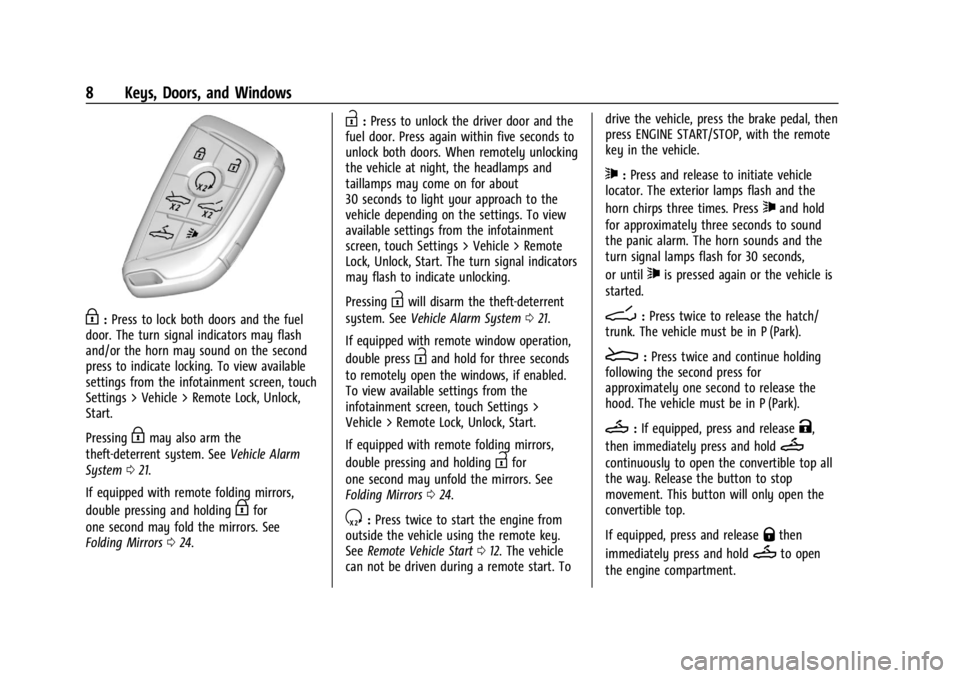
H:Press to lock both doors and the fuel
door. The turn signal indicators may flash
and/or the horn may sound on the second
press to indicate locking. To view available
settings from the infotainment screen, touch
Settings > Vehicle > Remote Lock, Unlock,
Start.
Pressing
Hmay also arm the
theft-deterrent system. See Vehicle Alarm
System 021.
If equipped with remote folding mirrors,
double pressing and holding
Hfor
one second may fold the mirrors. See
Folding Mirrors 024.
I:Press to unlock the driver door and the
fuel door. Press again within five seconds to
unlock both doors. When remotely unlocking
the vehicle at night, the headlamps and
taillamps may come on for about
30 seconds to light your approach to the
vehicle depending on the settings. To view
available settings from the infotainment
screen, touch Settings > Vehicle > Remote
Lock, Unlock, Start. The turn signal indicators
may flash to indicate unlocking.
Pressing
Iwill disarm the theft-deterrent
system. See Vehicle Alarm System 021.
If equipped with remote window operation,
double press
Iand hold for three seconds
to remotely open the windows, if enabled.
To view available settings from the
infotainment screen, touch Settings >
Vehicle > Remote Lock, Unlock, Start.
If equipped with remote folding mirrors,
double pressing and holding
Ifor
one second may unfold the mirrors. See
Folding Mirrors 024.
S:Press twice to start the engine from
outside the vehicle using the remote key.
See Remote Vehicle Start 012. The vehicle
can not be driven during a remote start. To drive the vehicle, press the brake pedal, then
press ENGINE START/STOP, with the remote
key in the vehicle.
7:
Press and release to initiate vehicle
locator. The exterior lamps flash and the
horn chirps three times. Press
7and hold
for approximately three seconds to sound
the panic alarm. The horn sounds and the
turn signal lamps flash for 30 seconds,
or until
7is pressed again or the vehicle is
started.
D: Press twice to release the hatch/
trunk. The vehicle must be in P (Park).
E: Press twice and continue holding
following the second press for
approximately one second to release the
hood. The vehicle must be in P (Park).
M: If equipped, press and releaseK,
then immediately press and hold
M
continuously to open the convertible top all
the way. Release the button to stop
movement. This button will only open the
convertible top.
If equipped, press and release
Qthen
immediately press and hold
Mto open
the engine compartment.
Page 11 of 351
Chevrolet Corvette Owner Manual (GMNA-Localizing-U.S./Canada/Mexico-
16287457) - 2023 - CRC - 3/10/22
10 Keys, Doors, and Windows
re-enabled when the vehicle is started with
another known remote key, or when the
vehicle is unlocked.
To view available settings from the
infotainment screen, touch Settings >
Vehicle > Remote Lock, Unlock, Start.
If equipped with remote folding mirrors,
passive locking may fold and unfold the
mirrors. SeeFolding Mirrors 024.
Temporary Disable of Passive Locking
Temporarily disable passive locking by
pressing and holding
Kon the interior door
switch with a door open for at least
four seconds, or until three chimes are
heard. Passive locking will then remain
disabled until the vehicle is turned on.
Remote Left in Vehicle Alert
When the vehicle is turned off and a remote
key is left in the vehicle, the horn will chirp
three times after both doors are closed.
To view available settings from the
infotainment screen, touch Settings >
Vehicle > Remote Lock, Unlock, Start. Remote No Longer in Vehicle Alert
If the vehicle is on, with a door open, and
then all doors are closed, the vehicle will
check for remote keys inside. If a remote
key is not detected, the Driver Information
Center (DIC) will display NO KEY FOUND and
the horn will chirp three times. This occurs
only once each time the vehicle is driven.
To view available settings from the
infotainment screen, touch Settings >
Vehicle > Remote Lock, Unlock, Start.
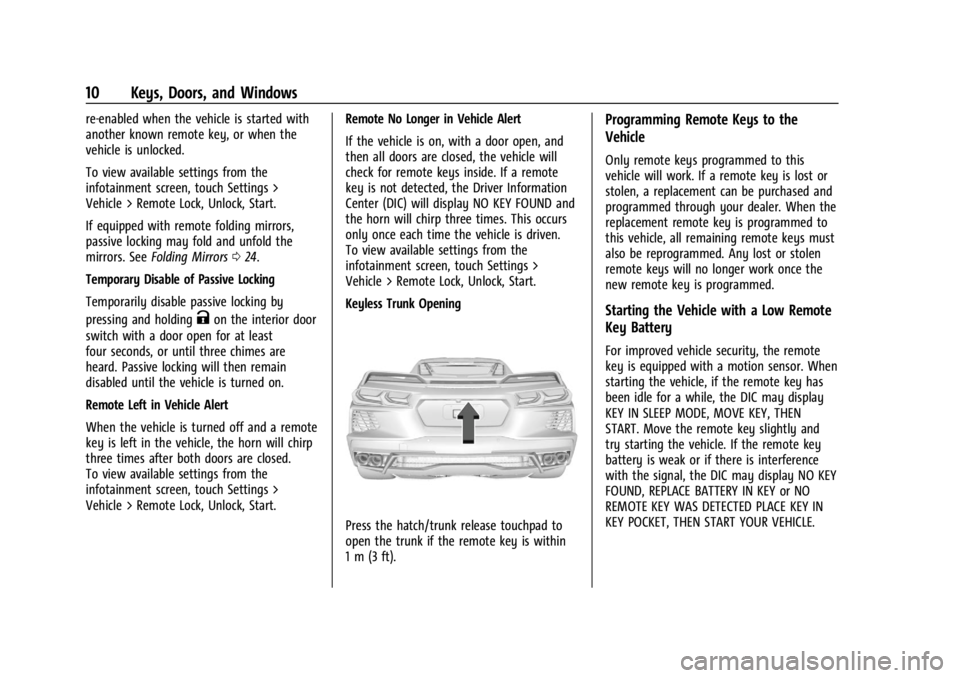
Keyless Trunk Opening
Press the hatch/trunk release touchpad to
open the trunk if the remote key is within
1 m (3 ft).
Programming Remote Keys to the
Vehicle
Only remote keys programmed to this
vehicle will work. If a remote key is lost or
stolen, a replacement can be purchased and
programmed through your dealer. When the
replacement remote key is programmed to
this vehicle, all remaining remote keys must
also be reprogrammed. Any lost or stolen
remote keys will no longer work once the
new remote key is programmed.
Starting the Vehicle with a Low Remote
Key Battery
For improved vehicle security, the remote
key is equipped with a motion sensor. When
starting the vehicle, if the remote key has
been idle for a while, the DIC may display
KEY IN SLEEP MODE, MOVE KEY, THEN
START. Move the remote key slightly and
try starting the vehicle. If the remote key
battery is weak or if there is interference
with the signal, the DIC may display NO KEY
FOUND, REPLACE BATTERY IN KEY or NO
REMOTE KEY WAS DETECTED PLACE KEY IN
KEY POCKET, THEN START YOUR VEHICLE.
Page 18 of 351
Chevrolet Corvette Owner Manual (GMNA-Localizing-U.S./Canada/Mexico-
16287457) - 2023 - CRC - 3/10/22
Keys, Doors, and Windows 17
number of remote keys inside has not
reduced, the driver door will unlock and the
horn will chirp three times.
Lockout Protection can be manually
overridden with the driver door open by
pressing and holding
Qon the power door
lock switch.
Doors
Hood
Hood Release
{Warning
Do not drive the vehicle if the hood is
not latched completely. The hood could
open fully, block your vision, and cause a
crash. You or others could be injured.
Always close the hood completely before
driving. When the hood is not closed, the
vehicle will not exceed 42 km/h
(26 mph). Close the hood to drive faster
than 42 km/h (26 mph).
The hood compartment can be accessed in
several ways. Ensure the hood is clear of any objects
before opening.
This vehicle prevents from shifting out of
P (Park) when the hood is not closed. Close
the hood to shift out of P (Park). Confirm
the hood is closed by checking that the
hood is flush with the surrounding
components.
If the hood is closed but the ajar message is
still present, then the transmission lockout
can be overridden by holding the brake for
20 seconds and then shifting into D (Drive).
In this case, the vehicle will not exceed
42 km/h (26 mph). See your dealer for
service.
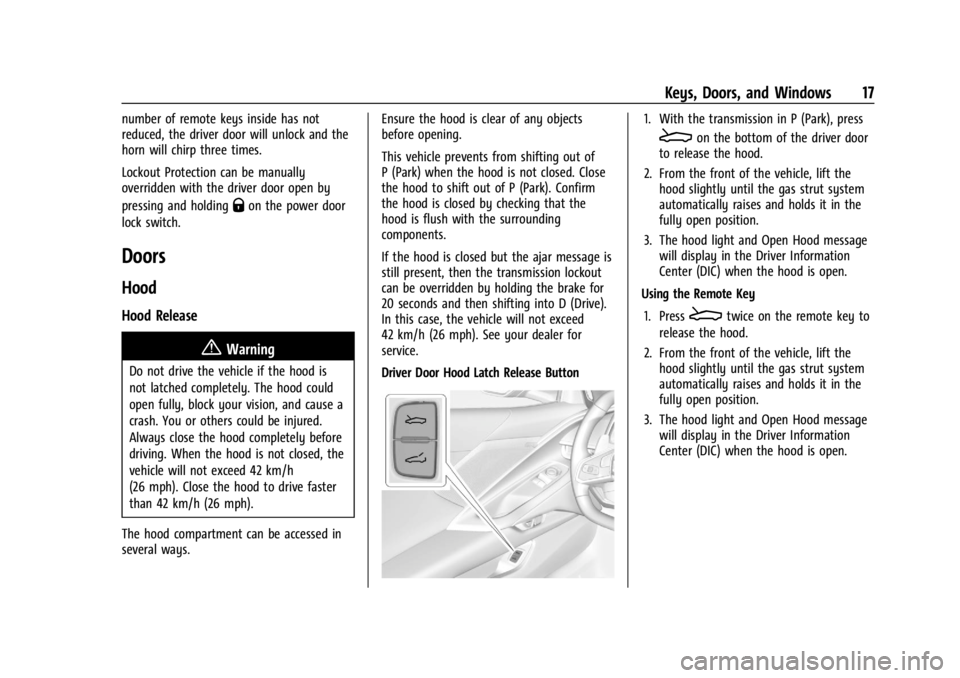
Driver Door Hood Latch Release Button
1. With the transmission in P (Park), press
Eon the bottom of the driver door
to release the hood.
2. From the front of the vehicle, lift the hood slightly until the gas strut system
automatically raises and holds it in the
fully open position.
3. The hood light and Open Hood message will display in the Driver Information
Center (DIC) when the hood is open.
Using the Remote Key
1. Press
Etwice on the remote key to
release the hood.
2. From the front of the vehicle, lift the hood slightly until the gas strut system
automatically raises and holds it in the
fully open position.
3. The hood light and Open Hood message will display in the Driver Information
Center (DIC) when the hood is open.
Page 23 of 351
Chevrolet Corvette Owner Manual (GMNA-Localizing-U.S./Canada/Mexico-
16287457) - 2023 - CRC - 3/10/22
22 Keys, Doors, and Windows
Off :Alarm system is disarmed.
On Solid : Vehicle is secured during the
delay to arm the system.
Fast Flash : Vehicle is unsecured. A door, the
hood, or the hatch/trunk is open.
Slow Flash : Alarm system is armed.
Arming the Alarm System
1. Turn off the vehicle.
2. Lock the vehicle in one of three ways:
.Use the remote key.
.Use the Keyless Access system.
.With a door open, pressQon the
interior of the door.
3. After 30 seconds the alarm system will arm, and the indicator light will begin to
slowly flash indicating the alarm system
is operating. Pressing
Qon the remote
key a second time will bypass the
30-second delay and immediately arm
the alarm system.
The vehicle alarm system will not arm if the
doors are locked with the mechanical key.
If the driver door is opened without first
unlocking with the remote key, the horn will
chirp and the lights will flash to indicate
pre-alarm. If the vehicle is not started, or the door is not unlocked by pressing
K
on the remote key during the 10-second
pre-alarm, the alarm will be activated.
The alarm will also be activated if the
passenger door, the hatch/trunk, or the
hood is opened without first disarming the
system. When the alarm is activated, the
turn signals flash and the horn sounds for
about 30 seconds. The alarm system will
then re-arm to monitor for the next
unauthorized event.
Disarming the Alarm System
To disarm the alarm system or turn off the
alarm if it has been activated, do one of the
following:
.PressKon the remote key.
.Unlock the vehicle using the Keyless
Access system.
.Start the vehicle.
To avoid setting off the alarm by accident:
.Lock the vehicle after all occupants have
left the vehicle and both doors are closed.
.Always unlock a door with the remote
key or use the Keyless Access system.
Unlocking the driver door with the key will
not disarm the system or turn off the alarm.
How to Detect a Tamper Condition
IfKis pressed on the remote key and the
horn chirps and the lights flash three times,
a previous alarm occurred while the system
was armed.
If the alarm has been activated, a message
will appear on the DIC.
Inclination Sensor and Intrusion Sensor
In addition to the standard theft-deterrent
system features, this system may also have
an inclination sensor and intrusion sensor.
The inclination sensor can activate the alarm
if it senses movement of the vehicle, such
as a change in vehicle orientation.
The intrusion sensor monitors the vehicle
interior, and can activate the alarm if it
senses unauthorized entry into the vehicle’s
interior. Do not allow passengers or pets to
remain in the vehicle when the intrusion
sensor is activated.
Before arming the theft-deterrent system
and activating the intrusion sensor:
.Make sure both doors and windows are
completely closed.
.Secure any loose items such as
sunshades.
Page 73 of 351
Chevrolet Corvette Owner Manual (GMNA-Localizing-U.S./Canada/Mexico-
16287457) - 2023 - CRC - 3/10/22
72 Instruments and Controls
Instruments and Controls
Controls
Steering Wheel Adjustment . . . . . . . . . . . . . 73
Heated Steering Wheel . . . . . . . . . . . . . . . . . 73
Horn . . . . . . . . . . . . . . . . . . . . . . . . . . . . . . . . . . . . 73
Windshield Wiper/Washer . . . . . . . . . . . . . . 73
Compass . . . . . . . . . . . . . . . . . . . . . . . . . . . . . . . . 74
Clock . . . . . . . . . . . . . . . . . . . . . . . . . . . . . . . . . . . 74
Power Outlets . . . . . . . . . . . . . . . . . . . . . . . . . . 75
Wireless Charging . . . . . . . . . . . . . . . . . . . . . . 76
Warning Lights, Gauges, and Indicators
Warning Lights, Gauges, andIndicators . . . . . . . . . . . . . . . . . . . . . . . . . . . . . 78
Instrument Cluster . . . . . . . . . . . . . . . . . . . . . 79
Speedometer . . . . . . . . . . . . . . . . . . . . . . . . . . . 82
Odometer . . . . . . . . . . . . . . . . . . . . . . . . . . . . . . 82
Trip Odometer . . . . . . . . . . . . . . . . . . . . . . . . . . 82
Tachometer . . . . . . . . . . . . . . . . . . . . . . . . . . . . 82
Fuel Gauge . . . . . . . . . . . . . . . . . . . . . . . . . . . . . 82
Engine Coolant Temperature Gauge . . . . 83
Transmission Temperature Gauge . . . . . . 83
Seat Belt Reminders . . . . . . . . . . . . . . . . . . . . 84
Airbag Readiness Light . . . . . . . . . . . . . . . . . 84
Passenger Airbag Status Indicator . . . . . . 85
Charging System Light . . . . . . . . . . . . . . . . . 85 Malfunction Indicator Lamp (Check
Engine Light) . . . . . . . . . . . . . . . . . . . . . . . . . 86
Front Lift System Light . . . . . . . . . . . . . . . . . 87
Brake System Warning Light . . . . . . . . . . . 87
Electric Parking Brake Light . . . . . . . . . . . . . 88
Service Electric Parking Brake Light . . . . . 88
Antilock Brake System (ABS) Warning Light . . . . . . . . . . . . . . . . . . . . . . . . . . . . . . . . . 88
Performance Transmission Active . . . . . . . 89
Traction Off Light . . . . . . . . . . . . . . . . . . . . . . 89
Traction Control System (TCS)/Electronic Stability Control Light . . . . . . . . . . . . . . . . 89
Electronic Stability Control (ESC) Off Light . . . . . . . . . . . . . . . . . . . . . . . . . . . . . . . . . 90
Driver Mode Control Light . . . . . . . . . . . . . 90
Tire Pressure Light . . . . . . . . . . . . . . . . . . . . . . 91
Engine Oil Pressure Light . . . . . . . . . . . . . . . 91
Security Light . . . . . . . . . . . . . . . . . . . . . . . . . . . 91
High-Beam On Light . . . . . . . . . . . . . . . . . . . . 92
Lamps On Reminder . . . . . . . . . . . . . . . . . . . . 92
Cruise Control Light . . . . . . . . . . . . . . . . . . . . 92
Door Ajar Light . . . . . . . . . . . . . . . . . . . . . . . . . 92
Information Displays
Driver Information Center (DIC) . . . . . . . . . 92
Head-Up Display (HUD) . . . . . . . . . . . . . . . . . 95
Vehicle Messages
Vehicle Messages . . . . . . . . . . . . . . . . . . . . . . 98
Engine Power Messages . . . . . . . . . . . . . . . . 98
Vehicle Speed Messages . . . . . . . . . . . . . . . 99
Universal Remote System
Universal Remote System . . . . . . . . . . . . . . 99
Universal Remote System Programming . . . . . . . . . . . . . . . . . . . . . . . . . 99
Universal Remote System Operation . . . 101
Page 74 of 351
Chevrolet Corvette Owner Manual (GMNA-Localizing-U.S./Canada/Mexico-
16287457) - 2023 - CRC - 3/10/22
Instruments and Controls 73
Controls
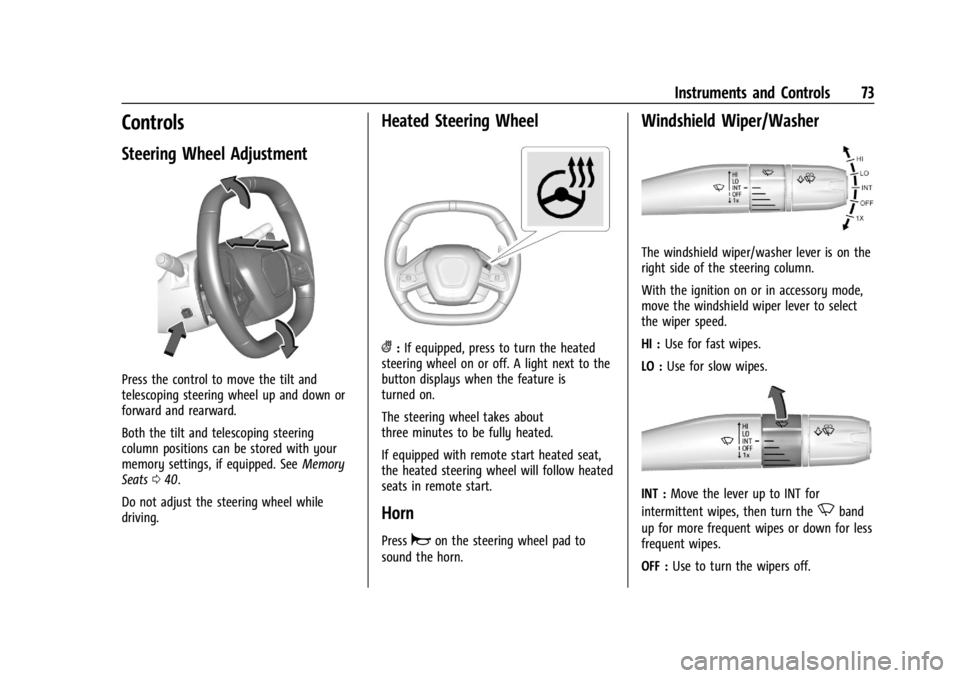
Steering Wheel Adjustment
Press the control to move the tilt and
telescoping steering wheel up and down or
forward and rearward.
Both the tilt and telescoping steering
column positions can be stored with your
memory settings, if equipped. SeeMemory
Seats 040.
Do not adjust the steering wheel while
driving.
Heated Steering Wheel
(: If equipped, press to turn the heated
steering wheel on or off. A light next to the
button displays when the feature is
turned on.
The steering wheel takes about
three minutes to be fully heated.
If equipped with remote start heated seat,
the heated steering wheel will follow heated
seats in remote start.
Horn
Pressaon the steering wheel pad to
sound the horn.
Windshield Wiper/Washer
The windshield wiper/washer lever is on the
right side of the steering column.
With the ignition on or in accessory mode,
move the windshield wiper lever to select
the wiper speed.
HI : Use for fast wipes.
LO : Use for slow wipes.
INT : Move the lever up to INT for
intermittent wipes, then turn the
Nband
up for more frequent wipes or down for less
frequent wipes.
OFF : Use to turn the wipers off.
Page 269 of 351
Chevrolet Corvette Owner Manual (GMNA-Localizing-U.S./Canada/Mexico-
16287457) - 2023 - CRC - 3/10/22
268 Vehicle Care
FusesUsage
F29 –
F30 Sensing and Diagnostic Module/Automatic
Occupant Sensing
F31 Body Control Module 1
F32 –
F33 Data Link Connection/ Wireless Charging Module
F34 Telematics/Head Up Display
F35 Horn
F36 –
F37 –
F38 Front Wash Pump
F39 Rear Auxiliary Power Outlet
F40 Performance Data Recorder/Center Stack
Module
F41 –
F42 Theft Deterrent
F43 Left Headlamp Fuses
Usage
F44 Exterior Lighting Module 2
F45 Power Steering Column Module
F46 Body Control Module 3 F47 Exterior Lighting Module 5
F48 Exterior Lighting Module 7
F49 Body Control Module 4 F50 Front Auxiliary Power Outlet
F51 –
F52 Steering Wheel Control Switch
F53 Heated Steering Wheel
F54 –
Relays Usage
K1 –
K2 Glove Box Relay
K3 Horn Relay Relays
Usage
K4 Front Wash Relay K5 Retained Accessory Power/Accessory Relay
K6 Front Trunk Release Relay 1
K7 –
K8 –
K9 Front Trunk Release Relay 2
K10 Wiper Relay
Rear Compartment Fuse Block
The rear compartment fuse block is in the
rear of the vehicle in between the seats.
Page 283 of 351
Chevrolet Corvette Owner Manual (GMNA-Localizing-U.S./Canada/Mexico-
16287457) - 2023 - CRC - 3/10/22
282 Vehicle Care
TPMS Malfunction Light and Message
The TPMS will not function properly if one
or more of the TPMS sensors are missing or
inoperable. When the system detects a
malfunction, the low tire pressure warning
light flashes for about one minute and then
stays on for the remainder of the time the
vehicle is on. A DIC warning message also
displays. The malfunction light and DIC
warning message will come on each time
the vehicle is turned on until the problem is
corrected. Some of the conditions that can
cause these to come on are:
.One of the road tires has been replaced
with the spare tire. The spare tire does
not have a TPMS sensor. The malfunction
light and the DIC message should go off
after the road tire is replaced and the
sensor matching process is performed
successfully. See "TPMS Sensor Matching
Process" later in this section.
.The TPMS sensor matching process was
not done or not completed successfully
after rotating the tires. The malfunction
light and the DIC message should go off
after successfully completing the sensor
matching process. See "TPMS Sensor
Matching Process" later in this section.
.One or more TPMS sensors are missing or
damaged. The malfunction light and the
DIC message should go off when the
TPMS sensors are installed and the sensor
matching process is performed
successfully. See your dealer for service.
.Replacement tires or wheels do not match
the original equipment tires or wheels.
Tires and wheels other than those
recommended could prevent the TPMS
from functioning properly. SeeBuying
New Tires 0285.
.Operating electronic devices or being near
facilities using radio wave frequencies
similar to the TPMS could cause the TPMS
sensors to malfunction.
If the TPMS is not functioning properly, it
cannot detect or signal a low tire pressure
condition. See your dealer for service if the
TPMS malfunction light and DIC message
come on and stay on.
Tire Fill Alert (If Equipped)
This feature provides visual and audible
alerts outside the vehicle to help when
inflating an underinflated tire to the
recommended cold tire pressure. When the low tire pressure warning light
comes on:
1. Park the vehicle in a safe, level place.
2. Set the parking brake firmly.
3. Place the vehicle in P (Park).
4. Add air to the tire that is underinflated. The turn signal lamp will flash.
When the recommended pressure is
reached, the horn sounds once and the
turn signal lamp will stop flashing and
briefly turn solid.
Repeat these steps for all underinflated tires
that have illuminated the low tire pressure
warning light.
{Warning
Overinflating a tire could cause the tire
to rupture and you or others could be
injured. Do not exceed the maximum
pressure listed on the tire sidewall. See
Tire Sidewall Labeling 0274 and
Vehicle Load Limits 0186.
If the tire is overinflated by more than
35 kPa (5 psi), the horn will sound multiple
times and the turn signal lamp will continue
to flash for several seconds after filling
stops. To release and correct the pressure,
Page 284 of 351
Chevrolet Corvette Owner Manual (GMNA-Localizing-U.S./Canada/Mexico-
16287457) - 2023 - CRC - 3/10/22
Vehicle Care 283
while the turn signal lamp is still flashing,
briefly press the center of the valve stem.
When the recommended pressure is reached,
the horn sounds once.
If the turn signal lamp does not flash within
15 seconds after starting to inflate the tire,
the tire fill alert has not been activated or is
not working.
If the hazard warning flashers are on, the
tire fill alert visual feedback will not work
properly.
The TPMS will not activate the tire fill alert
properly under the following conditions:
.There is interference from an external
device or transmitter.
.The air pressure from the inflation device
is not sufficient to inflate the tire.
.There is a malfunction in the TPMS.
.There is a malfunction in the horn or turn
signal lamps.
.The identification code of the TPMS
sensor is not registered to the system.
.The battery of the TPMS sensor is low.If the tire fill alert does not operate due to
TPMS interference, move the vehicle about
1 m (3 ft) back or forward and try again.
If the tire fill alert feature is not working,
use a tire pressure gauge.
TPMS Sensor Matching Process
—Auto
Learn Function
Each TPMS sensor has a unique
identification code. The identification code
needs to be matched to a new tire/wheel
position after rotating the tires or replacing
one or more of the TPMS sensors. When a
tire is installed, the vehicle must be
stationary for about 20 minutes before the
system recalculates. The following relearn
process takes up to 10 minutes, driving at a
minimum speed of 20 km/h (12 mph).
A dash (-) or pressure value will display in
the DIC. See Driver Information Center (DIC)
0 92. A warning message displays in the DIC
if a problem occurs during the relearn
process.
Tire Inspection
We recommend that the tires, including
the spare tire, if the vehicle has one, be
inspected for signs of wear or damage
at least once a month. Replace the tire if:
.The indicators at three or more
places around the tire can be seen.
.There is cord or fabric showing
through the tire's rubber.
.The tread or sidewall is cracked, cut,
or snagged deep enough to show
cord or fabric.
.The tire has a bump, bulge, or split.
.The tire has a puncture, cut, or other
damage that cannot be repaired well
because of the size or location of the
damage.
Tire Rotation
Tires should be rotated according to the
interval listed in the maintenance
schedule. See
Maintenance Schedule
0 306.
Tires are rotated to achieve uniform
wear for all tires. The first rotation is
the most important.
Anytime unusual wear is noticed, rotate
the tires as soon as possible, check for
proper tire inflation pressure, and check