battery CHEVROLET CORVETTE 2024 User Guide
[x] Cancel search | Manufacturer: CHEVROLET, Model Year: 2024, Model line: CORVETTE, Model: CHEVROLET CORVETTE 2024Pages: 362, PDF Size: 6.62 MB
Page 37 of 362
Chevrolet Corvette Owner Manual (GMNA-Localizing-U.S./Canada/Mexico-
17272984) - 2024 - CRC - 2/20/23
36 Keys, Doors, and Windows
5. When possible, operate the convertibletop when the vehicle is stopped. The top
can be operated while driving below
50 km/h (31 mph) and will stop if that
speed is exceeded. The top operation will
take approximately 17 seconds. Make
sure the top operation can be completed
before that speed is reached.
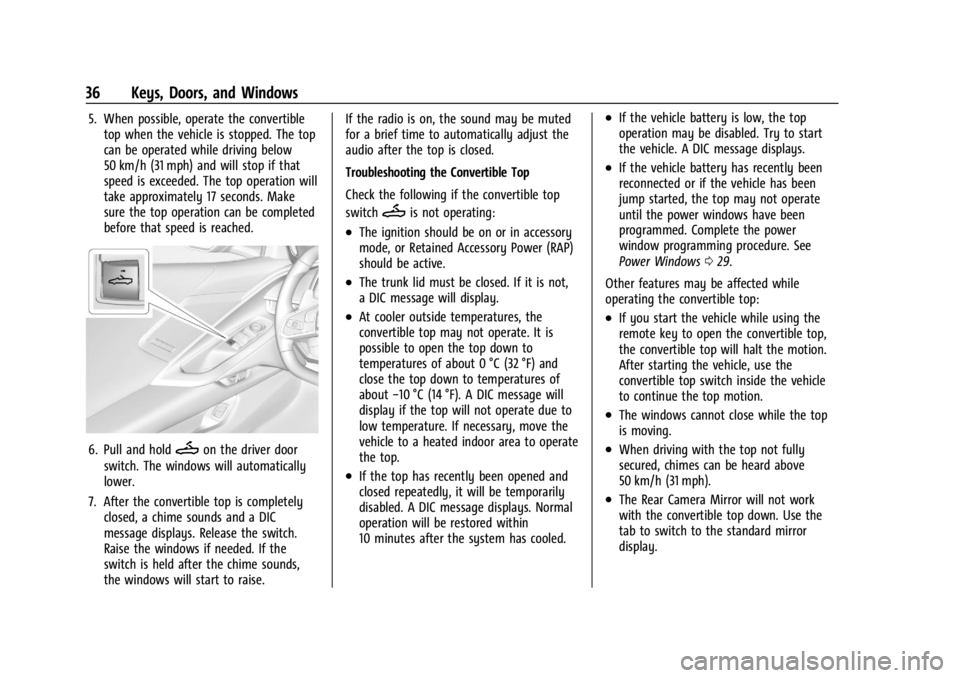
6. Pull and holdMon the driver door
switch. The windows will automatically
lower.
7. After the convertible top is completely closed, a chime sounds and a DIC
message displays. Release the switch.
Raise the windows if needed. If the
switch is held after the chime sounds,
the windows will start to raise. If the radio is on, the sound may be muted
for a brief time to automatically adjust the
audio after the top is closed.
Troubleshooting the Convertible Top
Check the following if the convertible top
switch
Mis not operating:
.The ignition should be on or in accessory
mode, or Retained Accessory Power (RAP)
should be active.
.The trunk lid must be closed. If it is not,
a DIC message will display.
.At cooler outside temperatures, the
convertible top may not operate. It is
possible to open the top down to
temperatures of about 0 °C (32 °F) and
close the top down to temperatures of
about
−10 °C (14 °F). A DIC message will
display if the top will not operate due to
low temperature. If necessary, move the
vehicle to a heated indoor area to operate
the top.
.If the top has recently been opened and
closed repeatedly, it will be temporarily
disabled. A DIC message displays. Normal
operation will be restored within
10 minutes after the system has cooled.
.If the vehicle battery is low, the top
operation may be disabled. Try to start
the vehicle. A DIC message displays.
.If the vehicle battery has recently been
reconnected or if the vehicle has been
jump started, the top may not operate
until the power windows have been
programmed. Complete the power
window programming procedure. See
Power Windows 029.
Other features may be affected while
operating the convertible top:
.If you start the vehicle while using the
remote key to open the convertible top,
the convertible top will halt the motion.
After starting the vehicle, use the
convertible top switch inside the vehicle
to continue the top motion.
.The windows cannot close while the top
is moving.
.When driving with the top not fully
secured, chimes can be heard above
50 km/h (31 mph).
.The Rear Camera Mirror will not work
with the convertible top down. Use the
tab to switch to the standard mirror
display.
Page 38 of 362
Chevrolet Corvette Owner Manual (GMNA-Localizing-U.S./Canada/Mexico-
17272984) - 2024 - CRC - 2/20/23
Keys, Doors, and Windows 37
If the vehicle battery has been disconnected
and reconnected, if the fuses were pulled or
replaced, or if a jump start was performed, a
message indicating the top is not secure
may display. Press and release
Kand then
quickly press and hold
Mon the remote
key, or press and hold
Mon the driver
door switch to open the top, or pull and
hold
Mon the driver door switch to close
the top until this message clears.
Partial Top Cycling
If the convertible top operation is stopped
before completion, the top will temporarily
hold its position. Over time, the tonneau
may drift to a near closed position.
Opening the Tonneau Cover —Engine Access
{Warning
When opening or closing the tonneau
cover, people can be injured by the
moving parts of the tonneau cover.
Maintain visual contact with the tonneau
cover when it is in motion and keep
hands and objects away from the moving
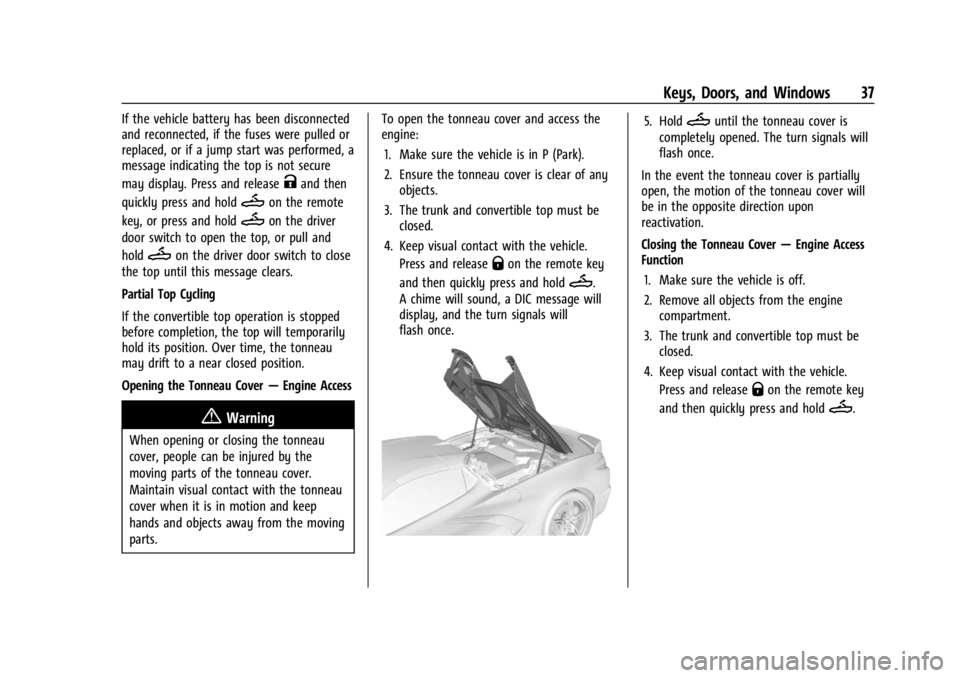
parts. To open the tonneau cover and access the
engine:
1. Make sure the vehicle is in P (Park).
2. Ensure the tonneau cover is clear of any objects.
3. The trunk and convertible top must be closed.
4. Keep visual contact with the vehicle. Press and release
Qon the remote key
and then quickly press and hold
M.
A chime will sound, a DIC message will
display, and the turn signals will
flash once.
5. HoldMuntil the tonneau cover is
completely opened. The turn signals will
flash once.
In the event the tonneau cover is partially
open, the motion of the tonneau cover will
be in the opposite direction upon
reactivation.
Closing the Tonneau Cover —Engine Access
Function
1. Make sure the vehicle is off.
2. Remove all objects from the engine compartment.
3. The trunk and convertible top must be closed.
4. Keep visual contact with the vehicle. Press and release
Qon the remote key
and then quickly press and hold
M.
Page 62 of 362

Chevrolet Corvette Owner Manual (GMNA-Localizing-U.S./Canada/Mexico-
17272984) - 2024 - CRC - 2/20/23
Seats and Restraints 61
{Warning
For up to 10 seconds after the vehicle is
turned off and the battery is
disconnected, an airbag can still inflate
during improper service. You can be
injured if you are close to an airbag
when it inflates. Avoid yellow connectors.
They are probably part of the airbag
system. Be sure to follow proper service
procedures, and make sure the person
performing work for you is qualified to
do so.
Adding Equipment to the
Airbag-Equipped Vehicle
Adding accessories that change the vehicle's
frame, bumper system, height, front end,
or side sheet metal may keep the airbag
system from working properly.
The operation of the airbag system can also
be affected by changing, including
improperly repairing or replacing, any parts
of the following:
.Airbag system, including airbag modules,
front or side impact sensors, sensing and
diagnostic module, or airbag wiring
.Front seats, including stitching, seams or
zippers
.Seat belts
.Steering wheel, instrument panel, ceiling
trim, or pillar garnish trim
.Inner door seals, including speakers
Your dealer and the service manual have
information about the location of the airbag
modules and sensors, sensing and diagnostic
module, and airbag wiring along with the
proper replacement procedures.
In addition, the vehicle has a passenger
sensing system for the front outboard
passenger position, which includes sensors
that are part of the passenger seat. The
passenger sensing system may not operate
properly if the original seat trim is replaced
with non-GM covers, upholstery or trim,
or with GM covers, upholstery or trim
designed for a different vehicle. Any object,
such as an aftermarket seat heater or a
comfort-enhancing pad or device, installed
under or on top of the seat fabric, could
also interfere with the operation of the
passenger sensing system. This could either
prevent proper deployment of the passenger
airbag(s) or prevent the passenger sensing system from properly turning off the
passenger airbag(s). See
Passenger Sensing
System 057.
If the vehicle must be modified because you
have a disability and have questions about
whether the modifications will affect the
vehicle’s airbag system, or if you have
questions about whether the airbag system
will be affected if the vehicle is modified for
any other reason, call Customer Assistance.
See Customer Assistance Offices 0331.
Airbag System Check
The airbag system does not need regularly
scheduled maintenance or replacement.
Make sure the airbag readiness light is
working. See Airbag Readiness Light 088.
Caution
If an airbag covering is damaged, opened,
or broken, the airbag may not work
properly. Do not open or break the airbag
coverings. If there are any opened or
broken airbag coverings, have the airbag
covering and/or airbag module replaced.
For the location of the airbags, see Where
Are the Airbags? 054. See your dealer
for service.
Page 75 of 362
Chevrolet Corvette Owner Manual (GMNA-Localizing-U.S./Canada/Mexico-
17272984) - 2024 - CRC - 2/20/23
74 Instruments and Controls
Instruments and Controls
Controls
Steering Wheel Adjustment . . . . . . . . . . . . . 75
Heated Steering Wheel . . . . . . . . . . . . . . . . . 75
Horn . . . . . . . . . . . . . . . . . . . . . . . . . . . . . . . . . . . . 75
Windshield Wiper/Washer . . . . . . . . . . . . . . 75
Compass . . . . . . . . . . . . . . . . . . . . . . . . . . . . . . . 76
Clock . . . . . . . . . . . . . . . . . . . . . . . . . . . . . . . . . . . 76
Power Outlets . . . . . . . . . . . . . . . . . . . . . . . . . . 77
Wireless Charging . . . . . . . . . . . . . . . . . . . . . . 78
Warning Lights, Gauges, and Indicators
Warning Lights, Gauges, andIndicators . . . . . . . . . . . . . . . . . . . . . . . . . . . . 80
Instrument Cluster . . . . . . . . . . . . . . . . . . . . . . 81
Speedometer . . . . . . . . . . . . . . . . . . . . . . . . . . . 85
Odometer . . . . . . . . . . . . . . . . . . . . . . . . . . . . . . 85
Trip Odometer . . . . . . . . . . . . . . . . . . . . . . . . . . 85
Tachometer . . . . . . . . . . . . . . . . . . . . . . . . . . . . 85
Battery Gauge (High Voltage) . . . . . . . . . . 86
Stealth Drive Mode Capability Gauge . . . . . . . . . . . . . . . . . . . . . . . . . . . . . . . . 86
Fuel Gauge . . . . . . . . . . . . . . . . . . . . . . . . . . . . . 86
Hybrid Battery Charging Light (Charge+) . . . . . . . . . . . . . . . . . . . . . . . . . . . . . 87
Power Indicator Gauge . . . . . . . . . . . . . . . . . 87
Engine Coolant Temperature Gauge . . . . 87
Transmission Temperature Gauge . . . . . . 88
Seat Belt Reminders . . . . . . . . . . . . . . . . . . . . 88 Airbag Readiness Light . . . . . . . . . . . . . . . . . 88
Passenger Airbag Status Indicator . . . . . . 89
Charging System Light (12-Volt
Battery) . . . . . . . . . . . . . . . . . . . . . . . . . . . . . . 90
Malfunction Indicator Lamp (Check
Engine Light) . . . . . . . . . . . . . . . . . . . . . . . . . 90
Front Lift System Light . . . . . . . . . . . . . . . . . 91
Brake System Warning Light . . . . . . . . . . . 92
Electric Parking Brake Light . . . . . . . . . . . . . 92
Service Electric Parking Brake Light . . . . . 92
Antilock Brake System (ABS) Warning Light . . . . . . . . . . . . . . . . . . . . . . . . . . . . . . . . . . 93
Performance Transmission Active . . . . . . . 93
All-Wheel-Drive Light . . . . . . . . . . . . . . . . . . . 93
Lane Keep Assist (LKA) Light . . . . . . . . . . . 94
Automatic Emergency Braking (AEB) Disabled Light . . . . . . . . . . . . . . . . . . . . . . . . 94
Vehicle Ahead Indicator . . . . . . . . . . . . . . . . 94
Pedestrian Ahead Indicator . . . . . . . . . . . . . 94
Traction Off Light . . . . . . . . . . . . . . . . . . . . . . 95
Traction Control System (TCS)/Electronic Stability Control Light . . . . . . . . . . . . . . . . 95
Electronic Stability Control (ESC) Off Light . . . . . . . . . . . . . . . . . . . . . . . . . . . . . . . . . . 95
Engine Coolant Temperature Warning Light . . . . . . . . . . . . . . . . . . . . . . . . . . . . . . . . . 96
Driver Mode Control Light . . . . . . . . . . . . . . 96
Tire Pressure Light . . . . . . . . . . . . . . . . . . . . . . 97
Engine Oil Pressure Light . . . . . . . . . . . . . . . 97
Low Fuel Warning Light . . . . . . . . . . . . . . . . 97 Auto Stop Indicator . . . . . . . . . . . . . . . . . . . . 98
Traffic Sign Indicator . . . . . . . . . . . . . . . . . . . 98
Security Light . . . . . . . . . . . . . . . . . . . . . . . . . . 98
High-Beam On Light . . . . . . . . . . . . . . . . . . . . 98
Lamps On Reminder . . . . . . . . . . . . . . . . . . . . 99
Cruise Control Light . . . . . . . . . . . . . . . . . . . . 99
Door Ajar Light . . . . . . . . . . . . . . . . . . . . . . . . . 99
Information Displays
Driver Information Center (DIC) . . . . . . . . 99
Head-Up Display (HUD) . . . . . . . . . . . . . . . . 102
Vehicle Messages
Vehicle Messages . . . . . . . . . . . . . . . . . . . . . . 105
Engine Power Messages . . . . . . . . . . . . . . . 106
Vehicle Speed Messages . . . . . . . . . . . . . . . 106
Universal Remote System
Universal Remote System . . . . . . . . . . . . . 106
Universal Remote System
Programming . . . . . . . . . . . . . . . . . . . . . . . . 106
Universal Remote System Operation . . . . . . . . . . . . . . . . . . . . . . . . . . . 108
Page 78 of 362

Chevrolet Corvette Owner Manual (GMNA-Localizing-U.S./Canada/Mexico-
17272984) - 2024 - CRC - 2/20/23
Instruments and Controls 77
Power Outlets
There are two accessory power outlets:
Interior Power Outlet
Underhood Power OutletThe outlet under the glove box can be used
to plug in electrical equipment, such as a
cell phone.
Lift the cover to access and replace when
not in use.
The power outlet under the glove box is
powered when the ignition is on or in
accessory mode, or until the driver door is
opened within 10 minutes of turning off the
vehicle. See
Retained Accessory Power (RAP)
0 181.
The underhood outlet is powered at all
times. The vehicle battery may run down if
the power outlet is used while the ignition
is off. Use this power outlet for plugging in
a GM Approved battery maintainer,
if equipped.
{Warning
Power is always supplied to the
underhood outlet. Do not leave electrical
equipment plugged in when the vehicle is
not in use because the vehicle could
catch fire and cause injury or death.
Caution
Leaving electrical equipment plugged in
for an extended period of time while the
vehicle is off will drain the battery.
Always unplug electrical equipment when
not in use and do not plug in equipment
that exceeds the maximum 20 amp
rating.
Certain electrical accessories may not be
compatible with the accessory power outlet
and could overload vehicle or adapter fuses.
If a problem is experienced, see your dealer.
When adding electrical equipment, be sure
to follow the proper installation instructions
included with the equipment. See Add-On
Electrical Equipment 0230.
It is recommended that a qualified
technician or dealer be seen for the proper
installation of your equipment.
Page 80 of 362

Chevrolet Corvette Owner Manual (GMNA-Localizing-U.S./Canada/Mexico-
17272984) - 2024 - CRC - 2/20/23
Instruments and Controls 79
To charge a compatible smartphone:1. Confirm the smartphone is capable of wireless charging.
2. Remove all objects from the charging pocket. The system may not charge if
there are any objects between the
smartphone and charger.
3. Place the smartphone face up against the rear of the charger.
To maximize the charge rate, ensure the
smartphone is fully seated and centered
in the holder with nothing under it.
A thick smartphone case may prevent
the charger from working, or reduce the
charging performance. See your dealer
for additional information.
4. A green
owill appear on the
infotainment display, next to the phone
icon. This indicates that the smartphone
is detected. 5. If a smartphone is placed on the charger
and a
pappears, remove the
smartphone and any objects from the
pocket. Turn the smartphone 180 degrees
and wait a few seconds before placing/
aligning it on the pocket again.
6. If a smartphone is placed on the charger and a
qappears, the charger and/or the
smartphone is overheated. Remove the
smartphone and any objects from the
charger in order to cool the system.
The smartphone may become warm during
charging. This is normal. In warmer
temperatures, the speed of charging may be
reduced.
For vehicles with wireless phone projection,
the smartphone may overheat during
wireless charging. The smartphone may slow
down, stop charging, or shut down to
protect the battery. The phone may need to
be removed from its case to prevent
overheating. The
]may flash while the
phone is cooling down enough for wireless
charging to automatically resume. This is
normal. Individual phone performance
may vary. Software Acknowledgements
Certain Wireless Charging Module product
from LG Electronics, Inc. ("LGE") contains the
open source software detailed below. Refer
to the indicated open source licenses (as are
included following this notice) for the terms
and conditions of their use.
OSS Notice Information
To obtain the source code that is
contained in this product, please visit
https://opensource.lge.com. In addition to
the source code, all referred license terms,
warranty disclaimers and copyright notices
are available for download. LG Electronics
will also provide open source code to you
on CD-ROM for a charge covering the cost of
performing such distribution (such as the
cost of media, shipping, and handling) upon
email request to [email protected]. This
offer is valid for three (3) years from the
date on which you purchased the product.
Page 82 of 362
Chevrolet Corvette Owner Manual (GMNA-Localizing-U.S./Canada/Mexico-
17272984) - 2024 - CRC - 2/20/23
Instruments and Controls 81
Instrument Cluster
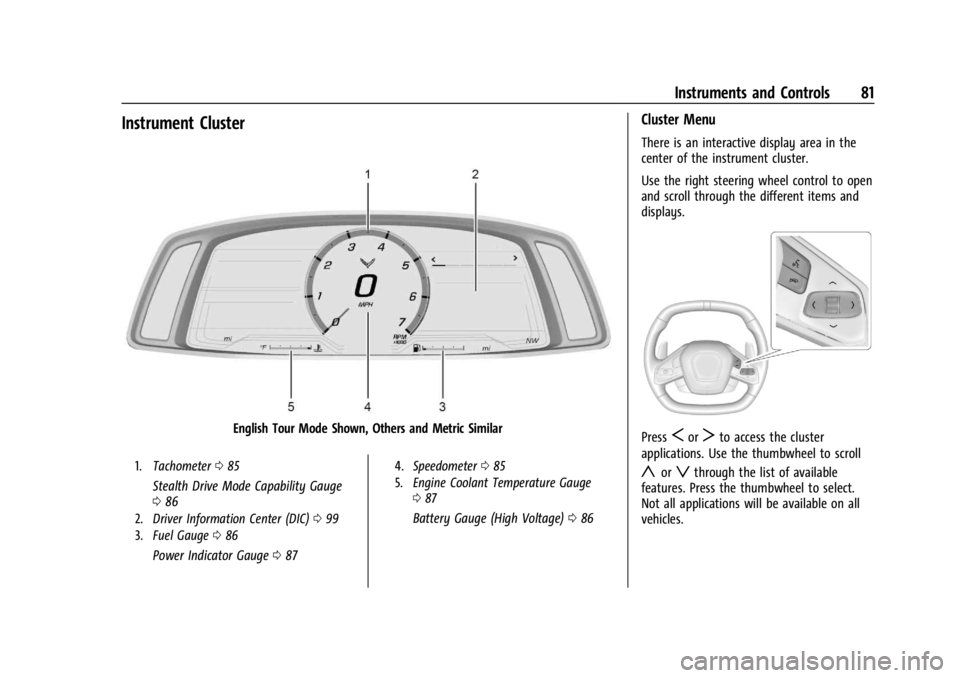
English Tour Mode Shown, Others and Metric Similar
1.Tachometer 085
Stealth Drive Mode Capability Gauge
086
2. Driver Information Center (DIC) 099
3. Fuel Gauge 086
Power Indicator Gauge 087
4. Speedometer 085
5. Engine Coolant Temperature Gauge
087
Battery Gauge (High Voltage) 086
Cluster Menu
There is an interactive display area in the
center of the instrument cluster.
Use the right steering wheel control to open
and scroll through the different items and
displays.
PressSorTto access the cluster
applications. Use the thumbwheel to scroll
yorzthrough the list of available
features. Press the thumbwheel to select.
Not all applications will be available on all
vehicles.
Page 83 of 362
Chevrolet Corvette Owner Manual (GMNA-Localizing-U.S./Canada/Mexico-
17272984) - 2024 - CRC - 2/20/23
82 Instruments and Controls
.Trip Computer/Performance/Maintenance:
The selected Driver Information Center
(DIC) displays can be viewed. SeeDriver
Information Center (DIC) 099.
.Audio
.Options
.Simplify
Info Tiles
The following is the list of all possible info
tiles that is shown on the left side of the
speedometer. Depending on the vehicle,
some may not be available. Information
displayed here can be customized from the
Options menu. See “Options”below.
Time & Temperature : Displays the current
time and the current outside air
temperature.
Instant Fuel Economy/Economy Trend :
Displays the current fuel economy in liters
per 100 kilometers (L/100 km) or miles per
gallon (mpg). This number reflects only the
approximate fuel economy and changes
frequently as driving conditions change.
This display cannot be reset. Shows history of the Average Fuel Economy
from the last 100 km (62 mi). Each bar
represents about 5 km (3 mi) of driving.
When driving, the bars shift to reflect the
most recent distance on the right side.
G-force :
Gives the driver an indication of
the vehicle performance in cornering. The
G-force gauge will show as an info tile on
the left side of the cluster, if selected.
Oil Temperature : Shows the current oil
temperature in either degrees Celsius (°C) or
degrees Fahrenheit (°F).
Oil Pressure : Shows the current oil pressure
in either kilopascal (kPa) or in pounds per
square inch (psi).
Battery Voltage : Shows the current 12-Volt
battery voltage.
Transmission Fluid Temperature : Shows the
temperature of the transmission fluid in
either degrees Celsius (°C) or degrees
Fahrenheit (°F).
Tire Status : Shows individual tire pressures
and overall temperature as either Cold, Cool,
Normal, Warm, or Hot. Normal is typical for
normal driving while Warm is typical for
spirited driving. Unknown may be displayed
if tire temperature information is
unavailable. Tire Pressure shows the approximate
pressures of all four tires. Tire pressure is
displayed in either kilopascal (kPa) or in
pounds per square inch (psi). If the pressure
is low, the value for that tire is shown in
amber. See
Tire Pressure Monitor System
0 288 and
Tire Pressure Monitor Operation 0289.
eLSD : If equipped, displays the amount of
rear differential coupling when the Electronic
Limited-Slip Differential (eLSD) is active and
functioning during vehicle operation.
A reading of 1% is an open differential and
100% is locked. It is normal for the value to
make small or large changes due to driving
conditions and driver inputs. See Limited-Slip
Differential 0211.
Wheel Slip : Shows the wheel
slip percentage of the vehicle.
Front Lift : During a driver requested Front
Lift (if equipped), the driver may
"remember" using the
S, or dismiss the
display by pressing the thumbwheel. When
the Front Lift is Raised due to location, the
driver may delete that stored location using
the
S, or dismiss the display by pressing
the thumbwheel.
See Front Lift System 0205.
Page 84 of 362
Chevrolet Corvette Owner Manual (GMNA-Localizing-U.S./Canada/Mexico-
17272984) - 2024 - CRC - 2/20/23
Instruments and Controls 83
Brake Temperature :Shows overall
temperature as either Normal, Warm, Hot,
or Overheated. Normal is typical for normal
driving while Warm is typical for spirited
driving. Unknown may be displayed if tire
temperature information is unavailable.
Lifetime Fuel Economy : Shows the
instantaneous fuel economy over the
lifetime of the vehicle.
Follow Distance : Shows the current follow
time to the vehicle ahead is displayed as a
time value.
Hybrid Battery Temperature : If equipped,
displays the temperature of the high voltage
battery which assists performance of the
vehicle in either degrees Celsius (°C) or
degrees Fahrenheit (°F).
Electric Power : If equipped, shows the
power coming from the high voltage
battery. When the power indicator is green,
battery power is being charged. When the
indicator is amber, the vehicle is using
power to assist.
Hybrid Battery : If equipped, displays the
high voltage battery charge status of the
vehicle. Hybrid Battery states:
.Red
–No eAWD
.Yellow –Electric assist limited
.White –Normal state of charge range
.Blue –Maximum state of charge range
Audio
Use the thumbwheel to scroll through audio
presets.
Options
Use the thumbwheel to scroll through items
in the Options menu.
Display Options
Press the thumbwheel to enter the Display
menu. There are seven instrument cluster
display configurations to choose from. Sport,
Tour, Track, Weather, My Mode, Z-Mode,
and Night. The style of the cluster will
change depending on the theme selected.
Default is linked to Driver mode. Other
display themes can be set.
If in Z-Mode or My Mode then those
displays plus HUD (if equipped) can be set. Night Mode is enabled when the Instrument
Panel Illumination Control is set to the
minimum level. See
Instrument Panel
Illumination Control 0113.
Shuttle Mode and Stealth Mode are enabled
when either are selected in the Driver Mode
Control before the vehicle is turned on. See
Driver Mode Control 0196.
.Sport/Z-Mode: Displays Coolant
Temperature, Fuel Gauge, Compass, Drive
Mode Indicator, Odometer, Speed,
Tachometer, Electronic Transmission
Range, Current Gear, Active Fuel
Management (AFM), Peak Performance,
Performance Shift Lights, Speed Limit, Info
Area, and Interaction Area.
.Tour/Weather/My Mode: Displays Coolant
Temperature, Fuel Gauge, Compass, Drive
Mode Indicator, Odometer, Speed,
Tachometer, Electronic Transmission
Range, Current Gear, Active Fuel
Management (AFM), Peak Performance,
Speed Limit, Info Area, and
Interaction Area.
.Track: Displays Coolant Temperature, Fuel
Gauge, Performance Traction
Management, Drive Mode Indicator,
Page 85 of 362
Chevrolet Corvette Owner Manual (GMNA-Localizing-U.S./Canada/Mexico-
17272984) - 2024 - CRC - 2/20/23
84 Instruments and Controls
Speed, Tachometer, Electronic
Transmission Range, Current Gear, Info
Area, and Interactive Area.
.Night: Displays Coolant Temperature, Fuel
Gauge, and Digital Speed.
.Shuttle: If equipped, displays Battery
Gauge, Power Indicator Gauge, Odometer,
and Digital Speed.
.Stealth: If equipped, displays Battery
Gauge, Fuel Gauge, Electric Capability
Gauge, Odometer, Drive Mode Indicator,
and Digital Speed.
Preset info tiles shown on each layout:
Sport : G-Force, Oil Pressure
G-Force, Hybrid Battery
Track : Oil Pressure, Transmissions Fluid
Temperature, Tire Pressure & Tire
Temperature, Oil Temperature
Hybrid Battery Temperature, Hybrid Battery,
Oil Temperature, Tire Pressure & Tire
Temperature
Tour : Time & Outside Air Temperature, Tire
Pressure & Tire Temperature
Electric Power, Tire Pressure & Tire
Temperature Weather :
Tire Pressure & Tire Temperature,
Oil Temperature
Tire Pressure & Tire Temperature, Hybrid
Battery
Z-Mode : G-Force, Oil Temperature
Hybrid Battery, Electric Power
My Mode : Time & Outside Air
Temperature, Oil Pressure
Electric Power, Oil Pressure
Night : None
Shuttle : None
Stealth : None
Info Titles Selection
Use the thumbwheel to select the items to
be displayed in the display areas. See "Info
Tiles" previously in this section.
If the maximum amount of info tiles has
been selected, all deselected info tiles
appear in an disabled state. If maximum
amount of info tiles is not selected, all info
tiles appear in an normal state and can be
selected. In the default layout, the info tiles
will be inserted from top to bottom. In the
enhanced layout, the info tiles will be inserted from top left to top right to bottom
left to bottom right. Info tiles that are
already occupied will be skipped.
Tachometer
Available in some Drive Modes, press the
thumbwheel while Tachometer is displayed
to enter the Tachometer menu. Choose
Traditional or Numerical by pressing the
thumbwheel while the desired item is
highlighted. A selected mark will be
displayed next to the selected item.
Traditional tachometer shows a linear gauge,
and Numerical tachometer shows shift lights
with numerical RPM.
Units
Press the thumbwheel while Units is
displayed to enter the Units menu. Choose
US or metric units by pressing the
thumbwheel while the desired item is
highlighted. A selected mark will be
displayed next to the selected item.
Tire Pressure
Use the thumbwheel to select the tire
pressure warning thresholds. Choose Light,
Eco, or Max by pressing the thumbwheel