center console CHEVROLET CORVETTE 2024 User Guide
[x] Cancel search | Manufacturer: CHEVROLET, Model Year: 2024, Model line: CORVETTE, Model: CHEVROLET CORVETTE 2024Pages: 362, PDF Size: 6.62 MB
Page 191 of 362
Chevrolet Corvette Owner Manual (GMNA-Localizing-U.S./Canada/Mexico-
17272984) - 2024 - CRC - 2/20/23
190 Driving and Operating
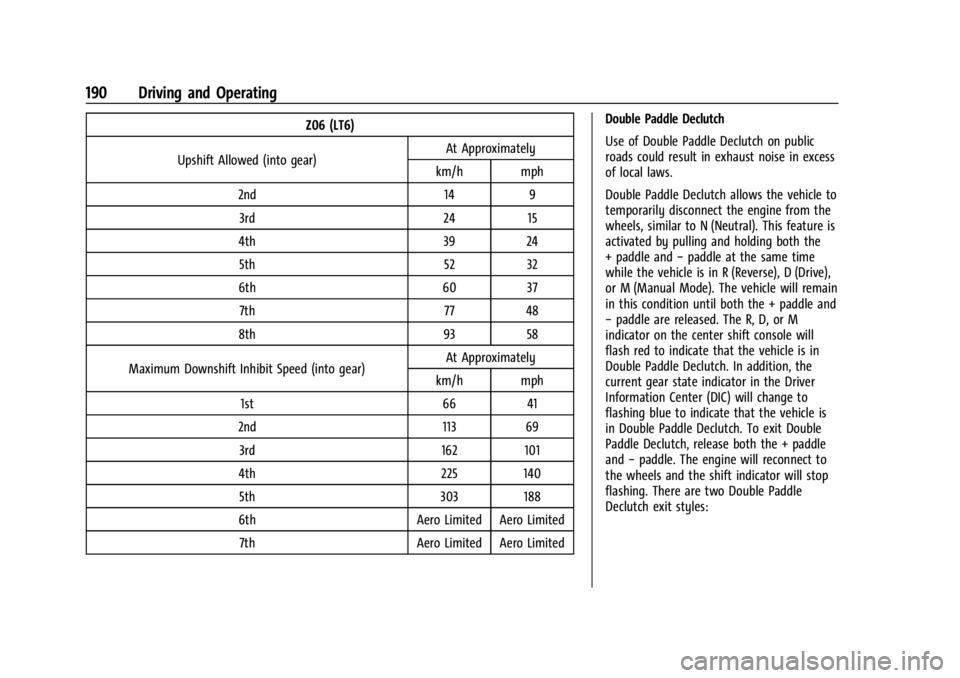
Z06 (LT6)
Upshift Allowed (into gear) At Approximately
km/h mph
2nd 14 9 3rd 24 15
4th 39 24 5th 52 32
6th 60 37 7th 77 48
8th 93 58
Maximum Downshift Inhibit Speed (into gear) At Approximately
km/h mph
1st 66 41
2nd 113 69 3rd 162 101
4th 225 140 5th 303 188
6th Aero Limited Aero Limited 7th Aero Limited Aero Limited Double Paddle Declutch
Use of Double Paddle Declutch on public
roads could result in exhaust noise in excess
of local laws.
Double Paddle Declutch allows the vehicle to
temporarily disconnect the engine from the
wheels, similar to N (Neutral). This feature is
activated by pulling and holding both the
+ paddle and
−paddle at the same time
while the vehicle is in R (Reverse), D (Drive),
or M (Manual Mode). The vehicle will remain
in this condition until both the + paddle and
− paddle are released. The R, D, or M
indicator on the center shift console will
flash red to indicate that the vehicle is in
Double Paddle Declutch. In addition, the
current gear state indicator in the Driver
Information Center (DIC) will change to
flashing blue to indicate that the vehicle is
in Double Paddle Declutch. To exit Double
Paddle Declutch, release both the + paddle
and −paddle. The engine will reconnect to
the wheels and the shift indicator will stop
flashing. There are two Double Paddle
Declutch exit styles:
Page 196 of 362
Chevrolet Corvette Owner Manual (GMNA-Localizing-U.S./Canada/Mexico-
17272984) - 2024 - CRC - 2/20/23
Driving and Operating 195
If cruise control is being used when TCS
begins to limit wheel spin, the cruise control
will automatically disengage. Cruise control
may be reengaged when road conditions
allow. SeeCruise Control 0212.
If the driver disables TCS, cruise control will
disengage. Cruise control will also be
disabled if Performance Traction
Management (PTM) is selected, or if
StabiliTrak is turned off.
Both systems come on automatically when
the vehicle is started and begins to move.
The systems may be heard or felt while
they are operating or while performing
diagnostic checks. This is normal and does
not mean there is a problem with the
vehicle.
It is recommended to leave both systems on
for normal driving conditions, but it may be
necessary to turn TCS off if the vehicle gets
stuck in sand, mud, ice, or snow. See If the
Vehicle Is Stuck 0173 and “Turning the
Systems Off and On” later in this section.
The indicator light for both systems is in the
instrument cluster. This light will:
.Flash when TCS is limiting wheel spin
.Flash when StabiliTrak/ESC is activated
.Flash when ABS is active
.Turn on and stay on when either system
is not working
If either system fails to turn on or to
activate, a message displays in the Driver
Information Center (DIC), and
=comes on
and stays on to indicate that the system is
inactive and is not assisting the driver in
maintaining control. The vehicle is safe to
drive, but driving should be adjusted
accordingly.
If
=comes on and stays on:
1. Stop the vehicle.
2. Turn the engine off and wait 15 seconds.
3. Start the engine. Drive the vehicle. If
=comes on and
stays on, the vehicle may need more time
to diagnose the problem. If the condition
persists, see your dealer.
Turning the Systems Off and On
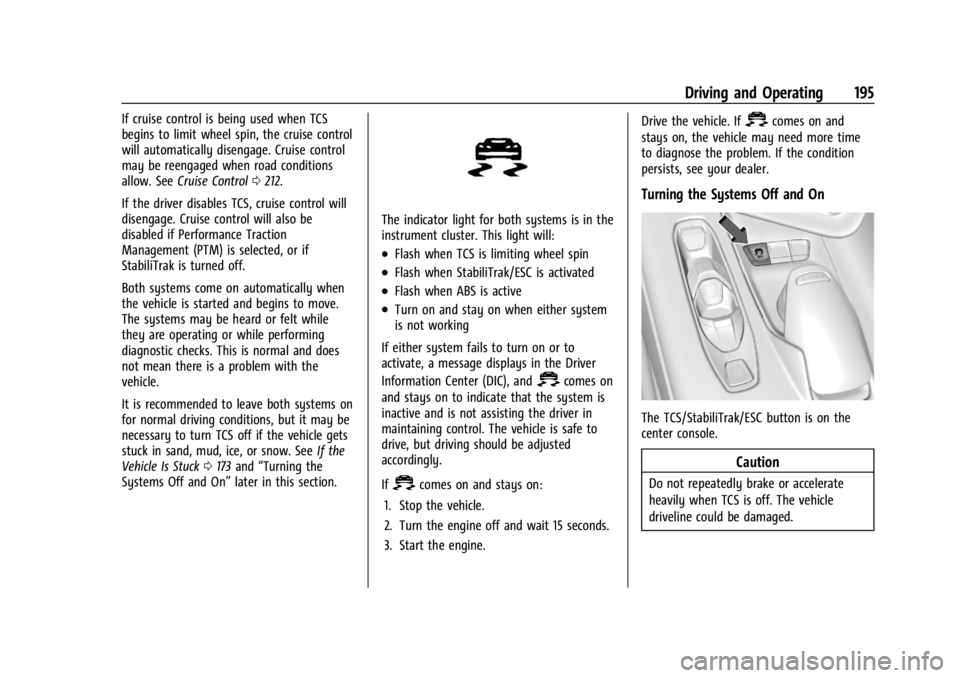
The TCS/StabiliTrak/ESC button is on the
center console.
Caution
Do not repeatedly brake or accelerate
heavily when TCS is off. The vehicle
driveline could be damaged.
Page 198 of 362
Chevrolet Corvette Owner Manual (GMNA-Localizing-U.S./Canada/Mexico-
17272984) - 2024 - CRC - 2/20/23
Driving and Operating 197
When each mode is selected, an indicator
will come on in the instrument cluster and
stay on.
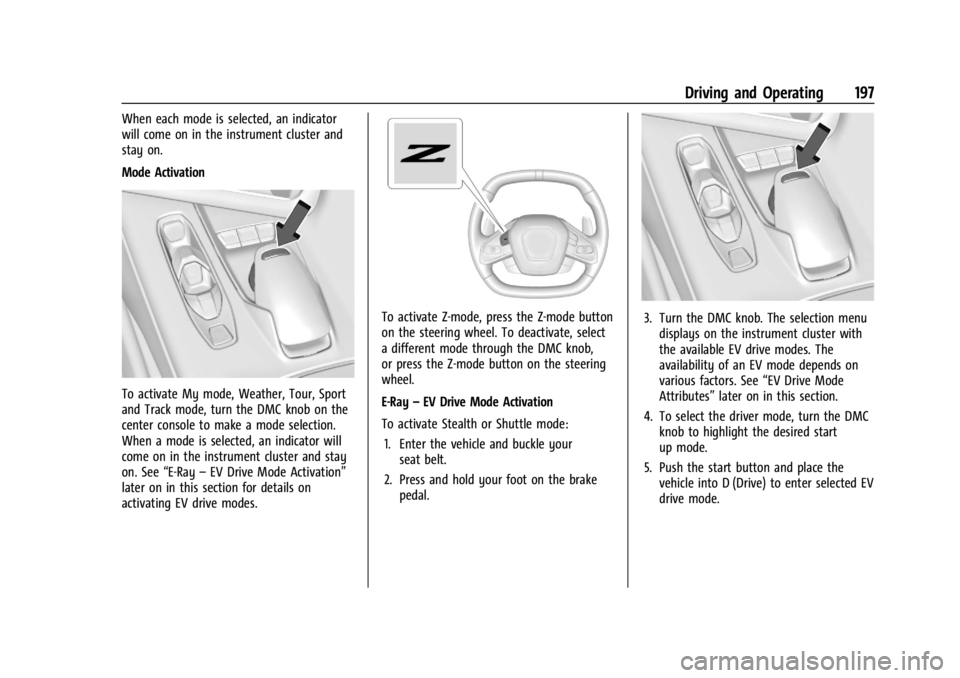
Mode Activation
To activate My mode, Weather, Tour, Sport
and Track mode, turn the DMC knob on the
center console to make a mode selection.
When a mode is selected, an indicator will
come on in the instrument cluster and stay
on. See“E-Ray–EV Drive Mode Activation”
later on in this section for details on
activating EV drive modes.
To activate Z-mode, press the Z-mode button
on the steering wheel. To deactivate, select
a different mode through the DMC knob,
or press the Z-mode button on the steering
wheel.
E-Ray –EV Drive Mode Activation
To activate Stealth or Shuttle mode: 1. Enter the vehicle and buckle your seat belt.
2. Press and hold your foot on the brake pedal.3. Turn the DMC knob. The selection menudisplays on the instrument cluster with
the available EV drive modes. The
availability of an EV mode depends on
various factors. See “EV Drive Mode
Attributes” later on in this section.
4. To select the driver mode, turn the DMC knob to highlight the desired start
up mode.
5. Push the start button and place the vehicle into D (Drive) to enter selected EV
drive mode.
Page 201 of 362
Chevrolet Corvette Owner Manual (GMNA-Localizing-U.S./Canada/Mexico-
17272984) - 2024 - CRC - 2/20/23
200 Driving and Operating
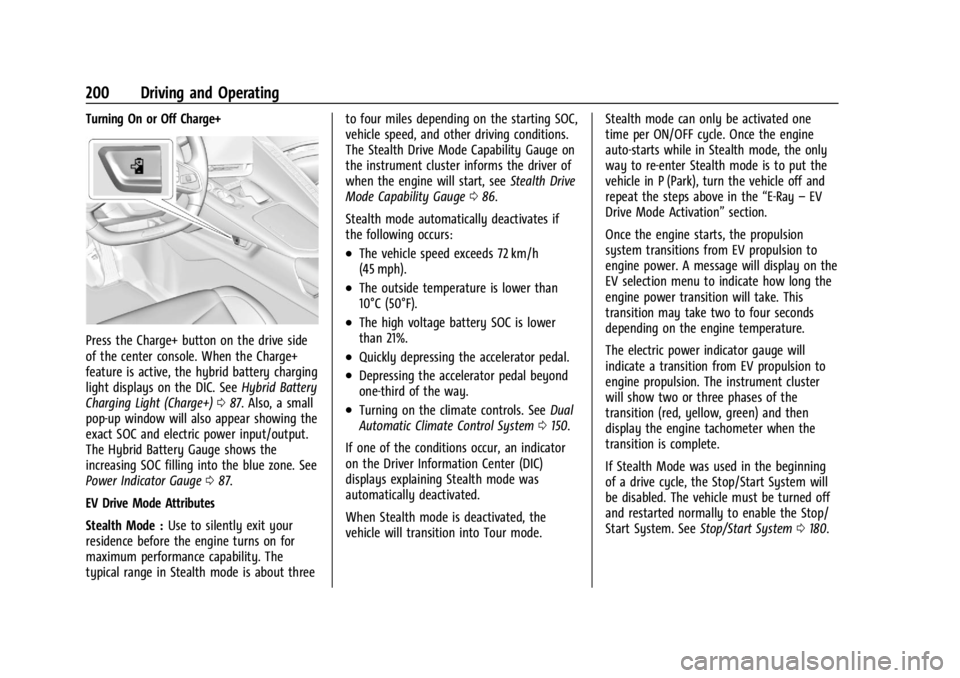
Turning On or Off Charge+
Press the Charge+ button on the drive side
of the center console. When the Charge+
feature is active, the hybrid battery charging
light displays on the DIC. SeeHybrid Battery
Charging Light (Charge+) 087. Also, a small
pop-up window will also appear showing the
exact SOC and electric power input/output.
The Hybrid Battery Gauge shows the
increasing SOC filling into the blue zone. See
Power Indicator Gauge 087.
EV Drive Mode Attributes
Stealth Mode : Use to silently exit your
residence before the engine turns on for
maximum performance capability. The
typical range in Stealth mode is about three to four miles depending on the starting SOC,
vehicle speed, and other driving conditions.
The Stealth Drive Mode Capability Gauge on
the instrument cluster informs the driver of
when the engine will start, see
Stealth Drive
Mode Capability Gauge 086.
Stealth mode automatically deactivates if
the following occurs:
.The vehicle speed exceeds 72 km/h
(45 mph).
.The outside temperature is lower than
10°C (50°F).
.The high voltage battery SOC is lower
than 21%.
.Quickly depressing the accelerator pedal.
.Depressing the accelerator pedal beyond
one-third of the way.
.Turning on the climate controls. See Dual
Automatic Climate Control System 0150.
If one of the conditions occur, an indicator
on the Driver Information Center (DIC)
displays explaining Stealth mode was
automatically deactivated.
When Stealth mode is deactivated, the
vehicle will transition into Tour mode. Stealth mode can only be activated one
time per ON/OFF cycle. Once the engine
auto-starts while in Stealth mode, the only
way to re-enter Stealth mode is to put the
vehicle in P (Park), turn the vehicle off and
repeat the steps above in the
“E-Ray–EV
Drive Mode Activation” section.
Once the engine starts, the propulsion
system transitions from EV propulsion to
engine power. A message will display on the
EV selection menu to indicate how long the
engine power transition will take. This
transition may take two to four seconds
depending on the engine temperature.
The electric power indicator gauge will
indicate a transition from EV propulsion to
engine propulsion. The instrument cluster
will show two or three phases of the
transition (red, yellow, green) and then
display the engine tachometer when the
transition is complete.
If Stealth Mode was used in the beginning
of a drive cycle, the Stop/Start System will
be disabled. The vehicle must be turned off
and restarted normally to enable the Stop/
Start System. See Stop/Start System 0180.
Page 206 of 362
Chevrolet Corvette Owner Manual (GMNA-Localizing-U.S./Canada/Mexico-
17272984) - 2024 - CRC - 2/20/23
Driving and Operating 205
To confirm, and enter PTM, press the
Z-Mode button again. The PTM state can
now be modified using the mode knob or
changing the Z-Mode setting in the center
stack. Both the Z-Mode and PTM indicators
will be displayed.
To cancel, press the center dismiss button
on the steering wheel (Z-Mode remains
active). Selecting PTM states may modify
other Z-Mode customization options.
.Off, Wet, Dry, Sport, Race 1, Race 2
Front Lift System
A two-position lift actuator (one per damper)
with 35 mm (1.5 in) of stroke will
hydraulically raise the front of the vehicle to
provide approximately 50 mm (2 in) of
increased clearance in approximately
three seconds (height and time will vary by
vehicle). The Front Lift System will allow
you to lift the front of the vehicle to enter a
driveway, driving over curbs, speed bumps
or onto ramps or a trailer.
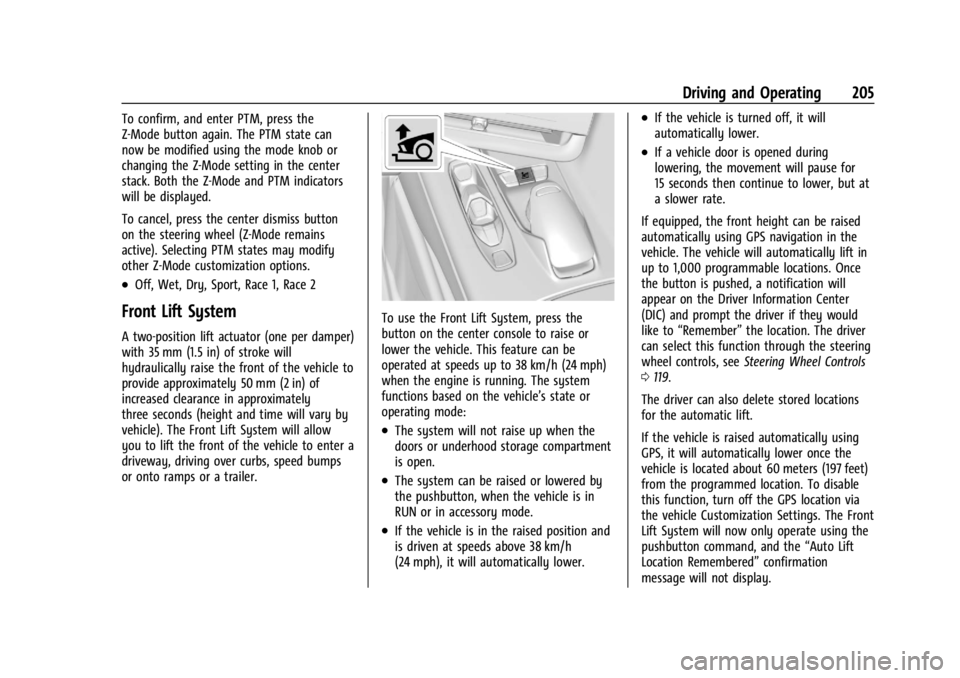
To use the Front Lift System, press the
button on the center console to raise or
lower the vehicle. This feature can be
operated at speeds up to 38 km/h (24 mph)
when the engine is running. The system
functions based on the vehicle’s state or
operating mode:
.The system will not raise up when the
doors or underhood storage compartment
is open.
.The system can be raised or lowered by
the pushbutton, when the vehicle is in
RUN or in accessory mode.
.If the vehicle is in the raised position and
is driven at speeds above 38 km/h
(24 mph), it will automatically lower.
.If the vehicle is turned off, it will
automatically lower.
.If a vehicle door is opened during
lowering, the movement will pause for
15 seconds then continue to lower, but at
a slower rate.
If equipped, the front height can be raised
automatically using GPS navigation in the
vehicle. The vehicle will automatically lift in
up to 1,000 programmable locations. Once
the button is pushed, a notification will
appear on the Driver Information Center
(DIC) and prompt the driver if they would
like to “Remember” the location. The driver
can select this function through the steering
wheel controls, see Steering Wheel Controls
0 119.
The driver can also delete stored locations
for the automatic lift.
If the vehicle is raised automatically using
GPS, it will automatically lower once the
vehicle is located about 60 meters (197 feet)
from the programmed location. To disable
this function, turn off the GPS location via
the vehicle Customization Settings. The Front
Lift System will now only operate using the
pushbutton command, and the “Auto Lift
Location Remembered” confirmation
message will not display.
Page 207 of 362
Chevrolet Corvette Owner Manual (GMNA-Localizing-U.S./Canada/Mexico-
17272984) - 2024 - CRC - 2/20/23
206 Driving and Operating
The Front Lift System can also be used in
accessory mode. Put the vehicle in accessory
mode and press and hold the button on the
center console for 10 consecutive seconds to
automatically raise the vehicle.
The Driver Information Center (DIC) may
display the message“Lift System
Unavailable” if:
.any doors are ajar
.the hood is open
.the vehicle is moving over 38 km/h
(24 mph)
.too many lift requests within a short
period
The Front Lift System should not be used to
service the vehicle. Do not place anything or
body parts under the vehicle while lifted.
See Recommended Fluids and Lubricants
0 320.
Performance Driving
If equipped, Competitive Driving mode,
Performance Traction Management (PTM),
and Launch Control are systems designed to
allow increased performance while
accelerating and/or cornering. This is
accomplished by regulating and optimizing
the engine, brakes, and suspension performance. These modes are for use at a
closed course race track and are not
intended for use on public roads. They will
not compensate for driver inexperience or
lack of familiarity with a race track.
Drivers who prefer to allow the system to
have more control of the engine, brakes,
and suspension are advised to turn on the
normal traction control and StabiliTrak/
Electronic Stability Control (ESC) systems on.
If equipped with E-Ray, there is a
Performance app on the infotainment screen
that shows the vehicle electric and engine
power/torque. See
“E-Ray Performance App”
later in this section for more information.
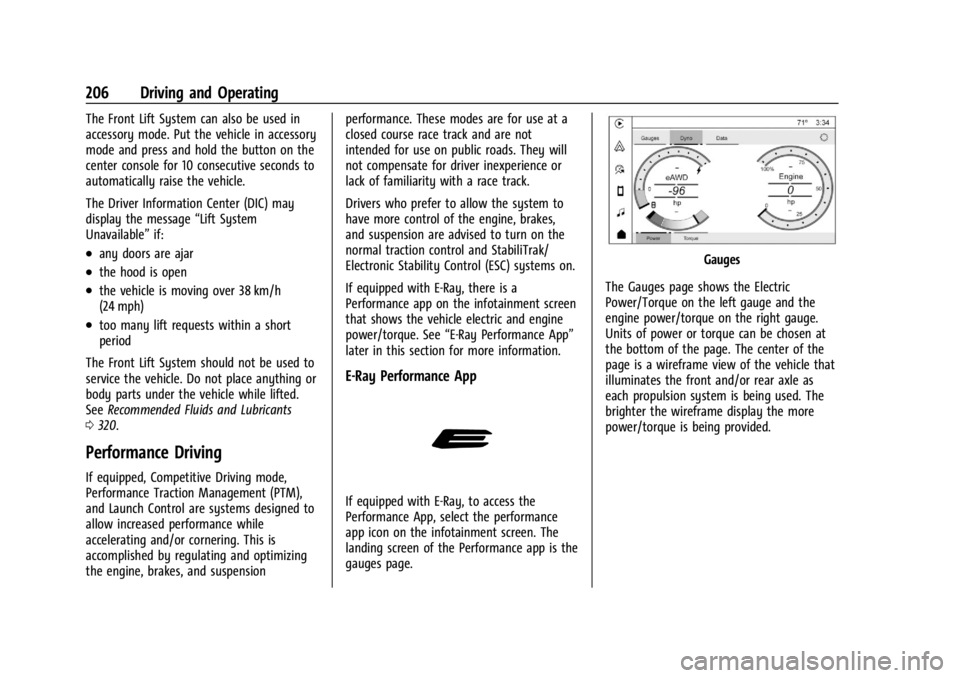
E-Ray Performance App
If equipped with E-Ray, to access the
Performance App, select the performance
app icon on the infotainment screen. The
landing screen of the Performance app is the
gauges page.
Gauges
The Gauges page shows the Electric
Power/Torque on the left gauge and the
engine power/torque on the right gauge.
Units of power or torque can be chosen at
the bottom of the page. The center of the
page is a wireframe view of the vehicle that
illuminates the front and/or rear axle as
each propulsion system is being used. The
brighter the wireframe display the more
power/torque is being provided.
Page 209 of 362
Chevrolet Corvette Owner Manual (GMNA-Localizing-U.S./Canada/Mexico-
17272984) - 2024 - CRC - 2/20/23
208 Driving and Operating
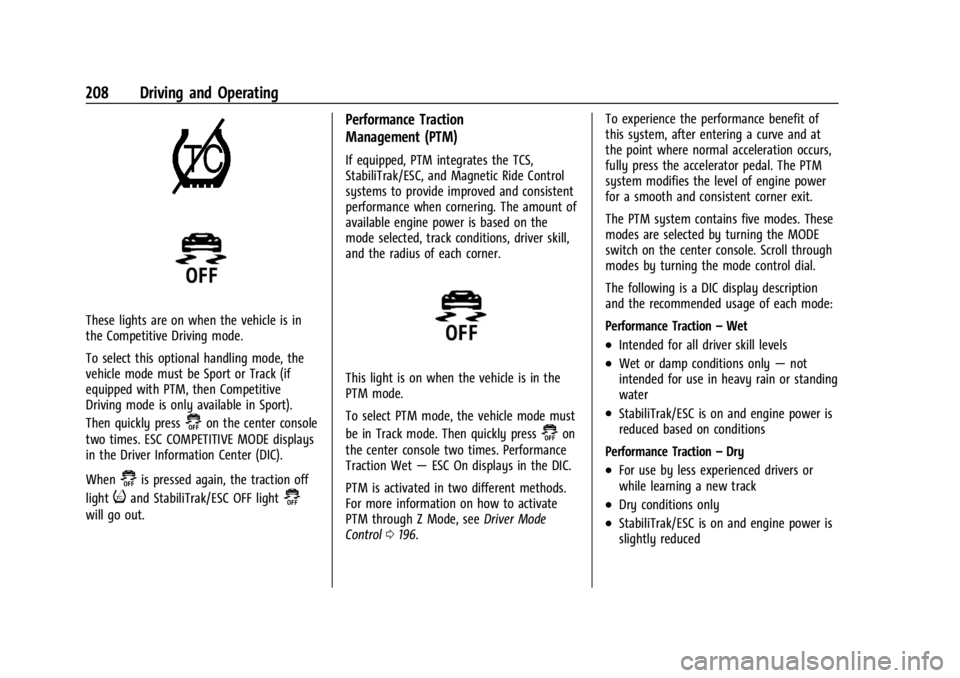
These lights are on when the vehicle is in
the Competitive Driving mode.
To select this optional handling mode, the
vehicle mode must be Sport or Track (if
equipped with PTM, then Competitive
Driving mode is only available in Sport).
Then quickly press
@on the center console
two times. ESC COMPETITIVE MODE displays
in the Driver Information Center (DIC).
When
@is pressed again, the traction off
light
iand StabiliTrak/ESC OFF light@
will go out.
Performance Traction
Management (PTM)
If equipped, PTM integrates the TCS,
StabiliTrak/ESC, and Magnetic Ride Control
systems to provide improved and consistent
performance when cornering. The amount of
available engine power is based on the
mode selected, track conditions, driver skill,
and the radius of each corner.
This light is on when the vehicle is in the
PTM mode.
To select PTM mode, the vehicle mode must
be in Track mode. Then quickly press
@on
the center console two times. Performance
Traction Wet —ESC On displays in the DIC.
PTM is activated in two different methods.
For more information on how to activate
PTM through Z Mode, see Driver Mode
Control 0196. To experience the performance benefit of
this system, after entering a curve and at
the point where normal acceleration occurs,
fully press the accelerator pedal. The PTM
system modifies the level of engine power
for a smooth and consistent corner exit.
The PTM system contains five modes. These
modes are selected by turning the MODE
switch on the center console. Scroll through
modes by turning the mode control dial.
The following is a DIC display description
and the recommended usage of each mode:
Performance Traction
–Wet
.Intended for all driver skill levels
.Wet or damp conditions only —not
intended for use in heavy rain or standing
water
.StabiliTrak/ESC is on and engine power is
reduced based on conditions
Performance Traction –Dry
.For use by less experienced drivers or
while learning a new track
.Dry conditions only
.StabiliTrak/ESC is on and engine power is
slightly reduced
Page 218 of 362
Chevrolet Corvette Owner Manual (GMNA-Localizing-U.S./Canada/Mexico-
17272984) - 2024 - CRC - 2/20/23
Driving and Operating 217
.The back of the vehicle is damaged. The
position and mounting angle of the
camera can change or the camera can be
affected. Be sure to have the camera and
its position and mounting angle checked
at your dealer.
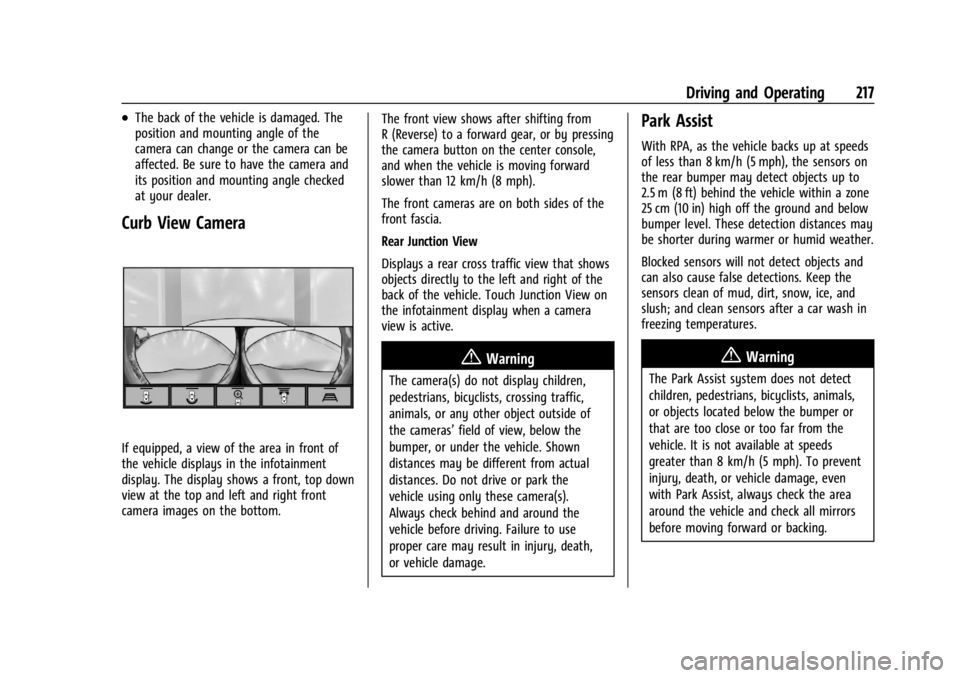
Curb View Camera
If equipped, a view of the area in front of
the vehicle displays in the infotainment
display. The display shows a front, top down
view at the top and left and right front
camera images on the bottom.The front view shows after shifting from
R (Reverse) to a forward gear, or by pressing
the camera button on the center console,
and when the vehicle is moving forward
slower than 12 km/h (8 mph).
The front cameras are on both sides of the
front fascia.
Rear Junction View
Displays a rear cross traffic view that shows
objects directly to the left and right of the
back of the vehicle. Touch Junction View on
the infotainment display when a camera
view is active.
{Warning
The camera(s) do not display children,
pedestrians, bicyclists, crossing traffic,
animals, or any other object outside of
the cameras’
field of view, below the
bumper, or under the vehicle. Shown
distances may be different from actual
distances. Do not drive or park the
vehicle using only these camera(s).
Always check behind and around the
vehicle before driving. Failure to use
proper care may result in injury, death,
or vehicle damage.
Park Assist
With RPA, as the vehicle backs up at speeds
of less than 8 km/h (5 mph), the sensors on
the rear bumper may detect objects up to
2.5 m (8 ft) behind the vehicle within a zone
25 cm (10 in) high off the ground and below
bumper level. These detection distances may
be shorter during warmer or humid weather.
Blocked sensors will not detect objects and
can also cause false detections. Keep the
sensors clean of mud, dirt, snow, ice, and
slush; and clean sensors after a car wash in
freezing temperatures.
{Warning
The Park Assist system does not detect
children, pedestrians, bicyclists, animals,
or objects located below the bumper or
that are too close or too far from the
vehicle. It is not available at speeds
greater than 8 km/h (5 mph). To prevent
injury, death, or vehicle damage, even
with Park Assist, always check the area
around the vehicle and check all mirrors
before moving forward or backing.
Page 351 of 362

Chevrolet Corvette Owner Manual (GMNA-Localizing-U.S./Canada/Mexico-
17272984) - 2024 - CRC - 2/20/23
350 Index
Assistance SystemsAdvanced . . . . . . . . . . . . . . . . . . . . . . . . . . . . . . 214
Automatic Emergency
Braking (AEB) . . . . . . . . . . . . . . . . . . . . . . . . 220
Blind Zone Alert (SBZA) . . . . . . . . . . . . . . . . 223
Curb View Camera . . . . . . . . . . . . . . . . . . . . . . 217
Driving . . . . . . . . . . . . . . . . . . . . . . . . . . . . . . . . 218
Forward Collision Alert (FCA) System . . . . . . . . . . . . . . . . . . . . . . . . . . . . . . 218
Front Pedestrian Braking (FPB) . . . . . . . . . 221
Lane Keep Assist (LKA) . . . . . . . . . . . . . . . . . 225
Parking . . . . . . . . . . . . . . . . . . . . . . . . . . . . . . . . . 217
Parking and Backing . . . . . . . . . . . . . . . . . . . 215
Rear Cross Traffic Alert (RCTA) . . . . . . . . . 218
Rear Vision Camera (RVC) . . . . . . . . . . . . . . 215
Audio
Bluetooth . . . . . . . . . . . . . . . . . . . . . . . . . . . . . . 125
Auto Stop Indicator . . . . . . . . . . . . . . . . . . . . . . . . . . . . . . . . 98
Automatic Dimming Mirrors . . . . . . . . . . . . . . . . . . . . . . . 26
Door Locks . . . . . . . . . . . . . . . . . . . . . . . . . . . . . . 16
Emergency Braking (AEB) Disabled
Light . . . . . . . . . . . . . . . . . . . . . . . . . . . . . . . . . . 94
Headlamp System . . . . . . . . . . . . . . . . . . . . . . 111
Auxiliary Jack . . . . . . . . . . . . . . . . . . . . . . . . . . . . . . . . . . . . 125
Avoiding Untrusted Media Devices . . . . . . . .124B
Battery Exterior Lighting Battery Saver . . . . . . . . . 115
Gauge . . . . . . . . . . . . . . . . . . . . . . . . . . . . . . . . . . 86
Power Protection . . . . . . . . . . . . . . . . . . . . . . . 114
Battery - North America . . . . . . . . . . . . 266, 299
Blade Replacement, Wiper . . . . . . . . . . . . . . . 270
Bluetooth Audio . . . . . . . . . . . . . . . . . . . . . . . . . . . . . . . . . . 125
Overview . . . . . . . . . . . . . . . . . . . . . . . . . . . . . . 136
Brake Fluid . . . . . . . . . . . . . . . . . . . . . . . . . . . . . . . . . . . 265
Pad Life System . . . . . . . . . . . . . . . . . . . . . . . 264
System Warning Light . . . . . . . . . . . . . . . . . . 92
Brake Pad Life System . . . . . . . . . . . . . . . . . . . 264
Brakes . . . . . . . . . . . . . . . . . . . . . . . . . . . . . . . . . . . 262 Antilock . . . . . . . . . . . . . . . . . . . . . . . . . . . . . . . . 192
Brake Assist . . . . . . . . . . . . . . . . . . . . . . . . . . . 193
Electric Brake Boost . . . . . . . . . . . . . . . . . . . . 192
Electric Parking Brake . . . . . . . . . . . . . . . . . . 192
Regenerative Braking . . . . . . . . . . . . . . . . . . 194
Braking . . . . . . . . . . . . . . . . . . . . . . . . . . . . . . . . . . . 157 Automatic Emergency (AEB) . . . . . . . . . . . 220
Front Pedestrian (FPB) System . . . . . . . . . 221
Break-In, New Vehicle . . . . . . . . . . . . . . . . . . . . . 177
Buckle To Drive . . . . . . . . . . . . . . . . . . . . . . . . . . . 46
Bulb Replacement Headlamp Aiming . . . . . . . . . . . . . . . . . . . . . . . 271 Buying New Tires . . . . . . . . . . . . . . . . . . . . . . . . 294C
Calibration
Compass . . . . . . . . . . . . . . . . . . . . . . . . . . . . . . . . 76
California Perchlorate Materials Requirements . . . 232
California Proposition 65 Warning . . . . . 1, 299
Camera Curb View . . . . . . . . . . . . . . . . . . . . . . . . . . . . . . 217
Rear Vision (RVC) . . . . . . . . . . . . . . . . . . . . . . 215
Canadian Vehicle Owners . . . . . . . . . . . . . . . . . . .2
Capacities and Specifications . . . . . . . . . . . . . 325
Carbon Monoxide
Engine Exhaust . . . . . . . . . . . . . . . . . . . . . . . . 183
Hatch . . . . . . . . . . . . . . . . . . . . . . . . . . . . . . . . . . . 20
Winter Driving . . . . . . . . . . . . . . . . . . . . . . . . . . 172
Cargo Tie-Downs . . . . . . . . . . . . . . . . . . . . . . . . . . . . . . 73
Caution, Danger, and Warning . . . . . . . . . . . . . .2
Center Console Storage . . . . . . . . . . . . . . . . . . . . . . . . . . . . . . . . . 73
Chains, Tire . . . . . . . . . . . . . . . . . . . . . . . . . . . . . . 298
Charging System Light . . . . . . . . . . . . . . . . . . . . . . . . . . . 90
Wireless . . . . . . . . . . . . . . . . . . . . . . . . . . . . . . . . 78
Check Engine Light (Malfunction Indicator) . . . . . . . . . . . . . . . . . . . . . . . . . . . . . . . 90
Page 359 of 362

Chevrolet Corvette Owner Manual (GMNA-Localizing-U.S./Canada/Mexico-
17272984) - 2024 - CRC - 2/20/23
358 Index
Security (cont'd)Vehicle . . . . . . . . . . . . . . . . . . . . . . . . . . . . . . . . . 22
Vehicle Alarm . . . . . . . . . . . . . . . . . . . . . . . . . . . 22
Service . . . . . . . . . . . . . . . . . . . . . . . . . . . . . . . . . . . .154 Accessories and Modifications . . . . . . . . . 232
Doing Your Own Work . . . . . . . . . . . . . . . . . 234
Electric Parking Brake Light . . . . . . . . . . . . . 92
Maintenance Records . . . . . . . . . . . . . . . . . . 323
Maintenance, General Information . . . . . 315
Parts Identification . . . . . . . . . . . . . . . . . . . . . 324
Scheduling Appointments . . . . . . . . . . . . . . 334
Services
Special Application . . . . . . . . . . . . . . . . . . . . . 319
Servicing the Airbag . . . . . . . . . . . . . . . . . . . . . . 60
Settings . . . . . . . . . . . . . . . . . . . . . . . . . . . . . . . . . . .142
Shifting Into Park . . . . . . . . . . . . . . . . . . . . . . . . . . . . . . . 181
Out of Park . . . . . . . . . . . . . . . . . . . . . . . . . . . . 182
Signals, Turn and Lane-Change . . . . . . . . . . . . 112
Software Updates . . . . . . . . . . . . . . . . . . . . . . . . . 122
Special Application Services . . . . . . . . . . . . . . 319
Specifications and Capacities . . . . . . . . . . . . . 325
Speedometer . . . . . . . . . . . . . . . . . . . . . . . . . . . . . 85
Start Assist, Hill . . . . . . . . . . . . . . . . . . . . . . . . . . 194
Start Vehicle, Remote . . . . . . . . . . . . . . . . . . . . . . 12
Starting the Engine . . . . . . . . . . . . . . . . . . . . . . 179
Stealth Drive Mode Capability Gauge . . . . . 86
Steering . . . . . . . . . . . . . . . . . . . . . . . . . . . . . . . . . .158 Steering (cont'd)
Heated Wheel . . . . . . . . . . . . . . . . . . . . . . . . . . 75
Wheel Adjustment . . . . . . . . . . . . . . . . . . . . . . 75
Wheel Controls . . . . . . . . . . . . . . . . . . . . . . . . . 119
Stop/Start System . . . . . . . . . . . . . . . . . . . . . . . 180
Storage Center Console . . . . . . . . . . . . . . . . . . . . . . . . . 73
Compartments . . . . . . . . . . . . . . . . . . . . . . . . . . . 71
Convenience Net . . . . . . . . . . . . . . . . . . . . . . . . 73
Cupholders . . . . . . . . . . . . . . . . . . . . . . . . . . . . . . 71
Glove Box . . . . . . . . . . . . . . . . . . . . . . . . . . . . . . . 71
Rear . . . . . . . . . . . . . . . . . . . . . . . . . . . . . . . . . . . . 72
Vehicle . . . . . . . . . . . . . . . . . . . . . . . . . . . . . . . . 234
Storage Areas Underhood . . . . . . . . . . . . . . . . . . . . . . . . . . . . . . 71
Struts
Gas . . . . . . . . . . . . . . . . . . . . . . . . . . . . . . . . . . . . 270
Stuck Vehicle . . . . . . . . . . . . . . . . . . . . . . . . . . . . . 173
Summer Tires . . . . . . . . . . . . . . . . . . . . . . . . . . . . 282
Sun Visors . . . . . . . . . . . . . . . . . . . . . . . . . . . . . . . . . 31
Symbols . . . . . . . . . . . . . . . . . . . . . . . . . . . . . . . . . . . .3 Navigation . . . . . . . . . . . . . . . . . . . . . . . . . . . . . 126
System Airbag . . . . . . . . . . . . . . . . . . . . . . . . . . . . . . . . . . 53
Brake Pad Life . . . . . . . . . . . . . . . . . . . . . . . . . 264
Engine Air Filter Life . . . . . . . . . . . . . . . . . . . 254
Front Lift . . . . . . . . . . . . . . . . . . . . . . . . . . . . . . 205
Global Positioning . . . . . . . . . . . . . . . . . . . . . 128 System (cont'd)
Infotainment . . . . . . . . . . . . . . . . . . . . . . . . . . . 340
T
Tachometer . . . . . . . . . . . . . . . . . . . . . . . . . . . . . . . 85
Teen Driver . . . . . . . . . . . . . . . . . . . . . . . . . . . . . . 144
Text Telephone (TTY) Users . . . . . . . . . . . . . . . 331
Theft-Deterrent Systems . . . . . . . . . . . . . . . . . . 24
Immobilizer . . . . . . . . . . . . . . . . . . . . . . . . . . . . . 23
Time . . . . . . . . . . . . . . . . . . . . . . . . . . . . . . . . . . . . . . 76
Tires . . . . . . . . . . . . . . . . . . . . . . . . . . . . . . . . . . . . . 279 All-Season . . . . . . . . . . . . . . . . . . . . . . . . . . . . . 280
Buying New Tires . . . . . . . . . . . . . . . . . . . . . . 294
Chains . . . . . . . . . . . . . . . . . . . . . . . . . . . . . . . . . 298
Competition Oriented . . . . . . . . . . . . . . . . . . 281
Designations . . . . . . . . . . . . . . . . . . . . . . . . . . . 283
Different Size . . . . . . . . . . . . . . . . . . . . . . . . . . 295
If a Tire Goes Flat . . . . . . . . . . . . . . . . . . . . . 298
Inspection . . . . . . . . . . . . . . . . . . . . . . . . . . . . . 291
Lifting the Vehicle . . . . . . . . . . . . . . . . . . . . . 232
Low-Profile . . . . . . . . . . . . . . . . . . . . . . . . . . . . . 281
Pressure . . . . . . . . . . . . . . . . . . . . . . . . . . 286, 287
Pressure Light . . . . . . . . . . . . . . . . . . . . . . . . . . 97
Pressure Monitor Operation . . . . . . . . . . . 289
Pressure Monitor System . . . . . . . . . . . . . . 288
Rotation . . . . . . . . . . . . . . . . . . . . . . . . . . . . . . . 292
Run-Flat . . . . . . . . . . . . . . . . . . . . . . . . . . . . . . . . 280
Sidewall Labeling . . . . . . . . . . . . . . . . . . . . . . 282