change wheel CHEVROLET CORVETTE 2024 User Guide
[x] Cancel search | Manufacturer: CHEVROLET, Model Year: 2024, Model line: CORVETTE, Model: CHEVROLET CORVETTE 2024Pages: 362, PDF Size: 6.62 MB
Page 141 of 362
Chevrolet Corvette Owner Manual (GMNA-Localizing-U.S./Canada/Mexico-
17272984) - 2024 - CRC - 2/20/23
140 Infotainment System
.Touch Answer on the infotainment
display.
Declining a Call
There are two ways to decline a call:
.Presscon the steering wheel controls.
.Touch Decline on the infotainment
display.
Call Waiting
Call waiting must be supported on the
Bluetooth cell phone and enabled by the
wireless service carrier to work.
Accepting a Call
Press
gto answer, then touch Switch on
the infotainment display.
Declining a Call
Press
cto decline, then touch Decline on
the infotainment display.
Switching Between Calls (Call Waiting
Calls Only)
To switch between calls, touch Phone on the
Home Page to display Call View. While in
Call View, touch the call information of the
call on hold to change calls.
Ending a Call
.Presscon the steering wheel controls.
.Touch#on the infotainment display,
next to a call, to end only that call.
Dual Tone Multi-Frequency (DTMF) Tones
The in-vehicle Bluetooth system can send
numbers during a call. This is used when
calling a menu-driven phone system. Use the
Keypad to enter the number.
Apple CarPlay and Android Auto
If equipped, Android Auto and/or Apple
CarPlay capability may be available through
a compatible smartphone. If available, the
Android Auto and Apple CarPlay icons will
change from gray to color on the Home
Page of the infotainment display.
To use Android Auto and/or Apple CarPlay:
For Wired Phone Projection
1. Download the Android Auto app to your smartphone from the Google Play store
for phones running Android 9 and below.
There is no app required for Apple
CarPlay. 2. Connect your Android phone or Apple
iPhone by using the factory-provided
phone USB cable and plugging into a
USB data port. For best performance, it is
highly recommended to use the device’s
factory-provided USB cable, which should
be replaced after significant wear to
maintain connection quality. Aftermarket
or third-party cables may not work.
3. When the phone is first connected to activate Apple CarPlay or Android Auto,
accept the terms and conditions on both
the infotainment system and the phone.
4. Follow the instructions on the phone.
The Android Auto and Apple CarPlay icons
on the Home Page will illuminate depending
on the smartphone. Android Auto and/or
Apple CarPlay may automatically launch the
next time the USB is connected. If not,
touch the Android Auto or Apple CarPlay
icon on the Home Page to launch.
Press
{on the center stack to return to the
Home Page.
For Wireless Phone Projection
Verify your phone is wireless compatible by
visiting the Android Auto or Apple CarPlay
support page.
Page 144 of 362
Chevrolet Corvette Owner Manual (GMNA-Localizing-U.S./Canada/Mexico-
17272984) - 2024 - CRC - 2/20/23
Infotainment System 143
Apps and Permissions
Shows a list of installed apps and the
permissions used.
Date / Time
Allows setting of the clock.
Display
Allows adjustment of the infotainment
display.
Sounds
Allows adjustment of the infotainment
system sounds.
Users
Modifies the infotainment system’s users.
Accounts
Allows adding or adjusting of the user
accounts.
Privacy
The menu may contain the following:
Location Services
Touch to view the Location Services screen.GM Privacy Statement
Touch to view the GM Privacy Statement
screen.
App permissions
Touch to view the Permission manager
screen.
Data Sharing with Google
Touch to manage data you share with
Google.
Google legal
Touch to view the Google legal screen.
Storage
This menu shows the storage info on the
infotainment system.
Security
This menu allows adjustment of the
infotainment security settings.
System
The menu may contain the following:
Language
This will set the display language used on
the infotainment display.Keyboard & speech
Touch to change keyboard and speech
settings.
Reset Options
Touch to change reset settings.
Quick Startup
This allows your infotainment system to
quickly resume its last session.
While the vehicle is in park, press and hold
the mute/end call button on the steering
wheel for 15 seconds to reboot the
infotainment system.
TTY Mode
Touch to turn off or on.
About
Touch to view the infotainment system
software information.
Legal Information
Touch to view legal and license information.Updates
This menu allows adjustment of the vehicle
update settings.
Page 153 of 362
Chevrolet Corvette Owner Manual (GMNA-Localizing-U.S./Canada/Mexico-
17272984) - 2024 - CRC - 2/20/23
152 Climate Controls
To change the current mode, select one or
more of the following:
Y:Air is directed to the A/C outlets.
[:Air is directed to the floor outlets,
with some air directed to the windshield,
and side window outlets.
z: Air is directed to the windshield and
side window outlets.
0MAX : Air is directed to the windshield
and the fan runs at a higher speed if not
already above a medium fan speed. This
mode overrides the previous mode selected
and clears fog or frost from the windshield
more quickly. When the control is pressed
again, the system returns to the previous
mode setting and fan speed.
For best results, clear all snow and ice from
the windshield before defrosting.
@: Press to turn on recirculation. An
indicator light comes on. Air is recirculated
to quickly cool the inside of the vehicle.
It can also be used to help reduce outside
air and odors that enter the vehicle. Avoid using recirculation for long periods of
time in cold or damp conditions. Using
recirculation in cold or damp conditions can
result in window fogging.
A/C :
Press to turn the air conditioning on
or off. An indicator light comes on to show
that the air conditioning is enabled. If the
fan is turned off, the air conditioner will not
run. The A/C light will stay on even if the
outside temperatures are below freezing.
If the A/C is turned off, the air temperature
coming through the climate control system
may be warmer than the ambient
temperature. It is recommended to use auto
climate control to maintain comfort.
Rear Window Defogger
1REAR : If equipped, press to turn the
rear window defogger on or off. An indicator
light on the button comes on to show that
the rear window defogger is on.
The rear window defogger only works when
the engine is running. The defogger can be
turned off by turning the vehicle off or to
accessory mode.
If equipped with heated outside mirrors,
press
1REAR to turn them on or off. See
Heated Mirrors 026.
Caution
Using a razor blade or sharp object to
clear the inside rear window can damage
the rear window defogger. Repairs would
not be covered by the vehicle warranty.
Do not clear the inside rear window with
sharp objects.
Remote Start Climate Control Operation :
If equipped with remote start, the climate
control system may run when the vehicle is
started remotely. If equipped with heated or
ventilated seats or a heated steering wheel,
these features may come on during a
remote start. See Remote Vehicle Start 012,
Heated and Ventilated Front Seats 044, and
Heated Steering Wheel 075.
Afterblow Feature
If equipped, under certain conditions, the
fan may stay on or may turn on and off
several times after you turn off and lock the
vehicle. This is normal.
Page 154 of 362
Chevrolet Corvette Owner Manual (GMNA-Localizing-U.S./Canada/Mexico-
17272984) - 2024 - CRC - 2/20/23
Climate Controls 153
E-Ray Stealth and Shuttle Modes Climate
Control Operation
Climate controls, including defrost, are not
functional while in Stealth and Shuttle
modes. Heated seats and steering wheel and
ventilated seats will remain functional.
If heat, A/C, or defrost controls are pressed
while in Stealth Mode, the engine will
automatically start and the climate controls
will be active. SeeDriver Mode Control
0 196.
Air Vents
Use the tab on the air outlets to change the
direction of the airflow or shut the outlet.
Operation Tips
.Clear away any ice, snow, or leaves from
the air inlets at the base of the
windshield that may block the flow of air
into the vehicle.
.Clear snow off the hood to improve
visibility and help decrease moisture
drawn into the vehicle.
.Use of non-GM approved hood deflectors
may adversely affect the performance of
the system.
.Keep the areas around the base of the
infotainment display and under the seats
clear to optimize air circulation.
Maintenance
Passenger Compartment Air Filter
The passenger compartment air filter
reduces dust, pollen, and other airborne
irritants from outside air that are pulled into
the vehicle. Reductions in airflow, which
may occur more often in dusty areas,
indicate that the filter may need to be
replaced. See Maintenance Schedule 0316.
Caution
Driving without a passenger compartment
air filter in place can cause water and
small particles, like paper and leaves, to
be pulled into your climate control
system which may cause damage to it.
Make sure you always replace the old
filter with a new one.
The passenger compartment air filter is
located under the hood between the battery
and windshield. See Underhood
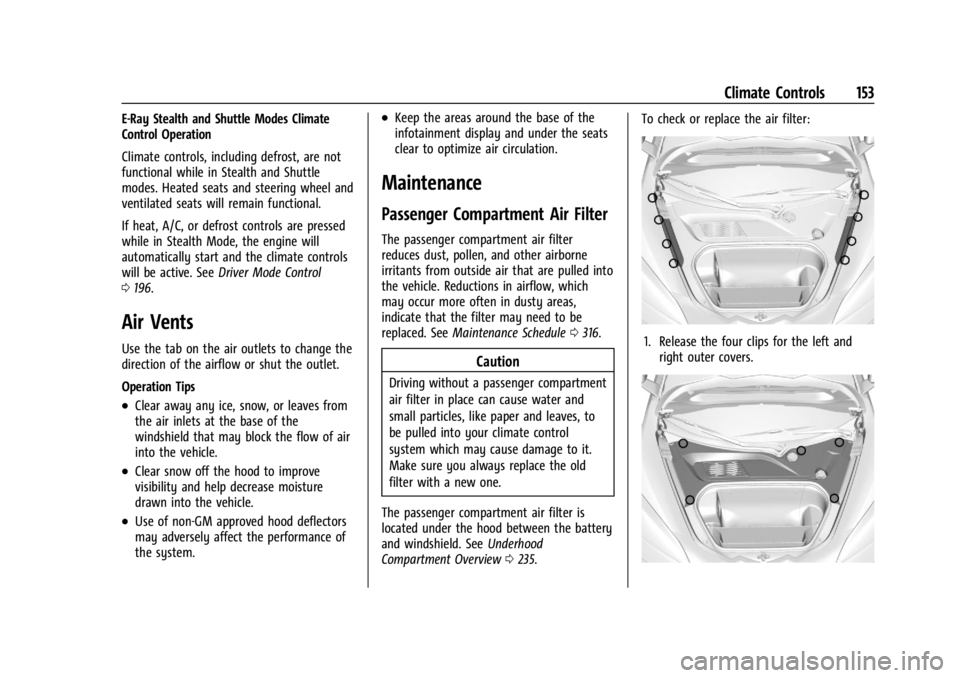
Compartment Overview 0235. To check or replace the air filter:
1. Release the four clips for the left and
right outer covers.
Page 160 of 362
Chevrolet Corvette Owner Manual (GMNA-Localizing-U.S./Canada/Mexico-
17272984) - 2024 - CRC - 2/20/23
Driving and Operating 159
Steering in Emergencies
.There are some situations when steering
around an obstacle may be more effective
than braking.
.Holding both sides of the steering wheel
allows you to turn 180 degrees without
removing a hand.
.The Antilock Brake System (ABS) allows
steering while braking.
Off-Road Recovery
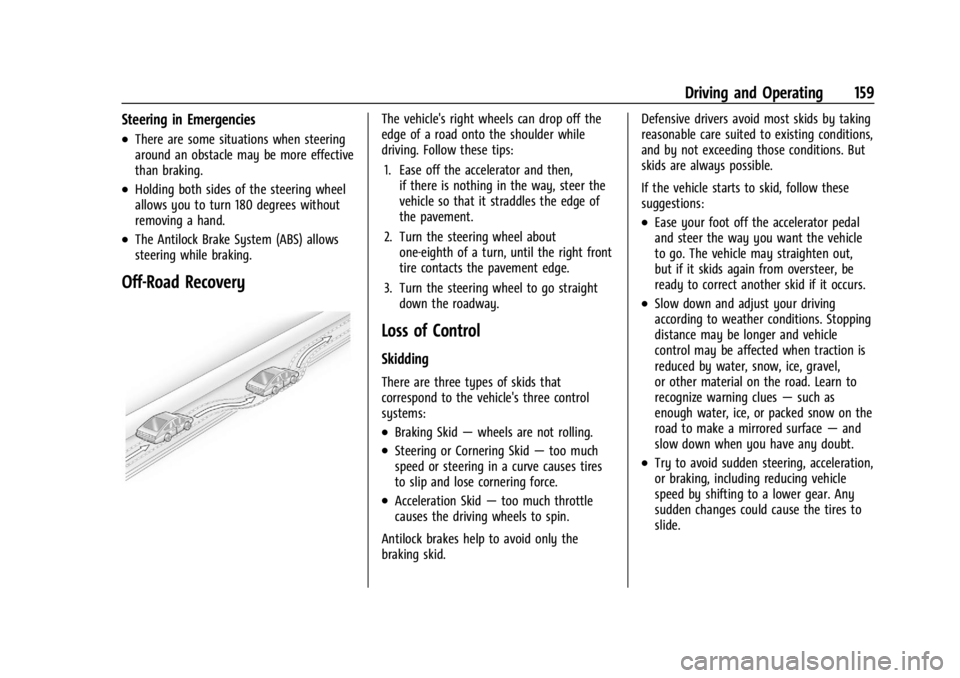
The vehicle's right wheels can drop off the
edge of a road onto the shoulder while
driving. Follow these tips:1. Ease off the accelerator and then, if there is nothing in the way, steer the
vehicle so that it straddles the edge of
the pavement.
2. Turn the steering wheel about one-eighth of a turn, until the right front
tire contacts the pavement edge.
3. Turn the steering wheel to go straight down the roadway.
Loss of Control
Skidding
There are three types of skids that
correspond to the vehicle's three control
systems:
.Braking Skid —wheels are not rolling.
.Steering or Cornering Skid —too much
speed or steering in a curve causes tires
to slip and lose cornering force.
.Acceleration Skid —too much throttle
causes the driving wheels to spin.
Antilock brakes help to avoid only the
braking skid. Defensive drivers avoid most skids by taking
reasonable care suited to existing conditions,
and by not exceeding those conditions. But
skids are always possible.
If the vehicle starts to skid, follow these
suggestions:
.Ease your foot off the accelerator pedal
and steer the way you want the vehicle
to go. The vehicle may straighten out,
but if it skids again from oversteer, be
ready to correct another skid if it occurs.
.Slow down and adjust your driving
according to weather conditions. Stopping
distance may be longer and vehicle
control may be affected when traction is
reduced by water, snow, ice, gravel,
or other material on the road. Learn to
recognize warning clues
—such as
enough water, ice, or packed snow on the
road to make a mirrored surface —and
slow down when you have any doubt.
.Try to avoid sudden steering, acceleration,
or braking, including reducing vehicle
speed by shifting to a lower gear. Any
sudden changes could cause the tires to
slide.
Page 191 of 362
Chevrolet Corvette Owner Manual (GMNA-Localizing-U.S./Canada/Mexico-
17272984) - 2024 - CRC - 2/20/23
190 Driving and Operating
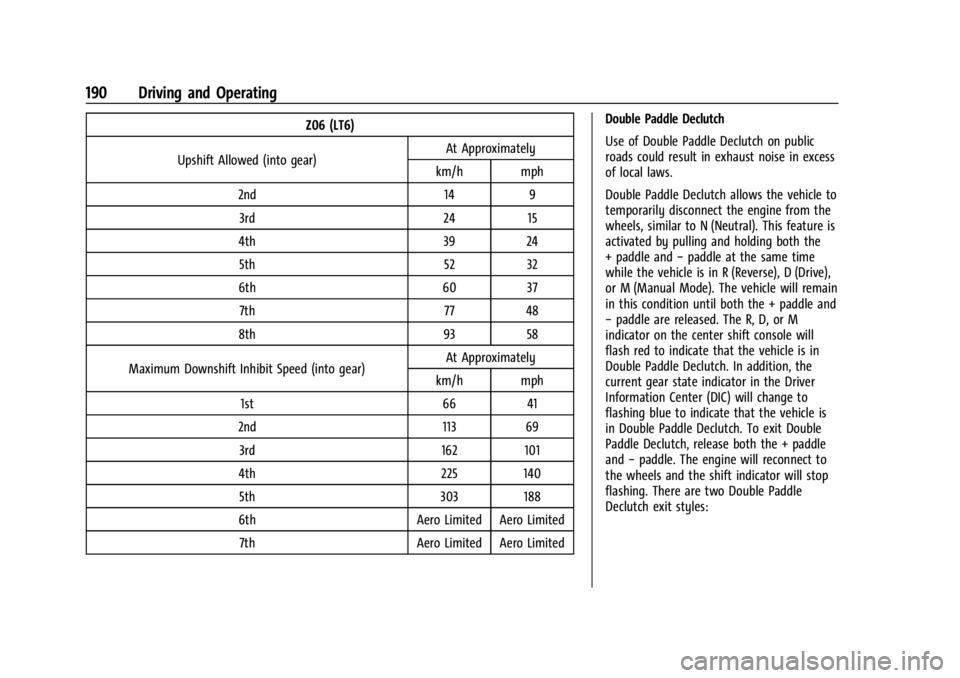
Z06 (LT6)
Upshift Allowed (into gear) At Approximately
km/h mph
2nd 14 9 3rd 24 15
4th 39 24 5th 52 32
6th 60 37 7th 77 48
8th 93 58
Maximum Downshift Inhibit Speed (into gear) At Approximately
km/h mph
1st 66 41
2nd 113 69 3rd 162 101
4th 225 140 5th 303 188
6th Aero Limited Aero Limited 7th Aero Limited Aero Limited Double Paddle Declutch
Use of Double Paddle Declutch on public
roads could result in exhaust noise in excess
of local laws.
Double Paddle Declutch allows the vehicle to
temporarily disconnect the engine from the
wheels, similar to N (Neutral). This feature is
activated by pulling and holding both the
+ paddle and
−paddle at the same time
while the vehicle is in R (Reverse), D (Drive),
or M (Manual Mode). The vehicle will remain
in this condition until both the + paddle and
− paddle are released. The R, D, or M
indicator on the center shift console will
flash red to indicate that the vehicle is in
Double Paddle Declutch. In addition, the
current gear state indicator in the Driver
Information Center (DIC) will change to
flashing blue to indicate that the vehicle is
in Double Paddle Declutch. To exit Double
Paddle Declutch, release both the + paddle
and −paddle. The engine will reconnect to
the wheels and the shift indicator will stop
flashing. There are two Double Paddle
Declutch exit styles:
Page 193 of 362
Chevrolet Corvette Owner Manual (GMNA-Localizing-U.S./Canada/Mexico-
17272984) - 2024 - CRC - 2/20/23
192 Driving and Operating
front and rear wheels to maximize driving
efficiency and improve driving dynamics.
Your vehicle has exceptional driving
capability, but care must always be taken to
adjust driving style to the traffic and road
conditions.
The vehicle eAWD settings may be
customized for the driver mode selected. See
Driver Mode Control0196 for more
information.
Brakes
Electric Brake Boost
Vehicles equipped with electric brake boost
have hydraulic brake circuits that are
electronically controlled when the brake
pedal is applied during normal operation.
The system performs routine tests and turns
off within a few minutes after the vehicle is
turned off. Noise may be heard during this
time. If the brake pedal is pressed during
the tests or when the electric brake boost
system is off, a noticeable change in pedal
force and travel may be felt. This is normal.
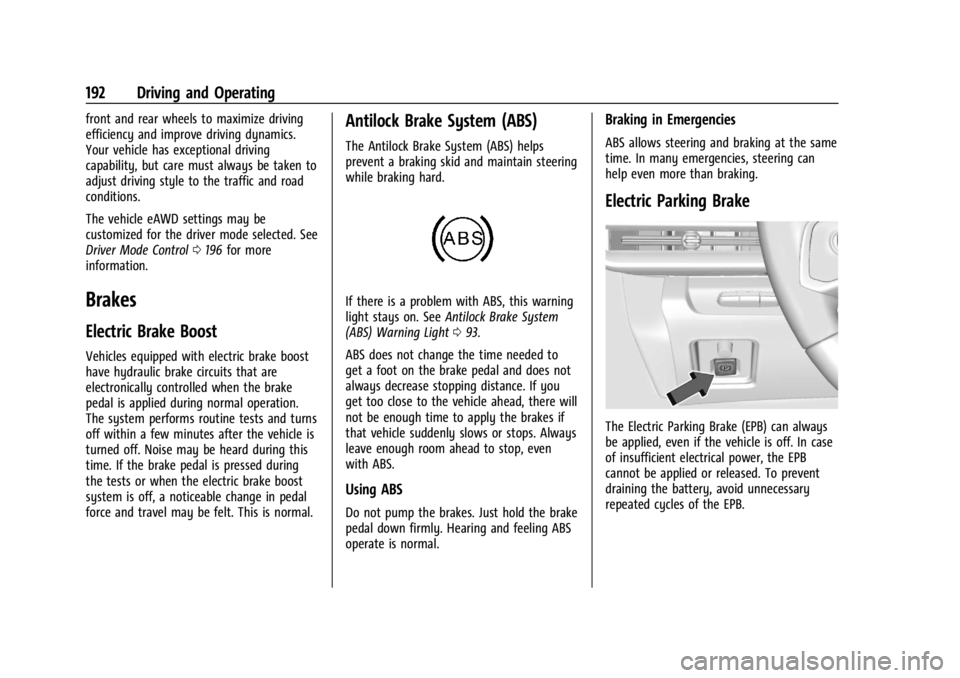
Antilock Brake System (ABS)
The Antilock Brake System (ABS) helps
prevent a braking skid and maintain steering
while braking hard.
If there is a problem with ABS, this warning
light stays on. See Antilock Brake System
(ABS) Warning Light 093.
ABS does not change the time needed to
get a foot on the brake pedal and does not
always decrease stopping distance. If you
get too close to the vehicle ahead, there will
not be enough time to apply the brakes if
that vehicle suddenly slows or stops. Always
leave enough room ahead to stop, even
with ABS.
Using ABS
Do not pump the brakes. Just hold the brake
pedal down firmly. Hearing and feeling ABS
operate is normal.
Braking in Emergencies
ABS allows steering and braking at the same
time. In many emergencies, steering can
help even more than braking.
Electric Parking Brake
The Electric Parking Brake (EPB) can always
be applied, even if the vehicle is off. In case
of insufficient electrical power, the EPB
cannot be applied or released. To prevent
draining the battery, avoid unnecessary
repeated cycles of the EPB.
Page 199 of 362
Chevrolet Corvette Owner Manual (GMNA-Localizing-U.S./Canada/Mexico-
17272984) - 2024 - CRC - 2/20/23
198 Driving and Operating
Mode Description
uWeather :Used for slippery surfaces to
help control wheel speed. This can
compromise the acceleration on dry asphalt.
This feature is not intended for use when
the vehicle is stuck in sand, mud, ice, snow,
or gravel. If the vehicle becomes stuck, see If
the Vehicle Is Stuck 0173. See “Driver Mode
Attributes,” later in this section.
sTour :Use for normal city and highway
driving to provide a smooth, soft ride. This
setting provides a balanced setting between
comfort and handling. This is the standard
mode. See “Driver Mode Attributes,” later in
this section.
rSport : Use when road conditions or
personal preference demand a more
controlled response. When this mode is
selected, the vehicle will immediately
downshift. The steering will change to
provide more precise control. If the vehicle
has Magnetic Ride Control, the suspension
will change to provide better cornering
performance.
Competitive mode can be accessed through
this mode. See Performance Driving 0206.
tTrack : Use for closed race tracks. Use
when maximum vehicle handling is desired.
When in Track mode, the dual clutch
transmission and steering will adjust to
track settings. In this mode the vehicle also
monitors driving behaviors and
automatically enables Performance Shift
features when spirited driving is detected.
These features maintain lower transmission
gears to increase available engine braking
and improve acceleration response. The
vehicle will exit this feature and return to
normal operation after a short time when
spirited driving is no longer detected.
If equipped, this mode also modifies real
time damping, exhaust valve tuning, engine
sound, brake pedal feel, Electronic Stability
Control (ESC) performance and Traction
Control System (TCS) performance.
Performance Traction Management (PTM)
can be accessed through this mode. See
“Performance Traction Management,” later
in this section.
qMy Mode : Use to personalize everyday
driving. This mode allows the driver to
configure the driver systems to their driving
preferences. This mode modifies the suspension, steering, brake feel, and engine
sound. My mode will remain active across
ignition cycles.
Through the center display, the following
vehicle subsystems may be available for
customization in this mode:
Engine Sound:
Stealth, Tour, Sport, Track
Steering: Tour, Sport, Track
Suspension: Tour, Sport, Track
Brake Feel: Tour, Sport, Track
For a more detailed description on how each
driver system is changed, see “Drive Mode
Customization,” later in this section.
Additionally the cluster theme can be set up
using the display menu in the cluster.
vMode : Use to personalize dynamic
driving. This mode allows the driver to
configure the driver systems to their own
preference for maximum handling. Z-mode
further enhances the experience by adding
powertrain customization. This mode
modifies Engine/Shift, Brake Feel, Steering,
Suspension, Engine Sound, and, Performance
Traction Management, if equipped.
Page 205 of 362
Chevrolet Corvette Owner Manual (GMNA-Localizing-U.S./Canada/Mexico-
17272984) - 2024 - CRC - 2/20/23
204 Driving and Operating
Engine Sound
Caution
Using a stealth engine sound setting
during spirited driving will cause the
exhaust system to overheat and damage
the variable exhaust valves. Do not use
this setting when auto-crossing or driving
on high speed tracks.
If available, engine sound settings change
when the variable exhaust valves open.
Steering (Assist Effort)
Adjusts from a lighter steering feel to
reduced assist for more steering feel.
Magnetic Ride Control
If equipped, this feature adjusts the shock
dampening firmness based on driving
conditions to improve comfort and
performance.
Drive Mode Customization
The vehicle is equipped to modify the
following vehicle settings base on vehicle
content. Through the infotainment home
screen, select Settings > Vehicle > “Drive
Mode Customization” to customize and
personalize My mode and/or Z-mode.
Engine Sound
Engine Sound adjusts the volume of engine
noise. Setting range from quietest to loudest
volume as you move from Stealth through
Track.
.Stealth, Tour, Sport, Track
Steering
This setting adjusts the effort required to
turn the steering wheel. The steering wheel
offers better feedback but requires more
effort as you move from Tour to Track.
.Tour, Sport, Track
Suspension
This setting adjusts the firmness of the
suspension in the vehicle. Suspension adjust
stiffness of the shocks and/or springs. The
ride is more comfortable at lower settings
and is stiffer at higher settings for better
control.
.Tour, Sport, Track Engine/Shift
This setting adjusts the throttle response,
gear shifting and engine performance. An
increased throttle response enhances the
acceleration feel as you move toward Track,
but with a comfort trade-off due to more
aggressive gear shifting.
.Weather, Tour, Sport, Track
Brake Feel
This setting adjusts the brake pedal
response. Settings range from a slower
response for more comfortable driving to
the quickest response for quicker
deceleration. Track allows for improved
pedal precision at higher decelerations for
high performance driving.
.Tour, Sport, Track
Performance Traction Management (PTM)
To activate PTM through Z-Mode, configure
Z-Mode to the desired PTM state in the
center stack (Settings > Vehicle > Drive
Mode Customization > Z-Mode). Press the
Z-Mode button once to activate Z-Mode.
When PTM is configured on, a message will
appear in the Driver Information Center
(DIC) “Z-Mode Active —Press Again for PTM
On —ESC May be Disabled.”
Page 211 of 362
Chevrolet Corvette Owner Manual (GMNA-Localizing-U.S./Canada/Mexico-
17272984) - 2024 - CRC - 2/20/23
210 Driving and Operating
The Launch Control feature initially limits
engine speed as the driver rapidly applies
the accelerator pedal to wide open throttle.
Allow the engine RPMs to stabilize.
A smooth, quick release of the brake pedal,
while maintaining the fully pressed
accelerator pedal, will manage tire slip and
transmissions clutch. After the vehicle is
launched, the system continues in
Competitive Driving mode or PTM.
Custom Launch Control
If equipped, Custom Launch Control allows
the following parameters for Launch Control
to be modified:
.Launch RPM
.Slip Target (5%–15%)
Adjusting the Launch RPM will also change
the behavior of the transmission during the
start of the launch. The higher the Launch
RPM, the faster the clutch will be applied
resulting in greater acceleration. This
parameter can be used to match the launch
behavior to the available tire traction. If the
driving wheels spin excessively during the
launch, reduce the Launch RPM. To adjust the Launch RPM, all of these
conditions must be met:
.Competitive Driving mode or any of the
PTM modes are selected (if equipped). See
Driver Mode Control
0196.
.The steering wheel must be straight.
.The driver door must be closed.
.The vehicle must be in D (Drive) or
M (Manual mode).
.The parking brake must not be engaged.
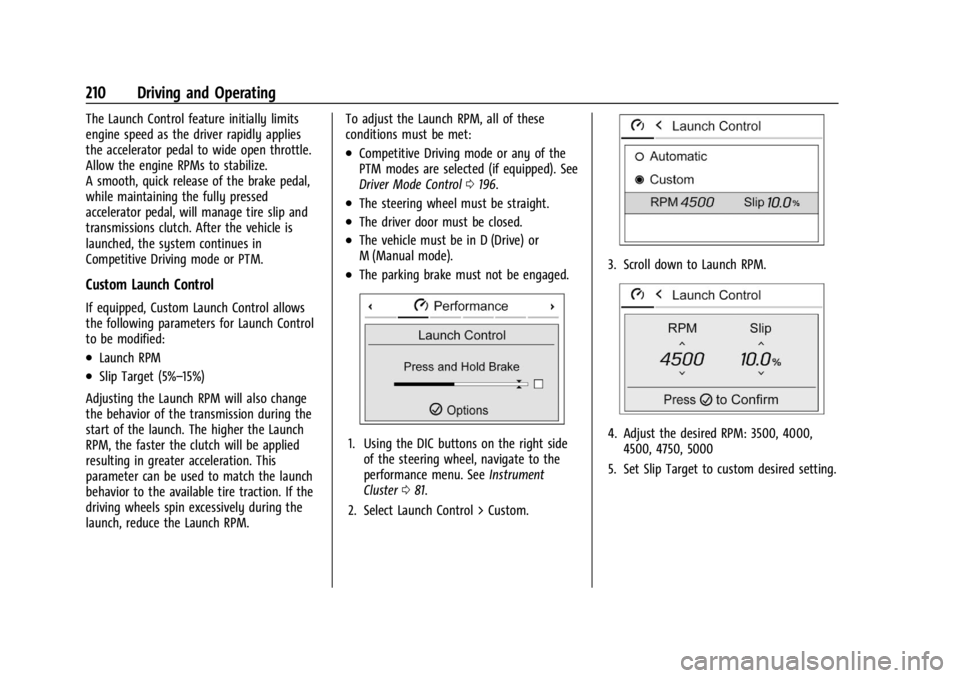
1. Using the DIC buttons on the right side
of the steering wheel, navigate to the
performance menu. See Instrument
Cluster 081.
2. Select Launch Control > Custom.
3. Scroll down to Launch RPM.
4. Adjust the desired RPM: 3500, 4000, 4500, 4750, 5000
5. Set Slip Target to custom desired setting.