brake light CHEVROLET CORVETTE 2024 Owner's Manual
[x] Cancel search | Manufacturer: CHEVROLET, Model Year: 2024, Model line: CORVETTE, Model: CHEVROLET CORVETTE 2024Pages: 362, PDF Size: 6.62 MB
Page 195 of 362
Chevrolet Corvette Owner Manual (GMNA-Localizing-U.S./Canada/Mexico-
17272984) - 2024 - CRC - 2/20/23
194 Driving and Operating
pedal pulsation, and/or pedal movement
during this time may occur. Continue to
apply the brake pedal as the driving
situation dictates. Brake Assist disengages
when the brake pedal is released.
Hill Start Assist (HSA)
{Warning
Do not rely on the HSA feature. HSA does
not replace the need to pay attention
and drive safely. You may not hear or
feel alerts or warnings provided by this
system. Failure to use proper care when
driving may result in injury, death,
or vehicle damage. SeeDefensive Driving
0 157.
When the vehicle is stopped on a grade, Hill
Start Assist (HSA) prevents the vehicle from
rolling in an unintended direction during the
transition from brake pedal release to
accelerator pedal apply. The brakes release
when the accelerator pedal is applied. If the
accelerator pedal is not applied within a few
minutes, the Electric Parking Brake will
apply. The brakes may also release under
other conditions. Do not rely on HSA to hold
the vehicle. HSA is available when the vehicle is facing
uphill in a forward gear, or when facing
downhill in R (Reverse). The vehicle must
come to a complete stop on a grade for HSA
to activate.
Regenerative Braking
E-Ray models have a regenerative braking
system that activates when the brake pedal
is applied.
Regenerative braking captures some of the
energy from the moving vehicle and turns it
back into electrical energy. This energy is
then stored back into the high voltage
battery system, contributing to increased
energy efficiency.
The brake system uses regenerative braking,
conventional hydraulic braking, or a
combination of both as appropriate.
When the brake pedal is applied, a slight
sound may be heard. This is normal.
Ride Control Systems
Traction Control/Electronic
Stability Control
The vehicle has a Traction Control
System (TCS) and a StabiliTrak/Electronic
Stability Control (ESC) system. These
systems help limit wheel spin and assist the
driver in maintaining control, especially on
slippery road conditions.
TCS activates if it senses that the rear
wheels are spinning too much or are
beginning to lose traction. When this
happens, TCS applies the brakes to the
spinning wheel and reduces engine power
(by closing the throttle and managing
engine spark) to limit wheel spin.
StabiliTrak/ESC activates when the vehicle
senses a difference between the intended
path and the direction the vehicle is actually
traveling. StabiliTrak/ESC selectively applies
braking pressure to any one of the vehicle
wheel brakes to assist the driver in keeping
the vehicle on the intended path.
Page 196 of 362
Chevrolet Corvette Owner Manual (GMNA-Localizing-U.S./Canada/Mexico-
17272984) - 2024 - CRC - 2/20/23
Driving and Operating 195
If cruise control is being used when TCS
begins to limit wheel spin, the cruise control
will automatically disengage. Cruise control
may be reengaged when road conditions
allow. SeeCruise Control 0212.
If the driver disables TCS, cruise control will
disengage. Cruise control will also be
disabled if Performance Traction
Management (PTM) is selected, or if
StabiliTrak is turned off.
Both systems come on automatically when
the vehicle is started and begins to move.
The systems may be heard or felt while
they are operating or while performing
diagnostic checks. This is normal and does
not mean there is a problem with the
vehicle.
It is recommended to leave both systems on
for normal driving conditions, but it may be
necessary to turn TCS off if the vehicle gets
stuck in sand, mud, ice, or snow. See If the
Vehicle Is Stuck 0173 and “Turning the
Systems Off and On” later in this section.
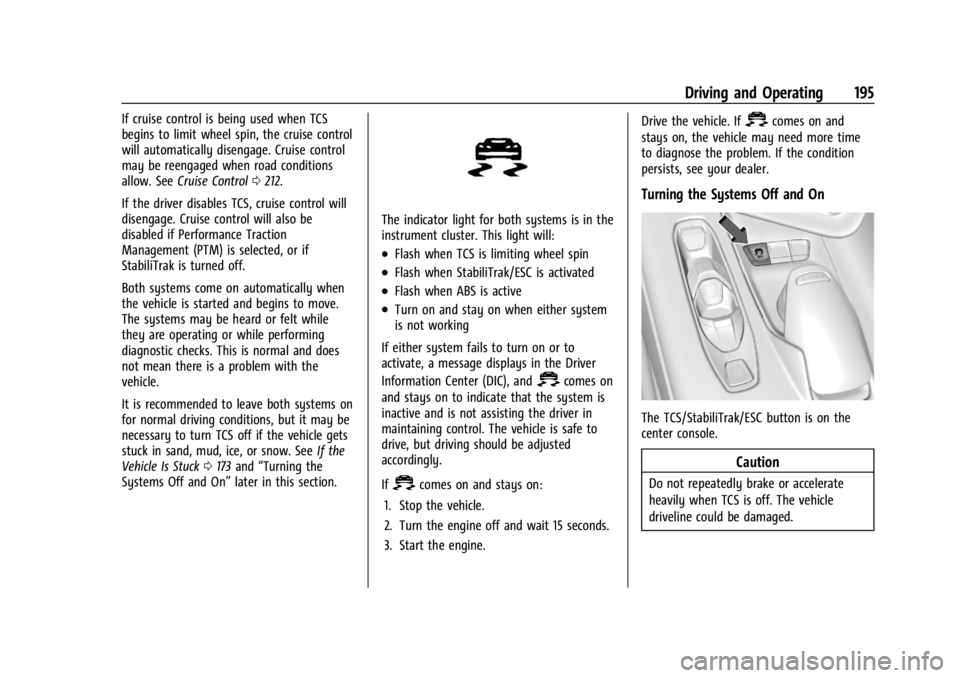
The indicator light for both systems is in the
instrument cluster. This light will:
.Flash when TCS is limiting wheel spin
.Flash when StabiliTrak/ESC is activated
.Flash when ABS is active
.Turn on and stay on when either system
is not working
If either system fails to turn on or to
activate, a message displays in the Driver
Information Center (DIC), and
=comes on
and stays on to indicate that the system is
inactive and is not assisting the driver in
maintaining control. The vehicle is safe to
drive, but driving should be adjusted
accordingly.
If
=comes on and stays on:
1. Stop the vehicle.
2. Turn the engine off and wait 15 seconds.
3. Start the engine. Drive the vehicle. If
=comes on and
stays on, the vehicle may need more time
to diagnose the problem. If the condition
persists, see your dealer.
Turning the Systems Off and On
The TCS/StabiliTrak/ESC button is on the
center console.
Caution
Do not repeatedly brake or accelerate
heavily when TCS is off. The vehicle
driveline could be damaged.
Page 198 of 362
Chevrolet Corvette Owner Manual (GMNA-Localizing-U.S./Canada/Mexico-
17272984) - 2024 - CRC - 2/20/23
Driving and Operating 197
When each mode is selected, an indicator
will come on in the instrument cluster and
stay on.
Mode Activation
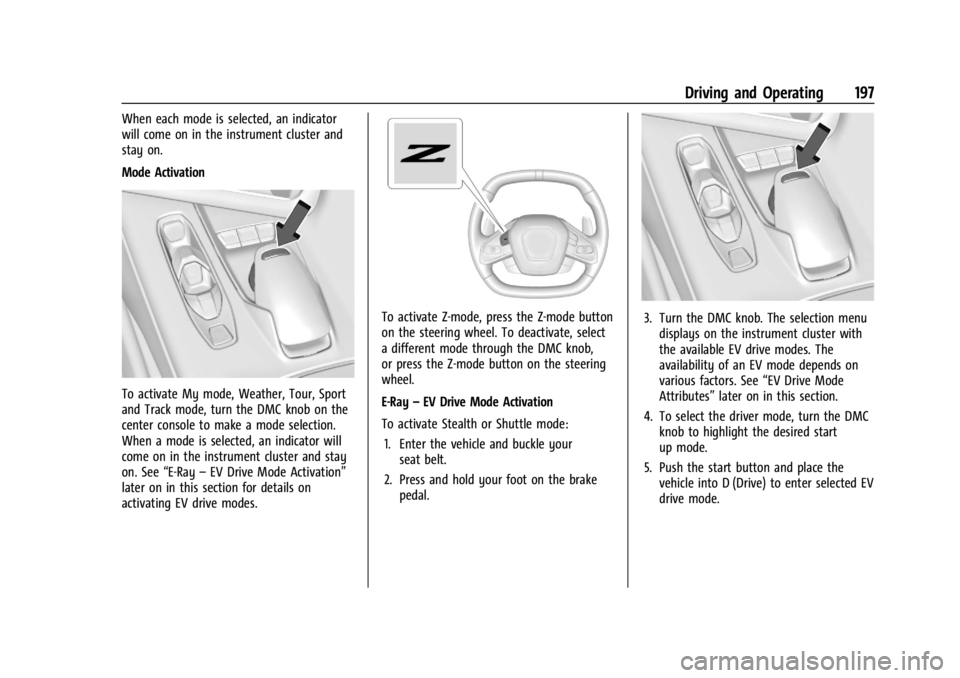
To activate My mode, Weather, Tour, Sport
and Track mode, turn the DMC knob on the
center console to make a mode selection.
When a mode is selected, an indicator will
come on in the instrument cluster and stay
on. See“E-Ray–EV Drive Mode Activation”
later on in this section for details on
activating EV drive modes.
To activate Z-mode, press the Z-mode button
on the steering wheel. To deactivate, select
a different mode through the DMC knob,
or press the Z-mode button on the steering
wheel.
E-Ray –EV Drive Mode Activation
To activate Stealth or Shuttle mode: 1. Enter the vehicle and buckle your seat belt.
2. Press and hold your foot on the brake pedal.3. Turn the DMC knob. The selection menudisplays on the instrument cluster with
the available EV drive modes. The
availability of an EV mode depends on
various factors. See “EV Drive Mode
Attributes” later on in this section.
4. To select the driver mode, turn the DMC knob to highlight the desired start
up mode.
5. Push the start button and place the vehicle into D (Drive) to enter selected EV
drive mode.
Page 204 of 362
Chevrolet Corvette Owner Manual (GMNA-Localizing-U.S./Canada/Mexico-
17272984) - 2024 - CRC - 2/20/23
Driving and Operating 203
Cluster Display
For more information on the display themes
of the Drive modes on the instrument
cluster, seeInstrument Cluster 081 >
Options > Display themes.
Throttle Progression
Adjusts throttle sensitivity by selecting how
quickly or slowly the throttle reacts to
input.
Throttle Progression is a preset of
Powertrain and cannot be modified or
changed independently.
Transmission Shift Operation
Basic:
.Transmission upshifts and downshifts are
selected based on vehicle speed and
accelerator position to optimize comfort
and fuel economy during mild driving
conditions.
Driver Influenced Gear Selection:
.Aggressive driving will influence both the
upshift and downshift points in all modes.
When engaged, the Performance
Transmission Active light displays. See
Performance Transmission Active 093.
When Performance Transmission is
activated from a standstill, by selecting PTM Race 1 or Race 2, the transmission
shift map is in the most aggressive state
where upshifts are only achieved at high
revolutions per minute (rpm), downshifts
happen early, and the lowest gear is
selected for cornering. Transmission
behavior will transition to a level
appropriate to the current driving
behavior after a short period of time.
If PTM Race 1 or Race 2 are not selected,
the Performance Transmission Active
behavior still activates automatically after
a sustained period of performance driving
is detected. See
“Performance Traction
Management (PTM)” later on in this
section.
.Criteria which have influence are: driving
mode, accelerator, brakes, lateral, and
longitudinal loading.
.Changes in gear selection behavior due to
aggressive driving can include:
‐ Downshifting early with higher rpm’s
during aggressive braking (i.e. entering
a corner)
‐ Altering upshifts while experiencing
lateral acceleration
‐ Not upshifting when the accelerator is
released to avoid unnecessary shifts if
the accelerator is re-applied ‐
Recognizing sporty driving and
anticipating upcoming corners with the
appropriate gear selection entering and
exiting
.Driver Modes
‐Driver influenced changes are effective
in all driving modes, however the
aggressiveness of the transmission
response will increase between Tour,
Sport, and Track modes respectively.
Active Fuel Management (Engine Cylinder
Shuts Off)
If equipped with Active Fuel Management
(AFM), the engine uses driver demand to
deactivate cylinders to improve fuel
performance. When accelerating, V8 mode is
prevalent. For lighter throttle applications,
the system may disable cylinders to run in
4-cylinder mode to save fuel.
Active Fuel Management is a preset of
Powertrain and cannot be modified or
changed independently.
Page 205 of 362
Chevrolet Corvette Owner Manual (GMNA-Localizing-U.S./Canada/Mexico-
17272984) - 2024 - CRC - 2/20/23
204 Driving and Operating
Engine Sound
Caution
Using a stealth engine sound setting
during spirited driving will cause the
exhaust system to overheat and damage
the variable exhaust valves. Do not use
this setting when auto-crossing or driving
on high speed tracks.
If available, engine sound settings change
when the variable exhaust valves open.
Steering (Assist Effort)
Adjusts from a lighter steering feel to
reduced assist for more steering feel.
Magnetic Ride Control
If equipped, this feature adjusts the shock
dampening firmness based on driving
conditions to improve comfort and
performance.
Drive Mode Customization
The vehicle is equipped to modify the
following vehicle settings base on vehicle
content. Through the infotainment home
screen, select Settings > Vehicle > “Drive
Mode Customization” to customize and
personalize My mode and/or Z-mode.
Engine Sound
Engine Sound adjusts the volume of engine
noise. Setting range from quietest to loudest
volume as you move from Stealth through
Track.
.Stealth, Tour, Sport, Track
Steering
This setting adjusts the effort required to
turn the steering wheel. The steering wheel
offers better feedback but requires more
effort as you move from Tour to Track.
.Tour, Sport, Track
Suspension
This setting adjusts the firmness of the
suspension in the vehicle. Suspension adjust
stiffness of the shocks and/or springs. The
ride is more comfortable at lower settings
and is stiffer at higher settings for better
control.
.Tour, Sport, Track Engine/Shift
This setting adjusts the throttle response,
gear shifting and engine performance. An
increased throttle response enhances the
acceleration feel as you move toward Track,
but with a comfort trade-off due to more
aggressive gear shifting.
.Weather, Tour, Sport, Track
Brake Feel
This setting adjusts the brake pedal
response. Settings range from a slower
response for more comfortable driving to
the quickest response for quicker
deceleration. Track allows for improved
pedal precision at higher decelerations for
high performance driving.
.Tour, Sport, Track
Performance Traction Management (PTM)
To activate PTM through Z-Mode, configure
Z-Mode to the desired PTM state in the
center stack (Settings > Vehicle > Drive
Mode Customization > Z-Mode). Press the
Z-Mode button once to activate Z-Mode.
When PTM is configured on, a message will
appear in the Driver Information Center
(DIC) “Z-Mode Active —Press Again for PTM
On —ESC May be Disabled.”
Page 208 of 362
Chevrolet Corvette Owner Manual (GMNA-Localizing-U.S./Canada/Mexico-
17272984) - 2024 - CRC - 2/20/23
Driving and Operating 207
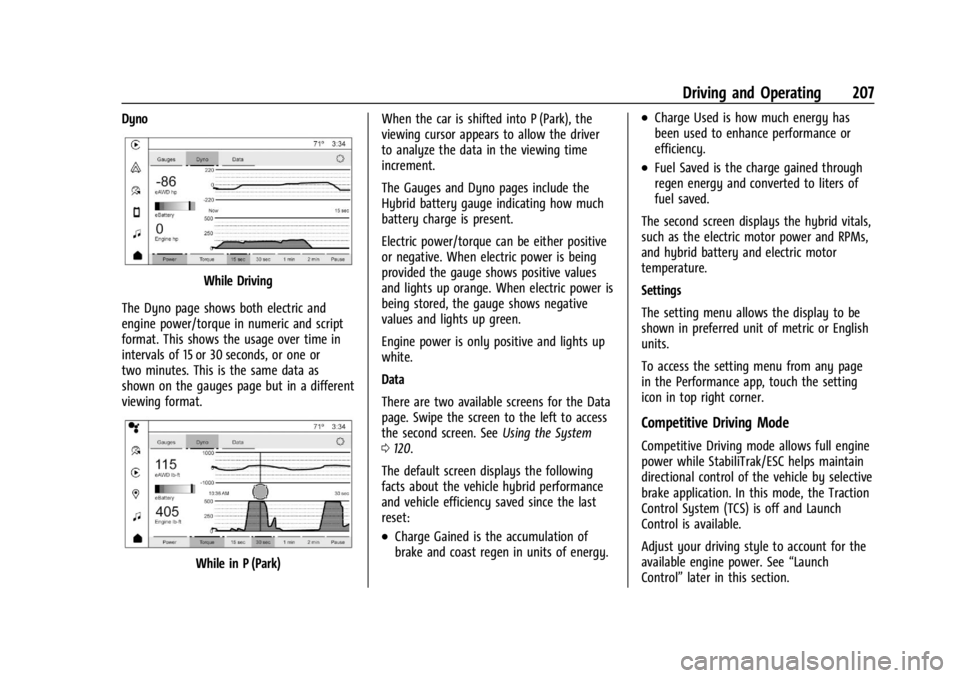
Dyno
While Driving
The Dyno page shows both electric and
engine power/torque in numeric and script
format. This shows the usage over time in
intervals of 15 or 30 seconds, or one or
two minutes. This is the same data as
shown on the gauges page but in a different
viewing format.
While in P (Park) When the car is shifted into P (Park), the
viewing cursor appears to allow the driver
to analyze the data in the viewing time
increment.
The Gauges and Dyno pages include the
Hybrid battery gauge indicating how much
battery charge is present.
Electric power/torque can be either positive
or negative. When electric power is being
provided the gauge shows positive values
and lights up orange. When electric power is
being stored, the gauge shows negative
values and lights up green.
Engine power is only positive and lights up
white.
Data
There are two available screens for the Data
page. Swipe the screen to the left to access
the second screen. See
Using the System
0 120.
The default screen displays the following
facts about the vehicle hybrid performance
and vehicle efficiency saved since the last
reset:
.Charge Gained is the accumulation of
brake and coast regen in units of energy.
.Charge Used is how much energy has
been used to enhance performance or
efficiency.
.Fuel Saved is the charge gained through
regen energy and converted to liters of
fuel saved.
The second screen displays the hybrid vitals,
such as the electric motor power and RPMs,
and hybrid battery and electric motor
temperature.
Settings
The setting menu allows the display to be
shown in preferred unit of metric or English
units.
To access the setting menu from any page
in the Performance app, touch the setting
icon in top right corner.
Competitive Driving Mode
Competitive Driving mode allows full engine
power while StabiliTrak/ESC helps maintain
directional control of the vehicle by selective
brake application. In this mode, the Traction
Control System (TCS) is off and Launch
Control is available.
Adjust your driving style to account for the
available engine power. See “Launch
Control” later in this section.
Page 210 of 362
Chevrolet Corvette Owner Manual (GMNA-Localizing-U.S./Canada/Mexico-
17272984) - 2024 - CRC - 2/20/23
Driving and Operating 209
Performance Traction–Sport
.For use by drivers who are familiar with
the track
.Dry conditions only
.Requires more driving skill than
Performance Traction –Dry
.StabiliTrak/ESC is on and more engine
power is available than in Performance
Traction –Dry
Performance Traction –Race 1
.For use by drivers who are familiar with
the track
.Dry conditions only
.Requires more driving skill than
Performance Traction –Dry or
Performance Traction –Sport
.StabiliTrak/ESC is off and available engine
power is the same as Performance
Traction –Sport
Performance Traction –Race 2
.For use by experienced drivers who are
familiar with the track
.Dry conditions only
.Requires more driving skill than in other
modes
.StabiliTrak/ESC is off and engine power is
available for maximum cornering speed Press and release
@to turn off PTM and
return to the TCS and StabiliTrak/ESC
systems. The traction off light
iand
StabiliTrak Off light
@will go out.
Launch Control (Sport and Track
Mode Only)
A Launch Control feature is available, within
Competitive Driving mode or PTM, on all
vehicles to allow the driver to achieve high
levels of vehicle acceleration in a straight
line. Launch Control is a form of TCS that
manages tire spin, and transmissions clutch,
while launching the vehicle. This feature is
intended for use during closed course race
events where consistent zero to
60 and quarter mile times are desirable.
Caution
The new vehicle break-in period should be
completed before using the launch
control feature, otherwise performance
will be limited and damage may occur to
the powertrain/engine. See New Vehicle
Break-In 0177. Launch Control is only available when the
following criteria are met:
.Competitive Driving mode or any of the
PTM modes are selected (if equipped). See
Driver Mode Control
0196.
.The steering wheel must be straight.
.The driver door must be closed.
.The vehicle must be in D (Drive) or
M (Manual mode).
.The parking brake must not be engaged.
Launching the Vehicle
.Ensure the vehicle is in Competitive
Driving mode or any of the PTM modes.
.The brake pedal must be firmly pressed
to the floor, equivalent to a panic brake
event.
.While maintaining the brake pedal, the
accelerator pedal is rapidly applied to
wide open throttle. If the vehicle rolls due
to wide open throttle or engine speed
does not exceed 3,000 Revolutions Per
Minute (RPM), release the throttle, press
the brake pedal more firmly, and reapply
the accelerator to wide open throttle.
.If the engine is cold, the vehicle may
be limited to 3000 rpm until
conditions are suitable for
acceleration.
Page 213 of 362
Chevrolet Corvette Owner Manual (GMNA-Localizing-U.S./Canada/Mexico-
17272984) - 2024 - CRC - 2/20/23
212 Driving and Operating
Cruise Control
Cruise control allows the vehicle to maintain
a constant speed without keeping your foot
on the accelerator pedal at speeds of about
40 km/h (25 mph) or above. Cruise control
does not work at speeds below about
40 km/h (25 mph).
{Warning
Cruise control can be dangerous where
you cannot drive safely at a steady
speed. Do not use cruise control on
winding roads or in heavy traffic.
Cruise control can be dangerous on
slippery roads. On such roads, fast
changes in tire traction can cause
excessive wheel slip, and you could lose
control. Do not use cruise control on
slippery roads.
Cruise control will disengage if:
.The Traction Control System (TCS) or
StabiliTrak/Electronic Stability Control
(ESC) system activates to limit wheel spin.
See Traction Control/Electronic Stability
Control 0194.
.TCS or StabiliTrak/ESC is turned off.
.The brakes are applied.
When road conditions allow you to safely
use it again, cruise control can be turned
back on.
For E-Ray models, cruise control is not
available in Shuttle Mode or Stealth Mode.
See Driver Mode Control 0196.
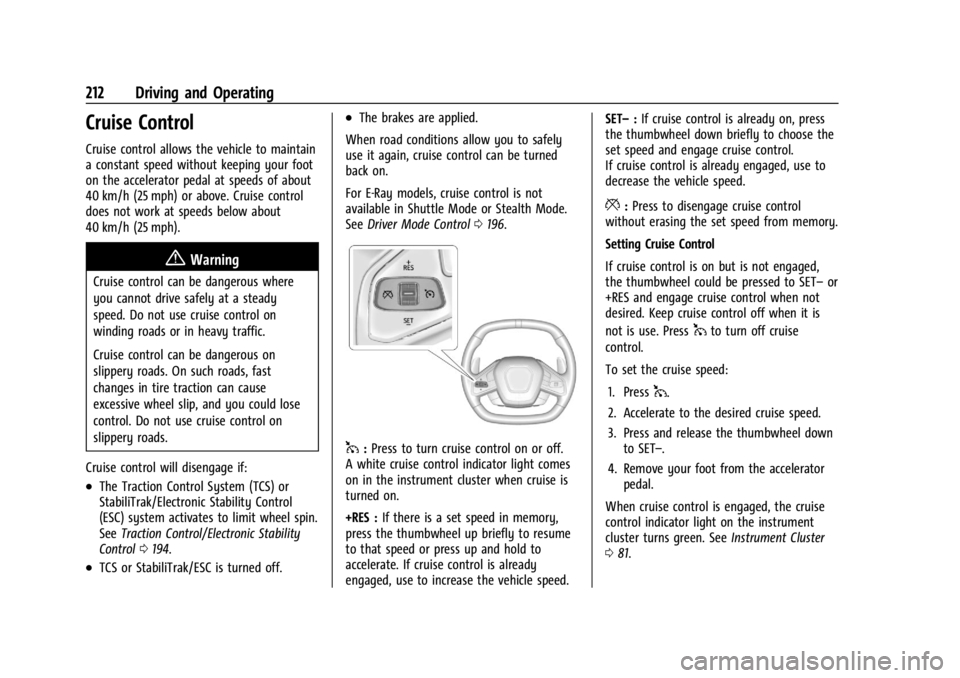
1:Press to turn cruise control on or off.
A white cruise control indicator light comes
on in the instrument cluster when cruise is
turned on.
+RES : If there is a set speed in memory,
press the thumbwheel up briefly to resume
to that speed or press up and hold to
accelerate. If cruise control is already
engaged, use to increase the vehicle speed. SET–
:If cruise control is already on, press
the thumbwheel down briefly to choose the
set speed and engage cruise control.
If cruise control is already engaged, use to
decrease the vehicle speed.
*: Press to disengage cruise control
without erasing the set speed from memory.
Setting Cruise Control
If cruise control is on but is not engaged,
the thumbwheel could be pressed to SET– or
+RES and engage cruise control when not
desired. Keep cruise control off when it is
not is use. Press
1to turn off cruise
control.
To set the cruise speed:
1. Press
1.
2. Accelerate to the desired cruise speed.
3. Press and release the thumbwheel down to SET–.
4. Remove your foot from the accelerator pedal.
When cruise control is engaged, the cruise
control indicator light on the instrument
cluster turns green. See Instrument Cluster
0 81.
Page 215 of 362
Chevrolet Corvette Owner Manual (GMNA-Localizing-U.S./Canada/Mexico-
17272984) - 2024 - CRC - 2/20/23
214 Driving and Operating
.If driving in hilly terrain, cruise control
may not be able to maintain vehicle
speed if an upshift or downshift is not
selected by the driver. While driving on
hilly terrain and cruise control is engaged
with a manual paddle shift gear selection,
the driver must select the proper gear for
the terrain or shift into D (Drive) for fully
automatic transmission operation. See
Manual Mode0187.
Ending Cruise Control
There are four ways to end cruise control:
.Lightly apply the brake pedal.
.Press*.
.Press1.
.Shift the transmission to N (Neutral).
Erasing Speed Memory
The cruise control set speed is erased from
memory if
1is pressed or when the vehicle
is turned off.
Advanced Driver Assistance
Systems
This vehicle may have features that work
together to help avoid crashes or reduce
crash damage while driving, backing, and
parking. Read this entire section before
using these systems.
{Warning
Do not rely on the Driver Assistance
Systems. These systems do not replace
the need for paying attention and driving
safely. You may not hear or see alerts or
warnings provided by these systems.
Failure to use proper care when driving
may result in injury, death, or vehicle
damage. See Defensive Driving 0157.
Under many conditions, these systems
will not:
.Detect children, pedestrians, bicyclists,
or animals.
.Detect vehicles or objects outside the
area monitored by the system.
.Work at all driving speeds. (Continued)
Warning (Continued)
.Warn you or provide you with enough
time to avoid a crash.
.Work under poor visibility or bad
weather conditions.
.Work if the detection sensor is not
cleaned or is covered by ice, snow,
mud, or dirt.
.Work if the detection sensor is
covered up, such as with a sticker,
magnet, or metal plate.
.Work if the area surrounding the
detection sensor is damaged or not
properly repaired.
Complete attention is always required
while driving, and you should be ready to
take action and apply the brakes and/or
steer the vehicle to avoid crashes.
Audible Alert
Some driver assistance features alert the
driver of obstacles by beeping. To view
available settings for this feature, touch the
Settings icon on the infotainment home
page. Select “Vehicle”to display the list of
available options and select “Comfort and
Convenience”.
Page 219 of 362
Chevrolet Corvette Owner Manual (GMNA-Localizing-U.S./Canada/Mexico-
17272984) - 2024 - CRC - 2/20/23
218 Driving and Operating
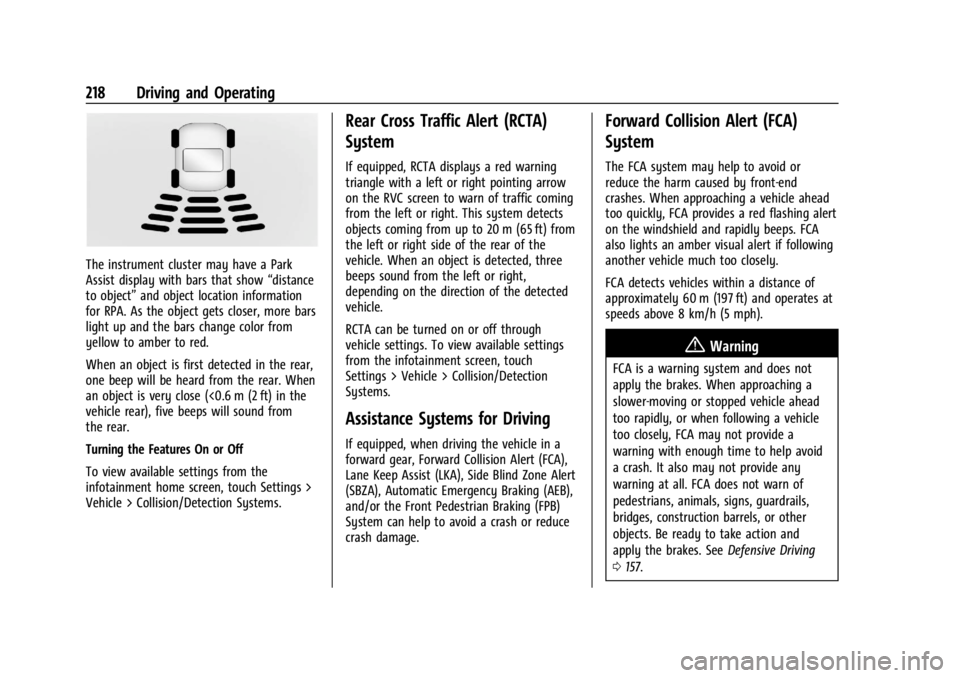
The instrument cluster may have a Park
Assist display with bars that show“distance
to object” and object location information
for RPA. As the object gets closer, more bars
light up and the bars change color from
yellow to amber to red.
When an object is first detected in the rear,
one beep will be heard from the rear. When
an object is very close (<0.6 m (2 ft) in the
vehicle rear), five beeps will sound from
the rear.
Turning the Features On or Off
To view available settings from the
infotainment home screen, touch Settings >
Vehicle > Collision/Detection Systems.
Rear Cross Traffic Alert (RCTA)
System
If equipped, RCTA displays a red warning
triangle with a left or right pointing arrow
on the RVC screen to warn of traffic coming
from the left or right. This system detects
objects coming from up to 20 m (65 ft) from
the left or right side of the rear of the
vehicle. When an object is detected, three
beeps sound from the left or right,
depending on the direction of the detected
vehicle.
RCTA can be turned on or off through
vehicle settings. To view available settings
from the infotainment screen, touch
Settings > Vehicle > Collision/Detection
Systems.
Assistance Systems for Driving
If equipped, when driving the vehicle in a
forward gear, Forward Collision Alert (FCA),
Lane Keep Assist (LKA), Side Blind Zone Alert
(SBZA), Automatic Emergency Braking (AEB),
and/or the Front Pedestrian Braking (FPB)
System can help to avoid a crash or reduce
crash damage.
Forward Collision Alert (FCA)
System
The FCA system may help to avoid or
reduce the harm caused by front-end
crashes. When approaching a vehicle ahead
too quickly, FCA provides a red flashing alert
on the windshield and rapidly beeps. FCA
also lights an amber visual alert if following
another vehicle much too closely.
FCA detects vehicles within a distance of
approximately 60 m (197 ft) and operates at
speeds above 8 km/h (5 mph).
{Warning
FCA is a warning system and does not
apply the brakes. When approaching a
slower-moving or stopped vehicle ahead
too rapidly, or when following a vehicle
too closely, FCA may not provide a
warning with enough time to help avoid
a crash. It also may not provide any
warning at all. FCA does not warn of
pedestrians, animals, signs, guardrails,
bridges, construction barrels, or other
objects. Be ready to take action and
apply the brakes. See Defensive Driving
0 157.