stop start CHEVROLET CORVETTE 2024 Workshop Manual
[x] Cancel search | Manufacturer: CHEVROLET, Model Year: 2024, Model line: CORVETTE, Model: CHEVROLET CORVETTE 2024Pages: 362, PDF Size: 6.62 MB
Page 273 of 362
Chevrolet Corvette Owner Manual (GMNA-Localizing-U.S./Canada/Mexico-
17272984) - 2024 - CRC - 2/20/23
272 Vehicle Care
Electrical System
Electrical System Overload
The vehicle has fuses to protect against an
electrical system overload.
When the current electrical load is too
heavy, the circuit breaker opens and closes,
protecting the circuit until the current load
returns to normal or the problem is fixed.
This greatly reduces the chance of circuit
overload and fire caused by electrical
problems.
Fuses protect the wires that provide the
power to the devices in your vehicle.
If there is a problem on the road and a fuse
needs to be replaced, the same amperage
fuse can be borrowed. Choose some feature
of the vehicle that is not needed to use and
replace it as soon as possible.
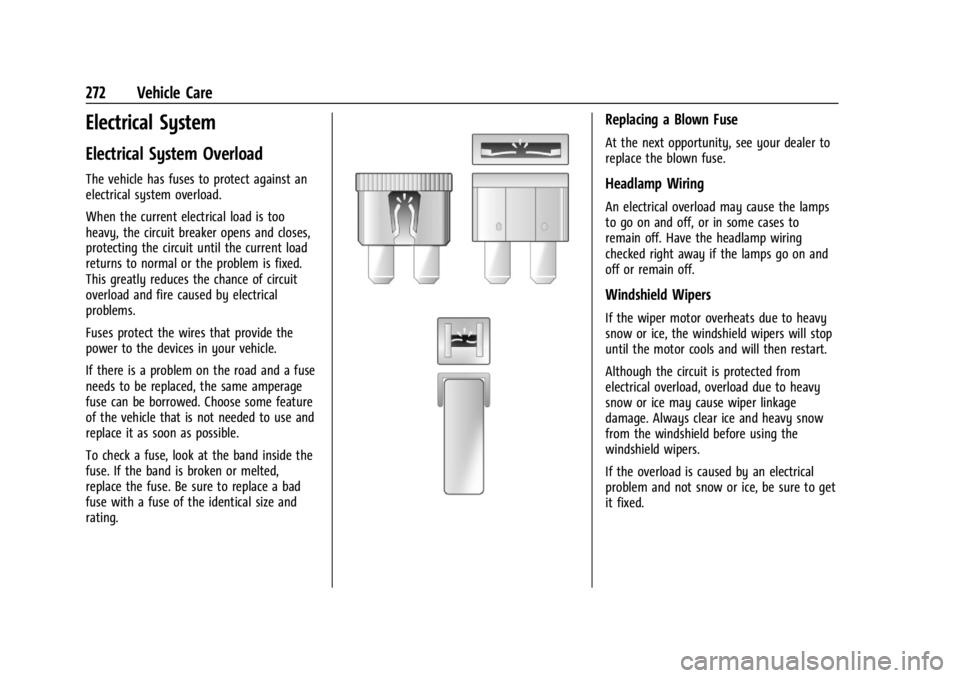
To check a fuse, look at the band inside the
fuse. If the band is broken or melted,
replace the fuse. Be sure to replace a bad
fuse with a fuse of the identical size and
rating.
Replacing a Blown Fuse
At the next opportunity, see your dealer to
replace the blown fuse.
Headlamp Wiring
An electrical overload may cause the lamps
to go on and off, or in some cases to
remain off. Have the headlamp wiring
checked right away if the lamps go on and
off or remain off.
Windshield Wipers
If the wiper motor overheats due to heavy
snow or ice, the windshield wipers will stop
until the motor cools and will then restart.
Although the circuit is protected from
electrical overload, overload due to heavy
snow or ice may cause wiper linkage
damage. Always clear ice and heavy snow
from the windshield before using the
windshield wipers.
If the overload is caused by an electrical
problem and not snow or ice, be sure to get
it fixed.
Page 290 of 362
Chevrolet Corvette Owner Manual (GMNA-Localizing-U.S./Canada/Mexico-
17272984) - 2024 - CRC - 2/20/23
Vehicle Care 289
As an added safety feature, your vehicle has
been equipped with a tire pressure
monitoring system (TPMS) that illuminates a
low tire pressure telltale when one or more
of your tires is significantly under-inflated.
Accordingly, when the low tire pressure
telltale illuminates, you should stop and
check your tires as soon as possible, and
inflate them to the proper pressure. Driving
on a significantly under-inflated tire causes
the tire to overheat and can lead to tire
failure. Under-inflation also reduces energy
efficiency and tire tread life, and may affect
the vehicle's handling and stopping ability.
Please note that the TPMS is not a
substitute for proper tire maintenance, and
it is the driver's responsibility to maintain
correct tire pressure, even if under-inflation
has not reached the level to trigger
illumination of the TPMS low tire pressure
telltale.
Your vehicle has also been equipped with a
TPMS malfunction indicator to indicate when
the system is not operating properly. The
TPMS malfunction indicator is combined
with the low tire pressure telltale. When the
system detects a malfunction, the telltale
will flash for approximately one minute and
then remain continuously illuminated. Thissequence will continue upon subsequent
vehicle start-ups as long as the malfunction
exists.
When the malfunction indicator is
illuminated, the system may not be able to
detect or signal low tire pressure as
intended. TPMS malfunctions may occur for
a variety of reasons, including the
installation of replacement or alternate tires
or wheels on the vehicle that prevent the
TPMS from functioning properly. Always
check the TPMS malfunction telltale after
replacing one or more tires or wheels on
your vehicle to ensure that the replacement
or alternate tires and wheels allow the
TPMS to continue to function properly.
See
Tire Pressure Monitor Operation 0289.
See Radio Frequency Statement 0337.
Tire Pressure Monitor Operation
This vehicle may have a Tire Pressure
Monitor System (TPMS). The TPMS is
designed to warn the driver when a low tire
pressure condition exists. TPMS sensors are
mounted onto each tire and wheel
assembly, excluding the spare tire and
wheel assembly. The TPMS sensors monitor the air pressure in the tires and transmit the
tire pressure readings to a receiver located
in the vehicle.
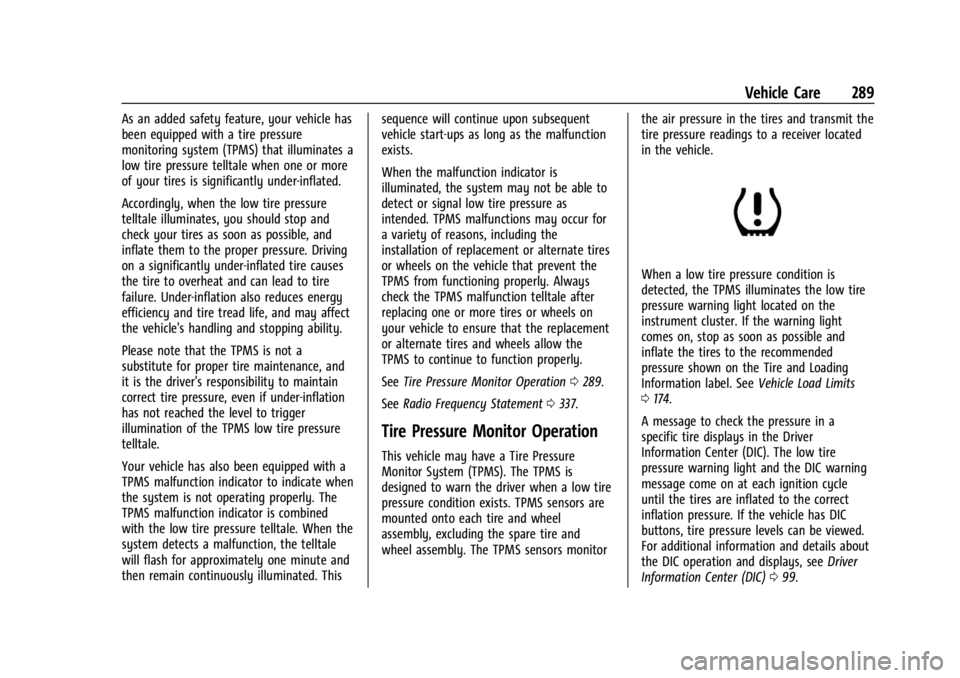
When a low tire pressure condition is
detected, the TPMS illuminates the low tire
pressure warning light located on the
instrument cluster. If the warning light
comes on, stop as soon as possible and
inflate the tires to the recommended
pressure shown on the Tire and Loading
Information label. See
Vehicle Load Limits
0 174.
A message to check the pressure in a
specific tire displays in the Driver
Information Center (DIC). The low tire
pressure warning light and the DIC warning
message come on at each ignition cycle
until the tires are inflated to the correct
inflation pressure. If the vehicle has DIC
buttons, tire pressure levels can be viewed.
For additional information and details about
the DIC operation and displays, see Driver
Information Center (DIC) 099.
Page 292 of 362
Chevrolet Corvette Owner Manual (GMNA-Localizing-U.S./Canada/Mexico-
17272984) - 2024 - CRC - 2/20/23
Vehicle Care 291
When the low tire pressure warning light
comes on:1. Park the vehicle in a safe, level place.
2. Set the parking brake firmly.
3. Place the vehicle in P (Park).
4. Add air to the tire that is underinflated. The turn signal lamp will flash.
When the recommended pressure is
reached, the horn sounds once. If the tire
being inflated is a front tire, then the
front turn signal lamp closest to the tire
being inflated will stop flashing and
briefly turn solid. If the tire being
inflated is a rear tire, then the rear turn
signal lamp closest to the tire being
inflated will stop flashing.
Repeat these steps for all underinflated tires
that have illuminated the low tire pressure
warning light.
{Warning
Overinflating a tire could cause the tire
to rupture and you or others could be
injured. Do not exceed the maximum
pressure listed on the tire sidewall. See
Tire Sidewall Labeling 0282 and
Vehicle Load Limits 0174. If the tire is overinflated by more than
35 kPa (5 psi), the horn will sound multiple
times and the turn signal lamp will continue
to flash for several seconds after filling
stops. To release and correct the pressure,
while the turn signal lamp is still flashing,
briefly press the center of the valve stem.
When the recommended pressure is reached,
the horn sounds once.
If the turn signal lamp does not flash within
15 seconds after starting to inflate the tire,
the tire fill alert has not been activated or is
not working.
If the hazard warning flashers are on, the
tire fill alert visual feedback will not work
properly.
The TPMS will not activate the tire fill alert
properly under the following conditions:
.There is interference from an external
device or transmitter.
.The air pressure from the inflation device
is not sufficient to inflate the tire.
.There is a malfunction in the TPMS.
.There is a malfunction in the horn or turn
signal lamps.
.The identification code of the TPMS
sensor is not registered to the system.
.The battery of the TPMS sensor is low. If the tire fill alert does not operate due to
TPMS interference, move the vehicle about
1 m (3 ft) back or forward and try again.
If the tire fill alert feature is not working,
use a tire pressure gauge.
TPMS Sensor Matching Process
—Auto
Learn Function
Each TPMS sensor has a unique
identification code. The identification code
needs to be matched to a new tire/wheel
position after rotating the tires or replacing
one or more of the TPMS sensors. When a
tire is installed, the vehicle must be
stationary for about 20 minutes before the
system recalculates. The following relearn
process takes up to 10 minutes, driving at a
minimum speed of 20 km/h (12 mph).
A dash (-) or pressure value will display in
the DIC. See Driver Information Center (DIC)
0 99. A warning message displays in the
DIC if a problem occurs during the relearn
process.
Tire Inspection
We recommend that the tires, including
the spare tire, if the vehicle has one, be
inspected for signs of wear or damage
at least once a month.
Page 348 of 362
Chevrolet Corvette Owner Manual (GMNA-Localizing-U.S./Canada/Mexico-
17272984) - 2024 - CRC - 2/20/23
Connected Services 347
Ensuring Security
.Change the default passwords for the
Wi-Fi hotspot and myChevrolet mobile
application. Make these passwords
different from each other and use a
combination of letters and numbers to
increase the security.
.Change the default name of the SSID
(Service Set Identifier). This is your
network’s name that is visible to other
wireless devices. Choose a unique name
and avoid family names or vehicle
descriptions.
Wi-Fi Hotspot (If Equipped)
The vehicle may have a built-in Wi-Fi
hotspot that provides access to the Internet
and web content at 4G LTE speed. Up to
seven mobile devices can be connected.
A data plan is required. Use the in-vehicle
controls only when it is safe to do so. 1. To retrieve Wi-Fi hotspot information, press
=to open the OnStar app on the
infotainment display, then select Wi-Fi
Hotspot. On some vehicles, touch Wi-Fi
or Wi-Fi Settings on the screen. 2. The Wi-Fi settings will display the Wi-Fi
hotspot name (SSID), password, and on
some vehicles, the connection type (no
Internet connection, 3G, 4G, 4G LTE), and
signal quality (poor, good, excellent). The
LTE icon shows connection to Wi-Fi. It is
possible that the icon may not illuminate
even though the vehicle has an active
connection.
3. To change the SSID or password, press
Qor call 1-888-4ONSTAR to connect
with an Advisor. On some vehicles, the
SSID and password can be changed in
the Wi-Fi Hotspot menu.
After initial set-up, your vehicle’s Wi-Fi
hotspot will connect automatically to your
mobile devices. Manage data usage by
turning Wi-Fi on or off on your mobile
device, using the myChevrolet mobile app,
or by contacting an OnStar Advisor. On
some vehicles, Wi-Fi can also be managed
from the Wi-Fi Hotspot menu. MyChevrolet Mobile App (If Available)
Download the myChevrolet mobile app to
compatible Apple and Android smartphones.
Chevrolet users can access the following
services from a smartphone:
.Remotely start/stop the vehicle,
if factory-equipped.
.Lock/unlock doors, if equipped with
automatic locks.
.Activate the horn and lamps.
.Check the vehicle’s fuel level, oil life,
or tire pressure, if factory-equipped with
the Tire Pressure Monitor System.
.Send destinations to the vehicle.
.Locate the vehicle on a map (U.S.
market only).
.Turn the vehicle's Wi-Fi hotspot on/off,
manage settings, and monitor data
consumption, if equipped.
.Locate a dealer and schedule service.
.Request Roadside Assistance.
.Set a parking reminder with pin drop,
take a photo, make a note, and set a
timer.
.Connect with Chevrolet on social media.
Page 355 of 362

Chevrolet Corvette Owner Manual (GMNA-Localizing-U.S./Canada/Mexico-
17272984) - 2024 - CRC - 2/20/23
354 Index
Heated (cont'd)Ventilated Front Seats . . . . . . . . . . . . . . . . . . 44
Heating . . . . . . . . . . . . . . . . . . . . . . . . . . . . . . . . . . 150
High Voltage Battery Gauge . . . . . . . . . . . . . . 86
High-Beam On Light . . . . . . . . . . . . . . . . . . . . . . 98
High-Speed Operation . . . . . . . . . . . . . . . . . . . 287
Hill Rollback Control . . . . . . . . . . . . . . . . . . . . . . . 196
Hill and Mountain Roads . . . . . . . . . . . . . . . . . 171
Hill Start Assist (HSA) . . . . . . . . . . . . . . . . . . . . 194
Hood . . . . . . . . . . . . . . . . . . . . . . . . . . . . . . . . . . . . . . 17
Horn . . . . . . . . . . . . . . . . . . . . . . . . . . . . . . . . . . . . . . .75
How to Wear Seat Belts Properly . . . . . . . . . 46
HVAC . . . . . . . . . . . . . . . . . . . . . . . . . . . . . . . . . . . . 150
Hybrid Battery Charging Light . . . . . . . . . . . . . . . . . . . . . . . . . . 87
I
Ignition Positions . . . . . . . . . . . . . . . . . . . . . . . . .178
Immobilizer . . . . . . . . . . . . . . . . . . . . . . . . . . . . . . . .23
IndicatorAuto Stop . . . . . . . . . . . . . . . . . . . . . . . . . . . . . . 98
Pedestrian Ahead . . . . . . . . . . . . . . . . . . . . . . . 94
Traffic Sign . . . . . . . . . . . . . . . . . . . . . . . . . . . . . 98
Vehicle Ahead . . . . . . . . . . . . . . . . . . . . . . . . . . 94
Indicators
Warning Lights and Gauges . . . . . . . . . . . . . 80
Infants and Young Children, Restraints . . . . 63 Information
Publication Ordering . . . . . . . . . . . . . . . . . . . 337
Infotainment Using the System . . . . . . . . . . . . . . . . . . . . . . 120
Infotainment System . . . . . . . . . . . . . . . . . . . . 340
Inspection Multi-Point Vehicle . . . . . . . . . . . . . . . . . . . . 318
Instrument Cluster . . . . . . . . . . . . . . . . . . . . . . . . .81
Instrument Panel Overview . . . . . . . . . . . . . . . . 4
Interior Rearview Mirrors . . . . . . . . . . . . . . . . . 26
Introduction . . . . . . . . . . . . . . . . . . . . . . . . . . . 2, 116
J
Jack Auxiliary . . . . . . . . . . . . . . . . . . . . . . . . . . . . . . . 125
Jump Starting - North America . . . . . . . . . . . . . . . 299
K
Keys . . . . . . . . . . . . . . . . . . . . . . . . . . . . . . . . . . . . . . . 6
Remote . . . . . . . . . . . . . . . . . . . . . . . . . . . . . . . . . . 7
Remote Operation . . . . . . . . . . . . . . . . . . . . . . . 7
L
Labeling, Tire Sidewall . . . . . . . . . . . . . . . . . . . 282
LampsCourtesy . . . . . . . . . . . . . . . . . . . . . . . . . . . . . . . . 113
Daytime Running (DRL) . . . . . . . . . . . . . . . . . 111
Engine Compartment . . . . . . . . . . . . . . . . . . . 114 Lamps (cont'd)
Exterior Controls . . . . . . . . . . . . . . . . . . . . . . . 109
Exterior Lamps Off Reminder . . . . . . . . . . 110
Exterior Lighting Battery Saver . . . . . . . . . 115
Flash-to-Pass . . . . . . . . . . . . . . . . . . . . . . . . . . . . 111
High/Low Beam Changer . . . . . . . . . . . . . . 110
Malfunction Indicator (Check
Engine) . . . . . . . . . . . . . . . . . . . . . . . . . . . . . . . 90
On Reminder . . . . . . . . . . . . . . . . . . . . . . . . . . . 99
Reading . . . . . . . . . . . . . . . . . . . . . . . . . . . . . . . . . 113
Lane Keep Assist Light . . . . . . . . . . . . . . . . . . . . . . . 94
Lap-Shoulder Belt . . . . . . . . . . . . . . . . . . . . . . . . . 48
LATCH, Lower Anchors and Tethers for Children . . . . . . . . . . . . . . . . . . . . . . . . . . . . . . . . . 67
LED Lighting . . . . . . . . . . . . . . . . . . . . . . . . . . . . . . 271
Leveling Control
Headlamp . . . . . . . . . . . . . . . . . . . . . . . . . . . . . . 112
Lifting the Vehicle, Tires . . . . . . . . . . . . . . . . . 232
Lighting Entry . . . . . . . . . . . . . . . . . . . . . . . . . . . . . . . . . . . 114
Exit . . . . . . . . . . . . . . . . . . . . . . . . . . . . . . . . . . . . . 114
Illumination Control . . . . . . . . . . . . . . . . . . . . 113
LED . . . . . . . . . . . . . . . . . . . . . . . . . . . . . . . . . . . . . 271
Lights Airbag Readiness . . . . . . . . . . . . . . . . . . . . . . . 88
All-Wheel-Drive . . . . . . . . . . . . . . . . . . . . . . . . . 93
Page 359 of 362

Chevrolet Corvette Owner Manual (GMNA-Localizing-U.S./Canada/Mexico-
17272984) - 2024 - CRC - 2/20/23
358 Index
Security (cont'd)Vehicle . . . . . . . . . . . . . . . . . . . . . . . . . . . . . . . . . 22
Vehicle Alarm . . . . . . . . . . . . . . . . . . . . . . . . . . . 22
Service . . . . . . . . . . . . . . . . . . . . . . . . . . . . . . . . . . . .154 Accessories and Modifications . . . . . . . . . 232
Doing Your Own Work . . . . . . . . . . . . . . . . . 234
Electric Parking Brake Light . . . . . . . . . . . . . 92
Maintenance Records . . . . . . . . . . . . . . . . . . 323
Maintenance, General Information . . . . . 315
Parts Identification . . . . . . . . . . . . . . . . . . . . . 324
Scheduling Appointments . . . . . . . . . . . . . . 334
Services
Special Application . . . . . . . . . . . . . . . . . . . . . 319
Servicing the Airbag . . . . . . . . . . . . . . . . . . . . . . 60
Settings . . . . . . . . . . . . . . . . . . . . . . . . . . . . . . . . . . .142
Shifting Into Park . . . . . . . . . . . . . . . . . . . . . . . . . . . . . . . 181
Out of Park . . . . . . . . . . . . . . . . . . . . . . . . . . . . 182
Signals, Turn and Lane-Change . . . . . . . . . . . . 112
Software Updates . . . . . . . . . . . . . . . . . . . . . . . . . 122
Special Application Services . . . . . . . . . . . . . . 319
Specifications and Capacities . . . . . . . . . . . . . 325
Speedometer . . . . . . . . . . . . . . . . . . . . . . . . . . . . . 85
Start Assist, Hill . . . . . . . . . . . . . . . . . . . . . . . . . . 194
Start Vehicle, Remote . . . . . . . . . . . . . . . . . . . . . . 12
Starting the Engine . . . . . . . . . . . . . . . . . . . . . . 179
Stealth Drive Mode Capability Gauge . . . . . 86
Steering . . . . . . . . . . . . . . . . . . . . . . . . . . . . . . . . . .158 Steering (cont'd)
Heated Wheel . . . . . . . . . . . . . . . . . . . . . . . . . . 75
Wheel Adjustment . . . . . . . . . . . . . . . . . . . . . . 75
Wheel Controls . . . . . . . . . . . . . . . . . . . . . . . . . 119
Stop/Start System . . . . . . . . . . . . . . . . . . . . . . . 180
Storage Center Console . . . . . . . . . . . . . . . . . . . . . . . . . 73
Compartments . . . . . . . . . . . . . . . . . . . . . . . . . . . 71
Convenience Net . . . . . . . . . . . . . . . . . . . . . . . . 73
Cupholders . . . . . . . . . . . . . . . . . . . . . . . . . . . . . . 71
Glove Box . . . . . . . . . . . . . . . . . . . . . . . . . . . . . . . 71
Rear . . . . . . . . . . . . . . . . . . . . . . . . . . . . . . . . . . . . 72
Vehicle . . . . . . . . . . . . . . . . . . . . . . . . . . . . . . . . 234
Storage Areas Underhood . . . . . . . . . . . . . . . . . . . . . . . . . . . . . . 71
Struts
Gas . . . . . . . . . . . . . . . . . . . . . . . . . . . . . . . . . . . . 270
Stuck Vehicle . . . . . . . . . . . . . . . . . . . . . . . . . . . . . 173
Summer Tires . . . . . . . . . . . . . . . . . . . . . . . . . . . . 282
Sun Visors . . . . . . . . . . . . . . . . . . . . . . . . . . . . . . . . . 31
Symbols . . . . . . . . . . . . . . . . . . . . . . . . . . . . . . . . . . . .3 Navigation . . . . . . . . . . . . . . . . . . . . . . . . . . . . . 126
System Airbag . . . . . . . . . . . . . . . . . . . . . . . . . . . . . . . . . . 53
Brake Pad Life . . . . . . . . . . . . . . . . . . . . . . . . . 264
Engine Air Filter Life . . . . . . . . . . . . . . . . . . . 254
Front Lift . . . . . . . . . . . . . . . . . . . . . . . . . . . . . . 205
Global Positioning . . . . . . . . . . . . . . . . . . . . . 128 System (cont'd)
Infotainment . . . . . . . . . . . . . . . . . . . . . . . . . . . 340
T
Tachometer . . . . . . . . . . . . . . . . . . . . . . . . . . . . . . . 85
Teen Driver . . . . . . . . . . . . . . . . . . . . . . . . . . . . . . 144
Text Telephone (TTY) Users . . . . . . . . . . . . . . . 331
Theft-Deterrent Systems . . . . . . . . . . . . . . . . . . 24
Immobilizer . . . . . . . . . . . . . . . . . . . . . . . . . . . . . 23
Time . . . . . . . . . . . . . . . . . . . . . . . . . . . . . . . . . . . . . . 76
Tires . . . . . . . . . . . . . . . . . . . . . . . . . . . . . . . . . . . . . 279 All-Season . . . . . . . . . . . . . . . . . . . . . . . . . . . . . 280
Buying New Tires . . . . . . . . . . . . . . . . . . . . . . 294
Chains . . . . . . . . . . . . . . . . . . . . . . . . . . . . . . . . . 298
Competition Oriented . . . . . . . . . . . . . . . . . . 281
Designations . . . . . . . . . . . . . . . . . . . . . . . . . . . 283
Different Size . . . . . . . . . . . . . . . . . . . . . . . . . . 295
If a Tire Goes Flat . . . . . . . . . . . . . . . . . . . . . 298
Inspection . . . . . . . . . . . . . . . . . . . . . . . . . . . . . 291
Lifting the Vehicle . . . . . . . . . . . . . . . . . . . . . 232
Low-Profile . . . . . . . . . . . . . . . . . . . . . . . . . . . . . 281
Pressure . . . . . . . . . . . . . . . . . . . . . . . . . . 286, 287
Pressure Light . . . . . . . . . . . . . . . . . . . . . . . . . . 97
Pressure Monitor Operation . . . . . . . . . . . 289
Pressure Monitor System . . . . . . . . . . . . . . 288
Rotation . . . . . . . . . . . . . . . . . . . . . . . . . . . . . . . 292
Run-Flat . . . . . . . . . . . . . . . . . . . . . . . . . . . . . . . . 280
Sidewall Labeling . . . . . . . . . . . . . . . . . . . . . . 282