audio CHEVROLET CORVETTE C6 2012 Owner's Manual
[x] Cancel search | Manufacturer: CHEVROLET, Model Year: 2012, Model line: CORVETTE C6, Model: CHEVROLET CORVETTE C6 2012Pages: 432, PDF Size: 5.73 MB
Page 206 of 432
Black plate (16,1)Chevrolet Corvette Owner Manual - 2012
7-16 Infotainment System
Auxiliary Devices
Using the Auxiliary Input Jack
The radio system has an auxiliary
input jack located on the right side
of the faceplate. This is not an audio
output; do not plug the headphone
set into the front auxiliary input jack.
An external audio device can be
connected to the auxiliary input jack
for use as another source for audio
listening.
Drivers are encouraged to set up
any auxiliary device while the
vehicle is in P (Park). SeeDefensive
Driving on page 9‑3.
Connect a 3.5 mm (1/8 in) cable to
the radio’s front auxiliary input jack
to use a portable audio player.
The radio displays AUX INPUT
DEVICE when a device is
connected and begins playing
audio from that device. Top Knob (Power/Volume):
Turn
to increase or decrease the volume
of the portable player. Additional
volume adjustments can be made
from the portable device.
BAND: Press to listen to the radio
while a portable audio device is
playing. The portable audio device
continues playing.
CD/AUX (CD/Auxiliary): Press to
play a CD while a portable audio
device is playing. Press again and
the system begins playing audio
from the connected portable audio
player. If a portable audio player is
connected, AUX INPUT DEVICE
displays. If a portable audio player
is not connected, AUX INPUT
DEVICE does not display.
Phone
Bluetooth
For vehicles equipped with
Bluetooth capability, the system can
interact with many cell phones,
allowing:
.Placement and receipt of calls in
a hands-free mode.
.Sharing of the cell phone’s
address book or contact list with
the vehicle.
To minimize driver distraction,
before driving, and with the vehicle
parked:
.Become familiar with the
features of the cell phone.
Organize the phone book and
contact lists clearly and delete
duplicate or rarely used entries.
If possible, program speed dial
or other shortcuts.
.Review the controls and
operation of the infotainment
system.
Page 207 of 432
Black plate (17,1)Chevrolet Corvette Owner Manual - 2012
Infotainment System 7-17
.Pair cell phone(s) to the vehicle.
The system may not work with
all cell phones. See“Pairing”in
this section for more information.
.If the cell phone has voice
dialing capability, learn to use
that feature to access the
address book or contact list.
See “Voice Pass-Thru” in this
section for more information.
.See “Storing and Deleting Phone
Numbers” in this section for
more information.
{WARNING
When using a cell phone, it can
be distracting to look too long or
too often at the screen of the
phone or the infotainment
(navigation) system. Taking your
eyes off the road too long or
too often could cause a crash
resulting in injury or death.
Focus your attention on driving. A Bluetooth system can use a
Bluetooth‐capable cell phone with a
Hands‐Free Profile to make and
receive phone calls. The system
can be used while the key is in the
ON/RUN or ACC/ACCESSORY
position. The range of the Bluetooth
system can be up to 9.1 m (30 ft).
Not all phones support all functions,
and not all phones work with the
in-vehicle Bluetooth system. See
www.gm.com/bluetooth for more
information on compatible phones.
Voice Recognition
The Bluetooth system uses voice
recognition to interpret voice
commands to dial phone numbers
and name tags.
For additional information, say
“Help”
while you are in a voice
recognition menu.
Noise: Keep interior noise levels to
a minimum. The system may not
recognize voice commands if there
is too much background noise. When to Speak:
A short tone
sounds after the system responds
indicating when it is waiting for a
voice command. Wait until the tone
and then speak.
How to Speak: Speak clearly in a
calm and natural voice.
Audio System
When using the in‐vehicle Bluetooth
system, sound comes through
the vehicle's front audio system
speakers and overrides the audio
system. Use the audio system
volume knob, during a call, to
change the volume level. The
adjusted volume level remains in
memory for later calls. To prevent
missed calls, a minimum volume
level is used if the volume is turned
down too low.
Page 211 of 432
Black plate (21,1)Chevrolet Corvette Owner Manual - 2012
Infotainment System 7-21
Digit Dial:This command allows a
phone number to be dialed by
entering the digits one at a time.
Re‐dial: This command is used to
dial the last number used on the cell
phone.
Using the “Dial”or“Call”
Command
1. Press and hold
b/gfor
two seconds.
2. Say “Dial”or“Call.”
3. Say the entire number without pausing, or say the name tag.
Once connected, the person called
will be heard through the audio
speakers.
Using the “Digit Dial” Command
The digit dial command allows a
phone number to be dialed by
entering the digits one at a time.
After each digit is entered, the
system repeats back the digit it
heard followed by a tone. If an unwanted number is
recognized by the system, say
“Clear”
at any time to clear the
last number.
To hear all of the numbers
recognized by the system, say
“Verify” at any time.
1. Press and hold
b/gfor
two seconds.
2. Say “Digit Dial.”
3. Say each digit, one at a time, that you want to dial. After each
digit is entered, the system
repeats back the digit it heard
followed by a tone. After the last
digit has been entered,
say “Dial.”
Once connected, the person called
will be heard through the audio
speakers.
Using the “Re‐dial”Command
1. Press and hold
b/gfor
two seconds.
2. After the tone, say “Re‐dial.”Once connected, the person called
will be heard through the audio
speakers.
Receiving a Call
When an incoming call is received,
the audio system mutes and a ring
tone is heard in the vehicle.
.Pressb/gto answer the call.
.Pressito ignore a call.
Call Waiting
Call waiting must be supported on
the cell phone and enabled by the
wireless service carrier.
.Pressb/gto answer an
incoming call when another call
is active. The original call is
placed on hold.
.Pressb/gagain to return to
the original call.
.To ignore the incoming call, no
action is required.
.Pressito disconnect the
current call and switch to the call
on hold.
Page 212 of 432
Black plate (22,1)Chevrolet Corvette Owner Manual - 2012
7-22 Infotainment System
Three‐Way Calling
Three‐way calling must be
supported on the cell phone and
enabled by the wireless service
carrier.
1. While on a call, press
b/g.
2. Say “Three‐way call.”
3. Use the dial or call command to dial the number of the third party
to be called.
4. Once the call is connected, press
b/gto link all callers
together.
Ending a Call
Pressito end a call.
Muting a Call
During a call, all sounds from inside
the vehicle can be muted so that the
person on the other end of the call
cannot hear them.
.To mute a call, pressb/g, and
then say “Mute call.”
.To cancel mute, pressb/g,
and then say “Un‐mute call.”
Transferring a Call
Audio can be transferred between
the Bluetooth system and the cell
phone.
The cell phone must be paired and
connected with the Bluetooth
system before a call can be
transferred. The connection process
can take up to two minutes after the
ignition is turned to ON/RUN. Transferring Audio from the
Bluetooth System to a Cell Phone
During a call with the audio in the
vehicle:
1. Press
b/g.
2. Say “Transfer Call.”
Transferring Audio to the
Bluetooth System from a Cell
Phone
During a call with the audio on the
cell phone, press
b/g. The audio
transfers to the vehicle. If the audio
does not transfer to the vehicle,
use the audio transfer feature on the
cell phone. See your cell phone
manufacturer's user guide for more
information.
Page 243 of 432
Black plate (21,1)Chevrolet Corvette Owner Manual - 2012
Driving and Operating 9-21
{WARNING
Turning off the vehicle while
moving may cause loss of power
assist in the brake and steering
systems and disable the airbags.
While driving, only shut the
vehicle off in an emergency.
If the vehicle cannot be pulled
over, and must be shut off while
driving, turn the ignition to
ACC/ACCESSORY.
When the engine is on or the
vehicle is in accessory power
mode, it is recommended that a
manual transmission be placed
in R (Reverse). An automatic
transmission must be placed in
P (Park). Then press the Acc. button
to turn the engine off and place the
vehicle in RAP. See Retained
Accessory Power (RAP) on
page 9‑24 for more information. If an automatic vehicle is not
correctly placed in P (Park) a SHIFT
TO PARK message will display on
the Driver Information Center (DIC).
For more information, see
Transmission Messages on
page 5‑52.
When the engine is off, press this
button to place the vehicle in
accessory mode. ACCESSORY
MODE ON will display on the Driver
Information Center (DIC). This mode
allows you to use things like the
radio and the power windows while
the engine is off. Use accessory
mode if you must have the vehicle
in motion while the engine is off, for
example, if the vehicle is being
pushed or towed.
After being in accessory mode for
about 10 minutes, the vehicle will
automatically enter RAP or OFF,
depending on if the doors are
opened or closed.
Service Only Mode
This power mode is available for
service and diagnostics, and to
verify the proper operation of the
malfunction indicator lamp as may
be required for emission inspection
purposes. With the vehicle off,
pressing and holding the bottom
of the button for more than
five seconds will place the vehicle in
Service Only Mode. The instruments
and audio systems will operate as
they do when the engine is running,
but the vehicle will not be able to be
driven. The engine will not start in
Service Only Mode. Push the button
again to turn the vehicle off.
Page 246 of 432
Black plate (24,1)Chevrolet Corvette Owner Manual - 2012
9-24 Driving and Operating
Retained Accessory
Power (RAP)
These vehicle accessories can be
used for up to 10 minutes after the
engine is turned off:
.Audio System
.Power Windows
These features continue to work up
to 10 minutes after the engine is
turned off or until either door is
opened. If a door is opened, the
power windows and audio system
will shut off.
Shifting Into Park
(Automatic Transmission)
{WARNING
It can be dangerous to get out of
the vehicle if the shift lever is not
fully in P (Park) with the parking (Continued)
WARNING (Continued)
brake firmly set. The vehicle can
roll. If you have left the engine
running, the vehicle can move
suddenly. You or others could be
injured. To be sure the vehicle will
not move, even when you are on
fairly level ground, use the steps
that follow.
1. Hold the brake pedal down and set the parking brake.
See Parking Brake on page 9‑36
for more information.
2. Move the shift lever into P (Park) by holding in the button on the
lever and pushing the lever all
the way toward the front of the
vehicle.
3. Press the Acc. button (ignition switch) to turn the engine off.
Leaving the Vehicle with
the Engine Running
(Automatic Transmission)
{WARNING
It can be dangerous to leave the
vehicle with the engine running.
The vehicle could move suddenly
if the shift lever is not fully in
P (Park) with the parking brake
firmly set. And, if you leave the
vehicle with the engine running,
it could overheat and even catch
fire. You or others could be
injured. Do not leave the vehicle
with the engine running.
If you have to leave the vehicle with
the engine running, be sure the
vehicle is in P (Park) and the
parking brake is firmly set before
you leave it. After you have moved
the shift lever into P (Park), hold
down the regular brake pedal.
Page 326 of 432
Black plate (50,1)Chevrolet Corvette Owner Manual - 2012
10-50 Vehicle Care
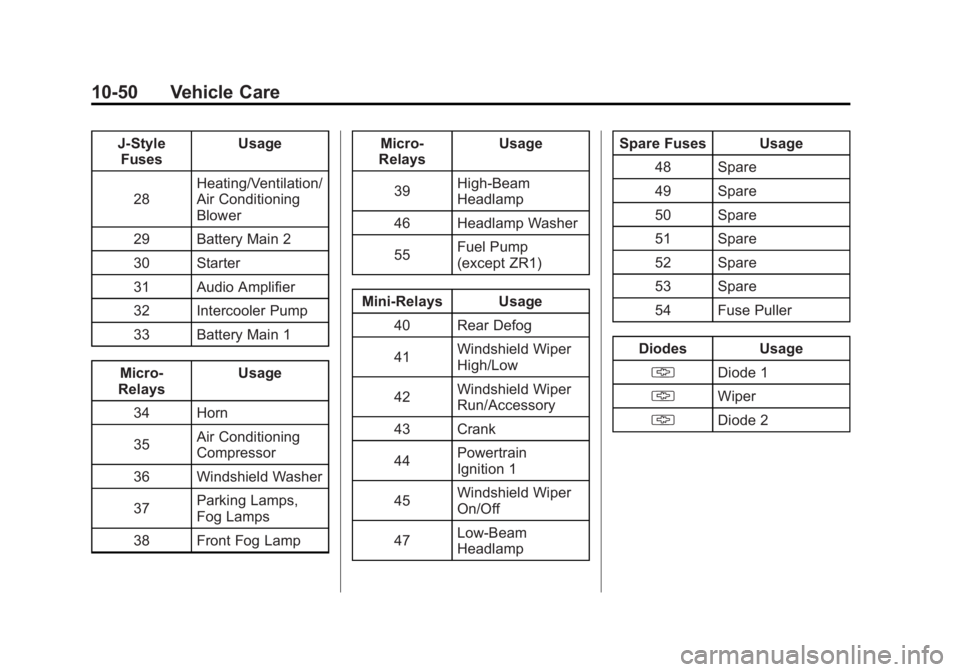
J-StyleFuses Usage
28 Heating/Ventilation/
Air Conditioning
Blower
29 Battery Main 2
30 Starter
31 Audio Amplifier
32 Intercooler Pump
33 Battery Main 1
Micro-
Relays Usage
34 Horn
35 Air Conditioning
Compressor
36 Windshield Washer
37 Parking Lamps,
Fog Lamps
38 Front Fog Lamp Micro-
Relays Usage
39 High-Beam
Headlamp
46 Headlamp Washer
55 Fuel Pump
(except ZR1)
Mini-Relays Usage 40 Rear Defog
41 Windshield Wiper
High/Low
42 Windshield Wiper
Run/Accessory
43 Crank
44 Powertrain
Ignition 1
45 Windshield Wiper
On/Off
47 Low-Beam
Headlamp Spare Fuses Usage
48 Spare
49 Spare
50 Spare
51 Spare
52 Spare
53 Spare
54 Fuse Puller
Diodes Usage § Diode 1
§ Wiper
§ Diode 2
Page 421 of 432
Black plate (1,1)Chevrolet Corvette Owner Manual - 2012
INDEX i-1
A
Accessories andModifications . . . . . . . . . . . . . . . . . 10-3
Accessory Power . . . . . . . . . . . . . . 9-24
Active Handling System . . . . . . . 9-38 Light . . . . . . . . . . . . . . . . . . . . . . . . . . 5-24
Add-On Electrical
Equipment . . . . . . . . . . . . . . . . . . . 9-54
Additional Information, OnStar
®. . . . . . . . . . . . . . . . . . . . . . 14-5
Adjustments
Lumbar, Front Seats . . . . . . . . . . . 3-2
Air Cleaner/Filter, Engine . . . . . 10-22
Air Dam, Front . . . . . . . . . . . . . . . . . 9-19
Air Filter, Passenger Compartment . . . . . . . . . . . . . . . . . 8-7
Air Vents . . . . . . . . . . . . . . . . . . . . . . . 8-6
Airbag System Check . . . . . . . . . . . . . . . . . . . . . . . . 3-28
How Does an AirbagRestrain? . . . . . . . . . . . . . . . . . . . 3-20
Passenger Sensing System . . . . . . . . . . . . . . . . . . . . . . 3-22
What Makes an Airbag Inflate? . . . . . . . . . . . . . . . . . . . . . . 3-19 Airbag System (cont'd)
What Will You See after an
Airbag Inflates? . . . . . . . . . . . . . 3-20
When Should an Airbag
Inflate? . . . . . . . . . . . . . . . . . . . . . . 3-18
Where Are the Airbags? . . . . . . 3-17
Airbags Adding Equipment to theVehicle . . . . . . . . . . . . . . . . . . . . . . 3-27
Passenger Status Indicator . . . 5-18
Readiness Light . . . . . . . . . . . . . . 5-17
Servicing Airbag-Equipped Vehicles . . . . . . . . . . . . . . . . . . . . . 3-26
System Check . . . . . . . . . . . . . . . . 3-15
Alarm System Anti-theft . . . . . . . . . . . . . . . . . . . . . . 2-14
AM-FM Radio . . . . . . . . . . . . . . . . . . . 7-5
Antenna Satellite Radio . . . . . . . . . . . . . . . . 7-11
Anti-theft Alarm System . . . . . . . . . . . . . . . . 2-14
Alarm System Messages . . . . . 5-49
Antilock Brake
System (ABS) . . . . . . . . . . . . . . . . 9-35
Warning Light . . . . . . . . . . . . . . . . . 5-22 Appearance Care
Exterior . . . . . . . . . . . . . . . . . . . . . 10-82
Interior . . . . . . . . . . . . . . . . . . . . . . 10-86
Ashtrays . . . . . . . . . . . . . . . . . . . . . . . . 5-7
Assistance Program, Roadside . . . . . . . . . . . . . . 13-8, 13-10
Audio Players . . . . . . . . . . . . . . . . . 7-11
CD . . . . . . . . . . . . . . . . . . . . . . . . . . . 7-11
Audio System Diversity Antenna System . . . . 7-11
Radio Reception . . . . . . . . . . . . . . 7-10
Theft-Deterrent Feature . . . . . . . . 7-2
Automatic Dimming Mirrors . . . . . . . . . . . . . . 2-17
Door Locks . . . . . . . . . . . . . . . . . . . 2-10
Transmission . . . . . . . . . . . . . . . . . 9-27
Transmission Fluid . . . . . . . . . 10-20
Automatic Transmission Manual Mode . . . . . . . . . . . . . . . . . 9-29
Shift Lock ControlFunction Check . . . . . . . . . . . 10-42
Auxiliary Devices . . . . . . . . . . . . . . . . . . . . . . . 7-16
Axle, Rear . . . . . . . . . . . . . . . . . . . . 10-40