automatic transmission CHEVROLET CORVETTE C6 2012 Owner's Manual
[x] Cancel search | Manufacturer: CHEVROLET, Model Year: 2012, Model line: CORVETTE C6, Model: CHEVROLET CORVETTE C6 2012Pages: 432, PDF Size: 5.73 MB
Page 140 of 432
Black plate (26,1)Chevrolet Corvette Owner Manual - 2012
5-26 Instruments and Controls
Information Displays
Driver Information
Center (DIC)
The Driver Information Center (DIC)
display is located on the instrument
panel cluster and shows driver
personalization features and
warning/status messages.
The DIC comes on when the ignition
is turned on. After displaying
CORVETTE BY CHEVROLET, the
DIC shows the information that was
last displayed before the engine
was turned off.
If a problem is detected, a warning
message appears on the DIC
display. SeeVehicle Messages on
page 5‑35 for more information.
DIC Operation and Displays
Depending on the features on the
vehicle, the drive gear may display
on the DIC. See “Manual Paddle
Shift” under Automatic Transmission on page 9‑27
andHead-Up Display
(HUD) on page 5‑31 for more
information.
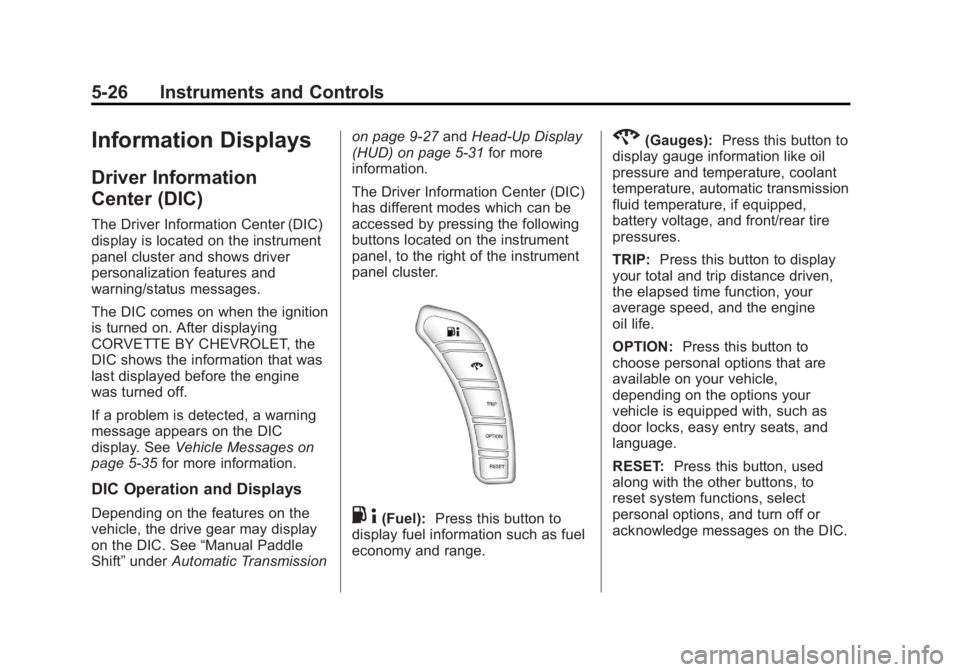
The Driver Information Center (DIC)
has different modes which can be
accessed by pressing the following
buttons located on the instrument
panel, to the right of the instrument
panel cluster.. 4(Fuel): Press this button to
display fuel information such as fuel
economy and range.
2(Gauges): Press this button to
display gauge information like oil
pressure and temperature, coolant
temperature, automatic transmission
fluid temperature, if equipped,
battery voltage, and front/rear tire
pressures.
TRIP: Press this button to display
your total and trip distance driven,
the elapsed time function, your
average speed, and the engine
oil life.
OPTION: Press this button to
choose personal options that are
available on your vehicle,
depending on the options your
vehicle is equipped with, such as
door locks, easy entry seats, and
language.
RESET: Press this button, used
along with the other buttons, to
reset system functions, select
personal options, and turn off or
acknowledge messages on the DIC.
Page 142 of 432
Black plate (28,1)Chevrolet Corvette Owner Manual - 2012
5-28 Instruments and Controls
Gauges Button
The gauges button displays oil
pressure, oil temperature, coolant
temperature, transmission fluid
temperature for automatic
transmission vehicles only,
battery voltage, and tire pressure
information.
Oil Pressure:This display shows
the oil pressure.
Press the gauges button to display
the oil pressure, such as:
.OIL PRESSURE 276 kPa or
.OIL PRESSURE 40 PSI
Oil Temperature: This display
shows the oil temperature.
Press the gauges button again to
display the oil temperature, such as:
.OIL TEMPERATURE 112°C or
.OIL TEMPERATURE 234°F If the oil temperature is low,
the display will show OIL
TEMPERATURE LOW. If the oil
temperature is high, the display will
show OIL TEMPERATURE HIGH.
Coolant Temperature:
This
display shows the engine coolant
temperature.
Press the gauges button again to
display the coolant temperature,
such as:
.COOLANT
TEMPERATURE 51°C or
.COOLANT
TEMPERATURE 123°F
If the coolant temperature is low,
the display will show COOLANT
TEMPERATURE LOW. If the
coolant temperature is high, the
display will show COOLANT
TEMPERATURE HIGH. Transmission Fluid
Temperature:
If you have an
automatic transmission vehicle,
this display shows the automatic
transmission fluid temperature.
Press the gauges button again to
display the automatic transmission
fluid temperature, such as:
.TRANS FLUID TEMP 51°C or
.TRANS FLUID TEMP 123°F
If the transmission fluid temperature
is low, the display will show TRANS
FLUID TEMP LOW. If the
transmission fluid temperature is
high, the display will show TRANS
FLUID TEMP HIGH.
Battery Voltage: This display
shows the current battery voltage.
Press the gauges button again to
display the battery voltage, such as:
.BATTERY VOLTAGE
13.5 VOLTS
Page 145 of 432
Black plate (31,1)Chevrolet Corvette Owner Manual - 2012
Instruments and Controls 5-31
Head-Up Display (HUD)
{WARNING
If the HUD image is too bright,
or too high in your field of view, it
may take you more time to see
things you need to see when it is
dark outside. Be sure to keep the
HUD image dim and placed low in
your field of view.
For vehicles with the Head-Up
Display (HUD), you can see some
of the driver information that
appears on the instrument panel
cluster.
The information may be displayed in
English or metric units and appears
as an image focused out toward
the front of the vehicle. The HUD
consists of the following information:
.Speedometer
.Turn Signal Indicators
.High-Beam Indicator Symbol
.Tachometer
.Manual Paddle Shift Gear
Indicator (If Equipped)
These displays on the HUD are
for use when using the manual
paddle shift controls to shift the
transmission. See “Manual
Paddle Shift” inAutomatic
Transmission on page 9‑27.
.Shift Light
This light is used for
performance driving to
indicate that the vehicle's best
performance level has been
reached to shift the transmission
into the next higher gear.
An arrow pointing up will light
up on the display just prior to
reaching the engine fuel cut-off
mode. This cut-off is about
6,500 rpm for the LS3 engine,
6,600 rpm for the LS9 & ZR1
engines, and 7,000 rpm for the
LS7 engine.
.Check Gauges Warning
.Engine Coolant Temperature
Gauge
.Transmission Fluid Temperature
Gauge, (Automatic Transmission
Vehicles Only)
.Engine Oil Temperature Gauge
.Engine Oil Pressure Gauge
.G-Force Gauge
.Boost Gauge (If Equipped)
.Audio Functions, Street
Mode Only
.Navigation, Only with Navigation
Radio, Turn-by-Turn Guidance.
Street Mode Only
Page 147 of 432
Black plate (33,1)Chevrolet Corvette Owner Manual - 2012
Instruments and Controls 5-33
Within each mode, the display, can
be further customized by pressing
the PAGE button. Pressing this
button in each mode will turn off and
on the following:
.Street Mode—No tachometer,
circular tachometer, and linear
tachometer.
.Track Modes 1 and 2 —No
minor gauge, coolant
temperature, transmission oil
temperature (Automatic
Transmission only), engine
oil temperature, engine oil
pressure, and boost gauge.
While in Track Mode 1 or 2, the
maximum G value achieved
during the current ignition cycle
can be displayed by pressing
and holding the PAGE button.
The maximum G display will be
shown until the PAGE button is
released. The maximum G value
display will be identical to the
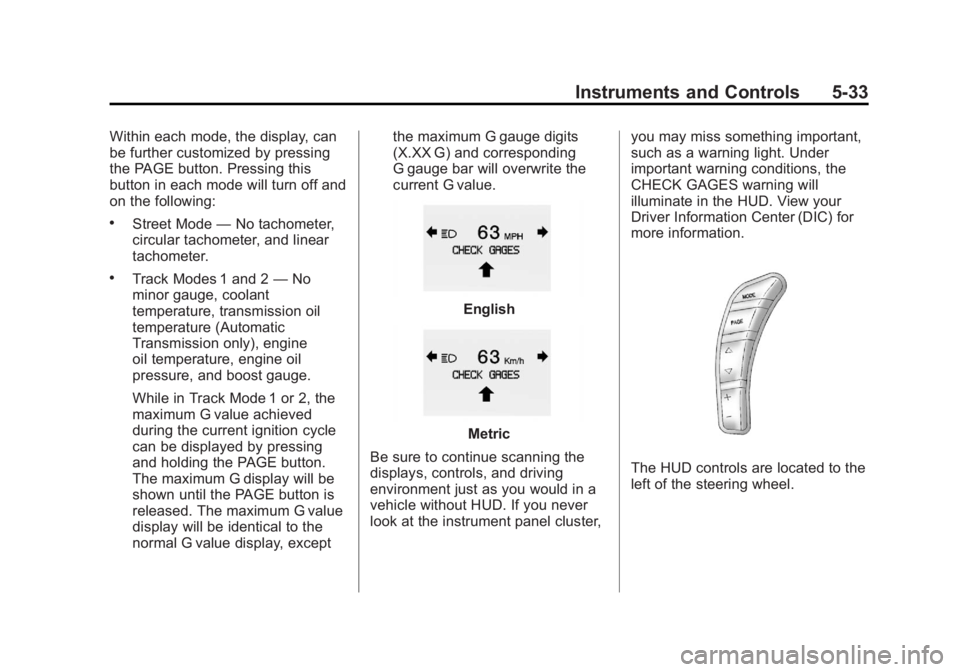
normal G value display, except the maximum G gauge digits
(X.XX G) and corresponding
G gauge bar will overwrite the
current G value.
English
Metric
Be sure to continue scanning the
displays, controls, and driving
environment just as you would in a
vehicle without HUD. If you never
look at the instrument panel cluster, you may miss something important,
such as a warning light. Under
important warning conditions, the
CHECK GAGES warning will
illuminate in the HUD. View your
Driver Information Center (DIC) for
more information.
The HUD controls are located to the
left of the steering wheel.
Page 151 of 432
Black plate (37,1)Chevrolet Corvette Owner Manual - 2012
Instruments and Controls 5-37
have ABS. If the regular brake
system warning light is also on,
you do not have ABS and there
is a problem with the brakes.
SeeAntilock Brake System (ABS)
Warning Light on page 5‑22 and
Brake System Warning Light on
page 5‑21.
If this message is displayed, the
Traction Control System (TCS) and
the Active Handling System will also
be disabled. The DIC will scroll
three messages: SERVICE
ANTILOCK BRAKES, SERVICE
TRACTION SYSTEM, and
SERVICE ACTIVE HANDLING, and
the instrument panel cluster lights
will come on along with a sound.
When the service message is
displayed, the computer controlled
systems will not assist the driver.
Have the system repaired by your
dealer as soon as possible. Adjust
your driving accordingly.
To acknowledge these messages,
press the RESET button.Convertible Top
Messages
ATTACH TRUNK PARTITION
If the vehicle has a power
convertible top, this message
displays and a sound will be heard
if the trunk partition is not in place.
Open the hatch/trunk and make
sure the trunk partition is secure
and no objects are on the trunk
partition. See Rear Storage on
page 4‑1 for more information.
CLOSE TRUNK TO MOVE TOP
This message displays and a sound
will be heard if the trunk is open
while you are trying to operate the
convertible top. Make sure the trunk
is closed before operating the
convertible top. See Convertible Top
on page 2‑24.
SET PARK BRAKE TO
MOVE TOP
If the vehicle has a manual
transmission, this message displays
and a sound will be heard if you try
to operate the power convertible top
without first setting the parking
brake. Set the parking brake
before trying to operate the power
convertible top. See Convertible Top
on page 2‑24 for more information.
SHIFT TO PARK OR SET PARK
BRAKE FOR TOP
If the vehicle has an automatic
transmission, this message displays
and a sound will be heard if you try
to operate the power convertible top
without first shifting into P (Park) or
setting the parking brake. Either
shift the vehicle into P (Park) or set
the parking brake before trying to
operate the power convertible top.
SeeConvertible Top on page 2‑24
for more information.
Page 152 of 432
Black plate (38,1)Chevrolet Corvette Owner Manual - 2012
5-38 Instruments and Controls
TOO COLD TO MOVE TOP
This message displays and a sound
will be heard when the power
convertible top button is pressed
and the power convertible top
pump motor temperature is below
−20°C (−4°F). Wait for the power
convertible top pump motor to
warm up before using the power
convertible top.
TOP MOTOR OVER
TEMPERATURE
This message displays and a sound
will be heard when the power
convertible top button is pressed
and the power convertible top
pump motor temperature is over
105°C (221°F). Wait for the power
convertible top pump motor to cool
down before using the power
convertible top.
TOP NOT SECURE
This message displays and a sound
will be heard when the power
convertible top button is released
before the top open or close
operation is complete or if the top is
closed without the header latch
engaged. Press and hold the
convertible top button to fully open
or close the top, and make sure that
the header latch is engaged after
the top is closed.
UNLATCH HEADER TO
MOVE TOP
This message displays and a sound
will be heard if you try to lower the
convertible top without first
unlocking the top. Move the latch
handle to unlock the convertible top.
SeeConvertible Top on page 2‑24.
Cruise Control Messages
CRUISE DISENGAGED
This message displays briefly when
you disengage the cruise control
system by stepping on the brake on
an automatic transmission vehicle or
the clutch on a manual transmission
vehicle, or by turning off the cruise
control switch. See Cruise Control
on page 9‑45 for more information.
CRUISE SET TO XXX MPH
(XXX km/h)
SeeCruise Control on page 9‑45.
Door Ajar Messages
DRIVER DOOR AJAR
This message displays if the
driver door is not closed properly.
Make sure that the door is closed
completely.
Page 163 of 432
Black plate (49,1)Chevrolet Corvette Owner Manual - 2012
Instruments and Controls 5-49
This message is an additional
reminder to the safety belt reminder
light in the instrument panel cluster.
SeeSafety Belt Reminders on
page 5‑17 for more information.
Anti-theft Alarm System
Messages
INTRUSION SENSOR OFF
This message may display when the
anti-theft alarm has been disarmed.
INTRUSION SENSOR ON
This message may display when the
anti-theft alarm has been armed.
Service Vehicle Messages
SERVICE AIR CONDITIONING
This message displays when the
electronic sensors that control the
air conditioning and heating
systems are no longer working. Have the climate control system
serviced by your dealer if you
notice a drop in heating and air
conditioning efficiency.
SERVICE ELECTRICAL
SYSTEM
This message displays if an
electrical problem has occurred
within the Powertrain Control
Module (PCM). Have the vehicle
serviced by your dealer.
SERVICE VEHICLE SOON
This message displays and a sound
will be heard when there may be an
electrical or another system problem
with the vehicle. Have your vehicle
checked by your dealer if this
message keeps appearing.
Starting the Vehicle
Messages
PRESS BRAKE TO START
ENGINE (Automatic
Transmission Only)
This message displays if you try to
start the engine by pressing the
keyless ignition start button without
having the brake pressed. The
brake needs to be pressed when
starting the engine. See
Ignition
Positions on page 9‑20 for more
information.
Tire Messages
HIGH TIRE PRESSURE
This message may be displayed
when one or more of the tires is
overinflated. This message
also displays LEFT FRONT,
RIGHT FRONT, LEFT REAR,
or RIGHT REAR to indicate
which tire is affected.
Page 166 of 432
Black plate (52,1)Chevrolet Corvette Owner Manual - 2012
5-52 Instruments and Controls
SeeRun-Flat Tires on page 10‑56,
Vehicle Load Limits on page 9‑14,
Tire Pressure on page 10‑62, and
Tire Pressure Monitor System on
page 10‑64. The DIC also shows
the tire pressure values. See Driver
Information Center (DIC) on
page 5‑26.
To acknowledge the message, press
the RESET button. A message
reappears every 10 minutes until the
condition is corrected.
Transmission Messages
SERVICE TRANSMISSION
This message displays when there
is a problem with the transmission.
See your dealer for service.
SHIFT TO PARK
If the vehicle has an automatic
transmission, this message displays
if the vehicle is not in P (Park) when
the engine is being turned off. The vehicle will be in ACCESSORY.
Once the shift lever is moved to
P (Park), the vehicle will turn off.
The vehicle will remain in
ACCESSORY, without the 20 minute
time-out period, until the shift lever
is moved to P (Park) or until the
driver presses the pushbutton to
restart the vehicle. See
Ignition
Positions on page 9‑20 for more
information.
TRANSMISSION HOT IDLE
ENGINE
This message displays and four
chimes sound if the transmission
fluid temperature rises above
132°C (270°F) or rises rapidly.
The transmission may shift gears
or apply the torque converter clutch
to reduce the fluid temperature.
Driving aggressively or driving
on long hills can cause the
transmission fluid temperature to be
higher than normal. If this message
appears, you may continue to drive at a slower speed. Monitor the
transmission fluid temperature and
allow it to cool to at least 110°C
(230°F). The transmission fluid
temperature can be monitored with
the gauges button on the DIC.
See
“DIC Operation and Displays”
under Driver Information Center
(DIC) on page 5‑26 andAutomatic
Transmission Fluid on page 10‑20.
Also check the engine coolant
temperature. If it is also hot, see
Engine Overheating on page 10‑30.
If this message is displayed during
normal vehicle operation on flat
roads, the vehicle may need
service. See your dealer for an
inspection.
If driving in a performance or
competitive manner, the use of
(S) Sport Automatic Mode or
(S) Sport Manual Paddle Shift
gear selection is recommended.
See Automatic Transmission on
page 9‑27 for more information.
Page 169 of 432
Black plate (55,1)Chevrolet Corvette Owner Manual - 2012
Instruments and Controls 5-55
Entering the Personal
Options Menu
To enter the personal options menu,
use the following steps:
1. If you have an automatictransmission vehicle, turn the
vehicle on with the shift lever in
P (Park).
If you have a manual
transmission vehicle, turn the
vehicle on with the parking
brake set.
To avoid excessive drain on the
battery, it is recommended that
the headlamps are turned off.
2. Press the OPTION button and you will enter the PERSONAL
OPTIONS menu. The DIC will display the current
driver number (1 or 2) for a
few seconds and then will
display instructions on which
buttons to use for setting the
personalizations. The RESET
button is used to select a
setting for a particular feature.
The OPTION button is used to
move to the next feature.
3. Press the OPTION button while the instruction screen is
displayed to enter the first
personalization menu item.
4. Once you have cycled through all of the personal options,
pressing the OPTION button a
final time exits the personal
options menu. In addition,
if no button is pressed within
45 seconds, the DIC will exit the
personal options menu. Personal Options
The following options are available
for programming:
Display Units:
This option allows
you to choose the measurement
units.
Press the OPTION button until
DISPLAY UNITS appears on the
display, then press the RESET
button to scroll through the
following modes:
.ENGLISH (default)
.METRIC
If you choose ENGLISH, all
information will be displayed in
English units.
If you choose METRIC, all
information will be displayed in
metric units.
When the mode you want is
selected, press the OPTION button
to set your choice and advance to
the next personal option.
Page 170 of 432
Black plate (56,1)Chevrolet Corvette Owner Manual - 2012
5-56 Instruments and Controls
Auto Memory Recall (Automatic
Transmission only):If your
automatic transmission vehicle has
the memory package, you may have
this option. This option allows the
driver seat, the telescopic steering
column, if your vehicle has this
feature, and the outside rearview
mirrors to automatically move to the
current driver's set position when
the engine starts.
Press the OPTION button until
AUTO MEMORY RECALL appears
on the display, then press the
RESET button to scroll through the
following modes:
.YES
.NO (default)
If you choose YES, the driver seat,
the outside rearview mirrors and the
telescopic steering column, if your
vehicle has this feature, positions
are recalled when you turn the
ignition on.
If you choose NO, this option will
turn off. When the mode you want is
selected, press the OPTION button
to set your choice and advance to
the next personal option.
Auto Exit Recall:
If your vehicle
has the memory package, you may
have this option. This option allows
the driver seat and telescopic
steering column, if your vehicle has
this feature, to automatically move
to the current driver's exit position
when one of the following occurs:
.The vehicle is turned off or in
Retained Accessory Power
(RAP) or accessory mode and
the driver door is opened.
.The vehicle is turned off or in
RAP and the unlock button on
the RKE transmitter is pressed.
In order for the Auto Exit Recall
feature to work on an automatic
transmission vehicle, the vehicle
must be in P (Park). On a manual
transmission vehicle, the parking
brake must be set. Press the OPTION button until
AUTO EXIT RECALL appears on
the display, then press the RESET
button to scroll through the following
modes:
.YES
.NO (default)
If you choose YES, when you turn
the ignition off and open the driver
door or press the unlock button on
the RKE transmitter, the seat and
the telescopic steering wheel, if your
vehicle has this feature, will return
to their stored exit positions for an
easy exit or an easy entrance when
returning to the vehicle.
The seat and steering wheel will
only return to the stored driving
position if you press the appropriate
memory button or activate the Auto
Memory Recall feature.
If you choose NO, this option will
turn off.