reset CHEVROLET CORVETTE C6 2012 Service Manual
[x] Cancel search | Manufacturer: CHEVROLET, Model Year: 2012, Model line: CORVETTE C6, Model: CHEVROLET CORVETTE C6 2012Pages: 432, PDF Size: 5.73 MB
Page 197 of 432

Black plate (7,1)Chevrolet Corvette Owner Manual - 2012
Infotainment System 7-7
To scan preset stations:
Press and hold
torufor
four seconds until PRESET SCAN
displays. The radio goes to the next
preset station, plays for a few
seconds, then goes to the next
preset station. Press
toruagain
or press one of the pushbuttons to
stop scanning presets.
The radio only scans stations with a
strong signal.
1–6 (Preset Pushbuttons):
Press to play stations that are
programmed to the radio preset
pushbuttons.
Storing Radio Stations
Drivers are encouraged to store
radio station while the vehicle is
parked. See Defensive Driving on
page 9‑3. Tune to stored radio
stations using the presets, favorites
button, and steering wheel controls,
if the vehicle has this feature. Up to 30 stations (six FM1, six FM2,
six AM, six M1, and six XM2), and
equalization settings for each
station can be programmed on the
six numbered pushbuttons. To set
presets:
1. Turn the radio on.
2. Press BAND to select FM1,
FM2, AM, XM1, or XM2.
3. Tune in the desired station.
4. Press AUTO EQ to select the equalization.
5. Press and hold one of the six numbered pushbuttons until the
radio beeps once.
6. Repeat the steps for each pushbutton.
Satellite Radio
XM™ Satellite Radio Service
XM is a satellite radio service
based in the 48 contiguous United
States and 10 Canadian provinces.
XM Satellite Radio has a wide
variety of programming and
commercial-free music, coast to
coast, and in digital-quality sound.
A service fee is required to receive
the XM service. If XM Service needs
to be reactivated, the radio will
display "No Subscription Please
Renew" on channel XM1.
For more information, contact
XM at www.xmradio.com or
1-800-929-2100 in the U.S.,
and www.xmradio.ca or
1-877-438-9677 in Canada.
Page 198 of 432
Black plate (8,1)Chevrolet Corvette Owner Manual - 2012
7-8 Infotainment System
Finding an XM Channel
BAND:Press to switch between
FM1, FM2, AM, XM1, or XM2.
O/e(Tune): Turn to manually
select an XM channel.
tSEEKu: Press to go to the
previous or to the next XM channel.
tSCANu: Press and holdt
orufor two seconds until
FREQUENCY SCAN displays.
The radio goes to a channel, plays
for a few seconds, then goes on
to the next station. Press
toru
again to stop scanning.
To scan preset stations:
Press and hold
torufor
four seconds until PRESET
SCAN displays. The radio goes
to the next preset station,
plays for a few seconds, then
goes to the next preset station. Press
toruagain or press one of
the pushbuttons to stop scanning
presets.
1–6 (Preset Pushbuttons):
Press to play channels that are
programmed to the radio preset
pushbuttons.
Finding a Category (CAT)
Station
To select an XM station by category:
1. Press the CAT button. The last selected category displays.
2. Turn the
O/eknob to select
a category.
3. Press
toruto go to a
category's station. SEEKING
CATEGORY displays.
4. To go to another station within that category, press the CAT
button to display the category,
then press
toruto go to
another station. If the radio cannot find the desired
category, NONE displays and the
radio returns to the last station
tuned.
SCAN:
To scan the stations within
a category:
1. Press CAT. The last selected
category displays.
2. Turn the
O/eknob to select
a category.
3. Press and hold
toruuntil
a beep sounds and SCAN
CATEGORY displays. The radio
begins scanning the stations in
the category.
4. Press
toruto stop scanning.
Page 199 of 432
Black plate (9,1)Chevrolet Corvette Owner Manual - 2012
Infotainment System 7-9
Storing XM Channels
Drivers are encouraged to store
XM channels while the vehicle is
parked. SeeDefensive Driving on
page 9‑3. Tune to stored radio
stations using the presets, favorites
button, and steering wheel controls,
if the vehicle has this feature.
Up to 30 stations (six FM1, six FM2,
and six AM, six XM1 and six XM2),
and equalization settings for each
station can be programmed on the
six numbered pushbuttons.
To set presets:
1. Tune to a channel.
2. Press AUTO EQ to select the equalization.
3. Press and hold one of the six numbered pushbuttons until the
radio beeps once.
4. Repeat the steps for each pushbutton.
XM Radio Messages
XL (Explicit Language
Channels): These channels, or any
others, can be blocked by calling
1-800-929-2100 in the U.S. and
1-877-438-9677 in Canada.
Updating: The encryption code
in the receiver is being updated,
and no action is required.
This process should take no
longer than 30 seconds.
No Signal: The system is
functioning correctly, but the vehicle
is in a location that is blocking the
XM signal. When the vehicle is
moved into an open area, the signal
should return.
Loading XM: The audio system is
acquiring and processing audio and
text data. No action is needed.
This message should disappear
shortly.
CH Off Air: This channel is not
currently in service. Tune in to
another channel. CH Unauth:
This channel is
blocked or cannot be received with
your XM Subscription package.
CH Unavail: This previously
assigned channel is no longer
assigned. Tune to another station.
If this station was one of the
presets, choose another station
for that preset button.
No Info: No artist, song title,
category, or text information is
available at this time on this
channel. The system is working
properly.
No Subscription Please Renew:
XM subscription needs to be
reactivated. Contact XM at
www.xmradio.com or call
1-800-929-2100 in the U.S. and
www.xmradio.ca or call
1-877-438-9677 in Canada.
Not Found: There are no channels
available for the selected category.
The system is working properly.
Page 295 of 432
Black plate (19,1)Chevrolet Corvette Owner Manual - 2012
Vehicle Care 10-19
Viscosity Grade
SAE 5W‐30 is the best viscosity
grade for the vehicle. Do not use
other viscosity grade oils such as
SAE 10W‐30, 10W‐40, or 20W‐50.
If in an area of extreme cold, where
the temperature falls below−20°F
(−29°C), an SAE 0W‐30 oil should
be used. An oil of this viscosity
grade will provide easier cold
starting for the engine at extremely
low temperatures. When selecting
an oil of the appropriate viscosity
grade, always select an oil that
meets the dexos1 specification or
equivalent. See “Specification”for
more information.
Engine Oil Additives/Engine
Oil Flushes
Do not add anything to the oil.
The recommended oils with the
dexos specification and displaying
the dexos certification mark are all
that is needed for good performance
and engine protection. Engine oil system flushes are not
recommended and could cause
engine damage not covered by the
vehicle warranty.
What to Do with Used Oil
Used engine oil contains certain
elements that can be unhealthy for
your skin and could even cause
cancer. Do not let used oil stay on
your skin for very long. Clean your
skin and nails with soap and water,
or a good hand cleaner. Wash or
properly dispose of clothing or rags
containing used engine oil. See the
manufacturer's warnings about the
use and disposal of oil products.
Used oil can be a threat to the
environment. If you change your
own oil, be sure to drain all the oil
from the filter before disposal. Never
dispose of oil by putting it in the
trash or pouring it on the ground,
into sewers, or into streams or
bodies of water. Recycle it by taking
it to a place that collects used oil.
Engine Oil Life System
When to Change Engine Oil
This vehicle has a computer that
indicates when to change the
engine oil and filter. This is based
on a combination of factors which
include engine revolutions, engine
temperature, and miles driven.
Based on driving conditions, the
mileage at which an oil change is
indicated can vary considerably.
For the oil life system to work
properly, the system must be reset
every time the oil is changed.
Z06, ZR1, and Grand Sport models
have a racetrack‐ready dry sump
engine lubrication system. This
high‐performance system operates
differently than a standard engine
lubrication system and requires a
special procedure when changing
the engine oil and filter. See
Engine
Oil on page 10‑14.
Page 296 of 432
Black plate (20,1)Chevrolet Corvette Owner Manual - 2012
10-20 Vehicle Care
When the system has calculated
that oil life has been diminished,
it indicates that an oil change is
necessary. A CHANGE ENGINE
OIL message comes on. Change
the oil as soon as possible within
the next 1 000 km (600 mi). It is
possible that, if driving under the
best conditions, the oil life system
might indicate that an oil change is
not necessary for up to a year.
The engine oil and filter must be
changed at least once a year and,
at this time, the system must be
reset. Your dealer has trained
service people who will perform this
work and reset the system. It is also
important to check the oil regularly
over the course of an oil drain
interval and keep it at the proper
level.
If the system is ever reset
accidentally, the oil must be
changed at 5 000 km (3,000 mi)
since the last oil change.
Remember to reset the oil life
system whenever the oil is changed.How to Reset the Engine Oil
Life System
Reset the system whenever the
engine oil is changed so that the
system can calculate the next
engine oil change. To reset the
system:
1. Press the TRIP button sothe OIL LIFE percentage is
displayed.
2. Press RESET and hold for two seconds. OIL LIFE
REMAINING 100% will
appear.
If the CHANGE ENGINE OIL
message comes back on when the
vehicle is started, the engine oil life
system has not reset. Repeat the
procedure.
Automatic Transmission
Fluid
How to Check Automatic
Transmission Fluid
It is not necessary to check
the transmission fluid level.
A transmission fluid leak is the only
reason for fluid loss. If a leak
occurs, take the vehicle to the
dealer and have it repaired as soon
as possible.
The vehicle is not equipped with a
transmission fluid level dipstick.
There is a special procedure for
checking and changing the
transmission fluid. Because this
procedure is difficult, this should be
done at the dealer. Contact the
dealer for additional information or
the procedure can be found in the
service manual. To purchase a
service manual, see Service
Publications Ordering Information
on page 13‑18.
Page 308 of 432
Black plate (32,1)Chevrolet Corvette Owner Manual - 2012
10-32 Vehicle Care
If the overheat warning is displayed
with no sign of steam:
1. Turn the air conditioning off.
2. Turn the heater on to the highesttemperature and to the highest
fan speed. Open the windows
as necessary.
3. If in a traffic jam, shift to N (Neutral) while stopped. If it is
safe to do so, pull off the road,
shift to P (Park) or N (Neutral)
and let the engine idle.
If the temperature overheat gauge
is no longer in the overheat zone or
an overheat warning no longer
displays, the vehicle can be driven.
Continue to drive the vehicle slowly
for about 10 minutes. Keep a safe
vehicle distance from the vehicle in
front. If the warning does not come
back on, continue to drive normally.
If the warning continues, pull over,
stop, and park the vehicle
right away. If there is no sign of steam, idle the
engine for three minutes while
parked. If the warning is still
displayed, turn off the engine until it
cools down. Also, see
“Overheated
Engine Protection Operating Mode”
next in this section.
Overheated Engine
Protection
Operating Mode
This emergency operating mode
lets the vehicle be driven to a
safe place, up to 80 km (50 mi),
in an emergency situation. If an
overheated engine condition exists
and the messages COOLANT
OVER TEMPERATURE and
REDUCED ENGINE POWER are
displayed, along with the check
engine light, an overheat protection
mode which alternates firing groups
of cylinders helps prevent engine
damage. In this mode, there is a
significant loss in power and engine
performance. Driving extended distances in the
overheat protection mode should be
avoided.
Notice:
After driving in the
overheated engine protection
operating mode, to avoid engine
damage, allow the engine to cool
before attempting any repair.
The engine oil will be severely
degraded. Repair the cause of
coolant loss, change the oil
and reset the oil life system.
See Engine Oil on page 10‑14.
Power Steering Fluid
SeeEngine Compartment Overview
on page 10‑8 for reservoir location.
Page 320 of 432
Black plate (44,1)Chevrolet Corvette Owner Manual - 2012
10-44 Vehicle Care
Headlamp Aiming
Headlamp aim has been preset at
the factory and should need no
further adjustment.
However, if the vehicle is damaged
in a crash, the headlamp aim may
be affected. Aim adjustment to the
low-beam headlamps may be
necessary if oncoming drivers flash
their high-beam headlamps at you
(for vertical aim).
If the headlamps need to be
re-aimed, it is recommended that
the vehicle be taken to the dealer
for service.
Bulb Replacement
For the proper type of replacement
bulbs, seeReplacement Bulbs on
page 10‑46.
For any bulb‐changing procedure
not listed in this section, contact
your dealer.
Halogen Bulbs
{WARNING
Halogen bulbs have pressurized
gas inside and can burst if you
drop or scratch the bulb. You or
others could be injured. Be sure
to read and follow the instructions
on the bulb package.
High Intensity Discharge
(HID) Lighting
{WARNING
The low beam high intensity
discharge lighting system
operates at a very high voltage.
If you try to service any of the
system components, you could be
seriously injured. Have your
dealer or a qualified technician
service them.
The vehicle may have HID
headlamps. After an HID headlamp
bulb has been replaced, you may
notice that the beam is a slightly
different shade than it was originally.
This is normal.
Page 345 of 432
Black plate (69,1)Chevrolet Corvette Owner Manual - 2012
Vehicle Care 10-69
Adjust the front and rear tires
to the recommended inflation
pressure on the Tire and
Loading Information label after
the tires have been rotated.
SeeTire Pressure on
page 10‑62 andVehicle Load
Limits on page 9‑14.
Reset the Tire Pressure
Monitor System. See Tire
Pressure Monitor Operation on
page 10‑66.
Check that all wheel nuts are
properly tightened. See “Wheel
Nut Torque” underCapacities
and Specifications on
page 12‑2.{WARNING
Rust or dirt on a wheel, or on
the parts to which it is fastened,
can make wheel nuts become
loose after time. The wheel could
come off and cause an accident.
When changing a wheel, remove
any rust or dirt from places where
the wheel attaches to the vehicle.
In an emergency, a cloth or a
paper towel can be used;
however, use a scraper or wire
brush later to remove all rust
or dirt.
Lightly coat the center of the
wheel hub with wheel bearing
grease after a wheel change or
tire rotation to prevent corrosion
or rust build-up. Do not get
grease on the flat wheel
mounting surface or on the
wheel nuts or bolts.
When It Is Time for
New Tires
Factors such as maintenance,
temperatures, driving speeds,
vehicle loading, and road conditions
affect the wear rate of the tires.
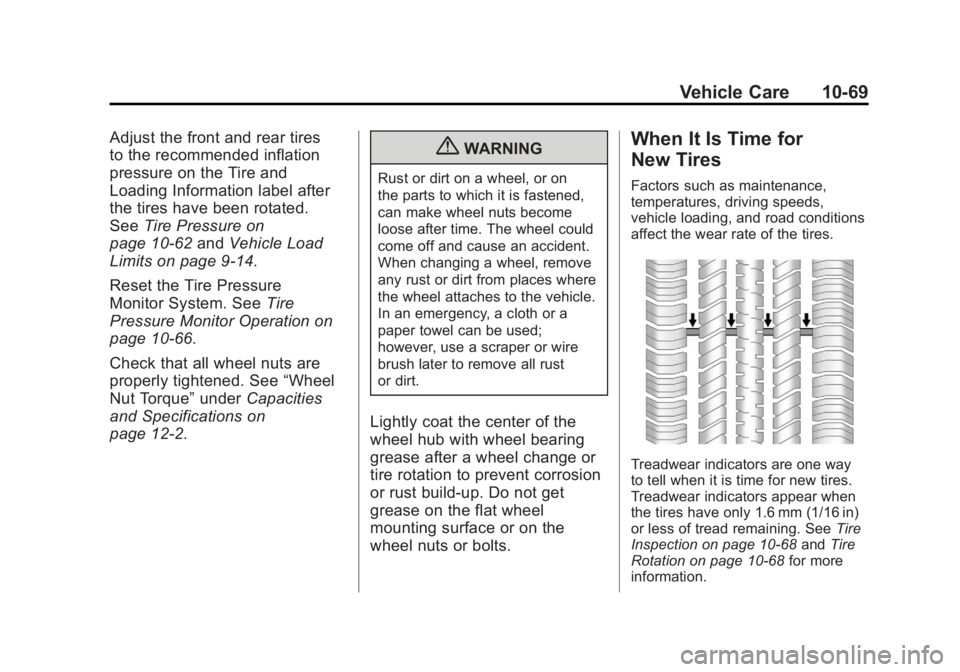
Treadwear indicators are one way
to tell when it is time for new tires.
Treadwear indicators appear when
the tires have only 1.6 mm (1/16 in)
or less of tread remaining. See Tire
Inspection on page 10‑68 andTire
Rotation on page 10‑68 for more
information.
Page 369 of 432
Black plate (3,1)Chevrolet Corvette Owner Manual - 2012
Service and Maintenance 11-3
Maintenance
Schedule
Owner Checks and Services
At Each Fuel Stop
.Check the engine oil level.
SeeEngine Oil on page 10‑14.
Once a Month
.Check the tire inflation
pressures. See Tire Pressure on
page 10‑62.
.Inspect the tires for wear.
See Tire Inspection on
page 10‑68.
.Check the windshield washer
fluid level. See Washer Fluid on
page 10‑34.
Engine Oil Change
When the CHANGE ENGINE OIL
SOON message displays, have the
engine oil and filter changed within
the next 1 000 km/600 mi. If driven
under the best conditions, the
engine oil life system might not
indicate the need for vehicle service
for more than a year. The engine oil
and filter must be changed at least
once a year and the oil life system
must be reset. Your trained dealer
technician can perform this work.
If the engine oil life system is reset
accidentally, service the vehicle
within 5 000 km/3,000 mi since the
last service. Reset the oil life
system when the oil is changed.
See Engine Oil Life System on
page 10‑19.
Required Services Every
12 000 km/7,500 mi
.Check engine oil level and oil
life percentage. If needed,
change engine oil and filter, and
reset oil life system. See Engine
Oil on page 10‑14 andEngine
Oil Life System on page 10‑19.
.Check engine coolant level.
See Engine Coolant on
page 10‑26.
.Check windshield washer fluid
level. See Washer Fluid on
page 10‑34.
.Visually inspect windshield
wiper blades for wear, cracking,
or contamination. See Exterior
Care on page 10‑82. Replace
worn or damaged wiper blades.
See Wiper Blade Replacement
on page 10‑43.
Page 410 of 432
Black plate (20,1)Chevrolet Corvette Owner Manual - 2012
13-20 Customer Information
Vehicle Data
Recording and
Privacy
This GM vehicle has a number of
sophisticated computers that record
information about the vehicle’s
performance and how it is driven.
For example, the vehicle uses
computer modules to monitor and
control engine and transmission
performance, to monitor the
conditions for airbag deployment
and deploy airbags in a crash, and,
if so equipped, to provide antilock
braking to help the driver control the
vehicle. These modules may store
data to help your dealer technician
service the vehicle. Some modules
may also store data about how you
operate the vehicle, such as rate of
fuel consumption or average speed.
These modules may also retain the
owner’s personal preferences, such
as radio presets, seat positions, and
temperature settings.
Event Data Recorders
This vehicle has an Event Data
Recorder (EDR). The main purpose
of an EDR is to record, in certain
crash or near crash-like situations,
such as an airbag deployment or
hitting a road obstacle, data that will
assist in understanding how a
vehicle's systems performed.
The EDR is designed to record data
related to vehicle dynamics and
safety systems for a short period of
time, typically 30 seconds or less.
The EDR in this vehicle is designed
to record such data as:
.How various systems in the
vehicle were operating.
.Whether or not the driver and
passenger safety belts were
buckled/fastened.
.How far, if at all, the driver was
pressing the accelerator and/or
brake pedal.
.How fast the vehicle was
traveling. This data can help provide a better
understanding of the circumstances
in which crashes and injuries occur.
Important:
EDR data is recorded
by the vehicle only if a non-trivial
crash situation occurs; no data is
recorded by the EDR under normal
driving conditions and no personal
data (e.g., name, gender, age,
and crash location) is recorded.
However, other parties, such as
law enforcement, could combine
the EDR data with the type of
personally identifying data
routinely acquired during a crash
investigation.
To read data recorded by an EDR,
special equipment is required, and
access to the vehicle or the EDR is
needed. In addition to the vehicle
manufacturer, other parties, such as
law enforcement, that have the
special equipment, can read the
information if they have access to
the vehicle or the EDR.
GM will not access this data or
share it with others except: with the
consent of the vehicle owner or,