key CHEVROLET CORVETTE C6 2012 Workshop Manual
[x] Cancel search | Manufacturer: CHEVROLET, Model Year: 2012, Model line: CORVETTE C6, Model: CHEVROLET CORVETTE C6 2012Pages: 432, PDF Size: 5.73 MB
Page 189 of 432
Black plate (7,1)Chevrolet Corvette Owner Manual - 2012
Lighting 6-7
Battery Power Protection
This vehicle has a feature to help
prevent the battery from being
drained in case any of the following
lamps are left on: the underhood
lamp, if your vehicle has this
feature, vanity mirror lamps,
cargo lamps, reading lamps, center
console, or glove box lamps. If any
of these lamps are left on, they will
automatically time-out after about
10 minutes. To reset it, all of the
above lamps must be turned off or
the ignition key on.
Exterior Lighting Battery
Saver
If the manual parking lamps or
headlamps have been left on,
the exterior lamps will turn off as
soon as the ignition is turned off or
Retained Accessory Power (RAP)
is active. This protects against
draining the battery in case you
have accidentally left the headlamps
or parking lamps on. The battery
saver does not work if the
headlamps are turned on after the
ignition switch is turned to off.
If you need to leave the lamps on,
use the exterior lamp control to turn
the lamps back on.
Page 207 of 432
Black plate (17,1)Chevrolet Corvette Owner Manual - 2012
Infotainment System 7-17
.Pair cell phone(s) to the vehicle.
The system may not work with
all cell phones. See“Pairing”in
this section for more information.
.If the cell phone has voice
dialing capability, learn to use
that feature to access the
address book or contact list.
See “Voice Pass-Thru” in this
section for more information.
.See “Storing and Deleting Phone
Numbers” in this section for
more information.
{WARNING
When using a cell phone, it can
be distracting to look too long or
too often at the screen of the
phone or the infotainment
(navigation) system. Taking your
eyes off the road too long or
too often could cause a crash
resulting in injury or death.
Focus your attention on driving. A Bluetooth system can use a
Bluetooth‐capable cell phone with a
Hands‐Free Profile to make and
receive phone calls. The system
can be used while the key is in the
ON/RUN or ACC/ACCESSORY
position. The range of the Bluetooth
system can be up to 9.1 m (30 ft).
Not all phones support all functions,
and not all phones work with the
in-vehicle Bluetooth system. See
www.gm.com/bluetooth for more
information on compatible phones.
Voice Recognition
The Bluetooth system uses voice
recognition to interpret voice
commands to dial phone numbers
and name tags.
For additional information, say
“Help”
while you are in a voice
recognition menu.
Noise: Keep interior noise levels to
a minimum. The system may not
recognize voice commands if there
is too much background noise. When to Speak:
A short tone
sounds after the system responds
indicating when it is waiting for a
voice command. Wait until the tone
and then speak.
How to Speak: Speak clearly in a
calm and natural voice.
Audio System
When using the in‐vehicle Bluetooth
system, sound comes through
the vehicle's front audio system
speakers and overrides the audio
system. Use the audio system
volume knob, during a call, to
change the volume level. The
adjusted volume level remains in
memory for later calls. To prevent
missed calls, a minimum volume
level is used if the volume is turned
down too low.
Page 242 of 432
Black plate (20,1)Chevrolet Corvette Owner Manual - 2012
9-20 Driving and Operating
Ignition Positions
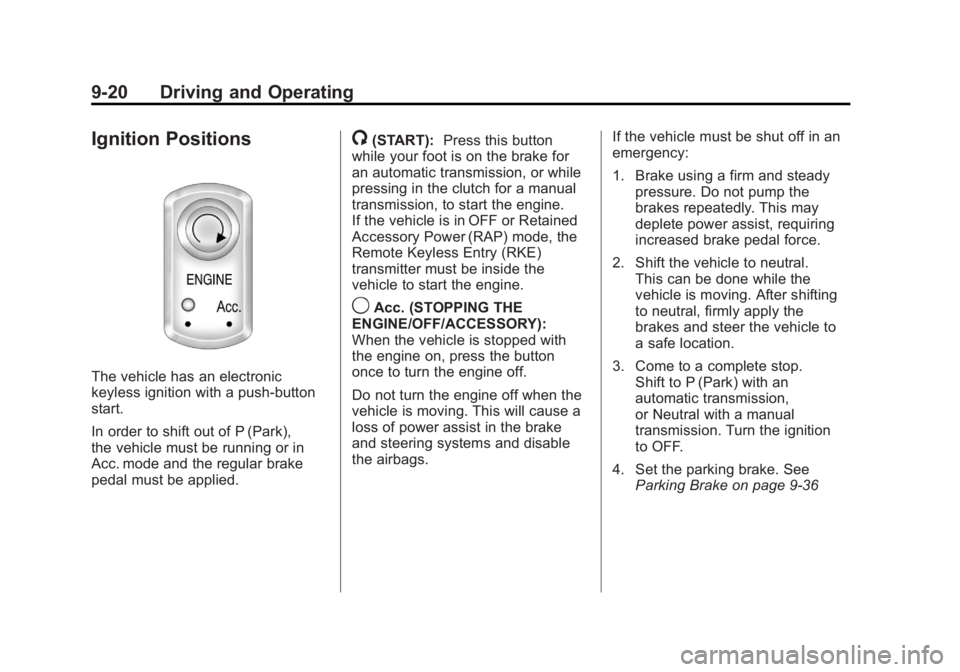
The vehicle has an electronic
keyless ignition with a push-button
start.
In order to shift out of P (Park),
the vehicle must be running or in
Acc. mode and the regular brake
pedal must be applied.
/(START):Press this button
while your foot is on the brake for
an automatic transmission, or while
pressing in the clutch for a manual
transmission, to start the engine.
If the vehicle is in OFF or Retained
Accessory Power (RAP) mode, the
Remote Keyless Entry (RKE)
transmitter must be inside the
vehicle to start the engine.
9Acc. (STOPPING THE
ENGINE/OFF/ACCESSORY):
When the vehicle is stopped with
the engine on, press the button
once to turn the engine off.
Do not turn the engine off when the
vehicle is moving. This will cause a
loss of power assist in the brake
and steering systems and disable
the airbags. If the vehicle must be shut off in an
emergency:
1. Brake using a firm and steady
pressure. Do not pump the
brakes repeatedly. This may
deplete power assist, requiring
increased brake pedal force.
2. Shift the vehicle to neutral. This can be done while the
vehicle is moving. After shifting
to neutral, firmly apply the
brakes and steer the vehicle to
a safe location.
3. Come to a complete stop. Shift to P (Park) with an
automatic transmission,
or Neutral with a manual
transmission. Turn the ignition
to OFF.
4. Set the parking brake. See Parking Brake on page 9‑36
Page 244 of 432
Black plate (22,1)Chevrolet Corvette Owner Manual - 2012
9-22 Driving and Operating
Starting the Engine
Move the shift lever to P (Park)
or N (Neutral) for an automatic
transmission. For a manual
transmission the vehicle can be
started in Neutral or any other gear
as long as the clutch pedal is
pressed. To restart a vehicle with a
manual transmission when you are
already moving, use the Neutral
position only. To restart a vehicle
with an automatic transmission
when you are already moving,
use N (Neutral).
Notice:Do not try to shift to
P (Park) if the vehicle is moving.
If you do, you could damage the
transmission. Shift to P (Park)
only when the vehicle is stopped.
The RKE transmitter must be inside
the vehicle for the ignition to work.
Cell phone chargers can interfere
with the operation of the Keyless
Access System. Battery chargers
should not be plugged in when
starting or turning off the engine. To start the vehicle, do the following:
1. For vehicles with an automatic
transmission, with your foot on
the brake pedal, press the
START button located on the
instrument panel. For vehicles
with a manual transmission, you
must also press in the clutch
pedal while pressing the START
button.
If there is not an RKE transmitter
in the vehicle or if there is
something causing interference
with it, the DIC will display
NO FOBS DETECTED.
See Key and Lock Messages on
page 5‑42 for more information.
2. When the engine begins cranking, let go of the button and
the engine cranks automatically
until it starts. If the battery in the
RKE transmitter is weak, the
DIC displays FOB BATTERY
LOW. You can still drive the
vehicle. See
“Battery Replacement”
under Remote Keyless Entry
(RKE) System Operation on
page 2‑3 for more information.
If the fob battery is dead, you
need to insert the fob into the
fob slot to enable engine
starting. See “NO FOBS
DETECTED” underKey and
Lock Messages on page 5‑42.
3. Do not race the engine immediately after starting it.
Operate the engine and
transmission gently until the oil
warms up and lubricates all
moving parts.
4. If the engine does not start and no DIC message is displayed,
wait 15 seconds before trying
again to let the cranking motor
cool down.
If the engine does not start after
five to 10 seconds, especially in
very cold weather (below −18°C
or 0°F), it could be flooded with
Page 245 of 432
Black plate (23,1)Chevrolet Corvette Owner Manual - 2012
Driving and Operating 9-23
too much gasoline. Try pushing
the accelerator pedal all the way
to the floor while cranking for up
to 15 seconds maximum. Wait at
least 15 seconds between each
try, to allow the cranking motor
to cool down. When the engine
starts, let go of the accelerator.
If the vehicle starts briefly but
then stops again, repeat these
steps. This clears the extra
gasoline from the engine.
Notice: Cranking the engine for
long periods of time, by pressing
the START button immediately
after cranking has ended, can
overheat and damage the
cranking motor, and drain the
battery. Wait at least 15 seconds
between each try, to allow the
cranking motor to cool down. The vehicle has a Computer-
Controlled Cranking System.
This feature assists in starting the
engine and protects components.
Once cranking has been initiated,
the engine continues cranking for a
few seconds or until the vehicle
starts. If the engine does not start,
cranking automatically stops after
15 seconds to prevent cranking
motor damage. To prevent gear
damage, this system also prevents
cranking if the engine is already
running.
Notice:
The engine is designed
to work with the electronics in
the vehicle. If electrical parts or
accessories are added, you
could change the way the engine
operates. Before adding electrical
equipment, check with your
dealer. If you do not, the engine
might not perform properly.
Any resulting damage would
not be covered by the vehicle
warranty.Stopping the Engine
If the vehicle has an automatic
transmission, move the shift lever
to P (Park) and press and hold the
Acc. (Off/Accessory) button, located
on the instrument panel, until the
engine shuts off. If the shift lever is
not in P (Park), the engine shuts off
and the vehicle goes into the
accessory mode. The DIC displays
SHIFT TO PARK. Once the shifter is
moved to P (Park), the vehicle turns
off. If the vehicle has a manual
transmission, it is recommended
that you move the shift lever to
R (Reverse) and set the parking
brake after you turn off the engine
by pressing and holding the Acc.
(Off/Accessory) button.
If the RKE transmitter is not
detected inside the vehicle when it
is turned to off, the DIC displays
NO FOB –OFF OR RUN?.
See Key and Lock Messages on
page 5‑42 for more information.
Page 279 of 432
Black plate (3,1)Chevrolet Corvette Owner Manual - 2012
Vehicle Care 10-3
California Proposition
65 Warning
Most motor vehicles, including this
one, contain and/or emit chemicals
known to the State of California to
cause cancer and birth defects or
other reproductive harm. Engine
exhaust, many parts and systems,
many fluids, and some component
wear by-products contain and/or
emit these chemicals.
California Perchlorate
Materials Requirements
Certain types of automotive
applications, such as airbag
initiators, safety belt pretensioners,
and lithium batteries contained in
Remote Keyless Entry transmitters,
may contain perchlorate materials.
Special handling may be necessary.
For additional information, see
www.dtsc.ca.gov/hazardouswaste/
perchlorate.
Accessories and
Modifications
Adding non‐dealer accessories or
making modifications to the vehicle
can affect vehicle performance and
safety, including such things as
airbags, braking, stability, ride and
handling, emissions systems,
aerodynamics, durability, and
electronic systems like antilock
brakes, traction control, and stability
control. These accessories or
modifications could even cause
malfunction or damage not covered
by the vehicle warranty.
Damage to vehicle components
resulting from modifications or the
installation or use of non‐GM
certified parts, including control
module or software modifications, is
not covered under the terms of the
vehicle warranty and may affect
remaining warranty coverage for
affected parts.GM Accessories are designed to
complement and function with
other systems on the vehicle.
See your dealer to accessorize
the vehicle using genuine GM
Accessories installed by a dealer
technician.
Also, see
Adding Equipment to the
Airbag-Equipped Vehicle on
page 3‑27.
Page 325 of 432
Black plate (49,1)Chevrolet Corvette Owner Manual - 2012
Vehicle Care 10-49
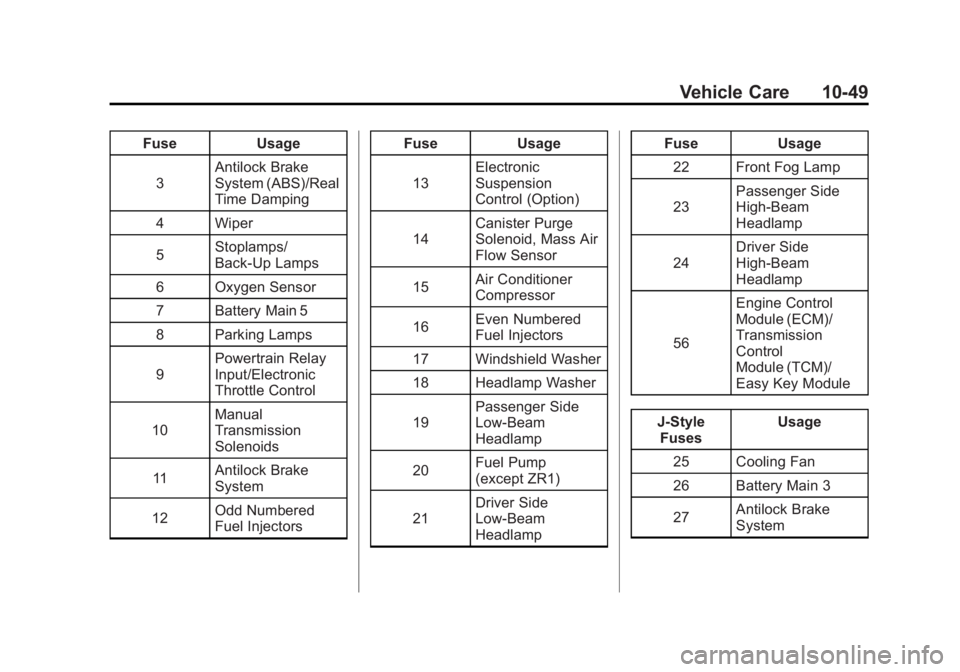
FuseUsage
3 Antilock Brake
System (ABS)/Real
Time Damping
4 Wiper
5 Stoplamps/
Back-Up Lamps
6 Oxygen Sensor
7 Battery Main 5
8 Parking Lamps
9 Powertrain Relay
Input/Electronic
Throttle Control
10 Manual
Transmission
Solenoids
11 Antilock Brake
System
12 Odd Numbered
Fuel Injectors Fuse
Usage
13 Electronic
Suspension
Control (Option)
14 Canister Purge
Solenoid, Mass Air
Flow Sensor
15 Air Conditioner
Compressor
16 Even Numbered
Fuel Injectors
17 Windshield Washer
18 Headlamp Washer
19 Passenger Side
Low-Beam
Headlamp
20 Fuel Pump
(except ZR1)
21 Driver Side
Low-Beam
Headlamp Fuse
Usage
22 Front Fog Lamp
23 Passenger Side
High-Beam
Headlamp
24 Driver Side
High-Beam
Headlamp
56 Engine Control
Module (ECM)/
Transmission
Control
Module (TCM)/
Easy Key Module
J-Style Fuses Usage
25 Cooling Fan
26 Battery Main 3
27 Antilock Brake
System
Page 361 of 432
Black plate (85,1)Chevrolet Corvette Owner Manual - 2012
Vehicle Care 10-85
Tires
Use a stiff brush with tire cleaner to
clean the tires.
Notice:Using petroleum-based
tire dressing products on the
vehicle may damage the paint
finish and/or tires. When applying
a tire dressing, always wipe off
any overspray from all painted
surfaces on the vehicle.
Wheels and Trim —Aluminum
or Chrome
Use a soft, clean cloth with mild
soap and water to clean the wheels.
After rinsing thoroughly with clean
water, dry with a soft, clean towel.
A wax may then be applied.
Keep the wheels clean using a soft,
clean cloth with mild soap and
water. Rinse with clean water.
After rinsing thoroughly, dry with a
soft, clean towel. A wax may then
be applied. Notice:
Chrome wheels and other
chrome trim may be damaged if
the vehicle is not washed after
driving on roads that have been
sprayed with magnesium,
calcium, or sodium chloride.
These chlorides are used on
roads for conditions such as
ice and dust. Always wash the
chrome with soap and water after
exposure.
Notice: To avoid surface
damage, do not use strong soaps,
chemicals, abrasive polishes,
cleaners, brushes, or cleaners
that contain acid on aluminum or
chrome-plated wheels. Use only
approved cleaners. Also, never
drive a vehicle with aluminum or
chrome-plated wheels through an
automatic car wash that uses
silicone carbide tire cleaning
brushes. Damage could occur
and the repairs would not be
covered by the vehicle warranty.
Steering, Suspension, and
Chassis Components
Visually inspect front and rear
suspension and steering system for
damaged, loose, or missing parts or
signs of wear. Inspect the power
steering for proper hook-up, binding,
leaks, cracks, chafing, etc. Visually
check constant velocity joints,
rubber boots, and axle seals for
leaks.
Body Component Lubrication
Lubricate all key lock cylinders,
hood hinges, liftgate hinges, and
steel fuel door hinge unless the
components are plastic. Applying
silicone grease on weatherstrips
with a clean cloth will make them
last longer, seal better, and not stick
or squeak.
Page 379 of 432
Black plate (13,1)Chevrolet Corvette Owner Manual - 2012
Service and Maintenance 11-13
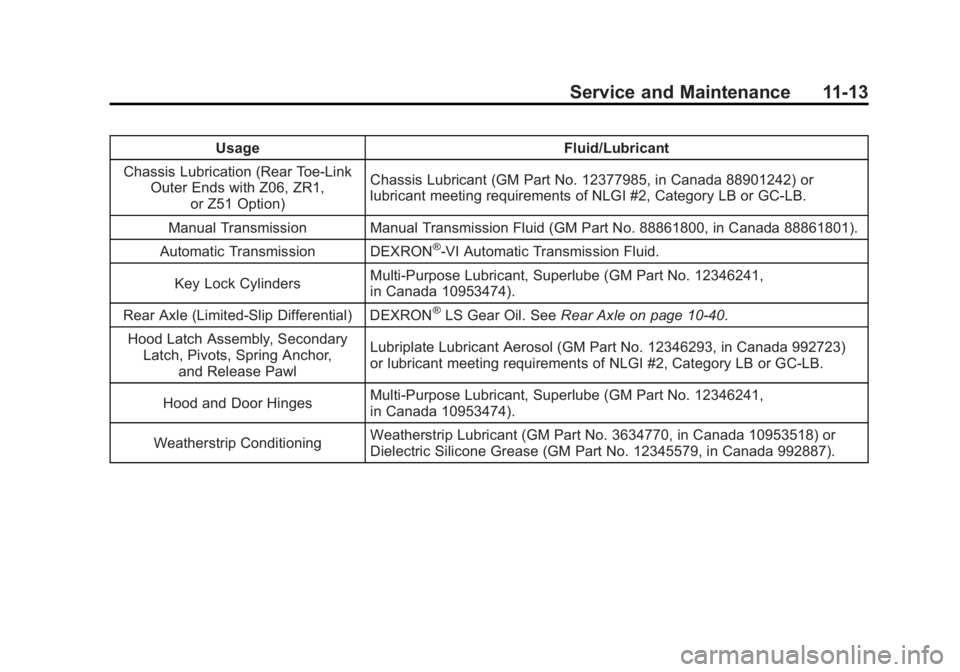
UsageFluid/Lubricant
Chassis Lubrication (Rear Toe‐Link Outer Ends with Z06, ZR1,
or Z51 Option) Chassis Lubricant (GM Part No. 12377985, in Canada 88901242) or
lubricant meeting requirements of NLGI #2, Category LB or GC-LB.
Manual Transmission Manual Transmission Fluid (GM Part No. 88861800, in Canada 88861801).
Automatic Transmission DEXRON
®-VI Automatic Transmission Fluid.
Key Lock Cylinders Multi-Purpose Lubricant, Superlube (GM Part No. 12346241,
in Canada 10953474).
Rear Axle (Limited-Slip Differential) DEXRON
®LS Gear Oil. See Rear Axle on page 10‑40.
Hood Latch Assembly, Secondary Latch, Pivots, Spring Anchor, and Release Pawl Lubriplate Lubricant Aerosol (GM Part No. 12346293, in Canada 992723)
or lubricant meeting requirements of NLGI #2, Category LB or GC-LB.
Hood and Door Hinges Multi-Purpose Lubricant, Superlube (GM Part No. 12346241,
in Canada 10953474).
Weatherstrip Conditioning Weatherstrip Lubricant (GM Part No. 3634770, in Canada 10953518) or
Dielectric Silicone Grease (GM Part No. 12345579, in Canada 992887).
Page 411 of 432
Black plate (21,1)Chevrolet Corvette Owner Manual - 2012
Customer Information 13-21
if the vehicle is leased, with the
consent of the lessee; in response
to an official request by police or
similar government office; as part of
GM's defense of litigation through
the discovery process; or, as
required by law. Data that GM
collects or receives may also be
used for GM research needs or
may be made available to others for
research purposes, where a need is
shown and the data is not tied to a
specific vehicle or vehicle owner.
OnStar®
If the vehicle is equipped with an
active OnStar system, that system
may also record data in crash or
near crash-like situations. The
OnStar Terms and Conditions
provides information on data
collection and use and is available
at www.onstar.com (U.S.) or
www.onstar.ca (Canada), or by
pressing the
Qbutton and
speaking to an advisor. See OnStar
Overview on page 14‑1.
Navigation System
If the vehicle has a navigation
system, use of the system may
result in the storage of destinations,
addresses, telephone numbers, and
other trip information. Refer to the
navigation manual for information
on stored data and for deletion
instructions.
Radio Frequency
Identification (RFID)
RFID technology is used in some
vehicles for functions such as tire
pressure monitoring and ignition
system security, as well as in
connection with conveniences
such as key fobs for remote door
locking/unlocking and starting, and
in-vehicle transmitters for garage
door openers. RFID technology in
GM vehicles does not use or record
personal information or link with
any other GM system containing
personal information.
Radio Frequency
Statement
This vehicle has systems that
operate on a radio frequency that
comply with Part 15 of the Federal
Communications Commission (FCC)
rules and with Industry Canada
Standards RSS‐GEN/210/220/310.
Operation is subject to the following
two conditions:
1. The device may not cause harmful interference.
2. The device must accept any interference received, including
interference that may cause
undesired operation of the
device.
Changes or modifications to any of
these systems by other than an
authorized service facility could void
authorization to use this equipment.