service indicator CHEVROLET CORVETTE C7 2018 User Guide
[x] Cancel search | Manufacturer: CHEVROLET, Model Year: 2018, Model line: CORVETTE C7, Model: CHEVROLET CORVETTE C7 2018Pages: 353, PDF Size: 6.48 MB
Page 116 of 353
Chevrolet Corvette Owner Manual (GMNA-Localizing-U.S./Canada/Mexico-
11374030) - 2018 - crc - 3/29/17
Instruments and Controls 115
Engine Oil Pressure Light
Caution
Lack of proper engine oil
maintenance can damage the
engine. Driving with the engine oil
low can also damage the engine.
The repairs would not be covered
by the vehicle warranty. Check
the oil level as soon as possible.
Add oil if required, but if the oil
level is within the operating range
and the oil pressure is still low,
have the vehicle serviced. Always
follow the maintenance schedule
for changing engine oil.
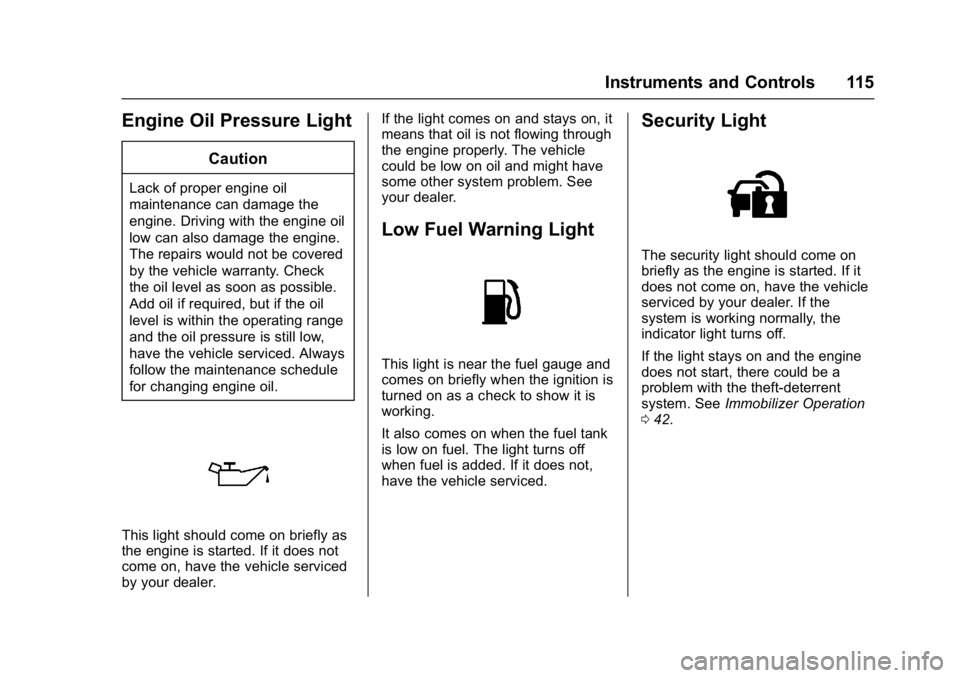
This light should come on briefly as
the engine is started. If it does not
come on, have the vehicle serviced
by your dealer.If the light comes on and stays on, it
means that oil is not flowing through
the engine properly. The vehicle
could be low on oil and might have
some other system problem. See
your dealer.
Low Fuel Warning Light
This light is near the fuel gauge and
comes on briefly when the ignition is
turned on as a check to show it is
working.
It also comes on when the fuel tank
is low on fuel. The light turns off
when fuel is added. If it does not,
have the vehicle serviced.
Security Light
The security light should come on
briefly as the engine is started. If it
does not come on, have the vehicle
serviced by your dealer. If the
system is working normally, the
indicator light turns off.
If the light stays on and the engine
does not start, there could be a
problem with the theft-deterrent
system. See
Immobilizer Operation
0 42.
Page 177 of 353
Chevrolet Corvette Owner Manual (GMNA-Localizing-U.S./Canada/Mexico-
11374030) - 2018 - crc - 4/4/17
176 Driving and Operating
Do not turn the engine off when the
vehicle is moving. This will cause a
loss of power assist in the brake
and steering systems and disable
the airbags.
If the vehicle must be shut off in an
emergency:1. Brake using a firm and steady pressure. Do not pump the
brakes repeatedly. This may
deplete power assist, requiring
increased brake pedal force.
2. Shift the vehicle to N (Neutral). This can be done while the
vehicle is moving. After shifting
to N (Neutral), firmly apply the
brakes and steer the vehicle to
a safe location.
3. Come to a complete stop. Shift to P (Park) with an automatic
transmission, or Neutral with a
manual transmission. Turn the
ignition off.
4. Set the parking brake. See Electric Parking Brake 0190.{Warning
Turning off the vehicle while
moving may cause loss of power
assist in the brake and steering
systems and disable the airbags.
While driving, only shut the
vehicle off in an emergency.
If the vehicle cannot be pulled over,
and must be shut off while driving,
press and hold ENGINE START/
STOP for longer than two seconds,
or press twice within five seconds.
ACC/ACCESSORY (Amber
Indicator Light) : This mode allows
the use of some electrical
accessories when the engine is off.
With the ignition off, pressing the
button one time without the brake
pedal applied will place the ignition
system in ACC/ACCESSORY.
The ignition will switch from ACC/
ACCESSORY to off after
five minutes to prevent battery
rundown. ON/RUN/START (Green Indicator
Light) :
This mode is for driving and
starting. With the ignition off, and
the brake pedal applied, pressing
the button once will place the
ignition system in ON/RUN/START.
Once engine cranking begins,
release the button. Engine cranking
will continue until the engine starts.
See Starting the Engine 0177. The
ignition will then remain in ON/RUN.
Service Mode
This power mode is available for
service and diagnostics, and to
verify the proper operation of the
malfunction indicator lamp as may
be required for emission inspection
purposes. With the vehicle off, and
the brake pedal not applied,
pressing and holding ENGINE
START/STOP for more than
five seconds will place the vehicle in
Service Mode. The instruments and
audio systems will operate as they
do in ON/RUN, but the vehicle will
not be able to be driven. The engine
will not start in Service Mode. Press
ENGINE START/STOP again to turn
the vehicle off.
Page 189 of 353
Chevrolet Corvette Owner Manual (GMNA-Localizing-U.S./Canada/Mexico-
11374030) - 2018 - crc - 4/4/17
188 Driving and Operating
The transmission has a spring that
centers the shift lever near 3 (Third)
and 4 (Fourth). This spring helps to
know what gear the shift lever is in
when shifting. Be careful when
shifting from 1 (First) to 2 (Second)
or downshifting from 7 (Seventh) to
6 (Sixth). The spring will try to pull
the shift lever toward 4 (Fourth) and
3 (Third). Move the lever into
2 (Second) or 6 (Sixth) and do not
let the shift lever move in the
direction of the pulling, or it could
shift from 1 (First) to 4 (Fourth) or
from 7 (Seventh) to 4 (Fourth).
If the vehicle is not upshifted as the
engine speed approaches fuel
shutoff rpm, the engine speed will
be limited to protect the engine. See
Tachometer0104.
Active Rev Match
Vehicles equipped with a manual
transmission have Active Rev Match
(ARM). ARM aids in smoother
shifting by matching the engine
speed to the next selected gear. By
monitoring shift lever and clutch
operation, ARM adjusts engine speed to match a calibrated value
based on gear selection. On
upshifts and downshifts, engine
speed will be increased and
decreased to match vehicle road
speed and transmission gear
position. ARM is maintained while
the clutch pedal is pressed, but will
deactivate if the shift lever is left in
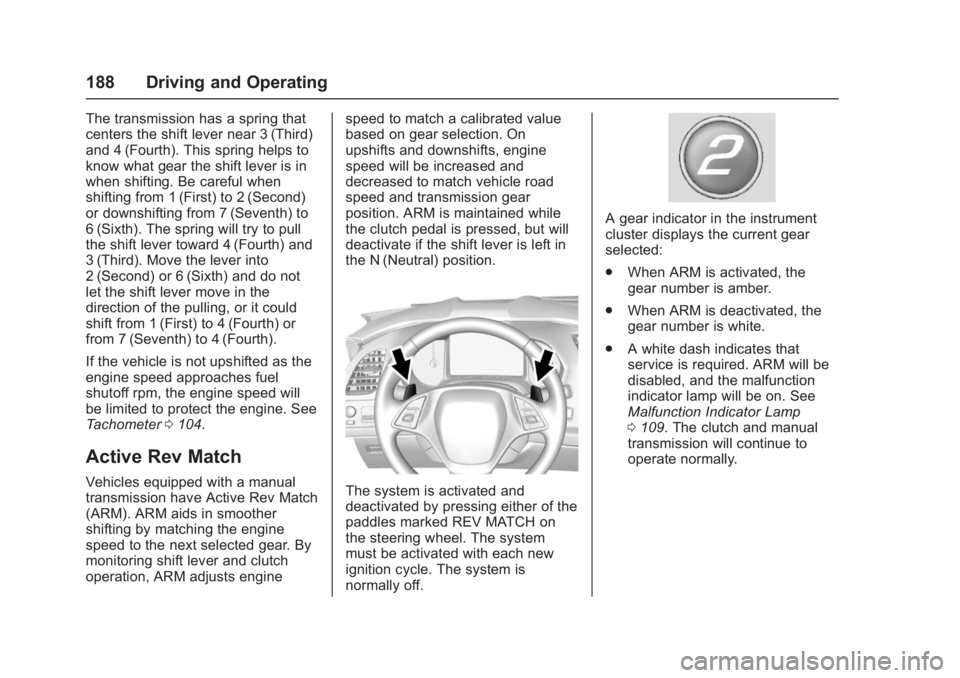
the N (Neutral) position.The system is activated and
deactivated by pressing either of the
paddles marked REV MATCH on
the steering wheel. The system
must be activated with each new
ignition cycle. The system is
normally off.
A gear indicator in the instrument
cluster displays the current gear
selected:
.
When ARM is activated, the
gear number is amber.
. When ARM is deactivated, the
gear number is white.
. A white dash indicates that
service is required. ARM will be
disabled, and the malfunction
indicator lamp will be on. See
Malfunction Indicator Lamp
0109. The clutch and manual
transmission will continue to
operate normally.
Page 211 of 353
Chevrolet Corvette Owner Manual (GMNA-Localizing-U.S./Canada/Mexico-
11374030) - 2018 - crc - 4/4/17
210 Driving and Operating
Conversions and
Add-Ons
Add-On Electrical
Equipment
{Warning
The Data Link Connector (DLC) is
used for vehicle service and
Emission Inspection/Maintenance
testing. SeeMalfunction Indicator
Lamp 0109. A device connected
to the DLC —such as an
aftermarket fleet or
driver-behavior tracking device —
may interfere with vehicle
systems. This could affect vehicle
operation and cause a crash.
Such devices may also access
information stored in the vehicle’s
systems.
Caution
Some electrical equipment can
damage the vehicle or cause
components to not work and
would not be covered by the
vehicle warranty. Always check
with your dealer before adding
electrical equipment.
Add-on equipment can drain the
vehicle's 12-volt battery, even if the
vehicle is not operating.
The vehicle has an airbag system.
Before attempting to add anything
electrical to the vehicle, see
Servicing the Airbag-Equipped
Vehicle 079 and Adding Equipment
to the Airbag-Equipped Vehicle
0 79.
Page 237 of 353
Chevrolet Corvette Owner Manual (GMNA-Localizing-U.S./Canada/Mexico-
11374030) - 2018 - crc - 3/29/17
236 Vehicle Care
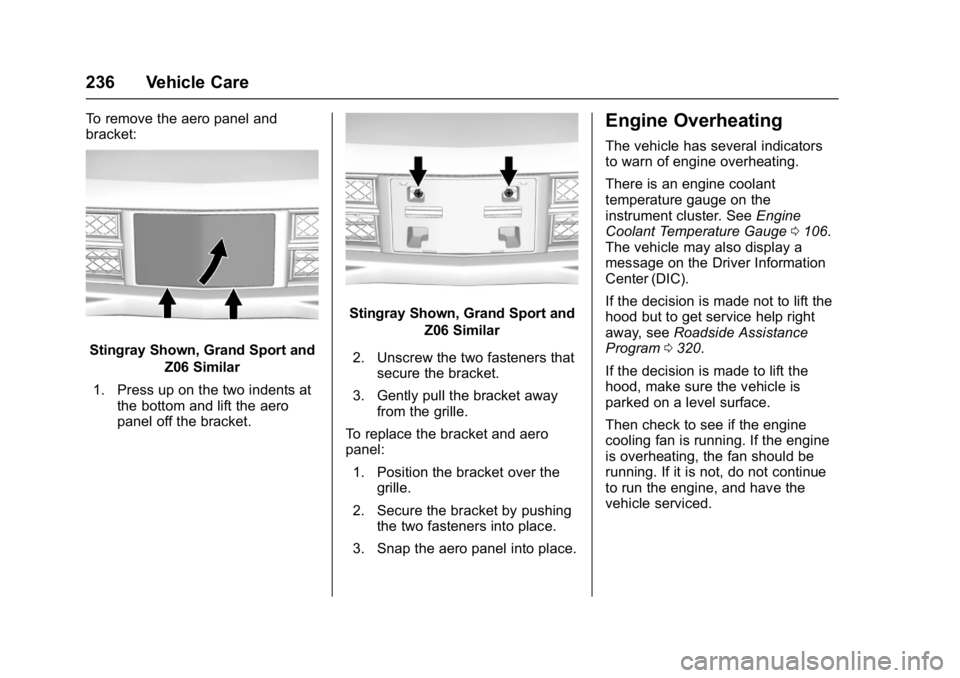
To remove the aero panel and
bracket:
Stingray Shown, Grand Sport andZ06 Similar
1. Press up on the two indents at the bottom and lift the aero
panel off the bracket.
Stingray Shown, Grand Sport and
Z06 Similar
2. Unscrew the two fasteners that secure the bracket.
3. Gently pull the bracket away from the grille.
To replace the bracket and aero
panel: 1. Position the bracket over the grille.
2. Secure the bracket by pushing the two fasteners into place.
3. Snap the aero panel into place.
Engine Overheating
The vehicle has several indicators
to warn of engine overheating.
There is an engine coolant
temperature gauge on the
instrument cluster. See Engine
Coolant Temperature Gauge 0106.
The vehicle may also display a
message on the Driver Information
Center (DIC).
If the decision is made not to lift the
hood but to get service help right
away, see Roadside Assistance
Program 0320.
If the decision is made to lift the
hood, make sure the vehicle is
parked on a level surface.
Then check to see if the engine
cooling fan is running. If the engine
is overheating, the fan should be
running. If it is not, do not continue
to run the engine, and have the
vehicle serviced.
Page 239 of 353
Chevrolet Corvette Owner Manual (GMNA-Localizing-U.S./Canada/Mexico-
11374030) - 2018 - crc - 3/29/17
238 Vehicle Care
Adding Washer Fluid
Open the cap with the washer
symbol on it. Add washer fluid until
the tank is full. SeeEngine
Compartment Overview 0217.
Caution
.
Do not use washer fluid that
contains any type of water
repellent coating. This can
cause the wiper blades to
chatter or skip.
. Do not use engine coolant
(antifreeze) in the
windshield washer. It can
damage the windshield
washer system and paint.
. Do not mix water with
ready-to-use washer fluid.
Water can cause the
(Continued)
Caution (Continued)
solution to freeze and
damage the washer fluid
tank and other parts of the
washer system.
. When using concentrated
washer fluid, follow the
manufacturer instructions for
adding water.
. Fill the washer fluid tank
only three-quarters full when
it is very cold. This allows
for fluid expansion if
freezing occurs, which could
damage the tank if it is
completely full.
Brakes
Brake Wear
Disc brake pads have built-in wear
indicators that make a high-pitched
warning sound when the brake pads
are worn and new pads are needed.
The sound can come and go or be heard all the time the vehicle is
moving, except when applying the
brake pedal firmly.
{Warning
The brake wear warning sound
means that soon the brakes will
not work well. That could lead to
a crash. When the brake wear
warning sound is heard, have the
vehicle serviced.
Caution
Continuing to drive with worn-out
brake pads could result in costly
brake repair.
Under certain weather or operating
conditions, occasional brake squeal
might be heard with the vehicle's
performance braking system. This
brake system is designed for
superior fade resistance and
consistent operation using high
Page 240 of 353
Chevrolet Corvette Owner Manual (GMNA-Localizing-U.S./Canada/Mexico-
11374030) - 2018 - crc - 3/29/17
Vehicle Care 239
performance brake pads. Brake
squeal is normal and does not affect
system performance.
If equipped with high performance
brake linings, there could be an
increased build-up of brake dust as
well as minor noises as compared
to standard brake linings.
Brake linings should always be
replaced as complete axle sets.
Brake Wear (Z06 and Grand Sport
with J57 Ceramic Brakes)
This vehicle does not have built-in
brake pad wear indicators. Periodic
visual inspection is required to
determine when to replace the
brake pads.
The Z06 and Grand Sport Coupe
with J57 models also have an
electronic brake pad wear sensor
system. When pads are worn, the
CHANGE BRAKE PADS message
displays in the Driver Information
Center. Some driving conditions or
climates can cause a brake squeal
when the brakes are first applied orlightly applied. Brake linings should
always be replaced as complete
axle sets.
Brake Rotor Wear
Z06 and Grand Sport models may
have ceramic brake rotors. Rotors
should be visually inspected
whenever the brake pads are
replaced. Rotors also need to be
weighed before brake pads are
replaced to confirm that the rotor
mass is greater than the wear-out
mass printed on then rotor. The
rotor can be reused if the weight of
the rotor is above the mass limit.
Rotor inspection and weighing
methods can be found in the service
manual.
Brake Pedal Travel
See your dealer if the brake pedal
does not return to normal height,
or if there is a rapid increase in
pedal travel. This could be a sign
that brake service may be required.
Replacing Brake System Parts
Always replace brake system parts
with new, approved replacement
parts. If this is not done, the brakes
may not work properly. The braking
performance expected can change
in many other ways if the wrong
replacement brake parts are
installed or parts are improperly
installed.
Brake Fluid
The brake master cylinder reservoir
is filled with GM approved DOT 3
brake fluid as indicated on the
reservoir cap. See
Engine
Compartment Overview 0217 for
the location of the reservoir.
Page 268 of 353
Chevrolet Corvette Owner Manual (GMNA-Localizing-U.S./Canada/Mexico-
11374030) - 2018 - crc - 3/29/17
Vehicle Care 267
flashes for about one minute and
then stays on for the remainder of
the ignition cycle. A DIC warning
message also displays. The
malfunction light and DIC warning
message come on at each ignition
cycle until the problem is corrected.
Some of the conditions that can
cause these to come on are:
.The TPMS sensor matching
process was not done or not
completed successfully. The
malfunction light and the DIC
message should go off after
successfully completing the
sensor matching process.
. One or more TPMS sensors are
missing or damaged. The
malfunction light and the DIC
message should go off when the
TPMS sensors are installed and
the sensor matching process is
performed successfully.
. Replacement tires or wheels do
not match the original equipment
tires or wheels. Tires and wheels
other than those recommended could prevent the TPMS from
functioning properly. See
Buying
New Tires 0269.
. Operating electronic devices or
being near facilities using radio
wave frequencies similar to the
TPMS could cause the TPMS
sensors to malfunction.
If the TPMS is not functioning
properly, it cannot detect or signal a
low tire pressure condition. See
your dealer for service if the TPMS
malfunction light and DIC message
come on and stays on.
TPMS Sensor Matching
Process —Auto Learn
Function
Each TPMS sensor has a unique
identification code. The identification
code needs to be matched to a new
tire/wheel position after rotating the
tires or replacing one or more of the
TPMS sensors. When a tire is
installed, the vehicle must be
stationary for about 20 minutes
before the system recalculates. The
following relearn process takes up
to 10 minutes, driving at a minimum speed of 19 km/h (12 mph).
A dash (-) or pressure value will
display in the DIC. See
Driver
Information Center (DIC) 0116.
A warning message displays in the
DIC if a problem occurs during the
relearn process.
Tire Inspection
We recommend that the tires,
including the spare tire, if the
vehicle has one, be inspected
for signs of wear or damage at
least once a month.
Replace the tire if:
.The indicators at three or
more places around the tire
can be seen.
.There is cord or fabric
showing through the tire's
rubber.
.The tread or sidewall is
cracked, cut, or snagged
deep enough to show cord or
fabric.
Page 307 of 353
Chevrolet Corvette Owner Manual (GMNA-Localizing-U.S./Canada/Mexico-
11374030) - 2018 - crc - 3/29/17
306 Service and Maintenance
Lamps
Properly working headlamps,
taillamps, and brake lamps are
important to see and be seen on
the road.
.Signs that the headlamps need
attention include dimming, failure
to light, cracking, or damage.
The brake lamps need to be
checked periodically to ensure
that they light when braking.
. With a multi-point inspection,
your dealer can check the lamps
and note any concerns.
Shocks and Struts
Shocks and struts help aid in control
for a smoother ride.
. Signs of wear may include
steering wheel vibration, bounce/
sway while braking, longer
stopping distance, or uneven
tire wear.
. As part of the multi-point
inspection, trained dealer
technicians can visually inspect
the shocks and struts for signs of leaking, blown seals,
or damage, and can advise
when service is needed.
Tires
Tires need to be properly inflated,
rotated, and balanced. Maintaining
the tires can save money and fuel,
and can reduce the risk of tire
failure.
. Signs that the tires need to be
replaced include three or more
visible treadwear indicators; cord
or fabric showing through the
rubber; cracks or cuts in the
tread or sidewall; or a bulge or
split in the tire.
. Trained dealer technicians can
inspect and recommend the right
tires. Your dealer can also
provide tire/wheel balancing
services to ensure smooth
vehicle operation at all speeds.
Your dealer sells and services
name brand tires.
Vehicle Care
To help keep the vehicle looking like
new, vehicle care products are
available from your dealer. For information on how to clean and
protect the vehicle’s interior and
exterior, see
Interior Care 0294 and
Exterior Care 0289.
Wheel Alignment
Wheel alignment is critical for
ensuring that the tires deliver
optimal wear and performance.
. Signs that the alignment may
need to be adjusted include
pulling, improper vehicle
handling, or unusual tire wear.
. Your dealer has the required
equipment to ensure proper
wheel alignment.
Windshield
For safety, appearance, and the
best viewing, keep the windshield
clean and clear.
. Signs of damage include
scratches, cracks, and chips.
. Trained dealer technicians can
inspect the windshield and
recommend proper replacement
if needed.
Page 347 of 353
Chevrolet Corvette Owner Manual (GMNA-Localizing-U.S./Canada/Mexico-
11374030) - 2018 - crc - 4/5/17
346 Index
Gauges (cont'd)Warning Lights and
Indicators . . . . . . . . . . . . . . . . . . . . . 98
General Information
Service and Maintenance . . . . . 298
Towing . . . . . . . . . . . . . . . . . . . . . . . . 209
Vehicle Care . . . . . . . . . . . . . . . . . . 212
Glove Box . . . . . . . . . . . . . . . . . . . . . . . 90
GM Mobility Reimbursement Program . . . . . . . . . . . . . . . . . . . . . . . 320
H
Hatch . . . . . . . . . . . . . . . . . . . . . . . . . . . . 38
Hazard Warning Flashers . . . . . . . 138
Head Restraints . . . . . . . . . . . . . . . . . 56
Head-up Display . . . . . . . . . . . . . . . . 118
HeadlampsAiming . . . . . . . . . . . . . . . . . . . . . . . . 245
Automatic . . . . . . . . . . . . . . . . . . . . . 137
Bulb Replacement . . . . . . . . . . . . 246
Daytime RunningLamps (DRL) . . . . . . . . . . . . . . . . 136
Flash-to-Pass . . . . . . . . . . . . . . . . . 136
High Intensity Discharge (HID) Lighting . . . . . . . . . . . . . . . 246
High-Beam On Light . . . . . . . . . . .116
High/Low Beam Changer . . . . . 136
Lamps On Reminder . . . . . . . . . .116 Heated and Ventilated Front
Seats . . . . . . . . . . . . . . . . . . . . . . . . . . 62
Heated Mirrors . . . . . . . . . . . . . . . . . . . 43
Heating . . . . . . . . . . . . . . . . . . . . . . . . . 147
High-Beam On Light . . . . . . . . . . . . 116
High-Speed Operation . . . . . . . . . . 264
Hill and Mountain Roads . . . . . . . . 168
Hill Start Assist (HSA) . . . . . . . . . . 192
Hood . . . . . . . . . . . . . . . . . . . . . . . . . . . 216
Horn . . . . . . . . . . . . . . . . . . . . . . . . . . . . . 95
How to Wear Seat Belts Properly . . . . . . . . . . . . . . . . . . . . . . . . 65
HVAC . . . . . . . . . . . . . . . . . . . . . . . . . . . 147
Hydraulic Clutch . . . . . . . . . . . . . . . . 229
I
Ignition Positions . . . . . . . . . . . . . . . 175
Immobilizer . . . . . . . . . . . . . . . . . . . . . . 41
Infants and Young Children, Restraints . . . . . . . . . . . . . . . . . . . . . . 82
Infotainment . . . . . . . . . . . . . . . . . . . . 141
Infotainment System . . . . . . . . . . . . 329
Instrument Cluster . . . . . . . . . . . . . . . 99
Instrument Panel
Storage Area . . . . . . . . . . . . . . . . . . . 90
Interior Rearview Mirrors . . . . . . . . . 44
Introduction . . . . . . . . . . . . . . . . . . . . . . . 2
J
Jump Starting - North
America . . . . . . . . . . . . . . . . . . . . . . . 284
K
Keyless EntryRemote (RKE) System . . . . . . . . . 27
Keys . . . . . . . . . . . . . . . . . . . . . . . . . . . . . 25
L
Labeling, Tire Sidewall . . . . . . . . . . 258
Lamps Courtesy . . . . . . . . . . . . . . . . . . . . . . 139
Daytime Running (DRL) . . . . . . 136
Exterior Controls . . . . . . . . . . . . . . 135
Exterior Lamps OffReminder . . . . . . . . . . . . . . . . . . . 136
Exterior Lighting Battery Saver . . . . . . . . . . . . . . . . . . . . . . . 140
License Plate . . . . . . . . . . . . . . . . . 246
Malfunction Indicator (Check Engine) . . . . . . . . . . . . . 109
On Reminder . . . . . . . . . . . . . . . . . .116
Reading . . . . . . . . . . . . . . . . . . . . . . 139
Lap-Shoulder Belt . . . . . . . . . . . . . . . 66
LATCH, Lower Anchors and
Tethers for Children . . . . . . . . . . . . 86
Latches, Seatback . . . . . . . . . . . . . . . 61
LED Lighting . . . . . . . . . . . . . . . . . . . . 246