traction control CHEVROLET CORVETTE C7 2018 User Guide
[x] Cancel search | Manufacturer: CHEVROLET, Model Year: 2018, Model line: CORVETTE C7, Model: CHEVROLET CORVETTE C7 2018Pages: 353, PDF Size: 6.48 MB
Page 162 of 353
Chevrolet Corvette Owner Manual (GMNA-Localizing-U.S./Canada/Mexico-
11374030) - 2018 - crc - 4/4/17
Driving and Operating 161
Brake Burnishing Procedure
(Grand Sport or Z06 without J57
Ceramic Brakes or Z07
Performance Package)1. Apply the brakes 25 times starting at 100 km/h (60 mph) to
50 km/h (30 mph) while
decelerating at 0.4 g. This is a
medium brake application.
Drive for at least 1 km (0.6 mi)
between applying the brakes.
This first step may be skipped
if there are more than 320 km
(200 mi) on the brake pads.
2. Repeatedly apply the brakes from 100 km/h (60 mph) to
25 km/h (15 mph) while
decelerating at 0.8 g. This is a
hard brake application, without
activating the Antilock Brake
System (ABS). Drive for at
least 1 km (0.6 mi) between
stops. Repeat until the brake
pedal travel starts to increase.
Depending on conditions, this
should take no longer than 25
brake applications. 3. Cool down: Drive at 100 km/h
(60 mph) for approximately
15 km (10 mi) without using the
brakes.
4. Apply the brakes 25 times from 100 km/h (60 mph) to 50 km/h
(30 mph) while decelerating at
0.4 g. This is a medium brake
application. Drive for at least
1 km (0.6 mi) between
applications.
Street High Performance Brake
Burnishing Procedure (Grand
Sport or Z06 with J57 Ceramic
Brakes or Z07 Performance
Package) 1. From a stop, accelerate as rapidly as possible without
activating traction control to a
speed of 100 km/h (60 mph).
2. Use enough pedal force to completely stop the vehicle in
four to five seconds. If ABS
activates, braking is too hard.
3. Repeat Steps 1 and 2 –50
times. This should take about
10 minutes. 4. After completing the 50 stops,
cool the brakes by driving for
8 km (5 mi) at 100 km/h
(60 mph).
As with all high performance brake
systems, some amount of brake
squeal is normal.
Racing/Track Brake Burnishing
Procedure (Grand Sport and Z06
with Z07 Performance Package or
J57 Ceramic Brakes)
This procedure should only be run
on a track and only on dry
pavement.
Caution
Brake pedal fade will occur during
this track burnish procedure and
can cause brake pedal travel and
force to increase. This could
extend stopping distance until the
brakes are fully burnished.
1. Drive a normal first lap, not too aggressively.
Page 168 of 353
Chevrolet Corvette Owner Manual (GMNA-Localizing-U.S./Canada/Mexico-
11374030) - 2018 - crc - 4/4/17
Driving and Operating 167
9. Install the caliper (1) with thetwo fasteners (2). Torque to
220 Y (162 lb ft).
10. Repeat the procedure for the opposite side of the vehicle.
11. Reinstall the wheels using the specified lug nut torque. Refer
to the procedure in the vehicle
service manual.
12. After a track event, repeat the steps to reinstall the original
splash shield.
Driving on Wet Roads
Rain and wet roads can reduce
vehicle traction and affect your
ability to stop and accelerate.
Always drive slower in these types
of driving conditions and avoid
driving through large puddles and
deep-standing or flowing water.
{Warning
Wet brakes can cause crashes.
They might not work as well in a
quick stop and could cause
pulling to one side. You could
lose control of the vehicle.
After driving through a large
puddle of water or a car/vehicle
wash, lightly apply the brake
pedal until the brakes work
normally.
Flowing or rushing water creates
strong forces. Driving through
flowing water could cause the
vehicle to be carried away. If this
happens, you and other vehicle
occupants could drown. Do not
ignore police warnings and be
very cautious about trying to drive
through flowing water.
Hydroplaning
Hydroplaning is dangerous. Water
can build up under the vehicle's
tires so they actually ride on the
water. This can happen if the road is wet enough and you are going fast
enough. When the vehicle is
hydroplaning, it has little or no
contact with the road.
There is no hard and fast rule about
hydroplaning. The best advice is to
slow down when the road is wet.
Other Rainy Weather Tips
Besides slowing down, other wet
weather driving tips include:
.
Allow extra following distance.
. Pass with caution.
. Keep windshield wiping
equipment in good shape.
. Keep the windshield washer fluid
reservoir filled.
. Have good tires with proper
tread depth. See Tires0254.
. Turn off cruise control.
Page 169 of 353
Chevrolet Corvette Owner Manual (GMNA-Localizing-U.S./Canada/Mexico-
11374030) - 2018 - crc - 4/4/17
168 Driving and Operating
Hill and Mountain Roads
Driving on steep hills or through
mountains is different than driving
on flat or rolling terrain. Tips include:
.Keep the vehicle serviced and in
good shape.
. Check all fluid levels and brakes,
tires, cooling system, and
transmission.
. Shift to a lower gear when going
down steep or long hills.
{Warning
Using the brakes to slow the
vehicle on a long downhill slope
can cause brake overheating, can
reduce brake performance, and
could result in a loss of braking.
Shift the transmission to a lower
gear to let the engine assist the
brakes on a steep downhill slope.
{Warning
Coasting downhill in N (Neutral)
or with the ignition off is
dangerous. This can cause
overheating of the brakes and
loss of steering. Always have the
engine running and the vehicle
in gear.
. Drive at speeds that keep the
vehicle in its own lane. Do not
swing wide or cross the
center line.
. Be alert on top of hills;
something could be in your lane
(e.g., stalled car, accident).
. Pay attention to special road
signs (e.g., falling rocks area,
winding roads, long grades,
passing or no-passing zones)
and take appropriate action.
Winter Driving
Driving on Snow or Ice
Snow or ice between the tires and
the road creates less traction or
grip, so drive carefully. Wet ice can
occur at about 0 °C (32 °F) when
freezing rain begins to fall. Avoid
driving on wet ice or in freezing rain
until roads can be treated.
For Slippery Road Driving:
.Accelerate gently. Accelerating
too quickly causes the wheels to
spin and makes the surface
under the tires slick.
. Turn on Traction Control. See
Traction Control/Electronic
Stability Control 0192.
. The Antilock Brake System
(ABS) improves vehicle stability
during hard stops, but the
brakes should be applied sooner
than when on dry pavement.
See Antilock Brake System
(ABS) 0189.
. Allow greater following distance
and watch for slippery spots. Icy
patches can occur on otherwise
Page 171 of 353
Chevrolet Corvette Owner Manual (GMNA-Localizing-U.S./Canada/Mexico-
11374030) - 2018 - crc - 4/4/17
170 Driving and Operating
If the Vehicle Is Stuck
Slowly and cautiously spin the
wheels to free the vehicle when
stuck in sand, mud, ice, or snow.
If stuck too severely for the traction
system to free the vehicle, turn the
traction system off and use the
rocking method. SeeTraction
Control/Electronic Stability Control
0 192.
{Warning
If the vehicle's tires spin at high
speed, they can explode, and you
or others could be injured. The
vehicle can overheat, causing an
engine compartment fire or other
damage. Spin the wheels as little
as possible and avoid going
above 56 km/h (35 mph).
Rocking the Vehicle to Get
it Out
Turn the steering wheel left and
right to clear the area around the
front wheels. Turn off any traction
system. Shift back and forth between R (Reverse) and a low
forward gear, spinning the wheels
as little as possible. To prevent
transmission wear, wait until the
wheels stop spinning before shifting
gears. Release the accelerator
pedal while shifting, and press
lightly on the accelerator pedal
when the transmission is in gear.
Slowly spinning the wheels in the
forward and reverse directions
causes a rocking motion that could
free the vehicle. If that does not get
the vehicle out after a few tries, it
might need to be towed out. If the
vehicle does need to be towed out,
see
Towing the Vehicle 0287.
Vehicle Load Limits
It is very important to know how
much weight the vehicle can
carry. This weight is called the
vehicle capacity weight and
includes the weight of all
occupants, cargo, and all
nonfactory-installed options.
Two labels on the vehicle may
show how much weight it may properly carry: the Tire and
Loading Information label and
the Certification label.
{Warning
Do not load the vehicle any
heavier than the Gross
Vehicle Weight Rating
(GVWR), or either the
maximum front or rear Gross
Axle Weight Rating (GAWR).
This can cause systems to
break and change the way the
vehicle handles. This could
cause loss of control and a
crash. Overloading can also
reduce stopping distance,
damage the tires, and shorten
the life of the vehicle.
Page 193 of 353
Chevrolet Corvette Owner Manual (GMNA-Localizing-U.S./Canada/Mexico-
11374030) - 2018 - crc - 4/4/17
192 Driving and Operating
Hill Start Assist (HSA)
If equipped, Hill Start Assist (HSA)
may automatically activate when the
vehicle is stopped on a grade. This
feature is designed to prevent the
vehicle from rolling, either forward or
rearward, during vehicle drive off.
During the transition from releasing
the brake pedal to accelerating to
drive off on a grade, HSA holds the
braking pressure to prevent rolling.
HSA will not activate if the vehicle is
in a drive gear and facing downhill
or if the vehicle is facing uphill and
in R (Reverse).
Ride Control Systems
Traction Control/
Electronic Stability
Control
The vehicle has a Traction Control
System (TCS) and a StabiliTrak
system. These systems help limit
wheel spin and assist the driver in
maintaining control, especially on
slippery road conditions.
TCS activates if it senses that the
rear wheels are spinning too much
or are beginning to lose traction.
When this happens, TCS applies
the brakes to the spinning wheel
and reduces engine power (by
closing the throttle and managing
engine spark) to limit wheel spin.
StabiliTrak activates when the
vehicle senses a difference between
the intended path and the direction
the vehicle is actually traveling.
StabiliTrak selectively applies
braking pressure to any one of the
vehicle wheel brakes to assist the
driver in keeping the vehicle on the
intended path.If cruise control is being used when
TCS begins to limit wheel spin, the
cruise control will automatically
disengage. Cruise control may be
reengaged when road conditions
allow. See
Cruise Control 0201.
Both systems come on
automatically when the vehicle is
started and begins to move. The
systems may be heard or felt while
they are operating or while
performing diagnostic checks. This
is normal and does not mean there
is a problem with the vehicle.
It is recommended to leave both
systems on for normal driving
conditions, but it may be necessary
to turn TCS off if the vehicle gets
stuck in sand, mud, ice, or snow.
See If the Vehicle Is Stuck 0170
and “Turning the Systems Off and
On” later in this section.
Page 194 of 353
Chevrolet Corvette Owner Manual (GMNA-Localizing-U.S./Canada/Mexico-
11374030) - 2018 - crc - 4/4/17
Driving and Operating 193
The indicator light for both systems
is in the instrument cluster. This
light will:
.Flash when TCS is limiting
wheel spin
. Flash when StabiliTrak is
activated
. Turn on and stay on when either
system is not working
If either system fails to turn on or to
activate, a message displays in the
Driver Information Center (DIC), and
dcomes on and stays on to
indicate that the system is inactive
and is not assisting the driver in
maintaining control. The vehicle is
safe to drive, but driving should be
adjusted accordingly.
If
dcomes on and stays on:
1. Stop the vehicle.
2. Turn the engine off and wait 15 seconds.
3. Start the engine. Drive the vehicle. If
dcomes on
and stays on, the vehicle may need
more time to diagnose the problem.
If the condition persists, see your
dealer.
Turning the Systems Off
and On
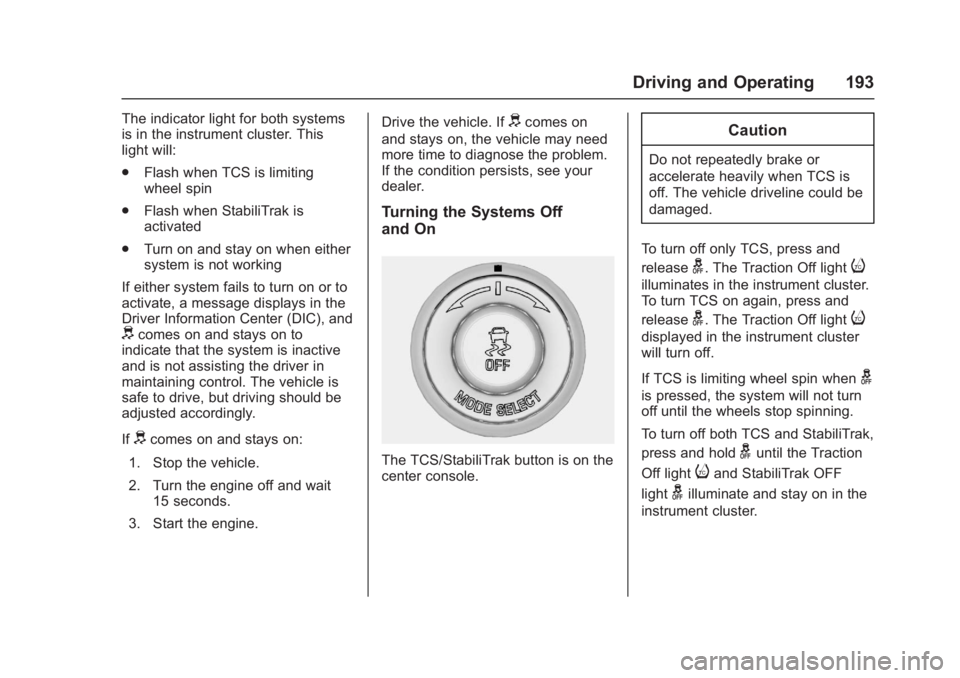
The TCS/StabiliTrak button is on the
center console.
Caution
Do not repeatedly brake or
accelerate heavily when TCS is
off. The vehicle driveline could be
damaged.
To turn off only TCS, press and
release
g. The Traction Off lighti
illuminates in the instrument cluster.
To turn TCS on again, press and
release
g. The Traction Off lighti
displayed in the instrument cluster
will turn off.
If TCS is limiting wheel spin when
g
is pressed, the system will not turn
off until the wheels stop spinning.
To turn off both TCS and StabiliTrak,
press and hold
guntil the Traction
Off light
iand StabiliTrak OFF
light
gilluminate and stay on in the
instrument cluster.
Page 195 of 353
Chevrolet Corvette Owner Manual (GMNA-Localizing-U.S./Canada/Mexico-
11374030) - 2018 - crc - 4/4/17
194 Driving and Operating
To turn TCS and StabiliTrak on
again, press and release
g. The
Traction Off light
iand StabiliTrak
OFF light
gin the instrument cluster
turn off.
If the Tire Pressure Monitor System
(TPMS) system is malfunctioning
and the DIC displays SERVICE
TIRE MONITOR SYSTEM,
StabiliTrak will be affected as
follows:
. StabiliTrak cannot be turned off
by the driver.
. If StabiliTrak is off, it will be
turned on automatically.
. Competitive Driving Mode or
Performance Traction
Management is unavailable.
. StabiliTrak will feel different in
aiding and maintaining
directional control.
Adding accessories can affect the
vehicle performance. See
Accessories and Modifications
0 213.
Driver Mode Control
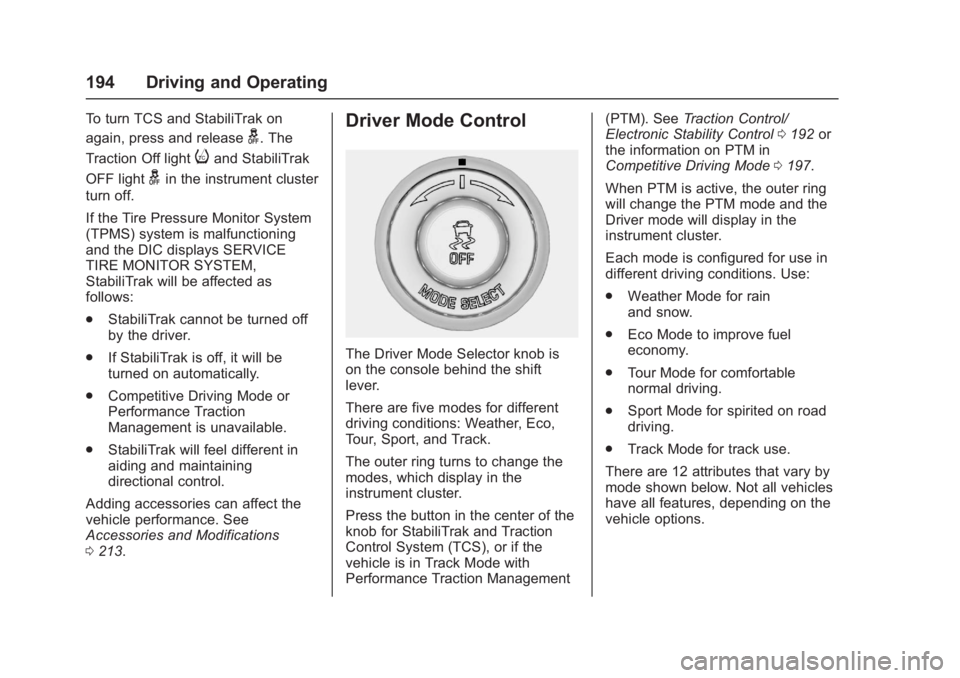
The Driver Mode Selector knob is
on the console behind the shift
lever.
There are five modes for different
driving conditions: Weather, Eco,
Tour, Sport, and Track.
The outer ring turns to change the
modes, which display in the
instrument cluster.
Press the button in the center of the
knob for StabiliTrak and Traction
Control System (TCS), or if the
vehicle is in Track Mode with
Performance Traction Management (PTM). See
Traction Control/
Electronic Stability Control 0192 or
the information on PTM in
Competitive Driving Mode 0197.
When PTM is active, the outer ring
will change the PTM mode and the
Driver mode will display in the
instrument cluster.
Each mode is configured for use in
different driving conditions. Use:
. Weather Mode for rain
and snow.
. Eco Mode to improve fuel
economy.
. Tour Mode for comfortable
normal driving.
. Sport Mode for spirited on road
driving.
. Track Mode for track use.
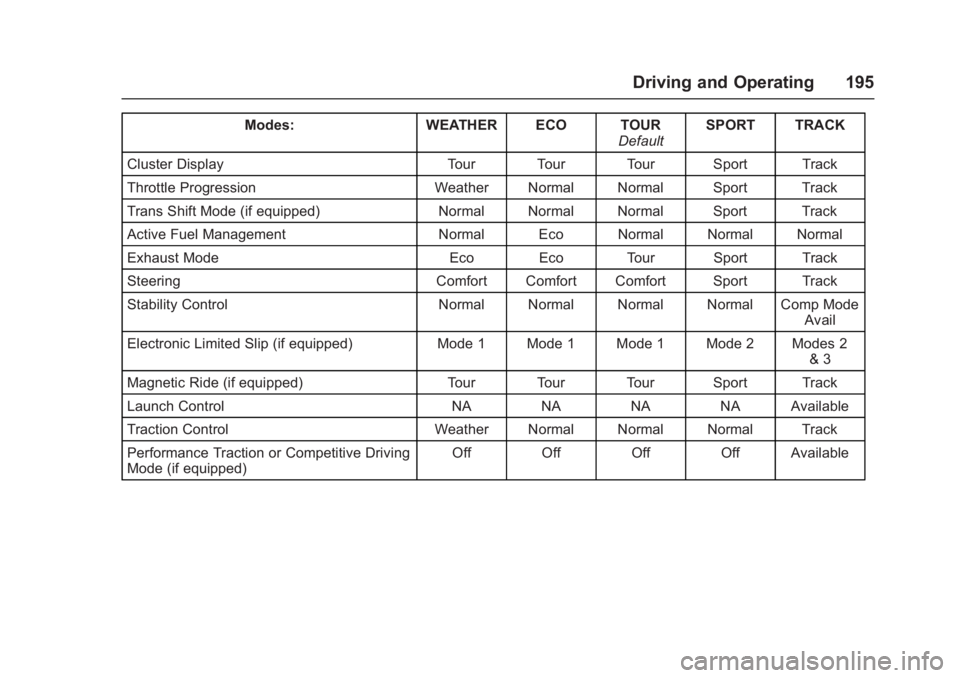
There are 12 attributes that vary by
mode shown below. Not all vehicles
have all features, depending on the
vehicle options.
Page 196 of 353
Chevrolet Corvette Owner Manual (GMNA-Localizing-U.S./Canada/Mexico-
11374030) - 2018 - crc - 4/4/17
Driving and Operating 195
Modes:WEATHER ECO TOUR
DefaultSPORT TRACK
Cluster Display Tour Tour Tour Sport Track
Throttle Progression Weather Normal Normal Sport Track
Trans Shift Mode (if equipped) Normal Normal Normal Sport Track
Active Fuel Management Normal Eco Normal Normal Normal
Exhaust Mode Eco Eco Tour Sport Track
Steering Comfort Comfort Comfort Sport Track
Stability Control Normal Normal Normal Normal Comp Mode
Avail
Electronic Limited Slip (if equipped) Mode 1 Mode 1 Mode 1 Mode 2 Modes 2
& 3
Magnetic Ride (if equipped) Tour Tour Tour Sport Track
Launch Control NA NA NA NA Available
Traction Control Weather Normal Normal Normal Track
Performance Traction or Competitive Driving
Mode (if equipped) Off Off Off Off Available
Page 198 of 353

Chevrolet Corvette Owner Manual (GMNA-Localizing-U.S./Canada/Mexico-
11374030) - 2018 - crc - 4/4/17
Driving and Operating 197
.StabiliTrak can be turned off by
pressing and holding
gfor
10 seconds.
PTM (Performance Traction
Management) (if equipped)
. Available in Track Mode.
. There are five selectable
settings if Competitive Driving
Mode is activated.
Competitive Driving Mode
If equipped, Competitive Driving
Mode, Performance Traction
Management, and Launch Control
are systems designed to allow
increased performance while
accelerating and/or cornering. This
is accomplished by regulating and
optimizing the engine, brakes, and
suspension performance. These
modes are for use at a closed
course race track and are not
intended for use on public roads.
They will not compensate for driver
inexperience or lack of familiarity
with the race track. Drivers who
prefer to allow the system to have
more control of the engine, brake, and suspension are advised to turn
the normal Traction Control System
(TCS) and StabiliTrak system on.
Caution
Attempting to shift when the drive
wheels are spinning and do not
have traction may cause damage
to the transmission. Damage
caused by misuse of the vehicle
is not covered by the vehicle
warranty. Do not attempt to shift
when the drive wheels do not
have traction.
Competitive Driving Mode
Competitive Driving Mode allows full
engine power while StabiliTrak
helps maintain directional control of
the vehicle by selective brake
application. In this mode, TCS is off.
Launch Control is available if in
Track Mode. Adjust your driving
style to account for the available
engine power. See
“Launch Control”
later in this section.
These lights are on when the
vehicle is in the Competitive
Driving Mode.
Page 199 of 353
Chevrolet Corvette Owner Manual (GMNA-Localizing-U.S./Canada/Mexico-
11374030) - 2018 - crc - 4/4/17
198 Driving and Operating
In order to select this optional
handling mode, the vehicle mode
must be in Sport or Track Mode. In
vehicles equipped with Performance
Traction Management (PTM), the
Competitive Driving Mode is only
available in Sport Mode. In vehicles
not equipped with PTM, the
Competitive Driving Mode is
available in Sport and Track Mode.
Then quickly press
gon the center
console two times. STABILITRAK
COMPETITIVE MODE displays in
the Driver Information Center (DIC).
When
gis pressed again, the
traction off light
iand StabiliTrak
OFF light
gwill go out.
Performance Traction
Management (Z06, Grand
Sport, and Stingray with FE4)
Performance Traction Management
(PTM) integrates the Traction
Control, StabiliTrak, and Magnetic
Ride Control systems to provide
improved and consistent
performance when cornering. The
amount of available engine power is based on the mode selected, track
conditions, driver skill, and the
radius of each corner.
This light is on when the vehicle is
in the PTM mode.
To select this optional handling
mode, the vehicle mode must be
Track. Then quickly press the TCS/
StabiliTrak
gbutton on the center
console two times. PERF TRAC 1 -
WET ACTIVE HANDLING ON
displays in the DIC.
To experience the performance
benefit of this system, after entering
a curve and at the point where
normal acceleration occurs, fully
push the accelerator pedal. The
PTM system will modify the level of
engine power for a smooth and
consistent corner exit.
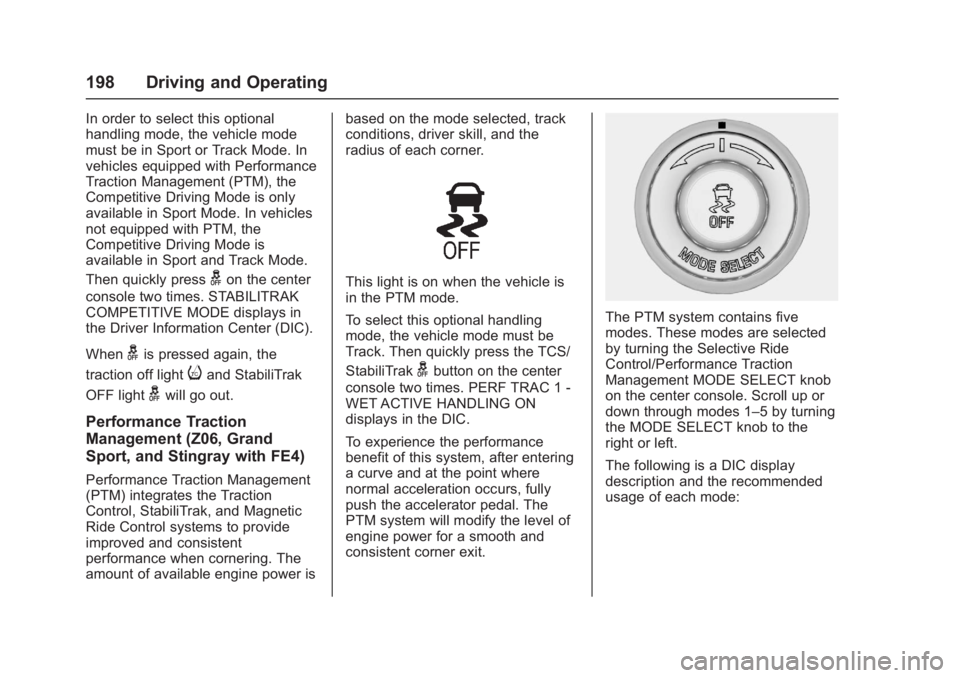
The PTM system contains five
modes. These modes are selected
by turning the Selective Ride
Control/Performance Traction
Management MODE SELECT knob
on the center console. Scroll up or
down through modes 1–5 by turning
the MODE SELECT knob to the
right or left.
The following is a DIC display
description and the recommended
usage of each mode: