ignition CHEVROLET CORVETTE C7 2018 Workshop Manual
[x] Cancel search | Manufacturer: CHEVROLET, Model Year: 2018, Model line: CORVETTE C7, Model: CHEVROLET CORVETTE C7 2018Pages: 353, PDF Size: 6.48 MB
Page 242 of 353
Chevrolet Corvette Owner Manual (GMNA-Localizing-U.S./Canada/Mexico-
11374030) - 2018 - crc - 3/29/17
Vehicle Care 241
For battery replacement, see your
dealer or the service manual. To
purchase a service manual, see
Service Publications Ordering
Information0325.
{Warning
WARNING: Battery posts,
terminals, and related
accessories contain lead and lead
compounds, chemicals known to
the State of California to cause
cancer and birth defects or other
reproductive harm. Batteries also
contain other chemicals known to
the State of California to cause
cancer. WASH HANDS AFTER
HANDLING. For more information
go to www.P65Warnings.ca.gov/
passenger-vehicle.
See California Proposition
65 Warning 0212 and the back
cover.
Vehicle Storage
{Warning
Batteries have acid that can burn
you and gas that can explode.
You can be badly hurt if you are
not careful. See Jump Starting -
North America 0284 for tips on
working around a battery without
getting hurt.
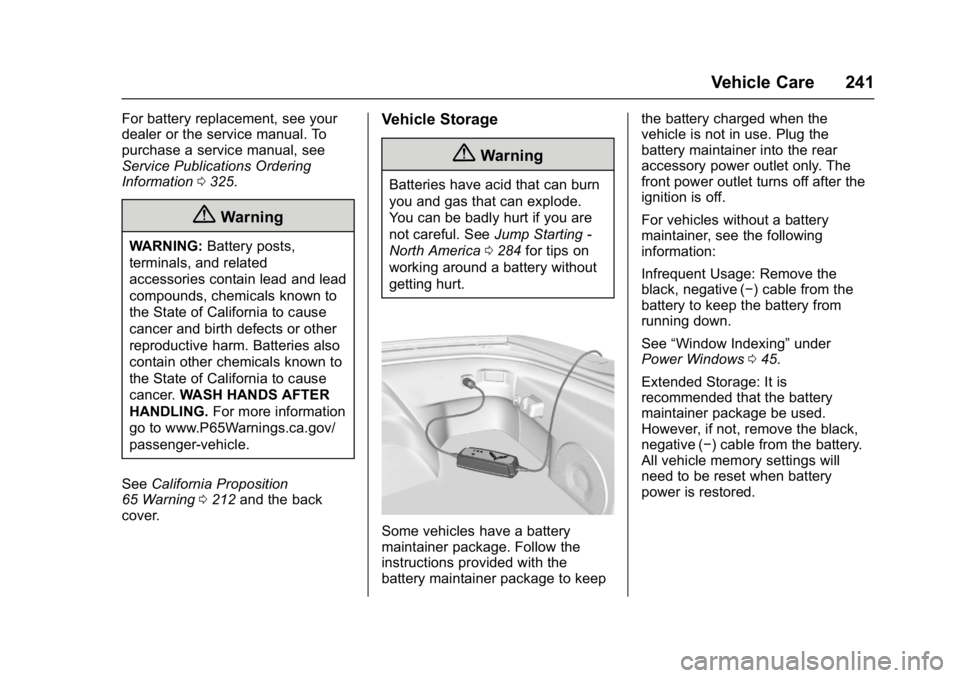
Some vehicles have a battery
maintainer package. Follow the
instructions provided with the
battery maintainer package to keep the battery charged when the
vehicle is not in use. Plug the
battery maintainer into the rear
accessory power outlet only. The
front power outlet turns off after the
ignition is off.
For vehicles without a battery
maintainer, see the following
information:
Infrequent Usage: Remove the
black, negative (−) cable from the
battery to keep the battery from
running down.
See
“Window Indexing” under
Power Windows 045.
Extended Storage: It is
recommended that the battery
maintainer package be used.
However, if not, remove the black,
negative (−) cable from the battery.
All vehicle memory settings will
need to be reset when battery
power is restored.
Page 244 of 353
Chevrolet Corvette Owner Manual (GMNA-Localizing-U.S./Canada/Mexico-
11374030) - 2018 - crc - 3/29/17
Vehicle Care 243
Automatic Transmission
Shift Lock Control
Function Check
{Warning
When you are doing this
inspection, the vehicle could
move suddenly. If the vehicle
moves, you or others could be
injured.
1. Before starting this check, be sure there is enough room
around the vehicle. It should be
parked on a level surface.
2. Apply the parking brake. See Electric Parking Brake 0190.
Be ready to apply the regular
brake immediately if the vehicle
begins to move.
3. With the engine off, turn the ignition on, but do not start the
engine. Without applying the
regular brake, try to move the
shift lever out of P (Park) with normal effort. If the shift lever
moves out of P (Park), contact
your dealer for service.
Park Brake and P (Park)
Mechanism Check
{Warning
When you are doing this check,
the vehicle could begin to move.
You or others could be injured
and property could be damaged.
Make sure there is room in front
of the vehicle in case it begins to
roll. Be ready to apply the regular
brake at once should the vehicle
begin to move.
Park on a fairly steep hill, with the
vehicle facing downhill. Keeping
your foot on the regular brake, set
the parking brake.
. To check the parking brake's
holding ability: With the engine
running and the transmission in
N (Neutral), slowly remove foot pressure from the regular brake
pedal. Do this until the vehicle is
held by the parking brake only.
. To check the P (Park)
mechanism's holding ability:
With the engine running, shift to
P (Park). Then release the
parking brake followed by the
regular brake.
Contact your dealer if service is
required.
Wiper Blade Replacement
Windshield wiper blades should be
inspected for wear and cracking.
Replacement blades come in
different types and are removed in
different ways. For proper type and
length, see Maintenance
Replacement Parts 0309.
To replace the windshield wiper
blade: 1. Open the hood.
2. Pull the windshield wiper assembly away from the
windshield.
Page 250 of 353
Chevrolet Corvette Owner Manual (GMNA-Localizing-U.S./Canada/Mexico-
11374030) - 2018 - crc - 3/29/17
Vehicle Care 249
The vehicle may not be equipped
with all of the fuses, relays, and
features shown.Fuses Usage
1 Front wiper
2 Starter
3 ABS valves
4 Engine control module
5 Electric parking brake
6 Front HVAC
7 ABS pump
8 Logistics
9 Vacuum pump
10 Electronic rear differential module
11 Heated seat 1
12 Column lock module
13 Steering column
14 Glove box
15 Engine inside position Fuses Usage
16 Body control module 6
17 HVAC controls
18 Body control module 5
19 Heated seat 2
20 Body control module 7
21 Electric steering column lock
22 Display
23 Auxiliary outlet
24 Radio
25 Instrument cluster HUD
26 Interior rearview mirror
27 Ignition –odd
28 Ignition –even
29 Data link connector
30 Seat fan Fuses Usage
31 Fuel pump power module
32 Exhaust valve 1
33 Horn
34 Headlamp washer
35 A/C clutch
36 Engine outside position
37 Real time dampening
38 Intercooler
39 Left headlamp
40 Right headlamp
41 Headlamp washer pump
42 Exhaust valve 2
43 Reverse lockout
44 Electric rear differential module
45 Rear transmission cooler fan
Page 267 of 353
Chevrolet Corvette Owner Manual (GMNA-Localizing-U.S./Canada/Mexico-
11374030) - 2018 - crc - 3/29/17
266 Vehicle Care
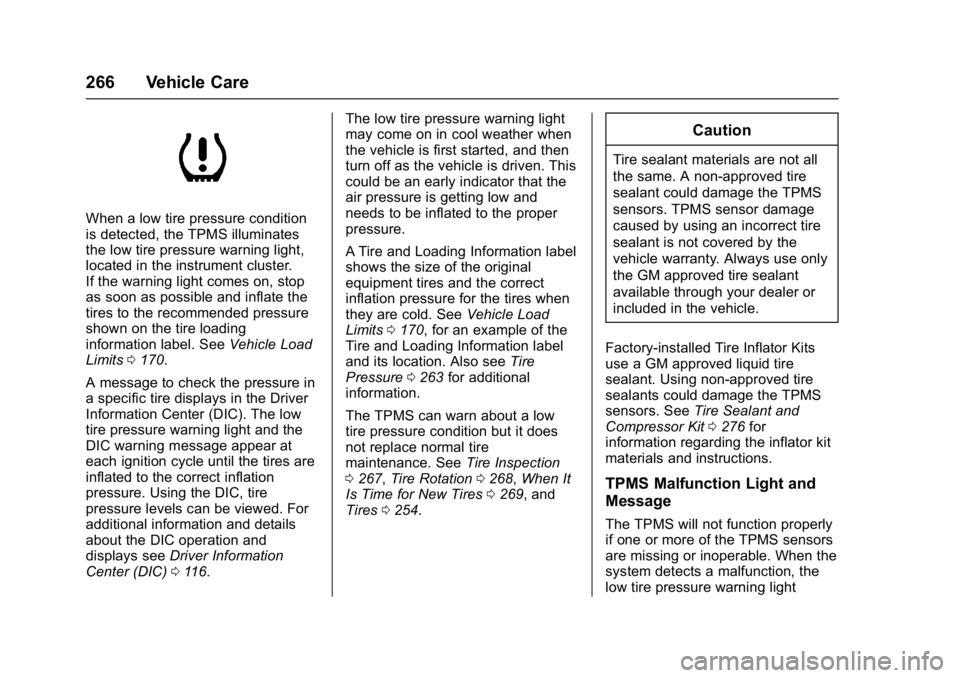
When a low tire pressure condition
is detected, the TPMS illuminates
the low tire pressure warning light,
located in the instrument cluster.
If the warning light comes on, stop
as soon as possible and inflate the
tires to the recommended pressure
shown on the tire loading
information label. SeeVehicle Load
Limits 0170.
A message to check the pressure in
a specific tire displays in the Driver
Information Center (DIC). The low
tire pressure warning light and the
DIC warning message appear at
each ignition cycle until the tires are
inflated to the correct inflation
pressure. Using the DIC, tire
pressure levels can be viewed. For
additional information and details
about the DIC operation and
displays see Driver Information
Center (DIC) 0116. The low tire pressure warning light
may come on in cool weather when
the vehicle is first started, and then
turn off as the vehicle is driven. This
could be an early indicator that the
air pressure is getting low and
needs to be inflated to the proper
pressure.
A Tire and Loading Information label
shows the size of the original
equipment tires and the correct
inflation pressure for the tires when
they are cold. See
Vehicle Load
Limits 0170, for an example of the
Tire and Loading Information label
and its location. Also see Tire
Pressure 0263 for additional
information.
The TPMS can warn about a low
tire pressure condition but it does
not replace normal tire
maintenance. See Tire Inspection
0 267, Tire Rotation 0268, When It
Is Time for New Tires 0269, and
Tires 0254.
Caution
Tire sealant materials are not all
the same. A non-approved tire
sealant could damage the TPMS
sensors. TPMS sensor damage
caused by using an incorrect tire
sealant is not covered by the
vehicle warranty. Always use only
the GM approved tire sealant
available through your dealer or
included in the vehicle.
Factory-installed Tire Inflator Kits
use a GM approved liquid tire
sealant. Using non-approved tire
sealants could damage the TPMS
sensors. See Tire Sealant and
Compressor Kit 0276 for
information regarding the inflator kit
materials and instructions.
TPMS Malfunction Light and
Message
The TPMS will not function properly
if one or more of the TPMS sensors
are missing or inoperable. When the
system detects a malfunction, the
low tire pressure warning light
Page 268 of 353
Chevrolet Corvette Owner Manual (GMNA-Localizing-U.S./Canada/Mexico-
11374030) - 2018 - crc - 3/29/17
Vehicle Care 267
flashes for about one minute and
then stays on for the remainder of
the ignition cycle. A DIC warning
message also displays. The
malfunction light and DIC warning
message come on at each ignition
cycle until the problem is corrected.
Some of the conditions that can
cause these to come on are:
.The TPMS sensor matching
process was not done or not
completed successfully. The
malfunction light and the DIC
message should go off after
successfully completing the
sensor matching process.
. One or more TPMS sensors are
missing or damaged. The
malfunction light and the DIC
message should go off when the
TPMS sensors are installed and
the sensor matching process is
performed successfully.
. Replacement tires or wheels do
not match the original equipment
tires or wheels. Tires and wheels
other than those recommended could prevent the TPMS from
functioning properly. See
Buying
New Tires 0269.
. Operating electronic devices or
being near facilities using radio
wave frequencies similar to the
TPMS could cause the TPMS
sensors to malfunction.
If the TPMS is not functioning
properly, it cannot detect or signal a
low tire pressure condition. See
your dealer for service if the TPMS
malfunction light and DIC message
come on and stays on.
TPMS Sensor Matching
Process —Auto Learn
Function
Each TPMS sensor has a unique
identification code. The identification
code needs to be matched to a new
tire/wheel position after rotating the
tires or replacing one or more of the
TPMS sensors. When a tire is
installed, the vehicle must be
stationary for about 20 minutes
before the system recalculates. The
following relearn process takes up
to 10 minutes, driving at a minimum speed of 19 km/h (12 mph).
A dash (-) or pressure value will
display in the DIC. See
Driver
Information Center (DIC) 0116.
A warning message displays in the
DIC if a problem occurs during the
relearn process.
Tire Inspection
We recommend that the tires,
including the spare tire, if the
vehicle has one, be inspected
for signs of wear or damage at
least once a month.
Replace the tire if:
.The indicators at three or
more places around the tire
can be seen.
.There is cord or fabric
showing through the tire's
rubber.
.The tread or sidewall is
cracked, cut, or snagged
deep enough to show cord or
fabric.
Page 276 of 353
Chevrolet Corvette Owner Manual (GMNA-Localizing-U.S./Canada/Mexico-
11374030) - 2018 - crc - 3/29/17
Vehicle Care 275
Warning (Continued)
control and a crash. Use another
type of traction device only if its
manufacturer recommends it for
the vehicle's tire size combination
and road conditions. Follow that
manufacturer's instructions. To
avoid vehicle damage, drive
slowly and readjust or remove the
traction device if it contacts the
vehicle. Do not spin the wheels.
If traction devices are used, install
them on the rear tires.
If a Tire Goes Flat
It is unusual for a tire to blow out
while driving, especially if the tires
are maintained properly. If air goes
out of a tire, it is much more likely to
leak out slowly. SeeTires0254 for
additional information. But if there
ever is a blowout, here are a few
tips about what to expect and what
to do:
If a front tire fails, the flat tire
creates a drag that pulls the vehicle
toward that side. Take your foot off the accelerator pedal and grip the
steering wheel firmly. Steer to
maintain lane position, and then
gently brake to a stop, well off the
road, if possible.
A rear blowout, particularly on a
curve, acts much like a skid and
may require the same correction as
used in a skid. Stop pressing the
accelerator pedal and steer to
straighten the vehicle. It may be
very bumpy and noisy. Gently brake
to a stop, well off the road,
if possible.
The vehicle has no spare tire, no
tire changing equipment, and no
place to store a tire.
If the vehicle has run-flat tires, there
is no need to stop on the side of the
road to change a flat tire. See
Run-Flat Tires
0255.
{Warning
Special tools and procedures are
required to service a run-flat tire.
If these special tools and
(Continued)
Warning (Continued)
procedures are not used, injury or
vehicle damage may occur.
Always be sure the proper tools
and procedures, as described in
the service manual, are used.
If this vehicle does not have run-flat
tires and a tire goes flat, avoid
further tire and wheel damage by
driving slowly to a level place, well
off the road, if possible. Turn on the
hazard warning flashers. See
Hazard Warning Flashers 0138.
1. Turn on the hazard warning flashers.
2. Set the parking brake firmly.
3. Put an automatic transmission in P (Park) or a manual
transmission in 1 (First) or
R (Reverse).
4. Turn off the ignition.
5. Inspect the flat tire.
Page 286 of 353
Chevrolet Corvette Owner Manual (GMNA-Localizing-U.S./Canada/Mexico-
11374030) - 2018 - crc - 3/29/17
Vehicle Care 285
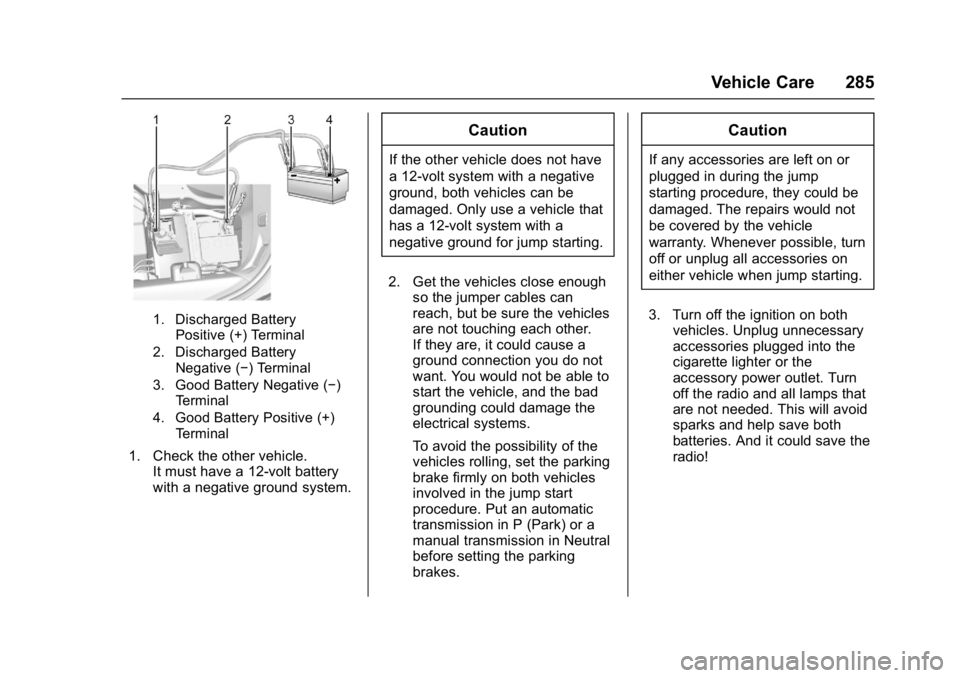
1. Discharged BatteryPositive (+) Terminal
2. Discharged Battery Negative (−) Terminal
3. Good Battery Negative (−) Terminal
4. Good Battery Positive (+) Terminal
1. Check the other vehicle. It must have a 12-volt battery
with a negative ground system.
Caution
If the other vehicle does not have
a 12-volt system with a negative
ground, both vehicles can be
damaged. Only use a vehicle that
has a 12-volt system with a
negative ground for jump starting.
2. Get the vehicles close enough so the jumper cables can
reach, but be sure the vehicles
are not touching each other.
If they are, it could cause a
ground connection you do not
want. You would not be able to
start the vehicle, and the bad
grounding could damage the
electrical systems.
To avoid the possibility of the
vehicles rolling, set the parking
brake firmly on both vehicles
involved in the jump start
procedure. Put an automatic
transmission in P (Park) or a
manual transmission in Neutral
before setting the parking
brakes.
Caution
If any accessories are left on or
plugged in during the jump
starting procedure, they could be
damaged. The repairs would not
be covered by the vehicle
warranty. Whenever possible, turn
off or unplug all accessories on
either vehicle when jump starting.
3. Turn off the ignition on both vehicles. Unplug unnecessary
accessories plugged into the
cigarette lighter or the
accessory power outlet. Turn
off the radio and all lamps that
are not needed. This will avoid
sparks and help save both
batteries. And it could save the
radio!
Page 333 of 353
Chevrolet Corvette Owner Manual (GMNA-Localizing-U.S./Canada/Mexico-
11374030) - 2018 - crc - 3/29/17
332 OnStar
OnStar Services
Emergency
Emergency Services require an
active, OnStar service plan
(excludes Basic Plan). With
Automatic Crash Response, built-in
sensors can automatically alert a
specially trained OnStar Advisor
who is immediately connected in to
the vehicle to help.
Press
Ufor a priority connection to
an OnStar Advisor who can contact
emergency service providers, direct
them to your exact location, and
relay important information.
With OnStar Crisis Assist, specially
trained Advisors are available
24 hours a day, 7 days a week, to
provide a central point of contact,
assistance, and information during a
crisis.
With Roadside Assistance, Advisors
can locate a nearby service provider
to help with a flat tire, a battery
jump, or an empty gas tank.
Security
If equipped, OnStar provides these
services:
. With Stolen Vehicle Assistance,
OnStar Advisors can use GPS to
pinpoint the vehicle and help
authorities quickly recover it.
. With Remote Ignition Block,
if equipped, OnStar can block
the engine from being restarted.
. With Stolen Vehicle Slowdown,
if equipped, OnStar can work
with law enforcement to
gradually slow the vehicle down.
Theft Alarm Notification
If equipped, if the doors are locked
and the vehicle alarm sounds, a
notification by text, e-mail, or phone
call will be sent. If the vehicle is
stolen, an OnStar Advisor can work
with authorities to recover the
vehicle.
Navigation
OnStar navigation requires a
specific OnStar service plan.
Press
|to receive Turn-by-Turn
directions or have them sent to the
vehicle navigation screen,
if equipped.
Turn-by-Turn Navigation
1. Press|to connect to an
Advisor.
2. Request directions to be downloaded to the vehicle.
3. Follow the voice-guided commands.
Using Voice Commands
During a Planned Route
Cancel Route
1. Press
Q. System responds:
“OnStar ready,” then a tone.
2. Say “Cancel route.” System
responds: “Do you want to
cancel directions?”
Page 339 of 353
Chevrolet Corvette Owner Manual (GMNA-Localizing-U.S./Canada/Mexico-
11374030) - 2018 - crc - 3/29/17
338 OnStar
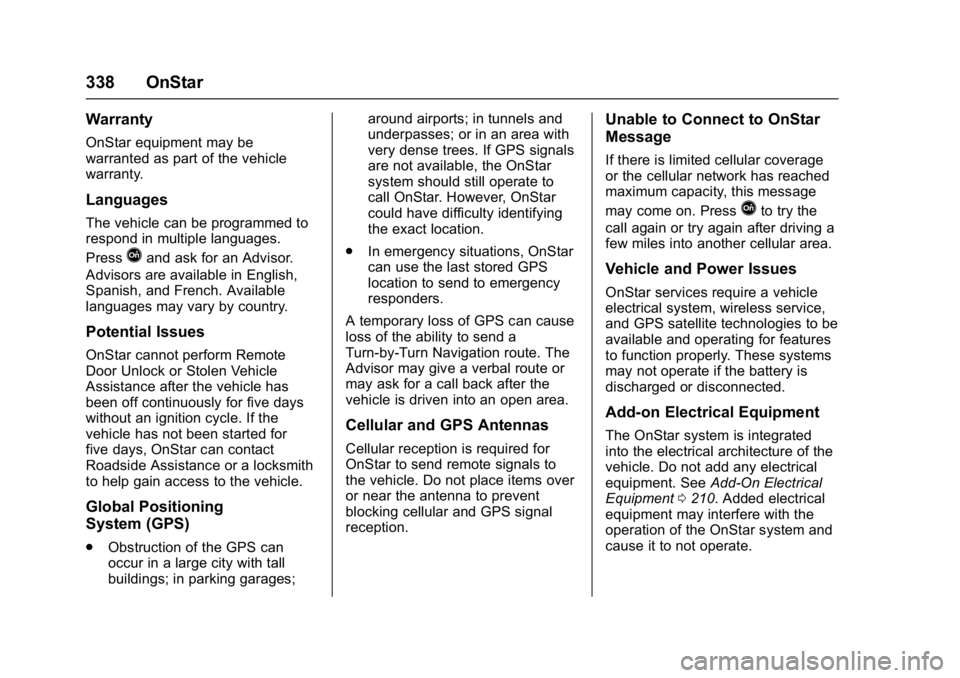
Warranty
OnStar equipment may be
warranted as part of the vehicle
warranty.
Languages
The vehicle can be programmed to
respond in multiple languages.
Press
Qand ask for an Advisor.
Advisors are available in English,
Spanish, and French. Available
languages may vary by country.
Potential Issues
OnStar cannot perform Remote
Door Unlock or Stolen Vehicle
Assistance after the vehicle has
been off continuously for five days
without an ignition cycle. If the
vehicle has not been started for
five days, OnStar can contact
Roadside Assistance or a locksmith
to help gain access to the vehicle.
Global Positioning
System (GPS)
. Obstruction of the GPS can
occur in a large city with tall
buildings; in parking garages; around airports; in tunnels and
underpasses; or in an area with
very dense trees. If GPS signals
are not available, the OnStar
system should still operate to
call OnStar. However, OnStar
could have difficulty identifying
the exact location.
. In emergency situations, OnStar
can use the last stored GPS
location to send to emergency
responders.
A temporary loss of GPS can cause
loss of the ability to send a
Turn-by-Turn Navigation route. The
Advisor may give a verbal route or
may ask for a call back after the
vehicle is driven into an open area.
Cellular and GPS Antennas
Cellular reception is required for
OnStar to send remote signals to
the vehicle. Do not place items over
or near the antenna to prevent
blocking cellular and GPS signal
reception.
Unable to Connect to OnStar
Message
If there is limited cellular coverage
or the cellular network has reached
maximum capacity, this message
may come on. Press
Qto try the
call again or try again after driving a
few miles into another cellular area.
Vehicle and Power Issues
OnStar services require a vehicle
electrical system, wireless service,
and GPS satellite technologies to be
available and operating for features
to function properly. These systems
may not operate if the battery is
discharged or disconnected.
Add-on Electrical Equipment
The OnStar system is integrated
into the electrical architecture of the
vehicle. Do not add any electrical
equipment. See Add-On Electrical
Equipment 0210. Added electrical
equipment may interfere with the
operation of the OnStar system and
cause it to not operate.
Page 347 of 353
Chevrolet Corvette Owner Manual (GMNA-Localizing-U.S./Canada/Mexico-
11374030) - 2018 - crc - 4/5/17
346 Index
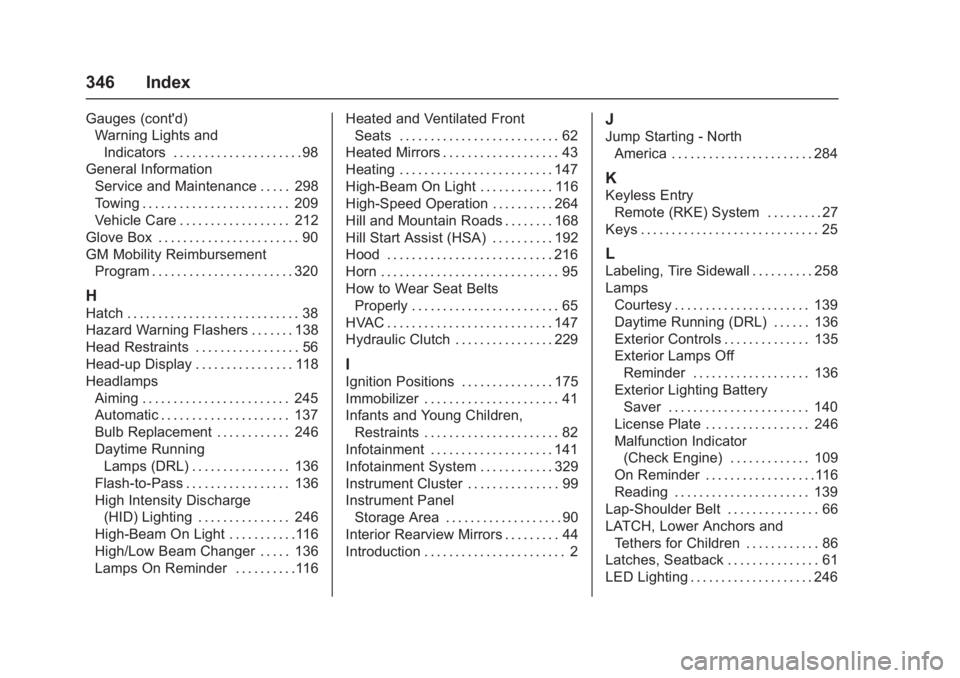
Gauges (cont'd)Warning Lights and
Indicators . . . . . . . . . . . . . . . . . . . . . 98
General Information
Service and Maintenance . . . . . 298
Towing . . . . . . . . . . . . . . . . . . . . . . . . 209
Vehicle Care . . . . . . . . . . . . . . . . . . 212
Glove Box . . . . . . . . . . . . . . . . . . . . . . . 90
GM Mobility Reimbursement Program . . . . . . . . . . . . . . . . . . . . . . . 320
H
Hatch . . . . . . . . . . . . . . . . . . . . . . . . . . . . 38
Hazard Warning Flashers . . . . . . . 138
Head Restraints . . . . . . . . . . . . . . . . . 56
Head-up Display . . . . . . . . . . . . . . . . 118
HeadlampsAiming . . . . . . . . . . . . . . . . . . . . . . . . 245
Automatic . . . . . . . . . . . . . . . . . . . . . 137
Bulb Replacement . . . . . . . . . . . . 246
Daytime RunningLamps (DRL) . . . . . . . . . . . . . . . . 136
Flash-to-Pass . . . . . . . . . . . . . . . . . 136
High Intensity Discharge (HID) Lighting . . . . . . . . . . . . . . . 246
High-Beam On Light . . . . . . . . . . .116
High/Low Beam Changer . . . . . 136
Lamps On Reminder . . . . . . . . . .116 Heated and Ventilated Front
Seats . . . . . . . . . . . . . . . . . . . . . . . . . . 62
Heated Mirrors . . . . . . . . . . . . . . . . . . . 43
Heating . . . . . . . . . . . . . . . . . . . . . . . . . 147
High-Beam On Light . . . . . . . . . . . . 116
High-Speed Operation . . . . . . . . . . 264
Hill and Mountain Roads . . . . . . . . 168
Hill Start Assist (HSA) . . . . . . . . . . 192
Hood . . . . . . . . . . . . . . . . . . . . . . . . . . . 216
Horn . . . . . . . . . . . . . . . . . . . . . . . . . . . . . 95
How to Wear Seat Belts Properly . . . . . . . . . . . . . . . . . . . . . . . . 65
HVAC . . . . . . . . . . . . . . . . . . . . . . . . . . . 147
Hydraulic Clutch . . . . . . . . . . . . . . . . 229
I
Ignition Positions . . . . . . . . . . . . . . . 175
Immobilizer . . . . . . . . . . . . . . . . . . . . . . 41
Infants and Young Children, Restraints . . . . . . . . . . . . . . . . . . . . . . 82
Infotainment . . . . . . . . . . . . . . . . . . . . 141
Infotainment System . . . . . . . . . . . . 329
Instrument Cluster . . . . . . . . . . . . . . . 99
Instrument Panel
Storage Area . . . . . . . . . . . . . . . . . . . 90
Interior Rearview Mirrors . . . . . . . . . 44
Introduction . . . . . . . . . . . . . . . . . . . . . . . 2
J
Jump Starting - North
America . . . . . . . . . . . . . . . . . . . . . . . 284
K
Keyless EntryRemote (RKE) System . . . . . . . . . 27
Keys . . . . . . . . . . . . . . . . . . . . . . . . . . . . . 25
L
Labeling, Tire Sidewall . . . . . . . . . . 258
Lamps Courtesy . . . . . . . . . . . . . . . . . . . . . . 139
Daytime Running (DRL) . . . . . . 136
Exterior Controls . . . . . . . . . . . . . . 135
Exterior Lamps OffReminder . . . . . . . . . . . . . . . . . . . 136
Exterior Lighting Battery Saver . . . . . . . . . . . . . . . . . . . . . . . 140
License Plate . . . . . . . . . . . . . . . . . 246
Malfunction Indicator (Check Engine) . . . . . . . . . . . . . 109
On Reminder . . . . . . . . . . . . . . . . . .116
Reading . . . . . . . . . . . . . . . . . . . . . . 139
Lap-Shoulder Belt . . . . . . . . . . . . . . . 66
LATCH, Lower Anchors and
Tethers for Children . . . . . . . . . . . . 86
Latches, Seatback . . . . . . . . . . . . . . . 61
LED Lighting . . . . . . . . . . . . . . . . . . . . 246