odometer CHEVROLET CORVETTE C7 2018 Owners Manual
[x] Cancel search | Manufacturer: CHEVROLET, Model Year: 2018, Model line: CORVETTE C7, Model: CHEVROLET CORVETTE C7 2018Pages: 353, PDF Size: 6.48 MB
Page 95 of 353
Chevrolet Corvette Owner Manual (GMNA-Localizing-U.S./Canada/Mexico-
11374030) - 2018 - crc - 3/29/17
94 Instruments and Controls
Instruments and
Controls
Controls
Steering Wheel Adjustment . . . . 95
Steering Wheel Controls . . . . . . . 95
Horn . . . . . . . . . . . . . . . . . . . . . . . . . . . 95
Windshield Wiper/Washer . . . . . . 95
Compass . . . . . . . . . . . . . . . . . . . . . . 96
Clock . . . . . . . . . . . . . . . . . . . . . . . . . . 96
Power Outlets . . . . . . . . . . . . . . . . . 97
Warning Lights, Gauges, and
Indicators
Warning Lights, Gauges, andIndicators . . . . . . . . . . . . . . . . . . . . 98
Instrument Cluster . . . . . . . . . . . . . 99
Speedometer . . . . . . . . . . . . . . . . . 104
Odometer . . . . . . . . . . . . . . . . . . . . . 104
Trip Odometer . . . . . . . . . . . . . . . . 104
Tachometer . . . . . . . . . . . . . . . . . . . 104
Fuel Gauge . . . . . . . . . . . . . . . . . . . 105
Boost Gauge . . . . . . . . . . . . . . . . . 106
Engine Coolant Temperature Gauge . . . . . . . . . . . . . . . . . . . . . . 106
Seat Belt Reminders . . . . . . . . . 107
Airbag Readiness Light . . . . . . . 108
Passenger Airbag Status Indicator . . . . . . . . . . . . . . . . . . . . 108 Charging System Light . . . . . . . 109
Malfunction Indicator Lamp . . . 109
Brake System Warning
Light . . . . . . . . . . . . . . . . . . . . . . . . . 111
Electric Parking Brake
Light . . . . . . . . . . . . . . . . . . . . . . . . 112
Service Electric Parking Brake Light . . . . . . . . . . . . . . . . . . . . . . . . 112
Antilock Brake System (ABS) Warning Light . . . . . . . . . . . . . . . 112
Traction Off Light . . . . . . . . . . . . . 113
Traction Control System (TCS)/ Electronic Stability Control
Light . . . . . . . . . . . . . . . . . . . . . . . . 113
Electronic Stability Control (ESC) Off Light . . . . . . . . . . . . . . 113
Engine Coolant Temperature Warning Light . . . . . . . . . . . . . . . 114
Tire Pressure Light . . . . . . . . . . . 114
Engine Oil Pressure Light . . . . . 115
Low Fuel Warning Light . . . . . . . 115
Security Light . . . . . . . . . . . . . . . . . 115
High-Beam On Light . . . . . . . . . . 116
Lamps On Reminder . . . . . . . . . . 116
Cruise Control Light . . . . . . . . . . 116
Door Ajar Light . . . . . . . . . . . . . . . 116
Information Displays
Driver Information Center (DIC) . . . . . . . . . . . . . . . . 116
Head-Up Display (HUD) . . . . . . 118
Vehicle Messages
Vehicle Messages . . . . . . . . . . . . 123
Engine Power Messages . . . . . 123
Vehicle Speed Messages . . . . . 124
Vehicle Personalization
Vehicle Personalization . . . . . . . 124
Universal Remote System
Universal Remote System . . . . 131
Universal Remote System Programming . . . . . . . . . . . . . . . 131
Universal Remote System Operation . . . . . . . . . . . . . . . . . . . 133
Page 105 of 353
Chevrolet Corvette Owner Manual (GMNA-Localizing-U.S./Canada/Mexico-
11374030) - 2018 - crc - 3/29/17
104 Instruments and Controls
confirm and save the setting. To
cancel the setting, press
o. The
vehicle must be in P (Park).
Speed Warning : The Speed
Warning display allows the driver to
set a speed that they do not want to
exceed. To set the Speed Warning,
press
pwhen Speed Warning is
displayed. Enable the speed
warning and then use
worxto
adjust the value. Press SEL to set
the speed. Once the speed is set,
this feature can be turned off by
pressing SEL while viewing this
page. If the selected speed limit is
exceeded, a pop-up warning is
displayed with a chime.
Pocket Gauges : Press
pwhile
Pocket Gauges is displayed to enter
the menu and select gauges that
can be displayed for the Sport
theme on the left or right of the
display area. Choose from Oil
Pressure Gauge, Oil Temperature
Gauge, Battery Voltage,
Transmission Fluid Temperature
Gauge, Horsepower, or a blank
gauge. Software Info :
Press
pwhile
Software Info is highlighted to
display open source software
information.
Speedometer
The speedometer shows the
vehicle's speed in either kilometers
per hour (km/h) or miles per
hour (mph).
Odometer
The odometer shows how far the
vehicle has been driven, in either
kilometers or miles.
Trip Odometer
The trip odometer shows how far
the vehicle has been driven since
the trip odometer was last reset.
The trip odometer is accessed and
reset through the Driver Information
Center (DIC). See Driver
Information Center (DIC) 0116.
Tachometer
The tachometer displays the engine
speed in revolutions per
minute (rpm).
Caution
If the engine is operated with the
rpm’s in the warning area at the
high end of the tachometer, the
vehicle could be damaged, and
the damage would not be covered
by the vehicle warranty. Do not
operate the engine with the rpm’s
in the warning area.
Page 118 of 353
Chevrolet Corvette Owner Manual (GMNA-Localizing-U.S./Canada/Mexico-
11374030) - 2018 - crc - 3/29/17
Instruments and Controls 117
oorp:Pressoto open
application menus on the left. Press
pto open interaction menus on the
right.
SEL : Press to open a menu or
select a menu item. Press and hold
to reset values on certain screens.
DIC Info Pages
The following is the list of all
possible DIC info displays.
Depending on the vehicle, some
may not be available.
Current Speed : Displays the
vehicle speed in either kilometers
per hour (km/h) or miles per
hour (mph).
Trip A or B/Average Fuel
Economy/Average Speed : Trip
displays the current distance
traveled, in either kilometers (km) or
miles (mi), since the trip odometer
was last reset. The trip odometer
can be reset by pressing and
holding SEL while this display is
active.
Average Fuel Economy displays the
approximate average liters per
100 kilometers (L/100 km) or miles per gallon (mpg). This number is
calculated based on the number of
L/100 km (mpg) recorded since the
last time this menu item was reset.
This number reflects only the
approximate average fuel economy
that the vehicle has right now, and
will change as driving conditions
change. The Average Fuel
Economy can be reset by pressing
and holding SEL while this display
is active.
Average Speed displays the
average speed of the vehicle in
kilometers per hour (km/h) or miles
per hour (mph). This average is
calculated based on the various
vehicle speeds recorded since the
last reset of this value. The average
speed can be reset by pressing and
holding SEL while this display is
active.
Fuel Range/Instantaneous Fuel
Economy :
Fuel Range displays the
approximate distance the vehicle
can be driven without refueling.
LOW will be displayed when the
vehicle is low on fuel. The fuel
range estimate is based on an
average of the vehicle's fuel economy over recent driving history
and the amount of fuel remaining in
the fuel tank.
Instantaneous Fuel Economy
displays the current fuel economy in
either liters per 100 kilometers
(L/100 km) or miles per
gallon (mpg). This number reflects
only the approximate fuel economy
that the vehicle has right now and
changes frequently as driving
conditions change.
This display may also show the
number of cylinders the vehicle is
running on. See
Active Fuel
Management 0180.
Oil Life : Displays an estimate of
the oil's remaining useful life.
If REMAINING OIL LIFE 99% is
displayed, that means 99% of the
current oil life remains.
When the remaining oil life is low,
the CHANGE ENGINE OIL SOON
message will appear on the display.
The oil should be changed as soon
as possible. See Engine Oil0222.
In addition to the engine oil life
system monitoring the oil life,
additional maintenance is
Page 145 of 353
Chevrolet Corvette Owner Manual (GMNA-Localizing-U.S./Canada/Mexico-
11374030) - 2018 - crc - 3/29/17
144 Infotainment System
Delete Recording :Touch to delete
the video. A confirmation screen
displays. Touch Yes to delete or No
to cancel.
Pause/Play : Touch to play or
pause the video. The button will
change when touched.
/: Touch to display the previous
screen.
Exit : Touch to exit the current
display.
Choose Video Overlay
Touch Choose Video Overlay to
display the menu screen.
Select one:
. No Overlay
. Sport .
Track
. Performance Timing
No Overlay:
No vehicle data displays on top of
the recorded video. Vehicle data is
still available with the video when
accessed in the toolbox software.
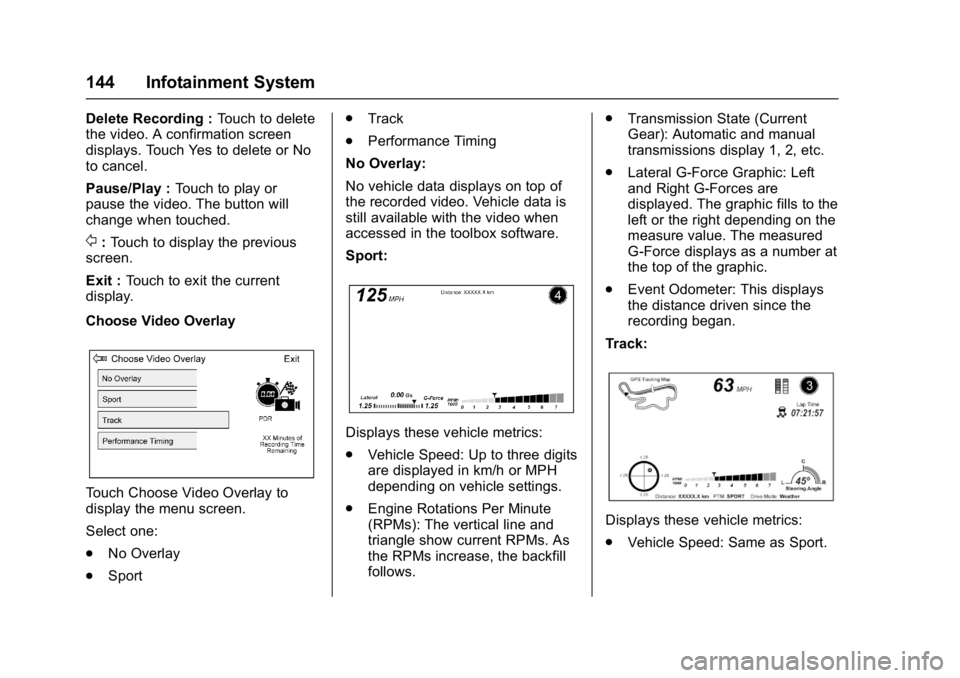
Sport:
Displays these vehicle metrics:
. Vehicle Speed: Up to three digits
are displayed in km/h or MPH
depending on vehicle settings.
. Engine Rotations Per Minute
(RPMs): The vertical line and
triangle show current RPMs. As
the RPMs increase, the backfill
follows. .
Transmission State (Current
Gear): Automatic and manual
transmissions display 1, 2, etc.
. Lateral G-Force Graphic: Left
and Right G-Forces are
displayed. The graphic fills to the
left or the right depending on the
measure value. The measured
G-Force displays as a number at
the top of the graphic.
. Event Odometer: This displays
the distance driven since the
recording began.
Track:
Displays these vehicle metrics:
. Vehicle Speed: Same as Sport.
Page 146 of 353
Chevrolet Corvette Owner Manual (GMNA-Localizing-U.S./Canada/Mexico-
11374030) - 2018 - crc - 3/29/17
Infotainment System 145
.GPS Tracking Map: Shows the
vehicle’s current position relative
to a known route.
. Engine Rotations Per Minute
(RPMs): The vertical line and
triangle indicate current RPMs.
As the RPMs increase, the
backfill follows.
. Transmission State (Current
Gear): Same as Sport.
. Friction Bubble Graphic: Lateral
and longitudinal G-Forces are
displayed as a dot within a
bubble. A red dot displays when
the vehicle starts braking and
turns green when the vehicle
accelerates. The dot is white
when the vehicle is not moving.
A white dot is the default.
. Brake and Throttle Graphic:
Displays the percentage value of
brake and throttle pedal position
from 0–100%.
. Steering Angle: The graphic fills
from the center to the left or right
depending on the direction of steering. The numerical steering
angle displays below the
graphic.
. Active Handling Active Indicator:
The graphic only displays if the
active handling systems are
activated.
. Performance Traction
Management (PTM) Mode:
Displays the current PTM mode.
The options are Wet, Dry, Sport
1, Sport 2, or Race.
. Current Lap Time: Displays the
elapsed lap time if the finish line
is defined and the vehicle has
crossed the defined finish line at
least once.
. Event Odometer: This displays
the distance driven since the
recording began.
. Drive Mode: Displays the
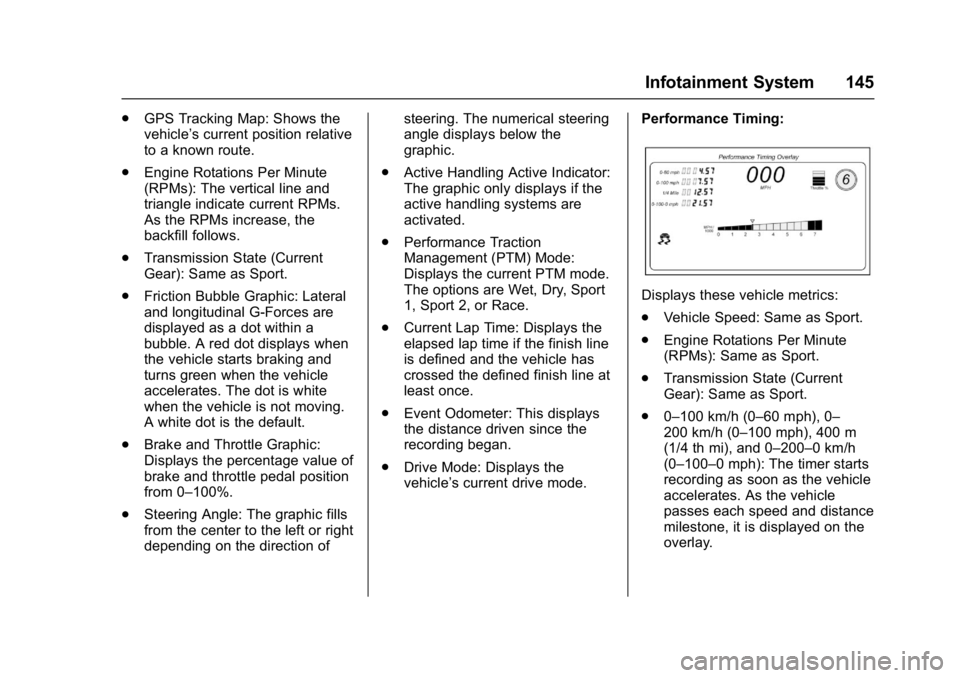
vehicle’s current drive mode. Performance Timing:
Displays these vehicle metrics:
.
Vehicle Speed: Same as Sport.
. Engine Rotations Per Minute
(RPMs): Same as Sport.
. Transmission State (Current
Gear): Same as Sport.
. 0–100 km/h (0–60 mph), 0–
200 km/h (0–100 mph), 400 m
(1/4 th mi), and 0–200–0 km/h
(0–100–0 mph): The timer starts
recording as soon as the vehicle
accelerates. As the vehicle
passes each speed and distance
milestone, it is displayed on the
overlay.
Page 275 of 353
Chevrolet Corvette Owner Manual (GMNA-Localizing-U.S./Canada/Mexico-
11374030) - 2018 - crc - 3/29/17
274 Vehicle Care
Caution
The wrong wheel can also cause
problems with bearing life, brake
cooling, speedometer or
odometer calibration, headlamp
aim, bumper height, vehicle
ground clearance, and tire
clearance to the body and
chassis.
Tightening Wheel Lug Nuts
{Warning
Never use oil or grease on studs
or the threads of the wheel nuts.
The wheel nuts might come loose
and the wheel could fall off,
causing a crash.
{Warning
Incorrect wheel nuts or improperly
tightened wheel nuts can cause
the wheel to become loose and
even come off. This could lead to
a crash. Be sure to use the
correct wheel nuts. If you have to
replace them, be sure to get new
GM original equipment
wheel nuts.
Caution
Improperly tightened wheel nuts
can lead to brake pulsation and
rotor damage. To avoid expensive
brake repairs, evenly tighten the
wheel nuts in the proper
sequence and to the proper
torque specification.
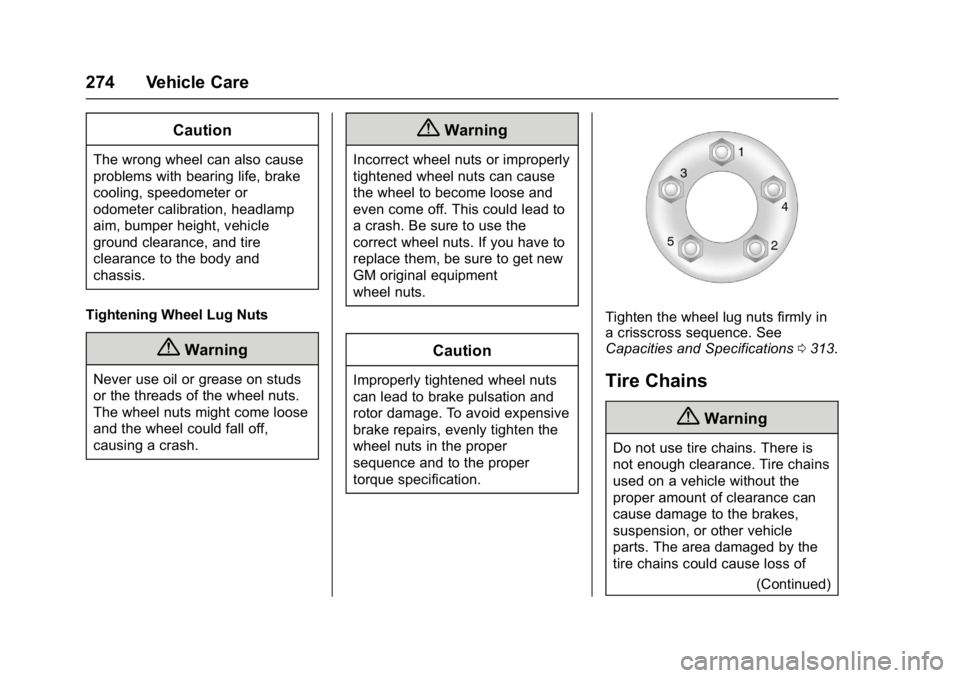
Tighten the wheel lug nuts firmly in
a crisscross sequence. See
Capacities and Specifications 0313.
Tire Chains
{Warning
Do not use tire chains. There is
not enough clearance. Tire chains
used on a vehicle without the
proper amount of clearance can
cause damage to the brakes,
suspension, or other vehicle
parts. The area damaged by the
tire chains could cause loss of
(Continued)
Page 312 of 353
Chevrolet Corvette Owner Manual (GMNA-Localizing-U.S./Canada/Mexico-
11374030) - 2018 - crc - 3/29/17
Service and Maintenance 311
Maintenance Records
After the scheduled services are performed, record the date, odometer reading, who performed the service, and the
type of services performed in the boxes provided. Retain all maintenance receipts.Date Odometer
Reading Serviced By Services Performed
Page 321 of 353
Chevrolet Corvette Owner Manual (GMNA-Localizing-U.S./Canada/Mexico-
11374030) - 2018 - crc - 3/29/17
320 Customer Information
.Find the
Chevrolet-recommended
maintenance services.
GM Mobility
Reimbursement Program
This program is available to
qualified applicants for cost
reimbursement of eligible
aftermarket adaptive equipment
required for the vehicle, such as
hand controls or a wheelchair/
scooter lift for the vehicle.
For more information on the limited
offer, see www.gmmobility.com or
call the GM Mobility Assistance
Center at 1-800-323-9935. Text
Telephone (TTY) users, call
1-800-833-9935. General Motors of Canada also has
a Mobility Program. See www.gm.ca
or call 1-800-GM-DRIVE (463-7483)
for details. TTY users call
1-800-263-3830.
Roadside Assistance
Program
For U.S.-purchased vehicles, call
1-800-243-8872. (Text Telephone
(TTY): 1-888-889-2438.)
For Canadian-purchased vehicles,
call 1-800-268-6800.
Service is available 24 hours a day,
365 days a year.
Calling for Assistance
When calling Roadside Assistance,
have the following information
ready:
.
Your name, home address, and
home telephone number
. Telephone number of your
location
. Location of the vehicle
. Model, year, color, and license
plate number of the vehicle .
Odometer reading, Vehicle
Identification Number (VIN), and
delivery date of the vehicle
. Description of the problem
Coverage
Services are provided for the
duration of the vehicle’s powertrain
warranty.
In the U.S., anyone driving the
vehicle is covered. In Canada, a
person driving the vehicle without
permission from the owner is not
covered.
Roadside Assistance is not a part of
the New Vehicle Limited Warranty.
General Motors North America and
Chevrolet reserve the right to make
any changes or discontinue the
Roadside Assistance program at
any time without notification.
General Motors North America and
Chevrolet reserve the right to limit
services or payment to an owner or
driver if they decide the claims are
made too often, or the same type of
claim is made many times.
Page 346 of 353
Chevrolet Corvette Owner Manual (GMNA-Localizing-U.S./Canada/Mexico-
11374030) - 2018 - crc - 4/5/17
Index 345
Electrical System (cont'd)Overload . . . . . . . . . . . . . . . . . . . . . 247
Rear Compartment Fuse
Block . . . . . . . . . . . . . . . . . . . . . . . . 251
Electronic Stability Control (ESC) Off Light . . . . . . . . . . . . . . . . 113
Emergency OnStar . . . . . . . . . . . . . . . . . . . . . . . 332
Engine
Air Cleaner/Filter . . . . . . . . . . . . . 229
Check Light (MalfunctionIndicator) . . . . . . . . . . . . . . . . . . . . 109
Compartment Overview . . . . . . . 217
Coolant Temperature Gauge . . . . . . . . . . . . . . . . . . . . . . 106
Coolant Temperature Warning Light . . . . . . . . . . . . . . . .114
Cooling System . . . . . . . . . . 232, 235
Drive Belt Routing . . . . . . . . . . . . 315
Exhaust . . . . . . . . . . . . . . . . . . . . . . 181
Oil Life System . . . . . . . . . . . . . . . 227
Oil Pressure Light . . . . . . . . . . . . .115
Overheating . . . . . . . . . . . . . . . . . . 236
Power Messages . . . . . . . . . . . . . 123
Running While Parked . . . . . . . . 181
Starting . . . . . . . . . . . . . . . . . . . . . . . 177
Entry Lighting . . . . . . . . . . . . . . . . . . . 140
Event Data Recorders . . . . . . . . . . 328 Exit Lighting . . . . . . . . . . . . . . . . . . . . 140
Extended Parking . . . . . . . . . . . . . . . 180
Extender, Seat Belt . . . . . . . . . . . . . . 68
Exterior Lamp Controls . . . . . . . . . 135
Exterior Lamps Off Reminder . . . 136
Exterior Lighting Battery
Saver . . . . . . . . . . . . . . . . . . . . . . . . . 140
F
Features
Memory . . . . . . . . . . . . . . . . . . . . . . . . . 12
Filter,
Engine Air Cleaner . . . . . . . . . . . 229
Flash-to-Pass . . . . . . . . . . . . . . . . . . . 136
Flashers, Hazard Warning . . . . . . 138
Flat Tire . . . . . . . . . . . . . . . . . . . . . . . . 275
Floor Mats . . . . . . . . . . . . . . . . . . . . . . 297
Fluid Automatic Transmission . . . . . . 228
Brakes . . . . . . . . . . . . . . . . . . . . . . . . 239
Washer . . . . . . . . . . . . . . . . . . . . . . . 237
Folding Mirrors . . . . . . . . . . . . . . . . . . 43
Frequency Statement Radio . . . . . . . . . . . . . . . . . . . . . . . . . 326
Front Air Dam . . . . . . . . . . . . . . . . . . 174
Front Seats Heated and Ventilated . . . . . . . . . . 62
Fuel . . . . . . . . . . . . . . . . . . . . . . . . . . . . 206 Additives . . . . . . . . . . . . . . . . . . . . . 207 Fuel (cont'd)
Economy Driving . . . . . . . . . . . . . . . 24
Filling a Portable Fuel
Container . . . . . . . . . . . . . . . . . . . 209
Filling the Tank . . . . . . . . . . . . . . . 207
Foreign Countries . . . . . . . . . . . . 207
Gauge . . . . . . . . . . . . . . . . . . . . . . . . 105
Low Fuel Warning Light . . . . . . . .115
Management, Active . . . . . . . . . . 180
Requirements, California . . . . . 207
Fuses . . . . . . . . . . . . . . . . . . . . . . . . . . 247 Engine Compartment FuseBlock . . . . . . . . . . . . . . . . . . . . . . . . 247
Rear Compartment Fuse
Block . . . . . . . . . . . . . . . . . . . . . . . . 251
G
Garage Door Opener . . . . . . . . . . . 131Programming . . . . . . . . . . . . . . . . . 131
Gas Strut(s) . . . . . . . . . . . . . . . . . . . . 244
Gauges Boost . . . . . . . . . . . . . . . . . . . . . . . . . 106
Engine CoolantTemperature . . . . . . . . . . . . . . . . 106
Fuel . . . . . . . . . . . . . . . . . . . . . . . . . . 105
Odometer . . . . . . . . . . . . . . . . . . . . . 104
Speedometer . . . . . . . . . . . . . . . . . 104
Tachometer . . . . . . . . . . . . . . . . . . . 104
Trip Odometer . . . . . . . . . . . . . . . . 104
Page 349 of 353
Chevrolet Corvette Owner Manual (GMNA-Localizing-U.S./Canada/Mexico-
11374030) - 2018 - crc - 4/5/17
348 Index
Mode . . . . . . . . . . . . . . . . . . . . . . . . . . . 194Driver Control . . . . . . . . . . . . . . . . . 194
Monitor System, Tire Pressure . . . . . . . . . . . . . . . . . . . . . . 264
N
NavigationOnStar . . . . . . . . . . . . . . . . . . . . . . . 332
Net Cargo . . . . . . . . . . . . . . . . . . . . . . . . . . . 93
Net, Convenience . . . . . . . . . . . . . . . 93
New Vehicle Break-In . . . . . . . . . . . 174
O
Odometer . . . . . . . . . . . . . . . . . . . . . . . 104 Trip . . . . . . . . . . . . . . . . . . . . . . . . . . . 104
Off-Road
Recovery . . . . . . . . . . . . . . . . . . . . . 156
Oil Engine . . . . . . . . . . . . . . . . . . . . . . . . 222
Engine Oil Life System . . . . . . . 227
Pressure Light . . . . . . . . . . . . . . . . .115
Older Children, Restraints . . . . . . . 81
Online Owner Center . . . . . . . . . . . 319
OnStar . . . . . . . . . . . . . . . . . . . . . . . . . 329
OnStar Additional Information . . . . . . . . . . . . . . . . . . . . 336
OnStar Connections . . . . . . . . . . . . 333
OnStar Diagnostics . . . . . . . . . . . . . 335 OnStar Emergency . . . . . . . . . . . . . 332
OnStar Navigation . . . . . . . . . . . . . . 332
OnStar Overview . . . . . . . . . . . . . . . 330
OnStar Security . . . . . . . . . . . . . . . . 332
Ordering
Service Publications . . . . . . . . . . 325
Outlets
Power . . . . . . . . . . . . . . . . . . . . . . . . . . 97
Overheating, Engine . . . . . . . . . . . . 236
P
Panel, Roof . . . . . . . . . . . . . . . . . . . . . . 47
Park Shifting Into . . . . . . . . . . . . . . . . . . . 178
Shifting Out of . . . . . . . . . . . . . . . . 179
Parking . . . . . . . . . . . . . . . . . . . . . . . . . 180 Brake and P (Park)
Mechanism Check . . . . . . . . . . 243
Extended . . . . . . . . . . . . . . . . . . . . . 180
Over Things That Burn . . . . . . . 180
Parking Assist . . . . . . . . . . . . . . . . . . 204
Parking or Backing
Assistance Systems . . . . . . . . . . 204
Passenger Airbag Status Indicator . . . . . . . . . . . . . . . . . . . . . . 108
Passenger Compartment Air
Filter . . . . . . . . . . . . . . . . . . . . . . . . . . 151
Passenger Sensing System . . . . . 75 Perchlorate Materials
Requirements, California . . . . . . 213
Performance Data Recorder (PDR) . . . . . . . . . . . . . . . 141
Personalization Vehicle . . . . . . . . . . . . . . . . . . . . . . . 124
Power
Door Locks . . . . . . . . . . . . . . . . . . . . . 36
Mirrors . . . . . . . . . . . . . . . . . . . . . . . . . . 43
Outlets . . . . . . . . . . . . . . . . . . . . . . . . . 97
Protection, Battery . . . . . . . . . . . . 140
Retained Accessory (RAP) . . . 178
Seat Adjustment . . . . . . . . . . . . . . . . 57
Windows . . . . . . . . . . . . . . . . . . . . . . . 45
Pregnancy, Using Seat Belts . . . . 68
Privacy Vehicle Data Recording . . . . . . . 328
Program Courtesy Transportation . . . . . . 322
Proposition 65 Warning,
California . . . . . . . . . . . .212, 240, 284,
Back Cover
R
Radio Frequency Statement . . . . 326
Reading Lamps . . . . . . . . . . . . . . . . . 139
Rear Axle . . . . . . . . . . . . . . . . . . . . . . . 242
Rear Storage . . . . . . . . . . . . . . . . . . . . 91