ABS CHEVROLET CORVETTE C8 2021 User Guide
[x] Cancel search | Manufacturer: CHEVROLET, Model Year: 2021, Model line: CORVETTE C8, Model: CHEVROLET CORVETTE C8 2021Pages: 339, PDF Size: 6.44 MB
Page 205 of 339
Chevrolet Corvette Owner Manual (GMNA-Localizing-U.S./Canada/Mexico-
14622938) - 2021 - CRC - 9/22/20
204 Driving and Operating
Braking in Emergencies
ABS allows steering and braking at the same
time. In many emergencies, steering can
help even more than braking.
Electric Parking Brake
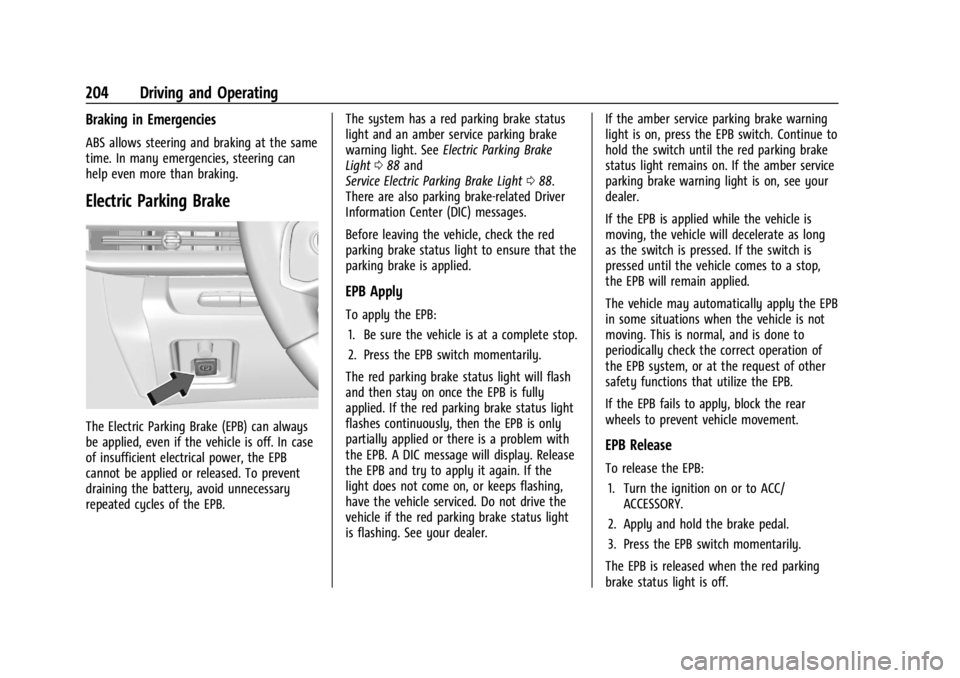
The Electric Parking Brake (EPB) can always
be applied, even if the vehicle is off. In case
of insufficient electrical power, the EPB
cannot be applied or released. To prevent
draining the battery, avoid unnecessary
repeated cycles of the EPB.The system has a red parking brake status
light and an amber service parking brake
warning light. See
Electric Parking Brake
Light 088 and
Service Electric Parking Brake Light 088.
There are also parking brake-related Driver
Information Center (DIC) messages.
Before leaving the vehicle, check the red
parking brake status light to ensure that the
parking brake is applied.
EPB Apply
To apply the EPB:
1. Be sure the vehicle is at a complete stop.
2. Press the EPB switch momentarily.
The red parking brake status light will flash
and then stay on once the EPB is fully
applied. If the red parking brake status light
flashes continuously, then the EPB is only
partially applied or there is a problem with
the EPB. A DIC message will display. Release
the EPB and try to apply it again. If the
light does not come on, or keeps flashing,
have the vehicle serviced. Do not drive the
vehicle if the red parking brake status light
is flashing. See your dealer. If the amber service parking brake warning
light is on, press the EPB switch. Continue to
hold the switch until the red parking brake
status light remains on. If the amber service
parking brake warning light is on, see your
dealer.
If the EPB is applied while the vehicle is
moving, the vehicle will decelerate as long
as the switch is pressed. If the switch is
pressed until the vehicle comes to a stop,
the EPB will remain applied.
The vehicle may automatically apply the EPB
in some situations when the vehicle is not
moving. This is normal, and is done to
periodically check the correct operation of
the EPB system, or at the request of other
safety functions that utilize the EPB.
If the EPB fails to apply, block the rear
wheels to prevent vehicle movement.
EPB Release
To release the EPB:
1. Turn the ignition on or to ACC/ ACCESSORY.
2. Apply and hold the brake pedal.
3. Press the EPB switch momentarily.
The EPB is released when the red parking
brake status light is off.
Page 206 of 339
Chevrolet Corvette Owner Manual (GMNA-Localizing-U.S./Canada/Mexico-
14622938) - 2021 - CRC - 9/22/20
Driving and Operating 205
If the amber service parking brake warning
light is on, release the EPB by pressing and
holding the EPB switch. Continue to hold the
switch until the red parking brake status
light is off. If either light stays on after
release is attempted, see your dealer.
Caution
Driving with the parking brake on can
overheat the brake system and cause
premature wear or damage to brake
system parts. Make sure that the parking
brake is fully released and the brake
warning light is off before driving.
Automatic EPB Release
The EPB will automatically release if the
vehicle is running, placed into gear, and an
attempt is made to drive away. Avoid rapid
acceleration when the EPB is applied, to
preserve parking brake lining life.
Brake Assist
Brake Assist detects rapid brake pedal
applications due to emergency braking
situations and provides additional braking to
activate the Antilock Brake System (ABS) if
the brake pedal is not pushed hard enough
to activate ABS normally. Minor noise, brakepedal pulsation, and/or pedal movement
during this time may occur. Continue to
apply the brake pedal as the driving
situation dictates. Brake Assist disengages
when the brake pedal is released.
Hill Start Assist (HSA)
{Warning
Do not rely on the HSA feature. HSA does
not replace the need to pay attention
and drive safely. You may not hear or
feel alerts or warnings provided by this
system. Failure to use proper care when
driving may result in injury, death,
or vehicle damage. See
Defensive Driving
0 177.
When the vehicle is stopped on a grade, Hill
Start Assist (HSA) prevents the vehicle from
rolling in an unintended direction during the
transition from brake pedal release to
accelerator pedal apply. The brakes release
when the accelerator pedal is applied. If the
accelerator pedal is not applied within a few
minutes, the Electric Parking Brake will
apply. The brakes may also release under
other conditions. Do not rely on HSA to hold
the vehicle. HSA is available when the vehicle is facing
uphill in a forward gear, or when facing
downhill in R (Reverse). The vehicle must
come to a complete stop on a grade for HSA
to activate.
Ride Control Systems
Traction Control/Electronic
Stability Control
The vehicle has a Traction Control
System (TCS) and a StabiliTrak/Electronic
Stability Control (ESC) system. These
systems help limit wheel spin and assist the
driver in maintaining control, especially on
slippery road conditions.
TCS activates if it senses that the rear
wheels are spinning too much or are
beginning to lose traction. When this
happens, TCS applies the brakes to the
spinning wheel and reduces engine power
(by closing the throttle and managing
engine spark) to limit wheel spin.
StabiliTrak/ESC activates when the vehicle
senses a difference between the intended
path and the direction the vehicle is actually
traveling. StabiliTrak/ESC selectively applies
Page 207 of 339
Chevrolet Corvette Owner Manual (GMNA-Localizing-U.S./Canada/Mexico-
14622938) - 2021 - CRC - 9/22/20
206 Driving and Operating
braking pressure to any one of the vehicle
wheel brakes to assist the driver in keeping
the vehicle on the intended path.
If cruise control is being used when TCS
begins to limit wheel spin, the cruise control
will automatically disengage. Cruise control
may be reengaged when road conditions
allow. SeeCruise Control 0218.
If the driver disables TCS, cruise control will
disengage. Cruise control will also be
disabled if Performance Traction
Management (PTM) is selected, or if
StabiliTrak is turned off.
Both systems come on automatically when
the vehicle is started and begins to move.
The systems may be heard or felt while
they are operating or while performing
diagnostic checks. This is normal and does
not mean there is a problem with the
vehicle.
It is recommended to leave both systems on
for normal driving conditions, but it may be
necessary to turn TCS off if the vehicle gets
stuck in sand, mud, ice, or snow. See If the
Vehicle Is Stuck 0187 and “Turning the
Systems Off and On” later in this section.
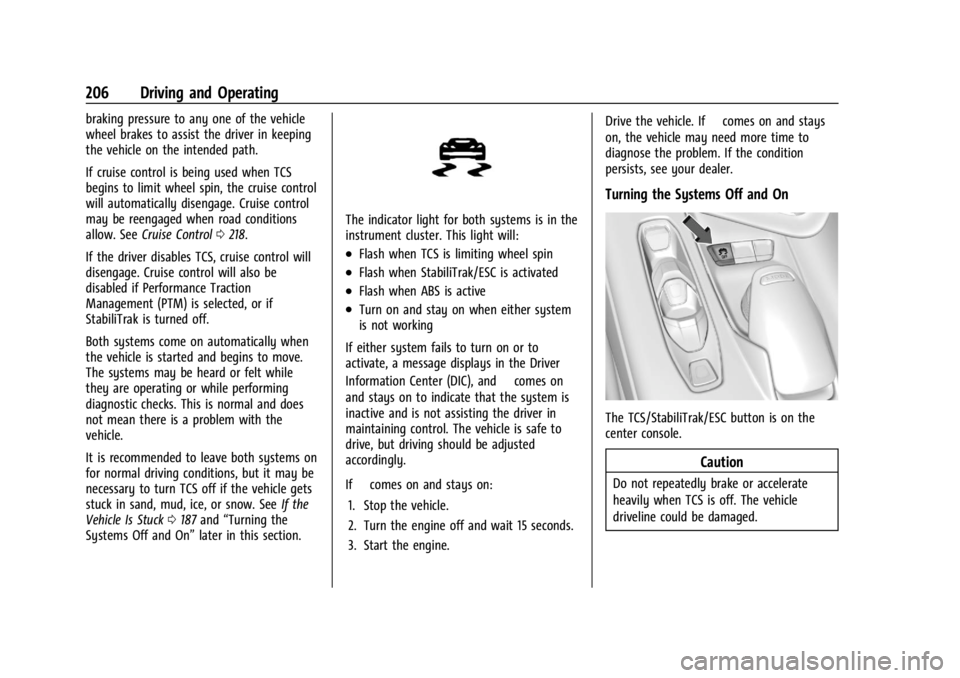
The indicator light for both systems is in the
instrument cluster. This light will:
.Flash when TCS is limiting wheel spin
.Flash when StabiliTrak/ESC is activated
.Flash when ABS is active
.Turn on and stay on when either system
is not working
If either system fails to turn on or to
activate, a message displays in the Driver
Information Center (DIC), and
=comes on
and stays on to indicate that the system is
inactive and is not assisting the driver in
maintaining control. The vehicle is safe to
drive, but driving should be adjusted
accordingly.
If
=comes on and stays on:
1. Stop the vehicle.
2. Turn the engine off and wait 15 seconds.
3. Start the engine. Drive the vehicle. If
=comes on and stays
on, the vehicle may need more time to
diagnose the problem. If the condition
persists, see your dealer.
Turning the Systems Off and On
The TCS/StabiliTrak/ESC button is on the
center console.
Caution
Do not repeatedly brake or accelerate
heavily when TCS is off. The vehicle
driveline could be damaged.
Page 252 of 339
Chevrolet Corvette Owner Manual (GMNA-Localizing-U.S./Canada/Mexico-
14622938) - 2021 - CRC - 9/22/20
Vehicle Care 251
.A fluid leak in the brake hydraulic system.
Have the brake hydraulic system fixed.
With a leak, the brakes will not
work well.
Always clean the brake fluid reservoir cap
and the area around the cap before
removing it.
Do not top off the brake fluid. Adding fluid
does not correct a leak. If fluid is added
when the linings are worn, there will be too
much fluid when new brake linings are
installed. Add or remove fluid, as necessary,
only when work is done on the brake
hydraulic system.
Caution
If too much brake fluid is added, the
brake fluid can spill and cause vehicle
damage, including damage to electrical
components and surfaces. Add brake fluid
only when work is done on the brake
hydraulic system.
When the brake fluid falls to a low level,
the brake warning light comes on. See Brake
System Warning Light 087. Brake fluid absorbs water over time which
degrades the effectiveness of the brake fluid.
Replace brake fluid at the specified intervals
to prevent increased stopping distance. See
Maintenance Schedule
0293.
What to Add
Use only GM approved DOT 4 brake fluid
from a clean, sealed container. See
Recommended Fluids and Lubricants 0301.
{Warning
The wrong or contaminated brake fluid
could result in damage to the brake
system. This could result in the loss of
braking leading to a possible injury.
Always use the proper GM approved
brake fluid.
Caution
If brake fluid is spilled on the vehicle's
painted surfaces, the paint finish can be
damaged. Immediately wash off any
painted surface.
Battery - North America
The original equipment battery is
maintenance free. Do not remove the cap
and do not add fluid.
Refer to the replacement number on the
original battery label when a new battery is
needed. For battery replacement, see your
dealer.
{Warning
WARNING: Battery posts, terminals, and
related accessories contain lead and lead
compounds, chemicals known to the
State of California to cause cancer and
birth defects or other reproductive harm.
Batteries also contain other chemicals
known to the State of California to cause
cancer. WASH HANDS AFTER HANDLING.
For more information go to
www.P65Warnings.ca.gov/
passenger-vehicle.
See California Proposition 65 Warning 0231
and the back cover.
Page 257 of 339
Chevrolet Corvette Owner Manual (GMNA-Localizing-U.S./Canada/Mexico-
14622938) - 2021 - CRC - 9/22/20
256 Vehicle Care
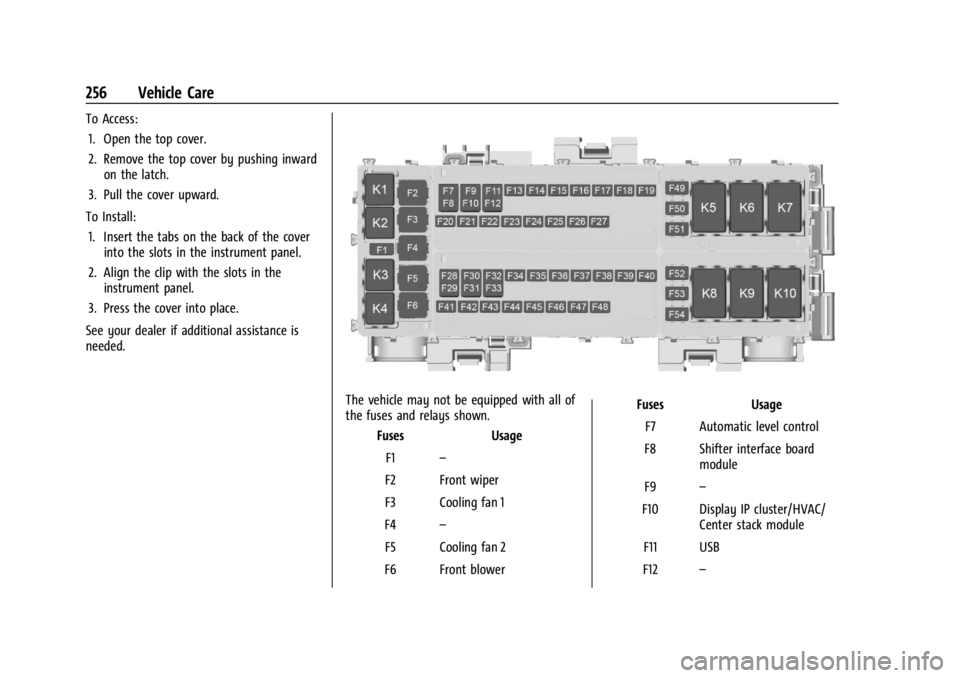
To Access:1. Open the top cover.
2. Remove the top cover by pushing inward on the latch.
3. Pull the cover upward.
To Install: 1. Insert the tabs on the back of the cover into the slots in the instrument panel.
2. Align the clip with the slots in the instrument panel.
3. Press the cover into place.
See your dealer if additional assistance is
needed.
The vehicle may not be equipped with all of
the fuses and relays shown. Fuses Usage
F1 –
F2 Front wiper
F3 Cooling fan 1
F4 –
F5 Cooling fan 2
F6 Front blower Fuses Usage
F7 Automatic level control
F8 Shifter interface board module
F9 –
F10 Display IP cluster/HVAC/ Center stack module
F11 USB
F12 –
Page 259 of 339
Chevrolet Corvette Owner Manual (GMNA-Localizing-U.S./Canada/Mexico-
14622938) - 2021 - CRC - 9/22/20
258 Vehicle Care
RelaysUsage
K6 Front trunk release relay 1 K7 –
K8 –
K9 Front trunk release relay 2
K10 Wiper relayRear Compartment Fuse Block
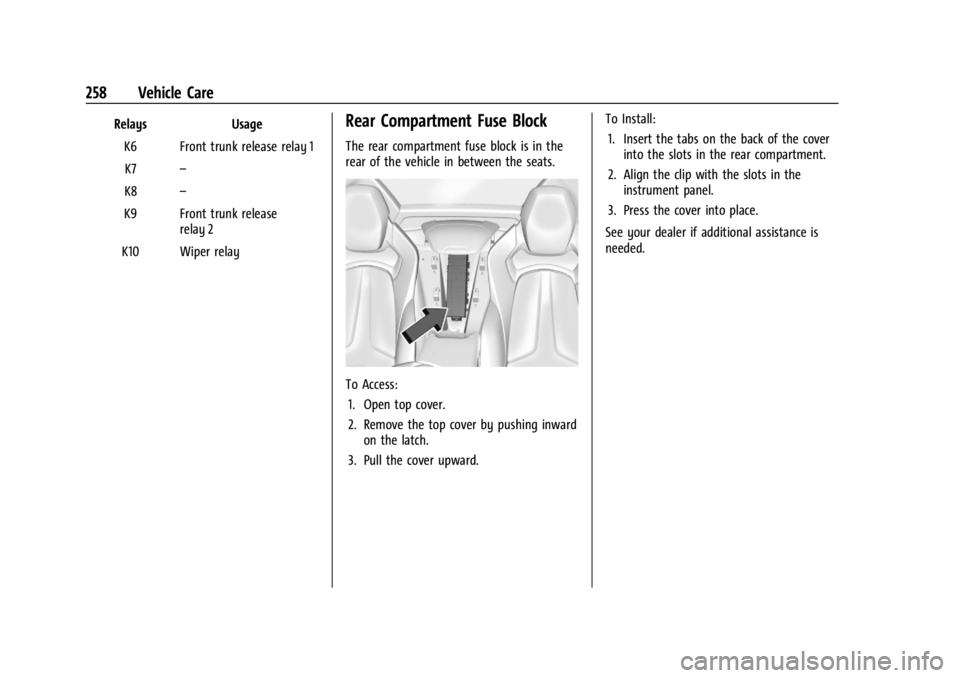
The rear compartment fuse block is in the
rear of the vehicle in between the seats.
To Access: 1. Open top cover.
2. Remove the top cover by pushing inward on the latch.
3. Pull the cover upward. To Install:
1. Insert the tabs on the back of the cover into the slots in the rear compartment.
2. Align the clip with the slots in the instrument panel.
3. Press the cover into place.
See your dealer if additional assistance is
needed.
Page 284 of 339
Chevrolet Corvette Owner Manual (GMNA-Localizing-U.S./Canada/Mexico-
14622938) - 2021 - CRC - 9/22/20
Vehicle Care 283
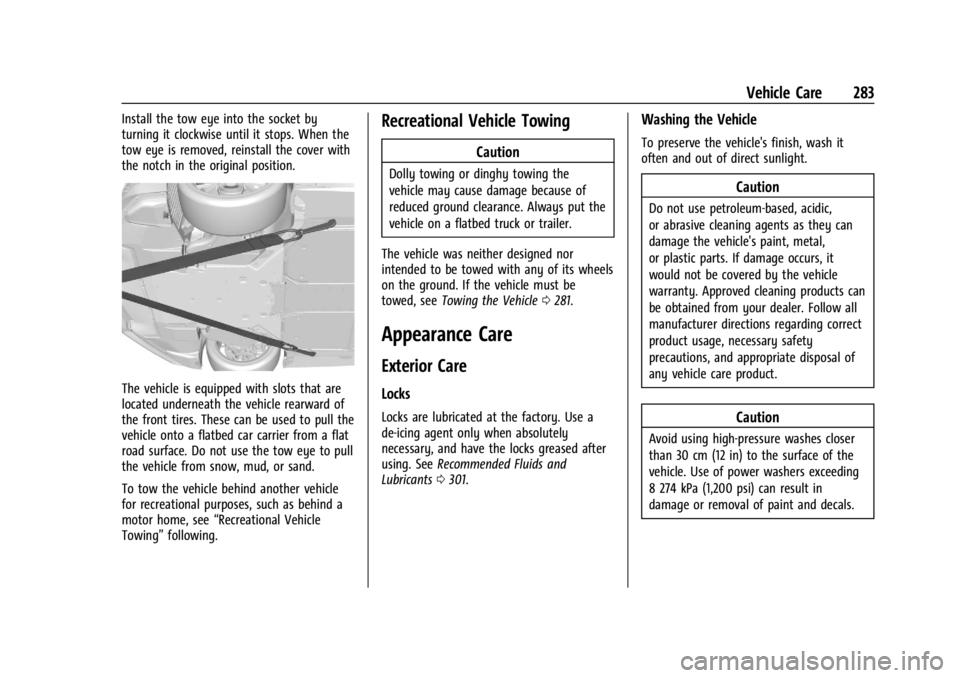
Install the tow eye into the socket by
turning it clockwise until it stops. When the
tow eye is removed, reinstall the cover with
the notch in the original position.
The vehicle is equipped with slots that are
located underneath the vehicle rearward of
the front tires. These can be used to pull the
vehicle onto a flatbed car carrier from a flat
road surface. Do not use the tow eye to pull
the vehicle from snow, mud, or sand.
To tow the vehicle behind another vehicle
for recreational purposes, such as behind a
motor home, see“Recreational Vehicle
Towing” following.
Recreational Vehicle Towing
Caution
Dolly towing or dinghy towing the
vehicle may cause damage because of
reduced ground clearance. Always put the
vehicle on a flatbed truck or trailer.
The vehicle was neither designed nor
intended to be towed with any of its wheels
on the ground. If the vehicle must be
towed, see Towing the Vehicle 0281.
Appearance Care
Exterior Care
Locks
Locks are lubricated at the factory. Use a
de-icing agent only when absolutely
necessary, and have the locks greased after
using. See Recommended Fluids and
Lubricants 0301.
Washing the Vehicle
To preserve the vehicle's finish, wash it
often and out of direct sunlight.
Caution
Do not use petroleum-based, acidic,
or abrasive cleaning agents as they can
damage the vehicle's paint, metal,
or plastic parts. If damage occurs, it
would not be covered by the vehicle
warranty. Approved cleaning products can
be obtained from your dealer. Follow all
manufacturer directions regarding correct
product usage, necessary safety
precautions, and appropriate disposal of
any vehicle care product.
Caution
Avoid using high-pressure washes closer
than 30 cm (12 in) to the surface of the
vehicle. Use of power washers exceeding
8 274 kPa (1,200 psi) can result in
damage or removal of paint and decals.
Page 329 of 339

Chevrolet Corvette Owner Manual (GMNA-Localizing-U.S./Canada/Mexico-
14622938) - 2021 - CRC - 9/22/20
328 Index
IndexA
Accessories and Modifications . . . . . . . . . . . . 231
Accessory Power . . . . . . . . . . . . . . . . . . . . . . . . . 194
Active Fuel Management . . . . . . . . . . . . . . . . 195
Add-On Electrical Equipment . . . . . . . . . . . . . 228
Additional InformationOnStar . . . . . . . . . . . . . . . . . . . . . . . . . . . . . . . . . 321
Additional Maintenance and Care . . . . . . . . 298
Adjustments Lumbar, Front Seats . . . . . . . . . . . . . . . . . . . . 40
Agreements Trademarks and License . . . . . . . . . . . . . . . 162
Air Cleaner/Filter, Engine . . . . . . . . . . . . . . . . 243
Air Conditioning . . . . . . . . . . . . . . . . . . . . . . . . . 170
Air Dam, Front . . . . . . . . . . . . . . . . . . . . . . . . . . . . 191
Air Filter Life System . . . . . . . . . . . . . . . . . . . . . . . . . . . . 242
Air Filter, Passenger Compartment . . . . . . . . 173
Air Vents . . . . . . . . . . . . . . . . . . . . . . . . . . . . . . . . . 173
Airbag System Check . . . . . . . . . . . . . . . . . . . . . . . . . . . . . . . . . . . 61
How Does an Airbag Restrain? . . . . . . . . . . 55
Passenger Sensing System . . . . . . . . . . . . . . 57
What Makes an Airbag Inflate? . . . . . . . . . 55
What Will You See after an AirbagInflates? . . . . . . . . . . . . . . . . . . . . . . . . . . . . . . 55
When Should an Airbag Inflate? . . . . . . . . 54
Where Are the Airbags? . . . . . . . . . . . . . . . . 54 Airbags
Adding Equipment to the Vehicle . . . . . . . 60
Passenger Status Indicator . . . . . . . . . . . . . . 85
Readiness Light . . . . . . . . . . . . . . . . . . . . . . . . . 84
Servicing Airbag-Equipped Vehicles . . . . . . 60
System Check . . . . . . . . . . . . . . . . . . . . . . . . . . . 52
Alarm
Vehicle Security . . . . . . . . . . . . . . . . . . . . . . . . 22
Alert Side Blind Zone (SBZA) . . . . . . . . . . . . . . . . . 224
All-Season Tires . . . . . . . . . . . . . . . . . . . . . . . . . . 261
AM-FM Radio . . . . . . . . . . . . . . . . . . . . . . . . . . . . . 116
Antenna
Diversity System . . . . . . . . . . . . . . . . . . . . . . 120
Antilock Brake System (ABS) . . . . . . . . . . . . . 203 Warning Light . . . . . . . . . . . . . . . . . . . . . . . . . . 88
Appearance Care Exterior . . . . . . . . . . . . . . . . . . . . . . . . . . . . . . . . 283
Interior . . . . . . . . . . . . . . . . . . . . . . . . . . . . . . . . 288
Apple CarPlay and Android Auto . . . . . . . . . . 151
Assistance Program, Roadside . . . . . . . . . . . . . 311
Assistance Systems for Parking and Backing . . . . . . . . . . . . . . . . . . . . . . . . . . . . . . . . . 221
Audio Bluetooth . . . . . . . . . . . . . . . . . . . . . . . . . . . . . . 123
Automatic Dimming Mirrors . . . . . . . . . . . . . . . . . . . . . . . 26
Door Locks . . . . . . . . . . . . . . . . . . . . . . . . . . . . . . 16
Page 334 of 339

Chevrolet Corvette Owner Manual (GMNA-Localizing-U.S./Canada/Mexico-
14622938) - 2021 - CRC - 9/22/20
Index 333
Lighting (cont'd)Illumination Control . . . . . . . . . . . . . . . . . . . 108
LED . . . . . . . . . . . . . . . . . . . . . . . . . . . . . . . . . . . . 254
Lights Airbag Readiness . . . . . . . . . . . . . . . . . . . . . . . 84
Antilock Brake System (ABS)Warning . . . . . . . . . . . . . . . . . . . . . . . . . . . . . . 88
Brake System Warning . . . . . . . . . . . . . . . . . 87
Charging System . . . . . . . . . . . . . . . . . . . . . . . 85
Check Engine (Malfunction Indicator) . . . . . . . . . . . . . . . . . . . . . . . . . . . . . 86
Cruise Control . . . . . . . . . . . . . . . . . . . . . . . . . . 91
Door Ajar . . . . . . . . . . . . . . . . . . . . . . . . . . . . . . . 91
Electric Parking Brake . . . . . . . . . . . . . . . . . . . 88
Electronic Stability Control (ESC), Off . . . . . . . . . . . . . . . . . . . . . . . . . . . . . 90
Engine Oil Pressure . . . . . . . . . . . . . . . . . . . . . 90
Flash-to-Pass . . . . . . . . . . . . . . . . . . . . . . . . . . . 106
Front Lift System . . . . . . . . . . . . . . . . . . . . . . . 87
High-Beam On . . . . . . . . . . . . . . . . . . . . . . . . . . 91
High/Low Beam Changer . . . . . . . . . . . . . . 105
Seat Belt Reminders . . . . . . . . . . . . . . . . . . . . 84
Security . . . . . . . . . . . . . . . . . . . . . . . . . . . . . . . . . 91
Service Electric Parking Brake . . . . . . . . . . . 88
Tire Pressure . . . . . . . . . . . . . . . . . . . . . . . . . . . . 90
Traction Off . . . . . . . . . . . . . . . . . . . . . . . . . . . . . 89
Limited-Slip Differential . . . . . . . . . . . . . . . . . . . 217 Locks
Automatic Door . . . . . . . . . . . . . . . . . . . . . . . . . 16
Delayed Locking . . . . . . . . . . . . . . . . . . . . . . . . 16
Door . . . . . . . . . . . . . . . . . . . . . . . . . . . . . . . . . . . . 14
Lockout Protection . . . . . . . . . . . . . . . . . . . . . . . 17
Loss of Control . . . . . . . . . . . . . . . . . . . . . . . . . . 179
Low-Profile Tires . . . . . . . . . . . . . . . . . . . . . . . . . 263
Lower Anchors and Tethers for Children (LATCH System) . . . . . . . . . . . . . . . . 66
Lumbar Adjustment . . . . . . . . . . . . . . . . . . . . . . . 40 Front Seats . . . . . . . . . . . . . . . . . . . . . . . . . . . . . 40
M
Maintenance
Records . . . . . . . . . . . . . . . . . . . . . . . . . . . . . . . . 303
Maintenance and Care Additional . . . . . . . . . . . . . . . . . . . . . . . . . . . . . 298
Maintenance Schedule . . . . . . . . . . . . . . . . . . . 293 Recommended Fluids andLubricants . . . . . . . . . . . . . . . . . . . . . . . . . . . . 301
Malfunction Indicator Lamp . . . . . . . . . . . . . . . 86
Manual Mode . . . . . . . . . . . . . . . . . . . . . . . . . . . 200
Map Data Updates . . . . . . . . . . . . . . . . . . . . . . . 136
Maps . . . . . . . . . . . . . . . . . . . . . . . . . . . . . . . . . . . . .128
Media Avoiding Untrusted Devices . . . . . . . . . . . . 120
Memory Seats . . . . . . . . . . . . . . . . . . . . . . . . . . . . .41 Messages
Engine Power . . . . . . . . . . . . . . . . . . . . . . . . . . . 97
Vehicle . . . . . . . . . . . . . . . . . . . . . . . . . . . . . . . . . 97
Vehicle Speed . . . . . . . . . . . . . . . . . . . . . . . . . . . 97
Mirror Rear Camera . . . . . . . . . . . . . . . . . . . . . . . . . . . . 27
Mirrors
Automatic Dimming . . . . . . . . . . . . . . . . . . . . 26
Automatic Dimming Rearview . . . . . . . . . . 26
Convex . . . . . . . . . . . . . . . . . . . . . . . . . . . . . . . . . 24
Folding . . . . . . . . . . . . . . . . . . . . . . . . . . . . . . . . . 25
Heated . . . . . . . . . . . . . . . . . . . . . . . . . . . . . . . . . 26
Manual Rearview . . . . . . . . . . . . . . . . . . . . . . . 26
Power . . . . . . . . . . . . . . . . . . . . . . . . . . . . . . . . . . 25
Tilt in Reverse . . . . . . . . . . . . . . . . . . . . . . . . . . 26
Mirrors, Interior Rearview . . . . . . . . . . . . . . . . . 26
Mode . . . . . . . . . . . . . . . . . . . . . . . . . . . . . . . . . . . . 207
Driver Control . . . . . . . . . . . . . . . . . . . . . . . . . 207
Monitor System, Tire Pressure . . . . . . . . . . . 269
N
Navigation Connected Services . . . . . . . . . . . . . . . . . . . . 325
Destination . . . . . . . . . . . . . . . . . . . . . . . . . . . . 129
Using the System . . . . . . . . . . . . . . . . . . . . . . 125
Navigation Symbols . . . . . . . . . . . . . . . . . . . . . .128
Net, Convenience . . . . . . . . . . . . . . . . . . . . . . . . . .72
New Vehicle Break-In . . . . . . . . . . . . . . . . . . . . 190