center console CHEVROLET CORVETTE C8 2021 User Guide
[x] Cancel search | Manufacturer: CHEVROLET, Model Year: 2021, Model line: CORVETTE C8, Model: CHEVROLET CORVETTE C8 2021Pages: 339, PDF Size: 6.44 MB
Page 201 of 339
Chevrolet Corvette Owner Manual (GMNA-Localizing-U.S./Canada/Mexico-
14622938) - 2021 - CRC - 9/22/20
200 Driving and Operating
Manual Mode
Manual Paddle Shift
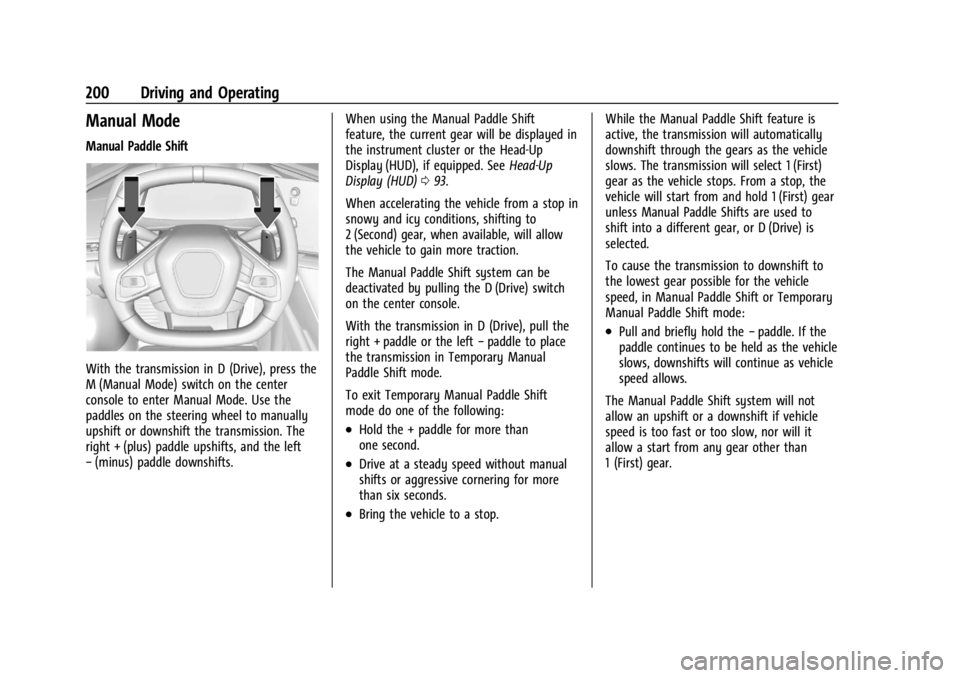
With the transmission in D (Drive), press the
M (Manual Mode) switch on the center
console to enter Manual Mode. Use the
paddles on the steering wheel to manually
upshift or downshift the transmission. The
right + (plus) paddle upshifts, and the left
−(minus) paddle downshifts. When using the Manual Paddle Shift
feature, the current gear will be displayed in
the instrument cluster or the Head-Up
Display (HUD), if equipped. See
Head-Up
Display (HUD) 093.
When accelerating the vehicle from a stop in
snowy and icy conditions, shifting to
2 (Second) gear, when available, will allow
the vehicle to gain more traction.
The Manual Paddle Shift system can be
deactivated by pulling the D (Drive) switch
on the center console.
With the transmission in D (Drive), pull the
right + paddle or the left −paddle to place
the transmission in Temporary Manual
Paddle Shift mode.
To exit Temporary Manual Paddle Shift
mode do one of the following:
.Hold the + paddle for more than
one second.
.Drive at a steady speed without manual
shifts or aggressive cornering for more
than six seconds.
.Bring the vehicle to a stop. While the Manual Paddle Shift feature is
active, the transmission will automatically
downshift through the gears as the vehicle
slows. The transmission will select 1 (First)
gear as the vehicle stops. From a stop, the
vehicle will start from and hold 1 (First) gear
unless Manual Paddle Shifts are used to
shift into a different gear, or D (Drive) is
selected.
To cause the transmission to downshift to
the lowest gear possible for the vehicle
speed, in Manual Paddle Shift or Temporary
Manual Paddle Shift mode:
.Pull and briefly hold the
−paddle. If the
paddle continues to be held as the vehicle
slows, downshifts will continue as vehicle
speed allows.
The Manual Paddle Shift system will not
allow an upshift or a downshift if vehicle
speed is too fast or too slow, nor will it
allow a start from any gear other than
1 (First) gear.
Page 203 of 339
Chevrolet Corvette Owner Manual (GMNA-Localizing-U.S./Canada/Mexico-
14622938) - 2021 - CRC - 9/22/20
202 Driving and Operating
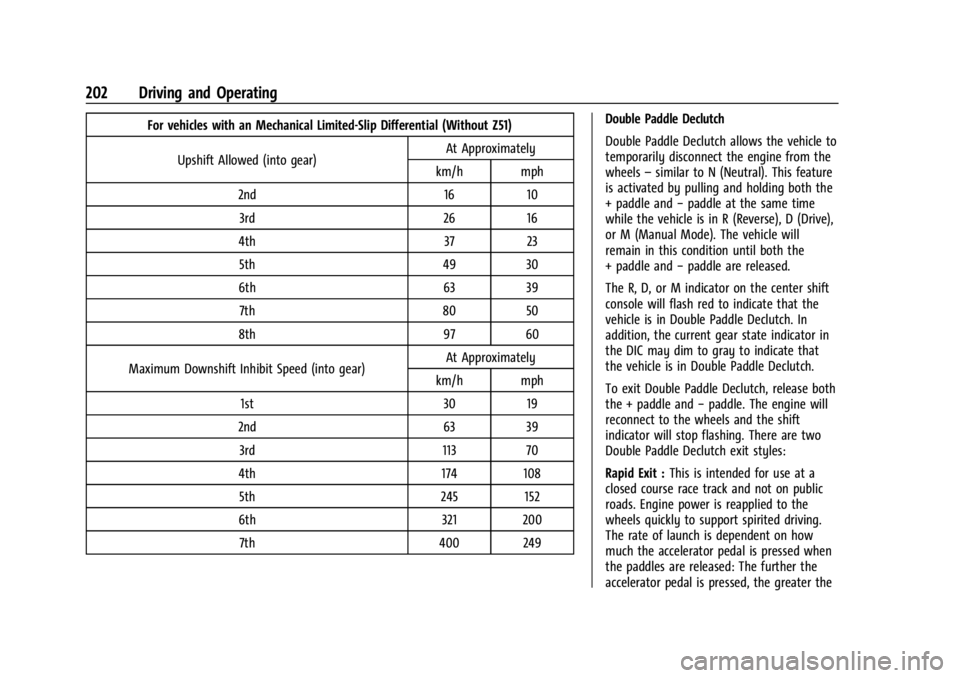
For vehicles with an Mechanical Limited-Slip Differential (Without Z51)Upshift Allowed (into gear) At Approximately
km/h mph
2nd 16 10 3rd 26 16
4th 37 23 5th 49 30
6th 63 39 7th 80 50
8th 97 60
Maximum Downshift Inhibit Speed (into gear) At Approximately
km/h mph
1st 30 19
2nd 63 39 3rd 113 70
4th 174 108 5th 245 152
6th 321 200 7th 400 249 Double Paddle Declutch
Double Paddle Declutch allows the vehicle to
temporarily disconnect the engine from the
wheels
–similar to N (Neutral). This feature
is activated by pulling and holding both the
+ paddle and −paddle at the same time
while the vehicle is in R (Reverse), D (Drive),
or M (Manual Mode). The vehicle will
remain in this condition until both the
+ paddle and −paddle are released.
The R, D, or M indicator on the center shift
console will flash red to indicate that the
vehicle is in Double Paddle Declutch. In
addition, the current gear state indicator in
the DIC may dim to gray to indicate that
the vehicle is in Double Paddle Declutch.
To exit Double Paddle Declutch, release both
the + paddle and −paddle. The engine will
reconnect to the wheels and the shift
indicator will stop flashing. There are two
Double Paddle Declutch exit styles:
Rapid Exit : This is intended for use at a
closed course race track and not on public
roads. Engine power is reapplied to the
wheels quickly to support spirited driving.
The rate of launch is dependent on how
much the accelerator pedal is pressed when
the paddles are released: The further the
accelerator pedal is pressed, the greater the
Page 207 of 339
Chevrolet Corvette Owner Manual (GMNA-Localizing-U.S./Canada/Mexico-
14622938) - 2021 - CRC - 9/22/20
206 Driving and Operating
braking pressure to any one of the vehicle
wheel brakes to assist the driver in keeping
the vehicle on the intended path.
If cruise control is being used when TCS
begins to limit wheel spin, the cruise control
will automatically disengage. Cruise control
may be reengaged when road conditions
allow. SeeCruise Control 0218.
If the driver disables TCS, cruise control will
disengage. Cruise control will also be
disabled if Performance Traction
Management (PTM) is selected, or if
StabiliTrak is turned off.
Both systems come on automatically when
the vehicle is started and begins to move.
The systems may be heard or felt while
they are operating or while performing
diagnostic checks. This is normal and does
not mean there is a problem with the
vehicle.
It is recommended to leave both systems on
for normal driving conditions, but it may be
necessary to turn TCS off if the vehicle gets
stuck in sand, mud, ice, or snow. See If the
Vehicle Is Stuck 0187 and “Turning the
Systems Off and On” later in this section.
The indicator light for both systems is in the
instrument cluster. This light will:
.Flash when TCS is limiting wheel spin
.Flash when StabiliTrak/ESC is activated
.Flash when ABS is active
.Turn on and stay on when either system
is not working
If either system fails to turn on or to
activate, a message displays in the Driver
Information Center (DIC), and
=comes on
and stays on to indicate that the system is
inactive and is not assisting the driver in
maintaining control. The vehicle is safe to
drive, but driving should be adjusted
accordingly.
If
=comes on and stays on:
1. Stop the vehicle.
2. Turn the engine off and wait 15 seconds.
3. Start the engine. Drive the vehicle. If
=comes on and stays
on, the vehicle may need more time to
diagnose the problem. If the condition
persists, see your dealer.
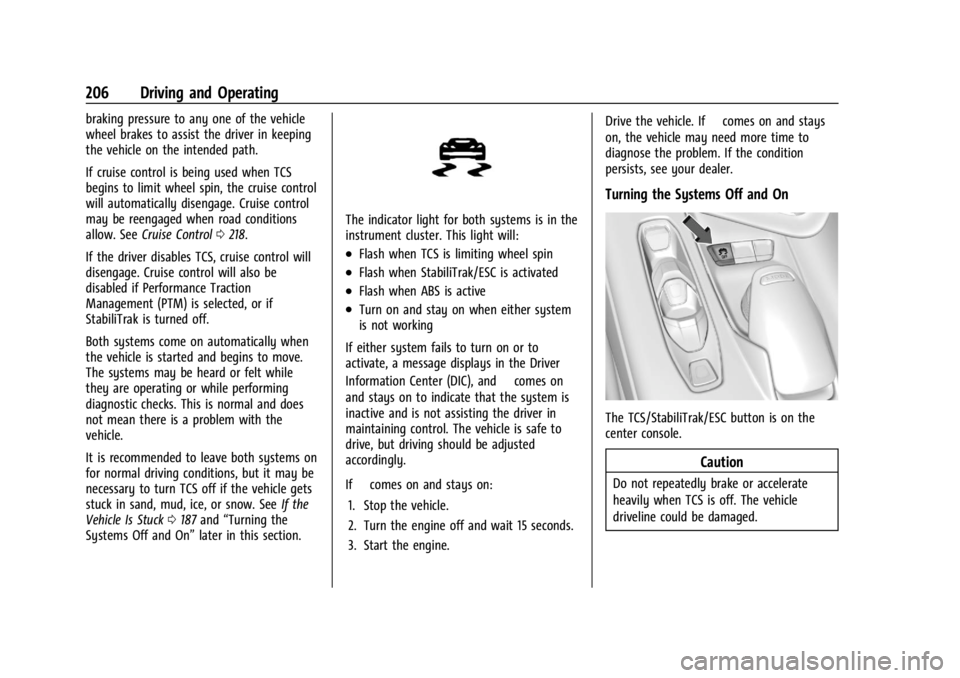
Turning the Systems Off and On
The TCS/StabiliTrak/ESC button is on the
center console.
Caution
Do not repeatedly brake or accelerate
heavily when TCS is off. The vehicle
driveline could be damaged.
Page 208 of 339
Chevrolet Corvette Owner Manual (GMNA-Localizing-U.S./Canada/Mexico-
14622938) - 2021 - CRC - 9/22/20
Driving and Operating 207
To turn off only TCS, press and release@.
The Traction Off light
iilluminates in the
instrument cluster. To turn TCS on again,
press and release
@. The Traction Off light
idisplayed in the instrument cluster will
turn off.
If TCS is limiting wheel spin when
@is
pressed, the system will not turn off until
the wheels stop spinning.
To turn off both TCS and StabiliTrak/ESC,
press and hold
@until the Traction Off light
iand StabiliTrak/ESC OFF light@illuminate and stay on in the instrument
cluster.
To turn TCS and StabiliTrak/ESC on again,
press and release
@. The Traction Off light
iand StabiliTrak/ESC OFF light@in the
instrument cluster turn off.
If the Tire Pressure Monitor System (TPMS)
system is malfunctioning and the DIC
displays SERVICE TIRE MONITOR SYSTEM,
StabiliTrak/ESC will be affected as follows:
.StabiliTrak/ESC cannot be turned off by
the driver.
.If StabiliTrak/ESC is off, it will be turned
on automatically.
.Competitive Driving Mode or Performance
Traction Management is unavailable.
.StabiliTrak/ESC will feel different in aiding
and maintaining directional control.
Adding accessories can affect the vehicle
performance. See Accessories and
Modifications 0231.
Hill Rollback Control
If the vehicle is in gear and inadvertently
rolls backwards, Hill Rollback Control helps
limit the rollback to a very low speed.
A noise may be heard while the vehicle
speed is actively being controlled. A Driver
Information Center (DIC) message displays
when active.
Driver Mode Control
Driver Mode Control (DMC) allows the driver
to adjust the overall driving experience to
better suit preference by selecting different
modes.
Drive mode availability and affected driver
systems are dependent upon vehicle trim
level, region, and optional features. Driver
modes may include: Weather, Tour, Sport,
and Track, along with two customizable
modes: My Mode and Z-Mode. If the vehicle is in Tour or My Mode it will
stay in that mode through future ignition
cycles. If the vehicle is in any other mode, it
will return to Tour when the vehicle is
restarted. When each mode is selected, an
indicator will come on in the instrument
cluster and stay on.
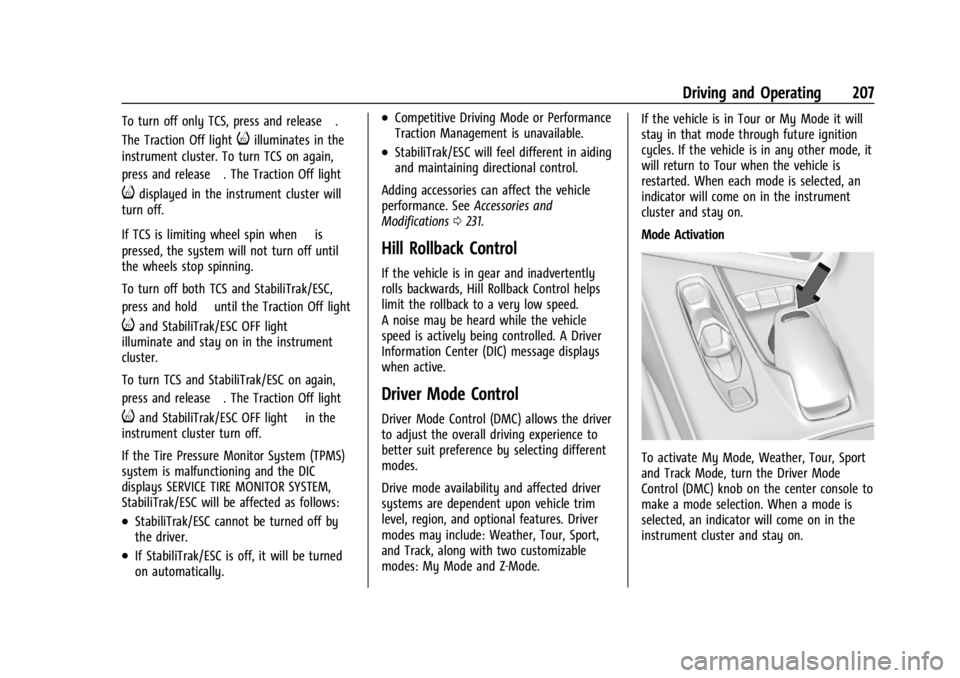
Mode Activation
To activate My Mode, Weather, Tour, Sport
and Track Mode, turn the Driver Mode
Control (DMC) knob on the center console to
make a mode selection. When a mode is
selected, an indicator will come on in the
instrument cluster and stay on.
Page 215 of 339
Chevrolet Corvette Owner Manual (GMNA-Localizing-U.S./Canada/Mexico-
14622938) - 2021 - CRC - 9/22/20
214 Driving and Operating
three seconds (height and time will vary by
vehicle). The Front Lift System will allow
you to lift the front of the vehicle to enter a
driveway, driving over curbs, speed bumps
or onto ramps or a trailer.
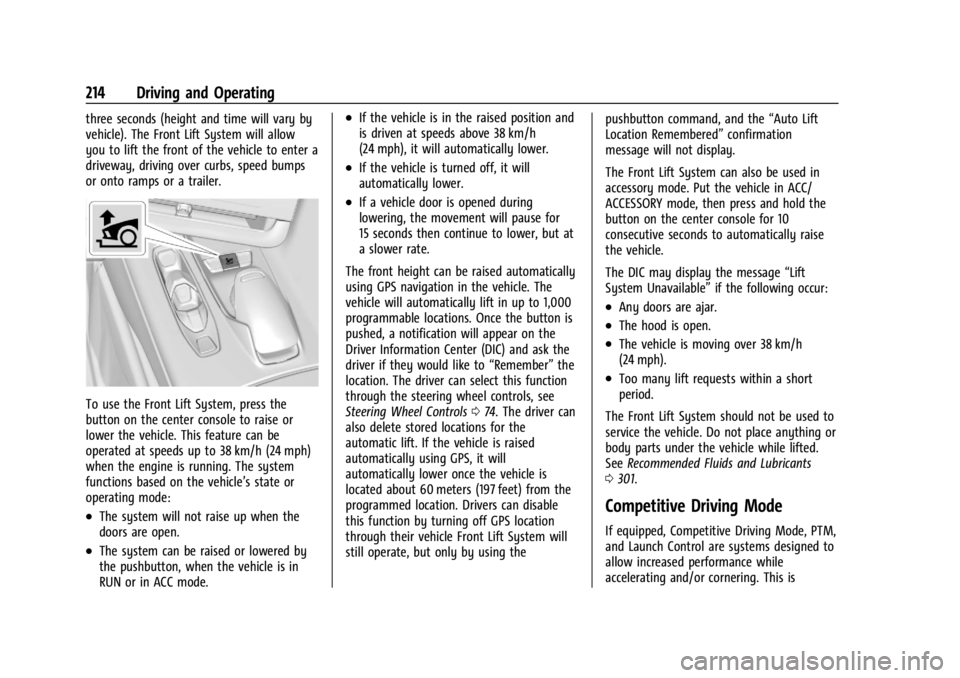
To use the Front Lift System, press the
button on the center console to raise or
lower the vehicle. This feature can be
operated at speeds up to 38 km/h (24 mph)
when the engine is running. The system
functions based on the vehicle’s state or
operating mode:
.The system will not raise up when the
doors are open.
.The system can be raised or lowered by
the pushbutton, when the vehicle is in
RUN or in ACC mode.
.If the vehicle is in the raised position and
is driven at speeds above 38 km/h
(24 mph), it will automatically lower.
.If the vehicle is turned off, it will
automatically lower.
.If a vehicle door is opened during
lowering, the movement will pause for
15 seconds then continue to lower, but at
a slower rate.
The front height can be raised automatically
using GPS navigation in the vehicle. The
vehicle will automatically lift in up to 1,000
programmable locations. Once the button is
pushed, a notification will appear on the
Driver Information Center (DIC) and ask the
driver if they would like to “Remember”the
location. The driver can select this function
through the steering wheel controls, see
Steering Wheel Controls 074. The driver can
also delete stored locations for the
automatic lift. If the vehicle is raised
automatically using GPS, it will
automatically lower once the vehicle is
located about 60 meters (197 feet) from the
programmed location. Drivers can disable
this function by turning off GPS location
through their vehicle Front Lift System will
still operate, but only by using the pushbutton command, and the
“Auto Lift
Location Remembered” confirmation
message will not display.
The Front Lift System can also be used in
accessory mode. Put the vehicle in ACC/
ACCESSORY mode, then press and hold the
button on the center console for 10
consecutive seconds to automatically raise
the vehicle.
The DIC may display the message “Lift
System Unavailable” if the following occur:
.Any doors are ajar.
.The hood is open.
.The vehicle is moving over 38 km/h
(24 mph).
.Too many lift requests within a short
period.
The Front Lift System should not be used to
service the vehicle. Do not place anything or
body parts under the vehicle while lifted.
See Recommended Fluids and Lubricants
0 301.
Competitive Driving Mode
If equipped, Competitive Driving Mode, PTM,
and Launch Control are systems designed to
allow increased performance while
accelerating and/or cornering. This is
Page 216 of 339
Chevrolet Corvette Owner Manual (GMNA-Localizing-U.S./Canada/Mexico-
14622938) - 2021 - CRC - 9/22/20
Driving and Operating 215
accomplished by regulating and optimizing
the engine, brakes, and suspension
performance. These modes are for use at a
closed course race track and are not
intended for use on public roads. They will
not compensate for driver inexperience or
lack of familiarity with the race track.
Drivers who prefer to allow the system to
have more control of the engine, brakes,
and suspension are advised to turn the
normal traction control and StabiliTrak/ESC
systems on.
Competitive Driving Mode
Competitive Driving Mode allows full engine
power while StabiliTrak/ESC helps maintain
directional control of the vehicle by selective
brake application. In this mode, the TCS is
off and Launch Control is available.
Adjust your driving style to account for the
available engine power. See“Launch
Control” later in this section.
These lights are on when the vehicle is in
the Competitive Driving Mode.
In order to select this optional handling
mode, the vehicle mode must be Sport or
Track (if equipped with Performance Traction
Management (PTM), then Competitive
Driving Mode is only available in Sport).
Then quickly press
@on the center console
two times. ESC COMPETITIVE MODE displays
in the Driver Information Center (DIC).
When
@is pressed again, the traction off
light
iand StabiliTrak/ESC OFF light@will
go out.
Performance Traction Management
(PTM) (if equipped)
PTM integrates the TCS, StabiliTrak/ESC, and
Magnetic Ride Control systems to provide
improved and consistent performance when
cornering. The amount of available engine power is based on the mode selected, track
conditions, driver skill, and the radius of
each corner.
This light is on when the vehicle is in the
PTM Mode. To select this optional handling
mode, the vehicle mode must be in Track.
Then quickly press
@on the center console
two times. Performance Traction Wet —ESC
On displays in the DIC.
To experience the performance benefit of
this system, after entering a curve and at
the point where normal acceleration occurs,
fully press the accelerator pedal. The PTM
system will modify the level of engine
power for a smooth and consistent
corner exit.
The PTM system contains five modes. These
modes are selected by turning the MODE
switch on the center console. Scroll through
modes 1–5 by turning the mode control dial.
Page 223 of 339
Chevrolet Corvette Owner Manual (GMNA-Localizing-U.S./Canada/Mexico-
14622938) - 2021 - CRC - 9/22/20
222 Driving and Operating
1. View displayed by the camera.
2. Corner of the rear bumper.
Displayed images may be farther or closer
than they appear. The area displayed is
limited and objects that are close to either
corner of the bumper or under the bumper
do not display.Curb View Camera
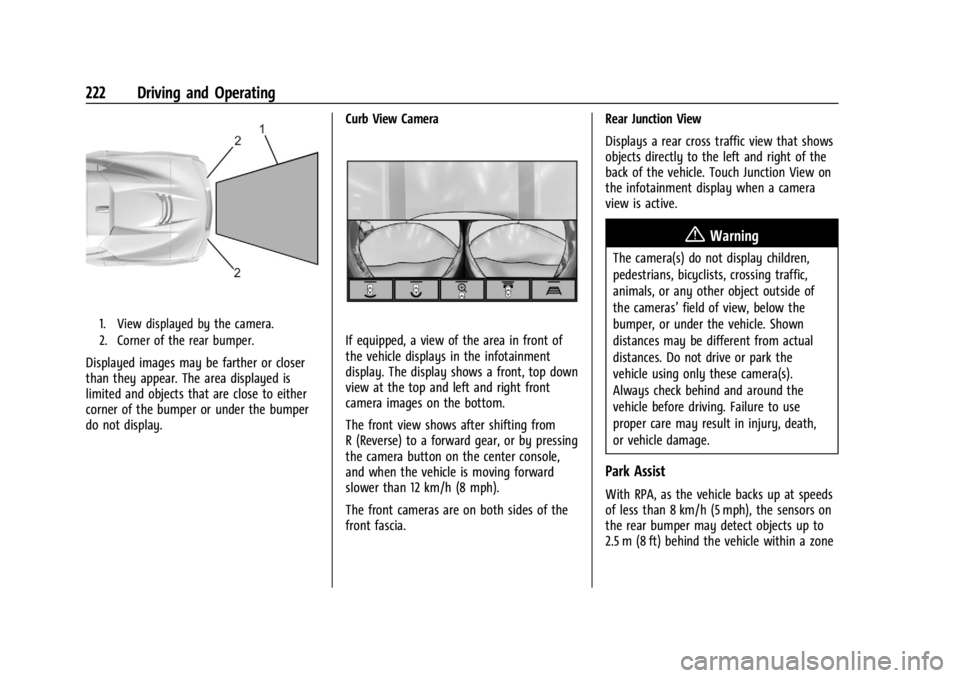
If equipped, a view of the area in front of
the vehicle displays in the infotainment
display. The display shows a front, top down
view at the top and left and right front
camera images on the bottom.
The front view shows after shifting from
R (Reverse) to a forward gear, or by pressing
the camera button on the center console,
and when the vehicle is moving forward
slower than 12 km/h (8 mph).
The front cameras are on both sides of the
front fascia.Rear Junction View
Displays a rear cross traffic view that shows
objects directly to the left and right of the
back of the vehicle. Touch Junction View on
the infotainment display when a camera
view is active.
{Warning
The camera(s) do not display children,
pedestrians, bicyclists, crossing traffic,
animals, or any other object outside of
the cameras’
field of view, below the
bumper, or under the vehicle. Shown
distances may be different from actual
distances. Do not drive or park the
vehicle using only these camera(s).
Always check behind and around the
vehicle before driving. Failure to use
proper care may result in injury, death,
or vehicle damage.
Park Assist
With RPA, as the vehicle backs up at speeds
of less than 8 km/h (5 mph), the sensors on
the rear bumper may detect objects up to
2.5 m (8 ft) behind the vehicle within a zone
Page 330 of 339

Chevrolet Corvette Owner Manual (GMNA-Localizing-U.S./Canada/Mexico-
14622938) - 2021 - CRC - 9/22/20
Index 329
Automatic (cont'd)Headlamp System . . . . . . . . . . . . . . . . . . . . . 106
Auxiliary Jack . . . . . . . . . . . . . . . . . . . . . . . . . . . . . 123
Avoiding Untrusted Media Devices . . . . . . . 120
B
Battery Exterior Lighting Battery Saver . . . . . . . . 109
Power Protection . . . . . . . . . . . . . . . . . . . . . . 109
Battery - North America . . . . . . . . . . . . . 251, 278
Blade Replacement, Wiper . . . . . . . . . . . . . . . 252
Bluetooth Overview . . . . . . . . . . . . . . . . . . . . . . . . . . . . . . 147
Bluetooth Audio . . . . . . . . . . . . . . . . . . . . . . . . . . 123
Brake Electric Boost . . . . . . . . . . . . . . . . . . . . . . . . . . 203
Parking, Electric . . . . . . . . . . . . . . . . . . . . . . . . 204
System Warning Light . . . . . . . . . . . . . . . . . . 87
Brakes . . . . . . . . . . . . . . . . . . . . . . . . . . . . . . . . . . . 249 Antilock . . . . . . . . . . . . . . . . . . . . . . . . . . . . . . . . 203
Assist . . . . . . . . . . . . . . . . . . . . . . . . . . . . . . . . . . 205
Fluid . . . . . . . . . . . . . . . . . . . . . . . . . . . . . . . . . . . 250
Braking . . . . . . . . . . . . . . . . . . . . . . . . . . . . . . . . . . . 177
Break-In, New Vehicle . . . . . . . . . . . . . . . . . . . . 190
Buckle To Drive . . . . . . . . . . . . . . . . . . . . . . . . . . . 46
Bulb Replacement Headlamp Aiming . . . . . . . . . . . . . . . . . . . . . . 254
Buying New Tires . . . . . . . . . . . . . . . . . . . . . . . . 274
C
Calibration . . . . . . . . . . . . . . . . . . . . . . . . . . . . . . . . .75
California Perchlorate Materials Requirements . . . 231
California Proposition
65 Warning . . . . . . . . . . . . . . . . . . . .231, 251, 278, Back Cover
Canadian Vehicle Owners . . . . . . . . . . . . . . . . . . . 1
Capacities and Specifications . . . . . . . . . . . . . 305
Carbon Monoxide Engine Exhaust . . . . . . . . . . . . . . . . . . . . . . . . 196
Hatch . . . . . . . . . . . . . . . . . . . . . . . . . . . . . . . . . . . 19
Winter Driving . . . . . . . . . . . . . . . . . . . . . . . . . 186
Cargo
Tie-Downs . . . . . . . . . . . . . . . . . . . . . . . . . . . . . . 72
Caution, Danger, and Warning . . . . . . . . . . . . . .2
Center Console Storage . . . . . . . . . . . . . . . . . . . .72
Chains, Tire . . . . . . . . . . . . . . . . . . . . . . . . . . . . . . 278
Charging Wireless . . . . . . . . . . . . . . . . . . . . . . . . . . . . . . . . 77
Charging System Light . . . . . . . . . . . . . . . . . . . . 85
Check Engine Light (Malfunction Indicator) . . . . 86
Child Restraints
Infants and Young Children . . . . . . . . . . . . . 62
Lower Anchors and Tethers forChildren . . . . . . . . . . . . . . . . . . . . . . . . . . . . . . . 66
Older Children . . . . . . . . . . . . . . . . . . . . . . . . . . 61 Child Restraints (cont'd)
Securing . . . . . . . . . . . . . . . . . . . . . . . . . . . . . . . . 66
Systems . . . . . . . . . . . . . . . . . . . . . . . . . . . . . . . . 64
Circuit Breakers . . . . . . . . . . . . . . . . . . . . . . . . . . 255
Cleaning Exterior Care . . . . . . . . . . . . . . . . . . . . . . . . . . . 283
Interior Care . . . . . . . . . . . . . . . . . . . . . . . . . . . 288
Climate Control Systems Dual Automatic . . . . . . . . . . . . . . . . . . . . . . . . 170
Clock . . . . . . . . . . . . . . . . . . . . . . . . . . . . . . . . . . . . . .75
Cluster, Instrument . . . . . . . . . . . . . . . . . . . . . . . 79
Collision Damage Repair . . . . . . . . . . . . . . . . . .314
Compartment Underhood . . . . . . . . . . . . . . . . . . . . . . . . . . . . 234
Compartments Storage . . . . . . . . . . . . . . . . . . . . . . . . . . . . . . . . . 70
Compass . . . . . . . . . . . . . . . . . . . . . . . . . . . . . . . . . . .75
Competitive Driving Mode . . . . . . . . . . . . . . . .214
Composite Materials . . . . . . . . . . . . . . . . . . . . . . 191
Connected Services Connections . . . . . . . . . . . . . . . . . . . . . . . . . . . 326
Diagnostics . . . . . . . . . . . . . . . . . . . . . . . . . . . . 327
Navigation . . . . . . . . . . . . . . . . . . . . . . . . . . . . . 325
Connections Connected Services . . . . . . . . . . . . . . . . . . . . 326
Control
Hill Rollback . . . . . . . . . . . . . . . . . . . . . . . . . . . 207
Traction and Electronic Stability . . . . . . . 205
Page 337 of 339

Chevrolet Corvette Owner Manual (GMNA-Localizing-U.S./Canada/Mexico-
14622938) - 2021 - CRC - 9/22/20
336 Index
Servicing System . . . . . . . . . . . . . . . . . . . . . . . . 136
Servicing the Airbag . . . . . . . . . . . . . . . . . . . . . . 60
Settings . . . . . . . . . . . . . . . . . . . . . . . . . . . . . . . . . . . 153
ShiftingInto Park . . . . . . . . . . . . . . . . . . . . . . . . . . . . . . 194
Out of Park . . . . . . . . . . . . . . . . . . . . . . . . . . . . 195
Side Blind Zone Alert (SBZA) . . . . . . . . . . . . . 224
Signals, Turn and Lane-Change . . . . . . . . . . . 107
Software Updates . . . . . . . . . . . . . . . . . . . . . . . . . 116
Special Application Services . . . . . . . . . . . . . . 298
Specifications and Capacities . . . . . . . . . . . . . 305
Speedometer . . . . . . . . . . . . . . . . . . . . . . . . . . . . . 82
Start Assist, Hill . . . . . . . . . . . . . . . . . . . . . . . . . . 205
Start Vehicle, Remote . . . . . . . . . . . . . . . . . . . . . . 12
Starting the Engine . . . . . . . . . . . . . . . . . . . . . . 193
Steering . . . . . . . . . . . . . . . . . . . . . . . . . . . . . . . . . . 177
Heated Wheel . . . . . . . . . . . . . . . . . . . . . . . . . . 74
Wheel Adjustment . . . . . . . . . . . . . . . . . . . . . . 74
Wheel Controls . . . . . . . . . . . . . . . . . . . . . . . . . 74
Steering Wheel Controls . . . . . . . . . . . . . . . . . . 113
Storage Rear . . . . . . . . . . . . . . . . . . . . . . . . . . . . . . . . . . . . . 71
Storage Areas Center Console . . . . . . . . . . . . . . . . . . . . . . . . . 72
Convenience Net . . . . . . . . . . . . . . . . . . . . . . . . 72
Front . . . . . . . . . . . . . . . . . . . . . . . . . . . . . . . . . . . . 71
Glove Box . . . . . . . . . . . . . . . . . . . . . . . . . . . . . . 70
Storage Compartments . . . . . . . . . . . . . . . . . . . 70 Struts
Gas . . . . . . . . . . . . . . . . . . . . . . . . . . . . . . . . . . . . 253
Stuck Vehicle . . . . . . . . . . . . . . . . . . . . . . . . . . . . .187
Summer Tires . . . . . . . . . . . . . . . . . . . . . . . . . . . . 263
Sun Visors . . . . . . . . . . . . . . . . . . . . . . . . . . . . . . . . . 31
Symbols . . . . . . . . . . . . . . . . . . . . . . . . . . . . . . . . . . . .2 Navigation . . . . . . . . . . . . . . . . . . . . . . . . . . . . . 128
System Engine Air Filter Life . . . . . . . . . . . . . . . . . . . 242
Front Lift . . . . . . . . . . . . . . . . . . . . . . . . . . . . . . 213
Global Positioning . . . . . . . . . . . . . . . . . . . . . 135
Infotainment . . . . . . . . . . . . . . . . . . . . . . . . . . . 319
OnStar . . . . . . . . . . . . . . . . . . . . . . . . . . . . . . . . . 134
Systems Driver Assistance . . . . . . . . . . . . . . . . . . . . . . 220
T
Tachometer . . . . . . . . . . . . . . . . . . . . . . . . . . . . . . . 82
Teen Driver . . . . . . . . . . . . . . . . . . . . . . . . . . . . . . 159
Text Telephone (TTY) Users . . . . . . . . . . . . . . 310
Theft-Deterrent Systems . . . . . . . . . . . . . . . . . . 24Immobilizer . . . . . . . . . . . . . . . . . . . . . . . . . . . . . 23
Time . . . . . . . . . . . . . . . . . . . . . . . . . . . . . . . . . . . . . . .75
Tires . . . . . . . . . . . . . . . . . . . . . . . . . . . . . . . . . . . . . 261 All-Season . . . . . . . . . . . . . . . . . . . . . . . . . . . . . 261
Buying New Tires . . . . . . . . . . . . . . . . . . . . . . 274
Chains . . . . . . . . . . . . . . . . . . . . . . . . . . . . . . . . . 278
Designations . . . . . . . . . . . . . . . . . . . . . . . . . . . 264 Tires (cont'd)
Different Size . . . . . . . . . . . . . . . . . . . . . . . . . . 275
If a Tire Goes Flat . . . . . . . . . . . . . . . . . . . . . 278
Inspection . . . . . . . . . . . . . . . . . . . . . . . . . . . . . 272
Lifting the Vehicle . . . . . . . . . . . . . . . . . . . . . 232
Low Profile . . . . . . . . . . . . . . . . . . . . . . . . . . . . 263
Pressure . . . . . . . . . . . . . . . . . . . . . . . . . . 267, 268
Pressure Light . . . . . . . . . . . . . . . . . . . . . . . . . . 90
Pressure Monitor Operation . . . . . . . . . . . 270
Pressure Monitor System . . . . . . . . . . . . . . 269
Rotation . . . . . . . . . . . . . . . . . . . . . . . . . . . . . . . 272
Run-Flat . . . . . . . . . . . . . . . . . . . . . . . . . . . . . . . . 262
Sidewall Labeling . . . . . . . . . . . . . . . . . . . . . . 263
Terminology and Definitions . . . . . . . . . . . 265
Uniform Tire Quality Grading . . . . . . . . . . 275
Wheel Alignment and Tire Balance . . . . 277
Wheel Replacement . . . . . . . . . . . . . . . . . . . . 277
When It Is Time for New Tires . . . . . . . . . 273
Winter . . . . . . . . . . . . . . . . . . . . . . . . . . . . . . . . . 262
Top Tier Fuel . . . . . . . . . . . . . . . . . . . . . . . . . . . . 225
Towing General Information . . . . . . . . . . . . . . . . . . . 228
Recreational Vehicle . . . . . . . . . . . . . . . . . . . 283
Vehicle . . . . . . . . . . . . . . . . . . . . . . . . . . . . . . . . 281
Track Events and Competitive Driving . . . . 179
Traction Limited-Slip Differential . . . . . . . . . . . . . . . . . 217
Off Light . . . . . . . . . . . . . . . . . . . . . . . . . . . . . . . . 89