cruise control CHEVROLET CORVETTE C8 2021 User Guide
[x] Cancel search | Manufacturer: CHEVROLET, Model Year: 2021, Model line: CORVETTE C8, Model: CHEVROLET CORVETTE C8 2021Pages: 339, PDF Size: 6.44 MB
Page 192 of 339
Chevrolet Corvette Owner Manual (GMNA-Localizing-U.S./Canada/Mexico-
14622938) - 2021 - CRC - 9/22/20
Driving and Operating 191
During the first 800 km (500 mi), engine
torque will be limited in low gears.
For the first 322 km (200 mi):
.To break in new tires, drive at moderate
speeds and avoid hard cornering.
.New brake linings also need a break-in
period. Avoid making hard stops. This is
recommended every time brake linings
are replaced.
For the first 800 km (500 mi):
.Avoid full throttle starts and abrupt stops.
.Do not exceed 4000 rpm.
.Avoid driving at any one constant speed,
fast or slow, including the use of cruise
control.
.Avoid downshifting to brake or slow the
vehicle when the engine speed will
exceed 4000 rpm.
.Do not let the engine labor. Never lug the
engine. This rule applies at all times, not
just during the break-in period.
For the first 2 414 km (1,500 mi):
.Do not participate in track events, sport
driving schools, or similar activities.
.Check engine oil with every refueling and
add if necessary. Oil and fuel
consumption may be higher than normal.
Front Air Dam (and Splitter)
If equipped, the front air dam and splitter
have minimal ground clearance.
Under normal operation, the components
will occasionally contact some road surfaces
(speed bumps, driveway ramps, etc.). This
can be heard inside the vehicle as a scraping
noise. This is normal and does not indicate a
problem.
Use care when approaching bumps or
objects on road surfaces and avoid them
when possible.
If equipped, the Front Lift System may be
used to increase front air dam or splitter
clearance. See Front Lift System 0213.
Composite Materials
This vehicle may be equipped with parts
containing carbon fiber, sheet-molding
compound, or other composite materials.
Dealer-installed accessories may also contain
composite materials. These parts and
accessories may include the splitter or rocker
extensions.
{Warning
Exposed edges of parts containing carbon
fiber and other composite materials can
be sharp. Contact with these parts could
result in injury. Use caution to avoid
contacting these parts, including when
washing the vehicle. If the parts are
damaged, replace the parts promptly
with replacements from your dealer.
{Warning
Rocker extensions may break under
pressure, resulting in property damage or
injury. Do not stand on the rocker
extension or use it as a step.
Page 202 of 339
Chevrolet Corvette Owner Manual (GMNA-Localizing-U.S./Canada/Mexico-
14622938) - 2021 - CRC - 9/22/20
Driving and Operating 201
When in Manual Paddle Shift mode,
if upshifting does not occur when needed,
vehicle speed will be limited to protect the
engine. When in Temporary Manual Paddle
Shift mode, the transmission will
automatically upshift if the accelerator pedal
is pressed all the way to the floor.
Manual Paddle Shift can be used with cruise
control. SeeCruise Control 0218.
The vehicle speeds required for Manual
Paddle Shift upshifts depend on several
vehicle inputs, which will vary the allowed
upshift speed by a few km/h (mph).
To prevent damage to the powertrain,
Manual Paddle downshifts to a lower gear
cannot be done above certain speeds. For vehicles with an Electronic Limited-Slip Differential (Z51)
Upshift Allowed (into gear) At Approximately
km/h mph
2nd 15 9 3rd 25 16
4th 36 22 5th 47 29
6th 60 37 7th 76 47
8th 92 57
Maximum Downshift Inhibit Speed (into gear) At Approximately
km/h mph
1st 30 19
2nd 63 39 3rd 104 65
4th 164 102 5th 232 144
6th 304 189 7th 380 236
Page 207 of 339
Chevrolet Corvette Owner Manual (GMNA-Localizing-U.S./Canada/Mexico-
14622938) - 2021 - CRC - 9/22/20
206 Driving and Operating
braking pressure to any one of the vehicle
wheel brakes to assist the driver in keeping
the vehicle on the intended path.
If cruise control is being used when TCS
begins to limit wheel spin, the cruise control
will automatically disengage. Cruise control
may be reengaged when road conditions
allow. SeeCruise Control 0218.
If the driver disables TCS, cruise control will
disengage. Cruise control will also be
disabled if Performance Traction
Management (PTM) is selected, or if
StabiliTrak is turned off.
Both systems come on automatically when
the vehicle is started and begins to move.
The systems may be heard or felt while
they are operating or while performing
diagnostic checks. This is normal and does
not mean there is a problem with the
vehicle.
It is recommended to leave both systems on
for normal driving conditions, but it may be
necessary to turn TCS off if the vehicle gets
stuck in sand, mud, ice, or snow. See If the
Vehicle Is Stuck 0187 and “Turning the
Systems Off and On” later in this section.
The indicator light for both systems is in the
instrument cluster. This light will:
.Flash when TCS is limiting wheel spin
.Flash when StabiliTrak/ESC is activated
.Flash when ABS is active
.Turn on and stay on when either system
is not working
If either system fails to turn on or to
activate, a message displays in the Driver
Information Center (DIC), and
=comes on
and stays on to indicate that the system is
inactive and is not assisting the driver in
maintaining control. The vehicle is safe to
drive, but driving should be adjusted
accordingly.
If
=comes on and stays on:
1. Stop the vehicle.
2. Turn the engine off and wait 15 seconds.
3. Start the engine. Drive the vehicle. If
=comes on and stays
on, the vehicle may need more time to
diagnose the problem. If the condition
persists, see your dealer.
Turning the Systems Off and On
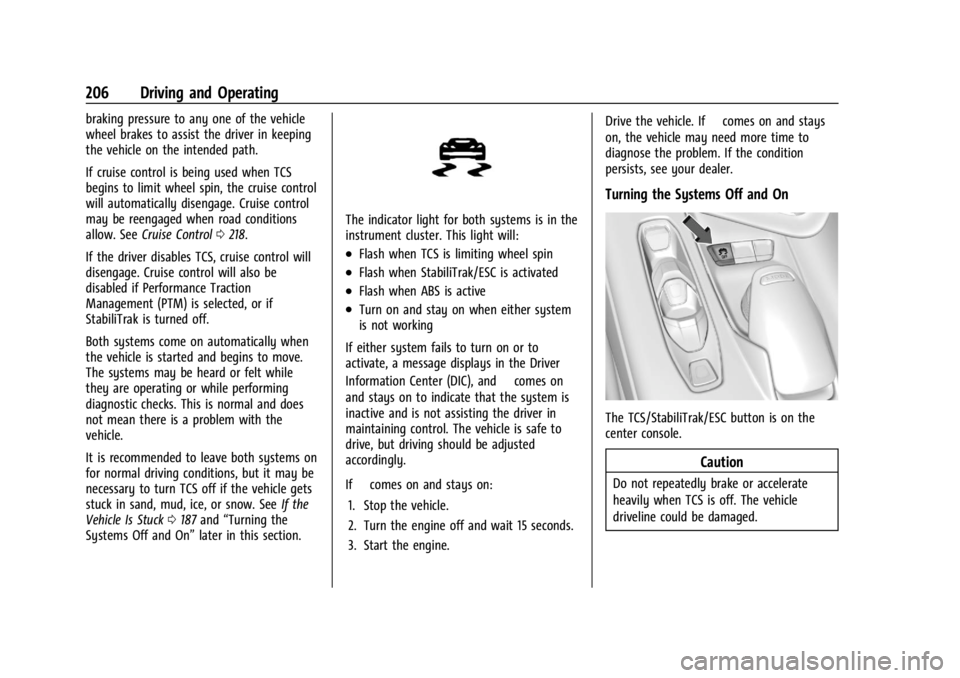
The TCS/StabiliTrak/ESC button is on the
center console.
Caution
Do not repeatedly brake or accelerate
heavily when TCS is off. The vehicle
driveline could be damaged.
Page 219 of 339
Chevrolet Corvette Owner Manual (GMNA-Localizing-U.S./Canada/Mexico-
14622938) - 2021 - CRC - 9/22/20
218 Driving and Operating
Cruise Control
With cruise control, a speed of about
40 km/h (25 mph) or more can be
maintained without keeping your foot on
the accelerator. Cruise control does not work
at speeds below about 40 km/h (25 mph).
{Warning
Cruise control can be dangerous where
you cannot drive safely at a steady
speed. Do not use cruise control on
winding roads or in heavy traffic.
Cruise control can be dangerous on
slippery roads. On such roads, fast
changes in tire traction can cause
excessive wheel slip, and you could lose
control. Do not use cruise control on
slippery roads.
If the Traction Control System (TCS) begins
to limit wheel spin while you are using
cruise control, the cruise control
automatically disengages. See Traction
Control/Electronic Stability Control 0205.
When road conditions allow for using safely
again, cruise control can be turned back on. If the brakes are applied, cruise control
disengages.
Cruise control will disengage if either TCS or
StabiliTrak/Electronic Stability Control (ESC)
is turned off.
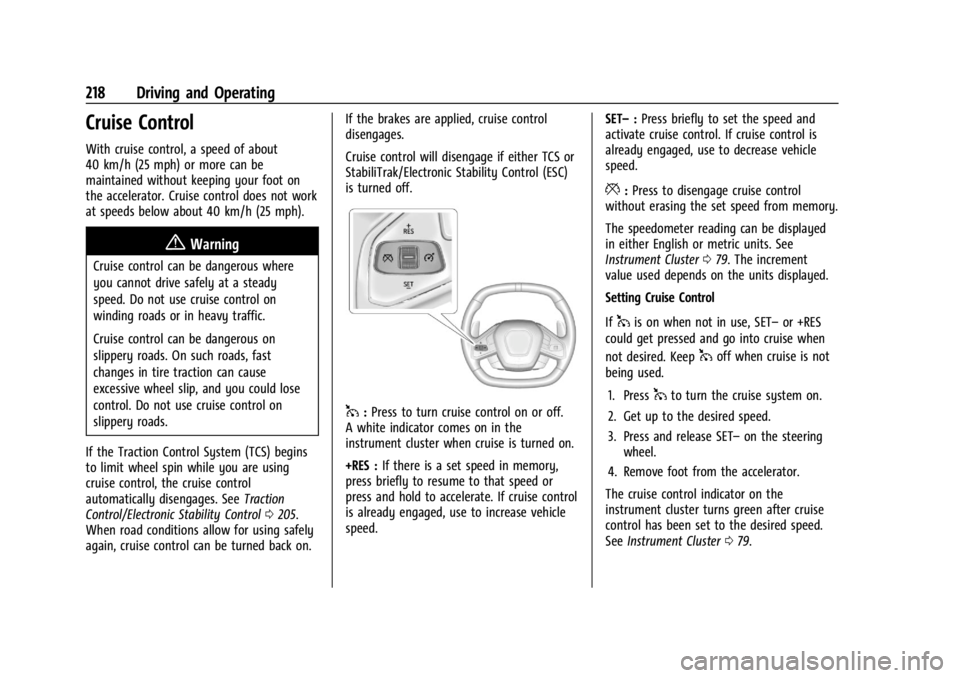
1:
Press to turn cruise control on or off.
A white indicator comes on in the
instrument cluster when cruise is turned on.
+RES : If there is a set speed in memory,
press briefly to resume to that speed or
press and hold to accelerate. If cruise control
is already engaged, use to increase vehicle
speed. SET–
:Press briefly to set the speed and
activate cruise control. If cruise control is
already engaged, use to decrease vehicle
speed.
*: Press to disengage cruise control
without erasing the set speed from memory.
The speedometer reading can be displayed
in either English or metric units. See
Instrument Cluster 079. The increment
value used depends on the units displayed.
Setting Cruise Control
If
1is on when not in use, SET– or +RES
could get pressed and go into cruise when
not desired. Keep
1off when cruise is not
being used.
1. Press
1to turn the cruise system on.
2. Get up to the desired speed.
3. Press and release SET– on the steering
wheel.
4. Remove foot from the accelerator.
The cruise control indicator on the
instrument cluster turns green after cruise
control has been set to the desired speed.
See Instrument Cluster 079.
Page 220 of 339
Chevrolet Corvette Owner Manual (GMNA-Localizing-U.S./Canada/Mexico-
14622938) - 2021 - CRC - 9/22/20
Driving and Operating 219
Resuming a Set Speed
If the cruise control is set at a desired speed
and then the brakes are applied or
*is
pressed, the cruise control is disengaged
without erasing the set speed from memory.
Once the vehicle reaches about 40 km/h
(25 mph) or more, briefly press +RES. The
vehicle returns to the previous set speed.
Increasing Speed While Using Cruise Control
Do one of the following:
.Press and hold +RES until the desired
speed is reached, then release it.
.To increase vehicle speed in small
increments, briefly press +RES. For each
press, the vehicle goes about 1 km/h
(1 mph) faster.
Reducing Speed While Using Cruise Control
Do one of the following:
.Press and hold SET– until the desired
lower speed is reached, then release it.
.To decrease the vehicle speed in small
increments, briefly press SET–. For each
press, the vehicle goes about 1 km/h
(1 mph) slower. Passing Another Vehicle While Using Cruise
Control
Use the accelerator pedal to increase the
vehicle speed. When you take your foot off
the pedal, the vehicle will slow down to the
previously set cruise speed.
While pressing the accelerator pedal or
shortly following the release to override
cruise control, briefly pressing SET–
will
result in cruise set to the current vehicle
speed.
Using Cruise Control on Hills
How well the cruise control works on hills
depends upon the vehicle speed, load, and
the steepness of the hills. When going up
steep hills, you may have to step on the
accelerator pedal to maintain your speed.
When going downhill, you may have to
brake or shift to a lower gear to keep your
speed down. If the brake pedal is applied,
cruise control will disengage.
Cruise Control in Manual Paddle Shift Gear
Selection
When the vehicle is in M (Manual Mode)
and the manual paddle shift controls are not
being used, cruise control operates in the
same manner as D (Drive). When the vehicle is in M (Manual Mode)
and the manual paddle shift controls are
being used, cruise control operates as
follows:
.If cruise control is active and a gear is
selected with the manual paddle shift
controls, the vehicle speed is maintained
in the driver selected gear and will not
automatically upshift or downshift the
transmission while the driver’s gear
selection is active.
.If driving in hilly terrain, cruise control
may not be able to maintain vehicle
speed if an upshift or downshift is not
selected by the driver. While driving on
hilly terrain and cruise control is active
with a manual paddle shift gear selection,
the driver must select the proper gear for
the terrain or select D (Drive) on the
shifter for full automatic transmission
operation.
Ending Cruise Control
.Step lightly on the brake pedal.
.Shift the transmission to N (Neutral).
.Press*.
.To turn off cruise control, press1.
Page 221 of 339
Chevrolet Corvette Owner Manual (GMNA-Localizing-U.S./Canada/Mexico-
14622938) - 2021 - CRC - 9/22/20
220 Driving and Operating
Erasing Speed Memory
The cruise control set speed is erased from
memory if
1is pressed or if the ignition is
turned off.
Driver Assistance Systems
This vehicle may have features that work
together to help avoid crashes or reduce
crash damage while driving, backing, and
parking. Read this entire section before
using these systems.
{Warning
Do not rely on the Driver Assistance
Systems. These systems do not replace
the need for paying attention and driving
safely. You may not hear or see alerts or
warnings provided by these systems.
Failure to use proper care when driving
may result in injury, death, or vehicle
damage. See Defensive Driving 0177.
Under many conditions, these systems
will not:
.Detect children, pedestrians, bicyclists,
or animals. (Continued)
Warning (Continued)
.Detect vehicles or objects outside the
area monitored by the system.
.Work at all driving speeds.
.Warn you or provide you with enough
time to avoid a crash.
.Work under poor visibility or bad
weather conditions.
.Work if the detection sensor is not
cleaned or is covered by ice, snow,
mud, or dirt.
.Work if the detection sensor is
covered up, such as with a sticker,
magnet, or metal plate.
.Work if the area surrounding the
detection sensor is damaged or not
properly repaired.
Complete attention is always required
while driving, and you should be ready to
take action and apply the brakes and/or
steer the vehicle to avoid crashes. Audible Alert
Some driver assistance features alert the
driver of obstacles by beeping. To change
the volume of the warning chime, see
“Comfort and Convenience”
underVehicle
Personalization 097.
Cleaning
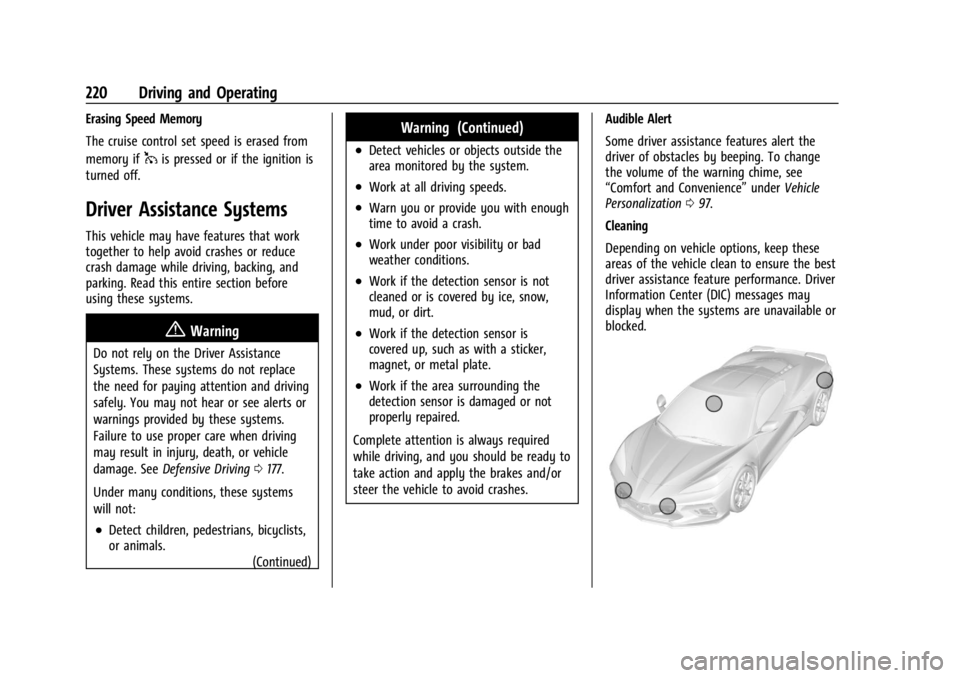
Depending on vehicle options, keep these
areas of the vehicle clean to ensure the best
driver assistance feature performance. Driver
Information Center (DIC) messages may
display when the systems are unavailable or
blocked.
Page 331 of 339

Chevrolet Corvette Owner Manual (GMNA-Localizing-U.S./Canada/Mexico-
14622938) - 2021 - CRC - 9/22/20
330 Index
Control of a Vehicle . . . . . . . . . . . . . . . . . . . . . . 177
ControlsSteering Wheel . . . . . . . . . . . . . . . . . . . . . . . . . 113
Convenience Net . . . . . . . . . . . . . . . . . . . . . . . . . . .72
Convertible Top . . . . . . . . . . . . . . . . . . . . . . . . . . . 34
Convex Mirrors . . . . . . . . . . . . . . . . . . . . . . . . . . . 24
Coolant Engine Temperature Gauge . . . . . . . . . . . . . 83
Cooling . . . . . . . . . . . . . . . . . . . . . . . . . . . . . . . . . . 170
Cooling System . . . . . . . . . . . . . . . . . . . . . . . . . . 245
Courtesy Lamps . . . . . . . . . . . . . . . . . . . . . . . . . . 108
Courtesy Transportation Program . . . . . . . . . 313
Coverage Explanations . . . . . . . . . . . . . . . . . . . 136
Cruise Control . . . . . . . . . . . . . . . . . . . . . . . . . . . .218 Light . . . . . . . . . . . . . . . . . . . . . . . . . . . . . . . . . . . . 91
Cupholders . . . . . . . . . . . . . . . . . . . . . . . . . . . . . . . 70
Customer Assistance . . . . . . . . . . . . . . . . . . . . . 310
Offices . . . . . . . . . . . . . . . . . . . . . . . . . . . . . . . . . 310
Text Telephone (TTY) Users . . . . . . . . . . . . 310
Customer Information Publications Ordering Information . . . . . 316
Customer Satisfaction Procedure . . . . . . . . . 308
Cybersecurity . . . . . . . . . . . . . . . . . . . . . . . . . . . . .318
D
Damage Repair, Collision . . . . . . . . . . . . . . . . . .314
Danger, Warning, and Caution . . . . . . . . . . . . . .2 Data Collection
Infotainment System . . . . . . . . . . . . . . . . . . 319
OnStar . . . . . . . . . . . . . . . . . . . . . . . . . . . . . . . . . 319
Data Recorder Performance . . . . . . . . . . . . . . . . . . . . . . . . . . . 142
Data Recorders, Event . . . . . . . . . . . . . . . . . . . .318
Database Coverage Explanations . . . . . . . . . 136
Daytime Running Lamps (DRL) . . . . . . . . . . . 106
Defensive Driving . . . . . . . . . . . . . . . . . . . . . . . . . 177
Delayed Locking . . . . . . . . . . . . . . . . . . . . . . . . . . .16
Destination . . . . . . . . . . . . . . . . . . . . . . . . . . . . . . 129
Diagnostics Connected Services . . . . . . . . . . . . . . . . . . . . 327
Differential, Limited-Slip . . . . . . . . . . . . . . . . . . 217
Distracted Driving . . . . . . . . . . . . . . . . . . . . . . . . 176
Diversity Antenna System . . . . . . . . . . . . . . . 120
Door Ajar Light . . . . . . . . . . . . . . . . . . . . . . . . . . . . . . . 91
Delayed Locking . . . . . . . . . . . . . . . . . . . . . . . . 16
Locks . . . . . . . . . . . . . . . . . . . . . . . . . . . . . . . . . . . 14
Drive Belt Routing, Engine . . . . . . . . . . . . . . . 307
Driver
Teen . . . . . . . . . . . . . . . . . . . . . . . . . . . . . . . . . . . 159
Driver Assistance Systems . . . . . . . . . . . . . . . 220
Driver Information Center (DIC) . . . . . . . . . . . 92
Driver Mode Control . . . . . . . . . . . . . . . . . . . . . 207
Driving Better Fuel Economy . . . . . . . . . . . . . . . . . . . 176 Driving (cont'd)
Competitive . . . . . . . . . . . . . . . . . . . . . . . . . . . . 214
Defensive . . . . . . . . . . . . . . . . . . . . . . . . . . . . . . . 177
Hill and Mountain Roads . . . . . . . . . . . . . . 186
If the Vehicle is Stuck . . . . . . . . . . . . . . . . . 187
Impaired . . . . . . . . . . . . . . . . . . . . . . . . . . . . . . . . 177
Loss of Control . . . . . . . . . . . . . . . . . . . . . . . . 179
Off-Road Recovery . . . . . . . . . . . . . . . . . . . . . 178
Track Events and Competitive . . . . . . . . . . 179
Vehicle Load Limits . . . . . . . . . . . . . . . . . . . . 188
Wet Roads . . . . . . . . . . . . . . . . . . . . . . . . . . . . . 185
Winter . . . . . . . . . . . . . . . . . . . . . . . . . . . . . . . . . 186
Dual Automatic Climate Control System . . . . . . . . . . . . . . . . . . . . . . . . . . . . . . . . 170
Dual Clutch Transmission . . . . . . . . . . . . . . . . 197 Manual Mode . . . . . . . . . . . . . . . . . . . . . . . . . 200
Dual Clutch Transmission Fluid . . . . . . . . . . . .241
Dual Clutch Transmission Fluid Life System . . . . . . . . . . . . . . . . . . . . . . . . . . . . . . . . 242
E
Electric Brake Boost . . . . . . . . . . . . . . . . . . . . . . 203
Electric Parking Brake . . . . . . . . . . . . . . . . . . . . 204
Electric Parking Brake Light . . . . . . . . . . . . . . . 88
Electrical Equipment, Add-On . . . . . . . . . . . . 228
Electrical SystemFuses and Circuit Breakers . . . . . . . . . . . . . 255
Instrument Panel Fuse Block . . . . . . . . . . . 255
Page 334 of 339

Chevrolet Corvette Owner Manual (GMNA-Localizing-U.S./Canada/Mexico-
14622938) - 2021 - CRC - 9/22/20
Index 333
Lighting (cont'd)Illumination Control . . . . . . . . . . . . . . . . . . . 108
LED . . . . . . . . . . . . . . . . . . . . . . . . . . . . . . . . . . . . 254
Lights Airbag Readiness . . . . . . . . . . . . . . . . . . . . . . . 84
Antilock Brake System (ABS)Warning . . . . . . . . . . . . . . . . . . . . . . . . . . . . . . 88
Brake System Warning . . . . . . . . . . . . . . . . . 87
Charging System . . . . . . . . . . . . . . . . . . . . . . . 85
Check Engine (Malfunction Indicator) . . . . . . . . . . . . . . . . . . . . . . . . . . . . . 86
Cruise Control . . . . . . . . . . . . . . . . . . . . . . . . . . 91
Door Ajar . . . . . . . . . . . . . . . . . . . . . . . . . . . . . . . 91
Electric Parking Brake . . . . . . . . . . . . . . . . . . . 88
Electronic Stability Control (ESC), Off . . . . . . . . . . . . . . . . . . . . . . . . . . . . . 90
Engine Oil Pressure . . . . . . . . . . . . . . . . . . . . . 90
Flash-to-Pass . . . . . . . . . . . . . . . . . . . . . . . . . . . 106
Front Lift System . . . . . . . . . . . . . . . . . . . . . . . 87
High-Beam On . . . . . . . . . . . . . . . . . . . . . . . . . . 91
High/Low Beam Changer . . . . . . . . . . . . . . 105
Seat Belt Reminders . . . . . . . . . . . . . . . . . . . . 84
Security . . . . . . . . . . . . . . . . . . . . . . . . . . . . . . . . . 91
Service Electric Parking Brake . . . . . . . . . . . 88
Tire Pressure . . . . . . . . . . . . . . . . . . . . . . . . . . . . 90
Traction Off . . . . . . . . . . . . . . . . . . . . . . . . . . . . . 89
Limited-Slip Differential . . . . . . . . . . . . . . . . . . . 217 Locks
Automatic Door . . . . . . . . . . . . . . . . . . . . . . . . . 16
Delayed Locking . . . . . . . . . . . . . . . . . . . . . . . . 16
Door . . . . . . . . . . . . . . . . . . . . . . . . . . . . . . . . . . . . 14
Lockout Protection . . . . . . . . . . . . . . . . . . . . . . . 17
Loss of Control . . . . . . . . . . . . . . . . . . . . . . . . . . 179
Low-Profile Tires . . . . . . . . . . . . . . . . . . . . . . . . . 263
Lower Anchors and Tethers for Children (LATCH System) . . . . . . . . . . . . . . . . 66
Lumbar Adjustment . . . . . . . . . . . . . . . . . . . . . . . 40 Front Seats . . . . . . . . . . . . . . . . . . . . . . . . . . . . . 40
M
Maintenance
Records . . . . . . . . . . . . . . . . . . . . . . . . . . . . . . . . 303
Maintenance and Care Additional . . . . . . . . . . . . . . . . . . . . . . . . . . . . . 298
Maintenance Schedule . . . . . . . . . . . . . . . . . . . 293 Recommended Fluids andLubricants . . . . . . . . . . . . . . . . . . . . . . . . . . . . 301
Malfunction Indicator Lamp . . . . . . . . . . . . . . . 86
Manual Mode . . . . . . . . . . . . . . . . . . . . . . . . . . . 200
Map Data Updates . . . . . . . . . . . . . . . . . . . . . . . 136
Maps . . . . . . . . . . . . . . . . . . . . . . . . . . . . . . . . . . . . .128
Media Avoiding Untrusted Devices . . . . . . . . . . . . 120
Memory Seats . . . . . . . . . . . . . . . . . . . . . . . . . . . . .41 Messages
Engine Power . . . . . . . . . . . . . . . . . . . . . . . . . . . 97
Vehicle . . . . . . . . . . . . . . . . . . . . . . . . . . . . . . . . . 97
Vehicle Speed . . . . . . . . . . . . . . . . . . . . . . . . . . . 97
Mirror Rear Camera . . . . . . . . . . . . . . . . . . . . . . . . . . . . 27
Mirrors
Automatic Dimming . . . . . . . . . . . . . . . . . . . . 26
Automatic Dimming Rearview . . . . . . . . . . 26
Convex . . . . . . . . . . . . . . . . . . . . . . . . . . . . . . . . . 24
Folding . . . . . . . . . . . . . . . . . . . . . . . . . . . . . . . . . 25
Heated . . . . . . . . . . . . . . . . . . . . . . . . . . . . . . . . . 26
Manual Rearview . . . . . . . . . . . . . . . . . . . . . . . 26
Power . . . . . . . . . . . . . . . . . . . . . . . . . . . . . . . . . . 25
Tilt in Reverse . . . . . . . . . . . . . . . . . . . . . . . . . . 26
Mirrors, Interior Rearview . . . . . . . . . . . . . . . . . 26
Mode . . . . . . . . . . . . . . . . . . . . . . . . . . . . . . . . . . . . 207
Driver Control . . . . . . . . . . . . . . . . . . . . . . . . . 207
Monitor System, Tire Pressure . . . . . . . . . . . 269
N
Navigation Connected Services . . . . . . . . . . . . . . . . . . . . 325
Destination . . . . . . . . . . . . . . . . . . . . . . . . . . . . 129
Using the System . . . . . . . . . . . . . . . . . . . . . . 125
Navigation Symbols . . . . . . . . . . . . . . . . . . . . . .128
Net, Convenience . . . . . . . . . . . . . . . . . . . . . . . . . .72
New Vehicle Break-In . . . . . . . . . . . . . . . . . . . . 190