interior CHEVROLET CORVETTE C8 2021 User Guide
[x] Cancel search | Manufacturer: CHEVROLET, Model Year: 2021, Model line: CORVETTE C8, Model: CHEVROLET CORVETTE C8 2021Pages: 339, PDF Size: 6.44 MB
Page 99 of 339
Chevrolet Corvette Owner Manual (GMNA-Localizing-U.S./Canada/Mexico-
14622938) - 2021 - CRC - 9/22/20
98 Instruments and Controls
To access the vehicle personalization menu:1. Touch the Settings icon on the Home Page of the infotainment display.
2. Touch Vehicle to display a list of available options.
3. Touch to select the desired feature setting.
4. Touch
9orRto turn a feature off or on.
5. Touch
zto go to the top level of the
Settings menu.
The menu may contain the following:
Buckle to Drive
This feature can prevent shifting out of Park
when the driver, and if applicable the front
passenger, seat belt is not buckled. See
Buckle To Drive 046.
Touch Off or On.
Driver Mode Customization
Touch and the following may display:
.Z-Mode
.My Mode
.Visualization Z-Mode
Touch and the following may display:
.Steering
.Suspension
.Engine/Gear Change
.Brake Feel
.Engine Sound
.PTM
For information on the range of settings, see
“Driver Mode Customization” inDriver Mode
Control 0207.
My Mode
Touch and the following may display:
.Steering
.Suspension
.Brake Feel
.Engine Sound
For information on the range of settings, see
“Driver Mode Customization” inDriver Mode
Control 0207.
Visualization
This setting shows handling and
performance settings on the infotainment
display when changing drive modes.
Touch Off or On.
Climate and Air Quality
Touch and the following may display:
.Auto Fan Speed
.Auto Cooled Seats
.Auto Heated Seats
.Auto Defog
.Auto Rear Defog
Auto Fan Speed
This setting specifies the amount of airflow
when the climate control fan setting is
Auto Fan.
Touch Low, Medium, or High.
Auto Cooled Seats
When enabled, this feature will
automatically activate the ventilated seats
at the level required by the interior
temperature. See Heated and Ventilated
Front Seats 044.
Touch Off or On.
Auto Heated Seats
This setting automatically turns on and
regulates the heated seats when the cabin
temperature is cool. The auto heated seats
Page 106 of 339
Chevrolet Corvette Owner Manual (GMNA-Localizing-U.S./Canada/Mexico-
14622938) - 2021 - CRC - 9/22/20
Lighting 105
Lighting
Exterior Lighting
Exterior Lamp Controls . . . . . . . . . . . . . . . . 105
Exterior Lamps Off Reminder . . . . . . . . . . 105
Headlamp High/Low-Beam Changer . . . 105
Flash-to-Pass . . . . . . . . . . . . . . . . . . . . . . . . . . . 106
Daytime Running Lamps (DRL) . . . . . . . . 106
Automatic Headlamp System . . . . . . . . . . 106
Hazard Warning Flashers . . . . . . . . . . . . . . 107
Turn and Lane-Change Signals . . . . . . . . . 107
Interior Lighting
Instrument Panel IlluminationControl . . . . . . . . . . . . . . . . . . . . . . . . . . . . . . 108
Courtesy Lamps . . . . . . . . . . . . . . . . . . . . . . . 108
Reading Lamps . . . . . . . . . . . . . . . . . . . . . . . . 108
Engine Compartment Lamp . . . . . . . . . . . . 108
Lighting Features
Entry Lighting . . . . . . . . . . . . . . . . . . . . . . . . . 109
Exit Lighting . . . . . . . . . . . . . . . . . . . . . . . . . . . 109
Battery Power Protection . . . . . . . . . . . . . . 109
Exterior Lighting Battery Saver . . . . . . . . 109
Exterior Lighting
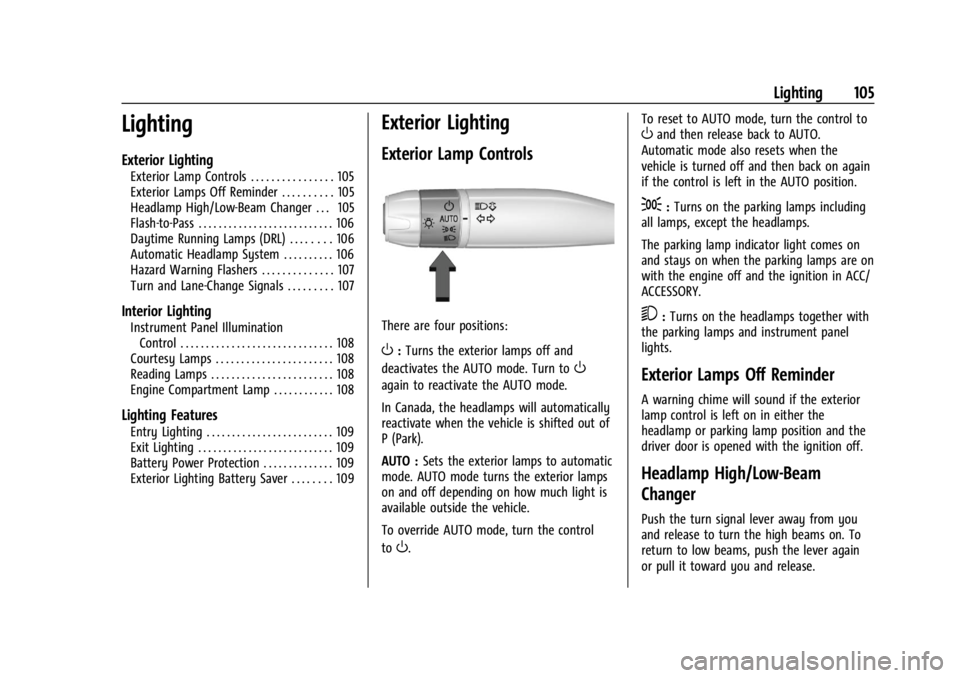
Exterior Lamp Controls
There are four positions:
O: Turns the exterior lamps off and
deactivates the AUTO mode. Turn to
O
again to reactivate the AUTO mode.
In Canada, the headlamps will automatically
reactivate when the vehicle is shifted out of
P (Park).
AUTO : Sets the exterior lamps to automatic
mode. AUTO mode turns the exterior lamps
on and off depending on how much light is
available outside the vehicle.
To override AUTO mode, turn the control
to
O. To reset to AUTO mode, turn the control to
Oand then release back to AUTO.
Automatic mode also resets when the
vehicle is turned off and then back on again
if the control is left in the AUTO position.
;: Turns on the parking lamps including
all lamps, except the headlamps.
The parking lamp indicator light comes on
and stays on when the parking lamps are on
with the engine off and the ignition in ACC/
ACCESSORY.
5: Turns on the headlamps together with
the parking lamps and instrument panel
lights.
Exterior Lamps Off Reminder
A warning chime will sound if the exterior
lamp control is left on in either the
headlamp or parking lamp position and the
driver door is opened with the ignition off.
Headlamp High/Low-Beam
Changer
Push the turn signal lever away from you
and release to turn the high beams on. To
return to low beams, push the lever again
or pull it toward you and release.
Page 109 of 339
Chevrolet Corvette Owner Manual (GMNA-Localizing-U.S./Canada/Mexico-
14622938) - 2021 - CRC - 9/22/20
108 Lighting
If after signaling a turn or lane change the
arrows flash rapidly or do not come on, a
turn signal indicator light failure may have
occurred.
If a turn signal has failed, the lamp may
need to be replaced. See your dealer.
Turn Signal on Chime
A chime sounds if the turn signal has been
on for more than 1.2 km (0.75 mi) of driving.
If you need to leave the turn signal on for
more than 1.2 km (0.75 mi), turn off the
signal and then turn it back on.
Interior Lighting
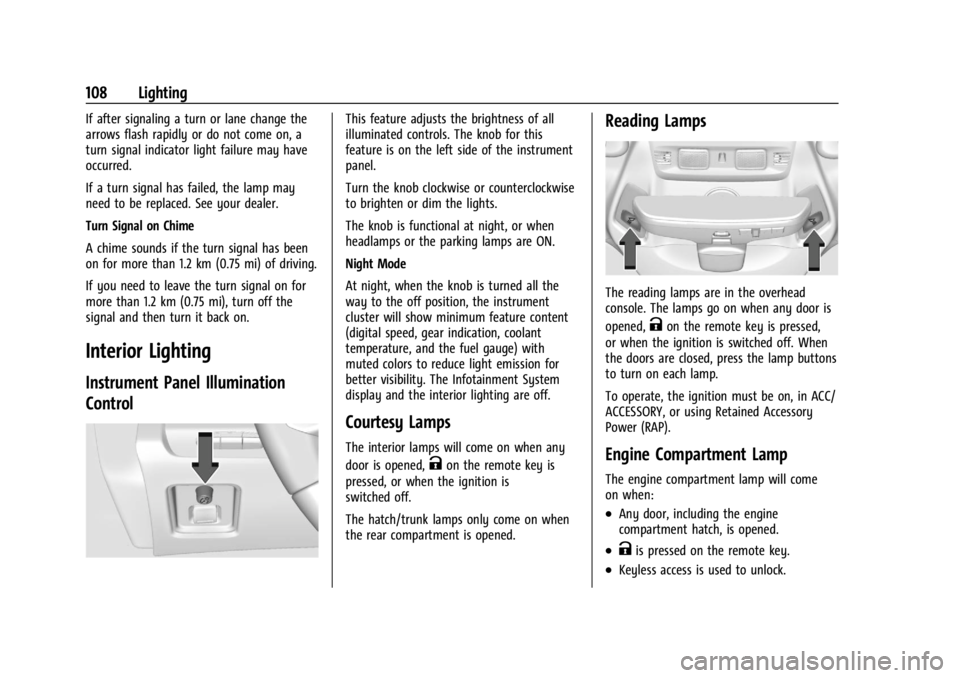
Instrument Panel Illumination
Control
This feature adjusts the brightness of all
illuminated controls. The knob for this
feature is on the left side of the instrument
panel.
Turn the knob clockwise or counterclockwise
to brighten or dim the lights.
The knob is functional at night, or when
headlamps or the parking lamps are ON.
Night Mode
At night, when the knob is turned all the
way to the off position, the instrument
cluster will show minimum feature content
(digital speed, gear indication, coolant
temperature, and the fuel gauge) with
muted colors to reduce light emission for
better visibility. The Infotainment System
display and the interior lighting are off.
Courtesy Lamps
The interior lamps will come on when any
door is opened,
Kon the remote key is
pressed, or when the ignition is
switched off.
The hatch/trunk lamps only come on when
the rear compartment is opened.
Reading Lamps
The reading lamps are in the overhead
console. The lamps go on when any door is
opened,
Kon the remote key is pressed,
or when the ignition is switched off. When
the doors are closed, press the lamp buttons
to turn on each lamp.
To operate, the ignition must be on, in ACC/
ACCESSORY, or using Retained Accessory
Power (RAP).
Engine Compartment Lamp
The engine compartment lamp will come
on when:
.Any door, including the engine
compartment hatch, is opened.
.Kis pressed on the remote key.
.Keyless access is used to unlock.
Page 110 of 339
Chevrolet Corvette Owner Manual (GMNA-Localizing-U.S./Canada/Mexico-
14622938) - 2021 - CRC - 9/22/20
Lighting 109
.The ignition is switched off.
The engine compartment lamp turns off
after all doors are closed.
If any door or the engine compartment
hatch/trunk remains open, while the vehicle
is off, a battery saver timer will turn the
lamp off after about 10 minutes.
Lighting Features
Entry Lighting
Some exterior lamps turn on briefly at
night, or in areas with limited lighting,
when
Kis pressed on the remote key. After
about 30 seconds the exterior lamps
turn off.
When any door is opened or remote unlock
pressed, all interior lights turn on and then
interior lamps dim to off after
approximately 20 seconds of door closure.
When the driver door is opened, all interior
lights, Driver Information Center (DIC) lights,
and door pocket lights turn on and then the
dome and remaining interior lamps dim to
off. Entry lighting can be disabled manually by turning the ignition to on or ACC/
ACCESSORY, or by pressing
Qon the
remote key.
The entry lighting feature for exterior
lighting can be changed. See “Vehicle
Locator Lights” underVehicle Personalization
0 97.
Exit Lighting
Some exterior lamps come on at night, or in
areas with limited lighting, when the driver
door is opened after the ignition is turned
off. The dome lamp comes on after the
ignition is turned off. The exterior lamps and
dome lamp remain on after the door is
closed for a set amount of time, then
automatically turn off.
The exterior lamps turn off immediately by
turning the exterior lamp control off.
The exit lighting feature for exterior lighting
can be changed. See Vehicle Personalization
0 97.
Battery Power Protection
This feature helps prevent the battery from
being drained if any interior lamps are
accidentally left on. If any of these lamps
are left on, they automatically turn off after
10 minutes, if the ignition is off. The lamps
will not come back on again until one of the
following occurs:
.The ignition is turned on.
.The doors are closed and then re-opened.
Exterior Lighting Battery Saver
The exterior lamps turn off about 10 minutes
after the ignition is turned off, if the parking
lamps or headlamps have been manually
left on. This protects against draining the
battery. To restart the 10-minute timer, turn
the exterior lamp control to the off position
and then back to the parking lamp or
headlamp position.
To keep the lamps on for more than
10 minutes, the ignition must be on or in
ACC/ACCESSORY.
Page 112 of 339
Chevrolet Corvette Owner Manual (GMNA-Localizing-U.S./Canada/Mexico-
14622938) - 2021 - CRC - 9/22/20
Infotainment System 111
Before driving:
.Become familiar with the operation,
center stack controls, steering wheel
controls, and infotainment display.
.Set up the audio by presetting favorite
stations, setting the tone, and adjusting
the speakers.
.Set up phone numbers in advance so they
can be called easily by pressing a single
control or by using a single voice
command.
See Distracted Driving 0176.
Active Noise Cancellation (ANC)
If equipped, ANC reduces engine noise in the
vehicle’s interior. ANC requires the
factory-installed audio system, radio,
speakers, amplifier (if equipped), induction
system, and exhaust system to work
properly. Deactivation is required by your
dealer if related aftermarket equipment is
installed.
Overview
Infotainment System
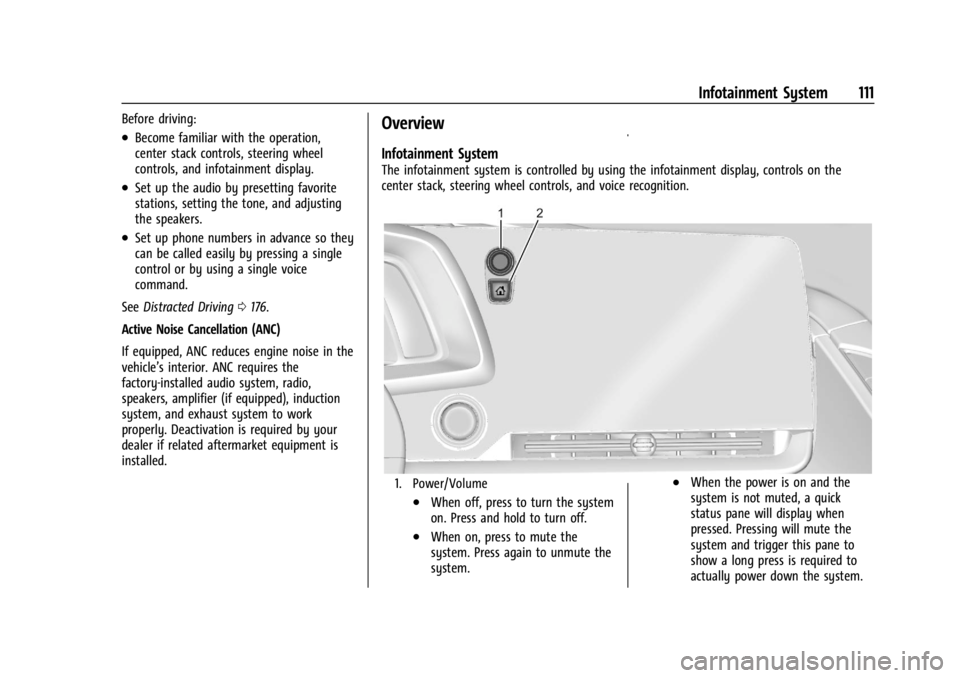
The infotainment system is controlled by using the infotainment display, controls on the
center stack, steering wheel controls, and voice recognition.
1. Power/Volume
.When off, press to turn the system
on. Press and hold to turn off.
.When on, press to mute the
system. Press again to unmute the
system.
.When the power is on and the
system is not muted, a quick
status pane will display when
pressed. Pressing will mute the
system and trigger this pane to
show a long press is required to
actually power down the system.
Page 231 of 339
Chevrolet Corvette Owner Manual (GMNA-Localizing-U.S./Canada/Mexico-
14622938) - 2021 - CRC - 9/22/20
230 Vehicle Care
Vehicle Care
General Information
General Information . . . . . . . . . . . . . . . . . . . 231
California Proposition 65 Warning . . . . . 231
California Perchlorate MaterialsRequirements . . . . . . . . . . . . . . . . . . . . . . . . 231
Accessories and Modifications . . . . . . . . . 231
Lifting the Vehicle . . . . . . . . . . . . . . . . . . . . . 232
Vehicle Checks
Doing Your Own Service Work . . . . . . . . . 233
Underhood Compartment Overview . . . 234
Engine Compartment Overview . . . . . . . . 235
Engine Oil . . . . . . . . . . . . . . . . . . . . . . . . . . . . . 238
Engine Oil Life System . . . . . . . . . . . . . . . . . 241
Dual Clutch Transmission Fluid . . . . . . . . 241
Dual Clutch Transmission Fluid Life System . . . . . . . . . . . . . . . . . . . . . . . . . . . . . . 242
Engine Air Filter Life System . . . . . . . . . . 242
Engine Air Cleaner/Filter . . . . . . . . . . . . . . . 243
Cooling System . . . . . . . . . . . . . . . . . . . . . . . . 245
Engine Overheating . . . . . . . . . . . . . . . . . . . 248
Washer Fluid . . . . . . . . . . . . . . . . . . . . . . . . . . 249
Brakes . . . . . . . . . . . . . . . . . . . . . . . . . . . . . . . . 249
Brake Fluid . . . . . . . . . . . . . . . . . . . . . . . . . . . . 250
Battery - North America . . . . . . . . . . . . . . . 251 Park Brake and P (Park) Mechanism
Check . . . . . . . . . . . . . . . . . . . . . . . . . . . . . . . . 252
Wiper Blade Replacement . . . . . . . . . . . . . 252
Windshield Replacement . . . . . . . . . . . . . . . 253
Gas Strut(s) . . . . . . . . . . . . . . . . . . . . . . . . . . . . 253
Headlamp Aiming
Front Headlamp Aiming . . . . . . . . . . . . . . . 254
Bulb Replacement
LED Lighting . . . . . . . . . . . . . . . . . . . . . . . . . . . 254
Electrical System
Electrical System Overload . . . . . . . . . . . . 254
Fuses and Circuit Breakers . . . . . . . . . . . . . 255
Instrument Panel Fuse Block . . . . . . . . . . . 255
Rear Compartment Fuse Block . . . . . . . . . 258
Wheels and Tires
Tires . . . . . . . . . . . . . . . . . . . . . . . . . . . . . . . . . . . 261
All-Season Tires . . . . . . . . . . . . . . . . . . . . . . . . 261
Winter Tires . . . . . . . . . . . . . . . . . . . . . . . . . . . 262
Run-Flat Tires . . . . . . . . . . . . . . . . . . . . . . . . . . 262
Low-Profile Tires . . . . . . . . . . . . . . . . . . . . . . . 263
Summer Tires . . . . . . . . . . . . . . . . . . . . . . . . . 263
Tire Sidewall Labeling . . . . . . . . . . . . . . . . . 263
Tire Designations . . . . . . . . . . . . . . . . . . . . . . 264
Tire Terminology and Definitions . . . . . . 265 Tire Pressure . . . . . . . . . . . . . . . . . . . . . . . . . . 267
Tire Pressure for High-Speed
Operation . . . . . . . . . . . . . . . . . . . . . . . . . . . 268
Tire Pressure Monitor System . . . . . . . . . 269
Tire Pressure Monitor Operation . . . . . . 270
Tire Inspection . . . . . . . . . . . . . . . . . . . . . . . . . 272
Tire Rotation . . . . . . . . . . . . . . . . . . . . . . . . . . 272
When It Is Time for New Tires . . . . . . . . 273
Buying New Tires . . . . . . . . . . . . . . . . . . . . . 274
Different Size Tires and Wheels . . . . . . . . 275
Uniform Tire Quality Grading . . . . . . . . . . 275
Wheel Alignment and Tire Balance . . . . 277
Wheel Replacement . . . . . . . . . . . . . . . . . . . 277
Tire Chains . . . . . . . . . . . . . . . . . . . . . . . . . . . . 278
If a Tire Goes Flat . . . . . . . . . . . . . . . . . . . . . 278
Jump Starting
Jump Starting - North America . . . . . . . . 278
Towing the Vehicle
Towing the Vehicle . . . . . . . . . . . . . . . . . . . . 281
Recreational Vehicle Towing . . . . . . . . . . . 283
Appearance Care
Exterior Care . . . . . . . . . . . . . . . . . . . . . . . . . . 283
Interior Care . . . . . . . . . . . . . . . . . . . . . . . . . . 288
Floor Mats . . . . . . . . . . . . . . . . . . . . . . . . . . . . 290
Page 286 of 339
Chevrolet Corvette Owner Manual (GMNA-Localizing-U.S./Canada/Mexico-
14622938) - 2021 - CRC - 9/22/20
Vehicle Care 285
Protecting Exterior Bright Metal Moldings
Caution
Failure to clean and protect the bright
metal moldings can result in a hazy
white finish or pitting. This damage
would not be covered by the vehicle
warranty.
The bright metal moldings on the vehicle
are aluminum, chrome, and stainless steel.
To prevent damage always follow these
cleaning instructions:
.Be sure the molding is cool to the touch
before applying any cleaning solution.
.Use only approved cleaning solutions for
aluminum, chrome, and stainless steel.
Some cleaners are highly acidic or contain
alkaline substances and can damage the
moldings.
.Always dilute a concentrated cleaner
according to the manufacturer’s
instructions.
.Do not use cleaners that are not intended
for automotive use.
.Use a nonabrasive wax on the vehicle
after washing to protect and extend the
molding finish.
Convertible Top Care
Only lower the top when it is completely
dry and avoid leaving the top lowered for
extended periods of time to prevent
excessive interior weathering.
Carbon Fiber Care
Carbon fiber composite parts can be washed
and waxed like any other parts. Use a clear
or black pigmented wax. See Composite
Materials 0191.
Cleaning Exterior Lamps/Lenses,
Emblems, Decals, and Stripes
Use only lukewarm or cold water, a soft
cloth, and a car washing soap to clean
exterior lamps, lenses, emblems, decals, and
stripes. Follow instructions under "Washing
the Vehicle" previously in this section.
Lamp covers are made of plastic, and some
have a UV protective coating. Do not clean
or wipe them while they are dry.
Do not use any of the following on lamp
covers:
.Abrasive or caustic agents
.Washer fluids and other cleaning agents
in higher concentrations than suggested
by the manufacturer
.Solvents, alcohols, fuels, or other harsh
cleaners
.Ice scrapers or other hard items
.Aftermarket appearance caps or covers
while the lamps are illuminated, due to
excessive heat generated
Caution
Failure to clean lamps properly can cause
damage to the lamp cover that would
not be covered by the vehicle warranty.
Caution
Using wax on low gloss black finish
stripes can increase the gloss level and
create a non-uniform finish. Clean low
gloss stripes with soap and water only.
Air Intakes - Mesh Grilles
Keep the rear and hood mesh grilles clear of
debris. The metal mesh grilles may be hot
to the touch after vehicle operation.
Page 289 of 339
Chevrolet Corvette Owner Manual (GMNA-Localizing-U.S./Canada/Mexico-
14622938) - 2021 - CRC - 9/22/20
288 Vehicle Care
Body Damage
If the vehicle is damaged and requires sheet
metal repair or replacement, make sure the
body repair shop applies anti-corrosion
material to parts repaired or replaced to
restore corrosion protection.
Original manufacturer replacement parts will
provide the corrosion protection while
maintaining the vehicle warranty.
Finish Damage
Quickly repair minor chips and scratches
with touch-up materials available from your
dealer. Larger areas of finish damage can be
corrected in your dealer's body and
paint shop.
Chemical Paint Spotting
Airborne pollutants can fall upon and attack
painted vehicle surfaces causing blotchy,
ring-shaped discolorations, and small,
irregular dark spots etched into the paint
surface. See“Finish Care” previously in this
section.
Interior Care
To prevent dirt particle abrasions, regularly
clean the vehicle interior. Immediately
remove any soils. Newspapers or dark
garments can transfer color to the vehicle
interior.
Use a soft bristle brush to remove dust from
knobs and crevices on the instrument
cluster. Using a mild soap solution,
immediately remove hand lotions,
sunscreen, and insect repellent from all
interior surfaces or permanent damage may
result.
Use cleaners specifically designed for the
surfaces being cleaned to prevent
permanent damage. Apply all cleaners
directly to the cleaning cloth. Do not spray
cleaners on any switches or controls.
Remove cleaners quickly.
Before using cleaners, read and follow all
safety instructions on the label. While
cleaning the interior, open the doors and
windows to get proper ventilation. To prevent damage, do not clean the
interior using the following cleaners or
techniques:
.Never use a razor or any other sharp
object to remove soil from any interior
surface.
.Never use a brush with stiff bristles.
.Never rub any surface aggressively or
with too much pressure.
.Do not use laundry detergents or
dishwashing soaps with degreasers. For
liquid cleaners, use approximately
20 drops per 3.8 L (1 gal) of water.
A concentrated soap solution will create
streaks and attract dirt. Do not use
solutions that contain strong or
caustic soap.
.Do not heavily saturate the upholstery
when cleaning.
.Do not use solvents or cleaners containing
solvents.
Page 290 of 339
Chevrolet Corvette Owner Manual (GMNA-Localizing-U.S./Canada/Mexico-
14622938) - 2021 - CRC - 9/22/20
Vehicle Care 289
Interior Glass
To clean, use a terry cloth fabric dampened
with water. Wipe droplets left behind with a
clean dry cloth. If necessary, use a
commercial glass cleaner after cleaning with
plain water.
Caution
To prevent scratching, never use abrasive
cleaners on automotive glass. Abrasive
cleaners or aggressive cleaning may
damage the rear window defogger.
Cleaning the windshield with water during
the first three to six months of ownership
will reduce tendency to fog.
Speaker Covers
Vacuum around a speaker cover gently, so
that the speaker will not be damaged. Clean
spots with water and mild soap.
Coated Moldings
Coated moldings should be cleaned.
.When lightly soiled, wipe with a sponge
or soft, lint-free cloth dampened with
water.
.When heavily soiled, use warm soapy
water.
Fabric/Carpet/Suede
Start by vacuuming the surface using a soft
brush attachment. If a rotating vacuum
brush attachment is being used, only use it
on the floor carpet. Before cleaning, gently
remove as much of the soil as possible:
.Gently blot liquids with a paper towel.
Continue blotting until no more soil can
be removed.
.For solid soils, remove as much as
possible prior to vacuuming.
To clean: 1. Saturate a clean, lint-free colorfast cloth with water. A microfiber cloth is
recommended to prevent lint transfer to
the fabric or carpet.
2. Remove excess moisture by gently wringing until water does not drip from
the cleaning cloth.
3. Start on the outside edge of the soil and gently rub toward the center. Fold the
cleaning cloth to a clean area frequently
to prevent forcing the soil in to the
fabric.
4. Continue gently rubbing the soiled area until there is no longer any color
transfer from the soil to the cleaning
cloth. 5. If the soil is not completely removed,
use a mild soap solution followed only
by plain water.
If the soil is not completely removed, it may
be necessary to use a commercial upholstery
cleaner or spot lifter. Test a small hidden
area for colorfastness before using a
commercial upholstery cleaner or spot lifter.
If ring formation occurs, clean the entire
fabric or carpet.
After cleaning, use a paper towel to blot
excess moisture.
Cleaning High Gloss Surfaces and Vehicle
Information and Radio Displays
Use a microfiber cloth on high gloss surfaces
or vehicle displays. First, use a soft bristle
brush to remove dirt that can scratch the
surface. Then gently clean by rubbing with a
microfiber cloth. Never use window cleaners
or solvents. Periodically hand wash the
microfiber cloth separately, using mild soap.
Do not use bleach or fabric softener. Rinse
thoroughly and air dry before next use.
Page 291 of 339
Chevrolet Corvette Owner Manual (GMNA-Localizing-U.S./Canada/Mexico-
14622938) - 2021 - CRC - 9/22/20
290 Vehicle Care
Caution
Do not attach a device with a suction cup
to the display. This may cause damage
and would not be covered by the vehicle
warranty.
Instrument Panel, Leather, Vinyl, Other
Plastic Surfaces, Low Gloss Paint
Surfaces, and Natural Open Pore Wood
Surfaces
Use a soft microfiber cloth dampened with
water to remove dust and loose dirt. For a
more thorough cleaning, use a soft
microfiber cloth dampened with a mild soap
solution.
Caution
Soaking or saturating leather, especially
perforated leather, as well as other
interior surfaces, may cause permanent
damage. Wipe excess moisture from
these surfaces after cleaning and allow
them to dry naturally. Never use heat,
steam, or spot removers. Do not use
cleaners that contain silicone or
wax-based products. Cleaners containing
(Continued)
Caution (Continued)
these solvents can permanently change
the appearance and feel of leather or soft
trim, and are not recommended.
Do not use cleaners that increase gloss,
especially on the instrument panel. Reflected
glare can decrease visibility through the
windshield under certain conditions.
Caution
Use of air fresheners may cause
permanent damage to plastics and
painted surfaces. If an air freshener
comes in contact with any plastic or
painted surface in the vehicle, blot
immediately and clean with a soft cloth
dampened with a mild soap solution.
Damage caused by air fresheners would
not be covered by the vehicle warranty.
Convenience Net
If equipped, wash with warm water and
mild detergent. Do not use chlorine bleach.
Rinse with cold water, and then dry
completely.
Care of Seat Belts
Keep belts clean and dry.
{Warning
Do not bleach or dye seat belt webbing.
It may severely weaken the webbing. In
a crash, they might not be able to
provide adequate protection. Clean and
rinse seat belt webbing only with mild
soap and lukewarm water. Allow the
webbing to dry.
Floor Mats
{Warning
If a floor mat is the wrong size or is not
properly installed, it can interfere with
the pedals. Interference with the pedals
can cause unintended acceleration and/or
increased stopping distance which can
cause a crash and injury. Make sure the
floor mat does not interfere with the
pedals.