service indicator CHEVROLET CORVETTE C8 2021 User Guide
[x] Cancel search | Manufacturer: CHEVROLET, Model Year: 2021, Model line: CORVETTE C8, Model: CHEVROLET CORVETTE C8 2021Pages: 339, PDF Size: 6.44 MB
Page 196 of 339
Chevrolet Corvette Owner Manual (GMNA-Localizing-U.S./Canada/Mexico-
14622938) - 2021 - CRC - 9/22/20
Driving and Operating 195
release when the EPB switch is used. The
EPB should automatically release when the
vehicle is shifted out of P (Park).
Leaving the Vehicle with the Engine
Running
{Warning
It can be dangerous to leave the vehicle
with the engine running. It could
overheat and catch fire.
It is dangerous to get out of the vehicle
if the vehicle is not in P (Park) with the
parking brake firmly set. The vehicle
can roll.
Do not leave the vehicle when the engine
is running. If you have left the engine
running, the vehicle can move suddenly.
You or others could be injured. To be
sure the vehicle will not move, even
when you are on fairly level ground,
always set the parking brake and shift to
P (Park).
If you have to leave the vehicle with the
engine running, be sure the vehicle is in
P (Park) and the parking brake is set before
you leave it.
Shifting out of Park
This vehicle is equipped with an
electronically controlled transmission.
If the vehicle has a battery with low
voltage, try charging or jump starting the
battery. See Jump Starting - North America
0 278.
To shift out of P (Park): 1. Ensure the engine is running.
2. Apply the brake pedal.
3. Press or pull the desired switch on the center console. For N (Neutral) press and
hold the N (Neutral) switch until the N
indicator illuminates red.
The P indicator will turn white and the gear
indicator on the shift switch will turn red
when the vehicle is no longer in P (Park).
If the vehicle cannot shift from P (Park), a
Driver Information Center (DIC) message will
display. See your dealer for service.
Parking over Things That Burn
{Warning
Things that can burn could touch hot
exhaust parts under the vehicle and
ignite. Do not park over papers, leaves,
dry grass, or other things that can burn.
Active Fuel Management
This vehicle's engine may be equipped with
Active Fuel Management, which allows the
engine to operate on either all or half of its
cylinders, depending on the driving
conditions.
When less power is required, such as
cruising at a constant vehicle speed, the
system will operate in the half cylinder
mode, allowing the vehicle to achieve better
fuel economy. When greater power
demands are required, such as accelerating
from a stop, passing, or merging onto a
highway, the system will maintain
full-cylinder operation.
If the vehicle has an Active Fuel
Management indicator, see Driver
Information Center (DIC) for more
information on using this display.
Page 208 of 339
Chevrolet Corvette Owner Manual (GMNA-Localizing-U.S./Canada/Mexico-
14622938) - 2021 - CRC - 9/22/20
Driving and Operating 207
To turn off only TCS, press and release@.
The Traction Off light
iilluminates in the
instrument cluster. To turn TCS on again,
press and release
@. The Traction Off light
idisplayed in the instrument cluster will
turn off.
If TCS is limiting wheel spin when
@is
pressed, the system will not turn off until
the wheels stop spinning.
To turn off both TCS and StabiliTrak/ESC,
press and hold
@until the Traction Off light
iand StabiliTrak/ESC OFF light@illuminate and stay on in the instrument
cluster.
To turn TCS and StabiliTrak/ESC on again,
press and release
@. The Traction Off light
iand StabiliTrak/ESC OFF light@in the
instrument cluster turn off.
If the Tire Pressure Monitor System (TPMS)
system is malfunctioning and the DIC
displays SERVICE TIRE MONITOR SYSTEM,
StabiliTrak/ESC will be affected as follows:
.StabiliTrak/ESC cannot be turned off by
the driver.
.If StabiliTrak/ESC is off, it will be turned
on automatically.
.Competitive Driving Mode or Performance
Traction Management is unavailable.
.StabiliTrak/ESC will feel different in aiding
and maintaining directional control.
Adding accessories can affect the vehicle
performance. See Accessories and
Modifications 0231.
Hill Rollback Control
If the vehicle is in gear and inadvertently
rolls backwards, Hill Rollback Control helps
limit the rollback to a very low speed.
A noise may be heard while the vehicle
speed is actively being controlled. A Driver
Information Center (DIC) message displays
when active.
Driver Mode Control
Driver Mode Control (DMC) allows the driver
to adjust the overall driving experience to
better suit preference by selecting different
modes.
Drive mode availability and affected driver
systems are dependent upon vehicle trim
level, region, and optional features. Driver
modes may include: Weather, Tour, Sport,
and Track, along with two customizable
modes: My Mode and Z-Mode. If the vehicle is in Tour or My Mode it will
stay in that mode through future ignition
cycles. If the vehicle is in any other mode, it
will return to Tour when the vehicle is
restarted. When each mode is selected, an
indicator will come on in the instrument
cluster and stay on.
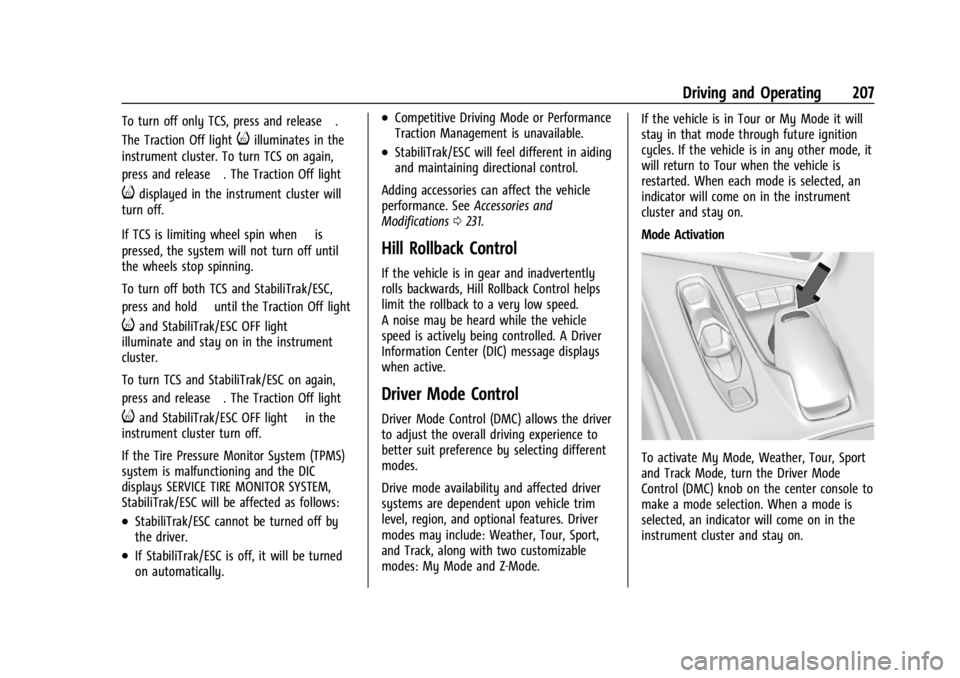
Mode Activation
To activate My Mode, Weather, Tour, Sport
and Track Mode, turn the Driver Mode
Control (DMC) knob on the center console to
make a mode selection. When a mode is
selected, an indicator will come on in the
instrument cluster and stay on.
Page 229 of 339
Chevrolet Corvette Owner Manual (GMNA-Localizing-U.S./Canada/Mexico-
14622938) - 2021 - CRC - 9/22/20
228 Driving and Operating
Filling the Tank with a Portable Fuel
Container
If the vehicle runs out of fuel and must be
filled from a portable fuel container:
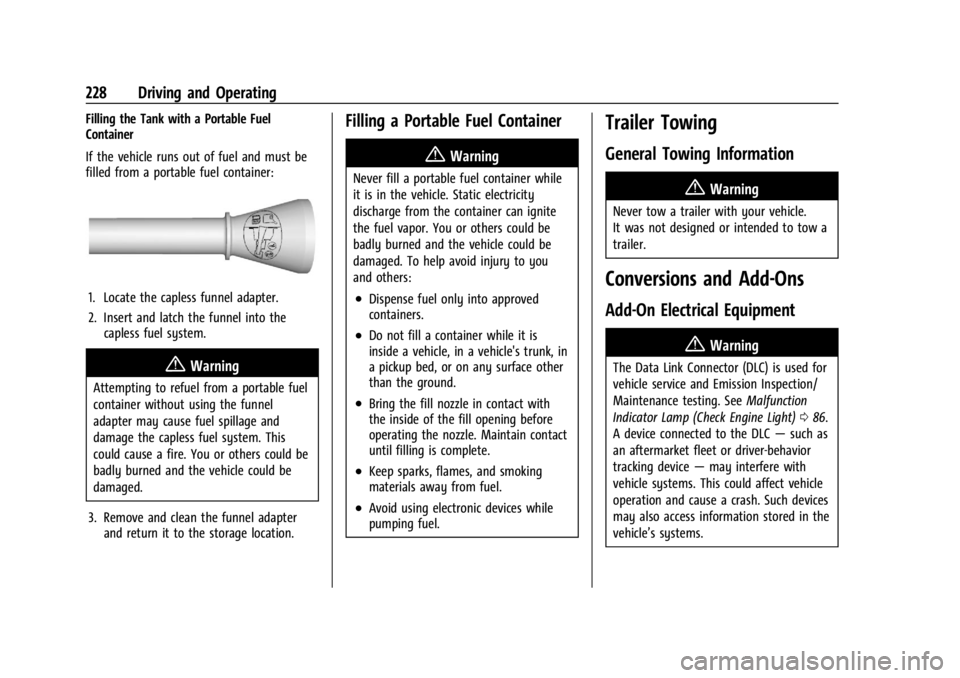
1. Locate the capless funnel adapter.
2. Insert and latch the funnel into thecapless fuel system.
{Warning
Attempting to refuel from a portable fuel
container without using the funnel
adapter may cause fuel spillage and
damage the capless fuel system. This
could cause a fire. You or others could be
badly burned and the vehicle could be
damaged.
3. Remove and clean the funnel adapter and return it to the storage location.
Filling a Portable Fuel Container
{Warning
Never fill a portable fuel container while
it is in the vehicle. Static electricity
discharge from the container can ignite
the fuel vapor. You or others could be
badly burned and the vehicle could be
damaged. To help avoid injury to you
and others:
.Dispense fuel only into approved
containers.
.Do not fill a container while it is
inside a vehicle, in a vehicle's trunk, in
a pickup bed, or on any surface other
than the ground.
.Bring the fill nozzle in contact with
the inside of the fill opening before
operating the nozzle. Maintain contact
until filling is complete.
.Keep sparks, flames, and smoking
materials away from fuel.
.Avoid using electronic devices while
pumping fuel.
Trailer Towing
General Towing Information
{Warning
Never tow a trailer with your vehicle.
It was not designed or intended to tow a
trailer.
Conversions and Add-Ons
Add-On Electrical Equipment
{Warning
The Data Link Connector (DLC) is used for
vehicle service and Emission Inspection/
Maintenance testing. See Malfunction
Indicator Lamp (Check Engine Light) 086.
A device connected to the DLC —such as
an aftermarket fleet or driver-behavior
tracking device —may interfere with
vehicle systems. This could affect vehicle
operation and cause a crash. Such devices
may also access information stored in the
vehicle’s systems.
Page 247 of 339
Chevrolet Corvette Owner Manual (GMNA-Localizing-U.S./Canada/Mexico-
14622938) - 2021 - CRC - 9/22/20
246 Vehicle Care
Warning (Continued)
the wrong mixture, the engine could get
too hot but there would not be an
overheat warning. The engine could catch
fire and you or others could be burned.
Use a mixture of 40% DEX-COOL coolant and
60% clean, drinkable water. If using this
mixture, nothing else needs to be added.
This mixture:
.Gives freezing protection down to −28 °C
(−18 °F), outside temperature.
.Gives boiling protection up to 129 °C
(265 °F), engine temperature.
.Protects against rust and corrosion.
.Will not damage aluminum parts.
.Helps keep the proper engine
temperature.
Caution
Do not use anything other than a mix of
DEX-COOL coolant that meets GM
Standard GMW3420 and clean, drinkable
water. Anything else can cause damage
to the engine cooling system and the
vehicle, which would not be covered by
the vehicle warranty. Never dispose of engine coolant by putting
it in the trash, pouring it on the ground,
or into sewers, streams, or bodies of water.
Have the coolant changed by an authorized
service center, familiar with legal
requirements regarding used coolant
disposal. This will help protect the
environment and your health.
If ambient temperatures are anticipated
below
−28 °C (−18 °F), make sure a proper
mixture ratio of 50% DEX-COOL coolant and
50% clean, drinkable water is used.
Checking Coolant
Be sure the cooling system is cool and that
the vehicle is on a level surface.
Check to see if coolant is visible in the
coolant surge tank. If the coolant inside the
coolant surge tank is boiling, do not do
anything else until it cools down. If coolant
is visible but the coolant level is not at or
above the cold fill line, add a mixture of
40% DEX-COOL coolant and 60% clean,
drinkable water at the coolant recovery
tank, but be sure the cooling system is cool
before this is done. See Engine Overheating
0 248. The surge tank is in the engine
compartment. See
Engine Compartment
Overview 0235.
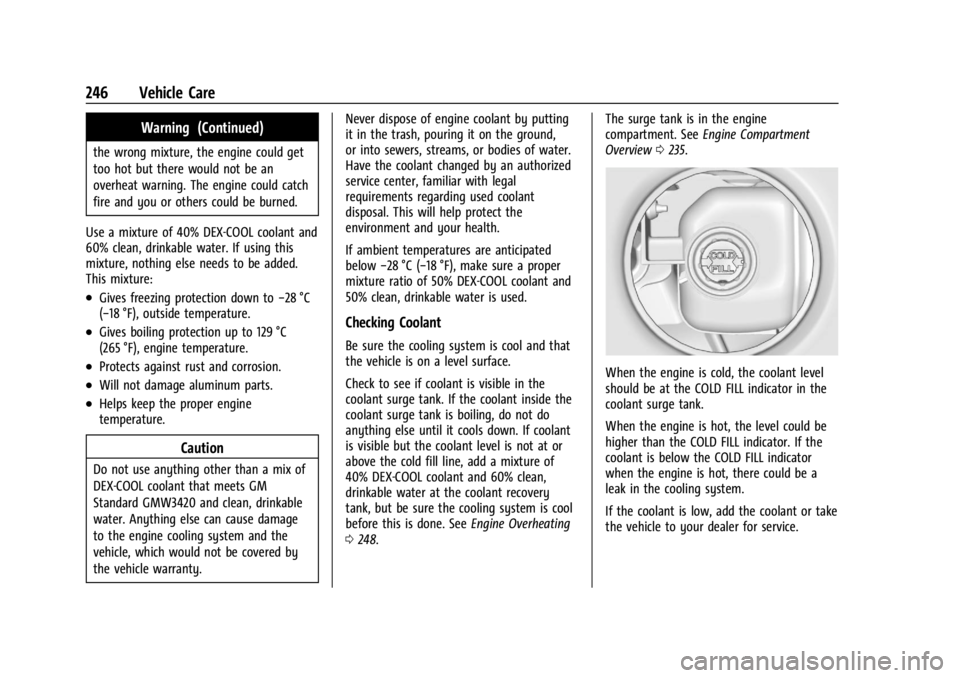
When the engine is cold, the coolant level
should be at the COLD FILL indicator in the
coolant surge tank.
When the engine is hot, the level could be
higher than the COLD FILL indicator. If the
coolant is below the COLD FILL indicator
when the engine is hot, there could be a
leak in the cooling system.
If the coolant is low, add the coolant or take
the vehicle to your dealer for service.
Page 249 of 339
Chevrolet Corvette Owner Manual (GMNA-Localizing-U.S./Canada/Mexico-
14622938) - 2021 - CRC - 9/22/20
248 Vehicle Care
7. Verify coolant level after the engine isshut off and the coolant is cold.
If necessary, repeat coolant fill procedure
Steps 3−7.
If the coolant still is not at the proper
level when the system cools down again,
see your dealer.
Caution
If the pressure cap is not tightly installed,
coolant loss and engine damage may
occur. Be sure the cap is properly and
tightly secured.
Engine Overheating
The vehicle has several indicators to warn of
engine overheating.
There is an engine coolant temperature
gauge on the instrument cluster. See Engine
Coolant Temperature Gauge 083. The
vehicle may also display a message on the
Driver Information Center (DIC).
If the decision is made not to lift the hatch
but to get service help right away, see
Roadside Assistance Program 0311.
If the decision is made to lift the hatch,
make sure the vehicle is parked on a level
surface. Then check to see if the engine cooling fans
are running. There are two cooling fans
located in the front (one at each corner) and
two cooling fans in the rear (one on each
side of the engine). If the engine is
overheating, the fans should be running.
If they are not, do not continue to run the
engine, and have the vehicle serviced.
Caution
Do not run the engine if there is a leak
in the engine cooling system. This can
cause a loss of all coolant and can
damage the system and vehicle. Have
any leaks fixed right away.
If Steam Is Coming from the Engine
{Warning
Steam and scalding liquids from a hot
cooling system are under pressure.
Turning the pressure cap, even a little,
can cause them to come out at high
speed and you could be burned. Never
turn the cap when the cooling system,
including the pressure cap, is hot. Wait
for the cooling system and pressure cap
to cool.
If Steam Is Coming from the Engine
Compartment with no Overheat Warning
Water from rain and car washes could enter
the engine compartment and contact hot
surfaces. If steam is coming from the engine
compartment with no accompanying
overheat warning, no service is needed.
If No Steam Is Coming from the Engine
If an engine overheat warning is displayed
but no steam can be seen or heard, the
problem may not be too serious. Sometimes
the engine can get a little too hot when the
vehicle:
.Climbs a long hill on a hot day.
.Stops after high-speed driving.
.Idles for long periods in traffic.
If the overheat warning is displayed with no
sign of steam: 1. Turn the air conditioning off.
2. Turn the heater on to the highest temperature and to the highest fan
speed. Open the windows as necessary.
3. When it is safe to do so, pull off the road, shift to P (Park) or N (Neutral), and
let the engine idle.
Page 250 of 339
Chevrolet Corvette Owner Manual (GMNA-Localizing-U.S./Canada/Mexico-
14622938) - 2021 - CRC - 9/22/20
Vehicle Care 249
If the engine coolant temperature gauge is
no longer in the shaded area or an overheat
warning no longer displays, the vehicle can
be driven. Continue to drive the vehicle
slowly for about 10 minutes. Keep a safe
vehicle distance from the vehicle in front.
If the warning does not come back on,
continue to drive normally and have the
cooling system checked for proper fill and
function.
If the warning continues, pull over safely,
and park the vehicle right away.
If there is no sign of steam, idle the engine
for three minutes while parked. If the
warning is still displayed, turn off the
engine until it cools down.
Washer Fluid
What to Use
When the vehicle needs windshield washer
fluid, be sure to read the manufacturer
instructions before use. If the vehicle will be
operating in an area where the temperature
may fall below freezing, use a fluid that has
sufficient protection against freezing.
Adding Washer Fluid
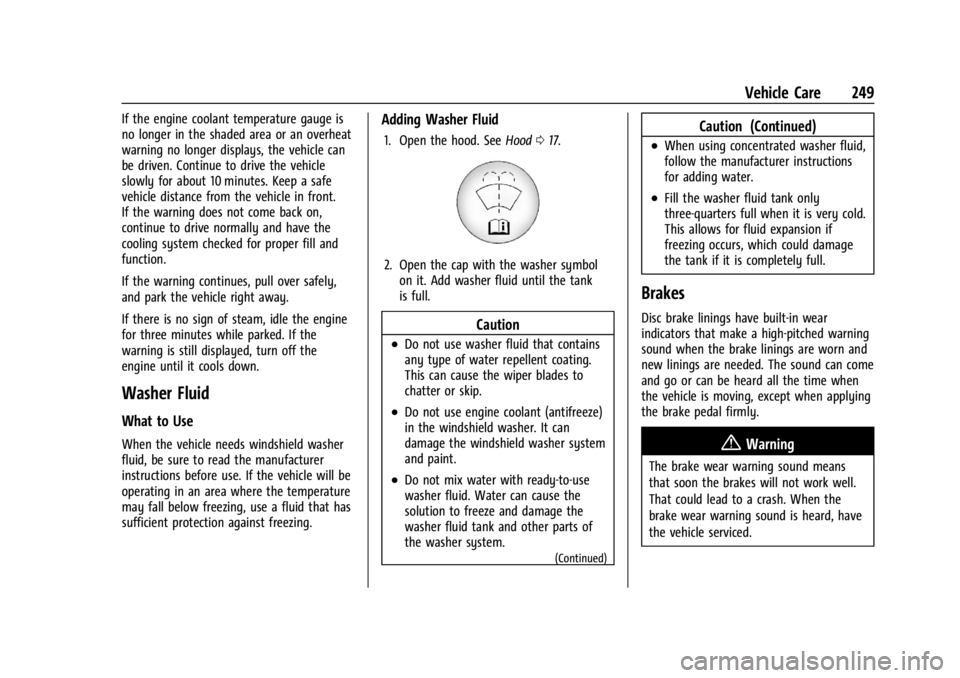
1. Open the hood. SeeHood017.
2. Open the cap with the washer symbol
on it. Add washer fluid until the tank
is full.
Caution
.Do not use washer fluid that contains
any type of water repellent coating.
This can cause the wiper blades to
chatter or skip.
.Do not use engine coolant (antifreeze)
in the windshield washer. It can
damage the windshield washer system
and paint.
.Do not mix water with ready-to-use
washer fluid. Water can cause the
solution to freeze and damage the
washer fluid tank and other parts of
the washer system.
(Continued)
Caution (Continued)
.When using concentrated washer fluid,
follow the manufacturer instructions
for adding water.
.Fill the washer fluid tank only
three-quarters full when it is very cold.
This allows for fluid expansion if
freezing occurs, which could damage
the tank if it is completely full.
Brakes
Disc brake linings have built-in wear
indicators that make a high-pitched warning
sound when the brake linings are worn and
new linings are needed. The sound can come
and go or can be heard all the time when
the vehicle is moving, except when applying
the brake pedal firmly.
{Warning
The brake wear warning sound means
that soon the brakes will not work well.
That could lead to a crash. When the
brake wear warning sound is heard, have
the vehicle serviced.
Page 301 of 339
Chevrolet Corvette Owner Manual (GMNA-Localizing-U.S./Canada/Mexico-
14622938) - 2021 - CRC - 9/22/20
300 Service and Maintenance
Tires
Tires need to be properly inflated, rotated,
and balanced. Maintaining the tires can save
money and fuel, and can reduce the risk of
tire failure.
.Signs that the tires need to be replaced
include three or more visible treadwear
indicators; cord or fabric showing through
the rubber; cracks or cuts in the tread or
sidewall; or a bulge or split in the tire.
.Trained dealer technicians can inspect and
recommend the right tires. Your dealer
can also provide tire/wheel balancing
services to ensure smooth vehicle
operation at all speeds. Your dealer sells
and services name brand tires.
Vehicle Care
To help keep the vehicle looking like new,
vehicle care products are available from your
dealer. For information on how to clean and
protect the vehicle’s interior and exterior,
see Interior Care 0288 and
Exterior Care 0283. Front Air Dam and Splitter
These components not only enhance the
looks of a vehicle, they are important for
fuel economy and vehicle handling as well.
Inspect front air dam and splitter. See your
dealer if missing or damaged. See
Front Air
Dam (and Splitter) 0191 and
Composite Materials 0191.
Wheel Alignment
Wheel alignment is critical for ensuring that
the tires deliver optimal wear and
performance.
.Signs that the alignment may need to be
adjusted include pulling, improper vehicle
handling, or unusual tire wear.
.Your dealer has the required equipment
to ensure proper wheel alignment. Windshield
For safety, appearance, and the best
viewing, keep the windshield clean and
clear.
.Signs of damage include scratches, cracks,
and chips.
.Trained dealer technicians can inspect the
windshield and recommend proper
replacement if needed.
Wiper Blades
Wiper blades need to be cleaned and kept in
good condition to provide a clear view.
.Signs of wear include streaking, skipping
across the windshield, and worn or split
rubber.
.Trained dealer technicians can check the
wiper blades and replace them when
needed.
Page 330 of 339

Chevrolet Corvette Owner Manual (GMNA-Localizing-U.S./Canada/Mexico-
14622938) - 2021 - CRC - 9/22/20
Index 329
Automatic (cont'd)Headlamp System . . . . . . . . . . . . . . . . . . . . . 106
Auxiliary Jack . . . . . . . . . . . . . . . . . . . . . . . . . . . . . 123
Avoiding Untrusted Media Devices . . . . . . . 120
B
Battery Exterior Lighting Battery Saver . . . . . . . . 109
Power Protection . . . . . . . . . . . . . . . . . . . . . . 109
Battery - North America . . . . . . . . . . . . . 251, 278
Blade Replacement, Wiper . . . . . . . . . . . . . . . 252
Bluetooth Overview . . . . . . . . . . . . . . . . . . . . . . . . . . . . . . 147
Bluetooth Audio . . . . . . . . . . . . . . . . . . . . . . . . . . 123
Brake Electric Boost . . . . . . . . . . . . . . . . . . . . . . . . . . 203
Parking, Electric . . . . . . . . . . . . . . . . . . . . . . . . 204
System Warning Light . . . . . . . . . . . . . . . . . . 87
Brakes . . . . . . . . . . . . . . . . . . . . . . . . . . . . . . . . . . . 249 Antilock . . . . . . . . . . . . . . . . . . . . . . . . . . . . . . . . 203
Assist . . . . . . . . . . . . . . . . . . . . . . . . . . . . . . . . . . 205
Fluid . . . . . . . . . . . . . . . . . . . . . . . . . . . . . . . . . . . 250
Braking . . . . . . . . . . . . . . . . . . . . . . . . . . . . . . . . . . . 177
Break-In, New Vehicle . . . . . . . . . . . . . . . . . . . . 190
Buckle To Drive . . . . . . . . . . . . . . . . . . . . . . . . . . . 46
Bulb Replacement Headlamp Aiming . . . . . . . . . . . . . . . . . . . . . . 254
Buying New Tires . . . . . . . . . . . . . . . . . . . . . . . . 274
C
Calibration . . . . . . . . . . . . . . . . . . . . . . . . . . . . . . . . .75
California Perchlorate Materials Requirements . . . 231
California Proposition
65 Warning . . . . . . . . . . . . . . . . . . . .231, 251, 278, Back Cover
Canadian Vehicle Owners . . . . . . . . . . . . . . . . . . . 1
Capacities and Specifications . . . . . . . . . . . . . 305
Carbon Monoxide Engine Exhaust . . . . . . . . . . . . . . . . . . . . . . . . 196
Hatch . . . . . . . . . . . . . . . . . . . . . . . . . . . . . . . . . . . 19
Winter Driving . . . . . . . . . . . . . . . . . . . . . . . . . 186
Cargo
Tie-Downs . . . . . . . . . . . . . . . . . . . . . . . . . . . . . . 72
Caution, Danger, and Warning . . . . . . . . . . . . . .2
Center Console Storage . . . . . . . . . . . . . . . . . . . .72
Chains, Tire . . . . . . . . . . . . . . . . . . . . . . . . . . . . . . 278
Charging Wireless . . . . . . . . . . . . . . . . . . . . . . . . . . . . . . . . 77
Charging System Light . . . . . . . . . . . . . . . . . . . . 85
Check Engine Light (Malfunction Indicator) . . . . 86
Child Restraints
Infants and Young Children . . . . . . . . . . . . . 62
Lower Anchors and Tethers forChildren . . . . . . . . . . . . . . . . . . . . . . . . . . . . . . . 66
Older Children . . . . . . . . . . . . . . . . . . . . . . . . . . 61 Child Restraints (cont'd)
Securing . . . . . . . . . . . . . . . . . . . . . . . . . . . . . . . . 66
Systems . . . . . . . . . . . . . . . . . . . . . . . . . . . . . . . . 64
Circuit Breakers . . . . . . . . . . . . . . . . . . . . . . . . . . 255
Cleaning Exterior Care . . . . . . . . . . . . . . . . . . . . . . . . . . . 283
Interior Care . . . . . . . . . . . . . . . . . . . . . . . . . . . 288
Climate Control Systems Dual Automatic . . . . . . . . . . . . . . . . . . . . . . . . 170
Clock . . . . . . . . . . . . . . . . . . . . . . . . . . . . . . . . . . . . . .75
Cluster, Instrument . . . . . . . . . . . . . . . . . . . . . . . 79
Collision Damage Repair . . . . . . . . . . . . . . . . . .314
Compartment Underhood . . . . . . . . . . . . . . . . . . . . . . . . . . . . 234
Compartments Storage . . . . . . . . . . . . . . . . . . . . . . . . . . . . . . . . . 70
Compass . . . . . . . . . . . . . . . . . . . . . . . . . . . . . . . . . . .75
Competitive Driving Mode . . . . . . . . . . . . . . . .214
Composite Materials . . . . . . . . . . . . . . . . . . . . . . 191
Connected Services Connections . . . . . . . . . . . . . . . . . . . . . . . . . . . 326
Diagnostics . . . . . . . . . . . . . . . . . . . . . . . . . . . . 327
Navigation . . . . . . . . . . . . . . . . . . . . . . . . . . . . . 325
Connections Connected Services . . . . . . . . . . . . . . . . . . . . 326
Control
Hill Rollback . . . . . . . . . . . . . . . . . . . . . . . . . . . 207
Traction and Electronic Stability . . . . . . . 205
Page 333 of 339

Chevrolet Corvette Owner Manual (GMNA-Localizing-U.S./Canada/Mexico-
14622938) - 2021 - CRC - 9/22/20
332 Index
General InformationService and Maintenance . . . . . . . . . . . . . . 292
Towing . . . . . . . . . . . . . . . . . . . . . . . . . . . . . . . . 228
Vehicle Care . . . . . . . . . . . . . . . . . . . . . . . . . . . 231
Global Positioning System (GPS) . . . . . . . . . . 135
Glove Box . . . . . . . . . . . . . . . . . . . . . . . . . . . . . . . . 70
GM Mobility Reimbursement Program . . . . 311
Guidance Problems with the Route . . . . . . . . . . . . . . 136
H
Hatch . . . . . . . . . . . . . . . . . . . . . . . . . . . . . . . . . . . . . .19
Hazard Warning Flashers . . . . . . . . . . . . . . . . 107
HD Radio Technology . . . . . . . . . . . . . . . . . . . . . 118
Head Restraints . . . . . . . . . . . . . . . . . . . . . . . . . . . 39
Head-up Display . . . . . . . . . . . . . . . . . . . . . . . . . . 93
HeadlampsAiming . . . . . . . . . . . . . . . . . . . . . . . . . . . . . . . . 254
Automatic . . . . . . . . . . . . . . . . . . . . . . . . . . . . . 106
Daytime Running Lamps (DRL) . . . . . . . . . 106
Flash-to-Pass . . . . . . . . . . . . . . . . . . . . . . . . . . . 106
High-Beam On Light . . . . . . . . . . . . . . . . . . . . 91
High/Low Beam Changer . . . . . . . . . . . . . . 105
Lamps On Reminder . . . . . . . . . . . . . . . . . . . . 91
Heated Steering Wheel . . . . . . . . . . . . . . . . . . . . . . . . . 74
Heated and Ventilated Front Seats . . . . . . . 44
Heated Mirrors . . . . . . . . . . . . . . . . . . . . . . . . . . . 26 Heating . . . . . . . . . . . . . . . . . . . . . . . . . . . . . . . . . . 170
High-Beam On Light . . . . . . . . . . . . . . . . . . . . . . .91
High-Speed Operation . . . . . . . . . . . . . . . . . . . 268
Hill and Mountain Roads . . . . . . . . . . . . . . . . 186
Hill Rollback Control . . . . . . . . . . . . . . . . . . . . . 207
Hill Start Assist (HSA) . . . . . . . . . . . . . . . . . . . . 205
Hood . . . . . . . . . . . . . . . . . . . . . . . . . . . . . . . . . . . . . . 17
Horn . . . . . . . . . . . . . . . . . . . . . . . . . . . . . . . . . . . . . . 74
How to Wear Seat Belts Properly . . . . . . . . . 46
HVAC . . . . . . . . . . . . . . . . . . . . . . . . . . . . . . . . . . . . 170I
If the System Needs Service . . . . . . . . . . . . . 136
Ignition Positions . . . . . . . . . . . . . . . . . . . . . . . . 192
Immobilizer . . . . . . . . . . . . . . . . . . . . . . . . . . . . . . . .23
Infants and Young Children, Restraints . . . . 62
Information
Publication Ordering . . . . . . . . . . . . . . . . . . . 316
Infotainment System . . . . . . . . . . . . . . . . . . . . 319
Instrument Cluster . . . . . . . . . . . . . . . . . . . . . . . . 79
Instrument Panel Overview . . . . . . . . . . . . . . . . 4
Interior Rearview Mirrors . . . . . . . . . . . . . . . . . 26
Introduction . . . . . . . . . . . . . . . . . . . . . . . . . . . 1, 110
J
Jack Auxiliary . . . . . . . . . . . . . . . . . . . . . . . . . . . . . . . 123
Jump Starting - North America . . . . . . . . . . . 278
K
Keyless Entry Remote (RKE) System . . . . . . . . . . . . . . . . . . . . 7
Keys . . . . . . . . . . . . . . . . . . . . . . . . . . . . . . . . . . . . . . . 6
L
Labeling, Tire Sidewall . . . . . . . . . . . . . . . . . . . 263
Lamps Courtesy . . . . . . . . . . . . . . . . . . . . . . . . . . . . . . . 108
Daytime Running (DRL) . . . . . . . . . . . . . . . . 106
Engine Compartment . . . . . . . . . . . . . . . . . . 108
Exterior Controls . . . . . . . . . . . . . . . . . . . . . . . 105
Exterior Lamps Off Reminder . . . . . . . . . . 105
Exterior Lighting Battery Saver . . . . . . . . 109
Malfunction Indicator (CheckEngine) . . . . . . . . . . . . . . . . . . . . . . . . . . . . . . . 86
On Reminder . . . . . . . . . . . . . . . . . . . . . . . . . . . 91
Reading . . . . . . . . . . . . . . . . . . . . . . . . . . . . . . . . 108
Lap-Shoulder Belt . . . . . . . . . . . . . . . . . . . . . . . . . 48
LATCH, Lower Anchors and Tethers for Children . . . . . . . . . . . . . . . . . . . . . . . . . . . . . . . . . 66
LED Lighting . . . . . . . . . . . . . . . . . . . . . . . . . . . . . 254
Lifting the Vehicle, Tires . . . . . . . . . . . . . . . . . 232
Light Performance Shifting . . . . . . . . . . . . . . . . . . . 89
Lighting Entry . . . . . . . . . . . . . . . . . . . . . . . . . . . . . . . . . . 109
Exit . . . . . . . . . . . . . . . . . . . . . . . . . . . . . . . . . . . . 109
Page 334 of 339

Chevrolet Corvette Owner Manual (GMNA-Localizing-U.S./Canada/Mexico-
14622938) - 2021 - CRC - 9/22/20
Index 333
Lighting (cont'd)Illumination Control . . . . . . . . . . . . . . . . . . . 108
LED . . . . . . . . . . . . . . . . . . . . . . . . . . . . . . . . . . . . 254
Lights Airbag Readiness . . . . . . . . . . . . . . . . . . . . . . . 84
Antilock Brake System (ABS)Warning . . . . . . . . . . . . . . . . . . . . . . . . . . . . . . 88
Brake System Warning . . . . . . . . . . . . . . . . . 87
Charging System . . . . . . . . . . . . . . . . . . . . . . . 85
Check Engine (Malfunction Indicator) . . . . . . . . . . . . . . . . . . . . . . . . . . . . . 86
Cruise Control . . . . . . . . . . . . . . . . . . . . . . . . . . 91
Door Ajar . . . . . . . . . . . . . . . . . . . . . . . . . . . . . . . 91
Electric Parking Brake . . . . . . . . . . . . . . . . . . . 88
Electronic Stability Control (ESC), Off . . . . . . . . . . . . . . . . . . . . . . . . . . . . . 90
Engine Oil Pressure . . . . . . . . . . . . . . . . . . . . . 90
Flash-to-Pass . . . . . . . . . . . . . . . . . . . . . . . . . . . 106
Front Lift System . . . . . . . . . . . . . . . . . . . . . . . 87
High-Beam On . . . . . . . . . . . . . . . . . . . . . . . . . . 91
High/Low Beam Changer . . . . . . . . . . . . . . 105
Seat Belt Reminders . . . . . . . . . . . . . . . . . . . . 84
Security . . . . . . . . . . . . . . . . . . . . . . . . . . . . . . . . . 91
Service Electric Parking Brake . . . . . . . . . . . 88
Tire Pressure . . . . . . . . . . . . . . . . . . . . . . . . . . . . 90
Traction Off . . . . . . . . . . . . . . . . . . . . . . . . . . . . . 89
Limited-Slip Differential . . . . . . . . . . . . . . . . . . . 217 Locks
Automatic Door . . . . . . . . . . . . . . . . . . . . . . . . . 16
Delayed Locking . . . . . . . . . . . . . . . . . . . . . . . . 16
Door . . . . . . . . . . . . . . . . . . . . . . . . . . . . . . . . . . . . 14
Lockout Protection . . . . . . . . . . . . . . . . . . . . . . . 17
Loss of Control . . . . . . . . . . . . . . . . . . . . . . . . . . 179
Low-Profile Tires . . . . . . . . . . . . . . . . . . . . . . . . . 263
Lower Anchors and Tethers for Children (LATCH System) . . . . . . . . . . . . . . . . 66
Lumbar Adjustment . . . . . . . . . . . . . . . . . . . . . . . 40 Front Seats . . . . . . . . . . . . . . . . . . . . . . . . . . . . . 40
M
Maintenance
Records . . . . . . . . . . . . . . . . . . . . . . . . . . . . . . . . 303
Maintenance and Care Additional . . . . . . . . . . . . . . . . . . . . . . . . . . . . . 298
Maintenance Schedule . . . . . . . . . . . . . . . . . . . 293 Recommended Fluids andLubricants . . . . . . . . . . . . . . . . . . . . . . . . . . . . 301
Malfunction Indicator Lamp . . . . . . . . . . . . . . . 86
Manual Mode . . . . . . . . . . . . . . . . . . . . . . . . . . . 200
Map Data Updates . . . . . . . . . . . . . . . . . . . . . . . 136
Maps . . . . . . . . . . . . . . . . . . . . . . . . . . . . . . . . . . . . .128
Media Avoiding Untrusted Devices . . . . . . . . . . . . 120
Memory Seats . . . . . . . . . . . . . . . . . . . . . . . . . . . . .41 Messages
Engine Power . . . . . . . . . . . . . . . . . . . . . . . . . . . 97
Vehicle . . . . . . . . . . . . . . . . . . . . . . . . . . . . . . . . . 97
Vehicle Speed . . . . . . . . . . . . . . . . . . . . . . . . . . . 97
Mirror Rear Camera . . . . . . . . . . . . . . . . . . . . . . . . . . . . 27
Mirrors
Automatic Dimming . . . . . . . . . . . . . . . . . . . . 26
Automatic Dimming Rearview . . . . . . . . . . 26
Convex . . . . . . . . . . . . . . . . . . . . . . . . . . . . . . . . . 24
Folding . . . . . . . . . . . . . . . . . . . . . . . . . . . . . . . . . 25
Heated . . . . . . . . . . . . . . . . . . . . . . . . . . . . . . . . . 26
Manual Rearview . . . . . . . . . . . . . . . . . . . . . . . 26
Power . . . . . . . . . . . . . . . . . . . . . . . . . . . . . . . . . . 25
Tilt in Reverse . . . . . . . . . . . . . . . . . . . . . . . . . . 26
Mirrors, Interior Rearview . . . . . . . . . . . . . . . . . 26
Mode . . . . . . . . . . . . . . . . . . . . . . . . . . . . . . . . . . . . 207
Driver Control . . . . . . . . . . . . . . . . . . . . . . . . . 207
Monitor System, Tire Pressure . . . . . . . . . . . 269
N
Navigation Connected Services . . . . . . . . . . . . . . . . . . . . 325
Destination . . . . . . . . . . . . . . . . . . . . . . . . . . . . 129
Using the System . . . . . . . . . . . . . . . . . . . . . . 125
Navigation Symbols . . . . . . . . . . . . . . . . . . . . . .128
Net, Convenience . . . . . . . . . . . . . . . . . . . . . . . . . .72
New Vehicle Break-In . . . . . . . . . . . . . . . . . . . . 190