remote start CHEVROLET CRUZE 2011 1.G User Guide
[x] Cancel search | Manufacturer: CHEVROLET, Model Year: 2011, Model line: CRUZE, Model: CHEVROLET CRUZE 2011 1.GPages: 394, PDF Size: 6.89 MB
Page 81 of 394
Black plate (33,1)Chevrolet Cruze Owner Manual - 2011
Seats and Restraints 3-33
In many crashes severe enough to
inflate the airbag, windshields are
broken by vehicle deformation.
Additional windshield breakage may
also occur from the right front
passenger airbag.
.Airbags are designed to inflate
only once. After an airbag
inflates, you will need some new
parts for the airbag system.
If you do not get them, the
airbag system will not be there
to help protect you in another
crash. A new system will include
airbag modules and possibly
other parts. The service manual
for your vehicle covers the need
to replace other parts.
.The vehicle has a crash sensing
and diagnostic module which
records information after a
crash. SeeVehicle Data
Recording and Privacy on
page 13‑14 andEvent Data
Recorders on page 13‑15.
.Let only qualified technicians
work on the airbag systems.
Improper service can mean that
an airbag system will not work
properly. See your dealer for
service.
Passenger Sensing
System
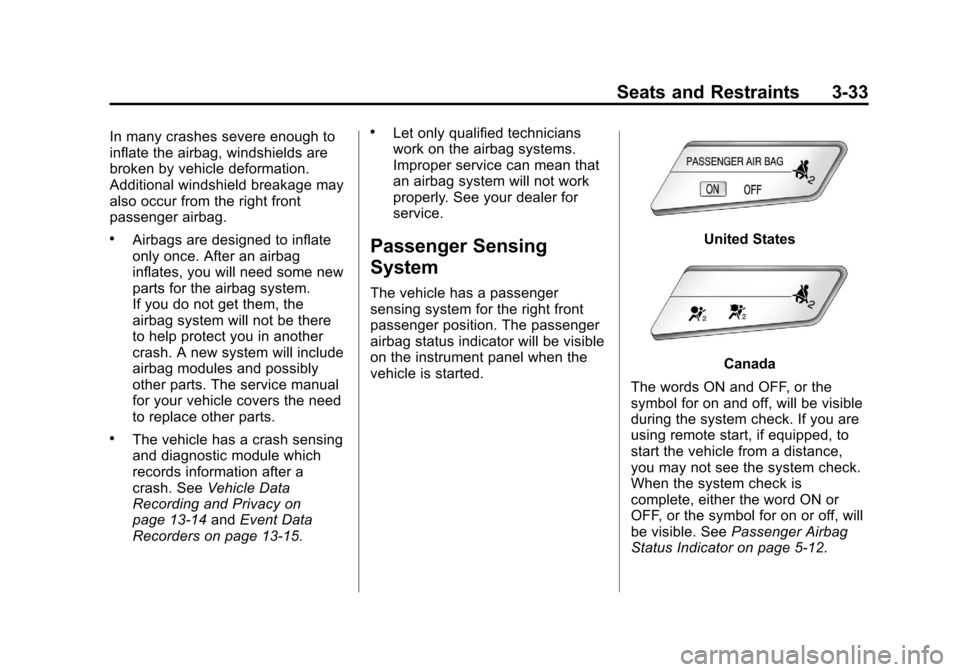
The vehicle has a passenger
sensing system for the right front
passenger position. The passenger
airbag status indicator will be visible
on the instrument panel when the
vehicle is started.
United States
Canada
The words ON and OFF, or the
symbol for on and off, will be visible
during the system check. If you are
using remote start, if equipped, to
start the vehicle from a distance,
you may not see the system check.
When the system check is
complete, either the word ON or
OFF, or the symbol for on or off, will
be visible. See Passenger Airbag
Status Indicator on page 5‑12.
Page 124 of 394
Black plate (12,1)Chevrolet Cruze Owner Manual - 2011
5-12 Instruments and Controls
Passenger Airbag Status
Indicator
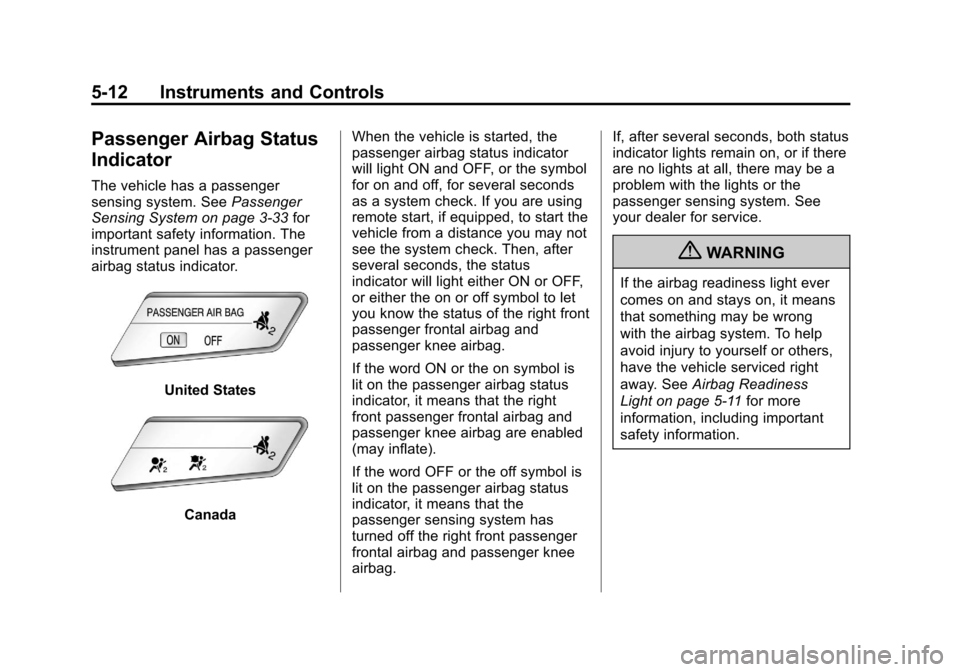
The vehicle has a passenger
sensing system. SeePassenger
Sensing System on page 3‑33 for
important safety information. The
instrument panel has a passenger
airbag status indicator.
United States
Canada When the vehicle is started, the
passenger airbag status indicator
will light ON and OFF, or the symbol
for on and off, for several seconds
as a system check. If you are using
remote start, if equipped, to start the
vehicle from a distance you may not
see the system check. Then, after
several seconds, the status
indicator will light either ON or OFF,
or either the on or off symbol to let
you know the status of the right front
passenger frontal airbag and
passenger knee airbag.
If the word ON or the on symbol is
lit on the passenger airbag status
indicator, it means that the right
front passenger frontal airbag and
passenger knee airbag are enabled
(may inflate).
If the word OFF or the off symbol is
lit on the passenger airbag status
indicator, it means that the
passenger sensing system has
turned off the right front passenger
frontal airbag and passenger knee
airbag. If, after several seconds, both status
indicator lights remain on, or if there
are no lights at all, there may be a
problem with the lights or the
passenger sensing system. See
your dealer for service.
{WARNING
If the airbag readiness light ever
comes on and stays on, it means
that something may be wrong
with the airbag system. To help
avoid injury to yourself or others,
have the vehicle serviced right
away. See
Airbag Readiness
Light on page 5‑11 for more
information, including important
safety information.
Page 140 of 394
Black plate (28,1)Chevrolet Cruze Owner Manual - 2011
5-28 Instruments and Controls
On the Canadian base level cluster,
vehicle messages appear as code
numbers.
25:Left front turn indicator failure
26: Left rear turn indicator failure
27: Right front turn indicator failure
28: Right rear turn indicator failure
35: Replace battery in radio remote
control
53: Tighten gas cap
68: Service power steering
75: Service air conditioner
82: Change engine oil soon
84: Engine power is reduced
95: Service airbagVehicle Messages
(Canada Uplevel and
United States)
DIC messages display when the
status of the vehicle has changed
and action may be needed to
correct the condition. Multiple
messages appear one after another.
Press any of the DIC buttons on the
turn signal lever to acknowledge
and clear them from the display.
More urgent messages cannot be
cleared from the DIC display. All
messages should be taken
seriously. Clearing messages will
not correct the problem.
On the Canadian uplevel cluster
and on vehicles sold in the United
States, vehicle messages are
displayed as text. The messages
and information about them follow.
Battery Voltage and
Charging Messages
BATTERY SAVER ACTIVE
This message displays when the
vehicle has detected that the battery
voltage is dropping beyond a
reasonable point. The battery saver
system starts reducing certain
features of the vehicle that you may
be able to notice. At the point that
features are disabled, this message
is displayed. It means that the
vehicle is trying to save the charge
in the battery. Turn off unnecessary
accessories to allow the battery to
recharge.
LOW BATTERY
This message is displayed when the
battery voltage is low. See Battery
on page 10‑26 for more information.
Page 147 of 394
Black plate (35,1)Chevrolet Cruze Owner Manual - 2011
Instruments and Controls 5-35
Entering the Personalization
Menus
1. Press CONFIG to access theConfiguration Settings menu.
2. Turn the MENU or MENU/SEL knob to highlight Vehicle
Settings. Press the CONFIG
button until Vehicle is highlighted
on vehicles with navigation
system only.
3. Press the center of the MENU or MENU/SEL knob to select the
Vehicle Settings menu. Key myst
be in the run position.
The following list of menu items will
be available:
.Climate and Air Quality
.Comfort and Convenience
.Collision/Detection Systems
.Languages
.Lighting
.Power Door Locks
.Remote Locking, Unlocking,
Starting
.Return to Factory Settings
Turn the MENU or MENU/SEL knob
to highlight the menu. Press the
knob to select it. Each of the menus
is detailed in the following
information.
Vehicles with a Navigation system
will display a check mark to indicate
this feature is on.
Climate and Air Quality
If equipped, select the Climate and
Air Quality menu and the following
will be displayed:
.Auto Fan Speed
.Air Quality Sensor
.Remote Start Auto Heat Seats
.Auto Defog
.Auto Rear Defog Auto Fan Speed
This will allow you to select the
automatic fan speed. This feature
sets the climate control fan speed to
maintain the interior temperature.
Press the MENU or MENU/SEL
knob when Auto Fan Speed is
highlighted to open the menu. Turn
the knob to highlight High, Medium,
or Low. Press the BACK button to
confirm the selection and move
back to the last menu.
Air Quality Sensor
This will allow you to select whether
the system will operate at high or
low sensitivity. Only vehicles with
the automatic climate control will
have this option.
Press the MENU or MENU/SEL
knob when Air Quality Sensor is
highlighted to open the menu. Turn
the knob to highlight High Sensitivity
or Low Sensitivity. Press the BACK
button to confirm the selection and
move back to the last menu.
Page 148 of 394
Black plate (36,1)Chevrolet Cruze Owner Manual - 2011
5-36 Instruments and Controls
Remote Start Auto Heat Seats
On vehicles with remote start and
heated seats, the heated seats can
be set to on or off.
Press the MENU or MENU/SEL
knob when Remote Start Auto Heat
Seats is highlighted to open the
menu. Turn the knob to highlight On
or Off. Press the BACK button to
confirm the selection and move
back to the last menu.
Auto Defog
When turned On and high humidity
is detected, the climate control
system may adjust to outside air
supply and turn on the air
conditioner or the heater. The fan
speed may slightly increase to help
prevent fogging. When high
humidity is no longer detected, the
system will return to its prior
operation.
Press the MENU or MENU/SEL
knob when Auto Defog is
highlighted to open the menu. Turn
the knob to highlight On or Off.Press the BACK button to confirm
the selection and move back to the
last menu.
Auto Rear Defog
When on, this feature turns on the
rear defogger at vehicle start when
the interior temperature is cold and
likely fog. The Auto rear defog
function can be disabled by
pressing
1. When OFF, the feature
can be turned on by pressing
1.
See “Rear Window Defogger” under
Climate Control Systems on
page 8‑1 for more information.
Press the MENU or MENU/SEL
knob when Auto Rear Defog is
highlighted to open the menu. Turn
the knob to highlight On or Off.
Press the knob to confirm the
selection and move back to the
last menu.
Comfort and Convenience
Select the Comfort and
Convenience menu and Chime
Volume will be displayed. Chime Volume
This allows the selection of the
chime volume level.
Press the MENU or MENU/SEL
knob when Chime Volume is
highlighted. Turn the knob to select
Normal or High. Press the BACK
button to confirm and go back to the
last menu.
Collision/Detection Systems
If equipped, select the Collision/
Detection Systems menu and Park
Assist will be displayed.
Park Assist
This allows the Ultrasonic Parking
Assist feature, audible only, to be
turned on or off.
Press the MENU or MENU/SEL
knob when Park Assist is
highlighted. Turn the knob to select
On or Off. Press the knob to confirm
and go back to the last menu.
Page 150 of 394
Black plate (38,1)Chevrolet Cruze Owner Manual - 2011
5-38 Instruments and Controls
Delayed Door Lock
When on, this feature will delay
the locking of the doors until
five seconds after the last door is
closed. You will hear three chimes
to signal delayed locking is in use.
Press either the power lock button
or the lock button on the RKE
transmitter twice to override the
delayed locking feature and
immediately lock all of the doors.
Press the MENU or MENU/SEL
knob when Delayed Door Lock is
highlighted to select On or Off.
Press BACK to return to the
last menu.
Unlocked Door Anti Lock Out
When on, all doors will lock. The
driver door will then unlock if door
locking is requested while the
drivers door is open and disables
Delayed Door Lock feature.Even when this feature is off, the
driver is protected from accidental
lockouts when the key is in the
ignition.
If Off is selected, the Delayed Door
Lock feature may be enabled
through an additional menu
selection.
Press the MENU or MENU/SEL
knob when Unlocked Door Anti Lock
Out is highlighted to select On or
Off. Press BACK to return to the
last menu.
Auto Door Lock
This allows selection of which of the
doors will automatically lock when
the vehicle is shifted into P (Park).
Press the MENU or MENU/SEL
knob when Auto Door Lock is
highlighted. Turn the knob to select
On or Off. Press the knob to confirm
and go back to the last menu.Remote Locking, Unlocking,
Starting
Select Remote Locking, Unlocking,
Starting and the following will be
displayed (depending on system):
.Remote Lock Feedback
.Door Unlock or Remote
Door Lock
.Remote Unlock Light Feedback
.Remote Start
Remote Lock Feedback
This allows selection of what type of
feedback is given when locking the
vehicle with the RKE transmitter.
Press the MENU or MENU/SEL
knob when Remote Lock Feedback
is highlighted. Turn the knob to
select Lights and Horn, Lights Only,
Horn Only, or Off. Press the knob to
confirm and go back to the
last menu.
Page 151 of 394
Black plate (39,1)Chevrolet Cruze Owner Manual - 2011
Instruments and Controls 5-39
Door Unlock or Remote Door Lock
This allows selection of which doors
will unlock when pressing the unlock
button on the RKE transmitter.
Press the MENU or MENU/SEL
knob when Door Unlock is
highlighted. Turn the knob to select
All Doors or Driver Door Only. When
set to Driver Door Only, the driver
door will unlock the first time the
unlock button is pressed and all
doors will unlock when the button is
pressed a second time. When set to
All Doors, all of the doors will unlock
at the first press of the unlock
button. Press the knob to confirm
and go back to the last menu.Remote Unlock Light Feedback
If equipped, this allows selection of
what type of feedback is given when
unlocking the vehicle with the RKE
transmitter.
Press the MENU or MENU/SEL
knob when Remote Unlock Light
Feedback is highlighted. Turn the
knob to select On or Off. Press the
knob to confirm and go back to the
last menu.
Remote Start
If equipped, this allows selection to
turn on or off Remote Start.
Press the MENU or MENU/SEL
knob when Remote Start is
highlighted. Turn the knob to select
On or Off. Press the knob to confirm
and go back to the last menu.Return to Factory Settings
Select Return to Factory Settings to
return all vehicle personalization to
the default settings. Turn the knob
to select Yes or No. Press the knob
to confirm and go back to the
last menu.
Page 198 of 394
Black plate (6,1)Chevrolet Cruze Owner Manual - 2011
8-6 Climate Controls
For vehicles with heated outside
rearview mirrors, they turn on when
the rear window defogger button is
on and help to clear fog or frost from
the surface of the mirrors. See
Heated Mirrors on page 2‑12.
Notice:Do not try to clear frost
or other material from the inside
of the front windshield and rear
window with a razor blade or
anything else that is sharp. This
may damage the rear window
defogger grid and affect your
radio's ability to pick up stations
clearly. The repairs wouldn't be
covered by your warranty.
Heated Seats (If Equipped): Press
to turn the heated seats on or off.
See Heated Front Seats on
page 3‑7. Remote Start Climate Control
Operation:
For vehicles with the
remote vehicle start feature, the
climate control system may run
when the vehicle is started remotely.
The system will default to a heating
or cooling mode depending on the
outside temperature and then go
back to the previous settings. See
Remote Vehicle Start on page 2‑5.
The rear window defogger turns on
if it is cold outside.
Sensors
The solar sensor, located on top of
the instrument panel near the
windshield, monitors the solar heat.
The climate control system uses the
sensor information to adjust the
temperature, fan speed,
recirculation, and air delivery mode
for best comfort.
If the sensor is covered, the
automatic climate control system
may not work properly.
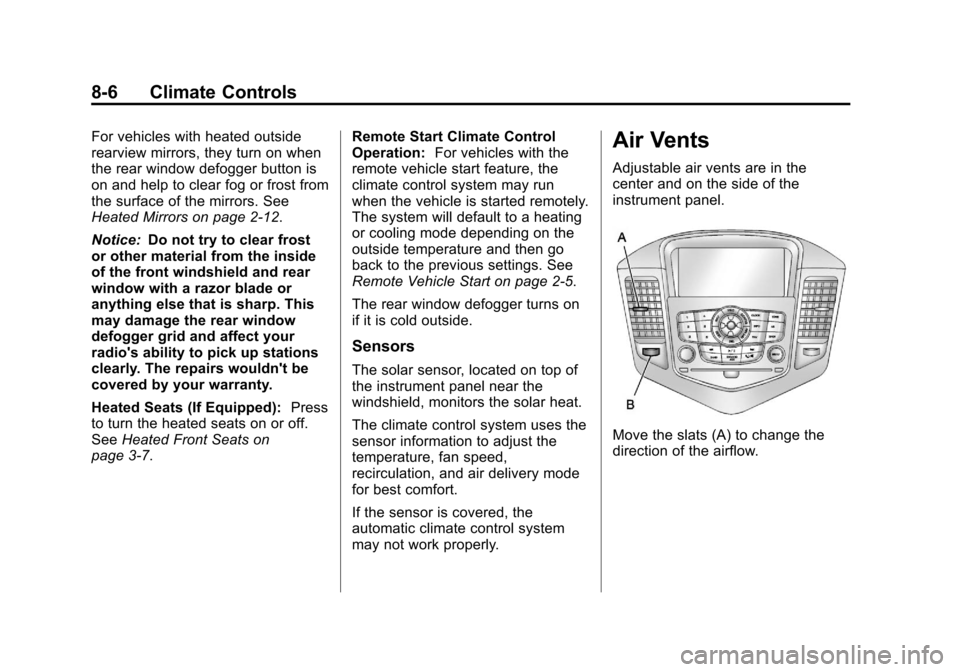
Air Vents
Adjustable air vents are in the
center and on the side of the
instrument panel.
Move the slats (A) to change the
direction of the airflow.
Page 259 of 394

Black plate (7,1)Chevrolet Cruze Owner Manual - 2011
Vehicle Care 10-7
A.Engine Air Cleaner/Filter on
page 10‑15.
B. Engine Oil Dipstick. See “Checking Engine Oil” under
Engine Oil on page 10‑9.
C. Electric Engine Cooling Fans (Out of View). See Cooling
System on page 10‑16.
D. Engine Oil Fill Cap. See “When
to Add Engine Oil” under
Engine Oil on page 10‑9. E. Remote Negative (-) Terminal.
See Jump Starting on
page 10‑84.
F. Brake/Clutch Fluid Reservoir. See “Brake Fluid” underBrakes
on page 10‑23 andHydraulic
Clutch on page 10‑14.
G. Battery on page 10‑26 (Under
Cover).
H. Engine Coolant Surge Tank and Pressure Cap. See Engine
Coolant on page 10‑17. I. Remote Positive (+) Terminal.
See Jump Starting on
page 10‑84.
J. Engine Compartment Fuse
Block on page 10‑37.
K. Windshield Washer Fluid Reservoir. See “Adding Washer
Fluid” under Washer Fluid on
page 10‑22.
Page 261 of 394
Black plate (9,1)Chevrolet Cruze Owner Manual - 2011
Vehicle Care 10-9
A.Engine Air Cleaner/Filter on
page 10‑15.
B. Engine Oil Dipstick. See “Checking Engine Oil” under
Engine Oil on page 10‑9.
C. Engine Cooling Fans (Out of View). See Cooling System on
page 10‑16.
D. Engine Oil Fill Cap. See “When
to Add Engine Oil” under
Engine Oil on page 10‑9.
E. Remote Negative (-) Terminal. See Jump Starting on
page 10‑84.
F. Brake/Clutch Fluid Reservoir. See “Brake Fluid” underBrakes
on page 10‑23 andHydraulic
Clutch on page 10‑14. G.
Battery on page 10‑26 (Under
Cover).
H. Engine Coolant Surge Tank and Pressure Cap. See Cooling
System on page 10‑16.
I. Remote Positive (+) Terminal. See Jump Starting on
page 10‑84.
J. Engine Compartment Fuse
Block on page 10‑37.
K. Windshield Washer Fluid Reservoir. See “Adding Washer
Fluid” under Washer Fluid on
page 10‑22.Engine Oil
To ensure proper engine
performance and long life, careful
attention must be paid to engine oil.
Following these simple, but
important steps will help protect
your investment:
.Always use engine oil approved
to the proper specification and of
the proper viscosity grade. See
“Selecting the Right Engine Oil”
in this section.
.Check the engine oil level
regularly and maintain the
proper oil level. See “Checking
Engine Oil” and“When to Add
Engine Oil” in this section.
.Change the engine oil at the
appropriate time. See Engine Oil
Life System on page 10‑12.
.Always dispose of engine oil
properly. See “What to Do With
Used Oil” in this section.