keyless CHEVROLET CRUZE 2012 1.G User Guide
[x] Cancel search | Manufacturer: CHEVROLET, Model Year: 2012, Model line: CRUZE, Model: CHEVROLET CRUZE 2012 1.GPages: 400, PDF Size: 6.88 MB
Page 36 of 400
Black plate (6,1)Chevrolet Cruze Owner Manual - 2012
2-6 Keys, Doors, and Windows
Programming Transmitters to
the Vehicle
Only RKE transmitters programmed
to the vehicle will work. If a
transmitter is lost or stolen, a
replacement can be purchased and
programmed through your dealer.
The vehicle can be reprogrammed
so that lost or stolen transmitters no
longer work. Any remaining
transmitters will need to be
reprogrammed. Each vehicle can
have up to five transmitters matched
to it.
Programming with a Recognized
Transmitter (Keyless Access
Vehicles Only)
A new transmitter can be
programmed to the vehicle when
there is one recognized transmitter.
To program, the vehicle must be off
and all of the transmitters, both
currently recognized and new, must
be with you.
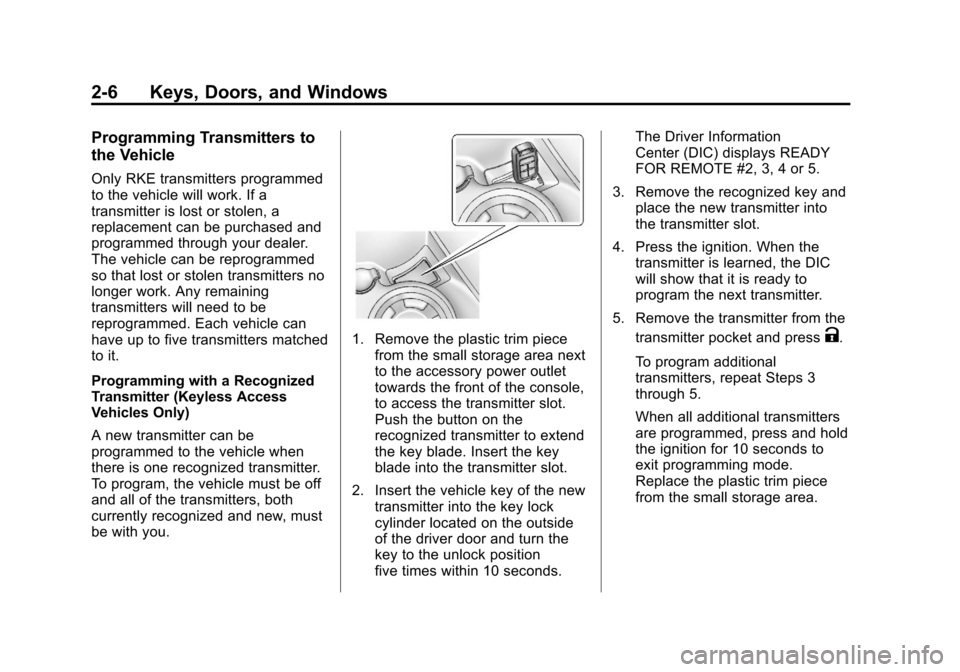
1. Remove the plastic trim piecefrom the small storage area next
to the accessory power outlet
towards the front of the console,
to access the transmitter slot.
Push the button on the
recognized transmitter to extend
the key blade. Insert the key
blade into the transmitter slot.
2. Insert the vehicle key of the new transmitter into the key lock
cylinder located on the outside
of the driver door and turn the
key to the unlock position
five times within 10 seconds. The Driver Information
Center (DIC) displays READY
FOR REMOTE #2, 3, 4 or 5.
3. Remove the recognized key and place the new transmitter into
the transmitter slot.
4. Press the ignition. When the transmitter is learned, the DIC
will show that it is ready to
program the next transmitter.
5. Remove the transmitter from the transmitter pocket and pressK.
To program additional
transmitters, repeat Steps 3
through 5.
When all additional transmitters
are programmed, press and hold
the ignition for 10 seconds to
exit programming mode.
Replace the plastic trim piece
from the small storage area.
Page 37 of 400
Black plate (7,1)Chevrolet Cruze Owner Manual - 2012
Keys, Doors, and Windows 2-7
Programming without a
Recognized Transmitter
(Keyless Access Vehicles Only)
If there are no currently recognized
transmitters available, follow this
procedure to program up to five
transmitters. This feature is not
available in Canada. This procedure
will take approximately 30 minutes
to complete. The vehicle must be off
and all of the transmitters you wish
to program must be with you.
1. Insert the vehicle key of thetransmitter into the key lock
cylinder located on the outside
of the driver door and turn the
key to the unlock position five
times within 10 seconds.
The Driver Information Center
(DIC) displays REMOTE LEARN
PENDING, PLEASE WAIT.
2. Wait for 10 minutes until the DIC displays PRESS ENGINE
START BUTTON TO LEARN
and then press the ignition. The DIC displays will again
show REMOTE LEARN
PENDING, PLEASE WAIT.
3. Repeat Step 2 two additional times. After the third time all
previously known transmitters
will no longer work with the
vehicle. Remaining transmitters
can be relearned during the
next steps.
The DIC display should
now show READY FOR
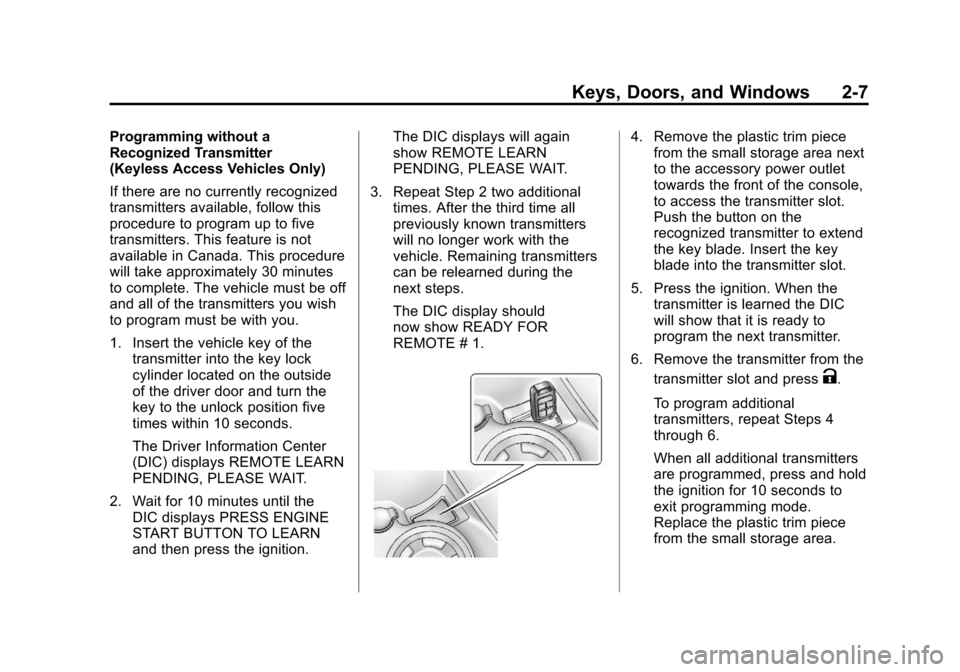
REMOTE # 1.4. Remove the plastic trim piecefrom the small storage area next
to the accessory power outlet
towards the front of the console,
to access the transmitter slot.
Push the button on the
recognized transmitter to extend
the key blade. Insert the key
blade into the transmitter slot.
5. Press the ignition. When the transmitter is learned the DIC
will show that it is ready to
program the next transmitter.
6. Remove the transmitter from the transmitter slot and press
K.
To program additional
transmitters, repeat Steps 4
through 6.
When all additional transmitters
are programmed, press and hold
the ignition for 10 seconds to
exit programming mode.
Replace the plastic trim piece
from the small storage area.
Page 38 of 400
Black plate (8,1)Chevrolet Cruze Owner Manual - 2012
2-8 Keys, Doors, and Windows
Starting the Vehicle with a Low
Transmitter Battery
If the transmitter battery is weak, the
DIC may display NO REMOTE
DETECTED when you try to start
the vehicle. The REPLACE
BATTERY IN REMOTE KEY
message may also be displayed
at this time.
To start the vehicle:
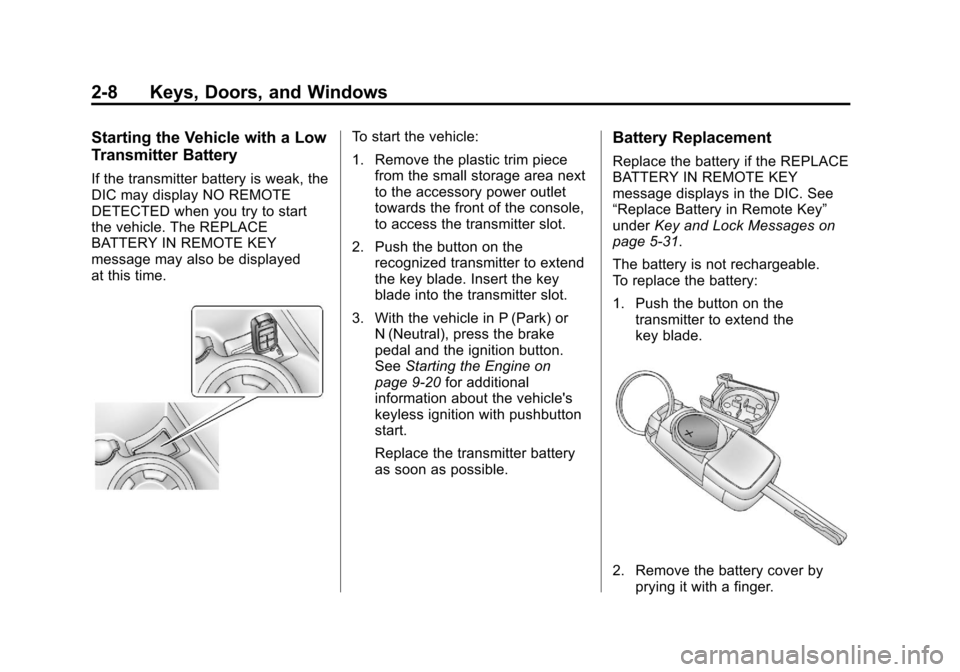
1. Remove the plastic trim piecefrom the small storage area next
to the accessory power outlet
towards the front of the console,
to access the transmitter slot.
2. Push the button on the recognized transmitter to extend
the key blade. Insert the key
blade into the transmitter slot.
3. With the vehicle in P (Park) or N (Neutral), press the brake
pedal and the ignition button.
See Starting the Engine on
page 9‑20 for additional
information about the vehicle's
keyless ignition with pushbutton
start.
Replace the transmitter battery
as soon as possible.Battery Replacement
Replace the battery if the REPLACE
BATTERY IN REMOTE KEY
message displays in the DIC. See
“Replace Battery in Remote Key”
under Key and Lock Messages on
page 5‑31.
The battery is not rechargeable.
To replace the battery:
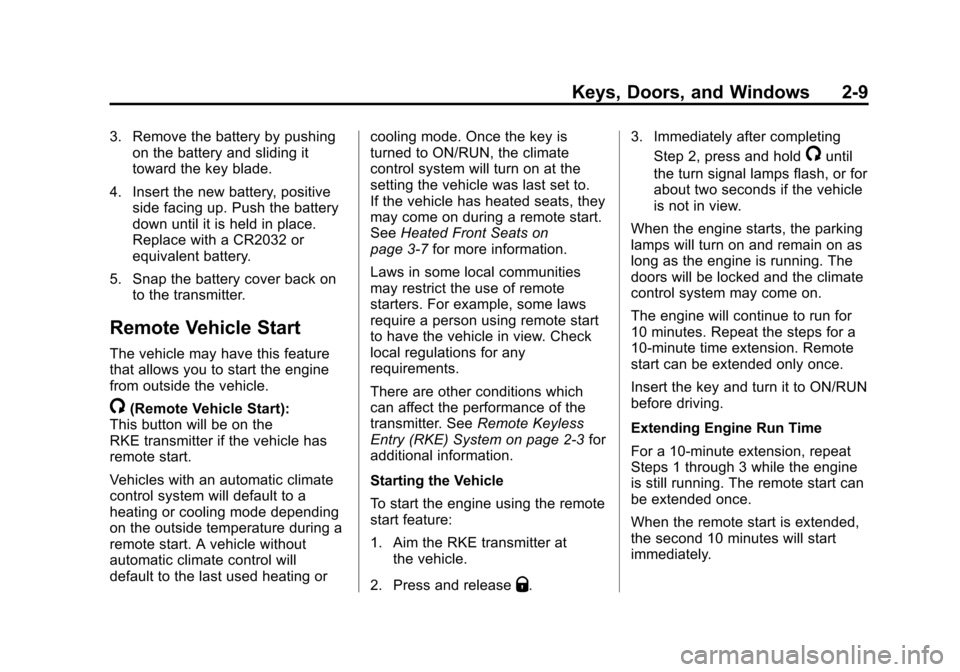
1. Push the button on the transmitter to extend the
key blade.
2. Remove the battery cover byprying it with a finger.
Page 39 of 400
Black plate (9,1)Chevrolet Cruze Owner Manual - 2012
Keys, Doors, and Windows 2-9
3. Remove the battery by pushingon the battery and sliding it
toward the key blade.
4. Insert the new battery, positive side facing up. Push the battery
down until it is held in place.
Replace with a CR2032 or
equivalent battery.
5. Snap the battery cover back on to the transmitter.
Remote Vehicle Start
The vehicle may have this feature
that allows you to start the engine
from outside the vehicle.
/(Remote Vehicle Start):
This button will be on the
RKE transmitter if the vehicle has
remote start.
Vehicles with an automatic climate
control system will default to a
heating or cooling mode depending
on the outside temperature during a
remote start. A vehicle without
automatic climate control will
default to the last used heating or cooling mode. Once the key is
turned to ON/RUN, the climate
control system will turn on at the
setting the vehicle was last set to.
If the vehicle has heated seats, they
may come on during a remote start.
See
Heated Front Seats on
page 3‑7 for more information.
Laws in some local communities
may restrict the use of remote
starters. For example, some laws
require a person using remote start
to have the vehicle in view. Check
local regulations for any
requirements.
There are other conditions which
can affect the performance of the
transmitter. See Remote Keyless
Entry (RKE) System on page 2‑3 for
additional information.
Starting the Vehicle
To start the engine using the remote
start feature:
1. Aim the RKE transmitter at the vehicle.
2. Press and release
Q. 3. Immediately after completing
Step 2, press and hold
/until
the turn signal lamps flash, or for
about two seconds if the vehicle
is not in view.
When the engine starts, the parking
lamps will turn on and remain on as
long as the engine is running. The
doors will be locked and the climate
control system may come on.
The engine will continue to run for
10 minutes. Repeat the steps for a
10-minute time extension. Remote
start can be extended only once.
Insert the key and turn it to ON/RUN
before driving.
Extending Engine Run Time
For a 10-minute extension, repeat
Steps 1 through 3 while the engine
is still running. The remote start can
be extended once.
When the remote start is extended,
the second 10 minutes will start
immediately.
Page 41 of 400
Black plate (11,1)Chevrolet Cruze Owner Manual - 2012
Keys, Doors, and Windows 2-11
WARNING (Continued)
.Outsiders can easily enter
through an unlocked door
when slowing or stopping the
vehicle. Lock the doors to
help prevent this from
happening.
To lock or unlock a door from
outside the vehicle, use the Remote
Keyless Entry (RKE) transmitter.
From inside the vehicle, use the
power door lock switch or the
manual lock knob. Pushing down
the manual lock knob on the driver
door will lock all doors.
The doors can also be unlocked
from the inside by pulling the door
handle. Pulling the door handle
again unlatches the door.
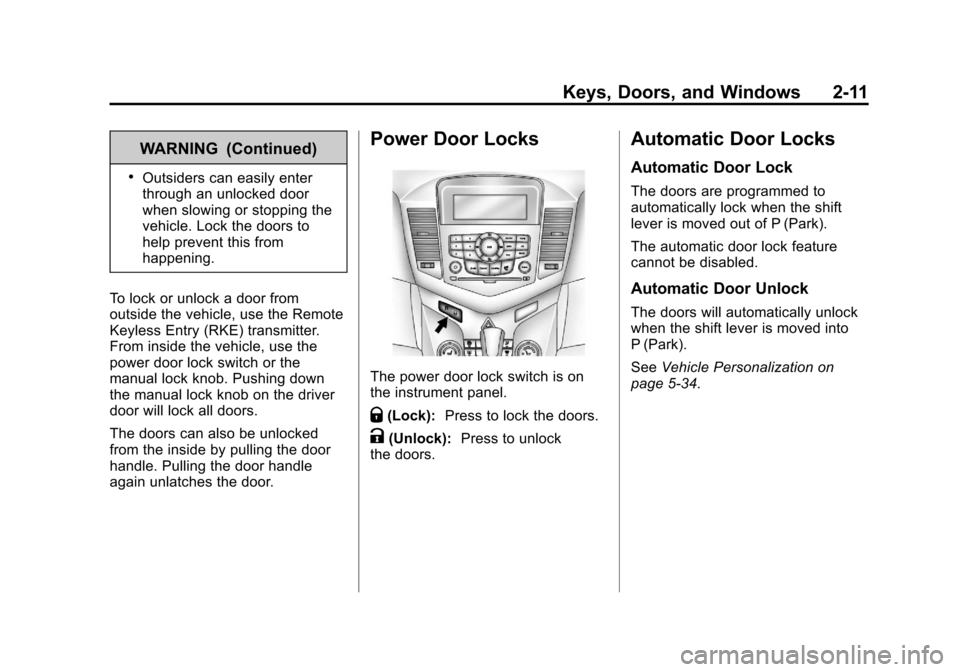
Power Door Locks
The power door lock switch is on
the instrument panel.
Q(Lock): Press to lock the doors.
K(Unlock): Press to unlock
the doors.
Automatic Door Locks
Automatic Door Lock
The doors are programmed to
automatically lock when the shift
lever is moved out of P (Park).
The automatic door lock feature
cannot be disabled.
Automatic Door Unlock
The doors will automatically unlock
when the shift lever is moved into
P (Park).
See Vehicle Personalization on
page 5‑34.
Page 43 of 400
Black plate (13,1)Chevrolet Cruze Owner Manual - 2012
Keys, Doors, and Windows 2-13
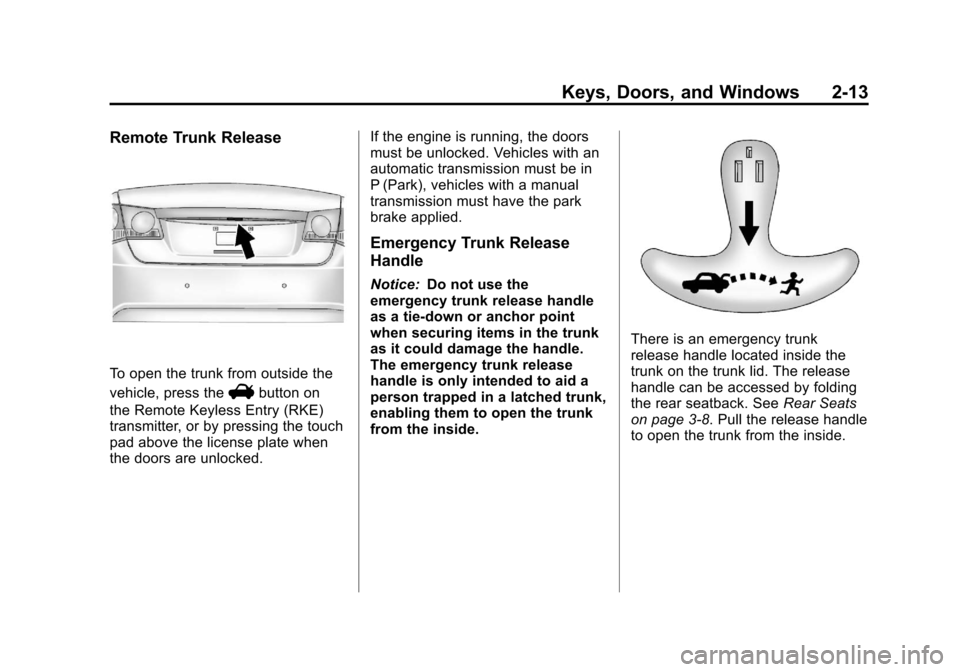
Remote Trunk Release
To open the trunk from outside the
vehicle, press the
Vbutton on
the Remote Keyless Entry (RKE)
transmitter, or by pressing the touch
pad above the license plate when
the doors are unlocked. If the engine is running, the doors
must be unlocked. Vehicles with an
automatic transmission must be in
P (Park), vehicles with a manual
transmission must have the park
brake applied.
Emergency Trunk Release
Handle
Notice:
Do not use the
emergency trunk release handle
as a tie-down or anchor point
when securing items in the trunk
as it could damage the handle.
The emergency trunk release
handle is only intended to aid a
person trapped in a latched trunk,
enabling them to open the trunk
from the inside.
There is an emergency trunk
release handle located inside the
trunk on the trunk lid. The release
handle can be accessed by folding
the rear seatback. See Rear Seats
on page 3‑8. Pull the release handle
to open the trunk from the inside.
Page 121 of 400
Black plate (13,1)Chevrolet Cruze Owner Manual - 2012
Instruments and Controls 5-13
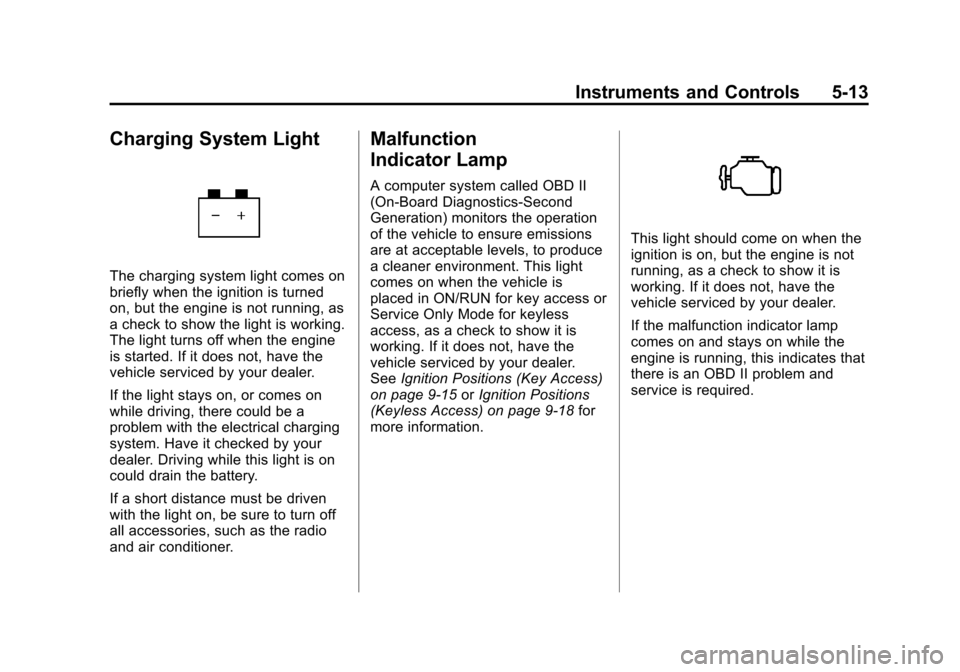
Charging System Light
The charging system light comes on
briefly when the ignition is turned
on, but the engine is not running, as
a check to show the light is working.
The light turns off when the engine
is started. If it does not, have the
vehicle serviced by your dealer.
If the light stays on, or comes on
while driving, there could be a
problem with the electrical charging
system. Have it checked by your
dealer. Driving while this light is on
could drain the battery.
If a short distance must be driven
with the light on, be sure to turn off
all accessories, such as the radio
and air conditioner.
Malfunction
Indicator Lamp
A computer system called OBD II
(On-Board Diagnostics-Second
Generation) monitors the operation
of the vehicle to ensure emissions
are at acceptable levels, to produce
a cleaner environment. This light
comes on when the vehicle is
placed in ON/RUN for key access or
Service Only Mode for keyless
access, as a check to show it is
working. If it does not, have the
vehicle serviced by your dealer.
SeeIgnition Positions (Key Access)
on page 9‑15 orIgnition Positions
(Keyless Access) on page 9‑18 for
more information.
This light should come on when the
ignition is on, but the engine is not
running, as a check to show it is
working. If it does not, have the
vehicle serviced by your dealer.
If the malfunction indicator lamp
comes on and stays on while the
engine is running, this indicates that
there is an OBD II problem and
service is required.
Page 139 of 400
Black plate (31,1)Chevrolet Cruze Owner Manual - 2012
Instruments and Controls 5-31
The performance may be reduced
the next time the vehicle is driven.
The vehicle may be driven at a
reduced speed while this message
is on, but maximum acceleration
and speed may be reduced.
Anytime this message stays on,
the vehicle should be taken to your
dealer for service as soon as
possible.
Fuel System Messages
FUEL LEVEL LOW
This message displays when the
vehicle is low on fuel. Refuel as
soon as possible.
TIGHTEN GAS CAP
This message displays when the
fuel cap is not on tight. Tighten the
fuel cap.
Key and Lock Messages
NO REMOTE DETECTED
This message displays when the
transmitter battery is weak on
vehicles with keyless access. See
“Starting the Vehicle with a Low
Transmitter Battery”underRemote
Keyless Entry (RKE) System
Operation on page 2‑3 for more
information.
REPLACE BATTERY IN
REMOTE KEY
This message displays when the
battery in the Remote Keyless Entry
(RKE) transmitter needs to be
replaced.
Lamp Messages
AUTOMATIC LIGHT
CONTROL ON
This message is displayed when the
automatic light control has been
turned on. See Automatic Headlamp
System on page 6‑3.
AUTOMATIC LIGHT
CONTROL OFF
This message is displayed when the
automatic light control has been
turned off. See Automatic Headlamp
System on page 6‑3.
XXX TURN INDICATOR
FAILURE
When one of the turn signals is out,
this message displays to show
which bulb needs to be replaced.
See Bulb Replacement on
page 10‑29 andReplacement Bulbs
on page 10‑34 for more information
on turn signal bulb replacement.
TURN SIGNAL ON
This message is displayed if the
turn signal has been left on. Turn off
the turn signal.
Page 152 of 400
Black plate (6,1)Chevrolet Cruze Owner Manual - 2012
6-6 Lighting
Lighting Features
Entry Lighting
The headlamps, parking lamps,
taillamps, and most of the interior
lights turn on briefly, when the
Remote Keyless Entry (RKE)
Kis
pressed. After about 30 seconds the
exterior lamps turn off, and then the
dome and remaining interior lights
will dim to off. Entry lighting can be
disabled manually by changing the
ignition out of the OFF position,
or by pressing the RKE
Qbutton.
This feature can be changed.
See Vehicle Personalization on
page 5‑34.
Exit Lighting
The headlamps, taillamps, parking
lamps, back‐up lamps, and license
plate lamps come on at night, or in
areas with limited lighting, when the
key is removed from the ignition.
The dome lamps also come on
when the key is removed from the
ignition. The exterior lamps and
dome lamps remain on after the
door is closed for a set amount of
time, then automatically turn off.
The exterior lamps turn off
immediately by turning the exterior
lamps control off.
The exit lighting feature can
be changed. See Vehicle
Personalization on page 5‑34.
Battery Power Protection
The battery saver feature is
designed to protect the vehicle's
battery.
If some interior lights are left on
and the ignition is turned off, the
battery rundown protection system
automatically turns the lamp off after
some time.
Page 199 of 400
Black plate (1,1)Chevrolet Cruze Owner Manual - 2012
Driving and Operating 9-1
Driving and
Operating
Driving Information
Distracted Driving . . . . . . . . . . . . . 9-2
Defensive Driving . . . . . . . . . . . . . 9-3
Drunk Driving . . . . . . . . . . . . . . . . . 9-3
Control of a Vehicle . . . . . . . . . . . 9-4
Braking . . . . . . . . . . . . . . . . . . . . . . . 9-4
Steering . . . . . . . . . . . . . . . . . . . . . . . 9-4
Off-Road Recovery . . . . . . . . . . . . 9-5
Loss of Control . . . . . . . . . . . . . . . . 9-5
Driving on Wet Roads . . . . . . . . . 9-6
Highway Hypnosis . . . . . . . . . . . . 9-7
Hill and Mountain Roads . . . . . . 9-7
Winter Driving . . . . . . . . . . . . . . . . . 9-8
If the Vehicle Is Stuck . . . . . . . . 9-10
Vehicle Load Limits . . . . . . . . . . 9-10
Starting and Operating
New Vehicle Break-In . . . . . . . . 9-15
Ignition Positions(Key Access) . . . . . . . . . . . . . . . 9-15
Ignition Positions (Keyless Access) . . . . . . . . . . . 9-18 Starting the Engine . . . . . . . . . . 9-20
Engine Heater . . . . . . . . . . . . . . . 9-22
Retained Accessory
Power (RAP) . . . . . . . . . . . . . . . 9-23
Shifting Into Park (Automatic
Transmission) . . . . . . . . . . . . . . 9-24
Shifting out of Park . . . . . . . . . . 9-25
Parking . . . . . . . . . . . . . . . . . . . . . . 9-27
Parking over Things That Burn . . . . . . . . . . . . . . . . . . 9-27
Engine Exhaust
Engine Exhaust . . . . . . . . . . . . . . 9-27
Running the Vehicle WhileParked . . . . . . . . . . . . . . . . . . . . . 9-28
Automatic Transmission
Automatic Transmission . . . . . 9-29
Manual Mode . . . . . . . . . . . . . . . . 9-31
Manual Transmission
Manual Transmission . . . . . . . . 9-33
Brakes
Antilock BrakeSystem (ABS) . . . . . . . . . . . . . . 9-35
Parking Brake . . . . . . . . . . . . . . . 9-36
Brake Assist . . . . . . . . . . . . . . . . . 9-36
Ride Control Systems
Traction Control System (TCS) . . . . . . . . . . . . . . 9-37
StabiliTrak
®System . . . . . . . . . 9-38
Cruise Control
Cruise Control . . . . . . . . . . . . . . . 9-40
Object Detection Systems
Ultrasonic Parking Assist . . . . 9-42
Fuel
Fuel . . . . . . . . . . . . . . . . . . . . . . . . . 9-44
Recommended Fuel . . . . . . . . . 9-44
Gasoline Specifications (U.S. and Canada Only) . . . . . . . . . . 9-44
California Fuel Requirements . . . . . . . . . . . . . . 9-45
Fuels in Foreign Countries . . . 9-45
Fuel Additives . . . . . . . . . . . . . . . 9-45
Filling the Tank . . . . . . . . . . . . . . 9-46
Filling a Portable Fuel Container . . . . . . . . . . . . . . . . . . . 9-48