lock CHEVROLET CRUZE 2012 1.G User Guide
[x] Cancel search | Manufacturer: CHEVROLET, Model Year: 2012, Model line: CRUZE, Model: CHEVROLET CRUZE 2012 1.GPages: 400, PDF Size: 6.88 MB
Page 22 of 400
Black plate (16,1)Chevrolet Cruze Owner Manual - 2012
1-16 In Brief
Storing a Favorite Station
Stations from all bands can be
stored in the favorite lists in any
order. Up to six stations can be
stored in each favorite page and the
number of available favorite pages
can be set.
To store the station to a position in
the list, press the corresponding
numeric button 1 to 6 until a beep
is heard.
For more information, see“Storing a
Station as a Favorite” inAM-FM
Radio on page 7‑12.
Setting the Clock
Adjusting the Time
The clock menu can be only be
used with the radio on while in ON/
RUN or ACC/ACCESSORY.
1. Press the CONFIG button and select Time Settings.
2. Select Set Time.
3. Turn the MENU knob to adjust the highlighted number. 4. Press the MENU knob to select
the next number.
5. To save the time and return to the Time Settings menu, press
the BACK button at any time or
press the MENU knob after
adjusting the minutes.
Setting the 12/24 Hour Format
1. Press the CONFIG button and select Time Settings.
2. Highlight 12/24 Hour Format.
3. Press the MENU knob to select the 12 hour or 24 hour display
format.
See Clock on page 5‑5.
Satellite Radio
Vehicles with an XM™ sxatellite
radio tuner and a valid XM satellite
radio subscription can receive
XM programming.
XM Satellite Radio Service
XM is a satellite radio service based
in the 48 contiguous United States
and 10 Canadian provinces. XM
satellite radio has a wide variety of
programming and commercial-free
music, coast to coast, and in
digital-quality sound. A fee is
required to receive the XM service.
For more information refer to:
.www.xmradio.com or call
1-800-929-2100 (U.S.).
.www.xmradio.ca or call
1-877-438-9677 (Canada).
For more information, see Satellite
Radio on page 7‑14.
Page 29 of 400
Black plate (23,1)Chevrolet Cruze Owner Manual - 2012
In Brief 1-23
Automatic Crash Response,
Emergency Services, Crisis Assist,
Stolen Vehicle Assistance, Vehicle
Diagnostics, Remote Door Unlock,
Roadside Assistance, Turn‐by‐Turn
Navigation, and Hands‐Free Calling
are available on most vehicles. Not
all OnStar services are available on
all vehicles. For more information,
see the OnStar Owner's Guide; visit
www.onstar.com (U.S.) or
www.onstar.ca (Canada); contact
OnStar at 1-888-4-ONSTAR
(1‐888‐466‐7827) or TTY
1‐877‐248‐2080; or push
the
Qbutton to speak with an
OnStar Advisor 24 hours a day,
seven days a week.
For a full description of OnStar
services and system limitations, see
the OnStar Owner's Guide in the
glove box. OnStar service is subject to the
OnStar Terms and Conditions
included in the OnStar Glove
Box Kit.
OnStar service requires wireless
communication networks and the
Global Positioning System (GPS)
satellite network. Not all OnStar
services are available everywhere
or on all vehicles at all times.
OnStar service cannot work unless
the vehicle is in a place where
OnStar has an agreement with a
wireless service provider for service
in that area, and the wireless
service provider has coverage,
network capacity, reception, and
technology compatible with OnStar's
service. Service involving location
information about the vehicle cannot
work unless GPS signals are
available, unobstructed, and
compatible with the OnStar
hardware. The vehicle must have a
working electrical system and
adequate battery power for the
OnStar equipment to operate.OnStar service may not work if the
OnStar equipment is not properly
installed or you have not maintained
it even if the vehicle is in good
working order and in compliance
with all government regulations.
If you try to add, connect, or modify
any equipment or software in the
vehicle, OnStar service may not
work. Other problems beyond
OnStar's control may prevent
service to you, such as hills, tall
buildings, tunnels, weather,
electrical system design and
architecture of the vehicle, damage
to important parts of the vehicle in a
crash, or wireless phone network
congestion or jamming.
See
Radio Frequency Statement on
page 13‑16 for information
regarding Part 15 of the Federal
Communications Commission (FCC)
rules and Industry Canada
Standards RSS-GEN/210/220/310.
Page 31 of 400
Black plate (1,1)Chevrolet Cruze Owner Manual - 2012
Keys, Doors, and Windows 2-1
Keys, Doors, and
Windows
Keys and Locks
Keys . . . . . . . . . . . . . . . . . . . . . . . . . . 2-2
Remote Keyless Entry (RKE)System . . . . . . . . . . . . . . . . . . . . . . 2-3
Remote Keyless Entry (RKE) System Operation . . . . . . . . . . . 2-3
Remote Vehicle Start . . . . . . . . . 2-9
Door Locks . . . . . . . . . . . . . . . . . . 2-10
Power Door Locks . . . . . . . . . . . 2-11
Automatic Door Locks . . . . . . . 2-11
Safety Locks . . . . . . . . . . . . . . . . . 2-12
Doors
Trunk . . . . . . . . . . . . . . . . . . . . . . . . 2-12
Vehicle Security
Vehicle Security . . . . . . . . . . . . . . 2-14
Vehicle Alarm System . . . . . . . 2-14
Immobilizer . . . . . . . . . . . . . . . . . . 2-14
Immobilizer Operation . . . . . . . 2-14
Exterior Mirrors
Convex Mirrors . . . . . . . . . . . . . . 2-15
Manual Mirrors . . . . . . . . . . . . . . . 2-16
Power Mirrors . . . . . . . . . . . . . . . . 2-16
Folding Mirrors . . . . . . . . . . . . . . . 2-16
Heated Mirrors . . . . . . . . . . . . . . . 2-16
Interior Mirrors
Manual Rearview Mirror . . . . . . 2-17
Automatic Dimming Rearview Mirror . . . . . . . . . . . . 2-17
Windows
Windows . . . . . . . . . . . . . . . . . . . . . 2-18
Power Windows . . . . . . . . . . . . . 2-18
Sun Visors . . . . . . . . . . . . . . . . . . . 2-20
Roof
Sunroof . . . . . . . . . . . . . . . . . . . . . . 2-21
Page 32 of 400
Black plate (2,1)Chevrolet Cruze Owner Manual - 2012
2-2 Keys, Doors, and Windows
Keys and Locks
Keys
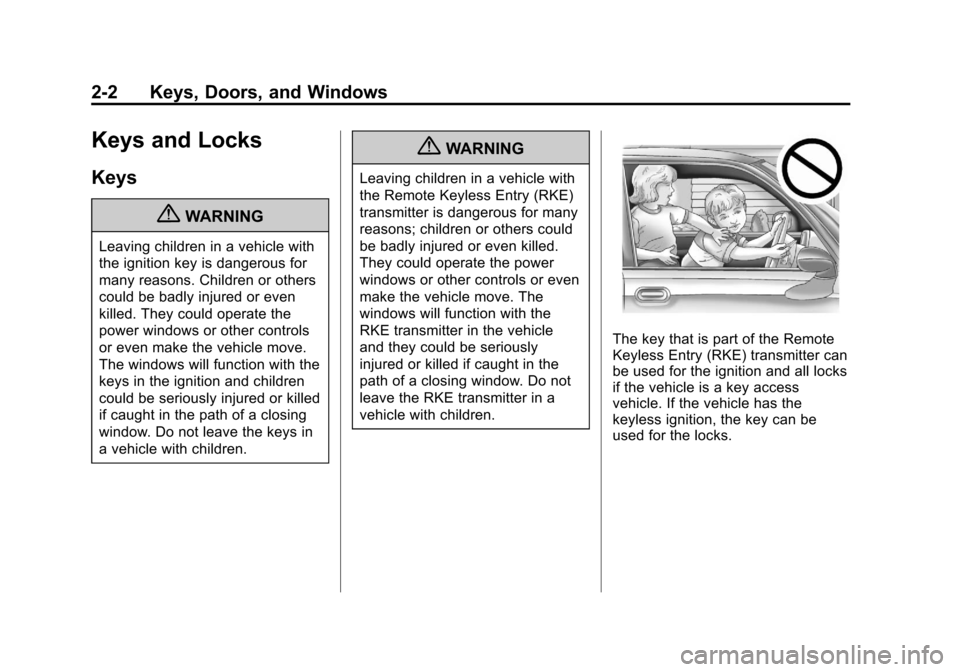
{WARNING
Leaving children in a vehicle with
the ignition key is dangerous for
many reasons. Children or others
could be badly injured or even
killed. They could operate the
power windows or other controls
or even make the vehicle move.
The windows will function with the
keys in the ignition and children
could be seriously injured or killed
if caught in the path of a closing
window. Do not leave the keys in
a vehicle with children.
{WARNING
Leaving children in a vehicle with
the Remote Keyless Entry (RKE)
transmitter is dangerous for many
reasons; children or others could
be badly injured or even killed.
They could operate the power
windows or other controls or even
make the vehicle move. The
windows will function with the
RKE transmitter in the vehicle
and they could be seriously
injured or killed if caught in the
path of a closing window. Do not
leave the RKE transmitter in a
vehicle with children.
The key that is part of the Remote
Keyless Entry (RKE) transmitter can
be used for the ignition and all locks
if the vehicle is a key access
vehicle. If the vehicle has the
keyless ignition, the key can be
used for the locks.
Page 33 of 400
Black plate (3,1)Chevrolet Cruze Owner Manual - 2012
Keys, Doors, and Windows 2-3
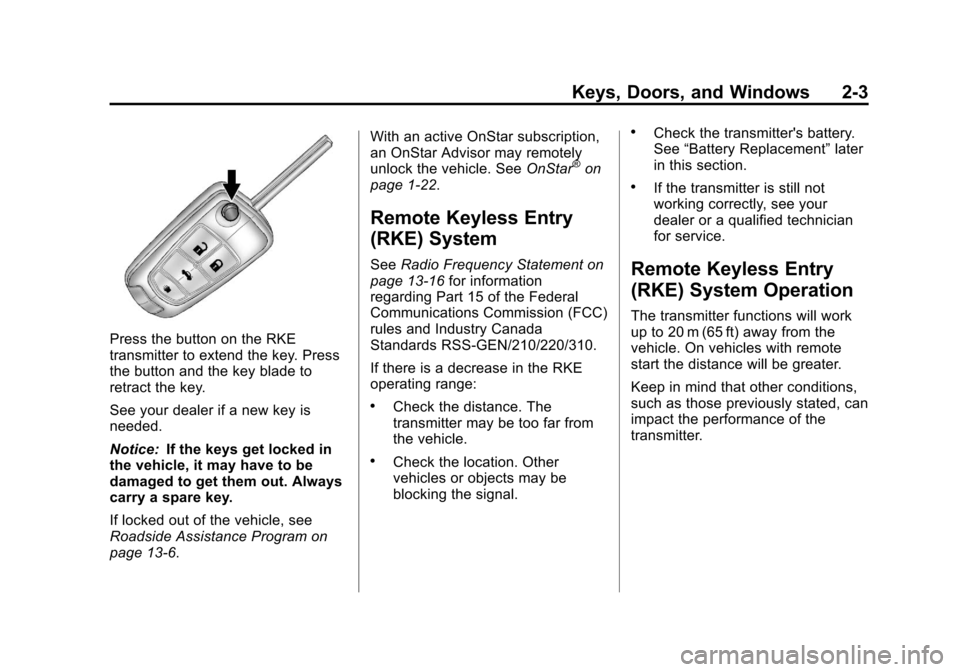
Press the button on the RKE
transmitter to extend the key. Press
the button and the key blade to
retract the key.
See your dealer if a new key is
needed.
Notice:If the keys get locked in
the vehicle, it may have to be
damaged to get them out. Always
carry a spare key.
If locked out of the vehicle, see
Roadside Assistance Program on
page 13‑6. With an active OnStar subscription,
an OnStar Advisor may remotely
unlock the vehicle. See
OnStar
®on
page 1‑22.
Remote Keyless Entry
(RKE) System
See Radio Frequency Statement on
page 13‑16 for information
regarding Part 15 of the Federal
Communications Commission (FCC)
rules and Industry Canada
Standards RSS-GEN/210/220/310.
If there is a decrease in the RKE
operating range:
.Check the distance. The
transmitter may be too far from
the vehicle.
.Check the location. Other
vehicles or objects may be
blocking the signal.
.Check the transmitter's battery.
See “Battery Replacement” later
in this section.
.If the transmitter is still not
working correctly, see your
dealer or a qualified technician
for service.
Remote Keyless Entry
(RKE) System Operation
The transmitter functions will work
up to 20 m (65 ft) away from the
vehicle. On vehicles with remote
start the distance will be greater.
Keep in mind that other conditions,
such as those previously stated, can
impact the performance of the
transmitter.
Page 34 of 400
Black plate (4,1)Chevrolet Cruze Owner Manual - 2012
2-4 Keys, Doors, and Windows
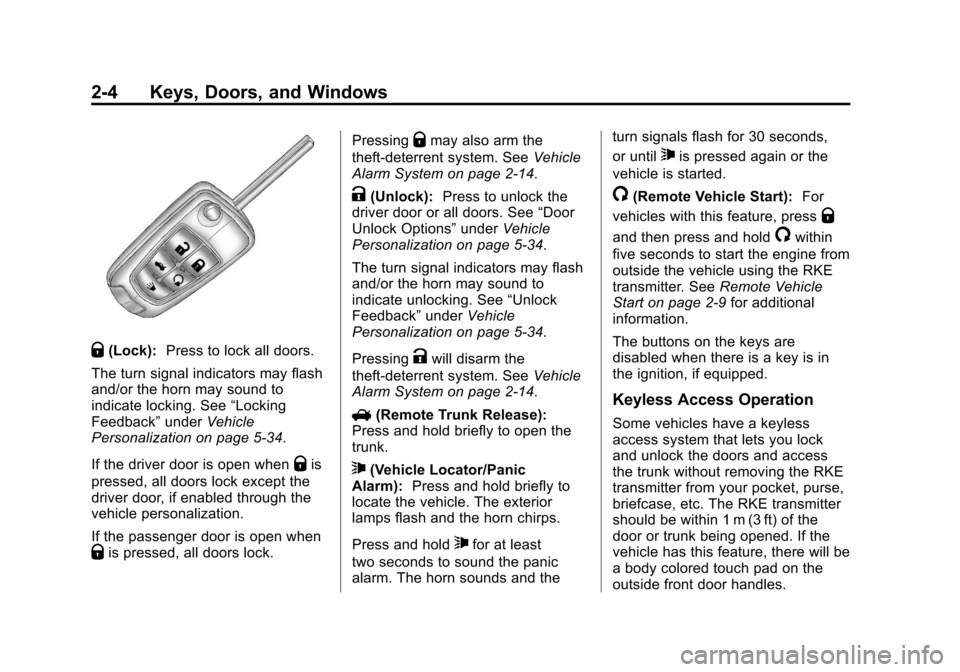
Q(Lock):Press to lock all doors.
The turn signal indicators may flash
and/or the horn may sound to
indicate locking. See “Locking
Feedback” underVehicle
Personalization on page 5‑34.
If the driver door is open when
Qis
pressed, all doors lock except the
driver door, if enabled through the
vehicle personalization.
If the passenger door is open when
Qis pressed, all doors lock. Pressing
Qmay also arm the
theft-deterrent system. See Vehicle
Alarm System on page 2‑14.
K(Unlock): Press to unlock the
driver door or all doors. See “Door
Unlock Options” underVehicle
Personalization on page 5‑34.
The turn signal indicators may flash
and/or the horn may sound to
indicate unlocking. See “Unlock
Feedback” underVehicle
Personalization on page 5‑34.
Pressing
Kwill disarm the
theft-deterrent system. See Vehicle
Alarm System on page 2‑14.
V (Remote Trunk Release):
Press and hold briefly to open the
trunk.
7(Vehicle Locator/Panic
Alarm): Press and hold briefly to
locate the vehicle. The exterior
lamps flash and the horn chirps.
Press and hold
7for at least
two seconds to sound the panic
alarm. The horn sounds and the turn signals flash for 30 seconds,
or until
7is pressed again or the
vehicle is started.
/(Remote Vehicle Start): For
vehicles with this feature, press
Q
and then press and hold/within
five seconds to start the engine from
outside the vehicle using the RKE
transmitter. See Remote Vehicle
Start on page 2‑9 for additional
information.
The buttons on the keys are
disabled when there is a key is in
the ignition, if equipped.
Keyless Access Operation
Some vehicles have a keyless
access system that lets you lock
and unlock the doors and access
the trunk without removing the RKE
transmitter from your pocket, purse,
briefcase, etc. The RKE transmitter
should be within 1 m (3 ft) of the
door or trunk being opened. If the
vehicle has this feature, there will be
a body colored touch pad on the
outside front door handles.
Page 35 of 400
Black plate (5,1)Chevrolet Cruze Owner Manual - 2012
Keys, Doors, and Windows 2-5
Keyless Unlocking
With the RKE transmitter within
1 m (3 ft), approach the front door
and pull the handle to unlock and
open the door. If the transmitter is
recognized, the door will unlock
and open.
Entering any door other than the
driver door will always cause all of
the doors to unlock. This is not
customizable.
To customize which doors unlock
when the driver door is opened, see
“Door Unlock Options”under
Vehicle Personalization on
page 5‑34. Keyless Locking
If the vehicle has the keyless
access system, this feature allows
you to select whether the doors
automatically lock during normal
vehicle exit. When the vehicle is
turned off and all doors become
closed, the vehicle will determine
how many keyless access
transmitters remain in the vehicles
interior. If at least one keyless
access transmitter has been
removed from the interior of the
vehicle, the doors will lock after
eight seconds.
If there are two keyless access
transmitters in the vehicle and one
is removed, the other will be locked
in. A person approaching the
outside of the locked vehicle without
an authorized keyless access
transmitter will not be able to open
the door, even with the transmitter in
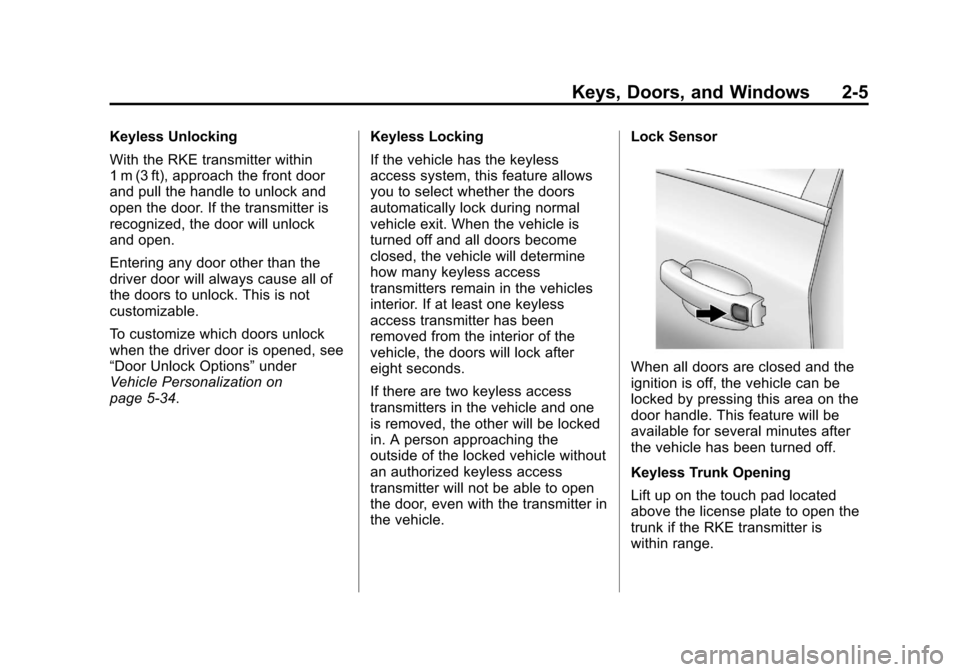
the vehicle.Lock Sensor
When all doors are closed and the
ignition is off, the vehicle can be
locked by pressing this area on the
door handle. This feature will be
available for several minutes after
the vehicle has been turned off.
Keyless Trunk Opening
Lift up on the touch pad located
above the license plate to open the
trunk if the RKE transmitter is
within range.
Page 36 of 400
Black plate (6,1)Chevrolet Cruze Owner Manual - 2012
2-6 Keys, Doors, and Windows
Programming Transmitters to
the Vehicle
Only RKE transmitters programmed
to the vehicle will work. If a
transmitter is lost or stolen, a
replacement can be purchased and
programmed through your dealer.
The vehicle can be reprogrammed
so that lost or stolen transmitters no
longer work. Any remaining
transmitters will need to be
reprogrammed. Each vehicle can
have up to five transmitters matched
to it.
Programming with a Recognized
Transmitter (Keyless Access
Vehicles Only)
A new transmitter can be
programmed to the vehicle when
there is one recognized transmitter.
To program, the vehicle must be off
and all of the transmitters, both
currently recognized and new, must
be with you.
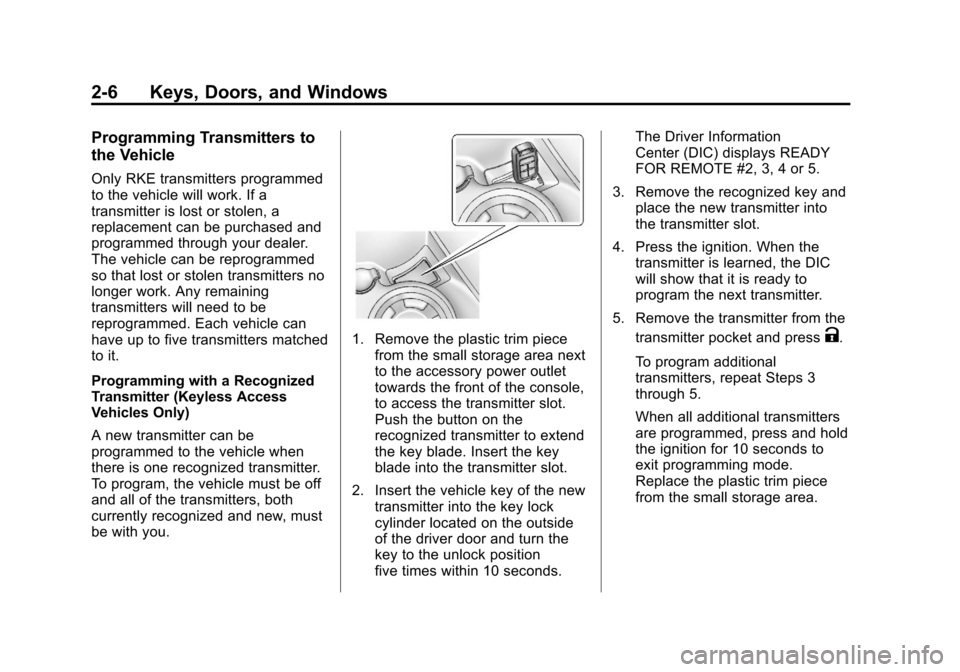
1. Remove the plastic trim piecefrom the small storage area next
to the accessory power outlet
towards the front of the console,
to access the transmitter slot.
Push the button on the
recognized transmitter to extend
the key blade. Insert the key
blade into the transmitter slot.
2. Insert the vehicle key of the new transmitter into the key lock
cylinder located on the outside
of the driver door and turn the
key to the unlock position
five times within 10 seconds. The Driver Information
Center (DIC) displays READY
FOR REMOTE #2, 3, 4 or 5.
3. Remove the recognized key and place the new transmitter into
the transmitter slot.
4. Press the ignition. When the transmitter is learned, the DIC
will show that it is ready to
program the next transmitter.
5. Remove the transmitter from the transmitter pocket and pressK.
To program additional
transmitters, repeat Steps 3
through 5.
When all additional transmitters
are programmed, press and hold
the ignition for 10 seconds to
exit programming mode.
Replace the plastic trim piece
from the small storage area.
Page 37 of 400
Black plate (7,1)Chevrolet Cruze Owner Manual - 2012
Keys, Doors, and Windows 2-7
Programming without a
Recognized Transmitter
(Keyless Access Vehicles Only)
If there are no currently recognized
transmitters available, follow this
procedure to program up to five
transmitters. This feature is not
available in Canada. This procedure
will take approximately 30 minutes
to complete. The vehicle must be off
and all of the transmitters you wish
to program must be with you.
1. Insert the vehicle key of thetransmitter into the key lock
cylinder located on the outside
of the driver door and turn the
key to the unlock position five
times within 10 seconds.
The Driver Information Center
(DIC) displays REMOTE LEARN
PENDING, PLEASE WAIT.
2. Wait for 10 minutes until the DIC displays PRESS ENGINE
START BUTTON TO LEARN
and then press the ignition. The DIC displays will again
show REMOTE LEARN
PENDING, PLEASE WAIT.
3. Repeat Step 2 two additional times. After the third time all
previously known transmitters
will no longer work with the
vehicle. Remaining transmitters
can be relearned during the
next steps.
The DIC display should
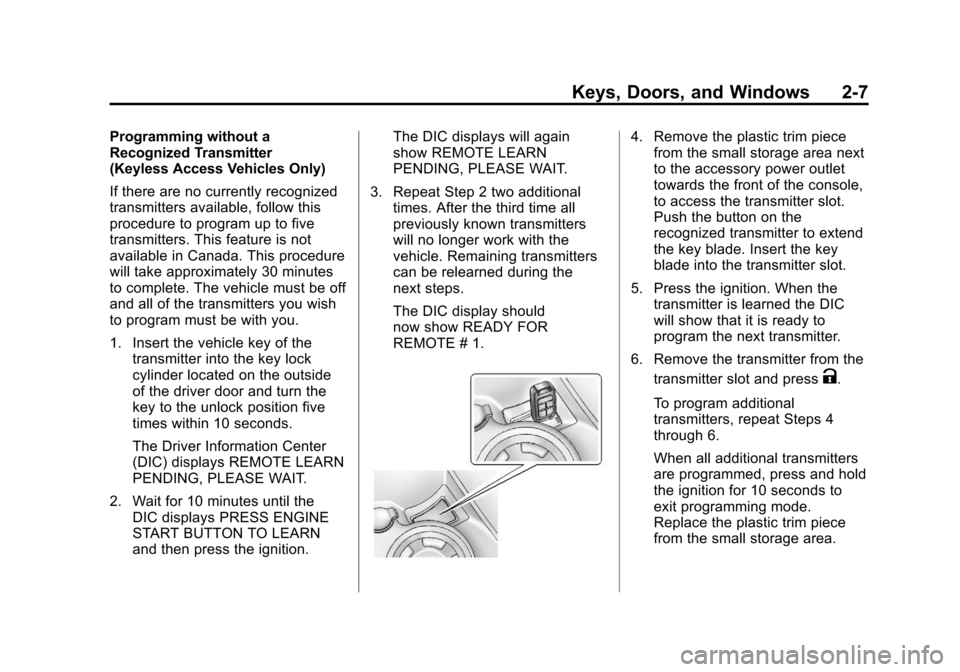
now show READY FOR
REMOTE # 1.4. Remove the plastic trim piecefrom the small storage area next
to the accessory power outlet
towards the front of the console,
to access the transmitter slot.
Push the button on the
recognized transmitter to extend
the key blade. Insert the key
blade into the transmitter slot.
5. Press the ignition. When the transmitter is learned the DIC
will show that it is ready to
program the next transmitter.
6. Remove the transmitter from the transmitter slot and press
K.
To program additional
transmitters, repeat Steps 4
through 6.
When all additional transmitters
are programmed, press and hold
the ignition for 10 seconds to
exit programming mode.
Replace the plastic trim piece
from the small storage area.
Page 38 of 400
Black plate (8,1)Chevrolet Cruze Owner Manual - 2012
2-8 Keys, Doors, and Windows
Starting the Vehicle with a Low
Transmitter Battery
If the transmitter battery is weak, the
DIC may display NO REMOTE
DETECTED when you try to start
the vehicle. The REPLACE
BATTERY IN REMOTE KEY
message may also be displayed
at this time.
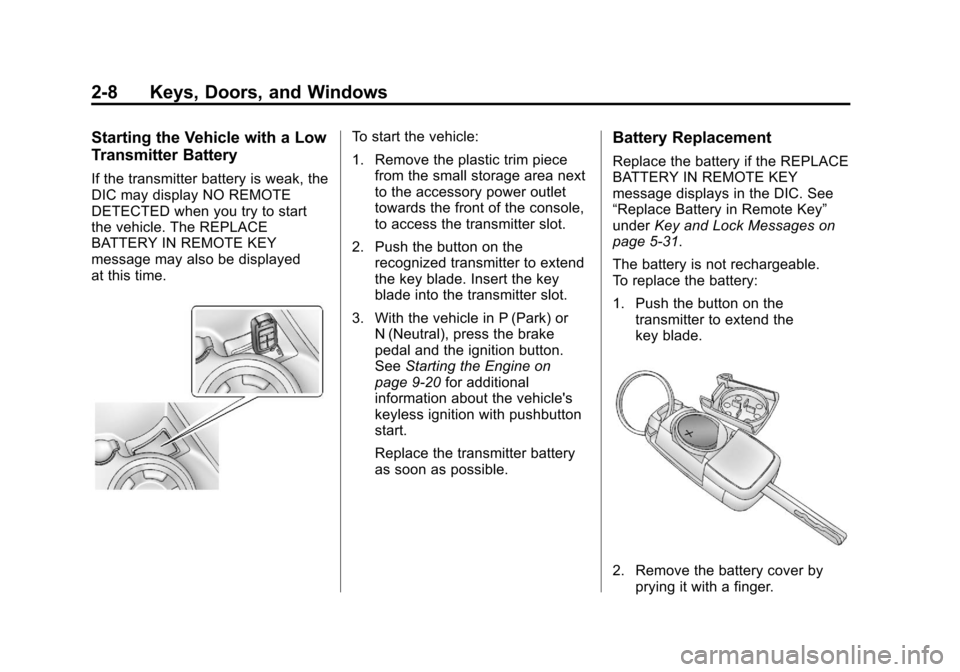
To start the vehicle:
1. Remove the plastic trim piecefrom the small storage area next
to the accessory power outlet
towards the front of the console,
to access the transmitter slot.
2. Push the button on the recognized transmitter to extend
the key blade. Insert the key
blade into the transmitter slot.
3. With the vehicle in P (Park) or N (Neutral), press the brake
pedal and the ignition button.
See Starting the Engine on
page 9‑20 for additional
information about the vehicle's
keyless ignition with pushbutton
start.
Replace the transmitter battery
as soon as possible.Battery Replacement
Replace the battery if the REPLACE
BATTERY IN REMOTE KEY
message displays in the DIC. See
“Replace Battery in Remote Key”
under Key and Lock Messages on
page 5‑31.
The battery is not rechargeable.
To replace the battery:
1. Push the button on the transmitter to extend the
key blade.
2. Remove the battery cover byprying it with a finger.