sensor CHEVROLET CRUZE 2012 1.G User Guide
[x] Cancel search | Manufacturer: CHEVROLET, Model Year: 2012, Model line: CRUZE, Model: CHEVROLET CRUZE 2012 1.GPages: 400, PDF Size: 6.88 MB
Page 134 of 400
Black plate (26,1)Chevrolet Cruze Owner Manual - 2012
5-26 Instruments and Controls
Timer
This display can be used as a timer.
To start the timer, press SET/CLR
while Timer is displayed. The
display will show the amount of time
that has passed since the timer was
last reset, not including time the
ignition is off. Time will continue to
be counted as long as the ignition is
on, even if another display is being
shown on the DIC. The timer will
record up to 99 hours, 59 minutes,
and 59 seconds (99:59:59) after
which the display will return to zero.
To stop the timer, press SET/CLR
briefly while Timer is displayed. To
reset the timer to zero, press and
hold SET/CLR.
Digital Speed
The speedometer shows how fast
the vehicle is moving in either
kilometers per hour (km/h) or miles
per hour (mph). The speedometer
cannot be reset.Navigation
This display is used for the OnStar
or navigation system Turn-by-Turn
guidance. See the OnStar Owner's
Guide or the navigation manual,
if the vehicle has navigation, for
more information.
Vehicle Information Menu
Items
Press MENU on the turn signal
lever until Vehicle Information menu
is displayed. Use
w xto scroll
through the menu items. Not all
items are available on every vehicle.
The following is a list of all possible
menu items:
.Units
.Tire Pressure
.Remaining Oil Life
.Coolant Temperature
.Battery Voltage
.Blank Display Units
Move
w xto change between
Metric or US when the Unit display
is active. Press SET/CLR to confirm
the setting. On some models, you
will have to select 1, 2, or 3 for the
Unit display. 1 is Imperial units, 2 is
US units, and 3 is metric units. This
will change the displays on the
cluster and DIC to the type of
measurements you select.
Tire Pressure
The display may show a vehicle
with the approximate pressures of
all four tires. Tire pressure is
displayed in either kilopascal (kPa)
or in pounds per square inch (psi).
On some models, this display only
allows for matching of the TPMS
sensors. In this case, the display
will show TIRE LEARN. See Tire
Pressure Monitor System on
page 10‑50 andTire Pressure
Monitor Operation on page 10‑52 for
more information.
Page 143 of 400
Black plate (35,1)Chevrolet Cruze Owner Manual - 2012
Instruments and Controls 5-35
Vehicles with a navigation system
will display a checkmark to indicate
this feature is on.
Climate and Air Quality
If equipped, select the Climate and
Air Quality menu and the following
will be displayed:
.Auto Fan Speed
.Air Quality Sensor
.Remote Start Auto Heat Seats
.Auto Defog
.Auto Rear Defog
Auto Fan Speed
This will allow you to select the
automatic fan speed. This feature
sets the climate control fan speed to
maintain the interior temperature.
Press the MENU or MENU/SEL
knob when Auto Fan Speed is
highlighted to open the menu. Turn
the knob to highlight High, Medium,
or Low. Press the BACK button to
confirm the selection and move
back to the last menu. Air Quality Sensor
This will allow you to select whether
the system will operate at high or
low sensitivity. Only vehicles with
the automatic climate control will
have this option.
Press the MENU or MENU/SEL
knob when Air Quality Sensor is
highlighted to open the menu. Turn
the knob to highlight High Sensitivity
or Low Sensitivity. Press the BACK
button to confirm the selection and
move back to the last menu.
Remote Start Auto Heat Seats
On vehicles with remote start and
heated seats, the heated seats can
be set to on or off.
Press the MENU or MENU/SEL
knob when Remote Start Auto Heat
Seats is highlighted to open the
menu. Turn the knob to highlight
On or Off. Press the BACK button to
confirm the selection and move
back to the last menu.
Auto Defog
When turned on and high humidity
is detected, the climate control
system may adjust to outside air
supply and turn on the air
conditioner or the heater. The fan
speed may slightly increase to help
prevent fogging. When high
humidity is no longer detected, the
system will return to its prior
operation.
Press the MENU or MENU/SEL
knob when Auto Defog is
highlighted to open the menu. Turn
the knob to highlight On or Off.
Press the BACK button to confirm
the selection and move back to the
last menu.
Auto Rear Defog
When on, this feature turns on the
rear defogger at vehicle start when
the interior temperature is cold and
fog is likely. The auto rear defog
function can be disabled by
pressing
1. When off, the feature
can be turned on by pressing
1.
Page 148 of 400
Black plate (2,1)Chevrolet Cruze Owner Manual - 2012
6-2 Lighting
5(Headlamps):Turns the
headlamps on together with the
lamps listed below. A warning chime
sounds if the driver door is opened
when the ignition switch is off and
the headlamps are on.
.Parking Lamps
.Taillamps
.License Plate Lamps
.Instrument Panel Lights
.Sidemarker Lamps
#(Front Fog Lamps): For
vehicles with fog lamps, press to
turn the lamps on or off.
See Front Fog Lamps on page 6‑4.
When the lights are on,
;will be
lit. See Lamps On Reminder on
page 5‑22.
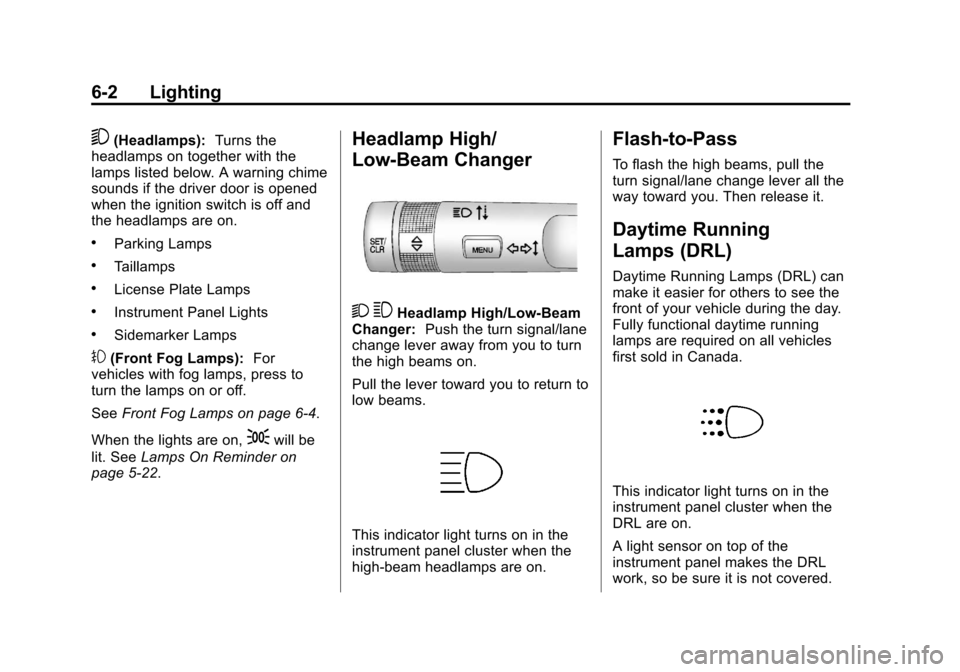
Headlamp High/
Low-Beam Changer
2 3Headlamp High/Low‐Beam
Changer: Push the turn signal/lane
change lever away from you to turn
the high beams on.
Pull the lever toward you to return to
low beams.
This indicator light turns on in the
instrument panel cluster when the
high‐beam headlamps are on.
Flash-to-Pass
To flash the high beams, pull the
turn signal/lane change lever all the
way toward you. Then release it.
Daytime Running
Lamps (DRL)
Daytime Running Lamps (DRL) can
make it easier for others to see the
front of your vehicle during the day.
Fully functional daytime running
lamps are required on all vehicles
first sold in Canada.
This indicator light turns on in the
instrument panel cluster when the
DRL are on.
A light sensor on top of the
instrument panel makes the DRL
work, so be sure it is not covered.
Page 149 of 400
Black plate (3,1)Chevrolet Cruze Owner Manual - 2012
Lighting 6-3
The DRL system makes the
low‐beam headlamps come on at
a reduced brightness when the
following conditions are met:
.The ignition is in the ON/
RUN mode.
.The exterior lamps control is
in AUTO.
.The engine is running.
When the DRL are on, only the
low‐beam headlamps, at a reduced
level of brightness, will be on. The
taillamps, sidemarker, instrument
panel, and other lamps will not
be on.
The headlamps automatically
change from DRL to the regular
headlamps depending on the
darkness of the surroundings. The
other lamps that come on with the
headlamps will also come on.
When it is bright enough outside,
the headlamps go off and the DRL
come on. To turn the DRL off or on again, turn
the exterior lamps control to the off
position and then release. For
vehicles first sold in Canada, the
DRL cannot be turned off.
Automatic Headlamp
System
When it is dark enough outside and
the exterior lamps control is in the
automatic position, the headlamps
come on automatically. See
Exterior
Lamp Controls on page 6‑1.
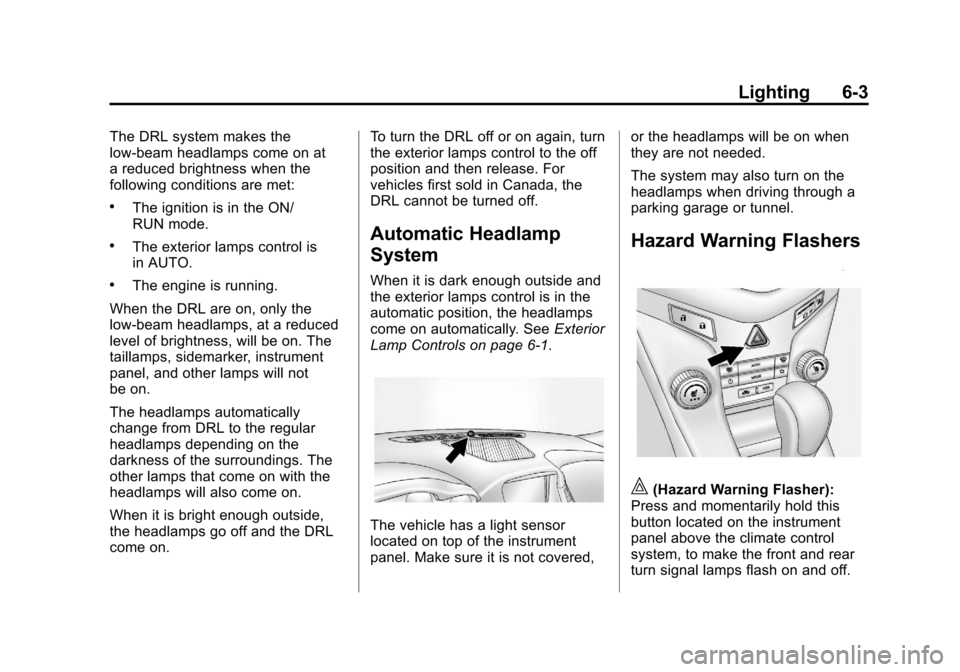
The vehicle has a light sensor
located on top of the instrument
panel. Make sure it is not covered, or the headlamps will be on when
they are not needed.
The system may also turn on the
headlamps when driving through a
parking garage or tunnel.
Hazard Warning Flashers
|(Hazard Warning Flasher):
Press and momentarily hold this
button located on the instrument
panel above the climate control
system, to make the front and rear
turn signal lamps flash on and off.
Page 193 of 400
Black plate (3,1)Chevrolet Cruze Owner Manual - 2012
Climate Controls 8-3
Notice:Do not use a razor blade
or sharp object to clear the inside
rear window. Do not adhere
anything to the defogger grid
lines in the rear glass. These
actions may damage the rear
defogger. Repairs would not be
covered by your warranty.
Heated Seats (If Equipped): Press
to turn the heated seats on or off.
See Heated Front Seats on
page 3‑7Automatic Climate
Control System
The heating, cooling, and ventilation
for the vehicle can be controlled
with this system.
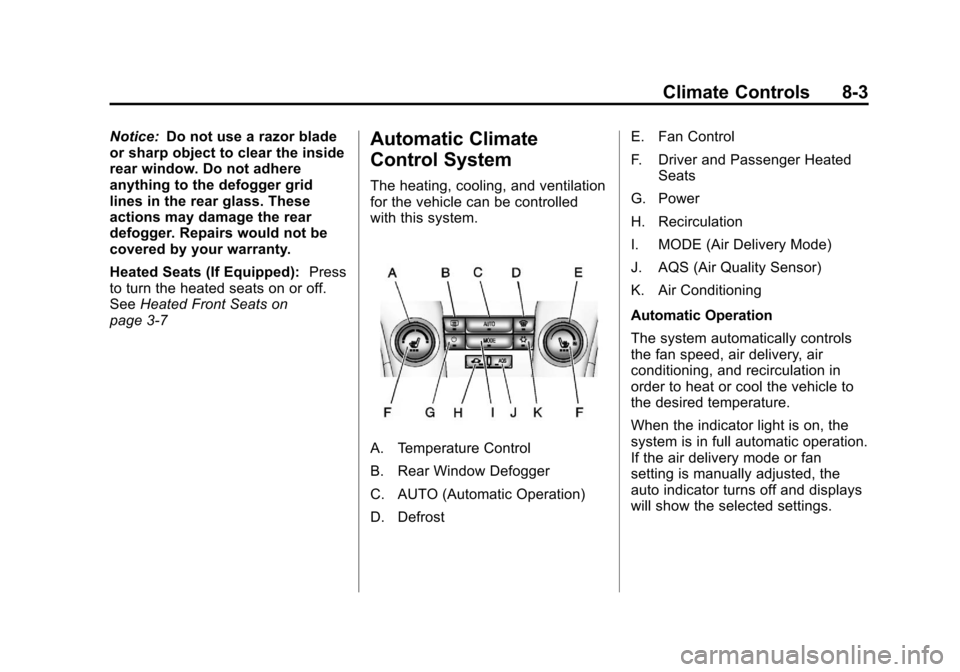
A. Temperature Control
B. Rear Window Defogger
C. AUTO (Automatic Operation)
D. Defrost E. Fan Control
F. Driver and Passenger Heated
Seats
G. Power
H. Recirculation
I. MODE (Air Delivery Mode)
J. AQS (Air Quality Sensor)
K. Air Conditioning
Automatic Operation
The system automatically controls
the fan speed, air delivery, air
conditioning, and recirculation in
order to heat or cool the vehicle to
the desired temperature.
When the indicator light is on, the
system is in full automatic operation.
If the air delivery mode or fan
setting is manually adjusted, the
auto indicator turns off and displays
will show the selected settings.
Page 195 of 400
Black plate (5,1)Chevrolet Cruze Owner Manual - 2012
Climate Controls 8-5
h(Recirculation):Press to turn
on recirculation. An indicator light
comes on. Air is recirculated to
quickly cool the inside of the vehicle
or prevent outside air and odors
from entering.
Automatic Air Recirculation:
When the AUTO indicator light is
on, the air is automatically
recirculated as needed to help
quickly cool the inside of the
vehicle.
AQS (Air Quality Sensor): For
vehicles with an air quality sensor,
the climate control system adjusts to
limit some exhaust fumes from
being pulled inside your vehicle.
Press the AQS button on the
climate control to activate the air
quality sensor. The air quality
sensor will not maintain recirculation for an extended period to prevent
the air inside the vehicle from
becoming too dry or stuffy. To adjust
the sensitivity of the Air Quality
Control, see
“Climate and Air
Quality” underVehicle
Personalization on page 5‑34.
Auto Defog: The climate control
system may have a sensor to
automatically detect high humidity
inside the vehicle. When high
humidity is detected, the climate
control system may adjust to
outside air supply and turn on the
air conditioner. If the climate control
system does not detect possible
window fogging, it returns to normal
operation. To turn Auto Defog off or
on, see “Climate and Air Quality”
under Vehicle Personalization on
page 5‑34.Rear Window Defogger
=(Rear Window Defogger):
Press to turn the rear window
defogger on or off.
The rear window defogger turns
off automatically after about
10 minutes. If turned on again it
runs for about five minutes before
turning off.
The rear window defogger can be
set to automatic operation. See
“Climate and Air Quality” under
Vehicle Personalization on
page 5‑34. When Auto Rear Defog
is selected, the rear window
defogger turns on automatically
when the interior temperature is cold
and the outside temperature is
about 40°F and below. The auto
rear defogger turns off automatically
after about 10 minutes. At higher
speeds, the rear window defogger
may stay on continuously.
Page 196 of 400
Black plate (6,1)Chevrolet Cruze Owner Manual - 2012
8-6 Climate Controls
For vehicles with heated outside
rearview mirrors, they turn on when
the rear window defogger button is
on and help to clear fog or frost from
the surface of the mirrors. See
Heated Mirrors on page 2‑16.
Notice:Do not try to clear frost
or other material from the inside
of the front windshield and rear
window with a razor blade or
anything else that is sharp. This
may damage the rear window
defogger grid and affect your
radio's ability to pick up stations
clearly. The repairs would not be
covered by your warranty.
Heated Seats (If Equipped): Press
to turn the heated seats on or off.
See Heated Front Seats on
page 3‑7.
Remote Start Climate Control
Operation: For vehicles with the
remote vehicle start feature, the
climate control system may run
when the vehicle is started remotely. The system will default to a heating
or cooling mode depending on the
outside temperature and then go
back to the previous settings. See
Remote Vehicle Start on page 2‑9.
The rear window defogger turns on
if it is cold outside.
Sensors
The solar sensor, located on top of
the instrument panel near the
windshield, monitors the solar heat.
The climate control system uses the
sensor information to adjust the
temperature, fan speed,
recirculation, and air delivery mode
for best comfort.
If the sensor is covered, the
automatic climate control system
may not work properly.
Air Vents
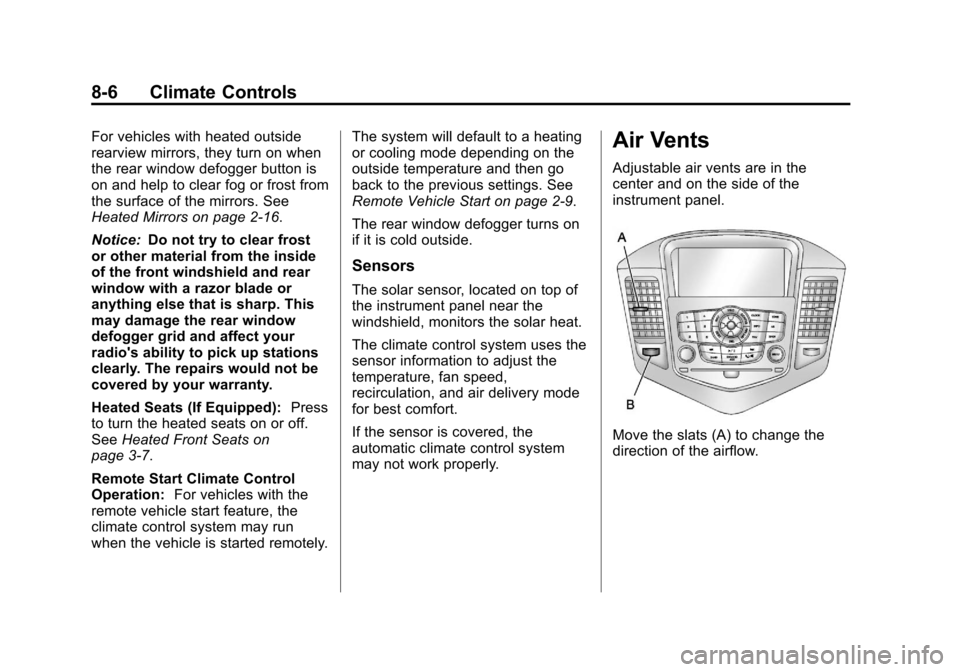
Adjustable air vents are in the
center and on the side of the
instrument panel.
Move the slats (A) to change the
direction of the airflow.
Page 240 of 400
Black plate (42,1)Chevrolet Cruze Owner Manual - 2012
9-42 Driving and Operating
Ending Cruise Control
There are three ways to end cruise
control:
.To disengage cruise control,
step lightly on the brake pedal or
clutch for a manual transmission.
.Press*on the steering wheel.
.To turn off cruise control, press1on the steering wheel.
Erasing Speed Memory
The cruise control set speed is
erased from memory if
1is pressed
or if the ignition is turned off.
Object Detection
Systems
Ultrasonic Parking Assist
For vehicles with the Ultrasonic
Rear Parking Assist (URPA) system,
it assists the driver with parking
and avoiding objects while in
R (Reverse). URPA operates at
speeds less than 8 km/h (5 mph).
The sensors on the rear bumper
detect objects up to 2.5 m (8 ft)
behind the vehicle, and at least
20 cm (8 in) off the ground.
{WARNING
The URPA system does not
detect pedestrians, bicyclists,
animals, or any other objects
located below the bumper or that
are too close or too far from the
vehicle. To prevent injury, death,
(Continued)
WARNING (Continued)
or vehicle damage, even with
URPA, always check behind the
vehicle and check all mirrors
before backing.
How the System Works
URPA comes on automatically
when the shift lever is moved into
R (Reverse). A single tone sounds
to indicate the system is working.
URPA operates only at speeds less
than 8 km/h (5 mph).
An obstacle is indicated by audible
beeps. The interval between the
beeps becomes shorter as the
vehicle gets closer to the obstacle.
When the distance is less than
30 cm (12 in), the beeping is a
continuous tone for five seconds.
Page 241 of 400
Black plate (43,1)Chevrolet Cruze Owner Manual - 2012
Driving and Operating 9-43
To be detected, objects must be at
least 20 cm (8 in) off the ground and
below trunk level. Objects must also
be within 2.5 m (8 ft) from the rear
bumper. The distance objects can
be detected may be less during
warmer or humid weather.
Turning the System On and Off
The URPA system can be turned
on and off using the infotainment
system controls. SeeVehicle
Personalization on page 5‑34 for
more information.
When the system is off, PARK
ASSIST OFF displays on the Driver
Information Center (DIC). The
message disappears after a short
period of time.
URPA defaults to the on setting
each time the vehicle is started.
When the System Does Not
Seem to Work Properly
The following messages may be
displayed on the DIC:
SERVICE PARKING ASSIST:
If this message occurs, take the
vehicle to your dealer to repair the
system.
PARK ASSIST Off: If the URPA
system does not activate due to a
temporary condition, the message
displays on the DIC. This can occur
under the following conditions:
.The driver has disabled the
system.
.The ultrasonic sensors are not
clean. Keep the vehicle's rear
bumper free of mud, dirt, snow,
ice, and slush. For cleaning
instructions, see Exterior Care
on page 10‑86.
.The park assist sensors are
covered by frost or ice. Frost or
ice can form around and behind
the sensors and may not always
be seen; this can occur after
washing the vehicle in cold
weather. The message may not
clear until the frost or ice has
melted.
.An object was hanging out of the
trunk during the last drive cycle.
Once the object is removed,
URPA will return to normal
operation.
.The bumper is damaged. Take
the vehicle to your dealer to
repair the system.
.Other conditions, such as
vibrations from a jackhammer or
the compression of air brakes on
a very large truck, are affecting
system performance.
Page 291 of 400
Black plate (37,1)Chevrolet Cruze Owner Manual - 2012
Vehicle Care 10-37
Mini Fuses Usage4 Canister Vent
Solenoid
5 Ignition
7 Not Used
8 Fuel Injection
9 Fuel Injection/
Ignition System
10 Engine Control
Module
11 Lambda Sensor
13 Canister Vent
Solenoid
14 Not Used
15 Rear Wiper
16 Ignition/Air Quality
Sensor/Aero‐Shutter
17 Ignition/Airbag Mini Fuses Usage
18 Fuel Control Module
19 Not Used
20 Fuel Pump
23 Not Used
29 Not Used
30 Antilock Brake
System
31 Body Control
Module
32 Body Control
Module
33 Front Seat Heating
34 Sunroof
(If Equipped)
35 Infotainment
System/Amplifier
36 Not Used Mini Fuses Usage
37 High Beam
Right Side
38 High Beam Left Side
39 Not Used
40 Not Used
46 Cooling Fan
47 Lambda Sensor
48 Fog Lights
49 Not Used
50 Not Used
51 Horn
52 Ignition
53 Automatic Dimming
Rearview Mirror
54 Light Switch/
Light Control