remote start CHEVROLET CRUZE 2012 1.G Owner's Manual
[x] Cancel search | Manufacturer: CHEVROLET, Model Year: 2012, Model line: CRUZE, Model: CHEVROLET CRUZE 2012 1.GPages: 400, PDF Size: 6.88 MB
Page 216 of 400
Black plate (18,1)Chevrolet Cruze Owner Manual - 2012
9-18 Driving and Operating
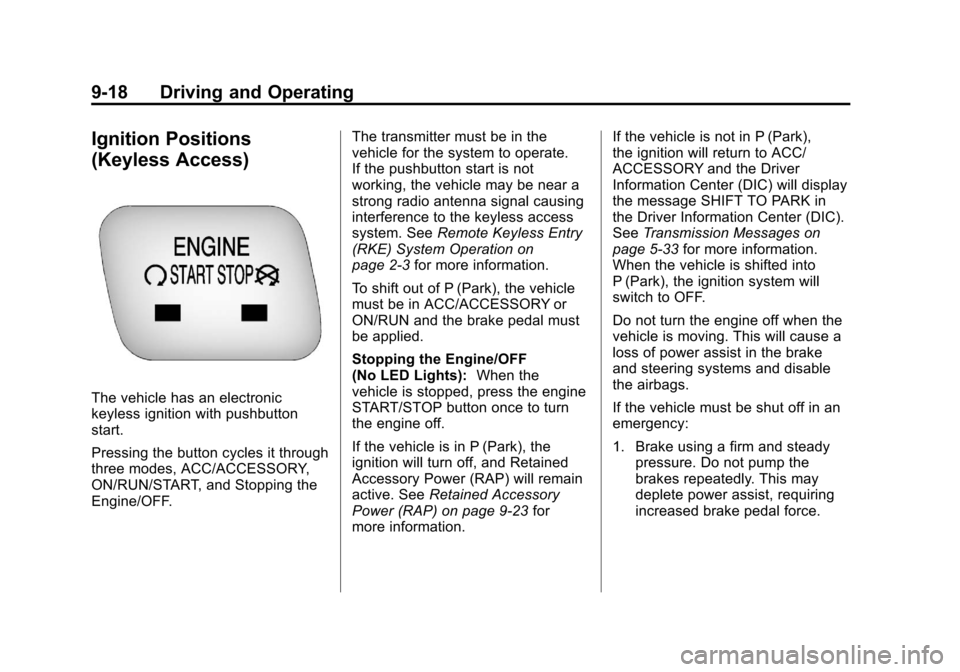
Ignition Positions
(Keyless Access)
The vehicle has an electronic
keyless ignition with pushbutton
start.
Pressing the button cycles it through
three modes, ACC/ACCESSORY,
ON/RUN/START, and Stopping the
Engine/OFF.The transmitter must be in the
vehicle for the system to operate.
If the pushbutton start is not
working, the vehicle may be near a
strong radio antenna signal causing
interference to the keyless access
system. See
Remote Keyless Entry
(RKE) System Operation on
page 2‑3 for more information.
To shift out of P (Park), the vehicle
must be in ACC/ACCESSORY or
ON/RUN and the brake pedal must
be applied.
Stopping the Engine/OFF
(No LED Lights): When the
vehicle is stopped, press the engine
START/STOP button once to turn
the engine off.
If the vehicle is in P (Park), the
ignition will turn off, and Retained
Accessory Power (RAP) will remain
active. See Retained Accessory
Power (RAP) on page 9‑23 for
more information. If the vehicle is not in P (Park),
the ignition will return to ACC/
ACCESSORY and the Driver
Information Center (DIC) will display
the message SHIFT TO PARK in
the Driver Information Center (DIC).
See
Transmission Messages on
page 5‑33 for more information.
When the vehicle is shifted into
P (Park), the ignition system will
switch to OFF.
Do not turn the engine off when the
vehicle is moving. This will cause a
loss of power assist in the brake
and steering systems and disable
the airbags.
If the vehicle must be shut off in an
emergency:
1. Brake using a firm and steady pressure. Do not pump the
brakes repeatedly. This may
deplete power assist, requiring
increased brake pedal force.
Page 219 of 400
Black plate (21,1)Chevrolet Cruze Owner Manual - 2012
Driving and Operating 9-21
components. If the ignition key is
turned to the START position,
and then released when the
engine begins cranking, the
engine will continue cranking
for a few seconds or until the
vehicle starts. If the engine does
not start and the key is held in
START for many seconds,
cranking stops after 15 seconds
to prevent cranking motor
damage. To prevent gear
damage, this system also
prevents cranking if the engine
is already running. Engine
cranking can be stopped by
turning the ignition switch to
ACC/ACCESSORY or
LOCK/OFF.
Notice: Cranking the engine for
long periods of time, by returning
the key to the START position
immediately after cranking has
ended, can overheat and damage
the cranking motor, and drain the
battery. Wait at least 15 seconds
between each try, to let the
cranking motor cool down. 2. If the engine does not start after
five to 10 seconds, especially
in very cold weather (below 0°F
or−18°C), it could be flooded
with too much gasoline.
Push the accelerator pedal all
the way to the floor and hold it
there as you hold the key in
START for a maximum of
15 seconds. Wait at least
15 seconds between each try, to
allow the cranking motor to cool.
When the engine starts, let go of
the key and accelerator. If the
vehicle starts briefly but then
stops again, repeat the
procedure. This clears the extra
gasoline from the engine. Do not
race the engine immediately
after starting it. Operate the
engine and transmission gently
until the oil warms up and
lubricates all moving parts. Starting Procedure
(Keyless Access)
1. If the vehicle has the keyless
access system, the transmitter
must be in the vehicle. Put your
foot on the brake pedal and
push the START/STOP button.
When the engine begins
cranking, let go of the button.
The idle speed will go down as
your engine gets warm. Do not
race the engine immediately
after starting it. Operate the
engine and transmission gently
to allow the oil to warm up and
lubricate all moving parts.
If the transmitter is not in the
vehicle or something is
interfering with the transmitter,
the Driver Information Center
(DIC) will display NO REMOTE
DETECTED. See Driver
Information Center (DIC) on
page 5‑23 for more information.
Page 220 of 400
Black plate (22,1)Chevrolet Cruze Owner Manual - 2012
9-22 Driving and Operating
If the battery in the keyless
access transmitter needs
replacing, the DIC displays
REPLACE BATTERY IN
REMOTE KEY. The vehicle can
still be driven. See“Starting the
Vehicle with a Low Transmitter
Battery” inRemote Keyless
Entry (RKE) System Operation
on page 2‑3 for more
information.
The vehicle has a
Computer-Controlled Cranking
System. This feature assists in
starting the engine and protects
components. If the START
button is pressed, and then
released when the engine
begins cranking, the engine will
continue cranking for a few
seconds or until the vehicle
starts. If the engine does not
start and the button is pressed
for many seconds, cranking will
be stopped after 15 seconds to
prevent cranking motor damage. To prevent gear damage, this
system also prevents cranking if
the engine is already running.
Engine cranking can be stopped
by pressing the START button a
second time.
Notice: Cranking the engine for
long periods of time, by returning
the key to the START position
immediately after cranking has
ended, can overheat and damage
the cranking motor, and drain the
battery. Wait at least 15 seconds
between each try, to let the
cranking motor cool down.
2. If the engine does not start after five to 10 seconds, especially in
very cold weather (below −18°C
or 0°F), it could be flooded with
too much gasoline. Try pushing
the accelerator pedal all the way
to the floor and holding it there
as you hold the key in START,
or press the START button, for
up to a maximum of 15 seconds. Wait at least 15 seconds
between each try, to allow the
cranking motor to cool down.
When the engine starts, let go of
the key or button, and the
accelerator. If the vehicle starts
briefly but then stops again, do
the same thing. This clears the
extra gasoline from the engine.
Do not race the engine
immediately after starting it.
Operate the engine and
transmission gently until the oil
warms up and lubricates all
moving parts.
Engine Heater
The engine heater, if available, can
help in cold weather conditions at or
below
−18°C (0°F) for easier starting
and better fuel economy during
engine warm-up. Plug in the heater
at least four hours before starting
the vehicle. An internal thermostat
in the plug end of the cord will
prevent engine heater operation at
temperatures above −18°C (0°F).
Page 261 of 400

Black plate (7,1)Chevrolet Cruze Owner Manual - 2012
Vehicle Care 10-7
A.Engine Air Cleaner/Filter on
page 10‑14.
B. Engine Oil Dipstick. See “Checking Engine Oil” under
Engine Oil on page 10‑9.
C. Electric Engine Cooling Fan (Out of View). See Cooling
System on page 10‑16.
D. Engine Oil Fill Cap. See “When
to Add Engine Oil” under
Engine Oil on page 10‑9. E. Remote Negative (-) Terminal.
See Jump Starting on
page 10‑80.
F. Brake/Clutch Fluid Reservoir. See “Brake Fluid” underBrakes
on page 10‑22 andHydraulic
Clutch on page 10‑14.
G. Battery on page 10‑25 (Under
Cover).
H. Engine Coolant Surge Tank and Pressure Cap. See Engine
Coolant on page 10‑16. I. Remote Positive (+) Terminal.
See Jump Starting on
page 10‑80.
J. Engine Compartment Fuse
Block on page 10‑36.
K. Windshield Washer Fluid Reservoir. See “Adding Washer
Fluid” under Washer Fluid on
page 10‑22.
Page 263 of 400
Black plate (9,1)Chevrolet Cruze Owner Manual - 2012
Vehicle Care 10-9
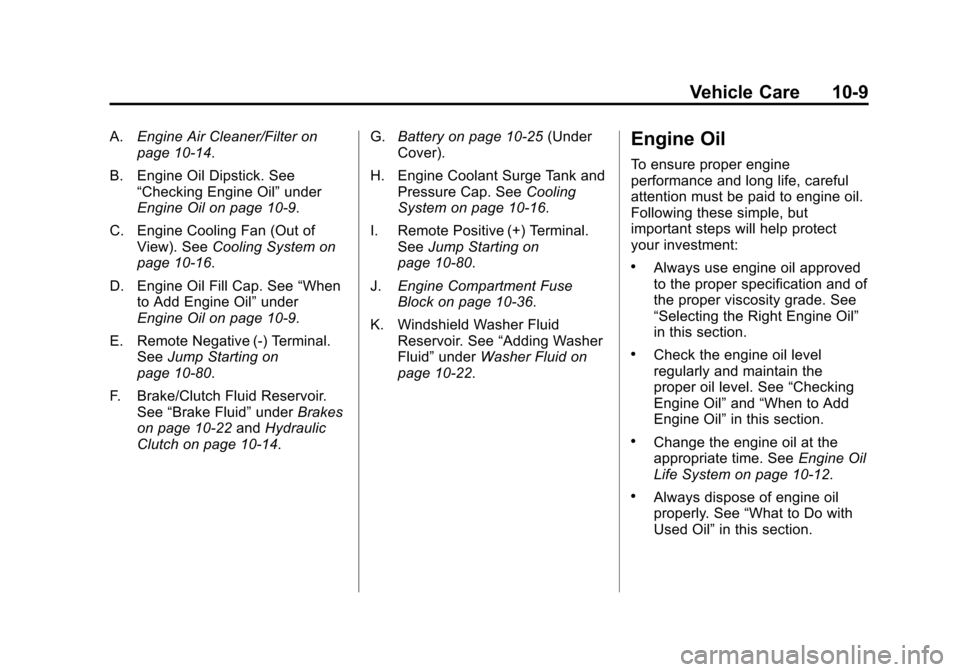
A.Engine Air Cleaner/Filter on
page 10‑14.
B. Engine Oil Dipstick. See “Checking Engine Oil” under
Engine Oil on page 10‑9.
C. Engine Cooling Fan (Out of View). See Cooling System on
page 10‑16.
D. Engine Oil Fill Cap. See “When
to Add Engine Oil” under
Engine Oil on page 10‑9.
E. Remote Negative (-) Terminal. See Jump Starting on
page 10‑80.
F. Brake/Clutch Fluid Reservoir. See “Brake Fluid” underBrakes
on page 10‑22 andHydraulic
Clutch on page 10‑14. G.
Battery on page 10‑25 (Under
Cover).
H. Engine Coolant Surge Tank and Pressure Cap. See Cooling
System on page 10‑16.
I. Remote Positive (+) Terminal. See Jump Starting on
page 10‑80.
J. Engine Compartment Fuse
Block on page 10‑36.
K. Windshield Washer Fluid Reservoir. See “Adding Washer
Fluid” under Washer Fluid on
page 10‑22.Engine Oil
To ensure proper engine
performance and long life, careful
attention must be paid to engine oil.
Following these simple, but
important steps will help protect
your investment:
.Always use engine oil approved
to the proper specification and of
the proper viscosity grade. See
“Selecting the Right Engine Oil”
in this section.
.Check the engine oil level
regularly and maintain the
proper oil level. See “Checking
Engine Oil” and“When to Add
Engine Oil” in this section.
.Change the engine oil at the
appropriate time. See Engine Oil
Life System on page 10‑12.
.Always dispose of engine oil
properly. See “What to Do with
Used Oil” in this section.
Page 388 of 400
Black plate (16,1)Chevrolet Cruze Owner Manual - 2012
13-16 Customer Information
Radio Frequency
Identification (RFID)
RFID technology is used in some
vehicles for functions such as tire
pressure monitoring and ignition
system security, as well as in
connection with conveniences such
as key fobs for remote door locking/
unlocking and starting, and
in-vehicle transmitters for garage
door openers. RFID technology in
GM vehicles does not use or record
personal information or link with any
other GM system containing
personal information.
Radio Frequency
Statement
This vehicle has systems that
operate on a radio frequency that
comply with Part 15 of the Federal
Communications Commission (FCC)
rules and with Industry Canada
Standards RSS‐GEN/210/220/310.
Operation is subject to the following
two conditions:
1. The device may not causeharmful interference.
2. The device must accept any interference received, including
interference that may cause
undesired operation of the
device.
Changes or modifications to any of
these systems by other than an
authorized service facility could void
authorization to use this equipment.
Page 397 of 400

Black plate (9,1)Chevrolet Cruze Owner Manual - 2012
INDEX i-9
Remote Keyless Entry (RKE)System . . . . . . . . . . . . . . . . . . . . . . . . 2-3
Remote Vehicle Start . . . . . . . . . . . 2-9
Replacement Bulbs . . . . . . . . . . . 10-34
Replacement Parts Airbags . . . . . . . . . . . . . . . . . . . . . . . 3-32
Maintenance . . . . . . . . . . . . . . . . .11-15
Replacing Airbag System . . . . . . 3-32
Replacing LATCH System Parts after a Crash . . . . . . . . . . . 3-48
Replacing Safety Belt
System Parts after a Crash . . . 3-18
Reporting Safety Defects Canadian Government . . . . . . 13-13
General Motors . . . . . . . . . . . . . 13-14
U.S. Government . . . . . . . . . . . 13-13
Restraints Where to Put . . . . . . . . . . . . . . . . . 3-40
Retained Accessory Power (RAP) . . . . . . . . . . . . . . . . . 9-23
Ride Control Systems
Messages . . . . . . . . . . . . . . . . . . . . 5-32
Roads Driving, Wet . . . . . . . . . . . . . . . . . . . 9-6
Roadside Assistance
Program . . . . . . . . . . . . . . . . . . . . . . 13-6 Roof
Sunroof . . . . . . . . . . . . . . . . . . . . . . . 2-21
Rotation, Tires . . . . . . . . . . . . . . . . 10-55
Routing, Engine Drive Belt . . . . . 12-4
Running the Vehicle While Parked . . . . . . . . . . . . . . . . . . . . . . . 9-28
S
Safety Belts . . . . . . . . . . . . . . . . . . . 3-10Care . . . . . . . . . . . . . . . . . . . . . . . . . . 3-18
Extender . . . . . . . . . . . . . . . . . . . . . . 3-17
How to Wear Safety BeltsProperly . . . . . . . . . . . . . . . . . . . . . 3-11
Lap-Shoulder Belt . . . . . . . . . . . . 3-12
Reminders . . . . . . . . . . . . . . . . . . . . 5-10
Replacing after a Crash . . . . . . 3-18
Use During Pregnancy . . . . . . . . 3-17
Safety Defects Reporting
Canadian Government . . . . . . 13-13
General Motors . . . . . . . . . . . . . 13-14
U.S. Government . . . . . . . . . . . 13-13
Safety Locks . . . . . . . . . . . . . . . . . . . 2-12
Safety System Check . . . . . . . . . . 3-17
Satellite Radio . . . . . . . . . . . . . . . . . 7-14
Scheduling Appointments . . . . . . 13-8
Sealant Kit, Tire . . . . . . . . . . . . . . 10-65 Seats
Adjustment, Front . . . . . . . . . . . . . . 3-3
Head Restraints . . . . . . . . . . . . . . . 3-2
Heated Front . . . . . . . . . . . . . . . . . . 3-7
Power Adjustment, Front . . . . . . 3-4
Rear . . . . . . . . . . . . . . . . . . . . . . . . . . . 3-8
Reclining Seatbacks . . . . . . . . . . . 3-5
Securing Child Restraints . . . . . . . . . . . . . . 3-48, 3-50
Security Light . . . . . . . . . . . . . . . . . . . . . . . . . . 5-21
Messages . . . . . . . . . . . . . . . . . . . . 5-32
Vehicle . . . . . . . . . . . . . . . . . . . . . . . 2-14
Vehicle Alarm . . . . . . . . . . . . . . . . . 2-14
Service Accessories and
Modifications . . . . . . . . . . . . . . . . 10-3
Doing Your Own Work . . . . . . . . 10-4
Engine Soon Light . . . . . . . . . . . . 5-13
Maintenance Records . . . . . . .11-16
Maintenance, General Information . . . . . . . . . . . . . . . . . . 11-1
Parts Identification Label . . . . . 12-1
Publications Ordering Information . . . . . . . . . . . . . . . . 13-12
Page 398 of 400

Black plate (10,1)Chevrolet Cruze Owner Manual - 2012
i-10 INDEX
Service (cont.)Scheduling Appointments . . . . . 13-8
Vehicle Messages . . . . . . . . . . . . 5-32
Vehicle Soon Light . . . . . . . . . . . . 5-16
Servicing the Airbag . . . . . . . . . . . 3-30
Shift Lock Control Function Check, Automatic
Transmission . . . . . . . . . . . . . . . . 10-26
Shifting
Into Park . . . . . . . . . . . . . . . . . . . . . . 9-24
Out of Park . . . . . . . . . . . . . . . . . . . 9-25
Sidemarker Bulb Replacement . . . . . . . . . . 10-31
Signals, Turn and
Lane-Change . . . . . . . . . . . . . . . . . 6-4
Spare Tire Compact . . . . . . . . . . . . . . . . . . . . 10-80
Specifications and
Capacities . . . . . . . . . . . . . . . . . . . . 12-2
Speedometer . . . . . . . . . . . . . . . . . . . 5-9
StabiliTrak OFF Light . . . . . . . . . . . . . . . . . . . . . 5-18
System . . . . . . . . . . . . . . . . . . . . . . . 9-38
Start Vehicle, Remote . . . . . . . . . . 2-9 Starter Switch Check . . . . . . . . . 10-26
Starting the Engine . . . . . . . . . . . . 9-20
Starting the Vehicle
Messsages . . . . . . . . . . . . . . . . . . . 5-33
Steering . . . . . . . . . . . . . . . . . . . . . . . . 9-4 Power, Warning Lights . . . . . . . . 5-17
Wheel Adjustment . . . . . . . . . . . . . 5-2
Wheel Controls . . . . . . . . . . . . . . . . 5-2
Stoplamps and Back-Up Lamps Bulb Replacement . . . . . . . . . . 10-31
Storage Areas
Center Console . . . . . . . . . . . . . . . . 4-2
Glove Box . . . . . . . . . . . . . . . . . . . . . 4-1
Instrument Panel . . . . . . . . . . . . . . 4-1
Storing the Tire Sealant and Compressor Kit . . . . . . . . . 10-72
Stuck Vehicle . . . . . . . . . . . . . . . . . . 9-10
Sun Visors . . . . . . . . . . . . . . . . . . . . . 2-20
Sunroof . . . . . . . . . . . . . . . . . . . . . . . . 2-21
Symbols . . . . . . . . . . . . . . . . . . . . . . . . . . iv
System Infotainment . . . . . . . . . . . . . . . . . . . 7-2T
Tachometer . . . . . . . . . . . . . . . . . . . . . 5-9
TaillampsBulb Replacement . . . . . . . . . . 10-31
Text Telephone (TTY) Users . . . 13-4
Theft-Deterrent Systems . . . . . . . 2-14 Immobilizer . . . . . . . . . . . . . . . . . . . 2-14
Time . . . . . . . . . . . . . . . . . . . . . . . . . . . . 5-5
Tires Buying New Tires . . . . . . . . . . . 10-57
Chains . . . . . . . . . . . . . . . . . . . . . . 10-62
Changing . . . . . . . . . . . . . . . . . . . 10-72
Compact Spare . . . . . . . . . . . . . 10-80
Designations . . . . . . . . . . . . . . . 10-46
Different Size . . . . . . . . . . . . . . . 10-59
If a Tire Goes Flat . . . . . . . . . . 10-63
Inflation Monitor System . . . . 10-52
Inspection . . . . . . . . . . . . . . . . . . 10-55
Low Profile . . . . . . . . . . . . . . . . . 10-43
Messages . . . . . . . . . . . . . . . . . . . . 5-33
Pressure Light . . . . . . . . . . . . . . . . 5-19
Pressure Monitor System . . . 10-50
Rotation . . . . . . . . . . . . . . . . . . . . 10-55
Sealant andCompressor Kit . . . . . . . . . . . 10-65
Page 399 of 400

Black plate (11,1)Chevrolet Cruze Owner Manual - 2012
INDEX i-11
Tires (cont.)Sealant and Compressor
Kit, Storing . . . . . . . . . . . . . . . . 10-72
Sidewall Labeling . . . . . . . . . . . 10-44
Terminology and
Definitions . . . . . . . . . . . . . . . . . 10-46
Uniform Tire Quality Grading . . . . . . . . . . . . . . . . . . . 10-59
Wheel Alignment and Tire
Balance . . . . . . . . . . . . . . . . . . . 10-61
Wheel Replacement . . . . . . . . 10-61
When It Is Time for New Tires . . . . . . . . . . . . . . . . . . . . . . 10-57
Winter . . . . . . . . . . . . . . . . . . . . . . 10-42
Towing Driving Characteristics . . . . . . . . 9-49
Equipment . . . . . . . . . . . . . . . . . . . . 9-55
General Information . . . . . . . . . . 9-48
Recreational Vehicle . . . . . . . . 10-84
Trailer . . . . . . . . . . . . . . . . . . . . . . . . 9-53
Vehicle . . . . . . . . . . . . . . . . . . . . . 10-83 Traction
Control System (TCS) . . . . . . . . 9-37
Control System (TCS)/
StabiliTrak
®Light . . . . . . . . . . . . 5-18
Off Light . . . . . . . . . . . . . . . . . . . . . . 5-18
Trailer Towing . . . . . . . . . . . . . . . . . 9-53
Transmission Automatic . . . . . . . . . . . . . . . . . . . . . 9-29
Fluid, Automatic . . . . . . . . . . . . 10-13
Fluid, Manual . . . . . . . . . . . . . . . 10-13
Messages . . . . . . . . . . . . . . . . . . . . 5-33
Transportation Program, Courtesy . . . . . . . . . . . . . . . . . . . . . 13-8
Trip Odometer . . . . . . . . . . . . . . . . . . 5-9
Trunk . . . . . . . . . . . . . . . . . . . . . . . . . . 2-12
Turn and Lane-Change Signals . . . . . . . . . . . . . . . . . . . . . . . . 6-4
Turn Signal Bulb Replacement . . . . . . . . . . 10-31
U
Ultrasonic Parking Assist . . . . . . 9-42
Uniform Tire QualityGrading . . . . . . . . . . . . . . . . . . . . . 10-59
Up-Shift Light . . . . . . . . . . . . . . . . . . 5-17
Using This Manual . . . . . . . . . . . . . . . . iv
V
Vehicle Alarm System . . . . . . . . . . . . . . . . 2-14
Canadian Owners . . . . . . . . . . . . . . . iii
Control . . . . . . . . . . . . . . . . . . . . . . . . 9-4
IdentificationNumber (VIN) . . . . . . . . . . . . . . . 12-1
Load Limits . . . . . . . . . . . . . . . . . . . 9-10
Messages . . . . . . . . . . . . . . . . . . . . 5-28
Personalization . . . . . . . . . . . . . . . 5-34
Reminder Messages . . . . . . . . . . 5-34
Remote Start . . . . . . . . . . . . . . . . . . 2-9
Security . . . . . . . . . . . . . . . . . . . . . . 2-14
Service Soon Light . . . . . . . . . . . 5-16
Towing . . . . . . . . . . . . . . . . . . . . . . 10-83