light CHEVROLET CRUZE 2014 1.G User Guide
[x] Cancel search | Manufacturer: CHEVROLET, Model Year: 2014, Model line: CRUZE, Model: CHEVROLET CRUZE 2014 1.GPages: 420, PDF Size: 5.92 MB
Page 22 of 420
Black plate (16,1)Chevrolet Cruze Owner Manual (GMNA-Localizing-U.S./Canada-6007168) -
2014 - 2nd Edition - 7/15/13
1-16 In Brief
Storing a Favorite Station
Stations from all bands can be
stored in the favorite lists in any
order. Up to six stations can be
stored in each favorite page and the
number of available favorite pages
can be set.
To store the station to a position in
the list, press the corresponding
numeric button 1 to 6 until a beep is
heard.
For more information, see“Storing a
Station as a Favorite” inAM-FM
Radio on page 7-7.
Setting the Clock
Adjusting the Time or Date
To set the time and date for the
radio with navigation:
1. Press CLOCK.
2. Select Set Time or Set Date.
3. Turn the MENU/SEL knob to adjust the highlighted number.
4. Press the MENU/SEL knob to select the next number. 5. To save the settings, press
BACK on the radio faceplate.
Setting the 12/24 Hour Format
To set the 12/24 hour format for the
radio with navigation:
1. Press CLOCK.
2. Highlight 12/24 Hour Format.
3. Press the MENU/SEL knob to select the 12 hour or 24 hour
display format.
4. To save the settings, press BACK on the radio faceplate.
For detailed instructions on setting
the clock for the vehicle's specific
audio system. See Clock on
page 5-4.
Satellite Radio
If equipped, vehicles with a
SiriusXM®satellite radio tuner and a
valid SiriusXM satellite radio
subscription can receive SiriusXM
programming.
SiriusXM Satellite Radio
Service
SiriusXM is a satellite radio service
based in the 48 contiguous United
States and 10 Canadian provinces.
SiriusXM satellite radio has a wide
variety of programming and
commercial-free music, coast to
coast, and in digital-quality sound.
A fee is required to receive the
SiriusXM service.
Refer to:
.www.siriusxm.com or call
1-866-635-2349 (U.S.).
.www.xmradio.ca or call
1-877-209-0079 (Canada).
See Satellite Radio on page 7-9.
Portable Audio Devices
Some vehicles have a 3.5 mm
(1/8 in) auxiliary input and a USB
port in the center console. External
devices such as iPods
®, laptop
computers, MP3 players, CD
Page 25 of 420
Black plate (19,1)Chevrolet Cruze Owner Manual (GMNA-Localizing-U.S./Canada-6007168) -
2014 - 2nd Edition - 7/15/13
In Brief 1-19
Ultrasonic Parking Assist
If equipped, this system uses
sensors on the rear bumper to
assist with parking and avoiding
objects while in R (Reverse).
It operates at speeds less than
8 km/h (5 mph). Ultrasonic Rear
Parking Assist (URPA) uses audible
beeps to provide distance and
system information.
Keep the sensors on the vehicle's
rear bumper clean to ensure proper
operation.
SeeUltrasonic Parking Assist on
page 9-45.
Power Outlets
The accessory power outlets can be
used to plug in electrical equipment,
such as a cell phone or MP3 player.
There is one accessory power outlet
located on the center floor console
and one on the rear of the center
floor console. These outlets are
powered when the key is in ON/
RUN or ACC/ACCESSORY, or until
the driver door is opened within
10 minutes of turning off the vehicle.
See Retained Accessory Power
(RAP) on page 9-23.
See Power Outlets on page 5-6.
Performance and
Maintenance
Traction Control/
Electronic Stability
Control
The Traction Control System (TCS)
limits wheel spin. The system turns
on automatically every time the
vehicle is started.
The StabiliTrak system assists with
directional control of the vehicle in
difficult driving conditions. The
system also turns on automatically
every time the vehicle is started.
.To turn off traction control, press
and release the
gbutton on the
center console. The traction off
light
iilluminates.
.To turn off both traction control
and StabiliTrak, press and hold
the
gbutton, until the traction off
light
iand the StabiliTrak OFF
light
gilluminate.
Page 26 of 420
Black plate (20,1)Chevrolet Cruze Owner Manual (GMNA-Localizing-U.S./Canada-6007168) -
2014 - 2nd Edition - 7/15/13
1-20 In Brief
.Press and release thegbutton
again to turn on both systems.
See Traction Control/Electronic
Stability Control on page 9-41.
Tire Pressure Monitor
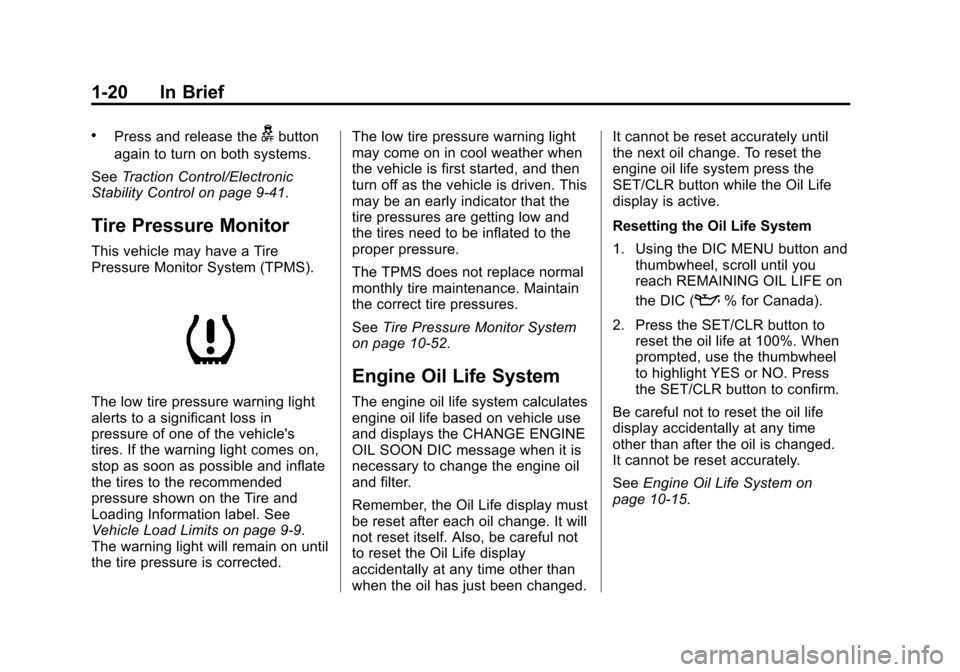
This vehicle may have a Tire
Pressure Monitor System (TPMS).
The low tire pressure warning light
alerts to a significant loss in
pressure of one of the vehicle's
tires. If the warning light comes on,
stop as soon as possible and inflate
the tires to the recommended
pressure shown on the Tire and
Loading Information label. See
Vehicle Load Limits on page 9-9.
The warning light will remain on until
the tire pressure is corrected. The low tire pressure warning light
may come on in cool weather when
the vehicle is first started, and then
turn off as the vehicle is driven. This
may be an early indicator that the
tire pressures are getting low and
the tires need to be inflated to the
proper pressure.
The TPMS does not replace normal
monthly tire maintenance. Maintain
the correct tire pressures.
See
Tire Pressure Monitor System
on page 10-52.
Engine Oil Life System
The engine oil life system calculates
engine oil life based on vehicle use
and displays the CHANGE ENGINE
OIL SOON DIC message when it is
necessary to change the engine oil
and filter.
Remember, the Oil Life display must
be reset after each oil change. It will
not reset itself. Also, be careful not
to reset the Oil Life display
accidentally at any time other than
when the oil has just been changed. It cannot be reset accurately until
the next oil change. To reset the
engine oil life system press the
SET/CLR button while the Oil Life
display is active.
Resetting the Oil Life System
1. Using the DIC MENU button and
thumbwheel, scroll until you
reach REMAINING OIL LIFE on
the DIC (
:% for Canada).
2. Press the SET/CLR button to reset the oil life at 100%. When
prompted, use the thumbwheel
to highlight YES or NO. Press
the SET/CLR button to confirm.
Be careful not to reset the oil life
display accidentally at any time
other than after the oil is changed.
It cannot be reset accurately.
See Engine Oil Life System on
page 10-15.
Page 28 of 420
Black plate (22,1)Chevrolet Cruze Owner Manual (GMNA-Localizing-U.S./Canada-6007168) -
2014 - 2nd Edition - 7/15/13
1-22 In Brief
message CLEANING EXHAUST
FILTER KEEP DRIVING UNTIL
MESSAGE IS CLEARED.
If the vehicle continues to be driven
in a manner that prevents effective
DPF cleaning, the DPF will become
plugged with particulates. If this
occurs, the engine computer will
turn on the service engine soon light
in the instrument cluster and the
DIC will display the message
ENGINE POWER IS REDUCED.
SeeDiesel Particulate Filter on
page 9-26 andEngine Power
Messages on page 5-29.
Fuel
Use Ultra-Low Sulfur Diesel
Fuel (ULSD)
Use Ultra-Low Sulfur Diesel Fuel
(ULSD) only. The emission control
hardware used on the vehicle may
be damaged by using fuel with high
sulfur levels. Use only fuel that is
dispensed from pumps bearing the
ULSD label. Do Not Use Low Sulfur Diesel
Fuel (LSD)
Do not use fuel that is dispensed
from pumps bearing the LSD label.
Do Not Use Non-Highway Fuel
Fuel labeled as off road or
non-highway is typically very high in
sulfur content and will damage the
emission control system.
Non-highway fuel is not intended for
use in on-highway vehicles.
In addition:
.Use the correct engine oil.
.Do not add gasoline to
diesel fuel.
.Do not modify the induction or
exhaust systems.
See Fuel for Diesel Engines on
page 9-54 andEngine Oil on
page 10-11.
Diesel Exhaust Fluid
Diesel Exhaust Fluid (DEF) is used
with diesel engines to reduce the
amount of regulated emissions
produced. The DEF system must be
maintained for the vehicle to run
properly. It is normal to hear the
DEF system purge fluid back into
the tank after the vehicle is shutoff.
Locating Diesel Exhaust Fluid
DEF can be purchased at a
Chevrolet dealer. It can also be
purchased at authorized vehicle
dealerships. Additionally, some
diesel fueling stations or retailers
may have DEF for purchase. For
vehicles with an active OnStar
®
subscription, OnStar can help to
locate a DEF retailer. See
“Customer Assistance Offices” in
the owner manual for phone
numbers to assist you in contacting
a GM dealer. See Recommended
Fluids and Lubricants on
page 11-12.
Page 34 of 420
Black plate (4,1)Chevrolet Cruze Owner Manual (GMNA-Localizing-U.S./Canada-6007168) -
2014 - 2nd Edition - 7/15/13
2-4 Keys, Doors, and Windows
The turn signal indicators may flash
and/or the horn may sound to
indicate locking. See“Remote Lock
Feedback” underVehicle
Personalization on page 5-35.
If the driver door is open when
Qis
pressed, all doors lock except the
driver door, if Unlocked Door Anti
Lock Out is enabled through the
vehicle personalization.
If the passenger door is open when
Qis pressed, all doors lock.
Pressing
Qmay also arm the
theft-deterrent system. See Vehicle
Alarm System on page 2-16.
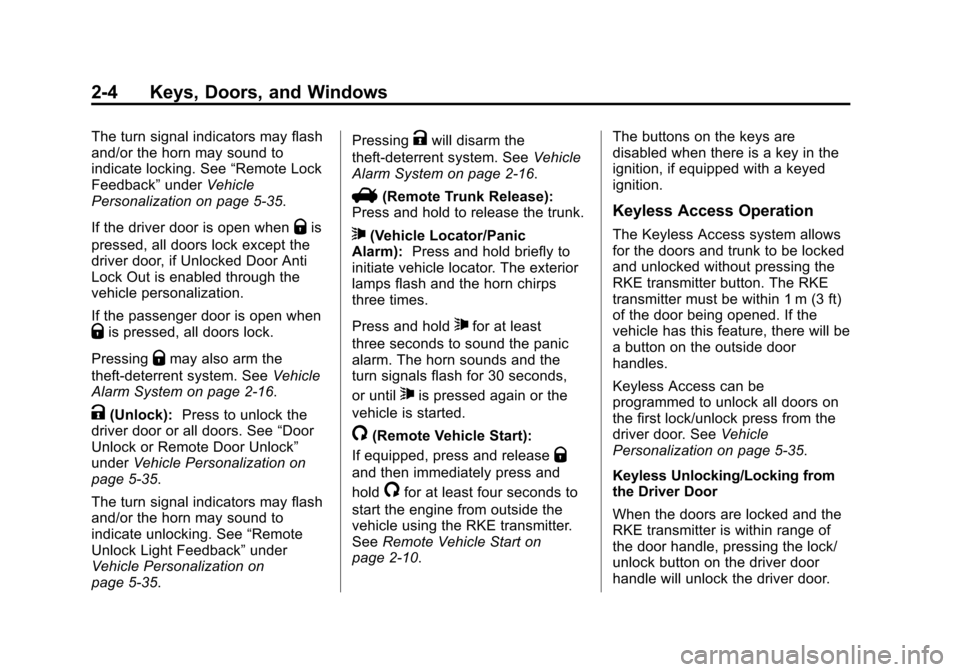
K(Unlock): Press to unlock the
driver door or all doors. See “Door
Unlock or Remote Door Unlock”
under Vehicle Personalization on
page 5-35.
The turn signal indicators may flash
and/or the horn may sound to
indicate unlocking. See “Remote
Unlock Light Feedback” under
Vehicle Personalization on
page 5-35. Pressing
Kwill disarm the
theft-deterrent system. See Vehicle
Alarm System on page 2-16.
V(Remote Trunk Release):
Press and hold to release the trunk.
7(Vehicle Locator/Panic
Alarm): Press and hold briefly to
initiate vehicle locator. The exterior
lamps flash and the horn chirps
three times.
Press and hold
7for at least
three seconds to sound the panic
alarm. The horn sounds and the
turn signals flash for 30 seconds,
or until
7is pressed again or the
vehicle is started.
/(Remote Vehicle Start):
If equipped, press and release
Q
and then immediately press and
hold
/for at least four seconds to
start the engine from outside the
vehicle using the RKE transmitter.
See Remote Vehicle Start on
page 2-10. The buttons on the keys are
disabled when there is a key in the
ignition, if equipped with a keyed
ignition.
Keyless Access Operation
The Keyless Access system allows
for the doors and trunk to be locked
and unlocked without pressing the
RKE transmitter button. The RKE
transmitter must be within 1 m (3 ft)
of the door being opened. If the
vehicle has this feature, there will be
a button on the outside door
handles.
Keyless Access can be
programmed to unlock all doors on
the first lock/unlock press from the
driver door. See
Vehicle
Personalization on page 5-35.
Keyless Unlocking/Locking from
the Driver Door
When the doors are locked and the
RKE transmitter is within range of
the door handle, pressing the lock/
unlock button on the driver door
handle will unlock the driver door.
Page 36 of 420
Black plate (6,1)Chevrolet Cruze Owner Manual (GMNA-Localizing-U.S./Canada-6007168) -
2014 - 2nd Edition - 7/15/13
2-6 Keys, Doors, and Windows
Programming Transmitters to
the Vehicle
Only RKE transmitters programmed
to the vehicle will work. If a
transmitter is lost or stolen, a
replacement can be purchased and
programmed through your dealer.
The vehicle can be reprogrammed
so that lost or stolen transmitters no
longer work. Any remaining
transmitters will need to be
reprogrammed. Each vehicle can
have up to eight transmitters
matched to it.
Programming with a Recognized
Transmitter (Key Vehicles Only)
To program a new key:
1. Insert the original, alreadyprogrammed key in the ignition
and turn the key to the ON/RUN
position.
2. Turn the key to LOCK/OFF, and remove the key. 3. Insert the new key to be
programmed and turn it to the
ON/RUN position within
five seconds.
The security light will turn off
once the key has been
programmed.
4. Repeat Steps 1–3 if additional keys are to be programmed.
If a key is lost or damaged, see your
dealer to have a new key made.
Programming without a
Recognized Transmitter (Key
Vehicles Only)
Program a new key to the vehicle
when a recognized key is not
available. Canadian regulations
require that owners see their dealer.
If there are no currently recognized
keys available, follow this procedure
to program the first key. This procedure will take
approximately 30 minutes to
complete for the first key. The
vehicle must be off and all of the
keys you wish to program must be
with you.
1. Insert the new vehicle key into
the ignition.
2. Turn to ON/RUN. The security light will come on.
3. Wait 10 minutes until the security light turns off.
4. Turn the ignition to LOCK/OFF.
5. Repeat Steps 2–4 two more times. After the third time, turn to
ON/RUN; the key is learned and
all previously known keys will no
longer work with the vehicle.
Remaining keys can be learned by
following the procedure in
“Programming with a Recognized
Transmitter (Key Vehicles Only).”
Page 40 of 420
Black plate (10,1)Chevrolet Cruze Owner Manual (GMNA-Localizing-U.S./Canada-6007168) -
2014 - 2nd Edition - 7/15/13
2-10 Keys, Doors, and Windows
4. Insert the new battery, positiveside facing up. Push the battery
down until it is held in place.
Replace with a CR2032 or
equivalent battery.
5. Snap the battery cover back on to the transmitter.
Remote Vehicle Start
If equipped, this feature allows the
engine to be started from outside
the vehicle.
/(Remote Vehicle Start): This
button will be on the RKE
transmitter if the vehicle has remote
start.
The climate control system will use
the previous settings during a
remote start. The rear defog may
come on during remote start based
on cold ambient conditions. The
rear fog indicator light does not
come on during remote start. If the
vehicle has heated seats, they may
come on during a remote start. See
Heated Front Seats on page 3-5. Laws in some local communities
may restrict the use of remote
starters. For example, some laws
require a person using remote start
to have the vehicle in view. Check
local regulations for any
requirements.
Other conditions can affect the
performance of the transmitter. See
Remote Keyless Entry (RKE)
System on page 2-3.
Starting the Vehicle
To start the engine using the remote
start feature:
1. Aim the RKE transmitter at the
vehicle.
2. Press and release
Q.
3. Immediately after completing Step 2, press and hold
/for at
least four seconds or until the
turn signal lamps flash. The turn
signal lamps flashing confirms
the request to remote start the
vehicle has been received. When the engine starts, the parking
lamps will turn on and remain on as
long as the engine is running. The
doors will be locked and the climate
control system may come on.
The engine will continue to run for
10 minutes. Repeat the steps for a
10-minute time extension. Remote
start can be extended only once.
Place the ignition to ON/RUN/
START.
Extending Engine Run Time
For a 10-minute extension, repeat
Steps 1–3 while the engine is still
running. The remote start can be
extended once.
When the remote start is extended,
the second 10 minutes will start
immediately.
For example, if the engine has been
running for five minutes, and
10 minutes are added, the engine
will run for a total of 15 minutes.
Page 43 of 420
Black plate (13,1)Chevrolet Cruze Owner Manual (GMNA-Localizing-U.S./Canada-6007168) -
2014 - 2nd Edition - 7/15/13
Keys, Doors, and Windows 2-13
Safety Locks
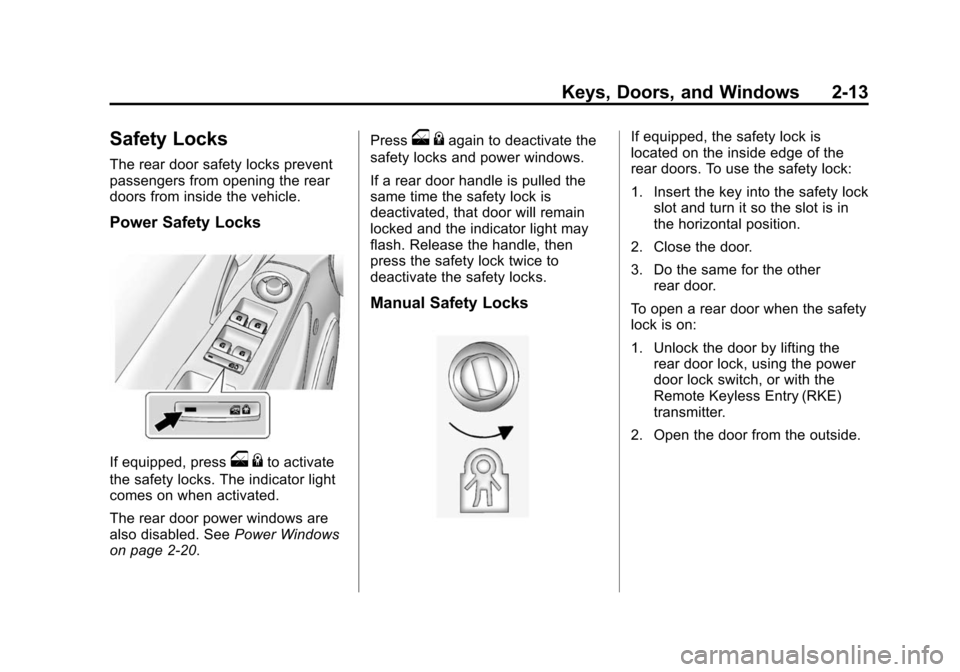
The rear door safety locks prevent
passengers from opening the rear
doors from inside the vehicle.
Power Safety Locks
If equipped, presso{to activate
the safety locks. The indicator light
comes on when activated.
The rear door power windows are
also disabled. See Power Windows
on page 2-20. Press
o
{again to deactivate the
safety locks and power windows.
If a rear door handle is pulled the
same time the safety lock is
deactivated, that door will remain
locked and the indicator light may
flash. Release the handle, then
press the safety lock twice to
deactivate the safety locks.
Manual Safety Locks
If equipped, the safety lock is
located on the inside edge of the
rear doors. To use the safety lock:
1. Insert the key into the safety lock slot and turn it so the slot is in
the horizontal position.
2. Close the door.
3. Do the same for the other rear door.
To open a rear door when the safety
lock is on:
1. Unlock the door by lifting the rear door lock, using the power
door lock switch, or with the
Remote Keyless Entry (RKE)
transmitter.
2. Open the door from the outside.
Page 45 of 420
Black plate (15,1)Chevrolet Cruze Owner Manual (GMNA-Localizing-U.S./Canada-6007168) -
2014 - 2nd Edition - 7/15/13
Keys, Doors, and Windows 2-15
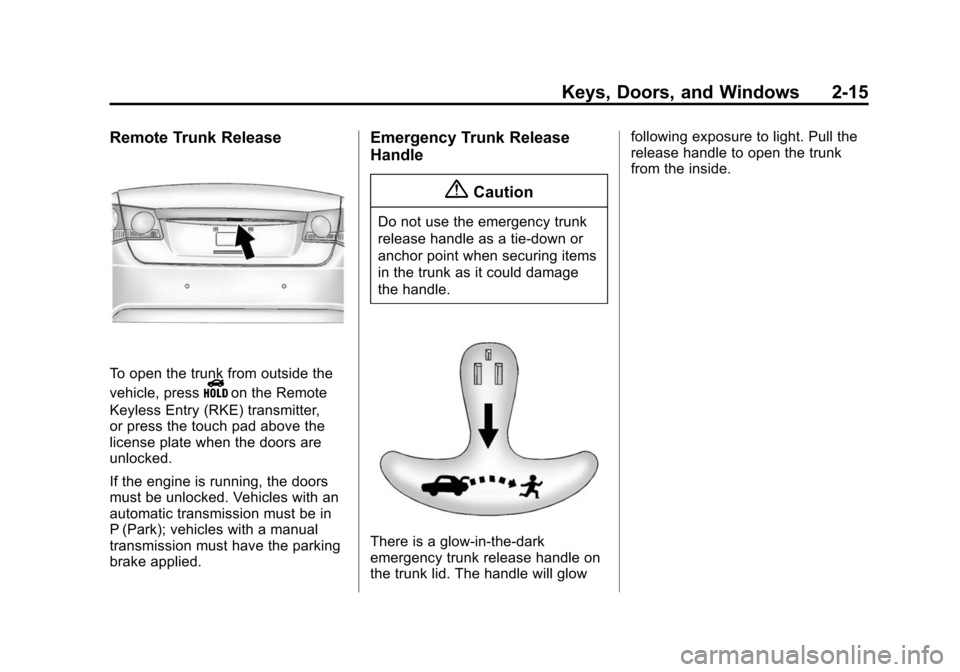
Remote Trunk Release
To open the trunk from outside the
vehicle, press
Yon the Remote
Keyless Entry (RKE) transmitter,
or press the touch pad above the
license plate when the doors are
unlocked.
If the engine is running, the doors
must be unlocked. Vehicles with an
automatic transmission must be in
P (Park); vehicles with a manual
transmission must have the parking
brake applied.
Emergency Trunk Release
Handle
{Caution
Do not use the emergency trunk
release handle as a tie-down or
anchor point when securing items
in the trunk as it could damage
the handle.
There is a glow-in-the-dark
emergency trunk release handle on
the trunk lid. The handle will glow following exposure to light. Pull the
release handle to open the trunk
from the inside.
Page 46 of 420
Black plate (16,1)Chevrolet Cruze Owner Manual (GMNA-Localizing-U.S./Canada-6007168) -
2014 - 2nd Edition - 7/15/13
2-16 Keys, Doors, and Windows
Vehicle Security
This vehicle has theft-deterrent
features; however, they do not make
the vehicle impossible to steal.
Vehicle Alarm System
This vehicle has a anti-theft alarm
system.
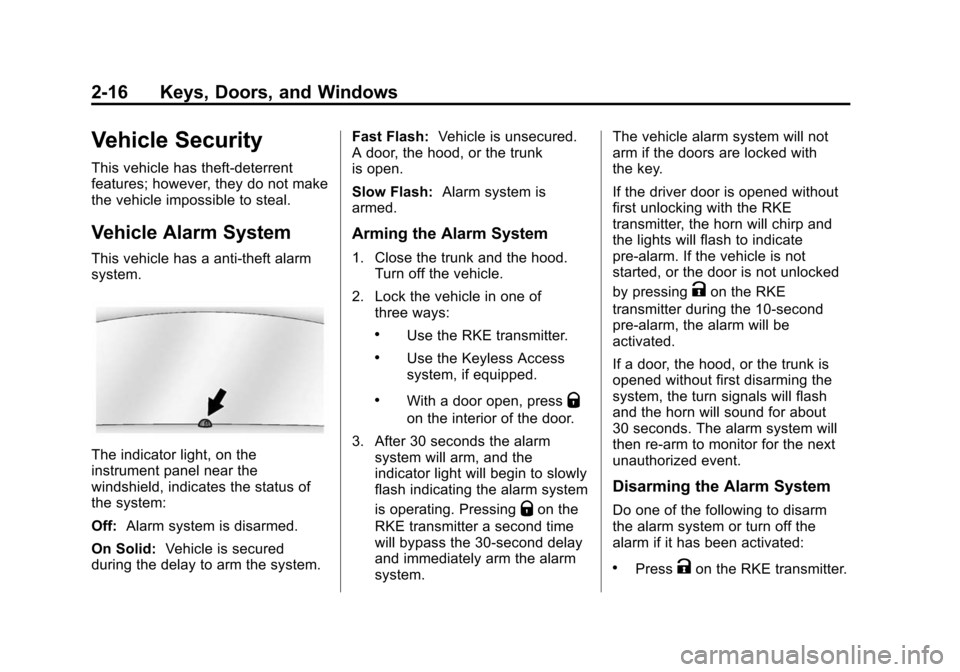
The indicator light, on the
instrument panel near the
windshield, indicates the status of
the system:
Off:Alarm system is disarmed.
On Solid: Vehicle is secured
during the delay to arm the system. Fast Flash:
Vehicle is unsecured.
A door, the hood, or the trunk
is open.
Slow Flash: Alarm system is
armed.
Arming the Alarm System
1. Close the trunk and the hood. Turn off the vehicle.
2. Lock the vehicle in one of three ways:
.Use the RKE transmitter.
.Use the Keyless Access
system, if equipped.
.With a door open, pressQ
on the interior of the door.
3. After 30 seconds the alarm system will arm, and the
indicator light will begin to slowly
flash indicating the alarm system
is operating. Pressing
Qon the
RKE transmitter a second time
will bypass the 30-second delay
and immediately arm the alarm
system. The vehicle alarm system will not
arm if the doors are locked with
the key.
If the driver door is opened without
first unlocking with the RKE
transmitter, the horn will chirp and
the lights will flash to indicate
pre-alarm. If the vehicle is not
started, or the door is not unlocked
by pressing
Kon the RKE
transmitter during the 10-second
pre-alarm, the alarm will be
activated.
If a door, the hood, or the trunk is
opened without first disarming the
system, the turn signals will flash
and the horn will sound for about
30 seconds. The alarm system will
then re-arm to monitor for the next
unauthorized event.
Disarming the Alarm System
Do one of the following to disarm
the alarm system or turn off the
alarm if it has been activated:
.PressKon the RKE transmitter.