AUX CHEVROLET CRUZE 2014 1.G Owners Manual
[x] Cancel search | Manufacturer: CHEVROLET, Model Year: 2014, Model line: CRUZE, Model: CHEVROLET CRUZE 2014 1.GPages: 420, PDF Size: 5.92 MB
Page 22 of 420
Black plate (16,1)Chevrolet Cruze Owner Manual (GMNA-Localizing-U.S./Canada-6007168) -
2014 - 2nd Edition - 7/15/13
1-16 In Brief
Storing a Favorite Station
Stations from all bands can be
stored in the favorite lists in any
order. Up to six stations can be
stored in each favorite page and the
number of available favorite pages
can be set.
To store the station to a position in
the list, press the corresponding
numeric button 1 to 6 until a beep is
heard.
For more information, see“Storing a
Station as a Favorite” inAM-FM
Radio on page 7-7.
Setting the Clock
Adjusting the Time or Date
To set the time and date for the
radio with navigation:
1. Press CLOCK.
2. Select Set Time or Set Date.
3. Turn the MENU/SEL knob to adjust the highlighted number.
4. Press the MENU/SEL knob to select the next number. 5. To save the settings, press
BACK on the radio faceplate.
Setting the 12/24 Hour Format
To set the 12/24 hour format for the
radio with navigation:
1. Press CLOCK.
2. Highlight 12/24 Hour Format.
3. Press the MENU/SEL knob to select the 12 hour or 24 hour
display format.
4. To save the settings, press BACK on the radio faceplate.
For detailed instructions on setting
the clock for the vehicle's specific
audio system. See Clock on
page 5-4.
Satellite Radio
If equipped, vehicles with a
SiriusXM®satellite radio tuner and a
valid SiriusXM satellite radio
subscription can receive SiriusXM
programming.
SiriusXM Satellite Radio
Service
SiriusXM is a satellite radio service
based in the 48 contiguous United
States and 10 Canadian provinces.
SiriusXM satellite radio has a wide
variety of programming and
commercial-free music, coast to
coast, and in digital-quality sound.
A fee is required to receive the
SiriusXM service.
Refer to:
.www.siriusxm.com or call
1-866-635-2349 (U.S.).
.www.xmradio.ca or call
1-877-209-0079 (Canada).
See Satellite Radio on page 7-9.
Portable Audio Devices
Some vehicles have a 3.5 mm
(1/8 in) auxiliary input and a USB
port in the center console. External
devices such as iPods
®, laptop
computers, MP3 players, CD
Page 23 of 420
Black plate (17,1)Chevrolet Cruze Owner Manual (GMNA-Localizing-U.S./Canada-6007168) -
2014 - 2nd Edition - 7/15/13
In Brief 1-17
changers, and USB drives may be
connected, depending on the audio
system.
SeeAuxiliary Devices on page 7-16.
Bluetooth®
The Bluetooth®system allows users
with a Bluetooth-enabled mobile
phone to make and receive
hands-free calls using the vehicle
audio system and controls.
The Bluetooth-enabled mobile
phone must be paired with the
in-vehicle Bluetooth system before it
can be used in the vehicle. Not all
phones will support all functions.
See Bluetooth (Overview) on
page 7-18 orBluetooth
(Infotainment Controls) on
page 7-20 orBluetooth (Voice
Recognition) on page 7-23.
Steering Wheel Controls
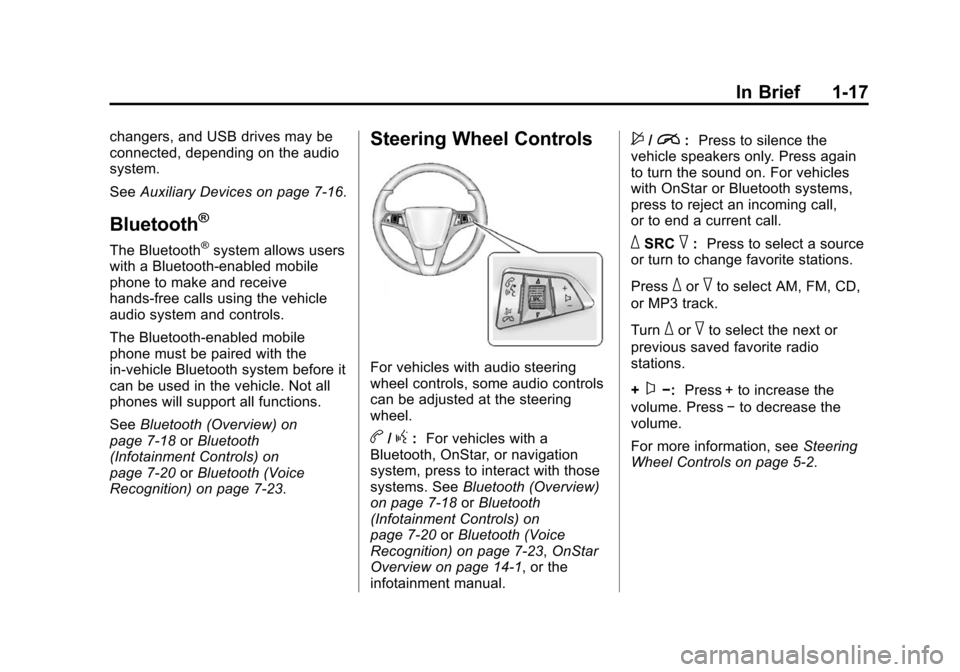
For vehicles with audio steering
wheel controls, some audio controls
can be adjusted at the steering
wheel.
b/g: For vehicles with a
Bluetooth, OnStar, or navigation
system, press to interact with those
systems. See Bluetooth (Overview)
on page 7-18 orBluetooth
(Infotainment Controls) on
page 7-20 orBluetooth (Voice
Recognition) on page 7-23, OnStar
Overview on page 14-1, or the
infotainment manual.
$/i: Press to silence the
vehicle speakers only. Press again
to turn the sound on. For vehicles
with OnStar or Bluetooth systems,
press to reject an incoming call,
or to end a current call.
_SRC^: Press to select a source
or turn to change favorite stations.
Press
_or^to select AM, FM, CD,
or MP3 track.
Turn
_or^to select the next or
previous saved favorite radio
stations.
+
x−: Press + to increase the
volume. Press −to decrease the
volume.
For more information, see Steering
Wheel Controls on page 5-2.
Page 106 of 420
Black plate (2,1)Chevrolet Cruze Owner Manual (GMNA-Localizing-U.S./Canada-6007168) -
2014 - 2nd Edition - 7/15/13
4-2 Storage
Center Console Storage
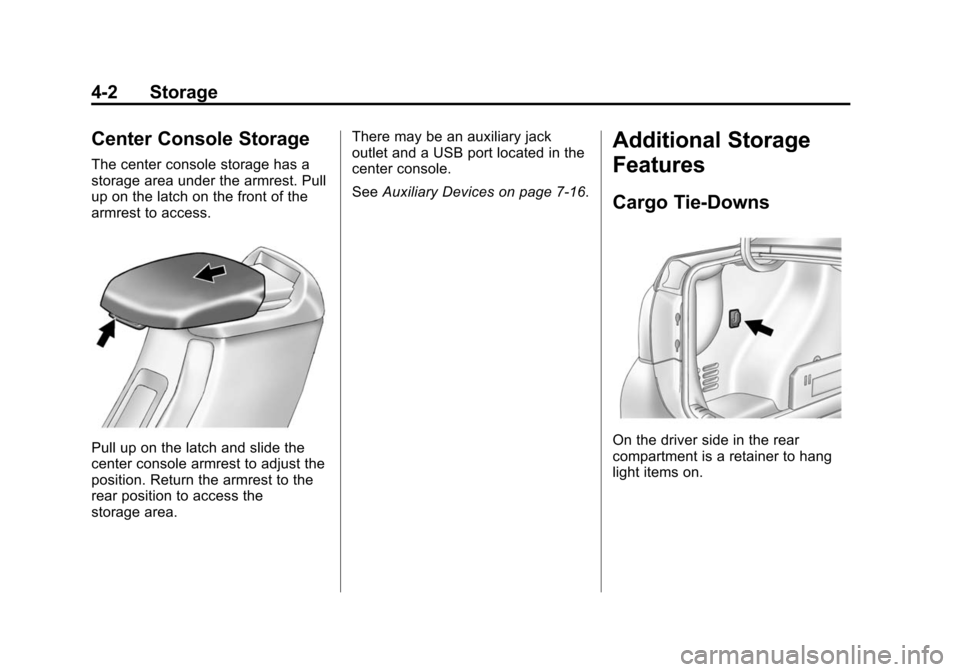
The center console storage has a
storage area under the armrest. Pull
up on the latch on the front of the
armrest to access.
Pull up on the latch and slide the
center console armrest to adjust the
position. Return the armrest to the
rear position to access the
storage area.There may be an auxiliary jack
outlet and a USB port located in the
center console.
See
Auxiliary Devices on page 7-16.
Additional Storage
Features
Cargo Tie-Downs
On the driver side in the rear
compartment is a retainer to hang
light items on.
Page 153 of 420
Black plate (1,1)Chevrolet Cruze Owner Manual (GMNA-Localizing-U.S./Canada-6007168) -
2014 - 2nd Edition - 7/15/13
Infotainment System 7-1
Infotainment
System
Introduction
Infotainment . . . . . . . . . . . . . . . . . . . 7-1
Theft-Deterrent Feature . . . . . . . 7-2
Overview . . . . . . . . . . . . . . . . . . . . . . 7-3
Operation . . . . . . . . . . . . . . . . . . . . . 7-4
Radio
AM-FM Radio . . . . . . . . . . . . . . . . . 7-7
Satellite Radio . . . . . . . . . . . . . . . . 7-9
Radio Reception . . . . . . . . . . . . . 7-12
Satellite Radio Antenna . . . . . . 7-13
Multi-Band Antenna . . . . . . . . . . 7-13
Audio Players
CD Player . . . . . . . . . . . . . . . . . . . 7-14
Auxiliary Devices . . . . . . . . . . . . 7-16
Phone
Bluetooth (Overview) . . . . . . . . 7-18
Bluetooth (InfotainmentControls) . . . . . . . . . . . . . . . . . . . 7-20
Bluetooth (Voice Recognition) . . . . . . . . . . . . . . . 7-23
Trademarks and License
Agreements
Trademarks and LicenseAgreements . . . . . . . . . . . . . . . . 7-29
Introduction
Infotainment
Read the following pages to
become familiar with the audio
system's features.
{Warning
Taking your eyes off the road for
extended periods could cause a
crash resulting in injury or death
to you or others. Do not give
extended attention to infotainment
tasks while driving.
This system provides access to
many audio and non-audio listings.
To minimize taking your eyes off the
road while driving, do the following
while the vehicle is parked:
.Become familiar with the
operation and controls of the
audio system.
Page 156 of 420
Black plate (4,1)Chevrolet Cruze Owner Manual (GMNA-Localizing-U.S./Canada-6007168) -
2014 - 2nd Edition - 7/15/13
7-4 Infotainment System
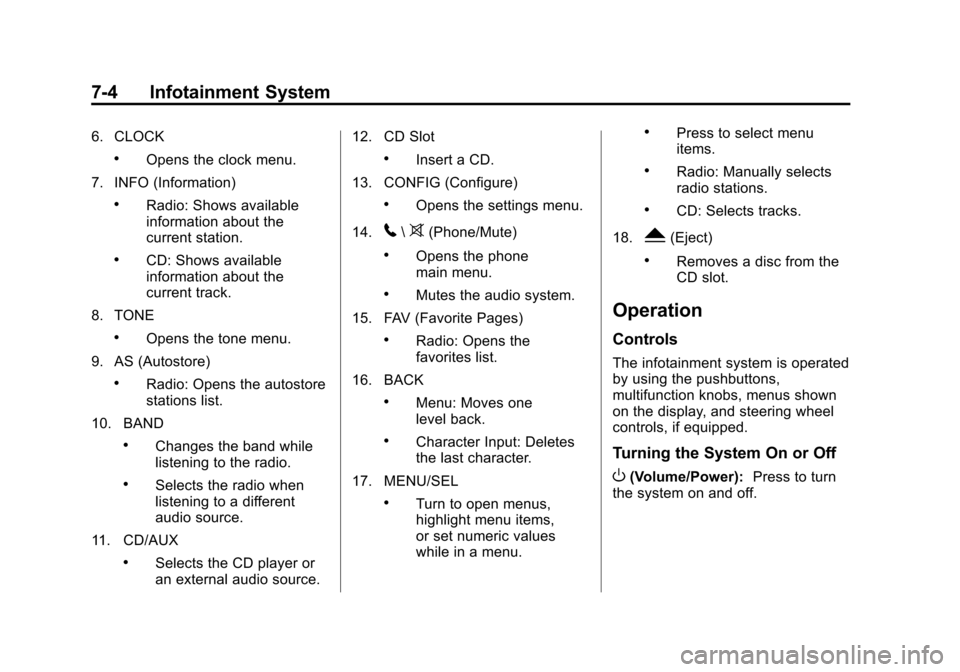
6. CLOCK
.Opens the clock menu.
7. INFO (Information)
.Radio: Shows available
information about the
current station.
.CD: Shows available
information about the
current track.
8. TONE
.Opens the tone menu.
9. AS (Autostore)
.Radio: Opens the autostore
stations list.
10. BAND
.Changes the band while
listening to the radio.
.Selects the radio when
listening to a different
audio source.
11. CD/AUX
.Selects the CD player or
an external audio source. 12. CD Slot
.Insert a CD.
13. CONFIG (Configure)
.Opens the settings menu.
14.
5\>(Phone/Mute)
.Opens the phone
main menu.
.Mutes the audio system.
15. FAV (Favorite Pages)
.Radio: Opens the
favorites list.
16. BACK
.Menu: Moves one
level back.
.Character Input: Deletes
the last character.
17. MENU/SEL
.Turn to open menus,
highlight menu items,
or set numeric values
while in a menu.
.Press to select menu
items.
.Radio: Manually selects
radio stations.
.CD: Selects tracks.
18.
Y(Eject)
.Removes a disc from the
CD slot.
Operation
Controls
The infotainment system is operated
by using the pushbuttons,
multifunction knobs, menus shown
on the display, and steering wheel
controls, if equipped.
Turning the System On or Off
O(Volume/Power): Press to turn
the system on and off.
Page 166 of 420
Black plate (14,1)Chevrolet Cruze Owner Manual (GMNA-Localizing-U.S./Canada-6007168) -
2014 - 2nd Edition - 7/15/13
7-14 Infotainment System
Audio Players
CD Player
The CD player can play audio CDs
and MP3 CDs.
The CD player will not play
8 cm (3 in) CDs.
Care of CDs
Sound quality can be reduced due
to disc quality, recording method,
quality of the music recorded, and
how the disc has been handled.
Handle discs carefully and store
them in their original cases or other
protective cases away from direct
sunlight and dust. If the bottom
surface of a disc is damaged, the
disc may not play properly or at all.
Do not touch the bottom surface of
a disc while handling it; this could
damage the surface. Pick up discs
by grasping the outer edges or the
edge of the hole and the outer edge.
If the bottom surface of a disc is
dirty, take a soft lint-free cloth,
or dampen a clean soft cloth in amild neutral detergent solution
mixed with water, and clean it. Wipe
the disc from the center to the
outer edge.
Care of the CD Player
Do not add a label to a disc, as it
could get caught in the CD player.
If a label is needed, label the top of
the recorded disc with a
marking pen.
Do not use disc lens cleaners
because they could contaminate the
lens of the disc optics and damage
the CD player.
{Caution
If a label is added to a CD, more
than one CD is inserted into the
slot at a time, or an attempt is
made to play scratched or
damaged CDs, the CD player
could be damaged. While using
the CD player, use only CDs in
good condition without any label,
(Continued)
Caution (Continued)
load one CD at a time, and keep
the CD player and the loading slot
free of foreign materials, liquids,
and debris.
Control Buttons
The buttons used to control the CD
player are:
CD/AUX:Press to use the CD
player.
lorg: Press to select tracks or
to fast forward or rewind within a
track.
INFO: Press to display additional
information about the current track
that may be available.
MENU/SEL: Turn to enter
the menu.
Y: Press to eject the disc.
Page 167 of 420
Black plate (15,1)Chevrolet Cruze Owner Manual (GMNA-Localizing-U.S./Canada-6007168) -
2014 - 2nd Edition - 7/15/13
Infotainment System 7-15
Inserting a CD
With the printed side facing up,
insert a disc into the CD slot until it
is drawn in.
Removing a CD
PressY.
The disc is pushed out of the
CD slot.
If the disc is not removed after it is
ejected, it is pulled back in after a
few seconds.
Playing a CD or MP3 CD
Press the CD/AUX button if there is
a disc in the player; it begins
playing.
Information about the disc and
current track is shown on the
display depending on the data
stored.
Selecting a CD Track
Using the control buttons:
.Pressgorlto select the
previous or next track. Using the CD Menu:
1. Turn the MENU/SEL knob.
2. Select Tracks list.
3. Select the track.
Playing Tracks in Random Order
Turn the MENU/SEL knob and then
set Shuffle Songs to On.
Fast Forward and Rewind
Press and hold
lorgto fast
forward or rewind within the current
track.
Selecting an MP3 Track
Using the control buttons:
.Pressgorlto select the
previous or next track.
Using the CD Menu:
1. Turn the MENU/SEL knob.
2. Select Playlists/Folders.
3. Select the playlist or folder.
4. Select the track. Searching for MP3 Tracks
The search feature may take some
time to display the information after
reading the disc due to the amount
of information stored on the disc.
FM automatically plays while the
disc is being read.
Tracks can be searched by:
.Playlists
.Artists
.Albums
.Song Titles
.Genres
.Folder View
To search for tracks:
1. Turn the MENU/SEL knob.
2. Select Search.
3. Select: Playlists, Artists, Albums, Song Titles, Genres,
or Folder View.
4. Select the track.
Page 168 of 420
Black plate (16,1)Chevrolet Cruze Owner Manual (GMNA-Localizing-U.S./Canada-6007168) -
2014 - 2nd Edition - 7/15/13
7-16 Infotainment System
Auxiliary Devices
If equipped, the AUX inputs are in
the center console and allow
portable devices to connect to the
vehicle using the 3.5 mm (1/8 in)
auxiliary jack or USB port.
Portable devices are controlled by
using the menu system described in
Operation on page 7-4.
3.5 mm Jack
Connect a 3.5 mm (1/8 in) cable to
the auxiliary input jack to use a
portable audio player.
Playback of an audio device that is
connected to the 3.5 mm jack can
only be controlled using the controls
on the device.
Adjusting the Volume
Turn the
Oknob to adjust the
volume of the infotainment system
after the volume level has been set
on the portable audio device.
USB Port
For vehicles with a USB port, the
following devices may be connected
and controlled by the infotainment
system.
.iPods
.PlaysForSure Devices (PFDs)
.USB Drives
.Zunes®
Not all iPods, PFDs, USB drives,
and Zunes are compatible with the
infotainment system. Devices are
also charged while plugged into the
USB port.
Connecting and Controlling
an iPod
Not all iPods can be controlled by
the infotainment system.
Connecting an iPod
Connect the iPod to the USB port. Searching for a Track
Tracks that are found can be
searched for by:
.Playlists
.Artists
.Albums
.Song Titles
.Podcasts
.Genres
.Audio Books
.Composers
To search for tracks:
1. Turn the MENU/SEL knob.
2. Select Search.
3. Select: Playlists, Artists, Albums, Song Titles, Podcasts, Genres,
Audio Books, or Composers.
4. Select the track.
Page 409 of 420

Black plate (1,1)Chevrolet Cruze Owner Manual (GMNA-Localizing-U.S./Canada-6007168) -
2014 - 2nd Edition - 7/15/13
INDEX i-1
A
Accessories andModifications . . . . . . . . . . . . . . . . . 10-3
Accessory Power . . . . . . . . . . . . . . 9-23
Add-On Electrical Equipment . . . . . . . . . . . . . . . . . . . 9-69
Additional Information
OnStar
®. . . . . . . . . . . . . . . . . . . . . . 14-5
Air Cleaner/Filter, Engine . . . . . 10-17
Air Conditioning . . . . . . . . . . . . . . . . 8-3
Air Filter, Passenger Compartment . . . . . . . . . . . . . . . . . 8-7
Air Vents . . . . . . . . . . . . . . . . . . . . . . . 8-6
Airbag System Check . . . . . . . . . . . . . . . . . . . . . . . . 3-29
How Does an AirbagRestrain? . . . . . . . . . . . . . . . . . . . 3-21
Passenger Sensing System . . . . . . . . . . . . . . . . . . . . . . 3-23
What Makes an Airbag
Inflate? . . . . . . . . . . . . . . . . . . . . . . 3-21
What Will You See after an Airbag Inflates? . . . . . . . . . . . . . 3-22
When Should an Airbag Inflate? . . . . . . . . . . . . . . . . . . . . . . 3-20
Where Are the Airbags? . . . . . . 3-18 Airbags
Adding Equipment to the
Vehicle . . . . . . . . . . . . . . . . . . . . . . 3-28
Passenger Status Indicator . . . 5-13
Readiness Light . . . . . . . . . . . . . . 5-12
Servicing Airbag-Equipped Vehicles . . . . . . . . . . . . . . . . . . . . . 3-27
System Check . . . . . . . . . . . . . . . . 3-16
Alarm Vehicle Security . . . . . . . . . . . . . . 2-16
Alert
Side Blind Zone (SBZA) . . . . . . 9-47
AM-FM Radio . . . . . . . . . . . . . . . . . . . 7-7
Antenna Multi-band . . . . . . . . . . . . . . . . . . . . 7-13
Satellite Radio . . . . . . . . . . . . . . . . 7-13
Antilock Brake System (ABS) . . . . . . . . . . . . . . . . 9-39
Warning Light . . . . . . . . . . . . . . . . . 5-17
Appearance Care Exterior . . . . . . . . . . . . . . . . . . . . . 10-88
Interior . . . . . . . . . . . . . . . . . . . . . . 10-93
Ashtrays . . . . . . . . . . . . . . . . . . . . . . . . 5-7
Assistance Program, Roadside . . . . . . . . . . . . . . . . . . . . . 13-5 Audio Players . . . . . . . . . . . . . . . . . 7-14
CD . . . . . . . . . . . . . . . . . . . . . . . . . . . 7-14
Audio System Radio Reception . . . . . . . . . . . . . . 7-12
Theft-Deterrent Feature . . . . . . . . 7-2
Automatic Climate Control System . . . . . . . . 8-3
Door Locks . . . . . . . . . . . . . . . . . . . 2-12
Headlamp System . . . . . . . . . . . . . 6-3
Transmission . . . . . . . . . . . . . . . . . 9-33
Transmission Fluid . . . . . . . . . 10-16
Automatic Transmission Manual Mode . . . . . . . . . . . . . . . . . 9-35
Shift Lock ControlFunction Check . . . . . . . . . . . 10-29
Auxiliary
Devices . . . . . . . . . . . . . . . . . . . . . . . 7-16
B
Battery . . . . . . . . . . . . . . . . . . . . . . . 10-28Jump Starting . . . . . . . . . . . . . . . 10-82
Power Protection . . . . . . . . . . . . . . 6-6
Voltage and ChargingMessages . . . . . . . . . . . . . . . . . . . 5-27
Blade Replacement, Wiper . . . 10-30
Page 411 of 420

Black plate (3,1)Chevrolet Cruze Owner Manual (GMNA-Localizing-U.S./Canada-6007168) -
2014 - 2nd Edition - 7/15/13
INDEX i-3
Compact Spare Tire . . . . . . . . . . 10-80
CompartmentsStorage . . . . . . . . . . . . . . . . . . . . . . . . 4-1
Compass . . . . . . . . . . . . . . . . . . . . . . . 5-4 Messages . . . . . . . . . . . . . . . . . . . . 5-27
Compressor Kit, Tire Sealant . . . . . . . . . . . . . . . . . . . . . . 10-66
Connections OnStar
®. . . . . . . . . . . . . . . . . . . . . . 14-3
Control Traction and Electronic
Stability . . . . . . . . . . . . . . . . . . . . . 9-41
Control of a Vehicle . . . . . . . . . . . . . 9-3
Convex Mirrors . . . . . . . . . . . . . . . . 2-18
Coolant Engine . . . . . . . . . . . . . . . . . . . . . . 10-19
Engine Temperature
Gauge . . . . . . . . . . . . . . . . . . . . . . 5-11
Cooling System . . . . . . . . . . . . . . . 10-18 Engine Messages . . . . . . . . . . . . 5-28
Courtesy Lamps . . . . . . . . . . . . . . . . 6-5
Courtesy Transportation
Program . . . . . . . . . . . . . . . . . . . . . . 13-7
Cruise Control . . . . . . . . . . . . . . . . . 9-43 Light . . . . . . . . . . . . . . . . . . . . . . . . . . 5-22
Messages . . . . . . . . . . . . . . . . . . . . 5-28 Cupholders . . . . . . . . . . . . . . . . . . . . . 4-1
Customer Assistance . . . . . . . . . . 13-4
Offices . . . . . . . . . . . . . . . . . . . . . . . . 13-3
Text Telephone (TTY)Users . . . . . . . . . . . . . . . . . . . . . . . 13-4
Customer Information Service Publications
Ordering Information . . . . . . .13-11
Customer Satisfaction Procedure . . . . . . . . . . . . . . . . . . . . 13-1
D
Damage Repair, Collision . . . . . . 13-9
Danger, Warnings, andCautions . . . . . . . . . . . . . . . . . . . . . . . . iii
Data Recorders, Event . . . . . . . 13-14
Daytime Running Lamps (DRL) . . . . . . . . . . . . . . . . . . 6-2
Defensive Driving . . . . . . . . . . . . . . . 9-3
Devices Auxiliary . . . . . . . . . . . . . . . . . . . . . . 7-16
Diagnostics OnStar
®. . . . . . . . . . . . . . . . . . . . . . 14-5
Diesel Exhaust Fluid . . . . . . . . . . . 1-22
Diesel Exhaust Fluid (DEF) Warning Light . . . . . . . . . . . . . . . . 5-21 Diesel Exhaust Fluid
Messages . . . . . . . . . . . . . . . . . . . . 5-29
Diesel Particulate Filter . . . . . . . . 9-26
Diesel Particulate Filter Messages . . . . . . . . . . . . . . . . . . . . 5-30
Distracted Driving . . . . . . . . . . . . . . . 9-2
Dome Lamps . . . . . . . . . . . . . . . . . . . 6-5
Door Ajar Light . . . . . . . . . . . . . . . . . . . . . 5-22
Ajar Messages . . . . . . . . . . . . . . . 5-28
Locks . . . . . . . . . . . . . . . . . . . . . . . . . 2-11
Power Locks . . . . . . . . . . . . . . . . . . 2-12
Drive Belt Routing, Engine . . . . . 12-4
Driver Information Center (DIC) . . . . . . . . . . . . . . . . . 5-23
Driving
Characteristics andTowing Tips . . . . . . . . . . . . . . . . . 9-63
Defensive . . . . . . . . . . . . . . . . . . . . . . 9-3
Drunk . . . . . . . . . . . . . . . . . . . . . . . . . . 9-3
For Better Fuel Economy . . . . . 1-21
Highway Hypnosis . . . . . . . . . . . . . 9-6
Hill and Mountain Roads . . . . . . . 9-6
If the Vehicle is Stuck . . . . . . . . . . 9-9
Loss of Control . . . . . . . . . . . . . . . . 9-5
Off-Road Recovery . . . . . . . . . . . . 9-4