Code 89 CHEVROLET CRUZE 2015 1.G User Guide
[x] Cancel search | Manufacturer: CHEVROLET, Model Year: 2015, Model line: CRUZE, Model: CHEVROLET CRUZE 2015 1.GPages: 417, PDF Size: 5.89 MB
Page 374 of 417
Black plate (1,1)Chevrolet Cruze Owner Manual (GMNA-Localizing-U.S./Canada-7707493) -
2015 - crc - 11/24/14
Technical Data 12-1
Technical Data
Vehicle Identification
Vehicle IdentificationNumber (VIN) . . . . . . . . . . . . . . 12-1
Service Parts Identification Label . . . . . . . . . . . . . . . . . . . . . . . 12-1
Vehicle Data
Capacities andSpecifications . . . . . . . . . . . . . . 12-2
Engine Drive Belt Routing . . . 12-4
Vehicle Identification
Vehicle Identification
Number (VIN)
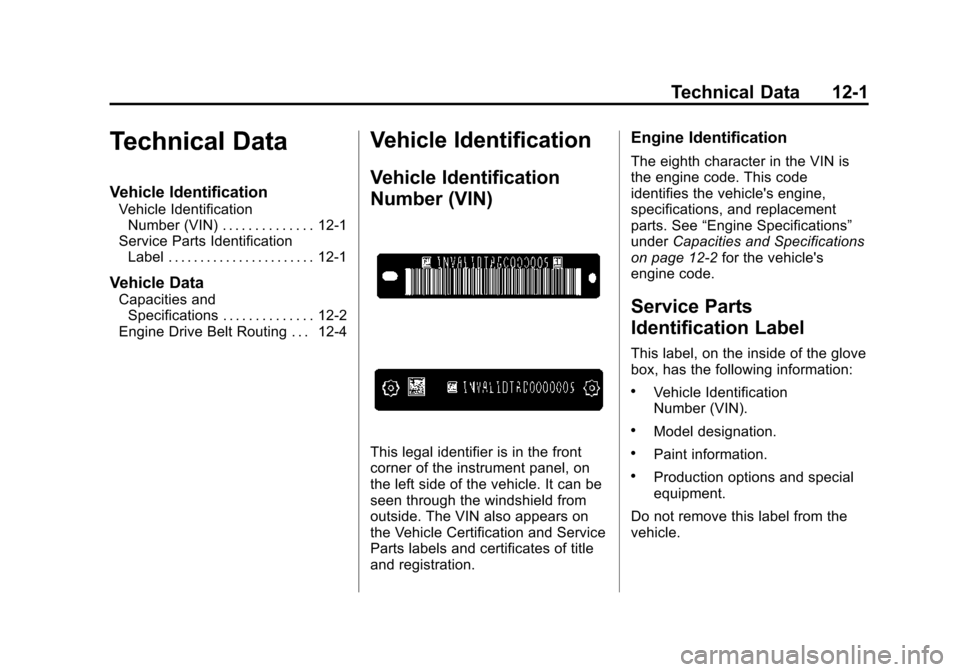
This legal identifier is in the front
corner of the instrument panel, on
the left side of the vehicle. It can be
seen through the windshield from
outside. The VIN also appears on
the Vehicle Certification and Service
Parts labels and certificates of title
and registration.
Engine Identification
The eighth character in the VIN is
the engine code. This code
identifies the vehicle's engine,
specifications, and replacement
parts. See “Engine Specifications”
under Capacities and Specifications
on page 12-2 for the vehicle's
engine code.
Service Parts
Identification Label
This label, on the inside of the glove
box, has the following information:
.Vehicle Identification
Number (VIN).
.Model designation.
.Paint information.
.Production options and special
equipment.
Do not remove this label from the
vehicle.
Page 376 of 417
Black plate (3,1)Chevrolet Cruze Owner Manual (GMNA-Localizing-U.S./Canada-7707493) -
2015 - crc - 11/24/14
Technical Data 12-3
ApplicationCapacities
Metric English
Fuel Tank
Standard Fuel Tank 59.0 L 15.6 gal
With RPO NL6 Fuel Tank 48.0 L 12.6 gal
Diesel Exhaust Fluid (DEF) 18.5 L 4.9 gal
Wheel Nut Torque 140 Y100 lb ft
All capacities are approximate. When adding, be sure to fill to the approximate level, as recommended in this
manual.
Engine Specifications
Engine VIN CodeTransmission Spark Plug Gap
1.4L L4 (LUV) BAutomatic
Manual 0.60
–0.70 mm (0.24 –
0.028 in)
1.8L L4 (LUW) HAutomatic
Manual 0.60
–0.70 mm (0.24 –
0.028 in)
1.8L L4 (LWE) GAutomatic
Manual 0.60
–0.70 mm (0.24 –
0.028 in)
2.0L L4 Diesel (LUZ) ZAutomatic -
Spark plug gap is for replacement spark plugs.
Page 380 of 417
Black plate (3,1)Chevrolet Cruze Owner Manual (GMNA-Localizing-U.S./Canada-7707493) -
2015 - crc - 11/24/14
Customer Information 13-3
STEP THREE—Canadian
Owners: In the event that you do
not feel your concerns have been
addressed after following the
procedure outlined in Steps One
and Two, General Motors of Canada
Limited wants you to be aware of its
participation in a no-charge
Mediation/Arbitration Program.
General Motors of Canada Limited
has committed to binding arbitration
of owner disputes involving
factory-related vehicle service
claims. The program provides for
the review of the facts involved by
an impartial third party arbiter, and
may include an informal hearing
before the arbiter. The program is
designed so that the entire dispute
settlement process, from the time
you file your complaint to the final
decision, should be completed in
about 70 days. We believe our
impartial program offers advantages
over courts in most jurisdictions
because it is informal, quick, and
free of charge. For further information concerning
eligibility in the Canadian Motor
Vehicle Arbitration Plan (CAMVAP),
call toll-free 1-800-207-0685, or call
the General Motors Customer Care
Centre, 1-800-263-3777 (English),
1-800-263-7854 (French),
or write to:
The Mediation/Arbitration Program
c/o Customer Care Centre
General Motors of Canada Limited
Mail Code: CA1-163-005
1908 Colonel Sam Drive
Oshawa, Ontario L1H 8P7
The inquiry should be accompanied
by the Vehicle Identification
Number (VIN).Customer Assistance
Offices
Chevrolet encourages customers to
call the toll-free number for
assistance. However, if a customer
wishes to write or e-mail Chevrolet,
the letter should be addressed to:
United States and Puerto Rico
Chevrolet Motor Division
Chevrolet Customer Assistance
Center
P.O. Box 33170
Detroit, MI 48232-5170
www.Chevrolet.com
1-800-222-1020
1-800-833-2438 (For Text
Telephone Devices (TTYs))
Roadside Assistance:
1-800-243-8872
From U.S. Virgin Islands:
1-800-496-9994
Page 381 of 417
Black plate (4,1)Chevrolet Cruze Owner Manual (GMNA-Localizing-U.S./Canada-7707493) -
2015 - crc - 11/24/14
13-4 Customer Information
Canada
General Motors of Canada Limited
Customer Care Centre, Mail Code:
CA1-163-005
1908 Colonel Sam Drive
Oshawa, Ontario L1H 8P7
www.gm.ca
1-800-263-3777 (English)
1-800-263-7854 (French)
1-800-263-3830 (For Text
Telephone devices (TTYs))
Roadside Assistance:
1-800-268-6800
Overseas
Please contact the local General
Motors Business Unit.
Customer Assistance for
Text Telephone (TTY)
Users
To assist customers who are deaf,
hard of hearing, or speech-impaired
and who use Text Telephones
(TTYs), Chevrolet has TTY
equipment available at its CustomerAssistance Center. Any TTY user in
the U.S. can communicate with
Chevrolet by dialing:
1-800-833-2438. TTY users in
Canada can dial 1-800-263-3830.
Online Owner Center
Online Owner Experience
(U.S.) my.chevrolet.com
The Chevrolet online owner
experience allows interaction with
Chevrolet and keeps important
vehicle-specific information in one
place.
Membership Benefits
E(Vehicle Information):
Download owner manuals and view
vehicle-specific how-to videos.
G(Maintenance Information):
View maintenance schedules,
alerts, and OnStar onboard vehicle
diagnostic information. Schedule
service appointments.
I(Service History): View and
print dealer-recorded service
records and self-recorded service
records.
D(Preferred Dealer
Information): Select a preferred
dealer and view locations, maps,
phone numbers, and hours.
J(Warranty Tracking
Information): Track the vehicle’s
warranty information.
J(Recall Information): View
active recalls by Vehicle
Identification Number (VIN). See
Vehicle Identification Number (VIN)
on page 12-1.
H(Other Account Information):
View GM Card, SiriusXM Satellite
radio (if equipped), and OnStar
account information.
F(Live Chat Support): Chat live
with online help representatives.
See my.chevrolet.com to register
your vehicle.
Page 390 of 417
Black plate (13,1)Chevrolet Cruze Owner Manual (GMNA-Localizing-U.S./Canada-7707493) -
2015 - crc - 11/24/14
Customer Information 13-13
To contact NHTSA, you may call
the Vehicle Safety Hotline
toll-free at 1-888-327-4236
(TTY: 1-800-424-9153); go to
http://www.safercar.gov;or
write to:
Administrator, NHTSA
1200 New Jersey Avenue, S.E.
Washington, D.C. 20590
You can also obtain other
information about motor
vehicle safety from
http://www.safercar.gov
.
Reporting Safety Defects
to the Canadian
Government
If you live in Canada, and you
believe that the vehicle has a safety
defect, notify Transport Canada
immediately, and notify General
Motors of Canada Limited. Call
Transport Canada at
1-800-333-0510 or write to:
Transport Canada
Road Safety Branch
80 rue Noel
Gatineau, QC J8Z 0A1
Reporting Safety Defects
to General Motors
In addition to notifying NHTSA (or
Transport Canada) in a situation like
this, notify General Motors. Call 1-800-222-1020, or write:
Chevrolet Motor Division
Chevrolet Customer Assistance
Center
P.O. Box 33170
Detroit, MI 48232-5170
In Canada, call 1-800-263-3777
(English) or 1-800-263-7854
(French), or write:
General Motors of Canada Limited
Customer Care Centre, Mail Code:
CA1-163-005
1908 Colonel Sam Drive
Oshawa, Ontario L1H 8P7
Page 398 of 417
Black plate (5,1)Chevrolet Cruze Owner Manual (GMNA-Localizing-U.S./Canada-7707493) -
2015 - crc - 11/24/14
OnStar 14-5
OnStar Hands-Free Calling
This service allows calls to be made
and received from the vehicle.
To Make a Call
1. Press
=. System responds:
“OnStar ready.”
2. Say “Call.”System responds:
“Call. Please say the name or
number to call.”
3. Say the entire number without pausing, including a “1”and the
area code. System responds:
“OK, calling.”
Calling 911 Emergency
1. Press=. System responds:
“OnStar ready,” followed by
a tone.
2. Say “Call.”System responds:
“Call. Please say the name or
number to call.”
3. Say “911”without pausing.
System responds: “911.”4. Say
“Call.”System responds:
“OK, dialing 911.”
Retrieve My Number
1. Press=. System responds:
“OnStar ready.”
2. Say “My number.” System
responds: “Your OnStar
Hands-Free Calling number is,”
then says the number.
End a Call
Press=. System responds: “Call
ended.”
Store a Name Tag for Speed
Dialing
1. Press=. System responds:
“OnStar ready.”
2. Say “Store.” System responds:
“Please say the number you
would like to store.” 3. Say the entire number without
pausing. System responds:
“Please say the name tag.”
4. Pick a name tag. System responds: “About to store
5. Say “Yes”or say “No”to try
again. System responds: “OK,
storing
Place a Call Using a Stored
Number
1. Press=. System responds:
“OnStar ready.”
2. Say “Call
responds: “OK, calling
Verify Minutes and Expiration
Press=and say “Minutes” then
“Verify” to check how many minutes
remain and their expiration date.
Page 403 of 417
Black plate (10,1)Chevrolet Cruze Owner Manual (GMNA-Localizing-U.S./Canada-7707493) -
2015 - crc - 11/24/14
14-10 OnStar
Uwe Rommel, Steve Salisbury,
Dave Smith, Steven M. Schweda,
Christian Spieler, Cosmin Truta,
Antoine Verheijen, Paul von Behren,
Rich Wales, Mike White.
This software is provided“as is,”
without warranty of any kind,
express or implied. In no event shall
Info-ZIP or its contributors be held
liable for any direct, indirect,
incidental, special or consequential
damages arising out of the use of or
inability to use this software.
Permission is granted to anyone to
use this software for any purpose,
including commercial applications,
and to alter it and redistribute it
freely, subject to the following
restrictions:
1. Redistributions of source code must retain the above copyright
notice, definition, disclaimer, and
this list of conditions.
2. Redistributions in binary form (compiled executables) must
reproduce the above copyright
notice, definition, disclaimer, and this list of conditions in
documentation and/or other
materials provided with the
distribution. The sole exception
to this condition is redistribution
of a standard UnZipSFX binary
(including SFXWiz) as part of a
self-extracting archive; that is
permitted without inclusion of
this license, as long as the
normal SFX banner has not
been removed from the binary or
disabled.
3. Altered versions–including, but not limited to, ports to new
operating systems, existing ports
with new graphical interfaces,
and dynamic, shared, or static
library versions–must be plainly
marked as such and must not be
misrepresented as being the
original source. Such altered
versions also must not be
misrepresented as being
Info-ZIP releases–including, but
not limited to, labeling of the
altered versions with the names
“Info-ZIP” (or any variation thereof, including, but not limited
to, different capitalizations),
“Pocket UnZip,” “WiZ”
or
“MacZip” without the explicit
permission of Info-ZIP. Such
altered versions are further
prohibited from
misrepresentative use of the
Zip-Bugs or Info-ZIP e-mail
addresses or of the
Info-ZIP URL(s).
4. Info-ZIP retains the right to use the names “Info-ZIP,” “Zip,”
“UnZip,” “UnZipSFX,” “WiZ,”
“Pocket UnZip,” “Pocket Zip,”
and “MacZip” for its own source
and binary releases.