infotainment CHEVROLET CRUZE 2015 1.G Service Manual
[x] Cancel search | Manufacturer: CHEVROLET, Model Year: 2015, Model line: CRUZE, Model: CHEVROLET CRUZE 2015 1.GPages: 417, PDF Size: 5.89 MB
Page 179 of 417
Black plate (28,1)Chevrolet Cruze Owner Manual (GMNA-Localizing-U.S./Canada-7707493) -
2015 - crc - 11/24/14
7-28 Infotainment System
Dual Tone Multi-Frequency
(DTMF) Tones
The Bluetooth system can send
numbers and the numbers stored as
name tags during a call. You can
use this feature when calling a
menu-driven phone system.
Account numbers can also be
stored for use.
Sending a Number or Name Tag
During a Call
1. Press
b/g. The system
responds “Ready,”followed by
a tone.
2. Say “Dial.”
3. Say the number or name tag to send.
Clearing the System
Unless information is deleted out of
the in-vehicle Bluetooth system, it
will be retained indefinitely. This
includes all saved name tags in the
phone book and phone pairing
information. For information on how
to delete this information, see the
previous sections on “Deleting a
Paired Phone” and“Deleting
Name Tags.”
Trademarks and
License Agreements
The Bluetooth®word mark and
logos are owned by the Bluetooth®
SIG, Inc. and any use of such marks
by General Motors is under license.
Other trademarks and trade names
are those of their respective owners.
Manufactured under license under
U.S. Patent #'s: 5,451,942;
5,956,674; 5,974,380; 5,978,762;
6,487,535 & other U.S. and
worldwide patents issued &
pending. DTS and the Symbol are
registered trademarks and DTS
Digital Surround and the DTS logos
are trademarks of DTS Inc. All
Rights Reserved.
Page 180 of 417
Black plate (29,1)Chevrolet Cruze Owner Manual (GMNA-Localizing-U.S./Canada-7707493) -
2015 - crc - 11/24/14
Infotainment System 7-29
Manufactured under license from
Dolby Laboratories. Dolby and the
double-D symbol are trademarks of
Dolby Laboratories.
“Made for iPod and iPhone”means
that an electronic accessory has
been designed to connect
specifically to iPod and has been
certified by the developer to meet
Apple performance standards.
iPod is a trademark of Apple
Computer, Inc., registered in the
U.S. and other countries.
Fees and Taxes —Subscription fee,
taxes, one time activation fee, and
other fees may apply. Subscription
fee is consumer only. All fees and
programming subject to change.
Subscriptions subject to Customer
Agreement available at
www.siriusxm.com. XM
®service
only available in the 48 contiguous
United States and Canada*. *Canada
—Some deterioration of
service may occur in extreme
northern latitudes. This is beyond
the control of SiriusXM
®Satellite
Radio. Explicit Language Notice —
Channels with frequent explicit
language are indicated with an “XL”
preceding the channel name.
Channel blocking is available for
SiriusXM Satellite Radio receivers
by notifying SiriusXM at:
.USA Customers —See
www.siriusxm.com or call
1-866-635-2349.
.Canadian Customers —See
www.xmradio.ca or call
1-877-209-0079.
It is prohibited to copy, decompile,
disassemble, reverse engineer,
hack, manipulate, or otherwise
make available any technology or
software incorporated in receivers
compatible with the SiriusXM
®
Satellite Radio System or that
support the SiriusXM website, the
Online Service or any of its content.
Furthermore, the AMBER voice
Page 181 of 417
Black plate (30,1)Chevrolet Cruze Owner Manual (GMNA-Localizing-U.S./Canada-7707493) -
2015 - crc - 11/24/14
7-30 Infotainment System
compression software included in
this product is protected by
intellectual property rights including
patent rights, copyrights, and trade
secrets of Digital Voice
Systems, Inc.
General Requirements:
1. A License Agreement fromSiriusXM
®is required for any
product that incorporates
SiriusXM Technology and/or for
use of any of the SiriusXM
marks to be manufactured,
distributed or marketed in the
SiriusXM Service Area.
2. For products to be distributed, marketed and/or sold in Canada,
a separate agreement is
required with Canadian Satellite
Radio Inc. (operating as XM
Canada).
Music and video recognition
technology and related data are
provided by Gracenote
®. Gracenote
is the industry standard in music
recognition technology and related
content delivery. For more
information, visit
www.gracenote.com.
CD, DVD, Blu-ray Disc, and music
and video-related data from
Gracenote, Inc., copyright © 2000 to
present Gracenote. One or more
patents owned by Gracenote apply
to this product and service. See the
Gracenote website for a
non-exhaustive list of applicable
Gracenote patents. Gracenote and
CDDB, MusicID, Media VOCS, the
Gracenote logo and logotype, and
the “Powered by Gracenote” logo
are either registered trademarks or trademarks of Gracenote in the
United States and/or other
countries.
If you require more information
regarding the use of the Gracenote
Service, visit: www.gracenote.com/
corporate.
For the data provided by
Gracenote®Music Recognition
Service, the content is not
necessarily guaranteed 100%.
Regarding the use of Gracenote
Music Recognition Service, when
this product is used, it is necessary
to agree to the following articles.
Gracenote
®End User License
This application or device contains
software from Gracenote, Inc. of
Emeryville, California (“Gracenote”).
The software from Gracenote (the
“Gracenote Software”) enables this
application to perform disc and/or
file identification and obtain
music-related information, including
name, artist, track, and title
information (“Gracenote Data”) from
Page 182 of 417
Black plate (31,1)Chevrolet Cruze Owner Manual (GMNA-Localizing-U.S./Canada-7707493) -
2015 - crc - 11/24/14
Infotainment System 7-31
online servers or embedded
databases (collectively,“Gracenote
Servers”) and to perform other
functions. You may use Gracenote
Data only by means of the intended
End-User functions of this
application or device. You agree that
you will use Gracenote Data, the
Gracenote Software, and Gracenote
Servers for your own personal
non-commercial use only. You agree
not to assign, copy, transfer or
transmit the Gracenote Software or
any Gracenote Data to any third
party.
YOU AGREE NOT TO USE OR
EXPLOIT GRACENOTE DATA, THE
GRACENOTE SOFTWARE, OR
GRACENOTE SERVERS, EXCEPT
AS EXPRESSLY PERMITTED
HEREIN. You agree that your
non-exclusive license to use the
Gracenote Data, the Gracenote
Software, and Gracenote Servers
will terminate if you violate these
restrictions. If your license
terminates, you agree to cease any and all use of the Gracenote Data,
the Gracenote Software, and
Gracenote Servers.
Gracenote reserves all rights in
Gracenote Data, the Gracenote
Software, and the Gracenote
Servers, including all ownership
rights.
Under no circumstances will
Gracenote become liable for any
payment to you for any information
that you provide. You agree that
Gracenote, Inc. may enforce its
rights under this Agreement against
you directly in its own name.
The Gracenote service uses a
unique identifier to track queries for
statistical purposes.
The purpose of a randomly
assigned numeric identifier is to
allow the Gracenote service to
count queries without knowing
anything about who you are. For
more information, see the web page
for the Gracenote Privacy Policy for
the Gracenote service.The Gracenote Software and each
item of Gracenote Data are licensed
to you
“AS IS.” Gracenote makes no
representations or warranties,
express or implied, regarding the
accuracy of any Gracenote Data
from in the Gracenote Servers.
Gracenote reserves the right to
delete data from the Gracenote
Servers or to change data
categories for any cause that
Gracenote deems sufficient.
No warranty is made that the
Gracenote Software or Gracenote
Servers are error-free or that
functioning of Gracenote Software
or Gracenote Servers will be
uninterrupted.
Gracenote is not obligated to
provide you with new enhanced or
additional data types or categories
that Gracenote may provide in the
future and is free to discontinue its
services at any time.
Page 183 of 417
Black plate (32,1)Chevrolet Cruze Owner Manual (GMNA-Localizing-U.S./Canada-7707493) -
2015 - crc - 11/24/14
7-32 Infotainment System
Gracenote disclaims all warranties
express or implied, including, but
not limited to, implied warranties of
merchantability, fitness for a
particular purpose, title, and
non-infringement. Gracenote does
not warrant the results that will be
obtained by your use of the
Gracenote software or any
Gracenote server. In no case will
Gracenote be liable for any
consequential or incidental
damages or for any lost profits or
lost revenues.
Page 194 of 417
Black plate (3,1)Chevrolet Cruze Owner Manual (GMNA-Localizing-U.S./Canada-7707493) -
2015 - crc - 11/24/14
Driving and Operating 9-3
{Warning
Taking your eyes off the road too
long or too often could cause a
crash resulting in injury or death.
Focus your attention on driving.
Refer to the infotainment section for
more information on using that
system and the navigation system,
if equipped, including pairing and
using a cell phone.
Defensive Driving
Defensive driving means “always
expect the unexpected.” The first
step in driving defensively is to wear
the safety belt. See Safety Belts on
page 3-8.
.Assume that other road users
(pedestrians, bicyclists, and
other drivers) are going to be
careless and make mistakes.
Anticipate what they might do
and be ready.
.Allow enough following distance
between you and the driver in
front of you.
.Focus on the task of driving.
Drunk Driving
Death and injury associated with
drinking and driving is a global
tragedy.
{Warning
Drinking and then driving is very
dangerous. Your reflexes,
perceptions, attentiveness, and
judgment can be affected by even
a small amount of alcohol. You
can have a serious —or even
fatal —collision if you drive after
drinking.
Do not drink and drive or ride with
a driver who has been drinking.
Ride home in a cab; or if you are
with a group, designate a driver
who will not drink.
Control of a Vehicle
Braking, steering, and accelerating
are important factors in helping to
control a vehicle while driving.
Braking
Braking action involves perception
time and reaction time. Deciding to
push the brake pedal is perception
time. Actually doing it is
reaction time.
Average driver reaction time is
about three-quarters of a second. In
that time, a vehicle moving at
100 km/h (60 mph) travels 20 m
(66 ft), which could be a lot of
distance in an emergency.
Helpful braking tips to keep in mind
include:
.Keep enough distance between
you and the vehicle in front
of you.
.Avoid needless heavy braking.
.Keep pace with traffic.
Page 237 of 417
Black plate (46,1)Chevrolet Cruze Owner Manual (GMNA-Localizing-U.S./Canada-7707493) -
2015 - crc - 11/24/14
9-46 Driving and Operating
Warning (Continued)
greater than 8 km/h (5 mph). To
prevent injury, death, or vehicle
damage, even with parking assist,
always check the area around the
vehicle and check all mirrors
before backing.
How the System Works
RPA comes on automatically when
the shift lever is moved into
R (Reverse). A single beep sounds
to indicate the system is working.
An obstacle detection is indicated
by beeps. The time between the
beeps becomes shorter as the
vehicle gets closer to the obstacle.
When the distance is less than
30 cm (12 in), the beeping is a
continuous beep for five seconds.
Turning the System On and Off
The RPA system can be turned on
and off using the infotainment
system controls. SeeVehicle
Personalization on page 5-36.
When the system is off, PARK
ASSIST OFF displays on the Driver
Information Center (DIC). The
message disappears after a short
period of time.
RPA defaults to the on setting each
time the vehicle is started.
Turn off RPA when towing a trailer.
When the System Does Not
Seem to Work Properly
The following messages may be
displayed on the DIC:
SERVICE PARKING ASSIST: If
this message occurs, check the
following conditions:
.The sensors are not clean. Keep
the vehicle's rear bumper free of
mud, dirt, snow, ice, and slush.
For cleaning instructions, see
Exterior Care on page 10-88.
.The park assist sensors are
covered by frost or ice. Frost or
ice can form around and behind
the sensors and may not always
be seen; this can occur after
washing the vehicle in cold
weather. The message may not
clear until the frost or ice has
melted.
If the above conditions do not exist,
take the vehicle to your dealer to
repair the system.
PARK ASSIST OFF: If the RPA
system does not activate due to a
temporary condition, the message
displays on the DIC. This can occur
under the following conditions:
.The driver has disabled the
system.
.An object was hanging out of the
trunk during the last drive cycle.
Once the object is removed,
RPA will return to normal
operation.
.The bumper is damaged. Take
the vehicle to your dealer to
repair the system.
Page 240 of 417
Black plate (49,1)Chevrolet Cruze Owner Manual (GMNA-Localizing-U.S./Canada-7707493) -
2015 - crc - 11/24/14
Driving and Operating 9-49
{Warning
The camera(s) do not display
children, pedestrians, bicyclists,
crossing traffic, animals, or any
other object outside of the
cameras’field of view, below the
bumper, or under the vehicle.
Shown distances may be different
from actual distances. Do not
drive or park the vehicle using
only these camera(s). Always
check behind and around the
vehicle before driving. Failure to
use proper care may result in
injury, death, or vehicle damage.
An image appears on the
infotainment screen when the
vehicle is shifted into R (Reverse).
The infotainment screen goes to the
previous screen after approximately
10 seconds once the vehicle is
shifted out of R (Reverse). To return to the previous screen
sooner, do one of the following:.Press a hard key on the
infotainment system.
.Shift into P (Park).
Symbols and Guidelines
The system may have a feature that
lets the driver view caution symbols
on the infotainment screen while
using the RVC. The Rear Park
Assist (RPA) system must not be
disabled to use the caution symbols.
The error message Rear Parking
Assist Symbols Unavailable may
display if RPA has been disabled
and the symbols have been
turned on.
The symbols appear and may cover
an object when viewing the
infotainment screen when an object
is detected by the RPA system.
The RVC system may also have a
guideline overlay that can help the
driver align the vehicle when
backing into a parking spot. To turn the symbols or guidelines on
or off:
1. Shift into P (Park).
2. Press the CONFIG button to
enter the configure menu
options.
3. Select Display.
4. Select Rear Camera Options.
5. Select Symbols or Guidelines. When a checkmark appears next
to the feature, it is turned on.
Rear Cross Traffic Alert (RCTA)
On vehicles with the RCTA, a
warning triangle with a left or right
pointing arrow may also display on
the RVC screen to warn of traffic
coming from the left or the right.
Three beeps will also sound from
the left or right. This system detects
objects coming from up to 20 m (65
ft) from the left or right side behind
the vehicle. The RCTA system will
not work properly if ice, snow, mud,
or anything else builds up on the
rear bumper sensors.
Page 299 of 417
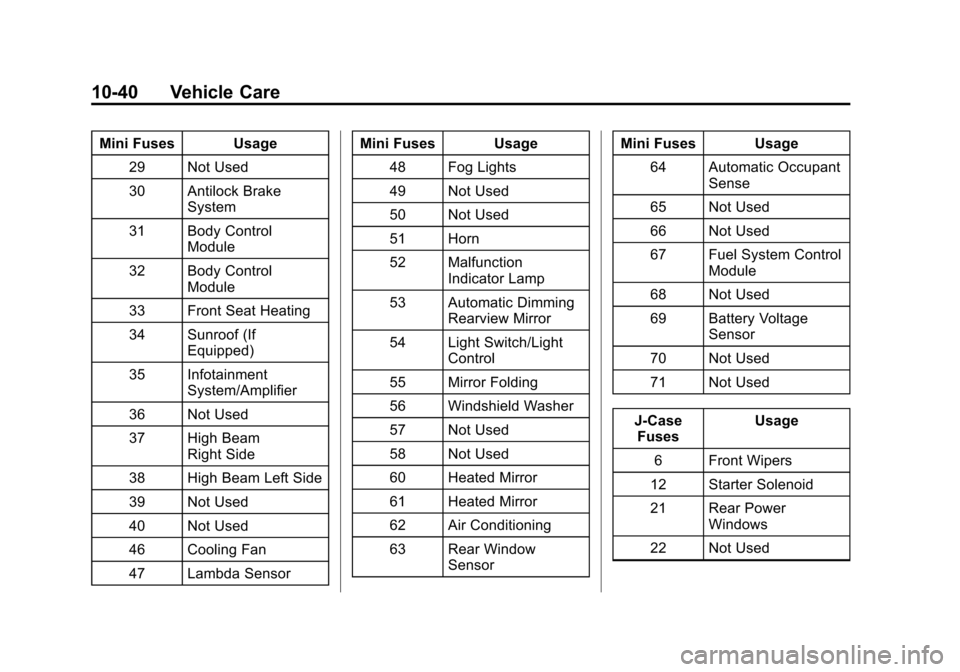
Black plate (40,1)Chevrolet Cruze Owner Manual (GMNA-Localizing-U.S./Canada-7707493) -
2015 - crc - 11/24/14
10-40 Vehicle Care
Mini Fuses Usage29 Not Used
30 Antilock Brake System
31 Body Control Module
32 Body Control Module
33 Front Seat Heating
34 Sunroof (If Equipped)
35 Infotainment System/Amplifier
36 Not Used
37 High Beam Right Side
38 High Beam Left Side
39 Not Used
40 Not Used
46 Cooling Fan
47 Lambda Sensor Mini Fuses Usage
48 Fog Lights
49 Not Used
50 Not Used
51 Horn
52 Malfunction Indicator Lamp
53 Automatic Dimming Rearview Mirror
54 Light Switch/Light Control
55 Mirror Folding
56 Windshield Washer
57 Not Used
58 Not Used
60 Heated Mirror
61 Heated Mirror
62 Air Conditioning
63 Rear Window Sensor Mini Fuses Usage
64 Automatic Occupant Sense
65 Not Used
66 Not Used
67 Fuel System Control Module
68 Not Used
69 Battery Voltage Sensor
70 Not Used
71 Not Used
J-Case Fuses Usage
6 Front Wipers
12 Starter Solenoid
21 Rear Power Windows
22 Not Used
Page 301 of 417
Black plate (42,1)Chevrolet Cruze Owner Manual (GMNA-Localizing-U.S./Canada-7707493) -
2015 - crc - 11/24/14
10-42 Vehicle Care
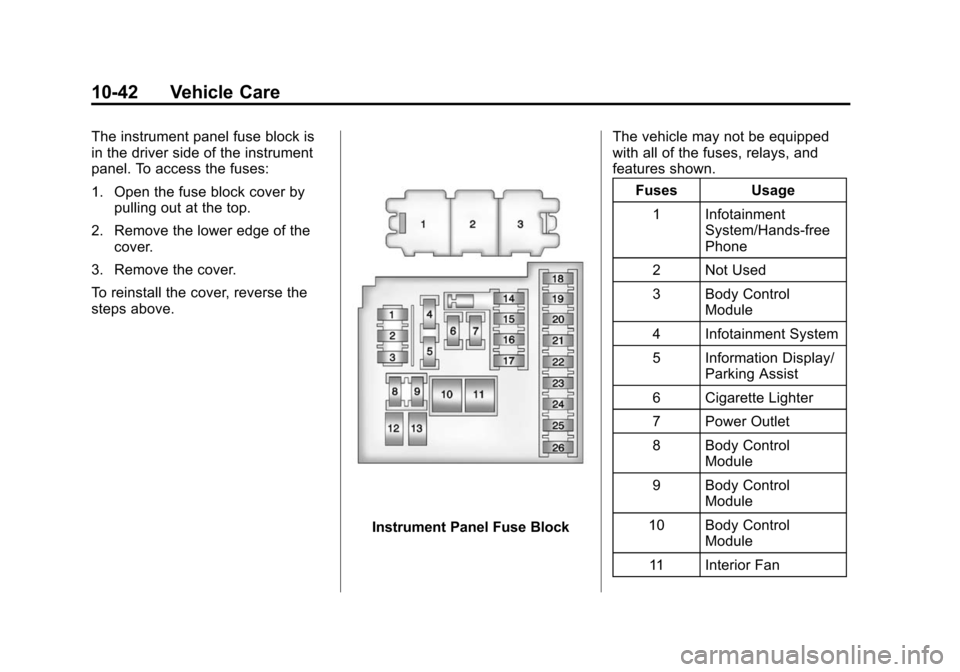
The instrument panel fuse block is
in the driver side of the instrument
panel. To access the fuses:
1. Open the fuse block cover bypulling out at the top.
2. Remove the lower edge of the cover.
3. Remove the cover.
To reinstall the cover, reverse the
steps above.
Instrument Panel Fuse Block The vehicle may not be equipped
with all of the fuses, relays, and
features shown.
Fuses Usage
1 Infotainment System/Hands-free
Phone
2 Not Used
3 Body Control Module
4 Infotainment System
5 Information Display/ Parking Assist
6 Cigarette Lighter
7 Power Outlet
8 Body Control Module
9 Body Control Module
10 Body Control Module
11 Interior Fan