lock CHEVROLET CRUZE 2017 2.G Owners Manual
[x] Cancel search | Manufacturer: CHEVROLET, Model Year: 2017, Model line: CRUZE, Model: CHEVROLET CRUZE 2017 2.GPages: 405, PDF Size: 6.76 MB
Page 242 of 405
Chevrolet Cruze Owner Manual (GMNA-Localizing-U.S./Canada/Mexico-
9803785) - 2017 - CRC - 4/13/16
Driving and Operating 241
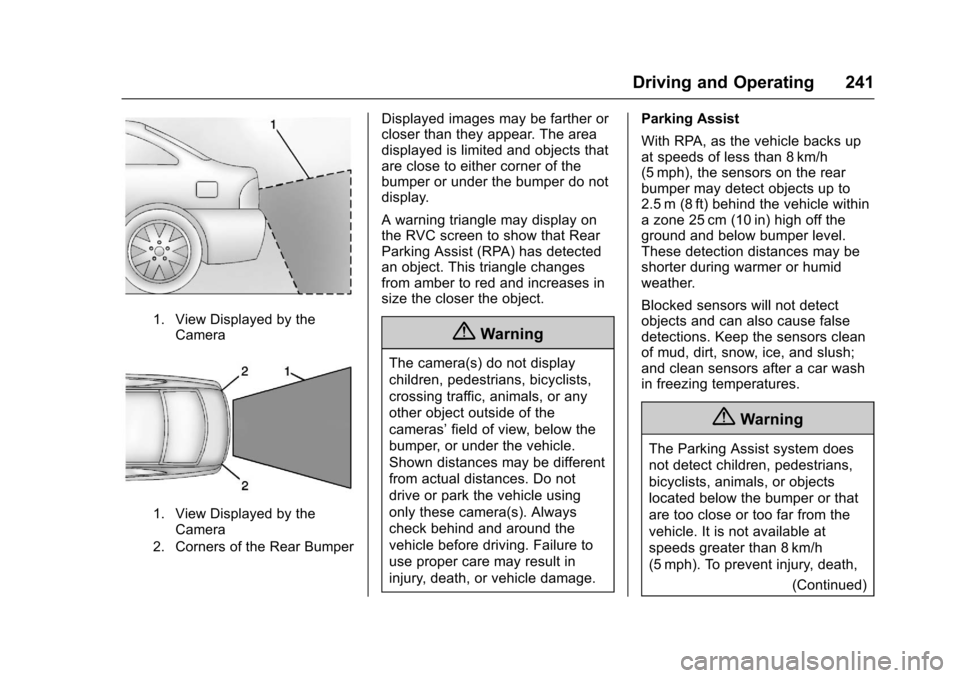
1. View Displayed by theCamera
1. View Displayed by theCamera
2. Corners of the Rear Bumper
Displayed images may be farther or
closer than they appear. The area
displayed is limited and objects that
are close to either corner of the
bumper or under the bumper do not
display.
A warning triangle may display on
the RVC screen to show that Rear
Parking Assist (RPA) has detected
an object. This triangle changes
from amber to red and increases in
size the closer the object.
{Warning
The camera(s) do not display
children, pedestrians, bicyclists,
crossing traffic, animals, or any
other object outside of the
cameras’ field of view, below the
bumper, or under the vehicle.
Shown distances may be different
from actual distances. Do not
drive or park the vehicle using
only these camera(s). Always
check behind and around the
vehicle before driving. Failure to
use proper care may result in
injury, death, or vehicle damage. Parking Assist
With RPA, as the vehicle backs up
at speeds of less than 8 km/h
(5 mph), the sensors on the rear
bumper may detect objects up to
2.5 m (8 ft) behind the vehicle within
a zone 25 cm (10 in) high off the
ground and below bumper level.
These detection distances may be
shorter during warmer or humid
weather.
Blocked sensors will not detect
objects and can also cause false
detections. Keep the sensors clean
of mud, dirt, snow, ice, and slush;
and clean sensors after a car wash
in freezing temperatures.
{Warning
The Parking Assist system does
not detect children, pedestrians,
bicyclists, animals, or objects
located below the bumper or that
are too close or too far from the
vehicle. It is not available at
speeds greater than 8 km/h
(5 mph). To prevent injury, death,
(Continued)
Page 244 of 405
Chevrolet Cruze Owner Manual (GMNA-Localizing-U.S./Canada/Mexico-
9803785) - 2017 - CRC - 4/13/16
Driving and Operating 243
Forward Collision Alert
(FCA) System
If equipped, the FCA system may
help to avoid or reduce the harm
caused by front-end crashes. When
approaching a vehicle ahead too
quickly, FCA provides a flashing red
alert on the windshield and rapidly
beeps. FCA also lights an amber
visual alert if following another
vehicle much too closely.
FCA detects vehicles within a
distance of approximately 60 m
(197 ft) and operates at speeds
above 40 km/h (25 mph).
{Warning
FCA is a warning system and
does not apply the brakes. When
approaching a slower-moving or
stopped vehicle ahead too rapidly,
or when following a vehicle too
closely, FCA may not provide a
warning with enough time to help
avoid a crash. It also may not
provide any warning at all. FCA(Continued)
Warning (Continued)
does not warn of pedestrians,
animals, signs, guardrails,
bridges, construction barrels,
or other objects. Be ready to take
action and apply the brakes. See
Defensive Driving0201.
FCA can be disabled with the FCA
steering wheel control.
Detecting the Vehicle Ahead
FCA warnings will not occur unless
the FCA system detects a vehicle
ahead. When a vehicle is detected,
the vehicle ahead indicator will
display green. Vehicles may not be
detected on curves, highway exit
ramps, or hills, due to poor visibility;
or if a vehicle ahead is partially
blocked by pedestrians or other objects. FCA will not detect another
vehicle ahead until it is completely
in the driving lane.
{Warning
FCA does not provide a warning
to help avoid a crash, unless it
detects a vehicle. FCA may not
detect a vehicle ahead if the FCA
sensor is blocked by dirt, snow,
or ice, or if the windshield is
damaged. It may also not detect a
vehicle on winding or hilly roads,
or in conditions that can limit
visibility such as fog, rain,
or snow, or if the headlamps or
windshield are not cleaned or in
proper condition. Keep the
windshield, headlamps, and FCA
sensors clean and in good repair.
Page 248 of 405
Chevrolet Cruze Owner Manual (GMNA-Localizing-U.S./Canada/Mexico-
9803785) - 2017 - CRC - 4/13/16
Driving and Operating 247
both sides of the vehicle toward the
rear corners of the vehicle, see your
dealer.
If the LCA displays do not light up
when moving vehicles are in the
side blind zone or rapidly
approaching this zone and the
system is clean, the system may
need service. Take the vehicle to
your dealer.
When LCA is disabled for any
reason other than the driver turning
it off, the Lane Change Alert On
option will not be available on the
personalization menu.
Radio Frequency Information
SeeRadio Frequency
Statement 0379.
Lane Departure
Warning (LDW)
If equipped, LDW may help avoid
crashes due to unintentional lane
departures. It may provide a
warning if the vehicle is crossing a
detected lane marking without using
a turn signal in the lane departure
direction. Since this system is part of the Lane Keep Assist (LKA)
system, read the entire LKA section
before using this feature.
Lane Keep Assist (LKA)
If equipped, LKA may help avoid
crashes due to unintentional lane
departures. It may assist by gently
turning the steering wheel if the
vehicle approaches a detected lane
marking without using a turn signal
in that direction. It may also provide
a Lane Departure Warning (LDW)
system alert as the lane marking is
crossed. The LKA system will not
assist or provide an LDW alert if it
detects that you are actively
steering. Override LKA by turning
the steering wheel. LKA uses a
camera to detect lane markings
between 60 km/h (37 mph) and
180 km/h (112 mph).
{Warning
The LKA system does not
continuously steer the vehicle.
It may not keep the vehicle in the
(Continued)
Warning (Continued)
lane or give a Lane Departure
Warning (LDW) alert, even if a
lane marking is detected.
The LKA and LDW systems
may not:
. Provide an alert or enough
steering assist to avoid a
lane departure or crash.
. Detect lane markings under
poor weather or visibility
conditions. This can occur if
the windshield or
headlamps are blocked by
dirt, snow, or ice, if they are
not in proper condition, or if
the sun shines directly into
the camera.
. Detect road edges.
. Detect lanes on winding or
hilly roads.
If LKA only detects lane markings
on one side of the road, it will
only assist or provide an LDW (Continued)
Page 258 of 405
Chevrolet Cruze Owner Manual (GMNA-Localizing-U.S./Canada/Mexico-
9803785) - 2017 - CRC - 4/13/16
Driving and Operating 257
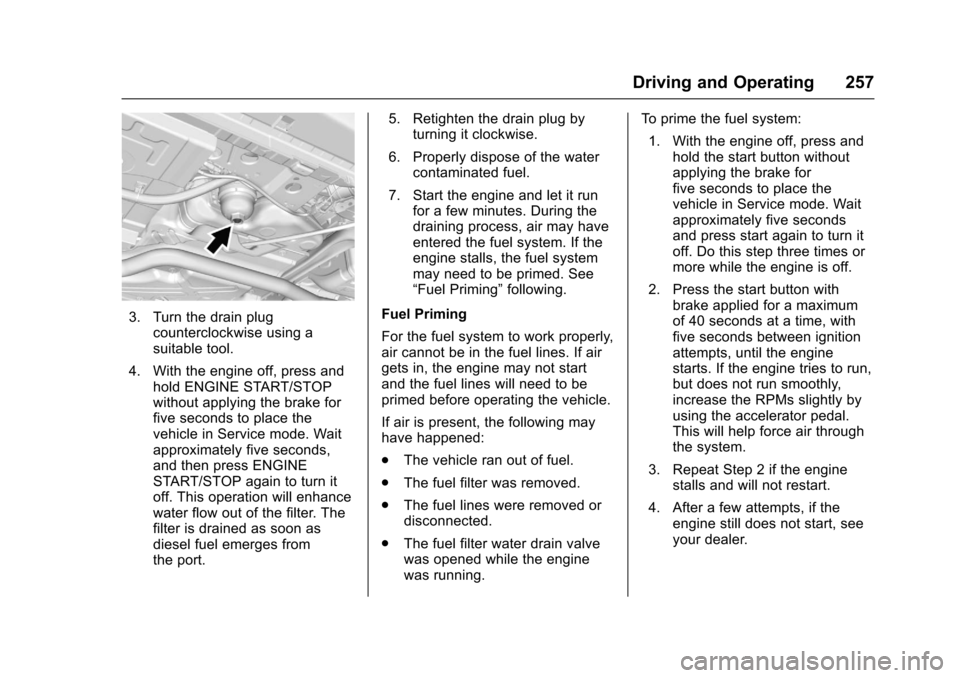
3. Turn the drain plugcounterclockwise using a
suitable tool.
4. With the engine off, press and hold ENGINE START/STOP
without applying the brake for
five seconds to place the
vehicle in Service mode. Wait
approximately five seconds,
and then press ENGINE
START/STOP again to turn it
off. This operation will enhance
water flow out of the filter. The
filter is drained as soon as
diesel fuel emerges from
the port. 5. Retighten the drain plug by
turning it clockwise.
6. Properly dispose of the water contaminated fuel.
7. Start the engine and let it run for a few minutes. During the
draining process, air may have
entered the fuel system. If the
engine stalls, the fuel system
may need to be primed. See
“Fuel Priming” following.
Fuel Priming
For the fuel system to work properly,
air cannot be in the fuel lines. If air
gets in, the engine may not start
and the fuel lines will need to be
primed before operating the vehicle.
If air is present, the following may
have happened:
. The vehicle ran out of fuel.
. The fuel filter was removed.
. The fuel lines were removed or
disconnected.
. The fuel filter water drain valve
was opened while the engine
was running. To prime the fuel system:
1. With the engine off, press and hold the start button without
applying the brake for
five seconds to place the
vehicle in Service mode. Wait
approximately five seconds
and press start again to turn it
off. Do this step three times or
more while the engine is off.
2. Press the start button with brake applied for a maximum
of 40 seconds at a time, with
five seconds between ignition
attempts, until the engine
starts. If the engine tries to run,
but does not run smoothly,
increase the RPMs slightly by
using the accelerator pedal.
This will help force air through
the system.
3. Repeat Step 2 if the engine stalls and will not restart.
4. After a few attempts, if the engine still does not start, see
your dealer.
Page 259 of 405
Chevrolet Cruze Owner Manual (GMNA-Localizing-U.S./Canada/Mexico-
9803785) - 2017 - CRC - 4/13/16
258 Driving and Operating
Running Out of Fuel
(Diesel)
{Warning
Diesel fuel is flammable. It could
start a fire if something ignites it,
and people could be burned. Do
not let it get on hot engine parts,
and keep matches or other
ignition sources away.
If the engine has stalled due to
running out of fuel, add at least
7.6 L (2 gal) of fuel if parked on a
level surface, or up to 18.9 L (5 gal)
of fuel if parked on a slope, and
perform the procedure under “Fuel
Priming” previously in this section.
Fuel Filter Replacement
(Diesel)
{Warning
Diesel fuel is flammable. It could
start a fire if something ignites it,
and people could be burned. Do
not let it get on hot engine parts,
and keep matches or other
ignition sources away.
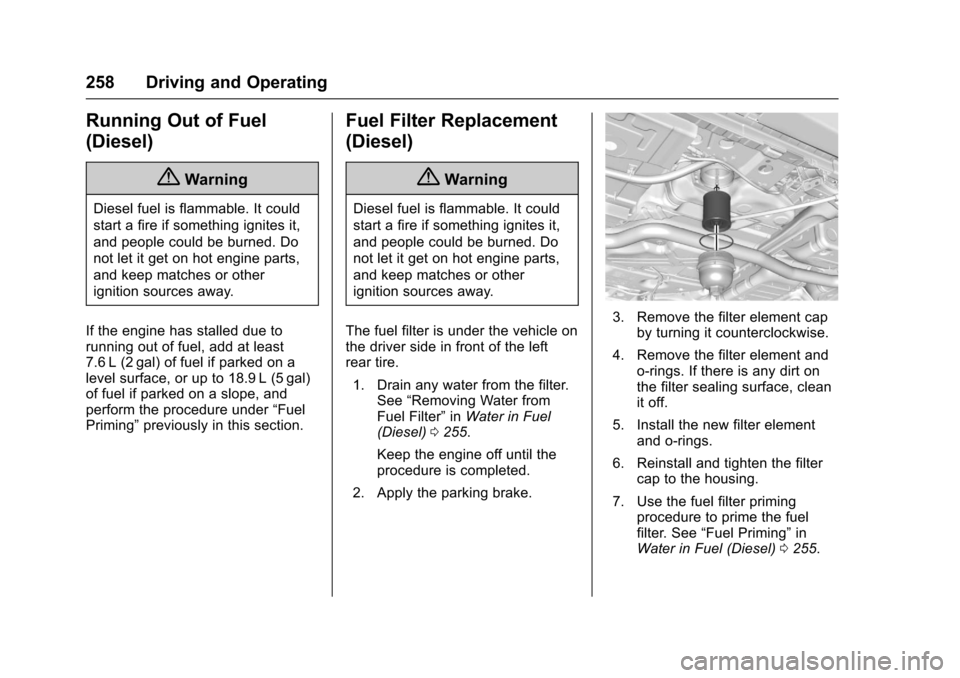
The fuel filter is under the vehicle on
the driver side in front of the left
rear tire. 1. Drain any water from the filter. See “Removing Water from
Fuel Filter” inWater in Fuel
(Diesel) 0255.
Keep the engine off until the
procedure is completed.
2. Apply the parking brake.
3. Remove the filter element cap by turning it counterclockwise.
4. Remove the filter element and o-rings. If there is any dirt on
the filter sealing surface, clean
it off.
5. Install the new filter element and o-rings.
6. Reinstall and tighten the filter cap to the housing.
7. Use the fuel filter priming procedure to prime the fuel
filter. See “Fuel Priming” in
Water in Fuel (Diesel) 0255.
Page 260 of 405
Chevrolet Cruze Owner Manual (GMNA-Localizing-U.S./Canada/Mexico-
9803785) - 2017 - CRC - 4/13/16
Driving and Operating 259
8. Start the engine and let it idlefor five minutes. Check the fuel
filter and air bleed valve for
leaks.
Filling the Tank
{Warning
Fuel vapors and fuel fires burn
violently and can cause injury or
death.
. To help avoid injuries to you
and others, read and follow
all the instructions on the
fuel pump island.
. Turn off the engine when
refueling.
. Keep sparks, flames, and
smoking materials away
from fuel.
. Do not leave the fuel pump
unattended.
. Do not use a cell phone
while refueling.
(Continued)
Warning (Continued)
.Do not re-enter the vehicle
while pumping fuel.
. Keep children away from
the fuel pump and never let
children pump fuel.
. Fuel can spray out if the fuel
cap is opened too quickly.
This spray can happen if the
tank is nearly full, and is
more likely in hot weather.
Open the fuel cap slowly
and wait for any hiss noise
to stop, then unscrew the
cap all the way.
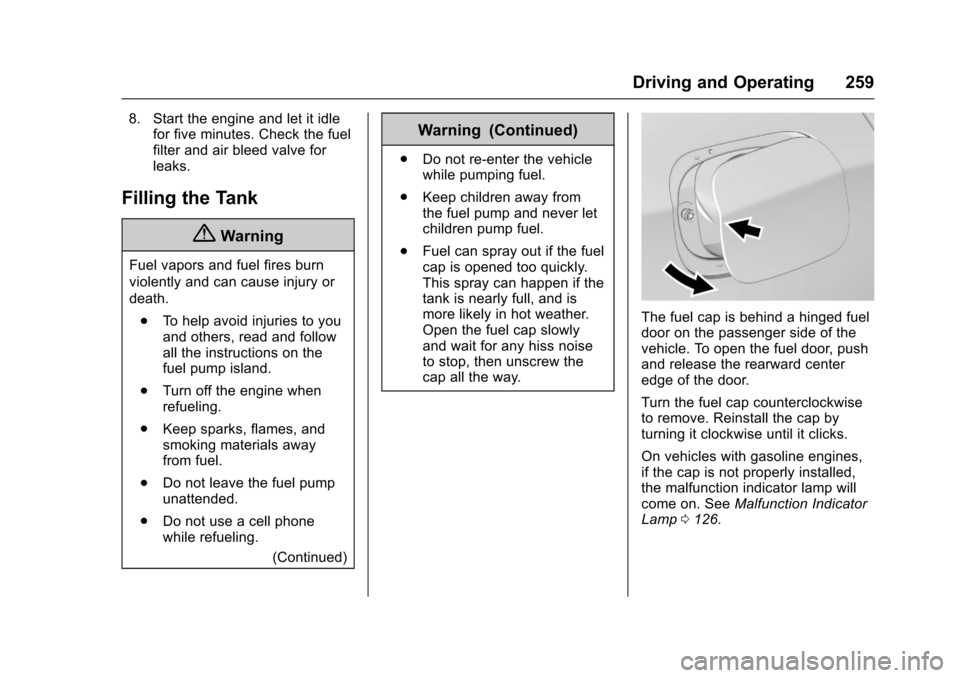
The fuel cap is behind a hinged fuel
door on the passenger side of the
vehicle. To open the fuel door, push
and release the rearward center
edge of the door.
Turn the fuel cap counterclockwise
to remove. Reinstall the cap by
turning it clockwise until it clicks.
On vehicles with gasoline engines,
if the cap is not properly installed,
the malfunction indicator lamp will
come on. See Malfunction Indicator
Lamp 0126.
Page 264 of 405
Chevrolet Cruze Owner Manual (GMNA-Localizing-U.S./Canada/Mexico-
9803785) - 2017 - CRC - 4/13/16
Vehicle Care 263
Vehicle Care
General Information
General Information . . . . . . . . . . 264
California Proposition65 Warning . . . . . . . . . . . . . . . . . 264
California Perchlorate Materials Requirements . . . . . 264
Accessories and Modifications . . . . . . . . . . . . . . . . 265
Vehicle Checks
Doing Your OwnService Work . . . . . . . . . . . . . . . 265
Hood . . . . . . . . . . . . . . . . . . . . . . . . . 266
Engine Compartment Overview . . . . . . . . . . . . . . . . . . . . 267
Engine Oil . . . . . . . . . . . . . . . . . . . . 270
Engine Oil Life System . . . . . . . 273
Automatic Transmission Fluid . . . . . . . . . . . . . . . . . . . . . . . . 275
Manual Transmission Fluid . . . 275
Hydraulic Clutch . . . . . . . . . . . . . . 275
Engine Air Cleaner/Filter . . . . . . 276
Cooling System . . . . . . . . . . . . . . 277
Engine Coolant . . . . . . . . . . . . . . . 278
Engine Overheating . . . . . . . . . . 281
Washer Fluid . . . . . . . . . . . . . . . . . 282
Brakes . . . . . . . . . . . . . . . . . . . . . . . 283
Brake Fluid . . . . . . . . . . . . . . . . . . . 284 Battery - North America . . . . . . 285
Fuel Filter . . . . . . . . . . . . . . . . . . . . 286
Starter Switch Check . . . . . . . . . 286
Automatic Transmission Shift
Lock Control Function
Check . . . . . . . . . . . . . . . . . . . . . . . 287
Ignition Transmission Lock Check . . . . . . . . . . . . . . . . . . . . . . . 287
Park Brake and P (Park) Mechanism Check . . . . . . . . . . 287
Wiper Blade Replacement . . . . 288
Headlamp Aiming
Headlamp Aiming . . . . . . . . . . . . 289
Bulb Replacement
Bulb Replacement . . . . . . . . . . . . 289
Halogen Bulbs . . . . . . . . . . . . . . . . 289
High Intensity Discharge (HID) Lighting . . . . . . . . . . . . . . . . . . . . . 289
Headlamps and Front Turn Signal . . . . . . . . . . . . . . . . . . . . . . . 290
Taillamps and Back-Up Lamps . . . . . . . . . . . . . . . . . . . . . . 291
Replacement Bulbs . . . . . . . . . . . 293
Electrical System
Electrical System Overload . . . 293
Fuses and Circuit Breakers . . . 294
Engine Compartment Fuse Block . . . . . . . . . . . . . . . . . . . . . . . . 294 Instrument Panel Fuse
Block . . . . . . . . . . . . . . . . . . . . . . . . 298
Wheels and Tires
Tires . . . . . . . . . . . . . . . . . . . . . . . . . . 301
All-Season Tires . . . . . . . . . . . . . . 301
Winter Tires . . . . . . . . . . . . . . . . . . 302
Low-Profile Tires . . . . . . . . . . . . . 302
Tire Sidewall Labeling . . . . . . . . 303
Tire Designations . . . . . . . . . . . . . 305
Tire Terminology andDefinitions . . . . . . . . . . . . . . . . . . 305
Tire Pressure . . . . . . . . . . . . . . . . . 308
Tire Pressure for High-Speed Operation . . . . . . . . . . . . . . . . . . . 309
Tire Pressure Monitor System . . . . . . . . . . . . . . . . . . . . . . 310
Tire Pressure Monitor Operation . . . . . . . . . . . . . . . . . . . 311
Tire Inspection . . . . . . . . . . . . . . . . 314
Tire Rotation . . . . . . . . . . . . . . . . . 314
When It Is Time for New Tires . . . . . . . . . . . . . . . . . . . . . . . . 315
Buying New Tires . . . . . . . . . . . . . 316
Different Size Tires and Wheels . . . . . . . . . . . . . . . . . . . . . . 317
Uniform Tire Quality Grading . . . . . . . . . . . . . . . . . . . . . 318
Wheel Alignment and Tire Balance . . . . . . . . . . . . . . . . . . . . . 319
Wheel Replacement . . . . . . . . . . 319
Page 266 of 405
Chevrolet Cruze Owner Manual (GMNA-Localizing-U.S./Canada/Mexico-
9803785) - 2017 - CRC - 4/13/16
Vehicle Care 265
Accessories and
Modifications
Adding non-dealer accessories or
making modifications to the vehicle
can affect vehicle performance and
safety, including such things as
airbags, braking, stability, ride and
handling, emissions systems,
aerodynamics, durability, and
electronic systems like antilock
brakes, traction control, and stability
control. These accessories or
modifications could even cause
malfunction or damage not covered
by the vehicle warranty.
Damage to suspension components
caused by modifying vehicle height
outside of factory settings will not be
covered by the vehicle warranty.Damage to vehicle components
resulting from modifications or the
installation or use of non-GM
certified parts, including control
module or software modifications, is
not covered under the terms of the
vehicle warranty and may affect
remaining warranty coverage for
affected parts.
GM Accessories are designed to
complement and function with other
systems on the vehicle. See your
dealer to accessorize the vehicle
using genuine GM Accessories
installed by a dealer technician.
Also, see
Adding Equipment to the
Airbag-Equipped Vehicle 084.
Vehicle Checks
Doing Your Own
Service Work
{Warning
It can be dangerous to work on
your vehicle if you do not have
the proper knowledge, service
manual, tools, or parts. Always
follow owner manual procedures
and consult the service manual
for your vehicle before doing any
service work.
If doing some of your own service
work, use the proper service
manual. It tells you much more
about how to service the vehicle
than this manual can. To order the
proper service manual, see Service
Publications Ordering
Information 0378.
This vehicle has an airbag system.
Before attempting to do your own
service work, see Servicing the
Airbag-Equipped Vehicle 084.
Page 269 of 405

Chevrolet Cruze Owner Manual (GMNA-Localizing-U.S./Canada/Mexico-
9803785) - 2017 - CRC - 4/13/16
268 Vehicle Care
1.Engine Air Cleaner/
Filter0276.
2. Engine Oil Fill Cap. See “When to Add Engine Oil”
under
Engine Oil 0270.
3. Engine Oil Dipstick. See “Checking Engine Oil” under
Engine Oil0270. 4. Engine Cooling Fan (Out of
View). See
Cooling
System 0277
.
5. Brake/Clutch Fluid Reservoir. See
Brake Fluid
0 284andHydraulic
Clutch 0275. 6. Engine Coolant Surge Tank
and Pressure Cap. See
Engine Coolant 0278.
7. Windshield Washer Fluid Reservoir. See “Adding
Washer Fluid” under
Washer Fluid0282.
8.
Engine Compartment Fuse
Block 0294.
Page 271 of 405
Chevrolet Cruze Owner Manual (GMNA-Localizing-U.S./Canada/Mexico-
9803785) - 2017 - CRC - 4/13/16
270 Vehicle Care
1.Engine Air Cleaner/
Filter0276.
2. Engine Oil Dipstick. See “Checking Engine Oil” under
Engine Oil0270.
3. Engine Cooling Fan (Out of View). See
Cooling
System 0277.
4. Engine Oil Fill Cap. See “When to Add Engine Oil”
under
Engine Oil 0270.
5. Brake/Clutch Fluid Reservoir. See
Brake Fluid
0 284andHydraulic
Clutch 0275.
6. Engine Coolant Surge Tank and Pressure Cap. See
Engine Coolant 0278.
7. Windshield Washer Fluid Reservoir. See “Adding
Washer Fluid” under
Washer Fluid0282.
8.
Engine Compartment Fuse
Block 0294.
Engine Oil
To ensure proper engine
performance and long life, careful
attention must be paid to engine oil. Following these simple, but
important steps will help protect
your investment:
.
Use engine oil approved to the
proper specification and of the
proper viscosity grade. See
“Selecting the Right Engine Oil”
in this section.
. Check the engine oil level
regularly and maintain the
proper oil level. See “Checking
Engine Oil” and“When to Add
Engine Oil” in this section.
. Change the engine oil at the
appropriate time. See Engine Oil
Life System 0273.
. Always dispose of engine oil
properly. See “What to Do with
Used Oil” in this section.
Checking Engine Oil
Check the engine oil level regularly
(every 650 km (400 mi), especially
prior to a long trip. The engine oil
dipstick handle is a loop. See
Engine Compartment Overview
0267 for the location.
{Warning
The engine oil dipstick handle
may be hot; it could burn you.
Use a towel or glove to touch the
dipstick handle.
If a low oil Driver Information Center
(DIC) message displays, check the
oil level.
Follow these guidelines:
. To get an accurate reading, park
the vehicle on level ground.
Check the engine oil level after
the engine has been off for at
least two hours. Checking the
engine oil level on steep grades
or too soon after engine shutoff
can result in incorrect readings.
Accuracy improves when
checking a cold engine prior to
starting. Remove the dipstick
and check the level.
. If unable to wait two hours, the
engine must be off for at least
15 minutes if the engine is
warm, or at least 30 minutes if
the engine is not warm. Pull out