horn CHEVROLET CRUZE 2017 2.G Owners Manual
[x] Cancel search | Manufacturer: CHEVROLET, Model Year: 2017, Model line: CRUZE, Model: CHEVROLET CRUZE 2017 2.GPages: 405, PDF Size: 6.76 MB
Page 8 of 405

Chevrolet Cruze Owner Manual (GMNA-Localizing-U.S./Canada/Mexico-
9803785) - 2017 - CRC - 4/13/16
In Brief 7
1.Air Vents 0197.
2. Headlamp High/Low-Beam
Changer 0160.
Turn Signal Lever. See Turn
and Lane-Change
Signals 0162.
Driver Information Center (DIC)
Buttons (If Equipped). See
Driver Information Center (DIC)
(Uplevel) 0137 orDriver
Information Center (DIC) (Base
Level) 0134.
3. Instrument Cluster 0116.
4. Windshield Wiper/
Washer 0109.
5. Infotainment 0166.
6. Light Sensor. See Automatic
Headlamp System 0160.
7. Hazard Warning
Flashers 0161.
8. Heated Front Seats 064 (If
Equipped).
9. Instrument Panel Fuse
Block 0298. 10.
Climate Control Systems (With
Air Conditioning) 0190 or
Climate Control Systems (With
Heater Only) 0192.
Automatic Climate Control
System 0193 (If Equipped).
11. Power Outlets 0112.
USB Port 0174.
12. Wireless Charging Pocket (If Equipped). See Wireless
Charging 0114.
13. Traction Control/Electronic
Stability Control 0235.
Assistance Systems for
Parking or Backing 0240.
14. Shift Lever. See Automatic
Transmission 0228 orManual
Transmission 0231.
15. Steering Wheel Controls 0108.
Driver Information Center (DIC)
Controls (If Equipped). See
Driver Information Center (DIC)
(Uplevel) 0137 orDriver
Information Center (DIC) (Base
Level) 0134.
16. Horn 0109. 17.
Steering Wheel
Adjustment 0108.
18. Cruise Control 0237.
Heated Steering Wheel 0109
(If Equipped).
Forward Collision Alert (FCA)
System 0243 (If Equipped).
Lane Keep Assist (LKA) 0247
(If Equipped).
19. Hood Release. See Hood 0266.
20. Data Link Connector (DLC) (Out of View). See Malfunction
Indicator Lamp 0126.
21. Exterior Lamp Controls 0158.
Fog Lamps 0162 (If
Equipped).
Instrument Panel Illumination
Control 0163.
Page 35 of 405
Chevrolet Cruze Owner Manual (GMNA-Localizing-U.S./Canada/Mexico-
9803785) - 2017 - CRC - 4/13/16
34 Keys, Doors, and Windows
Remote Keyless Entry
(RKE) System Operation
(Key Access)
The transmitter functions may work
up to 60 m (197 ft) away from the
vehicle.
Keep in mind that other conditions,
such as those previously stated, can
impact the performance of the
transmitter.
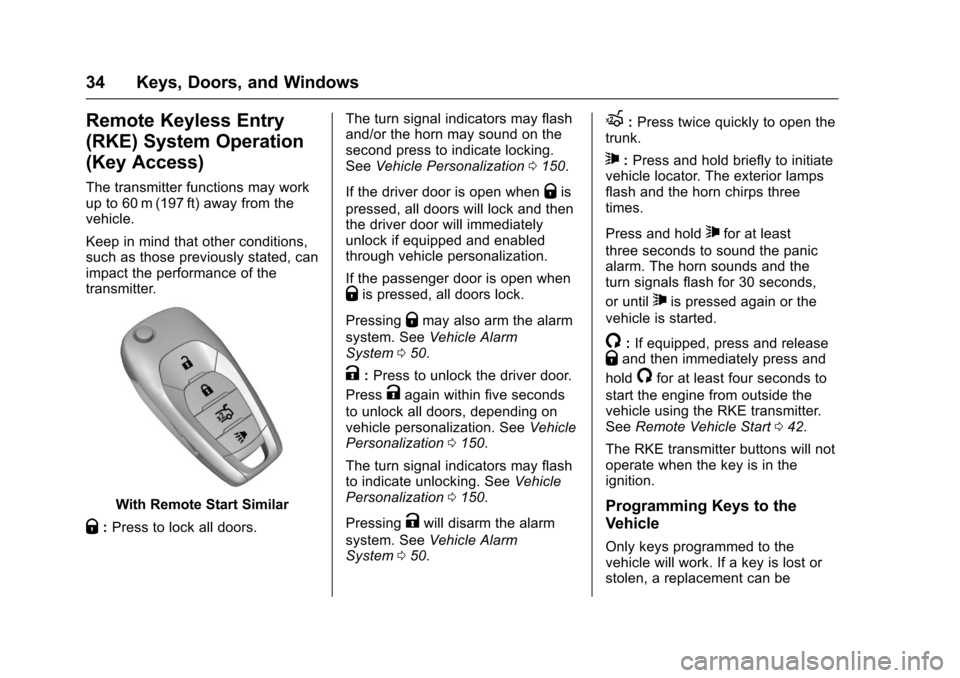
With Remote Start Similar
Q:Press to lock all doors. The turn signal indicators may flash
and/or the horn may sound on the
second press to indicate locking.
See
Vehicle Personalization 0150.
If the driver door is open when
Qis
pressed, all doors will lock and then
the driver door will immediately
unlock if equipped and enabled
through vehicle personalization.
If the passenger door is open when
Qis pressed, all doors lock.
Pressing
Qmay also arm the alarm
system. See Vehicle Alarm
System 050.
K:Press to unlock the driver door.
Press
Kagain within five seconds
to unlock all doors, depending on
vehicle personalization. See Vehicle
Personalization 0150.
The turn signal indicators may flash
to indicate unlocking. See Vehicle
Personalization 0150.
Pressing
Kwill disarm the alarm
system. See Vehicle Alarm
System 050.
X:Press twice quickly to open the
trunk.
7: Press and hold briefly to initiate
vehicle locator. The exterior lamps
flash and the horn chirps three
times.
Press and hold
7for at least
three seconds to sound the panic
alarm. The horn sounds and the
turn signals flash for 30 seconds,
or until
7is pressed again or the
vehicle is started.
/: If equipped, press and releaseQand then immediately press and
hold
/for at least four seconds to
start the engine from outside the
vehicle using the RKE transmitter.
See Remote Vehicle Start 042.
The RKE transmitter buttons will not
operate when the key is in the
ignition.
Programming Keys to the
Vehicle
Only keys programmed to the
vehicle will work. If a key is lost or
stolen, a replacement can be
Page 38 of 405
Chevrolet Cruze Owner Manual (GMNA-Localizing-U.S./Canada/Mexico-
9803785) - 2017 - CRC - 4/13/16
Keys, Doors, and Windows 37
Q:Press to lock all doors.
The turn signal indicators may flash
and/or the horn may sound on the
second press to indicate locking.
See Vehicle Personalization 0150.
If the driver door is open when
Qis
pressed, all doors will lock and then
the driver door will immediately
unlock, if enabled through the
vehicle personalization.
If the passenger door is open when
Qis pressed, all doors lock.
Pressing
Qmay also arm the alarm
system. See Vehicle Alarm
System 050.
K:Press to unlock the driver door.
Press
Kagain within five seconds
to unlock all doors, depending on
vehicle personalization. See Vehicle
Personalization 0150.
The turn signal indicators may flash
to indicate unlocking. See Vehicle
Personalization 0150.
Pressing
Kwill disarm the alarm
system. See Vehicle Alarm
System 050.
X:Press twice quickly to open the
trunk.
7: Press and hold briefly to initiate
vehicle locator. The exterior lamps
flash and the horn chirps three
times.
Press and hold
7for at least
three seconds to sound the panic
alarm. The horn sounds and the
turn signals flash for 30 seconds,
or until
7is pressed again or the
vehicle is started.
/: If equipped, press and releaseQand then immediately press and
hold
/for at least four seconds to
start the engine from outside the
vehicle using the RKE transmitter.
See Remote Vehicle Start 042.
Keyless Access Operation
The Keyless Access system allows
for the doors and trunk to be locked
and unlocked without pressing the
RKE transmitter button. The RKE
transmitter must be within 1 m (3 ft)
of the door being opened. If the vehicle has this feature, there will be
a button on the outside door
handles.
Keyless Access can be
programmed to unlock all doors on
the first lock/unlock press from the
driver door. See
Vehicle
Personalization 0150.
Keyless Unlocking/Locking from
the Driver Door
When the doors are locked and the
RKE transmitter is within range of
the door handle, pressing the lock/
unlock button on the driver door
handle will unlock the driver door.
If the lock/unlock button is pressed
again within five seconds, all
passenger doors will unlock.
Page 39 of 405
Chevrolet Cruze Owner Manual (GMNA-Localizing-U.S./Canada/Mexico-
9803785) - 2017 - CRC - 4/13/16
38 Keys, Doors, and Windows
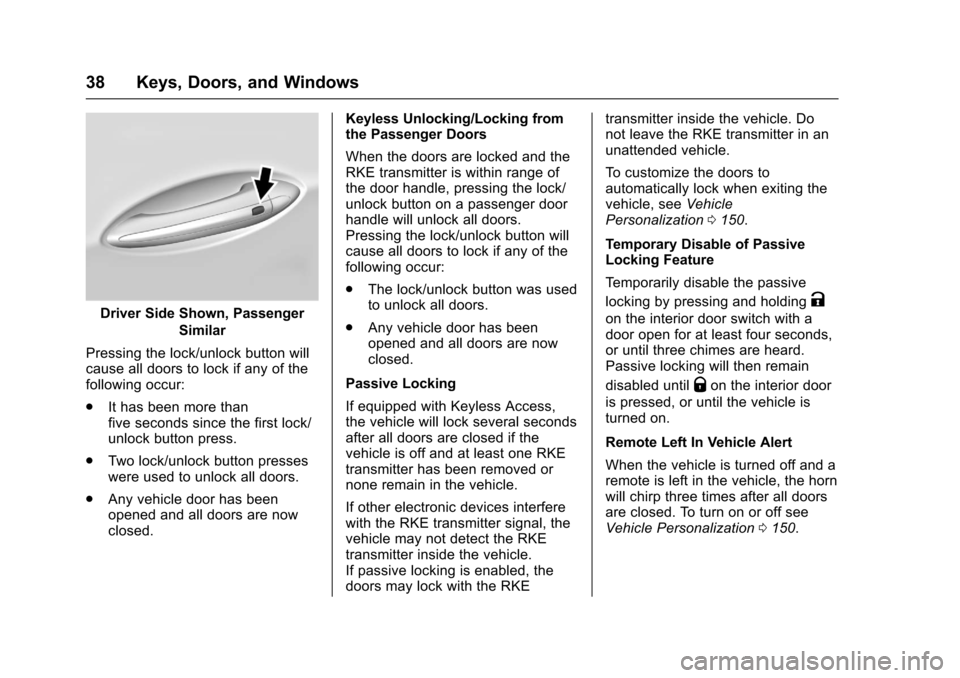
Driver Side Shown, PassengerSimilar
Pressing the lock/unlock button will
cause all doors to lock if any of the
following occur:
. It has been more than
five seconds since the first lock/
unlock button press.
. Two lock/unlock button presses
were used to unlock all doors.
. Any vehicle door has been
opened and all doors are now
closed. Keyless Unlocking/Locking from
the Passenger Doors
When the doors are locked and the
RKE transmitter is within range of
the door handle, pressing the lock/
unlock button on a passenger door
handle will unlock all doors.
Pressing the lock/unlock button will
cause all doors to lock if any of the
following occur:
.
The lock/unlock button was used
to unlock all doors.
. Any vehicle door has been
opened and all doors are now
closed.
Passive Locking
If equipped with Keyless Access,
the vehicle will lock several seconds
after all doors are closed if the
vehicle is off and at least one RKE
transmitter has been removed or
none remain in the vehicle.
If other electronic devices interfere
with the RKE transmitter signal, the
vehicle may not detect the RKE
transmitter inside the vehicle.
If passive locking is enabled, the
doors may lock with the RKE transmitter inside the vehicle. Do
not leave the RKE transmitter in an
unattended vehicle.
To customize the doors to
automatically lock when exiting the
vehicle, see
Vehicle
Personalization 0150.
Temporary Disable of Passive
Locking Feature
Temporarily disable the passive
locking by pressing and holdingK
on the interior door switch with a
door open for at least four seconds,
or until three chimes are heard.
Passive locking will then remain
disabled until
Qon the interior door
is pressed, or until the vehicle is
turned on.
Remote Left In Vehicle Alert
When the vehicle is turned off and a
remote is left in the vehicle, the horn
will chirp three times after all doors
are closed. To turn on or off see
Vehicle Personalization 0150.
Page 47 of 405
Chevrolet Cruze Owner Manual (GMNA-Localizing-U.S./Canada/Mexico-
9803785) - 2017 - CRC - 4/13/16
46 Keys, Doors, and Windows
Automatic Door Locks
When the doors are closed, the
ignition is on, and the shift lever is
moved out of P (Park) for an
automatic transmission, or the
vehicle speed is above 13 km/h
(8 mph) for a manual transmission,
the doors will lock.
To unlock the doors:
.Press
K.
. For automatic transmissions,
shift the vehicle into P (Park).
. For manual transmissions and a
keyed ignition system, remove
the key from the ignition when
parked.
. For manual transmissions and a
pushbutton start system, turn the
vehicle off when parked.
The automatic door lock feature
cannot be disabled. Automatic door
unlocking can be programmed.
See Vehicle Personalization 0150.
Lockout Protection
Key Access : When locking is
requested with the driver door open
and the key in the ignition, all the
doors will lock and then the driver
door will unlock.
This can be manually overridden by
pressing and holding
Qon the
power door lock switch.
Keyless Access : When locking is
requested with the driver door open
and the vehicle is in ACC/
ACCESSORY or ON/RUN/START,
all the doors will lock and then the
driver door will unlock.
If the vehicle is off and locking is
requested while a door is open,
when all doors are closed the
vehicle will check for RKE
transmitters inside. If an RKE
transmitter is detected and the
number of RKE transmitters inside
has not reduced, the driver door will
unlock and the horn will sound three
times. This can be manually overridden by
pressing and holding
Qon the
power door lock switch.
Unlocked Door Anti-Lockout
Keyless Access : Unlocked Door
Anti-Lockout, when on, will unlock
the driver door if locking is
requested while the driver door is
open. This feature can be turned on
or off using the vehicle
personalization menus. See Vehicle
Personalization 0150.
Safety Locks
The rear door safety locks prevent
passengers from opening the rear
doors from inside the vehicle.
Page 52 of 405
Chevrolet Cruze Owner Manual (GMNA-Localizing-U.S./Canada/Mexico-
9803785) - 2017 - CRC - 4/13/16
Keys, Doors, and Windows 51
bypass the 30-second delay
and immediately arm the alarm
system.
The vehicle alarm system will not
arm if the doors are locked with
the key.
If the driver door is opened without
first unlocking with the RKE
transmitter, the horn will chirp and
the lights will flash to indicate
pre-alarm. If the vehicle is not
started, or the door is not unlocked
by pressing
Kon the RKE
transmitter during the 10-second
pre-alarm, the alarm will be
activated.
If a door, the hood, or the trunk is
opened without first disarming the
system, the turn signals will flash
and the horn will sound for about
30 seconds. The alarm system will
then re-arm to monitor for the next
unauthorized event.
Disarming the Alarm System
Do one of the following to disarm
the alarm system or turn off the
alarm if it has been activated:
. Press
Kon the RKE transmitter.
. Unlock the vehicle using the
Keyless Access system,
if equipped.
. Start the vehicle.
To avoid setting off the alarm by
accident:
. Lock the vehicle after all
occupants have left the vehicle
and all doors are closed.
. Always unlock a door with the
RKE transmitter or use the
Keyless Access system,
if equipped.
Unlocking the driver door with the
key will not disarm the system or
turn off the alarm.
How to Detect a Tamper
Condition
IfKis pressed on the RKE
transmitter and the horn chirps and
the lamps flash three times, an
alarm occurred previously while the
alarm system was armed.
If the alarm has been activated, a
message will appear on the DIC.
See Security Messages 0146.
Immobilizer
See Radio Frequency
Statement 0379.
Immobilizer Operation
(Key Access)
This vehicle has a passive
theft-deterrent system.
The system does not have to be
manually armed or disarmed.
The vehicle is automatically
immobilized when the key is
removed from the ignition.
Page 108 of 405
Chevrolet Cruze Owner Manual (GMNA-Localizing-U.S./Canada/Mexico-
9803785) - 2017 - CRC - 4/13/16
Instruments and Controls 107
Instruments and
Controls
Controls
Steering Wheel Adjustment . . . 108
Steering Wheel Controls . . . . . . 108
Heated Steering Wheel . . . . . . . 109
Horn . . . . . . . . . . . . . . . . . . . . . . . . . . 109
Windshield Wiper/Washer . . . . 109
Compass . . . . . . . . . . . . . . . . . . . . . 110
Clock . . . . . . . . . . . . . . . . . . . . . . . . . 111
Power Outlets . . . . . . . . . . . . . . . . 112
Wireless Charging . . . . . . . . . . . . 114
Warning Lights, Gauges, and
Indicators
Warning Lights, Gauges, andIndicators . . . . . . . . . . . . . . . . . . . 115
Instrument Cluster . . . . . . . . . . . . 116
Speedometer . . . . . . . . . . . . . . . . . 121
Odometer . . . . . . . . . . . . . . . . . . . . . 121
Trip Odometer . . . . . . . . . . . . . . . . 121
Tachometer . . . . . . . . . . . . . . . . . . . 121
Fuel Gauge . . . . . . . . . . . . . . . . . . . 122
Engine Coolant Temperature Gauge . . . . . . . . . . . . . . . . . . . . . . 123
Safety Belt Reminders . . . . . . . . 124
Airbag Readiness Light . . . . . . . 125 Passenger Airbag Status
Indicator . . . . . . . . . . . . . . . . . . . . 125
Charging System Light . . . . . . . 126
Malfunction Indicator Lamp . . . 126
Brake System Warning Light . . . . . . . . . . . . . . . . . . . . . . . . 128
Antilock Brake System (ABS) Warning Light . . . . . . . . . . . . . . . 129
Up-Shift Light . . . . . . . . . . . . . . . . . 129
Lane Keep Assist (LKA) Light . . . . . . . . . . . . . . . . . . . . . . . . 129
Vehicle Ahead Indicator . . . . . . 130
Traction Off Light . . . . . . . . . . . . . 130
StabiliTrak
®OFF Light . . . . . . . . 130
Traction Control System (TCS)/ StabiliTrak
®Light . . . . . . . . . . . 131
Wait-to-Start Light . . . . . . . . . . . . 131
Tire Pressure Light . . . . . . . . . . . 131
Engine Oil Pressure Light . . . . 132
Low Fuel Warning Light . . . . . . 132
Diesel Exhaust Fluid (DEF) Warning Light . . . . . . . . . . . . . . . 132
Security Light . . . . . . . . . . . . . . . . . 133
High-Beam On Light . . . . . . . . . . 133
Front Fog Lamp Light . . . . . . . . . 133
Lamps On Reminder . . . . . . . . . 133
Cruise Control Light . . . . . . . . . . 133
Door Ajar Light . . . . . . . . . . . . . . . 134
Information Displays
Driver Information Center (DIC) (Base Level) . . . . . . . . . . . . . . . . 134
Driver Information Center (DIC) (Uplevel) . . . . . . . . . . . . . . . . . . . . 137
Vehicle Messages
Vehicle Messages . . . . . . . . . . . . 140
Battery Voltage and ChargingMessages . . . . . . . . . . . . . . . . . . . 140
Brake System Messages . . . . . 140
Compass Messages . . . . . . . . . . 140
Cruise Control Messages . . . . . 141
Door Ajar Messages . . . . . . . . . . 141
Engine Cooling System Messages . . . . . . . . . . . . . . . . . . . 141
Engine Oil Messages . . . . . . . . . 142
Engine Power Messages . . . . . 142
Fuel System Messages . . . . . . . 142
Diesel Exhaust Fluid Messages . . . . . . . . . . . . . . . . . . . 142
Diesel Particulate Filter Messages . . . . . . . . . . . . . . . . . . . 143
Key and Lock Messages . . . . . 143
Lamp Messages . . . . . . . . . . . . . . 144
Object Detection System Messages . . . . . . . . . . . . . . . . . . . 144
Ride Control System Messages . . . . . . . . . . . . . . . . . . . 146
Airbag System Messages . . . . 146
Safety Belt Messages . . . . . . . . 146
Page 110 of 405
Chevrolet Cruze Owner Manual (GMNA-Localizing-U.S./Canada/Mexico-
9803785) - 2017 - CRC - 4/13/16
Instruments and Controls 109
c:Press to reject an incoming
call or end a current call. Press to
mute or unmute the infotainment
system when not on a call.
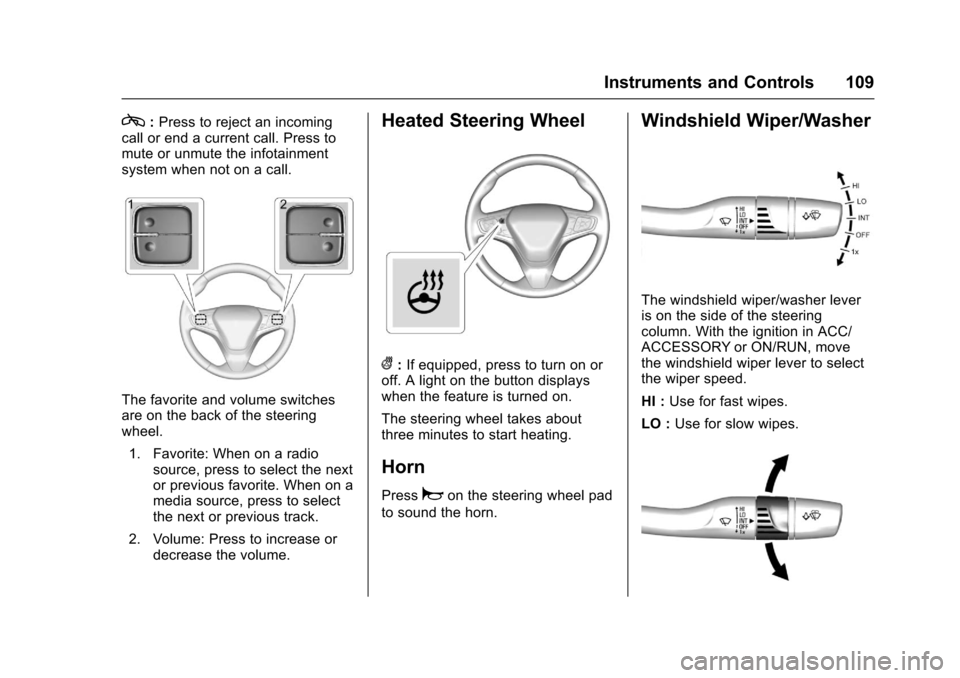
The favorite and volume switches
are on the back of the steering
wheel.
1. Favorite: When on a radio source, press to select the next
or previous favorite. When on a
media source, press to select
the next or previous track.
2. Volume: Press to increase or decrease the volume.
Heated Steering Wheel
(:If equipped, press to turn on or
off. A light on the button displays
when the feature is turned on.
The steering wheel takes about
three minutes to start heating.
Horn
Pressaon the steering wheel pad
to sound the horn.
Windshield Wiper/Washer
The windshield wiper/washer lever
is on the side of the steering
column. With the ignition in ACC/
ACCESSORY or ON/RUN, move
the windshield wiper lever to select
the wiper speed.
HI : Use for fast wipes.
LO : Use for slow wipes.
Page 155 of 405
Chevrolet Cruze Owner Manual (GMNA-Localizing-U.S./Canada/Mexico-
9803785) - 2017 - CRC - 4/13/16
154 Instruments and Controls
Unlocked Door Anti Lock Out
When on, this feature will keep the
driver door from locking until the
door is closed. If this feature is
turned on, the Delayed Door Lock
menu will not be available.
Select Off or On.
Auto Door Unlock
This allows selection of which of the
doors will automatically unlock when
the vehicle is shifted into P (Park)
with an automatic transmission or
when the vehicle is turned off with a
manual transmission.
Select Off, All Doors, or Driver Door.
Delayed Door Lock
When on, this feature will delay the
locking of the doors. To override the
delay, press the power door lock
switch on the door.
Select Off or On.
Remote Lock, Unlock, Start
Select and the following may
display:
.Remote Unlock Light Feedback .
Remote Lock Feedback
. Remote Door Unlock
. Remote Start Auto Heat Seats
. Passive Door Unlock
. Passive Door Lock
. Remote Left in Vehicle Alert
Remote Unlock Light Feedback
When on, the exterior lamps will
flash when unlocking the vehicle
with the RKE transmitter.
Select Off or Flash Lights.
Remote Lock Feedback
This allows selection of what type of
feedback is given when locking the
vehicle with the RKE transmitter.
Select Off, Lights and Horn, Lights
Only, or Horn Only.
Remote Door Unlock
This allows selection of which doors
will unlock when pressing
Kon the
RKE transmitter.
Select All Doors or Driver Door. Remote Start Auto Heat Seats
If equipped and turned on, this
feature will turn the heated seats on
when using remote start on
cold days.
Select Off or On.
Passive Door Unlock
This allows the selection of what
doors will unlock when using the
button on the driver door to unlock
the vehicle.
Select All Doors or Driver Door.
Passive Door Lock
This feature can be turned on, off,
or on with feedback. See
Remote
Keyless Entry (RKE) System
Operation (Key Access) 034 or
Remote Keyless Entry (RKE)
System Operation (Keyless
Access) 036.
Select Off, On with Horn
Chirp, or On.
Remote Left in Vehicle Alert
This feature sounds an alert when
the RKE transmitter is left in the
vehicle.
Page 297 of 405
Chevrolet Cruze Owner Manual (GMNA-Localizing-U.S./Canada/Mexico-
9803785) - 2017 - CRC - 4/13/16
296 Vehicle Care
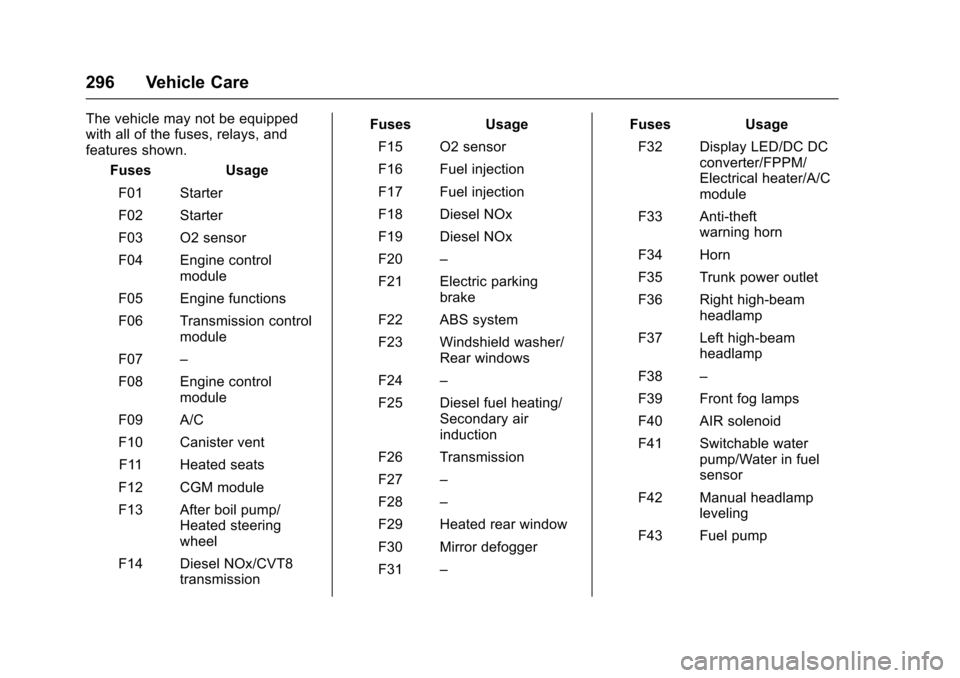
The vehicle may not be equipped
with all of the fuses, relays, and
features shown.Fuses Usage
F01 Starter
F02 Starter
F03 O2 sensor
F04 Engine control module
F05 Engine functions
F06 Transmission control module
F07 –
F08 Engine control module
F09 A/C
F10 Canister vent F11 Heated seats
F12 CGM module
F13 After boil pump/ Heated steering
wheel
F14 Diesel NOx/CVT8 transmission Fuses Usage
F15 O2 sensor
F16 Fuel injection
F17 Fuel injection
F18 Diesel NOx
F19 Diesel NOx
F20 –
F21 Electric parking brake
F22 ABS system
F23 Windshield washer/ Rear windows
F24 –
F25 Diesel fuel heating/ Secondary air
induction
F26 Transmission
F27 –
F28 –
F29 Heated rear window
F30 Mirror defogger
F31 – Fuses Usage
F32 Display LED/DC DC converter/FPPM/
Electrical heater/A/C
module
F33 Anti-theft warning horn
F34 Horn
F35 Trunk power outlet
F36 Right high-beam headlamp
F37 Left high-beam headlamp
F38 –
F39 Front fog lamps
F40 AIR solenoid
F41 Switchable water pump/Water in fuel
sensor
F42 Manual headlamp leveling
F43 Fuel pump