remote control CHEVROLET CRUZE 2018 User Guide
[x] Cancel search | Manufacturer: CHEVROLET, Model Year: 2018, Model line: CRUZE, Model: CHEVROLET CRUZE 2018Pages: 404, PDF Size: 4.64 MB
Page 149 of 404
Chevrolet Cruze Owner Manual (GMNA-Localizing-U.S./Canada/Mexico-
11348462) - 2018 - crc - 5/15/17
148 Instruments and Controls
Lane Change Alert
This allows the Lane Change Alert
feature to be turned on or off.
Select Off or On. SeeLane Change
Alert (LCA) 0240.
Comfort and Convenience
Select and the following may
display:
.
Chime Volume
. Auto Wipe in Reverse Gear
Chime Volume
This allows the selection of the
chime volume level.
Touch + or −to adjust the volume.
Auto Wipe in Reverse Gear
Select to set the Auto Wipe in
Reverse Gear feature on or off.
When on, and the front wipers are
on, the rear window wiper will turn
on automatically when the vehicle is
shifted into R (Reverse).
Select Off or On.
Lighting
Select and the following may
display:
. Vehicle Locator Lights
. Exit Lighting
Vehicle Locator Lights
This feature will flash the exterior
lamps and allows some of the
exterior lamps and most of the
interior lamps to turn on briefly when
Kon the Remote Keyless Entry
(RKE) transmitter is pressed to
locate the vehicle.
Select Off or On.
Exit Lighting
This allows the selection of how
long the exterior lamps stay on
when leaving the vehicle when it is
dark outside.
Select Off, 30 Seconds, 60 Seconds,
or 120 Seconds.
Power Door Locks
Select and the following may
display:
. Unlocked Door Anti Lock Out .
Auto Door Unlock
. Delayed Door Lock
Unlocked Door Anti Lock Out
When on, this feature will keep the
driver door from locking until the
door is closed. If this feature is
turned on, the Delayed Door Lock
menu will not be available.
Select Off or On.
Auto Door Unlock
This allows selection of which of the
doors will automatically unlock when
the vehicle is shifted into P (Park)
with an automatic transmission or
when the vehicle is turned off with a
manual transmission.
Select Off, All Doors, or Driver Door.
Delayed Door Lock
When on, this feature will delay the
locking of the doors. To override the
delay, press the power door lock
switch on the door.
Select Off or On.
Page 150 of 404
Chevrolet Cruze Owner Manual (GMNA-Localizing-U.S./Canada/Mexico-
11348462) - 2018 - crc - 5/15/17
Instruments and Controls 149
Remote Lock, Unlock, Start
Select and the following may
display:
.Remote Unlock Light Feedback
. Remote Lock Feedback
. Remote Door Unlock
. Remote Start Auto Heat Seats
. Passive Door Unlock
. Passive Door Lock
. Remote Left in Vehicle Alert
Remote Unlock Light Feedback
When on, the exterior lamps will
flash when unlocking the vehicle
with the RKE transmitter.
Select Off or Flash Lights.
Remote Lock Feedback
This allows selection of what type of
feedback is given when locking the
vehicle with the RKE transmitter.
Select Off, Lights and Horn, Lights
Only, or Horn Only. Remote Door Unlock
This allows selection of which doors
will unlock when pressing
Kon the
RKE transmitter.
Select All Doors or Driver Door.
Remote Start Auto Heat Seats
If equipped and turned on, this
feature will turn the heated seats on
when using remote start on
cold days.
Select Off or On.
Passive Door Unlock
This allows the selection of what
doors will unlock when using the
button on the driver door to unlock
the vehicle.
Select All Doors or Driver Door.
Passive Door Lock
This feature can be turned on, off,
or on with feedback.
See Remote Keyless Entry (RKE)
System Operation (Key Access)
0 34 orRemote Keyless Entry
(RKE) System Operation (Keyless
Access) 036. Select Off, On with Horn
Chirp, or On.
Remote Left in Vehicle Alert
This feature sounds an alert when
the RKE transmitter is left in the
vehicle. This menu also enables
Remote No Longer In Vehicle Alert.
Select Off or On.
Bluetooth
Select and the following may
display:
.
Pair New Device
. Discoverable
. Device Information
. Device Management
. Change Pairing PIN
. Ringtones
. Sort Order
. Voice Mail Numbers
. Text Message Alerts
Page 160 of 404
Chevrolet Cruze Owner Manual (GMNA-Localizing-U.S./Canada/Mexico-
11348462) - 2018 - crc - 5/15/17
Lighting 159
There are front reading lamps on
the overhead console and rear
reading lamps in the headliner,
if equipped.
#or$:Press the button near
each lamp to turn it on or off.
Lighting Features
Entry Lighting
If equipped with automatic light
control, some exterior lamps and
most of the interior lamps turn on
briefly at night or in areas with
limited lighting when the Remote
Keyless Entry (RKE) transmitter
K
button is pressed.
See Remote Keyless Entry (RKE)
System Operation (Key Access)
0 34 orRemote Keyless Entry
(RKE) System Operation (Keyless
Access) 036. After about
30 seconds the exterior lamps turn
off, then the dome lamps and
remaining interior lamps dim to off.
Entry lighting can be disabled
manually by changing the ignition
out of the OFF position, or by
pressing the RKE transmitter
Q
button.
This feature can be changed. See
Vehicle Personalization 0145.
Exit Lighting
If equipped with automatic light
control, some exterior lamps come
on at night, or in areas with limited
lighting, when the key is removed
from the ignition. The dome lamps
also come on when the key is
removed from the ignition. The
exterior lamps and dome lamps
remain on after the door is closed
for a set amount of time, then
automatically turn off.
If equipped with Keyless Access,
the exterior lamps automatically turn
on when a door is opened after the
ignition is changed to the OFF
position. The dome lamps also
come on after the ignition is
changed to the OFF position.
See Ignition Positions (Key Access)
0 206 orIgnition Positions (Keyless
Access) 0208.
The exterior lamps turn off
immediately by turning the exterior
lamps control off.
This feature can be changed. See
Vehicle Personalization 0145.
Page 193 of 404
Chevrolet Cruze Owner Manual (GMNA-Localizing-U.S./Canada/Mexico-
11348462) - 2018 - crc - 5/15/17
192 Climate Controls
compared to the comfort air
conditioning setting. This setting
allows higher humidity inside the
vehicle and window fogging before
the engine restarts. Pressing
0
during an Auto Stop will restart the
engine to prevent window fogging.
L:Press to turn on
recirculation. An indicator light
comes on. Air is recirculated to
quickly cool the inside of the vehicle
and reduce the entry of outside air
and odors.
Automatic Air Recirculation :
When the AUTO indicator light is
on, the air is automatically
recirculated as needed to help
quickly cool the inside of the
vehicle.
Auto Defog : The climate control
system may have a sensor to
automatically detect high humidity
inside the vehicle. When high
humidity is detected, the climate
control system may adjust to
outside air supply and turn on the
air conditioner. If the climate control
system does not detect possible
window fogging, it returns to normal operation. To turn Auto Defog off or
on, see
“Climate and Air Quality”
under Vehicle Personalization
0 145.
Rear Window Defogger
=:Press to turn the rear window
defogger on or off. An indicator light
on the button comes on to show that
the rear window defogger is on.
The defogger only works when the
ignition is on. The defogger turns off
if the ignition is off or in ACC/
ACCESSORY.
The rear window defogger can be
set to automatic operation. See
“Climate and Air Quality” under
Vehicle Personalization 0145.
When Auto Rear Defog is selected,
the rear window defogger turns on
automatically when the interior
temperature is cold and the outside
temperature is about 5 °C (40 °F)
and below. The auto rear defogger
turns off automatically. At higher
speeds, the rear window defogger
may stay on continuously. If equipped with heated outside
mirrors, they turn on when the rear
window defogger button is on and
help to clear fog or frost from the
surface of the mirrors. See
Heated
Mirrors 055.
Caution
Do not try to clear frost or other
material from the inside of the
front windshield and rear window
with a razor blade or anything
else that is sharp. This may
damage the rear window
defogger grid and affect the
radio's ability to pick up stations
clearly. The repairs would not be
covered by the vehicle warranty.
MorL:If equipped, press to turn
the heated seats on or off. See
Heated Front Seats 064.
Remote Start Climate Control
Operation : If the vehicle is
equipped with the remote vehicle
start feature, the climate control
system may run when the vehicle is
started remotely with settings
Page 194 of 404
Chevrolet Cruze Owner Manual (GMNA-Localizing-U.S./Canada/Mexico-
11348462) - 2018 - crc - 5/15/17
Climate Controls 193
according to ambient conditions.
The rear defog may come on during
remote start based on cold ambient
conditions. The rear defog indicator
light does not come on during a
remote start. If the vehicle has front
heated seats, they may come on
during a remote start. The heated
seat indicator lights do not come on
during a remote start.
SeeRemote Vehicle Start 042 and
Heated Front Seats 064.
Sensors
The solar sensor, on top of the
instrument panel near the
windshield, monitors the solar heat.
The climate control system uses the
sensor information to adjust the
temperature, fan speed,
recirculation, and air delivery mode
for best comfort.
If the sensor is covered, the
automatic climate control system
may not work properly.
Air Vents
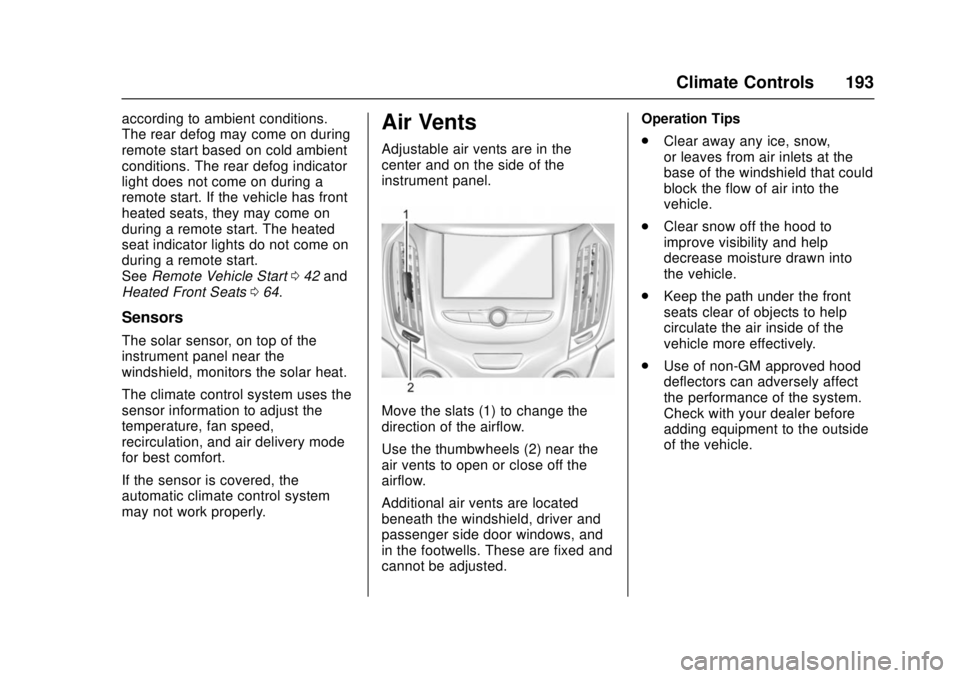
Adjustable air vents are in the
center and on the side of the
instrument panel.
Move the slats (1) to change the
direction of the airflow.
Use the thumbwheels (2) near the
air vents to open or close off the
airflow.
Additional air vents are located
beneath the windshield, driver and
passenger side door windows, and
in the footwells. These are fixed and
cannot be adjusted. Operation Tips
.
Clear away any ice, snow,
or leaves from air inlets at the
base of the windshield that could
block the flow of air into the
vehicle.
. Clear snow off the hood to
improve visibility and help
decrease moisture drawn into
the vehicle.
. Keep the path under the front
seats clear of objects to help
circulate the air inside of the
vehicle more effectively.
. Use of non-GM approved hood
deflectors can adversely affect
the performance of the system.
Check with your dealer before
adding equipment to the outside
of the vehicle.
Page 261 of 404
Chevrolet Cruze Owner Manual (GMNA-Localizing-U.S./Canada/Mexico-
11348462) - 2018 - crc - 5/15/17
260 Vehicle Care
California Perchlorate
Materials Requirements
Certain types of automotive
applications, such as airbag
initiators, seat belt pretensioners,
and lithium batteries contained in
Remote Keyless Entry transmitters,
may contain perchlorate materials.
Special handling may be necessary.
For additional information, see
www.dtsc.ca.gov/hazardouswaste/
perchlorate.
Accessories and
Modifications
Adding non-dealer accessories or
making modifications to the vehicle
can affect vehicle performance and
safety, including such things as
airbags, braking, stability, ride and
handling, emissions systems,
aerodynamics, durability, and
electronic systems like antilock
brakes, traction control, and stability
control. These accessories or
modifications could even cause
malfunction or damage not covered
by the vehicle warranty.Damage to suspension components
caused by modifying vehicle height
outside of factory settings will not be
covered by the vehicle warranty.
Damage to vehicle components
resulting from modifications or the
installation or use of non-GM
certified parts, including control
module or software modifications, is
not covered under the terms of the
vehicle warranty and may affect
remaining warranty coverage for
affected parts.
GM Accessories are designed to
complement and function with other
systems on the vehicle. See your
dealer to accessorize the vehicle
using genuine GM Accessories
installed by a dealer technician.
Also, see
Adding Equipment to the
Airbag-Equipped Vehicle 086.
Vehicle Checks
Doing Your Own
Service Work
{Warning
It can be dangerous to work on
your vehicle if you do not have
the proper knowledge, service
manual, tools, or parts. Always
follow owner ’s manual procedures
and consult the service manual
for your vehicle before doing any
service work.
If doing some of your own service
work, use the proper service
manual. It tells you much more
about how to service the vehicle
than this manual can. To order the
proper service manual, see Service
Publications Ordering Information
0 376.
This vehicle has an airbag system.
Before attempting to do your own
service work, see Servicing the
Airbag-Equipped Vehicle 085.
Page 389 of 404

Chevrolet Cruze Owner Manual (GMNA-Localizing-U.S./Canada/Mexico-
11348462) - 2018 - crc - 5/15/17
388 OnStar
compatible with the OnStar
hardware. OnStar services may not
work if the OnStar equipment is not
properly installed or it has not been
properly maintained. If equipment or
software is added, connected,
or modified, OnStar services may
not work. Other problems beyond
the control of OnStar—such as
hills, tall buildings, tunnels, weather,
electrical system design and
architecture of the vehicle, damage
to the vehicle in a crash, or wireless
phone network congestion or
jamming —may prevent service.
See Radio Frequency Statement
0 377.
Services for People with
Disabilities
Advisors provide services to help
with physical disabilities and
medical conditions.
Press
Qto help:
. Locate a gas station with an
attendant to pump gas.
. Find a hotel, restaurant, etc.,
that meets accessibility needs. .
Provide directions to the closest
hospital or pharmacy in urgent
situations.
TTY Users
OnStar has the ability to
communicate to deaf,
hard-of-hearing, or speech-impaired
customers while in the vehicle. The
available dealer-installed TTY
system can provide in-vehicle
access to all OnStar services,
except Virtual Advisor and OnStar
Turn-by-Turn Navigation.
OnStar Personal Identification
Number (PIN)
A PIN is needed to access some
OnStar services. The PIN will need
to be changed the first time when
speaking with an Advisor. To
change the OnStar PIN, contact an
OnStar Advisor by pressing
Qor
calling 1-888-4ONSTAR.
Warranty
OnStar equipment may be
warranted as part of the vehicle
warranty.
Languages
The vehicle can be programmed to
respond in multiple languages.
Press
Qand ask for an Advisor.
Advisors are available in English,
Spanish, and French. Available
languages may vary by country.
Potential Issues
OnStar cannot perform Remote
Door Unlock or Stolen Vehicle
Assistance after the vehicle has
been off continuously for 10 days
without an ignition cycle. If the
vehicle has not been started for
10 days, OnStar can contact
Roadside Assistance or a locksmith
to help gain access to the vehicle.
Global Positioning
System (GPS)
. Obstruction of the GPS can
occur in a large city with tall
buildings; in parking garages;
around airports; in tunnels and
underpasses; or in an area with
very dense trees. If GPS signals
are not available, the OnStar
system should still operate to
Page 398 of 404

Chevrolet Cruze Owner Manual (GMNA-Localizing-U.S./Canada/Mexico-
11348462) - 2018 - crc - 5/15/17
Index 397
I
Ignition Positions . . . . . . . . . . 206, 208
Ignition Transmission LockCheck . . . . . . . . . . . . . . . . . . . . . . . . . 281
Immobilizer . . . . . . . . . . . . . . . . . . . . . . 53
Indicator
Vehicle Ahead . . . . . . . . . . . . . . . . 133
Infants and Young Children, Restraints . . . . . . . . . . . . . . . . . . . . . . 89
Infotainment . . . . . . . . . . . . . . . . . . . . 161
Infotainment System . . . . . . . . . . . . 380
Instrument Cluster . . . . . . . . . . . . . . 120
Instrument Panel Overview . . . . . . . 6
Interior Rearview Mirrors . . . . . . . . . 55
Introduction . . . . . . . . . . . . . . . . . . . . . . . 2
J
Jump Starting - North
America . . . . . . . . . . . . . . . . . . . . . . . 333
K
Keyless EntryRemote (RKE) System . . . . . 34, 36
Keys . . . . . . . . . . . . . . . . . . . . . . . . . . . . . 31
L
Labeling, Tire Sidewall . . . . . . . . . . 300
Lamps Courtesy . . . . . . . . . . . . . . . . . . . . . . 158
Daytime Running (DRL) . . . . . . 155 Lamps (cont'd)
Dome . . . . . . . . . . . . . . . . . . . . . . . . . 158
Exterior Controls . . . . . . . . . . . . . . 153
Exterior Lighting Battery
Saver . . . . . . . . . . . . . . . . . . . . . . . 160
License Plate . . . . . . . . . . . . . . . . . 289
Malfunction Indicator (Check Engine) . . . . . . . . . . . . . 130
On Reminder . . . . . . . . . . . . . . . . . 137
Reading . . . . . . . . . . . . . . . . . . . . . . 158
Taillamps and Back-up . . . . . . . 286
Lane Change Alert (LCA) . . . . . . . 240
Lane Departure Warning (LDW) . . . . . . . . . . . . . . . . 242
Lane Keep Assist (LKA) . . . . . . . . 242
Lane Keep Assist Light . . . . . . . . . 133
Lap-Shoulder Belt . . . . . . . . . . . . . . . 71
LATCH System Replacing Parts after aCrash . . . . . . . . . . . . . . . . . . . . . . . 101
LATCH, Lower Anchors and Tethers for Children . . . . . . . . . . . . 94
Liftgate . . . . . . . . . . . . . . . . . . . . . . . . . . 50
Lighting
Entry . . . . . . . . . . . . . . . . . . . . . . . . . 159
Exit . . . . . . . . . . . . . . . . . . . . . . . . . . . 159
Illumination Control . . . . . . . . . . . 158 Lights
Airbag Readiness . . . . . . . . . . . . . 128
Antilock Brake System
(ABS) Warning . . . . . . . . . . . . . . 132
Brake System Warning . . . . . . . 132
Charging System . . . . . . . . . . . . . 130
Check Engine (Malfunction Indicator) . . . . . . . . . . . . . . . . . . . . 130
Cruise Control . . . . . . . . . . . . . . . . 137
Diesel Exhaust Fluid (DEF) . . . 136
Door Ajar . . . . . . . . . . . . . . . . . . . . . 137
Engine Oil Pressure . . . . . . . . . . 135
Flash-to-Pass . . . . . . . . . . . . . . . . . 155
Front Fog Lamp . . . . . . . . . . . . . . 137
High-Beam On . . . . . . . . . . . . . . . . 137
High/Low Beam Changer . . . . . 155
Lane Keep Assist . . . . . . . . . . . . . 133
Low Fuel Warning . . . . . . . . . . . . 136
Seat Belt Reminders . . . . . . . . . . 128
Security . . . . . . . . . . . . . . . . . . . . . . 136
StabiliTrak OFF . . . . . . . . . . . . . . . 134
Tire Pressure . . . . . . . . . . . . . . . . . 135
Traction Control System (TCS)/StabiliTrak . . . . . . . . . . . . 134
Traction Off . . . . . . . . . . . . . . . . . . . 134
Up-Shift . . . . . . . . . . . . . . . . . . . . . . 133
Wait to Start . . . . . . . . . . . . . . . . . . 135
Page 401 of 404

Chevrolet Cruze Owner Manual (GMNA-Localizing-U.S./Canada/Mexico-
11348462) - 2018 - crc - 5/15/17
400 Index
Roadside AssistanceProgram . . . . . . . . . . . . . . . . . . . . . . . 371
Roof Sunroof . . . . . . . . . . . . . . . . . . . . . . . . . 58
Rotation, Tires . . . . . . . . . . . . . . . . . . 311
Routing, Engine Drive Belt . . . . . . 366
Running out of Fuel . . . . . . . . . . . . . 253
Running the Vehicle While Parked . . . . . . . . . . . . . . . . . . . . . . . . 218
S
Safety Defects ReportingCanadian Government . . . . . . . . 378
General Motors . . . . . . . . . . . . . . . 378
U.S. Government . . . . . . . . . . . . . 377
Safety Locks . . . . . . . . . . . . . . . . . . . . . 47
Safety System Check . . . . . . . . . . . . 74
Satellite Radio . . . . . . . . . . . . . . . . . . 167
Scheduling Appointments . . . . . . . 373
Sealant Kit, Tire . . . . . . . . . . . . . . . . 319
Seat Belts . . . . . . . . . . . . . . . . . . . . . . . 69 Care . . . . . . . . . . . . . . . . . . . . . . . . . . . . 74
Extender . . . . . . . . . . . . . . . . . . . . . . . . 74
How to Wear Seat BeltsProperly . . . . . . . . . . . . . . . . . . . . . . . 70
Lap-Shoulder Belt . . . . . . . . . . . . . . 71
Reminders . . . . . . . . . . . . . . . . . . . . 128
Replacing after a Crash . . . . . . . . 75
Use During Pregnancy . . . . . . . . . . 73 Seats
Adjustment, Front . . . . . . . . . . . . . . . 62
Head Restraints . . . . . . . . . . . . . . . . 61
Heated Front . . . . . . . . . . . . . . . . . . . 64
Heated, Rear . . . . . . . . . . . . . . . . . . . 68
Power Adjustment, Front . . . . . . . 63
Rear . . . . . . . . . . . . . . . . . . . . . . . . . . . . 66
Reclining Seatbacks . . . . . . . . . . . . 63
Securing Child Restraints . . . . . . . . . . . . . . . . 101, 103
Security
Light . . . . . . . . . . . . . . . . . . . . . . . . . . 136
OnStar . . . . . . . . . . . . . . . . . . . . . . . 383
Vehicle . . . . . . . . . . . . . . . . . . . . . . . . . 51
Vehicle Alarm . . . . . . . . . . . . . . . . . . . 51
Service . . . . . . . . . . . . . . . . . . . . . . . . . 194
Accessories andModifications . . . . . . . . . . . . . . . . 260
Climate Control System . . . . . . . . . . . . . . . . . 186, 188
Doing Your Own Work . . . . . . . . 260
Maintenance Records . . . . . . . . 362
Maintenance, General
Information . . . . . . . . . . . . . . . . . . 349
Parts Identification Label . . . . . 363
Publications Ordering
Information . . . . . . . . . . . . . . . . . . 376
Scheduling Appointments . . . . . 373 Services
Special Application . . . . . . . . . . . 356
Servicing the Airbag . . . . . . . . . . . . . 85
Shift Lock Control Function Check, Automatic
Transmission . . . . . . . . . . . . . . . . . . 281
Shifting
Into Park . . . . . . . . . . . . . . . . . . . . . . 215
Out of Park . . . . . . . . . . . . . . . . . . . 215
Side Blind Zone Alert (SBZA) . . . 240
Signals, Turn and Lane-Change . . . . . . . . . . . . . . . . . 157
Software Updates . . . . . . . . . . . . . . 165
Spare Tire Compact . . . . . . . . . . . . . . . . . . . . . . 332
Special Application Services . . . . 356
Specifications and
Capacities . . . . . . . . . . . . . . . . . . . . . 364
Speedometer . . . . . . . . . . . . . . . . . . . 125
StabiliTrak OFF Light . . . . . . . . . . . . . . . . . . . . . 134
Start Vehicle, Remote . . . . . . . . . . . 42
Starter Switch Check . . . . . . . . . . . 280
Starting the Engine . . . . . . . . . . . . . 209
Steering . . . . . . . . . . . . . . . . . . . . . . . . 198 Heated Wheel . . . . . . . . . . . . . . . . . 111
Wheel Adjustment . . . . . . . . . . . . .110
Wheel Controls . . . . . . . . . . . . . . . .110
Page 403 of 404

Chevrolet Cruze Owner Manual (GMNA-Localizing-U.S./Canada/Mexico-
11348462) - 2018 - crc - 5/15/17
402 Index
UpdatesSoftware . . . . . . . . . . . . . . . . . . . . . . 165
USB Port . . . . . . . . . . . . . . . . . . . . . . . 169
Using This Manual . . . . . . . . . . . . . . . . 2
V
Vehicle Alarm System . . . . . . . . . . . . . . . . . . 51
Canadian Owners . . . . . . . . . . . . . . . 2
Control . . . . . . . . . . . . . . . . . . . . . . . 197
Identification Number (VIN) . . . 363
Load Limits . . . . . . . . . . . . . . . . . . . 202
Messages . . . . . . . . . . . . . . . . . . . . 144
Personalization . . . . . . . . . . . . . . . 145
Remote Start . . . . . . . . . . . . . . . . . . . 42
Security . . . . . . . . . . . . . . . . . . . . . . . . 51
Speed Messages . . . . . . . . . . . . . 144
Towing . . . . . . . . . . . . . . . . . . . . . . . . 336
Vehicle Ahead Indicator . . . . . . . . 133
Vehicle Care Storing the Tire Sealant
and Compressor Kit . . . . . . . . . 326
Tire Pressure . . . . . . . . . . . . . . . . . 305
Vehicle Data Recording and Privacy . . . . . . . . . . . . . . . . . . . . . . . . 379
Ventilation, Air . . . . . . . . . . . . . . . . . . 193
Visors . . . . . . . . . . . . . . . . . . . . . . . . . . . 58
W
Wait to Start Light . . . . . . . . . . . . . . 135
Warning
Brake System Light . . . . . . . . . . . 132
Caution and Danger . . . . . . . . . . . . . 3
Lane Departure (LDW) . . . . . . . 242
Warning Lights, Gauges, and Indicators . . . . . . . . . . . . . . . . . . . . . 119
Warnings Hazard Flashers . . . . . . . . . . . . . . 156
Washer Fluid . . . . . . . . . . . . . . . . . . . 276
Water in Fuel . . . . . . . . . . . . . . . . . . . 250
What Fuel to Use in Canada . . . . 248
What Fuel to Use in the U.S. . . . 246
Wheels Alignment and Tire Balance . . 316
Different Size . . . . . . . . . . . . . . . . . 314
Replacement . . . . . . . . . . . . . . . . . 316
When It Is Time for New
Tires . . . . . . . . . . . . . . . . . . . . . . . . . . 312
Where to Put the Restraint . . . . . . 93
Wi-Fi . . . . . . . . . . . . . . . . . . . . . . . . . . . 384
Windows . . . . . . . . . . . . . . . . . . . . . . . . 56 Power . . . . . . . . . . . . . . . . . . . . . . . . . . 56
Windshield Wiper/Washer . . . . . . . . . . . . . . . . . 111
Winter Driving . . . . . . . . . . . . . . . . . . . . . . . . 201 Winter Tires . . . . . . . . . . . . . . . . . . . . 299
Wiper Blade Replacement . . . . . . 282
Wipers
Rear Washer . . . . . . . . . . . . . . . . . .112
Wireless Charging . . . . . . . . . . . . . . 117