center console CHEVROLET CRUZE 2019 Owner's Manual
[x] Cancel search | Manufacturer: CHEVROLET, Model Year: 2019, Model line: CRUZE, Model: CHEVROLET CRUZE 2019Pages: 20, PDF Size: 2.8 MB
Page 5 of 20

5F Optional equipment
The Keyless Access System enables operation of the doors and trunk/liftg\
ate without removing the Remote Keyless Entry transmitter from a pocket or purse. Th\
e transmitter must be within 3 feet of a door or the trunk/liftgate.
KEYLESS UNLOCKING
With the transmitter within range:
Press the lock button on the driver’s door handle to unlock the driver’s door; press it again within 5 seconds to unlock all doors.
Press the lock button on the front passenger’s door handle to unlock all doors.
Press the touchpad either above the license plate or at the base of the liftgate to open the trunk/liftgate.
KEYLESS LOCKING
With the ignition off, the transmitter out of the vehicle, and all doors\
closed:
Press the lock button on any door handle to lock all doors immediately.
If Passive Locking is turned on, all doors will lock automatically after\
a short delay once all doors are closed.
Note: To change the door lock and unlock settings, go to Settings > Vehicle > Remote Lock, Unlock, Start.
See Keys, Doors and Windows in your Owner’s Manual.
KEYLESS ACCESS SYSTEMF
KEYLESS (PUSHBUTTON) STARTF
The Remote Keyless Entry (RKE) transmitter must be in the vehicle to turn on the ignition.
STARTING THE ENGINE
With the vehicle in Park, press the brake pedal and then press the ENGINE START/STOP button. The button indicator will be green.
Note: If the RKE transmitter battery is weak, place the transmitter in the front cupholder in the center console to enable the engine to start. Replace the transmitter battery as soon as possible.
STOPPING THE ENGINE/OFF
Shift to Park and press the ENGINE START/STOP button.
ACCESSORY MODE
With the engine off and the brake pedal not depressed, press the ENGINE START/STOP button. The button indicator will be amber.
See Driving and Operating in your Owner’s Manual.
Page 6 of 20
6F Optional equipment
FRONT SEATS
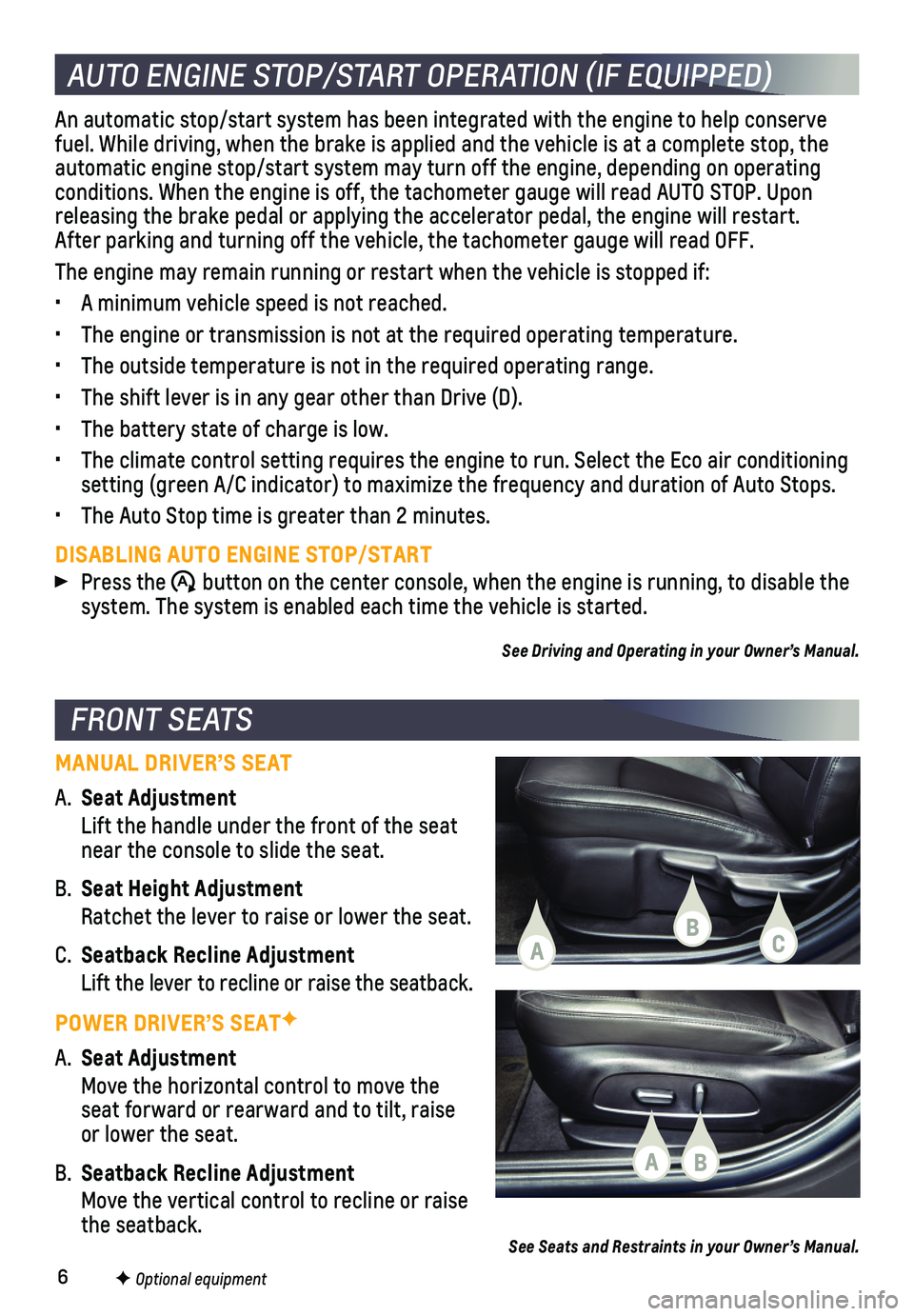
MANUAL DRIVER’S SEAT
A. Seat Adjustment
Lift the handle under the front of the seat near the console to slide the seat.
B. Seat Height Adjustment
Ratchet the lever to raise or lower the seat.
C. Seatback Recline Adjustment
Lift the lever to recline or raise the seatback.
POWER DRIVER’S SEATF
A. Seat Adjustment
Move the horizontal control to move the seat forward or rearward and to tilt, raise or lower the seat.
B. Seatback Recline Adjustment
Move the vertical control to recline or raise the seatback.See Seats and Restraints in your Owner’s Manual.
AUTO ENGINE STOP/START OPERATION (IF EQUIPPED)
An automatic stop/start system has been integrated with the engine to he\
lp conserve fuel. While driving, when the brake is applied and the vehicle is at a c\
omplete stop, the automatic engine stop/start system may turn off the engine, depending on\
operating conditions. When the engine is off, the tachometer gauge will read AUTO \
STOP. Upon releasing the brake pedal or applying the accelerator pedal, the engine \
will restart. After parking and turning off the vehicle, the tachometer gauge will read OFF.\
The engine may remain running or restart when the vehicle is stopped if:\
• A minimum vehicle speed is not reached.
• The engine or transmission is not at the required operating temperature.\
• The outside temperature is not in the required operating range.
• The shift lever is in any gear other than Drive (D).
• The battery state of charge is low.
• The climate control setting requires the engine to run. Select the Eco a\
ir conditioning setting (green A/C indicator) to maximize the frequency and duration o\
f Auto Stops.
• The Auto Stop time is greater than 2 minutes.
DISABLING AUTO ENGINE STOP/START
Press the $ button on the center console, when the engine is running, to disable the system. The system is enabled each time the vehicle is started.
See Driving and Operating in your Owner’s Manual.
CBA
BA
Page 9 of 20
9
INFOTAINMENT SYSTEM
MANAGING HOME PAGE ICONS
The Home page icons can be arranged in any order.
1. To enter edit mode, touch and hold the Home page icon to move.
2. Drag the icon to the desired position and release. Drag the icon to the \
edge of the screen to move to another page.
SETTING THE TIME
1. Select Settings on the Home page.
2. Select System > Time/Date.
3. Select Set Time.
4. Touch the arrows to adjust the time.
5. Touch to exit the menu.
Turn on Automatic Time and Date to have the time updated automatically.
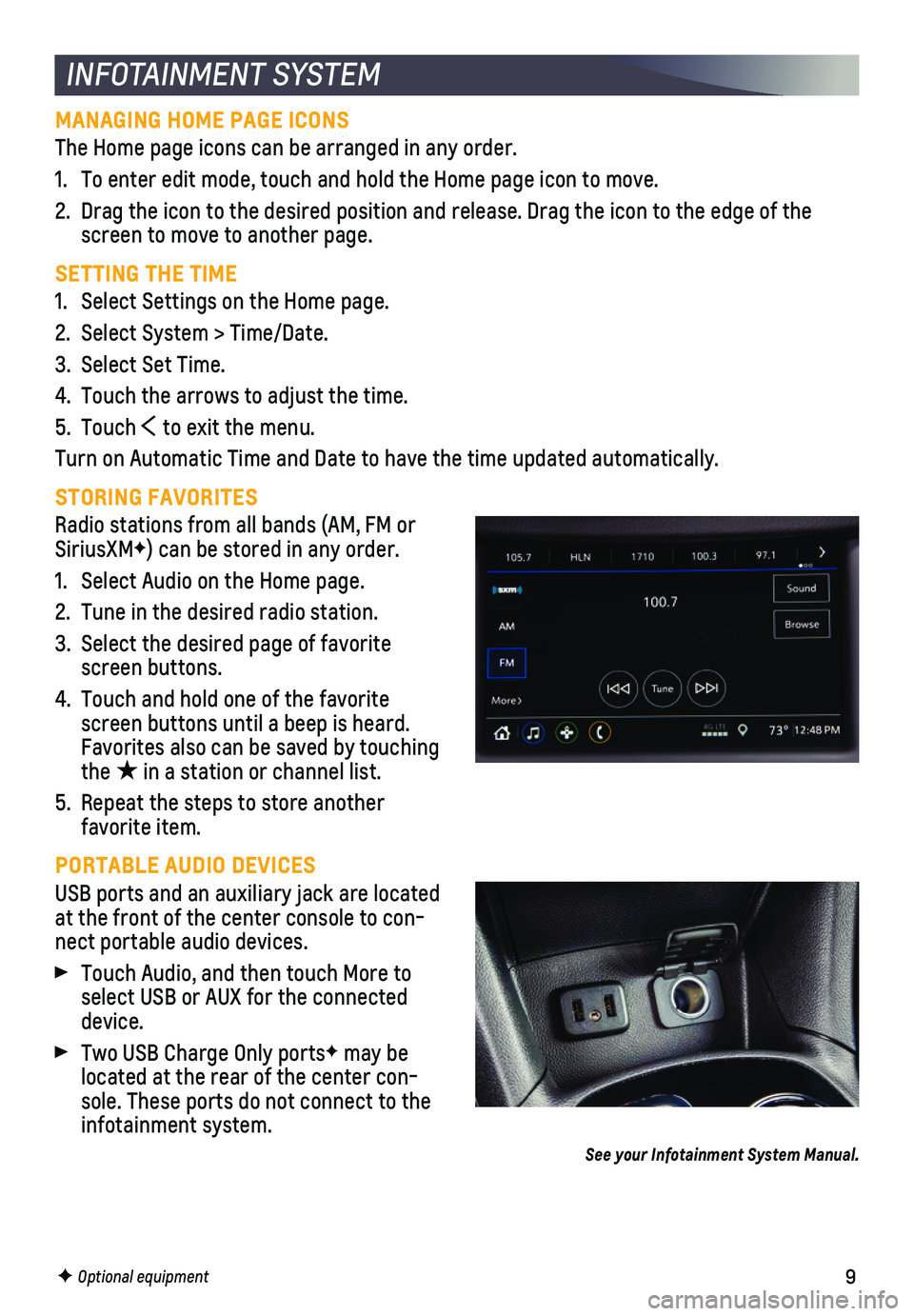
STORING FAVORITES
Radio stations from all bands (AM, FM or SiriusXMF) can be stored in any order.
1. Select Audio on the Home page.
2. Tune in the desired radio station.
3. Select the desired page of favorite screen buttons.
4. Touch and hold one of the favorite screen buttons until a beep is heard. Favorites also can be saved by touching the ★ in a station or channel list.
5. Repeat the steps to store another favorite item.
PORTABLE AUDIO DEVICES
USB ports and an auxiliary jack are located at the front of the center console to con-nect portable audio devices.
Touch Audio, and then touch More to select USB or AUX for the connected device.
Two USB Charge Only portsF may be located at the rear of the center con-sole. These ports do not connect to the infotainment system.
See your Infotainment System Manual.
F Optional equipment
Page 12 of 20
12
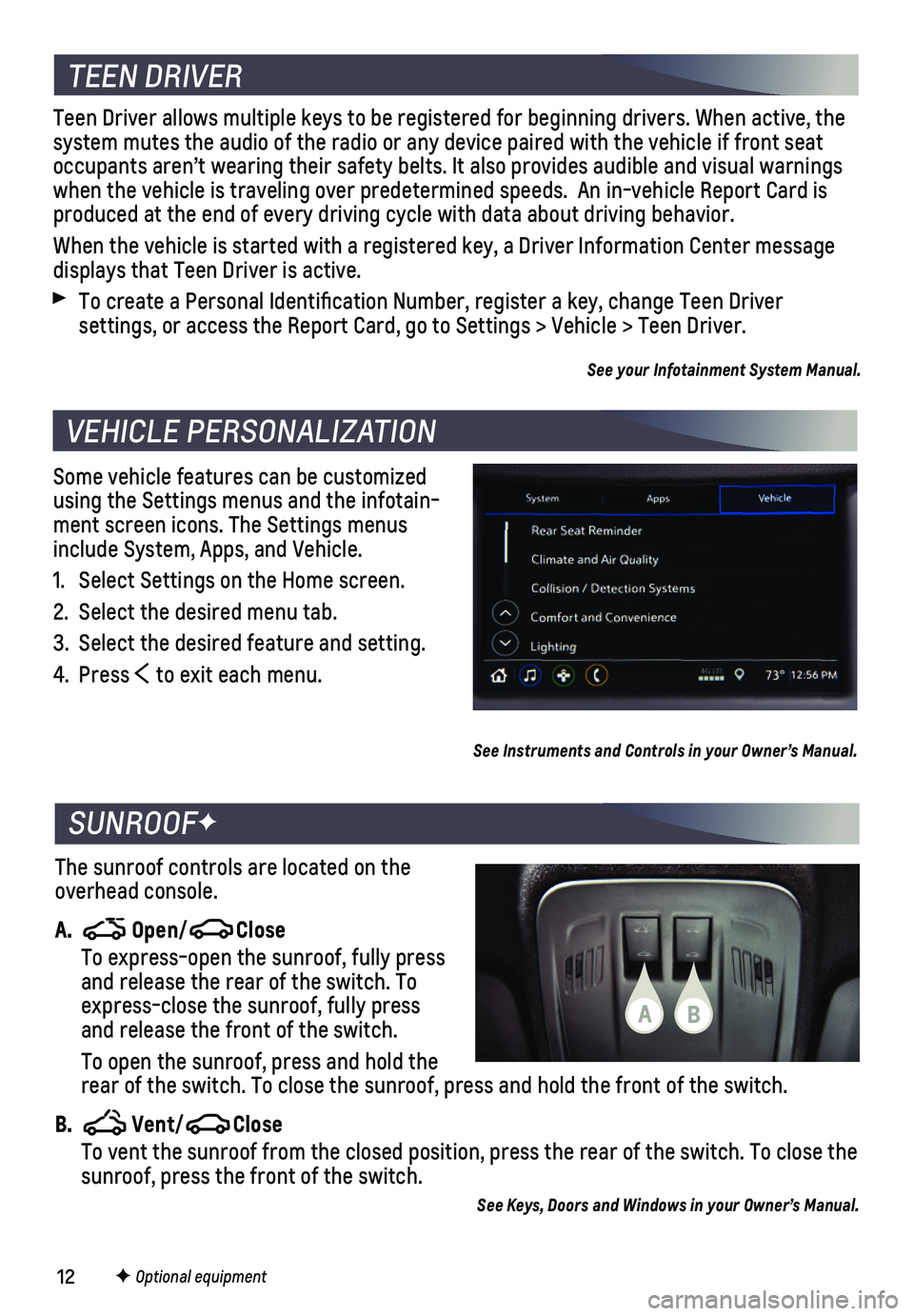
Some vehicle features can be customized using the Settings menus and the infotain-ment screen icons. The Settings menus include System, Apps, and Vehicle.
1. Select Settings on the Home screen.
2. Select the desired menu tab.
3. Select the desired feature and setting.
4. Press to exit each menu.
VEHICLE PERSONALIZATION
F Optional equipment
See Instruments and Controls in your Owner’s Manual.
TEEN DRIVER
Teen Driver allows multiple keys to be registered for beginning drivers.\
When active, the system mutes the audio of the radio or any device paired with the vehicl\
e if front seat occupants aren’t wearing their safety belts. It also provides audible\
and visual warnings when the vehicle is traveling over predetermined speeds. An in-vehicle \
Report Card is produced at the end of every driving cycle with data about driving behav\
ior.
When the vehicle is started with a registered key, a Driver Information \
Center message displays that Teen Driver is active.
To create a Personal Identification Number, register a key, change Tee\
n Driver
settings, or access the Report Card, go to Settings > Vehicle > Teen Dri\
ver.
See your Infotainment System Manual.
The sunroof controls are located on the overhead console.
A. Open/Close
To express-open the sunroof, fully press and release the rear of the switch. To express-close the sunroof, fully press and release the front of the switch.
To open the sunroof, press and hold the rear of the switch. To close the sunroof, press and hold the front of th\
e switch.
B. Vent/Close To vent the sunroof from the closed position, press the rear of the swit\
ch. To close the sunroof, press the front of the switch.
See Keys, Doors and Windows in your Owner’s Manual.
SUNROOFF
BA
Page 16 of 20

16
Safety or driver assistance features are no substitute for the driver’\
s responsibility to operate the vehicle in a safe manner. The driver should remain attentive to traffic, surroundings and road conditions at all times. Read your Owner’s Manual for important feature limitations and information.
REAR VISION CAMERA – When the vehicle is in Reverse, a view directly behind the vehicle\
is displayed on the infotainment screen. Vehicle speed must be below 8 m\
ph.
REAR CROSS TRAFFIC ALERTF – When the vehicle is in Reverse, the system warns of cross traffic coming from either direction by displaying a red alert o\
n the infotainment screen and sounding beeps.
REAR PARK ASSISTF – During low-speed parking maneuvers, the system provides
“distance to closest object” information on the Driver Information Center. A beep sounds when an object is detected and 5 beeps sound when an object is very close.
To turn the Rear Park Assist and Rear Cross Traffic Alert systems on or off, press the Rear Park Assist button on the center console.
LANE CHANGE ALERT WITH SIDE BLIND ZONE ALERTF – While driving, the system displays a warning symbol on the left or right side mirror when a vehicle is detected in that side blind zone area or rapidly approaching that area. The warning symbol flashes if a turn signal is activated when a vehicle has been detected on the same side.
To turn the system on or off, go to Settings > Vehicle > Collision/Detection Systems > Lane Change Alert.
DRIVER ASSISTANCE SYSTEMS
F Optional equipment
Page 18 of 20
18
TRACTION CONTROL AND STABILITRAK SYSTEMS
AUTOMATIC TRANSMISSION
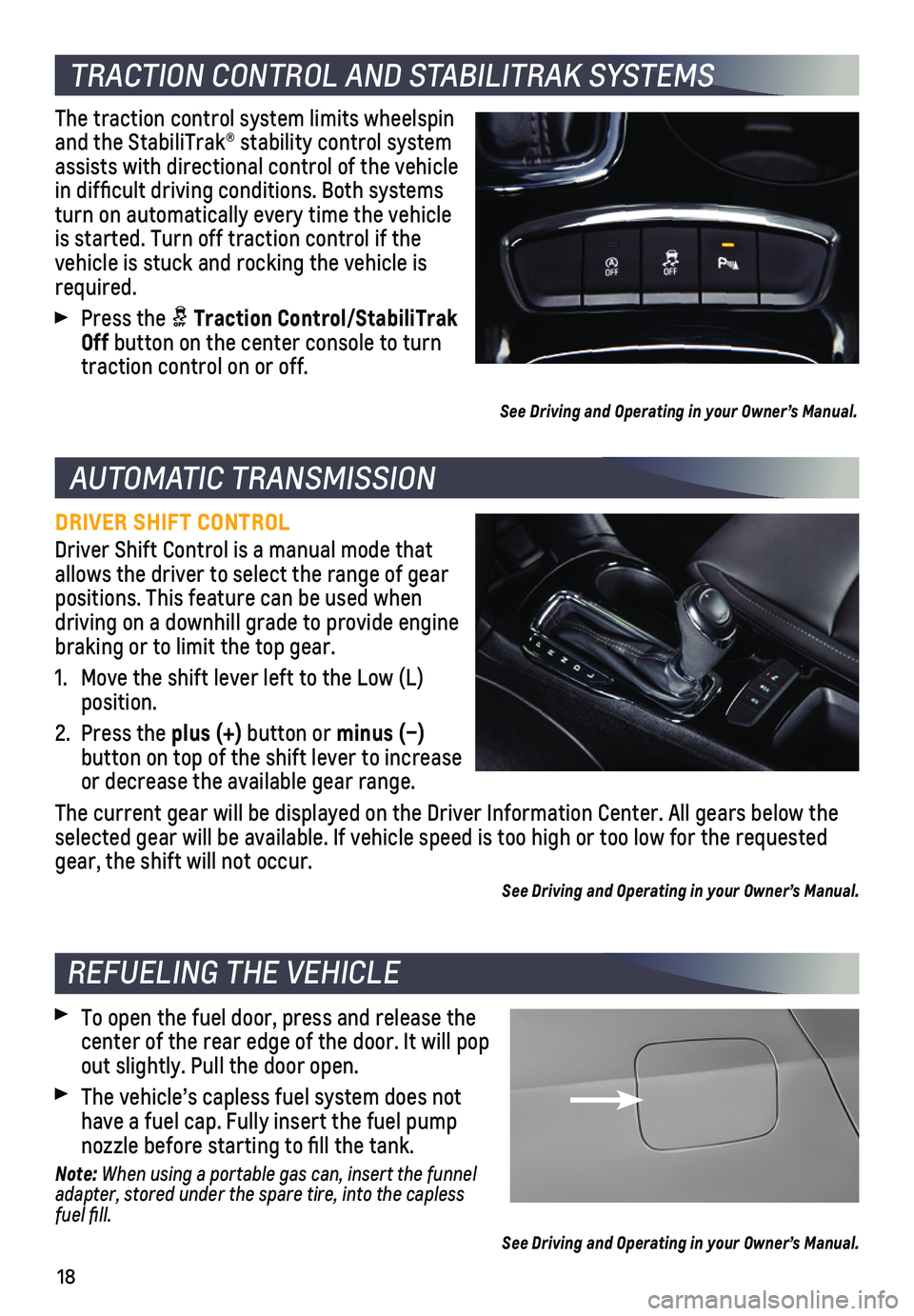
The traction control system limits wheelspin and the StabiliTrak® stability control system assists with directional control of the vehicle in difficult driving conditions. Both systems turn on automatically every time the vehicle is started. Turn off traction control if the vehicle is stuck and rocking the vehicle is required.
Press the Traction Control/StabiliTrak Off button on the center console to turn traction control on or off.
See Driving and Operating in your Owner’s Manual.
DRIVER SHIFT CONTROL
Driver Shift Control is a manual mode that allows the driver to select the range of gear positions. This feature can be used when driving on a downhill grade to provide engine braking or to limit the top gear.
1. Move the shift lever left to the Low (L) position.
2. Press the plus (+) button or minus (–)
button on top of the shift lever to increase or decrease the available gear range.
The current gear will be displayed on the Driver Information Center. All\
gears below the selected gear will be available. If vehicle speed is too high or too low\
for the requested gear, the shift will not occur.
See Driving and Operating in your Owner’s Manual.
REFUELING THE VEHICLE
To open the fuel door, press and release the center of the rear edge of the door. It will pop out slightly. Pull the door open.
The vehicle’s capless fuel system does not have a fuel cap. Fully insert the fuel pump nozzle before starting to fill the tank.
Note: When using a portable gas can, insert the funnel adapter, stored under the spare tire, into the capless fuel fill.
See Driving and Operating in your Owner’s Manual.