key CHEVROLET CRUZE 2019 Owner's Manual
[x] Cancel search | Manufacturer: CHEVROLET, Model Year: 2019, Model line: CRUZE, Model: CHEVROLET CRUZE 2019Pages: 20, PDF Size: 2.8 MB
Page 4 of 20
4F Optional equipment
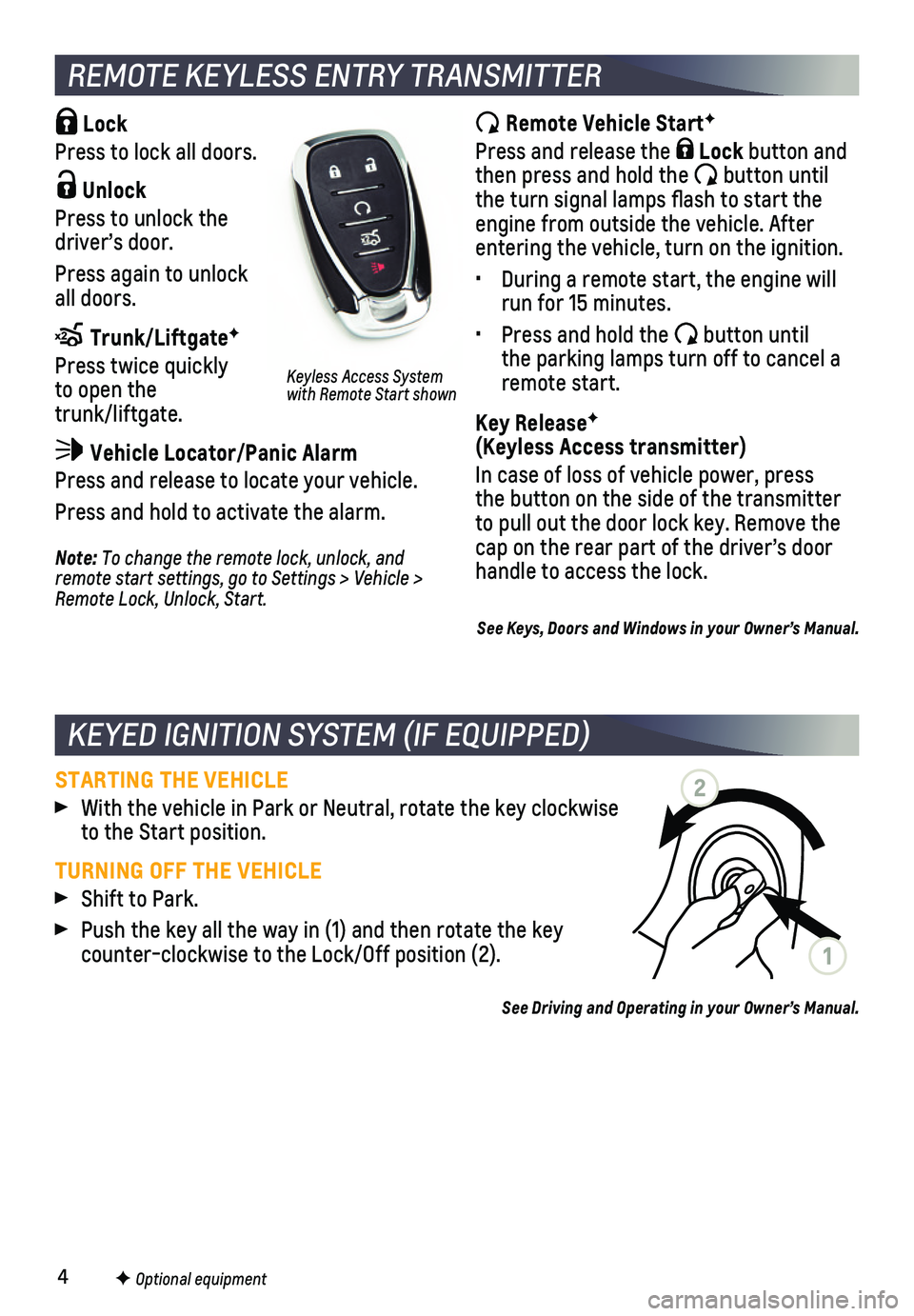
Lock
Press to lock all doors.
Unlock
Press to unlock the driver’s door.
Press again to unlock all doors.
Trunk/LiftgateF
Press twice quickly to open the trunk/liftgate.
Vehicle Locator/Panic Alarm
Press and release to locate your vehicle.
Press and hold to activate the alarm.
REMOTE KEYLESS ENTRY TRANSMITTER
Remote Vehicle StartF
Press and release the Lock button and then press and hold the button until the turn signal lamps flash to start the engine from outside the vehicle. After entering the vehicle, turn on the ignition.
• During a remote start, the engine will run for 15 minutes.
• Press and hold the button until the parking lamps turn off to cancel a remote start.
Key ReleaseF (Keyless Access transmitter)
In case of loss of vehicle power, press the button on the side of the transmitter to pull out the door lock key. Remove the cap on the rear part of the driver’s door handle to access the lock.Note: To change the remote lock, unlock, and remote start settings, go to Settings > Vehicle > Remote Lock, Unlock, Start.
Keyless Access System with Remote Start shown
See Keys, Doors and Windows in your Owner’s Manual.
STARTING THE VEHICLE
With the vehicle in Park or Neutral, rotate the key clockwise to the Start position.
TURNING OFF THE VEHICLE
Shift to Park.
Push the key all the way in (1) and then rotate the key counter-clockwise to the Lock/Off position (2).
See Driving and Operating in your Owner’s Manual.
KEYED IGNITION SYSTEM (IF EQUIPPED)
1
2
Page 5 of 20

5F Optional equipment
The Keyless Access System enables operation of the doors and trunk/liftg\
ate without removing the Remote Keyless Entry transmitter from a pocket or purse. Th\
e transmitter must be within 3 feet of a door or the trunk/liftgate.
KEYLESS UNLOCKING
With the transmitter within range:
Press the lock button on the driver’s door handle to unlock the driver’s door; press it again within 5 seconds to unlock all doors.
Press the lock button on the front passenger’s door handle to unlock all doors.
Press the touchpad either above the license plate or at the base of the liftgate to open the trunk/liftgate.
KEYLESS LOCKING
With the ignition off, the transmitter out of the vehicle, and all doors\
closed:
Press the lock button on any door handle to lock all doors immediately.
If Passive Locking is turned on, all doors will lock automatically after\
a short delay once all doors are closed.
Note: To change the door lock and unlock settings, go to Settings > Vehicle > Remote Lock, Unlock, Start.
See Keys, Doors and Windows in your Owner’s Manual.
KEYLESS ACCESS SYSTEMF
KEYLESS (PUSHBUTTON) STARTF
The Remote Keyless Entry (RKE) transmitter must be in the vehicle to turn on the ignition.
STARTING THE ENGINE
With the vehicle in Park, press the brake pedal and then press the ENGINE START/STOP button. The button indicator will be green.
Note: If the RKE transmitter battery is weak, place the transmitter in the front cupholder in the center console to enable the engine to start. Replace the transmitter battery as soon as possible.
STOPPING THE ENGINE/OFF
Shift to Park and press the ENGINE START/STOP button.
ACCESSORY MODE
With the engine off and the brake pedal not depressed, press the ENGINE START/STOP button. The button indicator will be amber.
See Driving and Operating in your Owner’s Manual.
Page 12 of 20
12
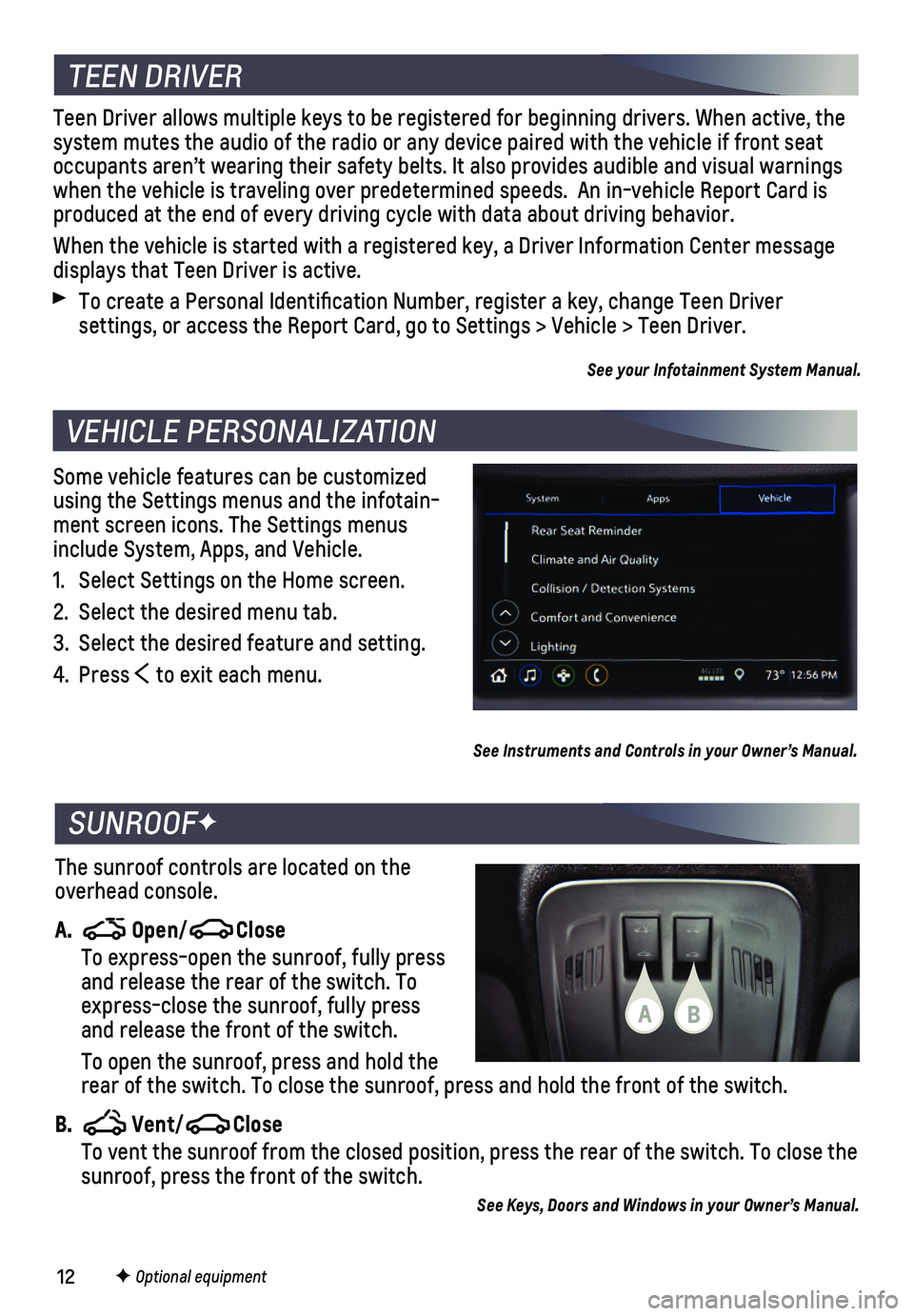
Some vehicle features can be customized using the Settings menus and the infotain-ment screen icons. The Settings menus include System, Apps, and Vehicle.
1. Select Settings on the Home screen.
2. Select the desired menu tab.
3. Select the desired feature and setting.
4. Press to exit each menu.
VEHICLE PERSONALIZATION
F Optional equipment
See Instruments and Controls in your Owner’s Manual.
TEEN DRIVER
Teen Driver allows multiple keys to be registered for beginning drivers.\
When active, the system mutes the audio of the radio or any device paired with the vehicl\
e if front seat occupants aren’t wearing their safety belts. It also provides audible\
and visual warnings when the vehicle is traveling over predetermined speeds. An in-vehicle \
Report Card is produced at the end of every driving cycle with data about driving behav\
ior.
When the vehicle is started with a registered key, a Driver Information \
Center message displays that Teen Driver is active.
To create a Personal Identification Number, register a key, change Tee\
n Driver
settings, or access the Report Card, go to Settings > Vehicle > Teen Dri\
ver.
See your Infotainment System Manual.
The sunroof controls are located on the overhead console.
A. Open/Close
To express-open the sunroof, fully press and release the rear of the switch. To express-close the sunroof, fully press and release the front of the switch.
To open the sunroof, press and hold the rear of the switch. To close the sunroof, press and hold the front of th\
e switch.
B. Vent/Close To vent the sunroof from the closed position, press the rear of the swit\
ch. To close the sunroof, press the front of the switch.
See Keys, Doors and Windows in your Owner’s Manual.
SUNROOFF
BA
Page 20 of 20
 TTY Users: 1-888-889-2438
As the owner of a new Chevrolet, you are automatically enrolled in the C\
hevrolet Roadside Assistance")
20
ROADSIDE ASSISTANCE
1-800-CHEV-USA (1-800-243-8872) TTY Users: 1-888-889-2438
As the owner of a new Chevrolet, you are automatically enrolled in the C\
hevrolet Roadside Assistance program for up to 5 years/60,000 miles, whichever oc\
curs first, at no expense to you. Chevrolet’s Roadside Assistance toll-free numbe\
r is staffed by a team of trained advisors who are available 24 hours a day, 365 days a ye\
ar, to contact a service provider for light services (fuel delivery, jump-starts, flat\
tire and lock-outs) or make arrangements to tow your vehicle to the nearest Chevrolet dealer fo\
r any repairs.
OnStar Roadside Assistance
If you have a current OnStar Safety & Security plan, push the blue OnStar button or red Emergency button to get the help you need. An OnStar advisor will use GPS technol\
ogy to pinpoint your vehicle location and contact the nearest service provid\
er.
To learn more about OnStar services, press the blue OnStar button, visit onstar.com, call 1-888-4-ONSTAR (1-888-466-7827), or refer to your Owner’s Manual.
CHEVROLET OWNER CENTER
Get to know your vehicle inside and out with the Chevrolet Owner Center.\
Check out personalized information, including an online Owner’s Manual and help\
ful how-to videos, track your service history and warranty status, manage your OnStar and C\
onnected Services vehicle plans, review your current Vehicle Diagnostics report (\
active service required) and more. Create an account today at my.chevrolet.com.
Download the myChevrolet app to your compatible smartphone (or device)\
and, if your vehicle is properly equipped, you can start or turn off your engine, loc\
k or unlock your doors, view key diagnostic information, set parking information and more\
.
The app is available on select Apple and Android devices. Service availa\
bility, features and functionality vary by vehicle, device and data plan. Device data con\
nection required. Visit onstar.com for more details. Download the mobile app from your compatible mobile device’s app store.
84169516 A!84169516=A!
Certain restrictions, precautions and safety procedures apply to your ve\
hicle. Please read your Owner’s Manual for complete instructions. All information contained in this guide is ba\
sed on the latest information available at the time of printing and is subject to change without notice. Copyright \
2018 General Motors. All rights reserved.
We recommend always using ACDelco or genuine GM service parts.
MYCHEVROLET MOBILE APP