key battery CHEVROLET CRUZE 2019 Track Prep Guide
[x] Cancel search | Manufacturer: CHEVROLET, Model Year: 2019, Model line: CRUZE, Model: CHEVROLET CRUZE 2019Pages: 379, PDF Size: 5.91 MB
Page 150 of 379
Chevrolet Cruze Owner Manual (GMNA-Localizing-U.S./Canada/Mexico-
12146336) - 2019 - crc - 10/22/18
Lighting 149
Lighting Features
Entry Lighting
If equipped with automatic light
control, some exterior lamps and
most of the interior lamps turn on
briefly at night or in areas with
limited lighting when the Remote
Keyless Entry (RKE) transmitter
K
button is pressed.
SeeRemote Keyless Entry (RKE)
System Operation (Keyless Access)
0 31 orRemote Keyless Entry
(RKE) System Operation (Key
Access) 038. After about
30 seconds the exterior lamps turn
off, then the dome lamps and
remaining interior lamps dim to off.
Entry lighting can be disabled
manually by changing the ignition
out of the OFF position, or by
pressing the RKE transmitter
Q
button.
This feature can be changed. See
Vehicle Personalization 0139.
Exit Lighting
If equipped with automatic light
control, some exterior lamps come
on at night, or in areas with limited
lighting, when the key is removed
from the ignition. The dome lamps
also come on when the key is
removed from the ignition. The
exterior lamps and dome lamps
remain on after the door is closed
for a set amount of time, then
automatically turn off.
If equipped with Keyless Access,
the exterior lamps automatically turn
on when a door is opened after the
ignition is changed to the OFF
position. The dome lamps also
come on after the ignition is
changed to the OFF position.
See Ignition Positions (Keyless
Access) 0169 orIgnition Positions
(Key Access) 0171.
The exterior lamps turn off
immediately by turning the exterior
lamps control off.
This feature can be changed. See
Vehicle Personalization 0139.
Battery Power Protection
The battery saver feature is
designed to protect the vehicle's
battery.
If some interior lamps are left on
and the ignition is turned off, the
battery rundown protection system
automatically turns the lamp off after
some time.
Exterior Lighting Battery
Saver
The exterior lamps turn off about
10 minutes after the ignition is
turned off, if the parking lamps or
headlamps have been manually left
on. This protects against draining
the battery. To restart the 10-minute
timer, turn the exterior lamp control
to the
Oposition and then back to
the
;or2position.
To keep the lamps on for more than
10 minutes, the ignition must be on
or in ACC/ACCESSORY.
Page 172 of 379
Chevrolet Cruze Owner Manual (GMNA-Localizing-U.S./Canada/Mexico-
12146336) - 2019 - crc - 10/22/18
Driving and Operating 171
The ignition will switch from ACC/
ACCESSORY to OFF after
five minutes to prevent battery
rundown.
ON/RUN/START :This mode has a
green light and is for starting the
engine and driving. With the ignition
off, and the brake or clutch pedal
applied, pressing the button once
will place the ignition system in ON/
RUN/START. Once engine cranking
begins, release the button. Engine
cranking will continue until the
engine starts. See Starting the
Engine 0173. The ignition will then
remain in ON/RUN.
Service Mode
This power mode is available for
service and diagnostics, and to
verify the proper operation of the
malfunction indicator lamp as may
be required for emission inspection
purposes. With the vehicle off and
the brake pedal not applied,
pressing and holding ENGINE
START/STOP for more than
five seconds will place the vehicle in
Service Mode. The instruments and
audio systems will operate as they do in ON/RUN, but the vehicle will
not be able to be driven. The engine
will not start in Service Mode. Press
ENGINE START/STOP again to turn
the vehicle off.
Ignition Positions (Key
Access)
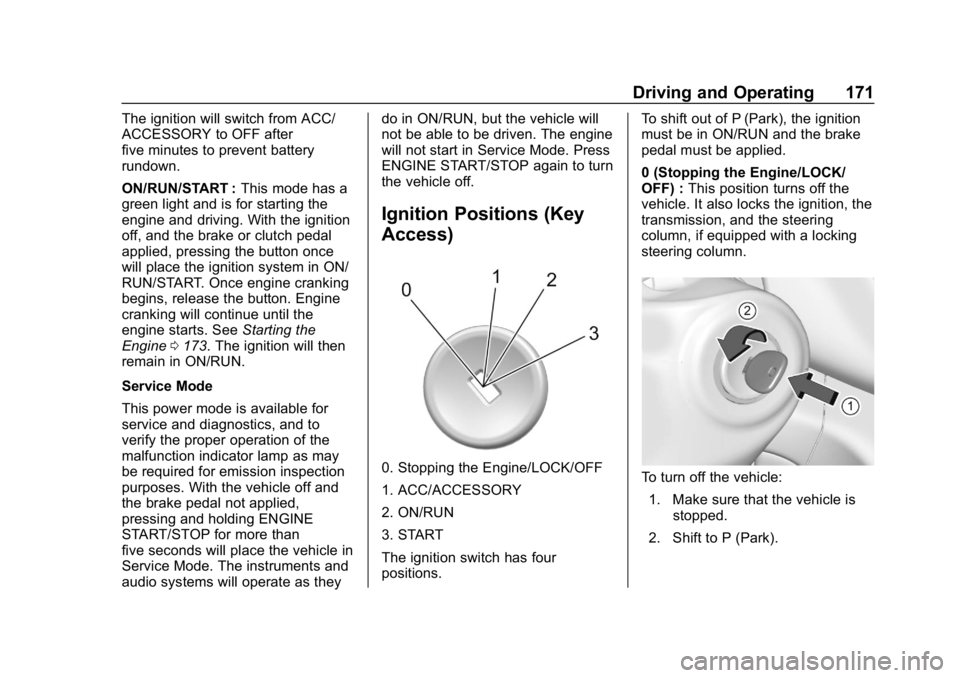
0. Stopping the Engine/LOCK/OFF
1. ACC/ACCESSORY
2. ON/RUN
3. START
The ignition switch has four
positions.
To shift out of P (Park), the ignition
must be in ON/RUN and the brake
pedal must be applied.
0 (Stopping the Engine/LOCK/
OFF) :
This position turns off the
vehicle. It also locks the ignition, the
transmission, and the steering
column, if equipped with a locking
steering column.To turn off the vehicle:
1. Make sure that the vehicle is stopped.
2. Shift to P (Park).
Page 174 of 379
Chevrolet Cruze Owner Manual (GMNA-Localizing-U.S./Canada/Mexico-
12146336) - 2019 - crc - 10/22/18
Driving and Operating 173
while the vehicle is off. It also
unlocks the steering column,
if equipped with a locking steering
column. Use this position if the
vehicle must be pushed or towed.
SeeRetained Accessory Power
(RAP) 0179.
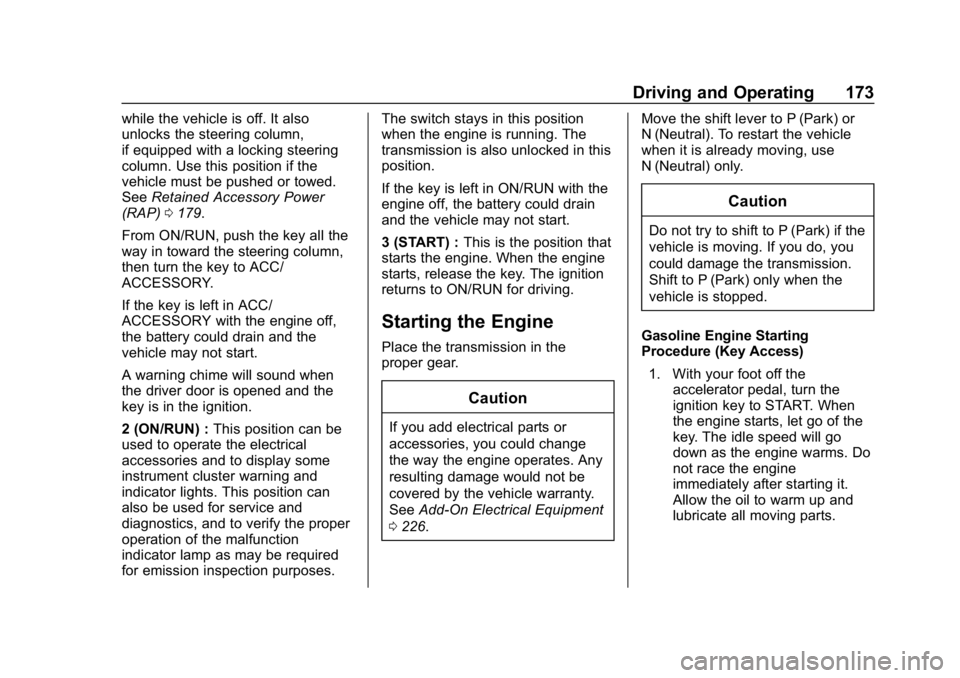
From ON/RUN, push the key all the
way in toward the steering column,
then turn the key to ACC/
ACCESSORY.
If the key is left in ACC/
ACCESSORY with the engine off,
the battery could drain and the
vehicle may not start.
A warning chime will sound when
the driver door is opened and the
key is in the ignition.
2 (ON/RUN) : This position can be
used to operate the electrical
accessories and to display some
instrument cluster warning and
indicator lights. This position can
also be used for service and
diagnostics, and to verify the proper
operation of the malfunction
indicator lamp as may be required
for emission inspection purposes. The switch stays in this position
when the engine is running. The
transmission is also unlocked in this
position.
If the key is left in ON/RUN with the
engine off, the battery could drain
and the vehicle may not start.
3 (START) :
This is the position that
starts the engine. When the engine
starts, release the key. The ignition
returns to ON/RUN for driving.
Starting the Engine
Place the transmission in the
proper gear.
Caution
If you add electrical parts or
accessories, you could change
the way the engine operates. Any
resulting damage would not be
covered by the vehicle warranty.
See Add-On Electrical Equipment
0 226. Move the shift lever to P (Park) or
N (Neutral). To restart the vehicle
when it is already moving, use
N (Neutral) only.
Caution
Do not try to shift to P (Park) if the
vehicle is moving. If you do, you
could damage the transmission.
Shift to P (Park) only when the
vehicle is stopped.
Gasoline Engine Starting
Procedure (Key Access) 1. With your foot off the accelerator pedal, turn the
ignition key to START. When
the engine starts, let go of the
key. The idle speed will go
down as the engine warms. Do
not race the engine
immediately after starting it.
Allow the oil to warm up and
lubricate all moving parts.
Page 175 of 379
Chevrolet Cruze Owner Manual (GMNA-Localizing-U.S./Canada/Mexico-
12146336) - 2019 - crc - 10/22/18
174 Driving and Operating
Caution
Cranking the engine for long
periods of time, by returning the
ignition to the START position
immediately after cranking has
ended, can overheat and damage
the cranking motor, and drain the
battery. Wait at least 15 seconds
between each try, to let the
cranking motor cool down.
2. If the engine does not start after five to 10 seconds,
especially in very cold weather
(below −18 °C or 0 °F), it could
be flooded with too much
gasoline. Push the accelerator
pedal all the way to the floor
and hold it there as you hold
the key in START for a
maximum of 15 seconds. Wait
at least 15 seconds between
each try, to allow the cranking
motor to cool. When the engine
starts, let go of the key and
accelerator. If the vehicle starts
briefly but then stops again, repeat the procedure. This
clears the extra gasoline from
the engine. Do not race the
engine immediately after
starting it. Operate the engine
and transmission gently until
the oil warms up and lubricates
all moving parts.
Gasoline Engine Starting
Procedure (Keyless Access) 1. With the Keyless Access system, the RKE transmitter
must be in the vehicle. Press
ENGINE START/STOP with the
brake pedal applied. When the
engine begins cranking, let go
of the button.
The idle speed will go down as
the engine gets warm. Do not
race the engine immediately
after starting it. Operate the
engine and transmission gently
until the oil warms up and
lubricates all moving parts.
If the RKE transmitter is not in
the vehicle, if there is
interference, or if the RKE
battery is low, a Driver Information Center (DIC)
message will display.
See
Driver Information Center
(DIC) (Base Level) 0132 or
Driver Information Center (DIC)
(Uplevel) 0135 andRemote
Keyless Entry (RKE) System
Operation (Keyless Access)
0 31 orRemote Keyless Entry
(RKE) System Operation (Key
Access) 038.
Caution
Cranking the engine for long
periods of time, by returning the
ignition to the START position
immediately after cranking has
ended, can overheat and damage
the cranking motor, and drain the
battery. Wait at least 15 seconds
between each try, to let the
cranking motor cool down.
2. If the engine does not start after five to 10 seconds,
especially in very cold weather
(below −18 °C or 0 °F), it could
be flooded with too much
Page 181 of 379
Chevrolet Cruze Owner Manual (GMNA-Localizing-U.S./Canada/Mexico-
12146336) - 2019 - crc - 10/22/18
180 Driving and Operating
If torque lock does occur, the
vehicle may need to be pushed
uphill by another vehicle to relieve
the parking pawl pressure, so you
can shift out of P (Park).
Shifting out of Park
This vehicle is equipped with an
automatic transmission shift lock
control system. The shift lock is
designed to:
.Prevent ignition key removal
unless the shift lever is in
P (Park) with the shift lever
button fully released.
. Prevent movement of the shift
lever out of P (Park) unless the
ignition is on and the brake
pedal is applied.
The shift lock release is always
functional except in the case of an
uncharged or low voltage (less than
9-volt) battery.
If the vehicle has an uncharged
battery or a battery with low voltage,
try charging or jump starting the
battery. See Jump Starting - North
America 0306. To shift out of P (Park):
1. Apply the brake pedal.
2. Turn the ignition to ON/RUN or Service Mode.
3. Press the shift lever button.
4. Move the shift lever to the desired position.
If still unable to shift out of P (Park): 1. Fully release the shift lever button.
2. Hold the brake pedal down and press the shift lever button
again.
3. Move the shift lever to the desired position.
If the shift lever still cannot be
moved from P (Park), see your
dealer.
This vehicle may have the Seat Belt
Assurance System, which may
prevent the vehicle from shifting out
of P (Park). See Seat Belts066.
Parking over Things
That Burn
{Warning
Things that can burn could touch
hot exhaust parts under the
vehicle and ignite. Do not park
over papers, leaves, dry grass,
or other things that can burn.
Extended Parking
It is best not to park with the vehicle
running. If the vehicle is left running,
be sure it will not move and there is
adequate ventilation.
See Shifting Into Park 0179 and
Engine Exhaust 0181.
If the vehicle is left parked and
running with the RKE transmitter
outside the vehicle, it will continue
to run for up to half an hour.
If the vehicle is left parked and
running with the RKE transmitter
inside the vehicle, it will continue to
run for up to an hour.
Page 284 of 379
Chevrolet Cruze Owner Manual (GMNA-Localizing-U.S./Canada/Mexico-
12146336) - 2019 - crc - 10/22/18
Vehicle Care 283
.The battery of the TPMS sensor
is low.
If the tire fill alert does not operate
due to TPMS interference, move the
vehicle about 1 m (3 ft) back or
forward and try again. If the tire fill
alert feature is not working, use a
tire pressure gauge.
TPMS Sensor Matching
Process
Each TPMS sensor has a unique
identification code. The identification
code needs to be matched to a new
tire/wheel position after rotating the
vehicle’s tires or replacing one or
more of the TPMS sensors. The
TPMS sensor matching process
should also be performed after
replacing a spare tire with a road
tire containing the TPMS sensor.
The malfunction light and the DIC
message should go off at the next
ignition cycle. The sensors are
matched to the tire/wheel positions,
using a TPMS relearn tool, in the
following order: driver side front tire,
passenger side front tire, passenger
side rear tire, and driver side rear. See your dealer for service or to
purchase a relearn tool. A TPMS
relearn tool can also be purchased.
See Tire Pressure Monitor Sensor
Activation Tool at
www.gmtoolsandequipment.com or
call 1-800-GM TOOLS
(1-800-468-6657).
There are two minutes to match the
first tire/wheel position, and
five minutes overall to match all four
tire/wheel positions. If it takes
longer, the matching process stops
and must be restarted.
The TPMS sensor matching
process is:
1. Set the parking brake.
2. Turn the ignition on without starting the vehicle or place the
vehicle in Service Mode.
See Ignition Positions (Keyless
Access) 0169 orIgnition
Positions (Key Access) 0171.
3. Uplevel DIC Only: Make sure the Tire Pressure info page
option is turned on. The info
pages on the DIC can be
turned on and off through the Options menu.
See
Driver Information Center
(DIC) (Base Level) 0132 or
Driver Information Center (DIC)
(Uplevel) 0135.
4. If the vehicle has an uplevel DIC, use the DIC controls on
the right side of the steering
wheel to scroll to the Tire
Pressure screen under the DIC
info page.
If the vehicle has a base level
DIC, press MENU to select the
Vehicle Information Menu in
the DIC. Use the thumbwheel
to scroll to the Tire Pressure
Menu item screen.
5. If the vehicle has an uplevel DIC, press and hold the
V
(Set/Reset) button in the center
of the DIC controls.
If the vehicle has a base level
DIC, press SET/CLR to begin
the sensor matching process.
A message requesting
acceptance of the process may
display.
Page 357 of 379
Chevrolet Cruze Owner Manual (GMNA-Localizing-U.S./Canada/Mexico-
12146336) - 2019 - crc - 10/22/18
356 OnStar
Press=to:
. Open the OnStar app on the
infotainment display. See the
infotainment manual for
information on how to use the
OnStar app.
Or
. Make a call, end a call,
or answer an incoming call.
. Give OnStar Hands-Free Calling
voice commands.
. Give OnStar Turn-by-Turn
Navigation voice commands.
. Obtain and customize the Wi-Fi
hotspot name or SSID and
password, if equipped.
Press
Qto connect to an
Advisor to:
. Verify account information or
update contact information.
. Get driving directions.
. Receive a Diagnostic check of
the vehicle's key operating
systems.
. Receive Roadside Assistance. .
Manage Wi-Fi Settings,
if equipped.
Press
>to get a priority connection
to an OnStar Advisor available
24/7 to:
. Get help for an emergency.
. Be a Good Samaritan or
respond to an AMBER Alert.
. Get assistance in severe
weather or other crisis situations
and find evacuation routes.
OnStar Services
Emergency
Emergency Services require an
active safety and security plan. With
Automatic Crash Response, built-in
sensors can automatically alert a
specially trained OnStar Advisor
who is immediately connected in to
the vehicle to help.
Press
>for a priority connection to
an OnStar Advisor who can contact
emergency service providers, direct
them to your exact location, and
relay important information.
With OnStar Crisis Assist, specially
trained Advisors are available
24 hours a day, 7 days a week, to
provide a central point of contact,
assistance, and information during a
crisis.
With Roadside Assistance, Advisors
can locate a nearby service provider
to help with a flat tire, a battery
jump, or an empty gas tank.
Page 373 of 379

Chevrolet Cruze Owner Manual (GMNA-Localizing-U.S./Canada/Mexico-
12146336) - 2019 - crc - 10/22/18
372 Index
IndicatorPedestrian Ahead . . . . . . . . . . . . 127
Vehicle Ahead . . . . . . . . . . . . . . . . 127
Infants and Young Children, Restraints . . . . . . . . . . . . . . . . . . . . . . 87
Information Publication Ordering . . . . . . . . . . 350
Infotainment . . . . . . . . . . . . . . . . . . . . 150
Infotainment System . . . . . . . . . . . . 354
Instrument Cluster . . . . . . . . . . . . . . 115
Instrument Panel Overview . . . . . . . 6
Interior Rearview Mirrors . . . . . . . . . 53
Introduction . . . . . . . . . . . . . . . . . . . . . . . 2
ISOFIX Child Restraint Systems . . . . . . . . . . . . . . . . . . . . . . 100
J
Jump Starting - NorthAmerica . . . . . . . . . . . . . . . . . . . . . . . 306
K
Keyless EntryRemote (RKE) System . . . . . 31, 38
Keys . . . . . . . . . . . . . . . . . . . . . . . . . . . . . 28
L
Labeling, Tire Sidewall . . . . . . . . . . 272
Lamps Courtesy . . . . . . . . . . . . . . . . . . . . . . 148 Lamps (cont'd)
Daytime Running (DRL) . . . . . . 145
Dome . . . . . . . . . . . . . . . . . . . . . . . . . 148
Exterior Controls . . . . . . . . . . . . . . 143
Exterior Lighting Battery
Saver . . . . . . . . . . . . . . . . . . . . . . . 149
License Plate . . . . . . . . . . . . . . . . . 261
Malfunction Indicator (Check Engine) . . . . . . . . . . . . . 124
On Reminder . . . . . . . . . . . . . . . . . 131
Reading . . . . . . . . . . . . . . . . . . . . . . 148
Taillamps and Back-up . . . . . . . 257
Lane Change Alert (LCA) . . . . . . . 209
Lane Departure Warning (LDW) . . . . . . . . . . . . . . . . 211
Lane Keep Assist (LKA) . . . . . . . . 211
Lane Keep Assist Light . . . . . . . . . 127
Lap-Shoulder Belt . . . . . . . . . . . . . . . 69
LATCH System Replacing Parts after aCrash . . . . . . . . . . . . . . . . . . . . . . . 100
LATCH, Lower Anchors and Tethers for Children . . . . . . . . . . . . 92
LED Lighting . . . . . . . . . . . . . . . . . . . . 255
Liftgate . . . . . . . . . . . . . . . . . . . . . . . . . . 47
Lighting Entry . . . . . . . . . . . . . . . . . . . . . . . . . 149
Exit . . . . . . . . . . . . . . . . . . . . . . . . . . . 149 Lighting (cont'd)
Illumination Control . . . . . . . . . . . 148
LED . . . . . . . . . . . . . . . . . . . . . . . . . . 255
Lights
Airbag Readiness . . . . . . . . . . . . . 122
Antilock Brake System(ABS) Warning . . . . . . . . . . . . . . 126
Brake System Warning . . . . . . . 126
Charging System . . . . . . . . . . . . . 123
Check Engine (Malfunction Indicator) . . . . . . . . . . . . . . . . . . . . 124
Cruise Control . . . . . . . . . . . . . . . . 131
Diesel Exhaust Fluid (DEF) . . . 130
Door Ajar . . . . . . . . . . . . . . . . . . . . . 131
Engine Oil Pressure . . . . . . . . . . 129
Flash-to-Pass . . . . . . . . . . . . . . . . . 145
Front Fog Lamp . . . . . . . . . . . . . . 131
High-Beam On . . . . . . . . . . . . . . . . 131
High/Low Beam Changer . . . . . 145
Lane Keep Assist . . . . . . . . . . . . . 127
Low Fuel Warning . . . . . . . . . . . . 130
Seat Belt Reminders . . . . . . . . . . 121
Security . . . . . . . . . . . . . . . . . . . . . . 130
StabiliTrak OFF . . . . . . . . . . . . . . . 128
Tire Pressure . . . . . . . . . . . . . . . . . 129
Traction Control System (TCS)/StabiliTrak . . . . . . . . . . . . 128
Traction Off . . . . . . . . . . . . . . . . . . . 128
Page 375 of 379

Chevrolet Cruze Owner Manual (GMNA-Localizing-U.S./Canada/Mexico-
12146336) - 2019 - crc - 10/22/18
374 Index
Passenger Compartment AirFilter . . . . . . . . . . . . . . . . . . . . . . . . . . 157
Passenger Sensing System . . . . . 79
Pedestrian Ahead Indicator . . . . . 127
Perchlorate Materials Requirements, California . . . . . . 230
Personalization
Vehicle . . . . . . . . . . . . . . . . . . . . . . . 139
Power Door Locks . . . . . . . . . . . . . . . . . . . . . 44
Mirrors . . . . . . . . . . . . . . . . . . . . . . . . . . 52
Outlets . . . . . . . . . . . . . . . . . . . . . . . .113
Protection, Battery . . . . . . . . . . . . 149
Retained Accessory (RAP) . . . 179
Seat Adjustment . . . . . . . . . . . . . . . . 60
Windows . . . . . . . . . . . . . . . . . . . . . . . 53
Pregnancy, Using Seat Belts . . . . 71
Privacy Vehicle Data Recording . . . . . . . 353
Program Courtesy Transportation . . . . . . 347
Prohibited Fuels . . . . . . . . . . . . . . . . 214
Proposition 65 Warning,
California . . . . . . . . . . . .229, 250, 306, Back Cover
Publication Ordering Information . . . . . . . . . . . . . . . . . . . . 350R
Radio Frequency Statement . . . . 351
Reading Lamps . . . . . . . . . . . . . . . . . 148
Rear Seats . . . . . . . . . . . . . . . . . . . . . . 63
Rear Vision Camera (RVC) . . . . . 201
Rear Window Washer/Wiper . . . . 112
Rearview Mirrors . . . . . . . . . . . . . . . . 53
Reclining Seatbacks . . . . . . . . . . . . . 60
RecommendedFuel . . . . . . . . . . . . . . . . . . . . . . . . . . 214
Recommended Fluids and Lubricants . . . . . . . . . . . . . . . . . . . . . 333
Records Maintenance . . . . . . . . . . . . . . . . . . 336
Recreational Vehicle Towing . . . . 310
Reimbursement Program, GM Mobility . . . . . . . . . . . . . . . . . . . 345
Remote Keyless Entry (RKE) System . . . . . . . . . . . . . . 31, 38
Remote Vehicle Start . . . . . . . . . . . . 40
Replacement Parts Airbags . . . . . . . . . . . . . . . . . . . . . . . . . 85
Maintenance . . . . . . . . . . . . . . . . . . 334
Replacing Airbag System . . . . . . . . 85
Replacing LATCH System
Parts after a Crash . . . . . . . . . . . . 100
Replacing Seat Belt System Parts after a Crash . . . . . . . . . . . . . 73 Reporting Safety Defects
Canadian Government . . . . . . . . 352
General Motors . . . . . . . . . . . . . . . 352
U.S. Government . . . . . . . . . . . . . 352
Restraints Where to Put . . . . . . . . . . . . . . . . . . . 91
Retained Accessory
Power (RAP) . . . . . . . . . . . . . . . . . . 179
Roads Driving, Wet . . . . . . . . . . . . . . . . . . 162
Roadside Assistance
Program . . . . . . . . . . . . . . . . . . . . . . . 345
Roof Sunroof . . . . . . . . . . . . . . . . . . . . . . . . . 55
Rotation, Tires . . . . . . . . . . . . . . . . . . 284
Routing, Engine Drive Belt . . . . . . 340
Running out of Fuel . . . . . . . . . . . . . 220
Running the Vehicle While Parked . . . . . . . . . . . . . . . . . . . . . . . . 181
S
Safety Defects ReportingCanadian Government . . . . . . . . 352
General Motors . . . . . . . . . . . . . . . 352
U.S. Government . . . . . . . . . . . . . 352
Safety Locks . . . . . . . . . . . . . . . . . . . . . 45
Safety System Check . . . . . . . . . . . . 72
Scheduling Appointments . . . . . . . 347