steering CHEVROLET CRUZE 2019 Track Prep Guide
[x] Cancel search | Manufacturer: CHEVROLET, Model Year: 2019, Model line: CRUZE, Model: CHEVROLET CRUZE 2019Pages: 379, PDF Size: 5.91 MB
Page 133 of 379
Chevrolet Cruze Owner Manual (GMNA-Localizing-U.S./Canada/Mexico-
12146336) - 2019 - crc - 10/22/18
132 Instruments and Controls
If equipped, this light comes on
when a door is open or not securely
latched. Before driving, check that
all doors are properly closed.Information Displays
Driver Information Center
(DIC) (Base Level)
The DIC displays information about
your vehicle. It also displays
warning messages if a system
problem is detected. SeeVehicle
Messages 0138. All messages
appear in the DIC display in the
center of the instrument cluster.
DIC Operation and Displays
The DIC has different displays
which can be accessed by using the
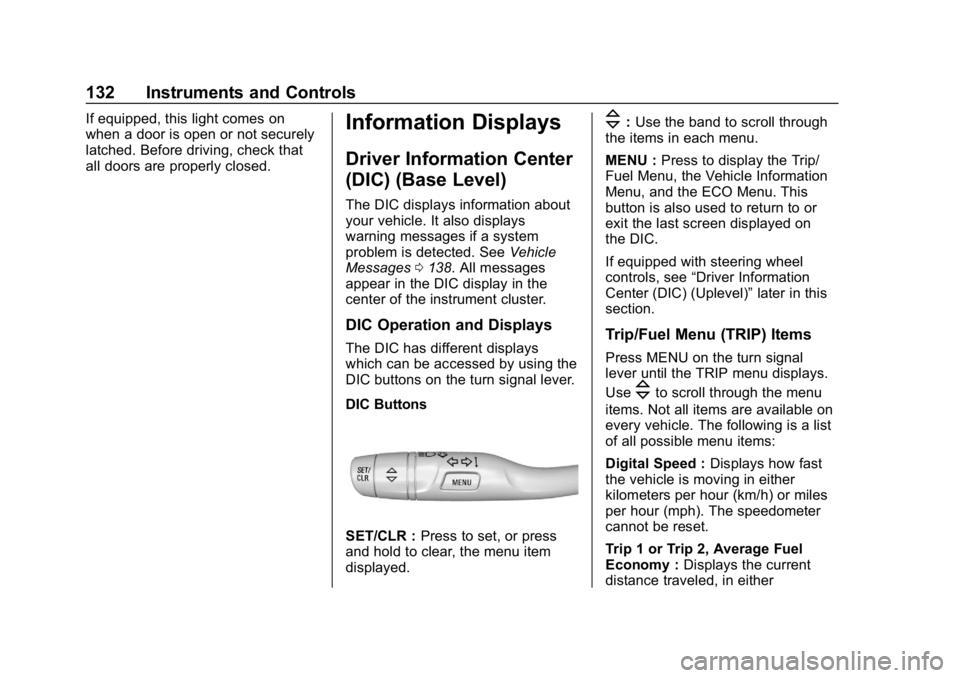
DIC buttons on the turn signal lever.
DIC Buttons
SET/CLR : Press to set, or press
and hold to clear, the menu item
displayed.
\: Use the band to scroll through
the items in each menu.
MENU : Press to display the Trip/
Fuel Menu, the Vehicle Information
Menu, and the ECO Menu. This
button is also used to return to or
exit the last screen displayed on
the DIC.
If equipped with steering wheel
controls, see “Driver Information
Center (DIC) (Uplevel)” later in this
section.
Trip/Fuel Menu (TRIP) Items
Press MENU on the turn signal
lever until the TRIP menu displays.
Use
\to scroll through the menu
items. Not all items are available on
every vehicle. The following is a list
of all possible menu items:
Digital Speed : Displays how fast
the vehicle is moving in either
kilometers per hour (km/h) or miles
per hour (mph). The speedometer
cannot be reset.
Trip 1 or Trip 2, Average Fuel
Economy : Displays the current
distance traveled, in either
Page 136 of 379
Chevrolet Cruze Owner Manual (GMNA-Localizing-U.S./Canada/Mexico-
12146336) - 2019 - crc - 10/22/18
Instruments and Controls 135
graph displays the instantaneous
fuel economy. Quickly press SET/
CLR to change the settings for the
distance options.
When viewing best AFE, a several
second press and hold of SET/CLR
will reset the best value. The best
value will show“- - -“until the
selected distance has been
traveled.
The display provides feedback on
how current driving behavior in the
bar graph affects the running
average in the top display and how
well recent driving compares to the
best that has been achieved.
Top Consumers : Shows a list of
the features that are currently
impacting the fuel economy, in order
from highest to lowest. If a feature is
turned off, it will be removed from
the list.
Economy Trend : Shows history of
the Average Fuel Economy from the
last 50 km (30 mi). Each bar
represents about 5 km (3 mi) of
driving. During driving the bars will
shift to always reflect the most recent distance on the right side.
Press and hold SET/CLR to clear
the graph.
Driver Information Center
(DIC) (Uplevel)
The DIC displays are shown in the
center of the instrument cluster in
the Info app. See
Instrument Cluster
0 115. The displays show the status
of many vehicle systems. The
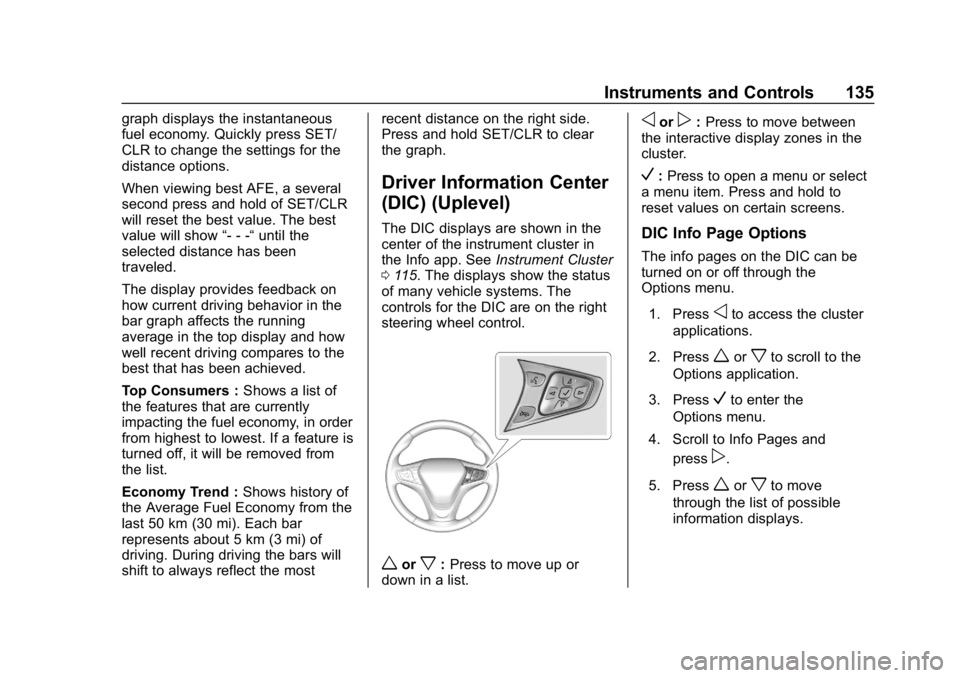
controls for the DIC are on the right
steering wheel control.
worx: Press to move up or
down in a list.
oorp: Press to move between
the interactive display zones in the
cluster.
V: Press to open a menu or select
a menu item. Press and hold to
reset values on certain screens.
DIC Info Page Options
The info pages on the DIC can be
turned on or off through the
Options menu.
1. Press
oto access the cluster
applications.
2. Press
worxto scroll to the
Options application.
3. Press
Vto enter the
Options menu.
4. Scroll to Info Pages and press
p.
5. Press
worxto move
through the list of possible
information displays.
Page 139 of 379
Chevrolet Cruze Owner Manual (GMNA-Localizing-U.S./Canada/Mexico-
12146336) - 2019 - crc - 10/22/18
138 Instruments and Controls
Vehicle Messages
Messages displayed on the DIC
indicate the status of the vehicle or
some action that may be needed to
correct a condition. Multiple
messages may appear one after
another.
The messages that do not require
immediate action can be
acknowledged and cleared by
pressing
V. The messages that
require immediate action cannot be
cleared until that action is
performed.
All messages should be taken
seriously; clearing the message
does not correct the problem.
If a SERVICE message appears,
see your dealer.
Follow the instructions given in the
messages. The system displays
messages regarding the following
topics:
. Service Messages
. Fluid Levels
. Vehicle Security .
Brakes
. Steering
. Ride Control Systems
. Driver Assistance Systems
. Cruise Control
. Lighting and Bulb Replacement
. Wiper/Washer Systems
. Doors and Windows
. Seat Belts
. Airbag Systems
. Engine and Transmission
. Tire Pressure
. Battery
Engine Power Messages
ENGINE POWER IS REDUCED
This message displays when the
vehicle's propulsion power is
reduced. A reduction in propulsion
power can affect the vehicle's ability
to accelerate. If this message is on,
but there is no observed reduction
in performance, proceed to your
destination. The performance may be reduced the next time the vehicle
is driven. The vehicle may be driven
while this message is on, but
maximum acceleration and speed
may be reduced. Anytime this
message stays on, or displays
repeatedly, the vehicle should be
taken to your dealer for service as
soon as possible.
Vehicle Speed Messages
SPEED LIMITED TO
XXX KM/H (MPH)
This message shows that the
vehicle speed has been limited to
the speed displayed. The limited
speed is a protection for various
propulsion and vehicle systems,
such as lubrication, thermal,
suspension, Teen Driver if
equipped, or tires.
Page 140 of 379
Chevrolet Cruze Owner Manual (GMNA-Localizing-U.S./Canada/Mexico-
12146336) - 2019 - crc - 10/22/18
Instruments and Controls 139
Vehicle
Personalization
The following are all possible
vehicle personalization features.
Depending on the vehicle, some
may not be available.
For System, Apps, and Personal
features and functions, see
“Settings”in the infotainment
manual.
To access the vehicle
personalization menu:
1. Touch the Settings icon on the Home Page of the infotainment
display.
2. Touch Vehicle to display a list of available options.
3. Touch to select the desired feature setting.
4. Touch
9orRto turn a feature
off or on.
5. Touch
zto go to the top level
of the Settings menu. The menu may contain the
following:
Rear Seat Reminder
This allows for a chime and a
message when the rear door has
been opened before or during
operation of the vehicle.
Touch Off or On.
Climate and Air Quality
Touch and the following may
display:
.
Auto Fan Speed
. Auto Heated Seats
. Auto Defog
. Auto Rear Defog
Auto Fan Speed
This setting specifies the amount of
airflow when the climate control fan
setting is Auto Fan.
Touch Low, Medium, or High. Auto Heated Seats
When enabled, this feature will
automatically activate the heated
seats at the level required by the
interior temperature. The auto
heated seats can be turned off by
using the heated seat buttons on
the center stack. See
Heated Front
Seats 062.
If equipped with the auto heated
steering wheel, this feature will turn
on when the auto heated seats
turn on.
Touch Off or On.
Auto Defog
This setting automatically turns the
front defogger on when the engine
is started.
Touch Off or On.
Auto Rear Defog
This setting automatically turns the
rear defogger on when the engine is
started.
Touch Off or On.
Page 143 of 379
Chevrolet Cruze Owner Manual (GMNA-Localizing-U.S./Canada/Mexico-
12146336) - 2019 - crc - 10/22/18
142 Instruments and Controls
Remote Lock Feedback
This setting specifies how the
vehicle responds when the vehicle
is locked with the RKE transmitter.
Touch Off, Lights and Horn, Lights
Only, or Horn Only.
Remote Door Unlock
This setting specifies whether all
doors, or just the driver door, unlock
when pressing
Kon the RKE
transmitter.
Touch All Doors or Driver Door.
Remote Start Auto Heat Seats
This setting automatically turns on
the heated seats when using the
remote start function on cold days.
See Heated Front Seats 062 and
Remote Vehicle Start 040.
If equipped with the auto heated
steering wheel, this feature will turn
on when the remote start auto
heated seats turn on.
Touch Off or On. Passive Door Unlock
This setting specifies which doors
unlock when using the button on the
driver door handle to unlock the
vehicle.
Touch All Doors or Driver Door Only.
Passive Door Lock
This setting specifies if the vehicle
will automatically lock, or lock and
provide an alert after all the doors
are closed, and you walk away from
the vehicle with the RKE transmitter.
See
Remote Keyless Entry (RKE)
System Operation (Keyless Access)
0 31 orRemote Keyless Entry
(RKE) System Operation (Key
Access) 038.
Touch Off, On with Horn
Chirp, or On.
Remote Left in Vehicle Alert
This feature sounds an alert when
the RKE transmitter is left in the
vehicle. This menu also enables
Remote No Longer in Vehicle Alert.
Touch Off or On.
Teen Driver
See “Teen Driver” under“Settings”
in the infotainment manual.
Valet Mode
This will lock the infotainment
system and steering wheel controls.
It may also limit access to vehicle
storage locations, if equipped.
To enable valet mode:
1. Enter a four-digit code on the keypad.
2. Touch Enter to go to the confirmation screen.
3. Re-enter the four-digit code.
Touch Lock or Unlock to lock or
unlock the system. Touch Back to
go back to the previous menu.
Page 144 of 379
Chevrolet Cruze Owner Manual (GMNA-Localizing-U.S./Canada/Mexico-
12146336) - 2019 - crc - 10/22/18
Lighting 143
Lighting
Exterior Lighting
Exterior Lamp Controls . . . . . . . 143
Headlamp High/Low-BeamChanger . . . . . . . . . . . . . . . . . . . . 145
Flash-to-Pass . . . . . . . . . . . . . . . . 145
Daytime Running Lamps (DRL) . . . . . . . . . . . . . . . 145
Automatic Headlamp System . . . . . . . . . . . . . . . . . . . . . . 145
Hazard Warning Flashers . . . . . 146
Turn and Lane-Change Signals . . . . . . . . . . . . . . . . . . . . . . 147
Fog Lamps . . . . . . . . . . . . . . . . . . . 147
Interior Lighting
Instrument Panel Illumination Control . . . . . . . . . . . . . . . . . . . . . . 148
Courtesy Lamps . . . . . . . . . . . . . . 148
Dome Lamps . . . . . . . . . . . . . . . . . 148
Reading Lamps . . . . . . . . . . . . . . 148
Lighting Features
Entry Lighting . . . . . . . . . . . . . . . . 149
Exit Lighting . . . . . . . . . . . . . . . . . . 149
Battery Power Protection . . . . . 149
Exterior Lighting Battery Saver . . . . . . . . . . . . . . . . . . . . . . . 149
Exterior Lighting
Exterior Lamp Controls
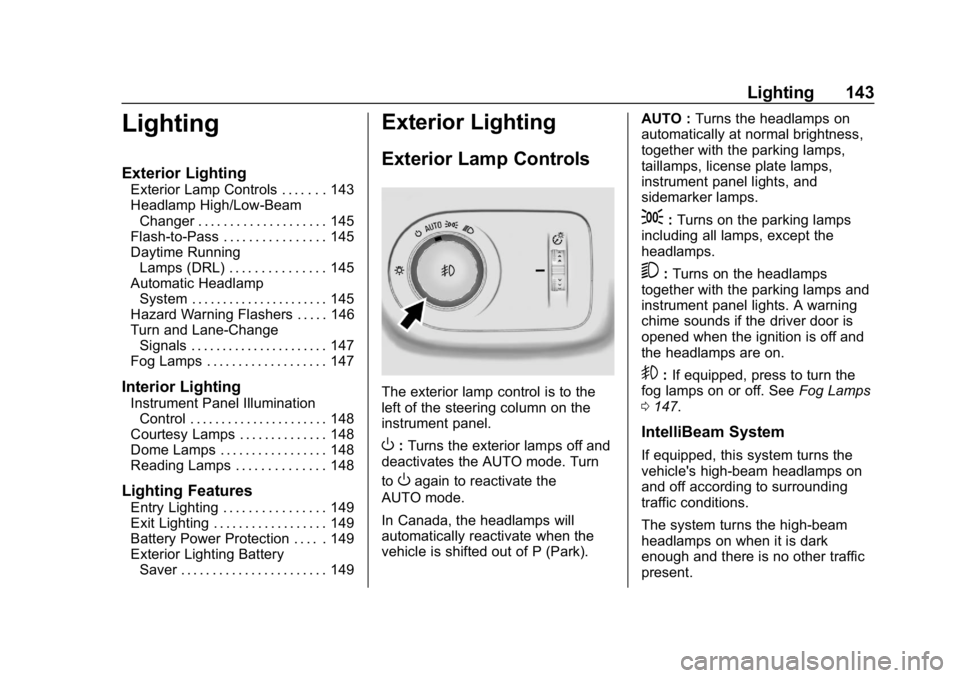
The exterior lamp control is to the
left of the steering column on the
instrument panel.
O: Turns the exterior lamps off and
deactivates the AUTO mode. Turn
to
Oagain to reactivate the
AUTO mode.
In Canada, the headlamps will
automatically reactivate when the
vehicle is shifted out of P (Park). AUTO :
Turns the headlamps on
automatically at normal brightness,
together with the parking lamps,
taillamps, license plate lamps,
instrument panel lights, and
sidemarker lamps.
;: Turns on the parking lamps
including all lamps, except the
headlamps.
5: Turns on the headlamps
together with the parking lamps and
instrument panel lights. A warning
chime sounds if the driver door is
opened when the ignition is off and
the headlamps are on.
9: If equipped, press to turn the
fog lamps on or off. See Fog Lamps
0 147.
IntelliBeam System
If equipped, this system turns the
vehicle's high-beam headlamps on
and off according to surrounding
traffic conditions.
The system turns the high-beam
headlamps on when it is dark
enough and there is no other traffic
present.
Page 148 of 379
Chevrolet Cruze Owner Manual (GMNA-Localizing-U.S./Canada/Mexico-
12146336) - 2019 - crc - 10/22/18
Lighting 147
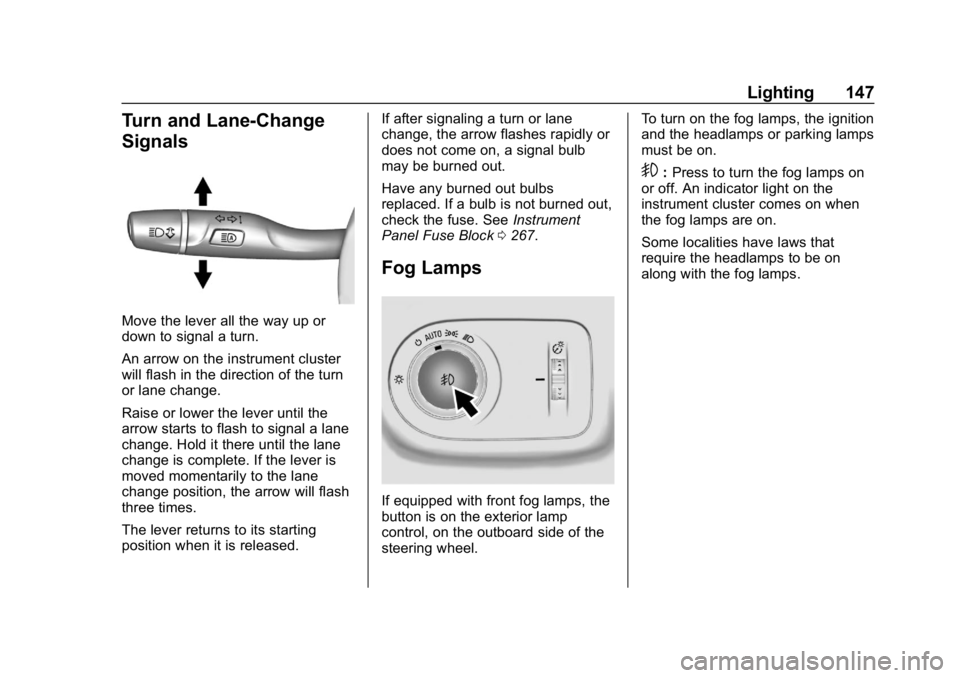
Turn and Lane-Change
Signals
Move the lever all the way up or
down to signal a turn.
An arrow on the instrument cluster
will flash in the direction of the turn
or lane change.
Raise or lower the lever until the
arrow starts to flash to signal a lane
change. Hold it there until the lane
change is complete. If the lever is
moved momentarily to the lane
change position, the arrow will flash
three times.
The lever returns to its starting
position when it is released.If after signaling a turn or lane
change, the arrow flashes rapidly or
does not come on, a signal bulb
may be burned out.
Have any burned out bulbs
replaced. If a bulb is not burned out,
check the fuse. See
Instrument
Panel Fuse Block 0267.
Fog Lamps
If equipped with front fog lamps, the
button is on the exterior lamp
control, on the outboard side of the
steering wheel. To turn on the fog lamps, the ignition
and the headlamps or parking lamps
must be on.
9:
Press to turn the fog lamps on
or off. An indicator light on the
instrument cluster comes on when
the fog lamps are on.
Some localities have laws that
require the headlamps to be on
along with the fog lamps.
Page 159 of 379
Chevrolet Cruze Owner Manual (GMNA-Localizing-U.S./Canada/Mexico-
12146336) - 2019 - crc - 10/22/18
158 Driving and Operating
Driving and
Operating
Driving Information
Distracted Driving . . . . . . . . . . . . 159
Defensive Driving . . . . . . . . . . . . . 160
Drunk Driving . . . . . . . . . . . . . . . . . 160
Control of a Vehicle . . . . . . . . . . . 160
Braking . . . . . . . . . . . . . . . . . . . . . . . 160
Steering . . . . . . . . . . . . . . . . . . . . . . 161
Off-Road Recovery . . . . . . . . . . . 161
Loss of Control . . . . . . . . . . . . . . . 162
Driving on Wet Roads . . . . . . . . 162
Hill and Mountain Roads . . . . . 163
Winter Driving . . . . . . . . . . . . . . . . 164
If the Vehicle Is Stuck . . . . . . . . 165
Vehicle Load Limits . . . . . . . . . . . 165
Starting and Operating
New Vehicle Break-In . . . . . . . . . 169
Ignition Positions (KeylessAccess) . . . . . . . . . . . . . . . . . . . . . 169
Ignition Positions (Key Access) . . . . . . . . . . . . . . . . . . . . . 171
Starting the Engine . . . . . . . . . . . 173
Stop/Start System . . . . . . . . . . . . 176
Engine Heater . . . . . . . . . . . . . . . . 177 Retained Accessory
Power (RAP) . . . . . . . . . . . . . . . . 179
Shifting Into Park . . . . . . . . . . . . . 179
Shifting out of Park . . . . . . . . . . . 180
Parking over Things That Burn . . . . . . . . . . . . . . . . . . . 180
Extended Parking . . . . . . . . . . . . 180
Engine Exhaust
Engine Exhaust . . . . . . . . . . . . . . 181
Running the Vehicle While Parked . . . . . . . . . . . . . . . . . . . . . . 181
Diesel Particulate Filter
Diesel Particulate Filter . . . . . . . 182
Diesel Exhaust Fluid
Diesel Exhaust Fluid . . . . . . . . . . 183
Automatic Transmission
Automatic Transmission . . . . . . 189
Manual Mode . . . . . . . . . . . . . . . . . 192
Brakes
Antilock BrakeSystem (ABS) . . . . . . . . . . . . . . . 193
Parking Brake . . . . . . . . . . . . . . . . 194
Brake Assist . . . . . . . . . . . . . . . . . . 195
Hill Start Assist (HSA) . . . . . . . . 195
Ride Control Systems
Traction Control/Electronic Stability Control . . . . . . . . . . . . . 196
Cruise Control
Cruise Control . . . . . . . . . . . . . . . . 197
Driver Assistance Systems
Driver Assistance Systems . . . 200
Assistance Systems forParking or Backing . . . . . . . . . . 201
Assistance Systems for Driving . . . . . . . . . . . . . . . . . . . . . . 203
Forward Collision Alert (FCA) System . . . . . . . . . . . . . . . . . . . . . . 203
Forward Automatic Braking (FAB) . . . . . . . . . . . . . . . 205
Front Pedestrian Braking (FPB) System . . . . . . . . . . . . . . . 207
Side Blind Zone Alert (SBZA) . . . . . . . . . . . . . . . . 209
Lane Change Alert (LCA) . . . . . 209
Lane Departure Warning (LDW) . . . . . . . . . . . . . . 211
Lane Keep Assist (LKA) . . . . . . 211
Fuel
Top Tier Fuel (Gasoline) . . . . . . 213
Top Tier Fuel (Diesel) . . . . . . . . . 214
Recommended Fuel (Gasoline) . . . . . . . . . . . . . . . . . . . 214
Page 160 of 379
Chevrolet Cruze Owner Manual (GMNA-Localizing-U.S./Canada/Mexico-
12146336) - 2019 - crc - 10/22/18
Driving and Operating 159
Prohibited Fuels (Gasoline) . . . 214
Fuels in Foreign Countries(Gasoline) . . . . . . . . . . . . . . . . . . . 215
Fuel Additives (Gasoline) . . . . . 215
Fuel Additives (Diesel) . . . . . . . 215
Fuel for Diesel Engines . . . . . . . 215
Biodiesel . . . . . . . . . . . . . . . . . . . . . 216
Cold Weather Operation (Diesel) . . . . . . . . . . . . . . . . . . . . . 217
Water in Fuel (Diesel) . . . . . . . . 218
Running Out of Fuel (Diesel) . . . . . . . . . . . . . . . . . . . . . 220
Fuel Filter Replacement (Diesel) . . . . . . . . . . . . . . . . . . . . . 221
Filling the Tank (Gasoline) . . . . 221
Filling the Tank (Diesel) . . . . . . . 223
Filling a Portable Fuel Container (Gasoline) . . . . . . . . 225
Filling a Portable Fuel Container (Diesel) . . . . . . . . . . . 225
Trailer Towing
General TowingInformation . . . . . . . . . . . . . . . . . . 226
Conversions and Add-Ons
Add-On ElectricalEquipment . . . . . . . . . . . . . . . . . . 226
Driving Information
Distracted Driving
Distraction comes in many forms
and can take your focus from the
task of driving. Exercise good
judgment and do not let other
activities divert your attention away
from the road. Many local
governments have enacted laws
regarding driver distraction. Become
familiar with the local laws in
your area.
To avoid distracted driving, keep
your eyes on the road, keep your
hands on the steering wheel, and
focus your attention on driving.
. Do not use a phone in
demanding driving situations.
Use a hands-free method to
place or receive necessary
phone calls.
. Watch the road. Do not read,
take notes, or look up
information on phones or other
electronic devices. .
Designate a front seat
passenger to handle potential
distractions.
. Become familiar with vehicle
features before driving, such as
programming favorite radio
stations and adjusting climate
control and seat settings.
Program all trip information into
any navigation device prior to
driving.
. Wait until the vehicle is parked
to retrieve items that have fallen
to the floor.
. Stop or park the vehicle to tend
to children.
. Keep pets in an appropriate
carrier or restraint.
. Avoid stressful conversations
while driving, whether with a
passenger or on a cell phone.
Page 161 of 379
Chevrolet Cruze Owner Manual (GMNA-Localizing-U.S./Canada/Mexico-
12146336) - 2019 - crc - 10/22/18
160 Driving and Operating
{Warning
Taking your eyes off the road too
long or too often could cause a
crash resulting in injury or death.
Focus your attention on driving.
Refer to the infotainment section for
more information on using that
system and the navigation system,
if equipped, including pairing and
using a cell phone.
Defensive Driving
Defensive driving means “always
expect the unexpected.” The first
step in driving defensively is to wear
the seat belt. See Seat Belts066.
. Assume that other road users
(pedestrians, bicyclists, and
other drivers) are going to be
careless and make mistakes.
Anticipate what they might do
and be ready.
. Allow enough following distance
between you and the driver in
front of you. .
Focus on the task of driving.
Drunk Driving
Death and injury associated with
drinking and driving is a global
tragedy.
{Warning
Drinking and then driving is very
dangerous. Your reflexes,
perceptions, attentiveness, and
judgment can be affected by even
a small amount of alcohol. You
can have a serious —or even
fatal —collision if you drive after
drinking.
Do not drink and drive or ride with
a driver who has been drinking.
Ride home in a cab; or if you are
with a group, designate a driver
who will not drink.
Control of a Vehicle
Braking, steering, and accelerating
are important factors in helping to
control a vehicle while driving.
Braking
Braking action involves perception
time and reaction time. Deciding to
push the brake pedal is perception
time. Actually doing it is
reaction time.
Average driver reaction time is
about three-quarters of a second. In
that time, a vehicle moving at
100 km/h (60 mph) travels 20 m
(66 ft), which could be a lot of
distance in an emergency.
Helpful braking tips to keep in mind
include:
. Keep enough distance between
you and the vehicle in front
of you.
. Avoid needless heavy braking.
. Keep pace with traffic.
If the engine ever stops while the
vehicle is being driven, brake
normally but do not pump the
brakes. Doing so could make the
pedal harder to push down. If the
engine stops, there will be some
power brake assist but it will be
used when the brake is applied.