fog light CHEVROLET CRUZE HATCHBACK 2017 User Guide
[x] Cancel search | Manufacturer: CHEVROLET, Model Year: 2017, Model line: CRUZE HATCHBACK, Model: CHEVROLET CRUZE HATCHBACK 2017Pages: 405, PDF Size: 6.76 MB
Page 163 of 405
Chevrolet Cruze Owner Manual (GMNA-Localizing-U.S./Canada/Mexico-
9803785) - 2017 - CRC - 4/13/16
162 Lighting
Turn and Lane-Change
Signals
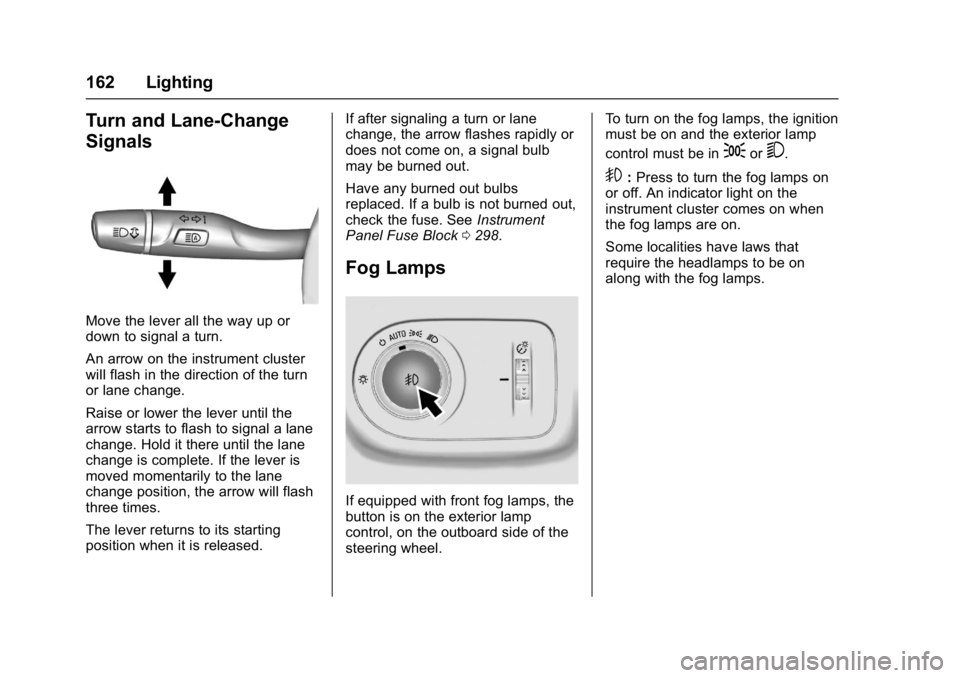
Move the lever all the way up or
down to signal a turn.
An arrow on the instrument cluster
will flash in the direction of the turn
or lane change.
Raise or lower the lever until the
arrow starts to flash to signal a lane
change. Hold it there until the lane
change is complete. If the lever is
moved momentarily to the lane
change position, the arrow will flash
three times.
The lever returns to its starting
position when it is released.If after signaling a turn or lane
change, the arrow flashes rapidly or
does not come on, a signal bulb
may be burned out.
Have any burned out bulbs
replaced. If a bulb is not burned out,
check the fuse. See
Instrument
Panel Fuse Block 0298.
Fog Lamps
If equipped with front fog lamps, the
button is on the exterior lamp
control, on the outboard side of the
steering wheel. To turn on the fog lamps, the ignition
must be on and the exterior lamp
control must be in
;or5.
9:
Press to turn the fog lamps on
or off. An indicator light on the
instrument cluster comes on when
the fog lamps are on.
Some localities have laws that
require the headlamps to be on
along with the fog lamps.
Page 192 of 405
Chevrolet Cruze Owner Manual (GMNA-Localizing-U.S./Canada/Mexico-
9803785) - 2017 - CRC - 4/13/16
Climate Controls 191
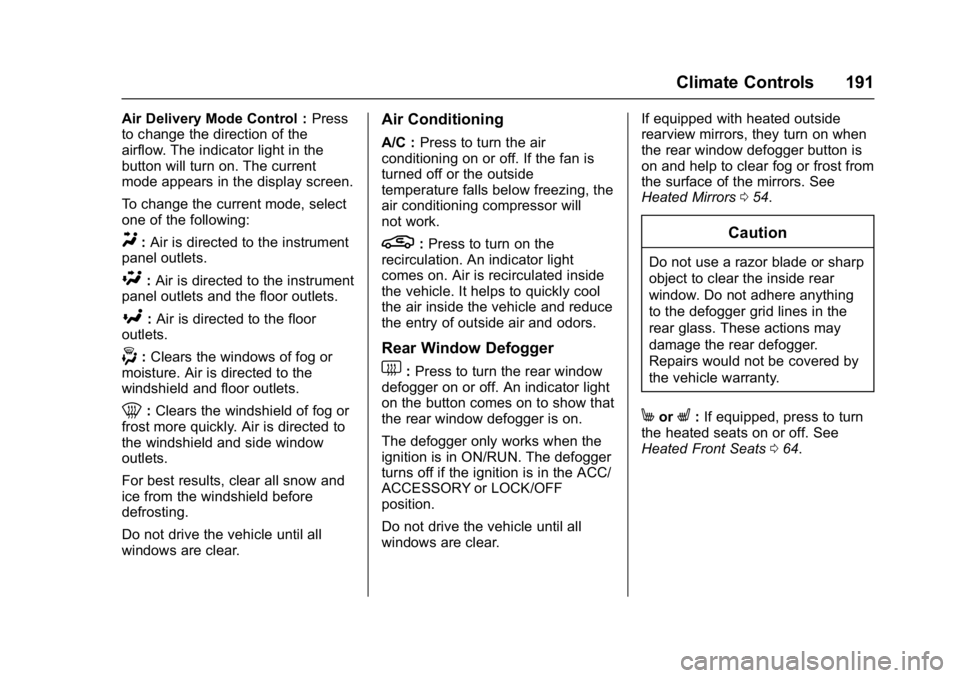
Air Delivery Mode Control :Press
to change the direction of the
airflow. The indicator light in the
button will turn on. The current
mode appears in the display screen.
To change the current mode, select
one of the following:
Y: Air is directed to the instrument
panel outlets.
\: Air is directed to the instrument
panel outlets and the floor outlets.
[: Air is directed to the floor
outlets.
-: Clears the windows of fog or
moisture. Air is directed to the
windshield and floor outlets.
0: Clears the windshield of fog or
frost more quickly. Air is directed to
the windshield and side window
outlets.
For best results, clear all snow and
ice from the windshield before
defrosting.
Do not drive the vehicle until all
windows are clear.
Air Conditioning
A/C : Press to turn the air
conditioning on or off. If the fan is
turned off or the outside
temperature falls below freezing, the
air conditioning compressor will
not work.
L: Press to turn on the
recirculation. An indicator light
comes on. Air is recirculated inside
the vehicle. It helps to quickly cool
the air inside the vehicle and reduce
the entry of outside air and odors.
Rear Window Defogger
1: Press to turn the rear window
defogger on or off. An indicator light
on the button comes on to show that
the rear window defogger is on.
The defogger only works when the
ignition is in ON/RUN. The defogger
turns off if the ignition is in the ACC/
ACCESSORY or LOCK/OFF
position.
Do not drive the vehicle until all
windows are clear. If equipped with heated outside
rearview mirrors, they turn on when
the rear window defogger button is
on and help to clear fog or frost from
the surface of the mirrors. See
Heated Mirrors
054.
Caution
Do not use a razor blade or sharp
object to clear the inside rear
window. Do not adhere anything
to the defogger grid lines in the
rear glass. These actions may
damage the rear defogger.
Repairs would not be covered by
the vehicle warranty.
MorL:If equipped, press to turn
the heated seats on or off. See
Heated Front Seats 064.
Page 193 of 405
Chevrolet Cruze Owner Manual (GMNA-Localizing-U.S./Canada/Mexico-
9803785) - 2017 - CRC - 4/13/16
192 Climate Controls
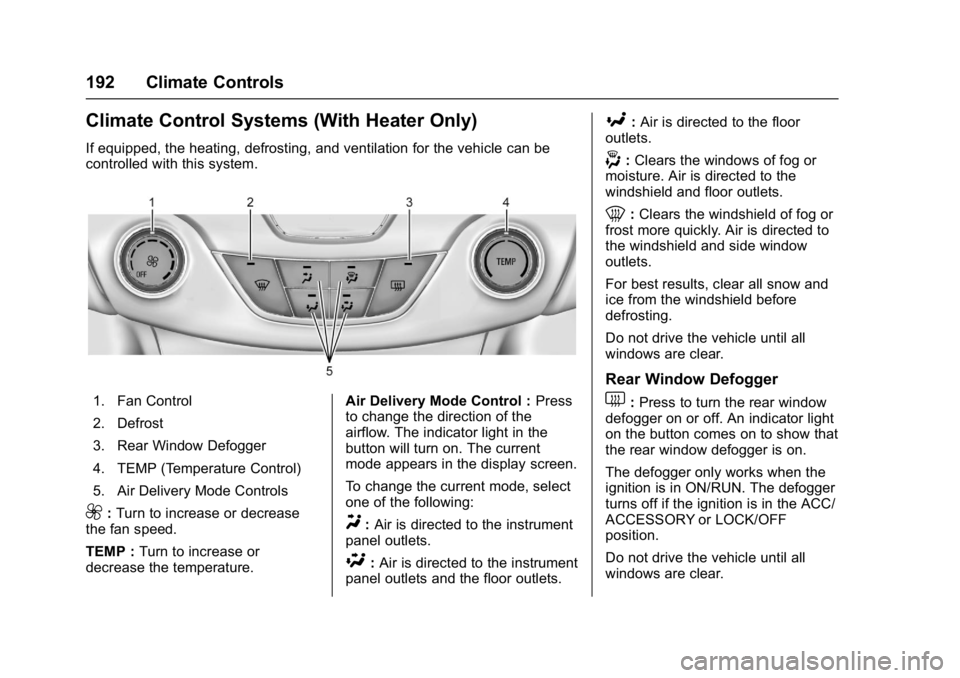
Climate Control Systems (With Heater Only)
If equipped, the heating, defrosting, and ventilation for the vehicle can be
controlled with this system.
1. Fan Control
2. Defrost
3. Rear Window Defogger
4. TEMP (Temperature Control)
5. Air Delivery Mode Controls
9:Turn to increase or decrease
the fan speed.
TEMP : Turn to increase or
decrease the temperature. Air Delivery Mode Control :
Press
to change the direction of the
airflow. The indicator light in the
button will turn on. The current
mode appears in the display screen.
To change the current mode, select
one of the following:Y: Air is directed to the instrument
panel outlets.
\: Air is directed to the instrument
panel outlets and the floor outlets.
[: Air is directed to the floor
outlets.
-: Clears the windows of fog or
moisture. Air is directed to the
windshield and floor outlets.
0: Clears the windshield of fog or
frost more quickly. Air is directed to
the windshield and side window
outlets.
For best results, clear all snow and
ice from the windshield before
defrosting.
Do not drive the vehicle until all
windows are clear.
Rear Window Defogger
1: Press to turn the rear window
defogger on or off. An indicator light
on the button comes on to show that
the rear window defogger is on.
The defogger only works when the
ignition is in ON/RUN. The defogger
turns off if the ignition is in the ACC/
ACCESSORY or LOCK/OFF
position.
Do not drive the vehicle until all
windows are clear.
Page 195 of 405
Chevrolet Cruze Owner Manual (GMNA-Localizing-U.S./Canada/Mexico-
9803785) - 2017 - CRC - 4/13/16
194 Climate Controls
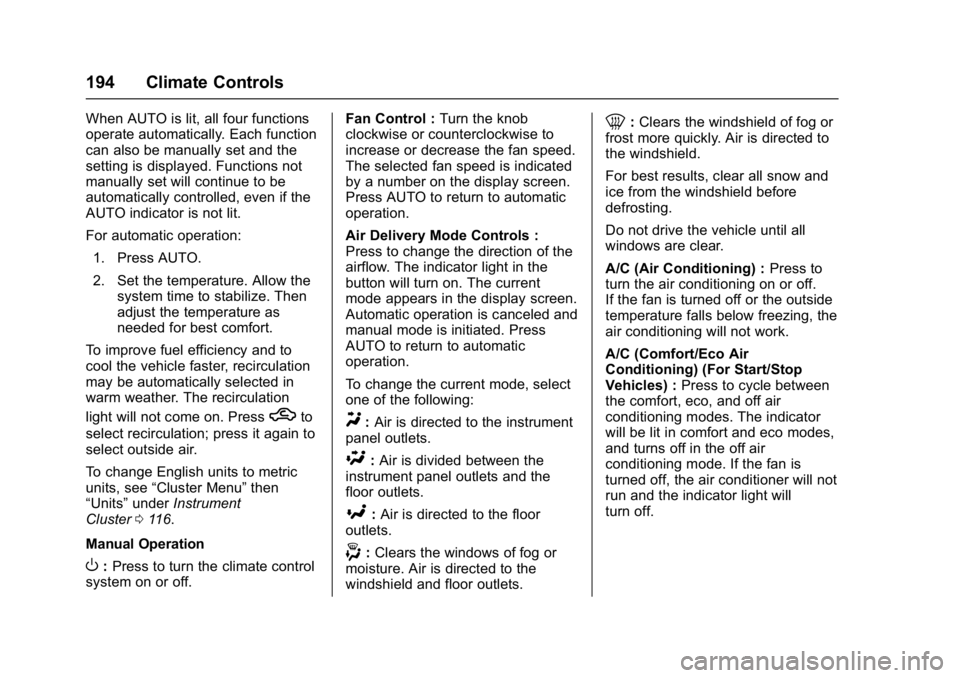
When AUTO is lit, all four functions
operate automatically. Each function
can also be manually set and the
setting is displayed. Functions not
manually set will continue to be
automatically controlled, even if the
AUTO indicator is not lit.
For automatic operation:1. Press AUTO.
2. Set the temperature. Allow the system time to stabilize. Then
adjust the temperature as
needed for best comfort.
To improve fuel efficiency and to
cool the vehicle faster, recirculation
may be automatically selected in
warm weather. The recirculation
light will not come on. Press
hto
select recirculation; press it again to
select outside air.
To change English units to metric
units, see “Cluster Menu” then
“Units” underInstrument
Cluster 0116.
Manual Operation
O: Press to turn the climate control
system on or off. Fan Control :
Turn the knob
clockwise or counterclockwise to
increase or decrease the fan speed.
The selected fan speed is indicated
by a number on the display screen.
Press AUTO to return to automatic
operation.
Air Delivery Mode Controls :
Press to change the direction of the
airflow. The indicator light in the
button will turn on. The current
mode appears in the display screen.
Automatic operation is canceled and
manual mode is initiated. Press
AUTO to return to automatic
operation.
To change the current mode, select
one of the following:
Y: Air is directed to the instrument
panel outlets.
\: Air is divided between the
instrument panel outlets and the
floor outlets.
[: Air is directed to the floor
outlets.
-: Clears the windows of fog or
moisture. Air is directed to the
windshield and floor outlets.
0: Clears the windshield of fog or
frost more quickly. Air is directed to
the windshield.
For best results, clear all snow and
ice from the windshield before
defrosting.
Do not drive the vehicle until all
windows are clear.
A/C (Air Conditioning) : Press to
turn the air conditioning on or off.
If the fan is turned off or the outside
temperature falls below freezing, the
air conditioning will not work.
A/C (Comfort/Eco Air
Conditioning) (For Start/Stop
Vehicles) : Press to cycle between
the comfort, eco, and off air
conditioning modes. The indicator
will be lit in comfort and eco modes,
and turns off in the off air
conditioning mode. If the fan is
turned off, the air conditioner will not
run and the indicator light will
turn off.
Page 196 of 405
Chevrolet Cruze Owner Manual (GMNA-Localizing-U.S./Canada/Mexico-
9803785) - 2017 - CRC - 4/13/16
Climate Controls 195
Press AUTO to return to automatic
operation and the air conditioner
runs automatically as needed. With
Stop/Start vehicles, the A/C will
return to the last selected a/c mode.
For comfort a/c, press A/C. The
indicator will turn amber. This
setting limits Auto Stops to ensure
cabin comfort is maintained and
reduces the likelihood of window
fogging.
For eco a/c, press A/C again. The
indicator will turn green. This setting
balances fuel economy and air
conditioning comfort. In warm
weather conditions, Auto Stops may
occur more frequently and the
vehicle interior may be warmer as
compared to the comfort air
conditioning setting. This setting
allows higher humidity inside the
vehicle and window fogging before
the engine restarts. Pressing
0
during an Auto Stop will restart the
engine to prevent window fogging.
L:Press to turn on
recirculation. An indicator light
comes on. Air is recirculated to
quickly cool the inside of the vehicle
and reduce the entry of outside air
and odors.
Automatic Air Recirculation :
When the AUTO indicator light is
on, the air is automatically
recirculated as needed to help
quickly cool the inside of the
vehicle.
Auto Defog : The climate control
system may have a sensor to
automatically detect high humidity
inside the vehicle. When high
humidity is detected, the climate
control system may adjust to
outside air supply and turn on the
air conditioner. If the climate control
system does not detect possible
window fogging, it returns to normal
operation. To turn Auto Defog
off or on, see “Climate and Air
Quality” underVehicle
Personalization 0150.Rear Window Defogger
=:Press to turn the rear window
defogger on or off. An indicator light
on the button comes on to show that
the rear window defogger is on.
The defogger only works when the
ignition is in ON/RUN. The defogger
turns off if the ignition is in the ACC/
ACCESSORY or LOCK/OFF
position.
The rear window defogger can be
set to automatic operation. See
“Climate and Air Quality” under
Vehicle Personalization 0150.
When Auto Rear Defog is selected,
the rear window defogger turns on
automatically when the interior
temperature is cold and the outside
temperature is about 5 °C (40 °F)
and below. The auto rear defogger
turns off automatically. At higher
speeds, the rear window defogger
may stay on continuously.
Page 197 of 405
Chevrolet Cruze Owner Manual (GMNA-Localizing-U.S./Canada/Mexico-
9803785) - 2017 - CRC - 4/13/16
196 Climate Controls
If equipped with heated outside
mirrors, they turn on when the rear
window defogger button is on and
help to clear fog or frost from the
surface of the mirrors. SeeHeated
Mirrors 054.
Caution
Do not try to clear frost or other
material from the inside of the
front windshield and rear window
with a razor blade or anything
else that is sharp. This may
damage the rear window
defogger grid and affect the
radio's ability to pick up stations
clearly. The repairs would not be
covered by the vehicle warranty.
MorL:If equipped, press to turn
the heated seats on or off. See
Heated Front Seats 064. Remote Start Climate Control
Operation :
If the vehicle is
equipped with the remote vehicle
start feature, the climate control
system may run when the vehicle is
started remotely with settings
according to ambient conditions.
The rear defog may come on during
remote start based on cold ambient
conditions. The rear defog indicator
light does not come on during a
remote start. If the vehicle has front
heated seats, they may come on
during a remote start. The heated
seat indicator lights do not come on
during a remote start. See Remote
Vehicle Start 042 and Heated Front
Seats 064.
Sensors
The solar sensor, on top of the
instrument panel near the
windshield, monitors the solar heat.
The climate control system uses the
sensor information to adjust the
temperature, fan speed,
recirculation, and air delivery mode
for best comfort.
If the sensor is covered, the
automatic climate control system
may not work properly.
Page 217 of 405
Chevrolet Cruze Owner Manual (GMNA-Localizing-U.S./Canada/Mexico-
9803785) - 2017 - CRC - 4/13/16
216 Driving and Operating
Stop/Start System
{Warning
Exiting the vehicle without first
shifting into P (Park) may cause
the vehicle to move. You or others
may be injured. Because the
vehicle has the auto engine stop/
start feature, the vehicle's engine
might seem to be shut off;
however, once the brake pedal is
released, the engine will start up
again.
Shift to P (Park) and turn the
ignition to LOCK/OFF, before
exiting the vehicle.
The vehicle may have a fuel saving
stop/start system to shut off the
engine to help conserve fuel. Auto Engine Stop/Start
When the brakes are applied and
the vehicle is at a complete stop,
the engine may turn off. When
stopped, the tachometer displays
AUTO STOP. See
Tachometer
0 121. When the brake pedal is
released or the accelerator pedal is
pushed, the engine will restart.
Auto Stop may be deactivated if:
. A minimum vehicle speed is not
reached.
. The engine or transmission is
not at the required operating
temperature.
. The outside temperature is not
in the required operating range,
typically below 5 °C (41 °F) or
above 50 °C (122 °F).
. The shift lever is in any gear
other than D (Drive).
. The battery has been recently
disconnected.
. The battery charge is low. .
The interior comfort level has not
reached the required level for
the climate control system or
defog settings. Use the eco
(green indicator on) air
conditioning mode for better
efficiency. See Automatic
Climate Control System 0193.
. The Auto Stop time is greater
than two minutes.
Diesel Engine Starting Procedure
The diesel engine starts differently
than a gasoline engine. 1. With the Keyless Access system, the RKE transmitter
must be in the vehicle.
Observe the wait-to-start light.
See Wait-to-Start Light 0131.
This light may not come on if
the engine is warm.
2. Press the ENGINE START/ STOP button with the brake
pedal or clutch pedal applied to
START. The start will be
delayed if the wait-to-start lamp
is illuminated.
Page 244 of 405
Chevrolet Cruze Owner Manual (GMNA-Localizing-U.S./Canada/Mexico-
9803785) - 2017 - CRC - 4/13/16
Driving and Operating 243
Forward Collision Alert
(FCA) System
If equipped, the FCA system may
help to avoid or reduce the harm
caused by front-end crashes. When
approaching a vehicle ahead too
quickly, FCA provides a flashing red
alert on the windshield and rapidly
beeps. FCA also lights an amber
visual alert if following another
vehicle much too closely.
FCA detects vehicles within a
distance of approximately 60 m
(197 ft) and operates at speeds
above 40 km/h (25 mph).
{Warning
FCA is a warning system and
does not apply the brakes. When
approaching a slower-moving or
stopped vehicle ahead too rapidly,
or when following a vehicle too
closely, FCA may not provide a
warning with enough time to help
avoid a crash. It also may not
provide any warning at all. FCA(Continued)
Warning (Continued)
does not warn of pedestrians,
animals, signs, guardrails,
bridges, construction barrels,
or other objects. Be ready to take
action and apply the brakes. See
Defensive Driving0201.
FCA can be disabled with the FCA
steering wheel control.
Detecting the Vehicle Ahead
FCA warnings will not occur unless
the FCA system detects a vehicle
ahead. When a vehicle is detected,
the vehicle ahead indicator will
display green. Vehicles may not be
detected on curves, highway exit
ramps, or hills, due to poor visibility;
or if a vehicle ahead is partially
blocked by pedestrians or other objects. FCA will not detect another
vehicle ahead until it is completely
in the driving lane.
{Warning
FCA does not provide a warning
to help avoid a crash, unless it
detects a vehicle. FCA may not
detect a vehicle ahead if the FCA
sensor is blocked by dirt, snow,
or ice, or if the windshield is
damaged. It may also not detect a
vehicle on winding or hilly roads,
or in conditions that can limit
visibility such as fog, rain,
or snow, or if the headlamps or
windshield are not cleaned or in
proper condition. Keep the
windshield, headlamps, and FCA
sensors clean and in good repair.
Page 397 of 405

Chevrolet Cruze Owner Manual (GMNA-Localizing-U.S./Canada/Mexico-
9803785) - 2017 - CRC - 4/13/16
396 Index
Drive Belt Routing, Engine . . . . . . 368
Driver Assistance Systems . . . . . 239
Driver InformationCenter (DIC) . . . . . . . . . . . . . 134, 137
Driving Assistance Systems . . . . . . . . . . 242
Defensive . . . . . . . . . . . . . . . . . . . . . 201
Drunk . . . . . . . . . . . . . . . . . . . . . . . . . 201
For Better Fuel Economy . . . . . . . 28
Hill and Mountain Roads . . . . . . 204
If the Vehicle is Stuck . . . . . . . . . 206
Loss of Control . . . . . . . . . . . . . . . 203
Off-Road Recovery . . . . . . . . . . . 202
Vehicle Load Limits . . . . . . . . . . . 206
Wet Roads . . . . . . . . . . . . . . . . . . . 203
Winter . . . . . . . . . . . . . . . . . . . . . . . . 205
E
Electrical Equipment,Add-On . . . . . . . . . . . . . . . . . . . . . . . 262
Electrical System
Engine Compartment FuseBlock . . . . . . . . . . . . . . . . . . . . . . . . 294
Fuses and Circuit Breakers . . . 294
Instrument Panel Fuse Block . . . . . . . . . . . . . . . . . . . . . . . . 298
Overload . . . . . . . . . . . . . . . . . . . . . 293
Emergency OnStar
®. . . . . . . . . . . . . . . . . . . . . . 384 Engine
Air Cleaner/Filter . . . . . . . . . . . . . 276
Check and Service Engine
Soon Light . . . . . . . . . . . . . . . . . . 126
Compartment Overview . . . . . . . 267
Coolant . . . . . . . . . . . . . . . . . . . . . . . 278
Coolant Temperature Gauge . . . . . . . . . . . . . . . . . . . . . . 123
Cooling System . . . . . . . . . . . . . . . 277
Cooling System Messages . . . 141
Drive Belt Routing . . . . . . . . . . . . 368
Exhaust . . . . . . . . . . . . . . . . . . . . . . 221
Heater . . . . . . . . . . . . . . . . . . . . . . . . 218
Oil Life System . . . . . . . . . . . . . . . 273
Oil Messages . . . . . . . . . . . . . . . . . 142
Oil Pressure Light . . . . . . . . . . . . 132
Overheating . . . . . . . . . . . . . . . . . . 281
Power Messages . . . . . . . . . . . . . 142
Running While Parked . . . . . . . . 222
Starting . . . . . . . . . . . . . . . . . . . . . . . 214
Engines
Diesel Fuel . . . . . . . . . . . . . . . . . . . 250
Entry Lighting . . . . . . . . . . . . . . . . . . . 164
Event Data Recorders . . . . . . . . . . 381
Exhaust Fluid Diesel . . . . . . . . . . . . . . . . . . . . . . . . 223
Exit Lighting . . . . . . . . . . . . . . . . . . . . 164
Extended Parking . . . . . . . . . . . . . . . 221 Extender, Safety Belt . . . . . . . . . . . . 72
Exterior Lamp Controls . . . . . . . . . 158
Exterior Lighting Battery
Saver . . . . . . . . . . . . . . . . . . . . . . . . . 165
F
Filter . . . . . . . . . . . . . . . . . . . . . . . . . . . . 222Fuel . . . . . . . . . . . . . . . . . . . . . . . . . . 286
Replacement (Fuel) . . . . . . . . . . . 258
Filter, Engine Air Cleaner . . . . . . . . . . . 276
Flash-to-Pass . . . . . . . . . . . . . . . . . . . 160
Flashers, Hazard Warning . . . . . . 161
Flat Tire . . . . . . . . . . . . . . . . . . . . . . . . 321
Changing . . . . . . . . . . . . . . . . . . . . . 329
Floor Mats . . . . . . . . . . . . . . . . . . . . . . 350
Fluid Automatic Transmission . . . . . . 275
Brakes . . . . . . . . . . . . . . . . . . . . . . . . 284
Diesel Exhaust . . . . . . . . . . . . . . . . . 29
Washer . . . . . . . . . . . . . . . . . . . . . . . 282
Fog Lamps . . . . . . . . . . . . . . . . . . . . . 162
Folding Mirrors . . . . . . . . . . . . . . . . . . 54
Forward Collision Alert (FCA) System . . . . . . . . . . . . . . . . . 243
Frequency Statement
Radio . . . . . . . . . . . . . . . . . . . . . . . . . 379
Front Fog Lamp Light . . . . . . . . . . . . . . . . . . . . . . . . . . 133
Page 399 of 405

Chevrolet Cruze Owner Manual (GMNA-Localizing-U.S./Canada/Mexico-
9803785) - 2017 - CRC - 4/13/16
398 Index
How to Wear Safety BeltsProperly . . . . . . . . . . . . . . . . . . . . . . . . 68
Hydraulic Clutch . . . . . . . . . . . . . . . . 275
I
Ignition Positions . . . . . . . . . . 210, 212
Ignition Transmission Lock Check . . . . . . . . . . . . . . . . . . . . . . . . . 287
Immobilizer . . . . . . . . . . . . . . . . . . . . . . 51
Indicator Vehicle Ahead . . . . . . . . . . . . . . . . 130
Infants and Young Children,
Restraints . . . . . . . . . . . . . . . . . . . . . . 87
Infotainment . . . . . . . . . . . . . . . . . . . . 166
Infotainment System . . . . . . . . . . . . 382
Instrument Cluster . . . . . . . . . . . . . . 116
Instrument Panel Overview . . . . . . . 6
Interior Rearview Mirrors . . . . . . . . . 54
Introduction . . . . . . . . . . . . . . . . . . . . . . . 2
J
Jump Starting - North America . . . . . . . . . . . . . . . . . . . . . . . 336
K
Key and Lock Messages . . . . . . . . 143
Keyless EntryRemote (RKE) System . . . . . 34, 36
Keys . . . . . . . . . . . . . . . . . . . . . . . . . . . . . 31
L
Labeling, Tire Sidewall . . . . . . . . . . 303
Lamps Courtesy . . . . . . . . . . . . . . . . . . . . . . 163
Daytime Running (DRL) . . . . . . 160
Dome . . . . . . . . . . . . . . . . . . . . . . . . . 163
Exterior Controls . . . . . . . . . . . . . . 158
Exterior Lighting BatterySaver . . . . . . . . . . . . . . . . . . . . . . . 165
Malfunction Indicator . . . . . . . . . 126
Messages . . . . . . . . . . . . . . . . . . . . 144
On Reminder . . . . . . . . . . . . . . . . . 133
Reading . . . . . . . . . . . . . . . . . . . . . . 163
Taillamps and Back-up . . . . . . . 291
Lane Change Alert (LCA) . . . . . . . 245
Lane Departure Warning (LDW) . . . . . . . . . . . . . . . . 247
Lane Keep Assist (LKA) . . . . . . . . 247
Lane Keep Assist Light . . . . . . . . . 129
Lap-Shoulder Belt . . . . . . . . . . . . . . . 69
LATCH System Replacing Parts after aCrash . . . . . . . . . . . . . . . . . . . . . . . . . 99
LATCH, Lower Anchors and
Tethers for Children . . . . . . . . . . . . 92
Liftgate . . . . . . . . . . . . . . . . . . . . . . . . . . 49
Lighting Entry . . . . . . . . . . . . . . . . . . . . . . . . . 164 Lighting (cont'd)
Exit . . . . . . . . . . . . . . . . . . . . . . . . . . . 164
Illumination Control . . . . . . . . . . . 163
Lights . . . . . . . . . . . . . . . . . . . . . . . . . . . 129
Airbag Readiness . . . . . . . . . . . . . 125
Antilock Brake System(ABS) Warning . . . . . . . . . . . . . . 129
Brake System Warning . . . . . . . 128
Charging System . . . . . . . . . . . . . 126
Cruise Control . . . . . . . . . . . . . . . . 133
Diesel Exhaust Fluid (DEF) . . . 132
Door Ajar . . . . . . . . . . . . . . . . . . . . . 134
Engine Oil Pressure . . . . . . . . . . 132
Flash-to-Pass . . . . . . . . . . . . . . . . . 160
Front Fog Lamp . . . . . . . . . . . . . . 133
High-Beam On . . . . . . . . . . . . . . . . 133
High/Low Beam Changer . . . . . 160
Low Fuel Warning . . . . . . . . . . . . 132
Safety Belt Reminders . . . . . . . . 124
Security . . . . . . . . . . . . . . . . . . . . . . 133
StabiliTrak
®OFF . . . . . . . . . . . . . 130
Tire Pressure . . . . . . . . . . . . . . . . . 131
Traction Control System (TCS)/StabiliTrak
®. . . . . . . . . . 131
Traction Off . . . . . . . . . . . . . . . . . . . 130
Up-Shift . . . . . . . . . . . . . . . . . . . . . . 129
Wait to Start . . . . . . . . . . . . . . . . . . 131