sensor CHEVROLET DYNASTY 1993 Service Manual
[x] Cancel search | Manufacturer: CHEVROLET, Model Year: 1993, Model line: DYNASTY, Model: CHEVROLET DYNASTY 1993Pages: 2438, PDF Size: 74.98 MB
Page 481 of 2438
2.2L TURBO III, 3.3L AND 3.8L IGNITION SYSTEMSÐSERVICE PROCEDURES INDEX
page page
Camshaft Position Sensor ServiceÐTurbo III Engine.42Camshaft Position SensorÐ3.3L and 3.8L Engines.43
Coolant Temperature SensorÐ3.3L and 3.8L Engines .............................. 39
Coolant Temperature SensorÐTurbo III ........ 39
Crankshaft Position SensorÐ3.3L and 3.8L Engines.42
Crankshaft Position SensorÐTurbo III Engine . . . 42
Idle RPM Test ........................... 41
Ignition Coil ServiceÐTurbo III Engine ........ 43 Ignition CoilÐ3.3L and 3.8L Engine
........... 43
Knock SensorÐTurbo III Engines ............ 40
Manifold Absolute Pressure (MAP) SensorÐ3.3L and 3.8L Engines ....................... 44
Manifold Absolute Pressure (MAP) SensorÐ Turbo III Engine ........................ 44
Powertrain Control Module (PCM) ............ 39
Spark Plug Cable Service .................. 40
Spark Plug Service ....................... 41
POWERTRAIN CONTROL MODULE (PCM)
REMOVAL
(1) Remove air cleaner duct or air cleaner assem-
bly. (2) Remove battery.
(3) Remove powertrain control module (PCM)
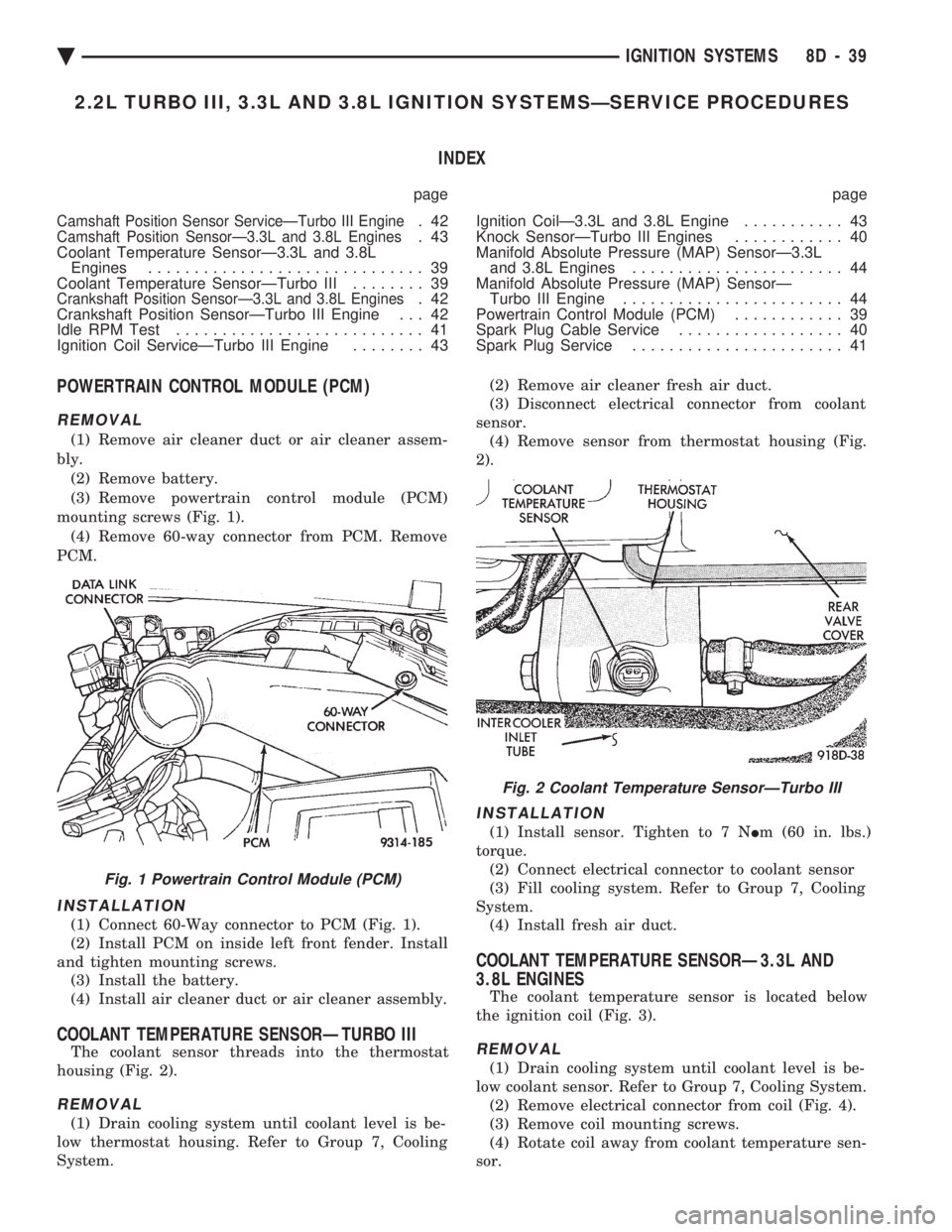
mounting screws (Fig. 1). (4) Remove 60-way connector from PCM. Remove
PCM.
INSTALLATION
(1) Connect 60-Way connector to PCM (Fig. 1).
(2) Install PCM on inside left front fender. Install
and tighten mounting screws. (3) Install the battery.
(4) Install air cleaner duct or air cleaner assembly.
COOLANT TEMPERATURE SENSORÐTURBO III
The coolant sensor threads into the thermostat
housing (Fig. 2).
REMOVAL
(1) Drain cooling system until coolant level is be-
low thermostat housing. Refer to Group 7, Cooling
System. (2) Remove air cleaner fresh air duct.
(3) Disconnect electrical connector from coolant
sensor. (4) Remove sensor from thermostat housing (Fig.
2).
INSTALLATION
(1) Install sensor. Tighten to 7 N Im (60 in. lbs.)
torque. (2) Connect electrical connector to coolant sensor
(3) Fill cooling system. Refer to Group 7, Cooling
System. (4) Install fresh air duct.
COOLANT TEMPERATURE SENSORÐ3.3L AND
3.8L ENGINES
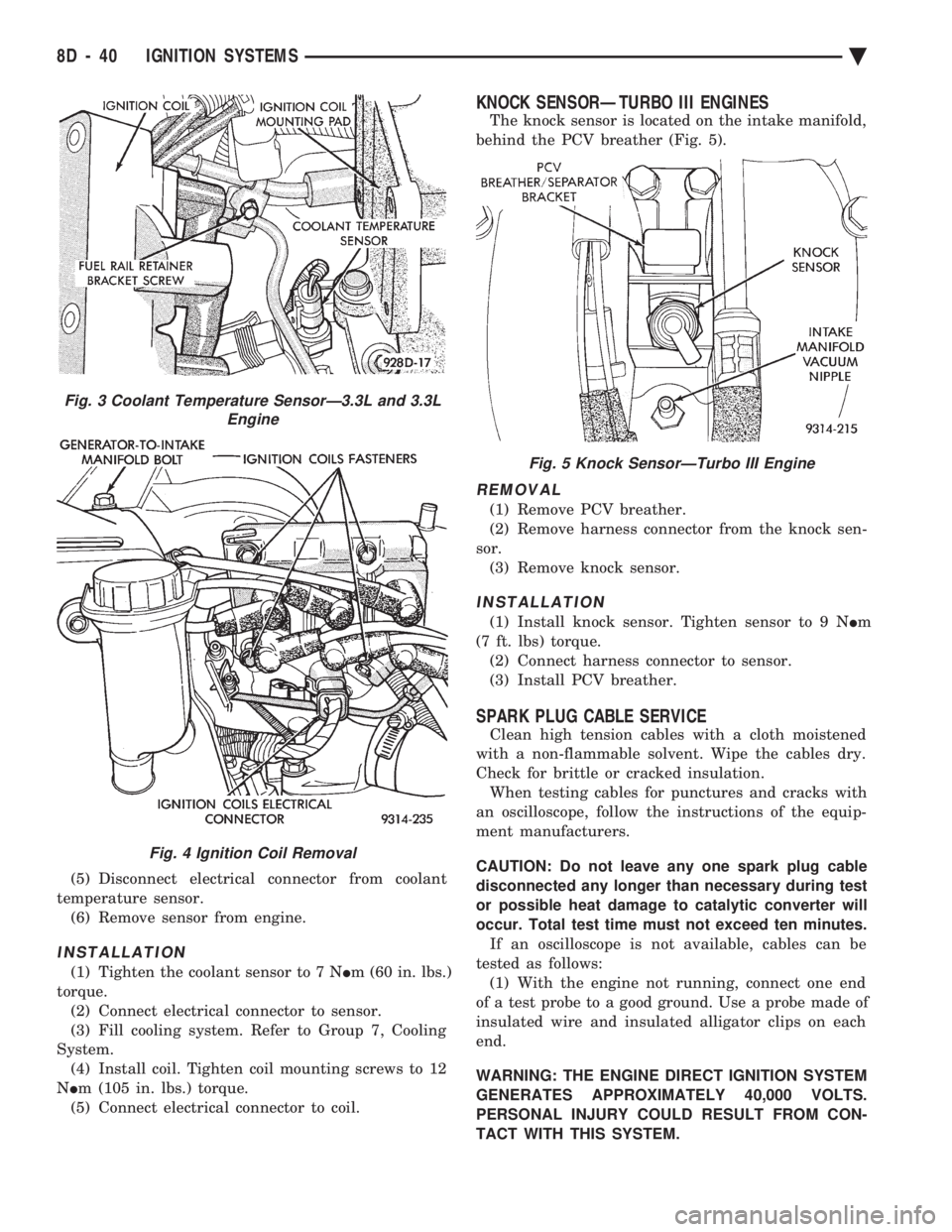
The coolant temperature sensor is located below
the ignition coil (Fig. 3).
REMOVAL
(1) Drain cooling system until coolant level is be-
low coolant sensor. Refer to Group 7, Cooling System. (2) Remove electrical connector from coil (Fig. 4).
(3) Remove coil mounting screws.
(4) Rotate coil away from coolant temperature sen-
sor.
Fig. 1 Powertrain Control Module (PCM)
Fig. 2 Coolant Temperature SensorÐTurbo III
Ä IGNITION SYSTEMS 8D - 39
Page 482 of 2438
(5) Disconnect electrical connector from coolant
temperature sensor. (6) Remove sensor from engine.
INSTALLATION
(1) Tighten the coolant sensor to 7 N Im (60 in. lbs.)
torque. (2) Connect electrical connector to sensor.
(3) Fill cooling system. Refer to Group 7, Cooling
System. (4) Install coil. Tighten coil mounting screws to 12
N Im (105 in. lbs.) torque.
(5) Connect electrical connector to coil.
KNOCK SENSORÐTURBO III ENGINES
The knock sensor is located on the intake manifold,
behind the PCV breather (Fig. 5).
REMOVAL
(1) Remove PCV breather.
(2) Remove harness connector from the knock sen-
sor. (3) Remove knock sensor.
INSTALLATION
(1) Install knock sensor. Tighten sensor to 9 N Im
(7 ft. lbs) torque. (2) Connect harness connector to sensor.
(3) Install PCV breather.
SPARK PLUG CABLE SERVICE
Clean high tension cables with a cloth moistened
with a non-flammable solvent. Wipe the cables dry.
Check for brittle or cracked insulation. When testing cables for punctures and cracks with
an oscilloscope, follow the instructions of the equip-
ment manufacturers.
CAUTION: Do not leave any one spark plug cable
disconnected any longer than necessary during test
or possible heat damage to catalytic converter will
occur. Total test time must not exceed ten minutes. If an oscilloscope is not available, cables can be
tested as follows: (1) With the engine not running, connect one end
of a test probe to a good ground. Use a probe made of
insulated wire and insulated alligator clips on each
end.
WARNING: THE ENGINE DIRECT IGNITION SYSTEM
GENERATES APPROXIMATELY 40,000 VOLTS.
PERSONAL INJURY COULD RESULT FROM CON-
TACT WITH THIS SYSTEM.
Fig. 3 Coolant Temperature SensorÐ3.3L and 3.3L Engine
Fig. 4 Ignition Coil Removal
Fig. 5 Knock SensorÐTurbo III Engine
8D - 40 IGNITION SYSTEMS Ä
Page 484 of 2438
CRANKSHAFT POSITION SENSORÐTURBO III EN-
GINE
REMOVAL
(1) Remove throttle body.
(2) Remove inter-cooler to turbo-charger air hose.
(3) Disconnect crank timing sensor pick-up lead at
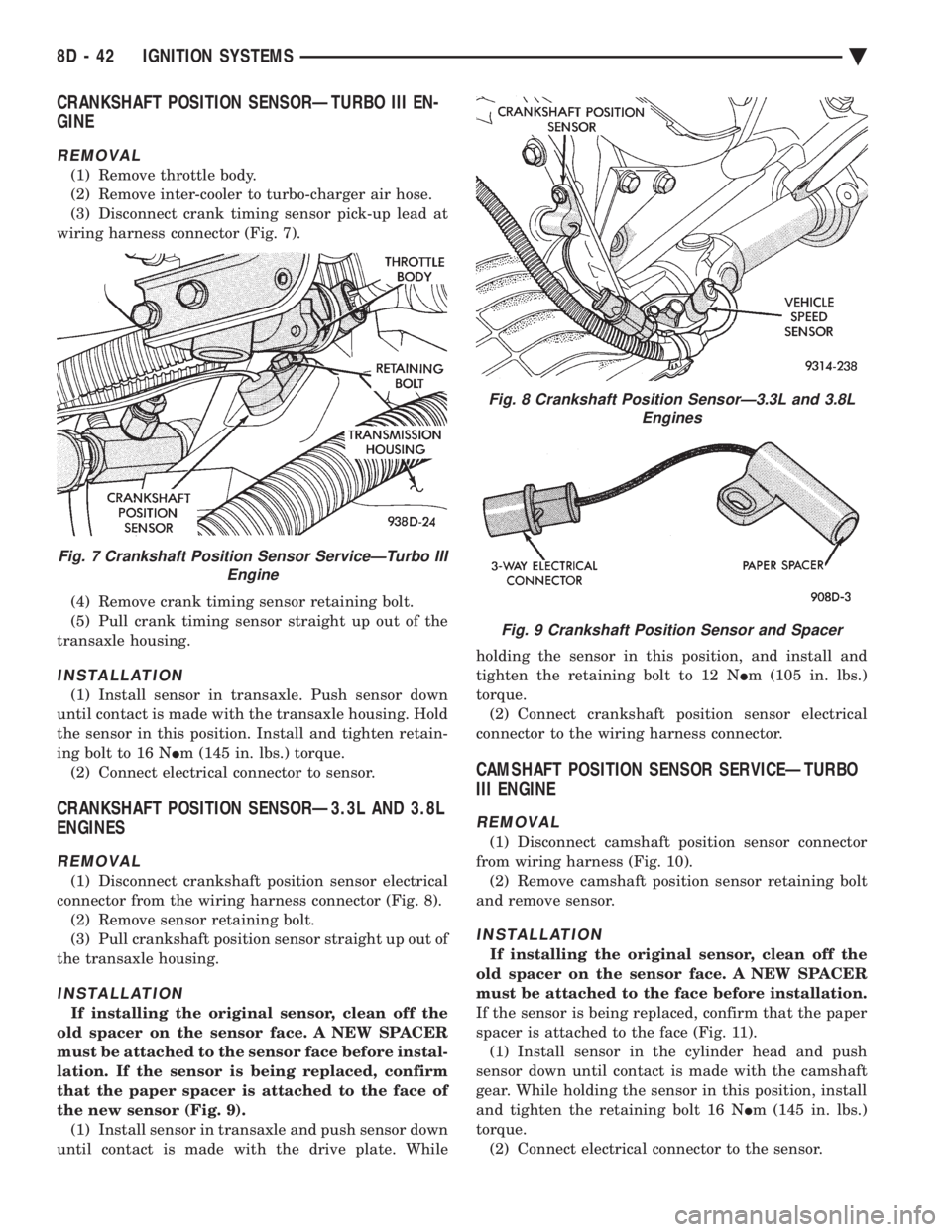
wiring harness connector (Fig. 7).
(4) Remove crank timing sensor retaining bolt.
(5) Pull crank timing sensor straight up out of the
transaxle housing.
INSTALLATION
(1) Install sensor in transaxle. Push sensor down
until contact is made with the transaxle housing. Hold
the sensor in this position. Install and tighten retain-
ing bolt to 16 N Im (145 in. lbs.) torque.
(2) Connect electrical connector to sensor.
CRANKSHAFT POSITION SENSORÐ3.3L AND 3.8L
ENGINES
REMOVAL
(1) Disconnect crankshaft position sensor electrical
connector from the wiring harness connector (Fig. 8). (2) Remove sensor retaining bolt.
(3) Pull crankshaft position sensor straight up out of
the transaxle housing.
INSTALLATION
If installing the original sensor, clean off the
old spacer on the sensor face. A NEW SPACER
must be attached to the sensor face before instal-
lation. If the sensor is being replaced, confirm
that the paper spacer is attached to the face of
the new sensor (Fig. 9). (1) Install sensor in transaxle and push sensor down
until contact is made with the drive plate. While holding the sensor in this position, and install and
tighten the retaining bolt to 12 N
Im (105 in. lbs.)
torque. (2) Connect crankshaft position sensor electrical
connector to the wiring harness connector.
CAMSHAFT POSITION SENSOR SERVICEÐTURBO
III ENGINE
REMOVAL
(1) Disconnect camshaft position sensor connector
from wiring harness (Fig. 10). (2) Remove camshaft position sensor retaining bolt
and remove sensor.
INSTALLATION
If installing the original sensor, clean off the
old spacer on the sensor face. A NEW SPACER
must be attached to the face before installation.
If the sensor is being replaced, confirm that the paper
spacer is attached to the face (Fig. 11). (1) Install sensor in the cylinder head and push
sensor down until contact is made with the camshaft
gear. While holding the sensor in this position, install
and tighten the retaining bolt 16 N Im (145 in. lbs.)
torque. (2) Connect electrical connector to the sensor.
Fig. 7 Crankshaft Position Sensor ServiceÐTurbo III Engine
Fig. 8 Crankshaft Position SensorÐ3.3L and 3.8LEngines
Fig. 9 Crankshaft Position Sensor and Spacer
8D - 42 IGNITION SYSTEMS Ä
Page 485 of 2438
CAMSHAFT POSITION SENSORÐ3.3L AND 3.8L
ENGINES
REMOVAL
(1) Disconnect camshaft position sensor electrical
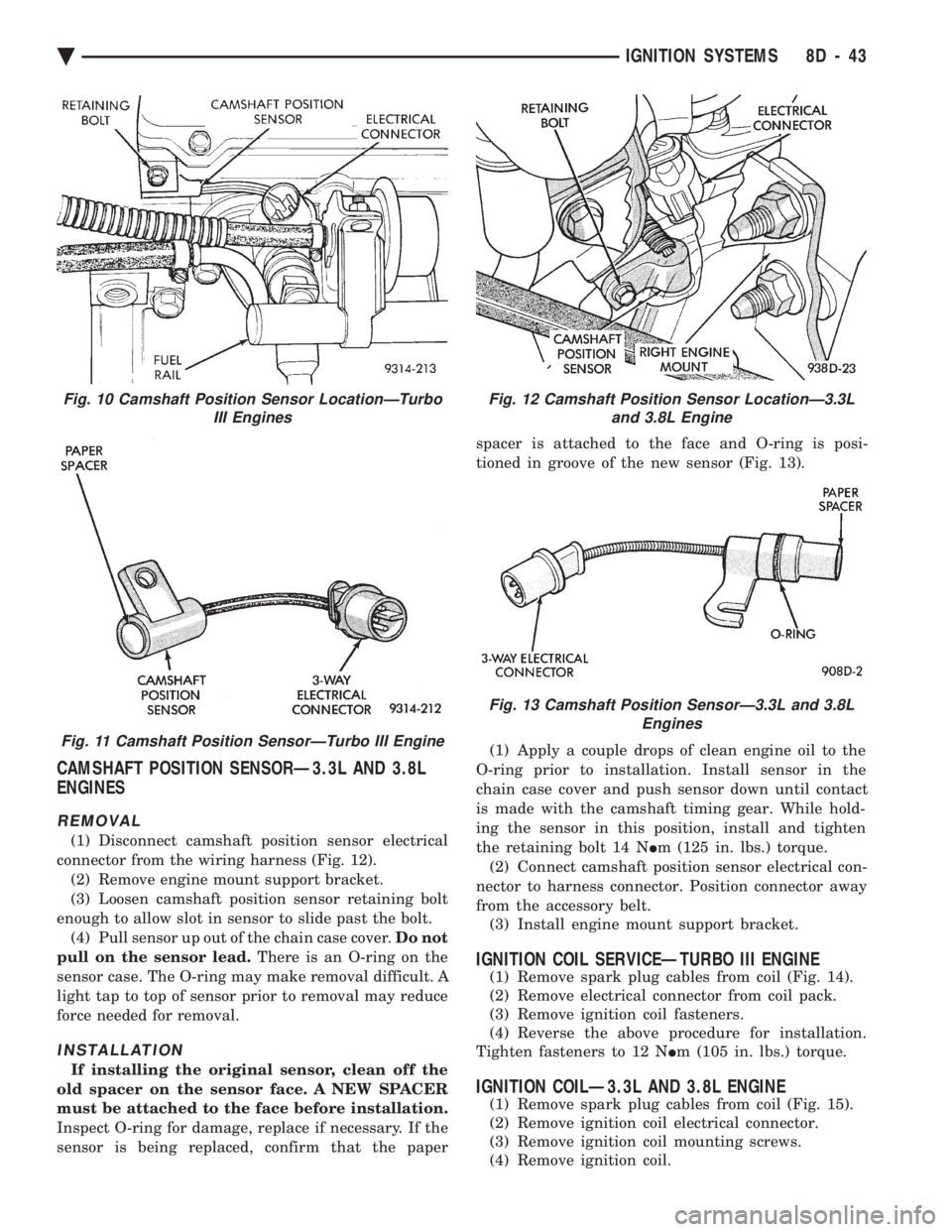
connector from the wiring harness (Fig. 12). (2) Remove engine mount support bracket.
(3) Loosen camshaft position sensor retaining bolt
enough to allow slot in sensor to slide past the bolt. (4) Pull sensor up out of the chain case cover. Do not
pull on the sensor lead. There is an O-ring on the
sensor case. The O-ring may make removal difficult. A
light tap to top of sensor prior to removal may reduce
force needed for removal.
INSTALLATION
If installing the original sensor, clean off the
old spacer on the sensor face. A NEW SPACER
must be attached to the face before installation.
Inspect O-ring for damage, replace if necessary. If the
sensor is being replaced, confirm that the paper spacer is attached to the face and O-ring is posi-
tioned in groove of the new sensor (Fig. 13).
(1) Apply a couple drops of clean engine oil to the
O-ring prior to installation. Install sensor in the
chain case cover and push sensor down until contact
is made with the camshaft timing gear. While hold-
ing the sensor in this position, install and tighten
the retaining bolt 14 N Im (125 in. lbs.) torque.
(2) Connect camshaft position sensor electrical con-
nector to harness connector. Position connector away
from the accessory belt. (3) Install engine mount support bracket.
IGNITION COIL SERVICEÐTURBO III ENGINE
(1) Remove spark plug cables from coil (Fig. 14).
(2) Remove electrical connector from coil pack.
(3) Remove ignition coil fasteners.
(4) Reverse the above procedure for installation.
Tighten fasteners to 12 N Im (105 in. lbs.) torque.
IGNITION COILÐ3.3L AND 3.8L ENGINE
(1) Remove spark plug cables from coil (Fig. 15).
(2) Remove ignition coil electrical connector.
(3) Remove ignition coil mounting screws.
(4) Remove ignition coil.
Fig. 12 Camshaft Position Sensor LocationÐ3.3L and 3.8L Engine
Fig. 13 Camshaft Position SensorÐ3.3L and 3.8L Engines
Fig. 10 Camshaft Position Sensor LocationÐTurboIII Engines
Fig. 11 Camshaft Position SensorÐTurbo III Engine
Ä IGNITION SYSTEMS 8D - 43
Page 486 of 2438
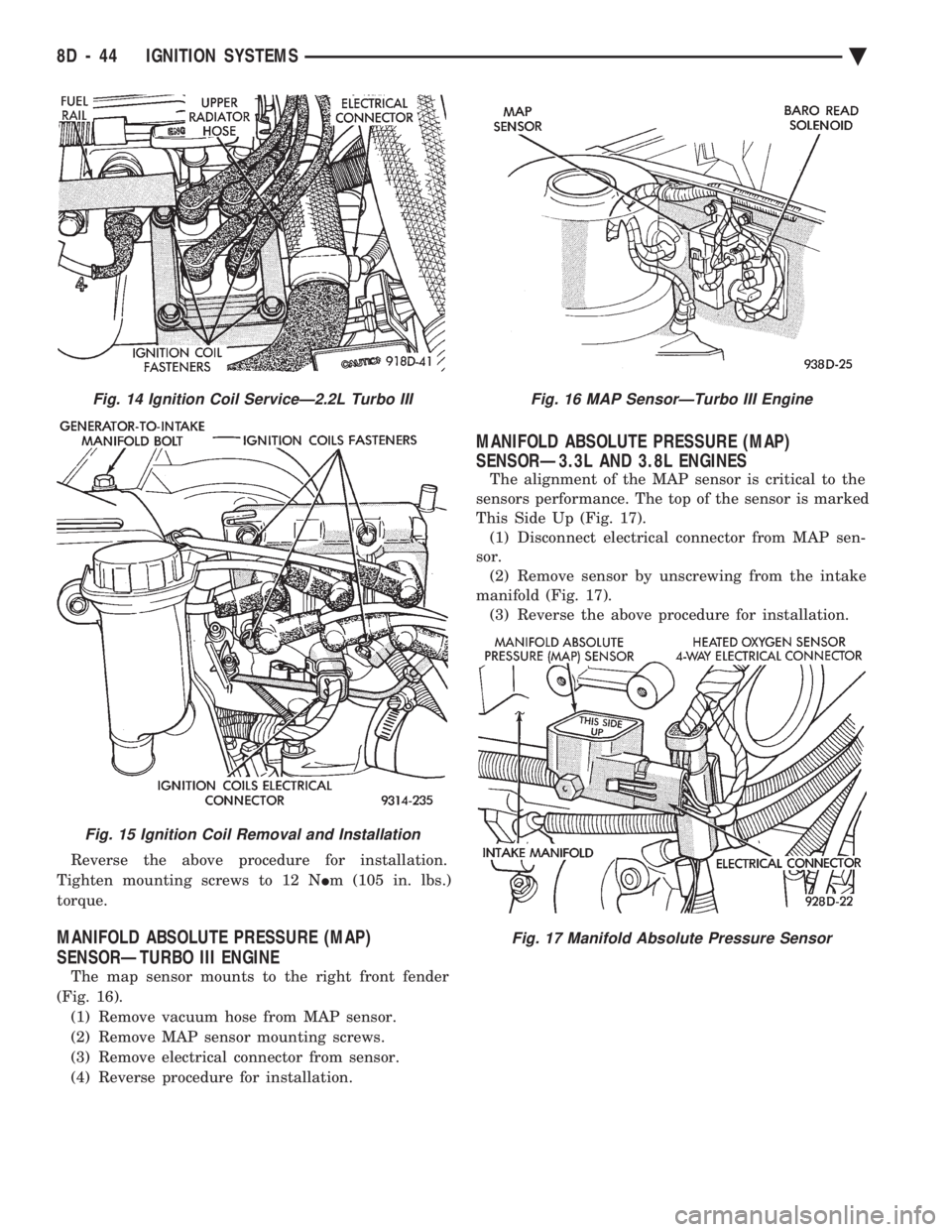
Reverse the above procedure for installation.
Tighten mounting screws to 12 N Im (105 in. lbs.)
torque.
MANIFOLD ABSOLUTE PRESSURE (MAP)
SENSORÐTURBO III ENGINE
The map sensor mounts to the right front fender
(Fig. 16). (1) Remove vacuum hose from MAP sensor.
(2) Remove MAP sensor mounting screws.
(3) Remove electrical connector from sensor.
(4) Reverse procedure for installation.
MANIFOLD ABSOLUTE PRESSURE (MAP)
SENSORÐ3.3L AND 3.8L ENGINES
The alignment of the MAP sensor is critical to the
sensors performance. The top of the sensor is marked
This Side Up (Fig. 17). (1) Disconnect electrical connector from MAP sen-
sor. (2) Remove sensor by unscrewing from the intake
manifold (Fig. 17). (3) Reverse the above procedure for installation.
Fig. 14 Ignition Coil ServiceÐ2.2L Turbo III
Fig. 15 Ignition Coil Removal and Installation
Fig. 16 MAP SensorÐTurbo III Engine
Fig. 17 Manifold Absolute Pressure Sensor
8D - 44 IGNITION SYSTEMS Ä
Page 502 of 2438
(4) Check cavity H of the black connector for con-
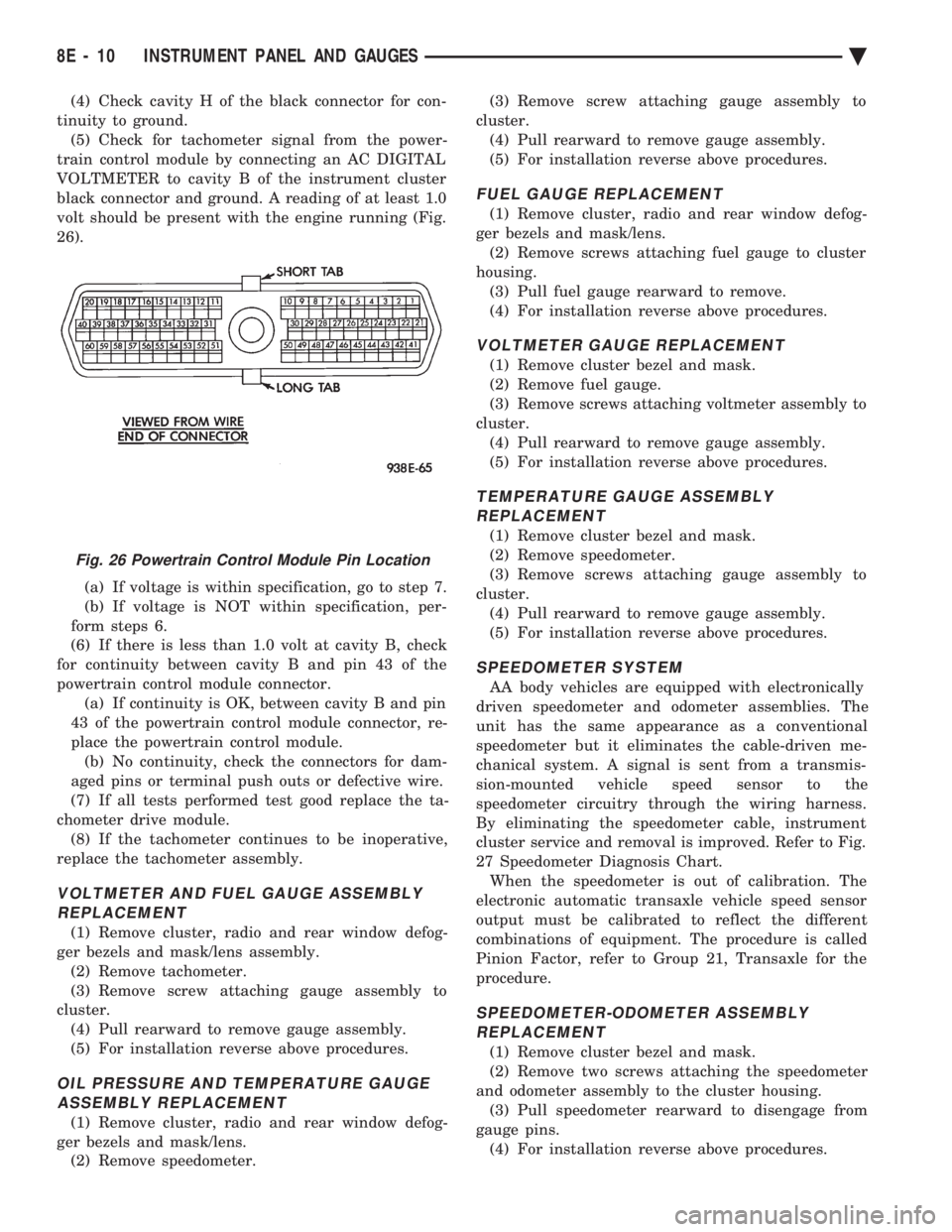
tinuity to ground. (5) Check for tachometer signal from the power-
train control module by connecting an AC DIGITAL
VOLTMETER to cavity B of the instrument cluster
black connector and ground. A reading of at least 1.0
volt should be present with the engine running (Fig.
26).
(a) If voltage is within specification, go to step 7.
(b) If voltage is NOT within specification, per-
form steps 6.
(6) If there is less than 1.0 volt at cavity B, check
for continuity between cavity B and pin 43 of the
powertrain control module connector. (a) If continuity is OK, between cavity B and pin
43 of the powertrain control module connector, re-
place the powertrain control module. (b) No continuity, check the connectors for dam-
aged pins or terminal push outs or defective wire.
(7) If all tests performed test good replace the ta-
chometer drive module. (8) If the tachometer continues to be inoperative,
replace the tachometer assembly.
VOLTMETER AND FUEL GAUGE ASSEMBLY REPLACEMENT
(1) Remove cluster, radio and rear window defog-
ger bezels and mask/lens assembly. (2) Remove tachometer.
(3) Remove screw attaching gauge assembly to
cluster. (4) Pull rearward to remove gauge assembly.
(5) For installation reverse above procedures.
OIL PRESSURE AND TEMPERATURE GAUGEASSEMBLY REPLACEMENT
(1) Remove cluster, radio and rear window defog-
ger bezels and mask/lens. (2) Remove speedometer. (3) Remove screw attaching gauge assembly to
cluster. (4) Pull rearward to remove gauge assembly.
(5) For installation reverse above procedures.
FUEL GAUGE REPLACEMENT
(1) Remove cluster, radio and rear window defog-
ger bezels and mask/lens. (2) Remove screws attaching fuel gauge to cluster
housing. (3) Pull fuel gauge rearward to remove.
(4) For installation reverse above procedures.
VOLTMETER GAUGE REPLACEMENT
(1) Remove cluster bezel and mask.
(2) Remove fuel gauge.
(3) Remove screws attaching voltmeter assembly to
cluster. (4) Pull rearward to remove gauge assembly.
(5) For installation reverse above procedures.
TEMPERATURE GAUGE ASSEMBLY REPLACEMENT
(1) Remove cluster bezel and mask.
(2) Remove speedometer.
(3) Remove screws attaching gauge assembly to
cluster. (4) Pull rearward to remove gauge assembly.
(5) For installation reverse above procedures.
SPEEDOMETER SYSTEM
AA body vehicles are equipped with electronically
driven speedometer and odometer assemblies. The
unit has the same appearance as a conventional
speedometer but it eliminates the cable-driven me-
chanical system. A signal is sent from a transmis-
sion-mounted vehicle speed sensor to the
speedometer circuitry through the wiring harness.
By eliminating the speedometer cable, instrument
cluster service and removal is improved. Refer to Fig.
27 Speedometer Diagnosis Chart. When the speedometer is out of calibration. The
electronic automatic transaxle vehicle speed sensor
output must be calibrated to reflect the different
combinations of equipment. The procedure is called
Pinion Factor, refer to Group 21, Transaxle for the
procedure.
SPEEDOMETER-ODOMETER ASSEMBLY REPLACEMENT
(1) Remove cluster bezel and mask.
(2) Remove two screws attaching the speedometer
and odometer assembly to the cluster housing. (3) Pull speedometer rearward to disengage from
gauge pins. (4) For installation reverse above procedures.
Fig. 26 Powertrain Control Module Pin Location
8E - 10 INSTRUMENT PANEL AND GAUGES Ä
Page 503 of 2438
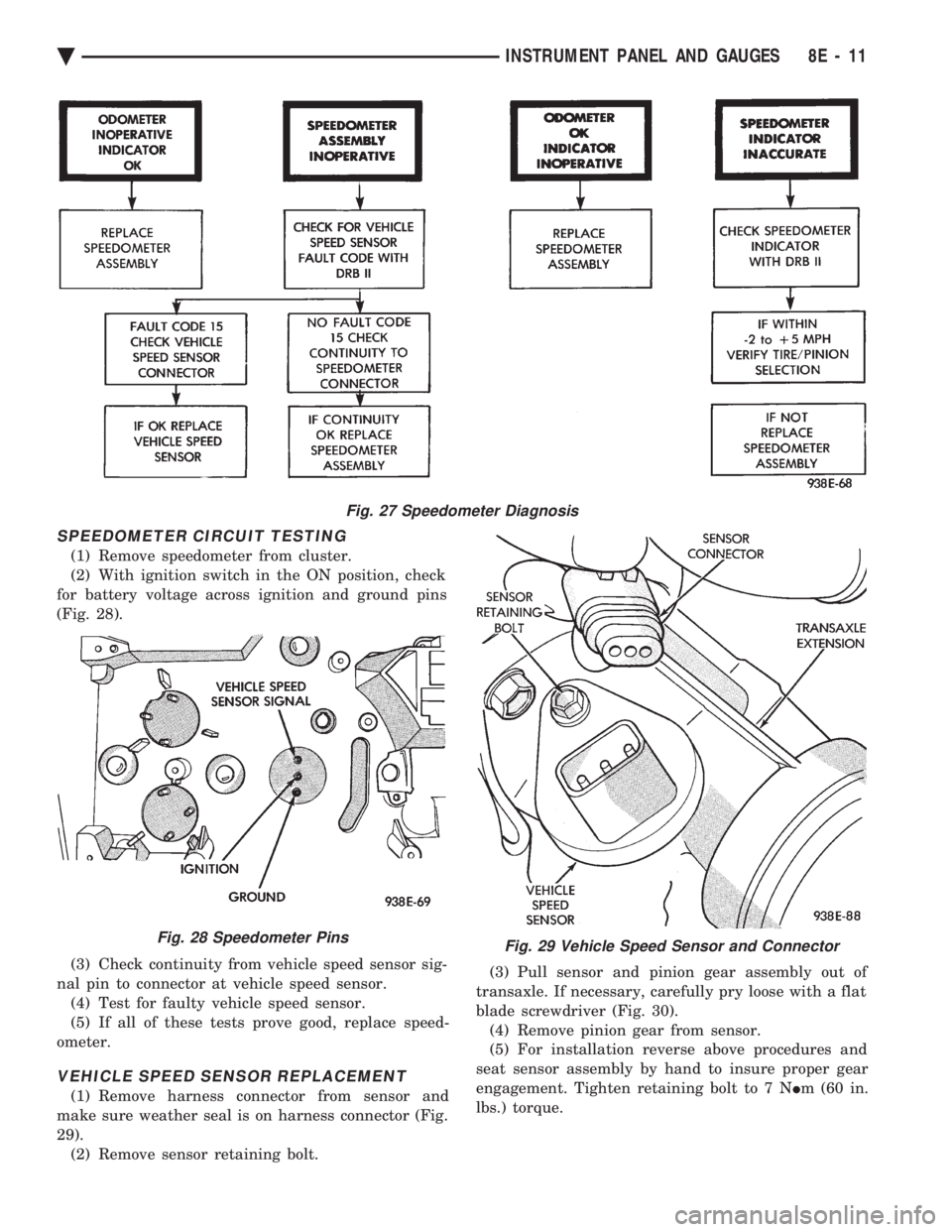
SPEEDOMETER CIRCUIT TESTING
(1) Remove speedometer from cluster.
(2) With ignition switch in the ON position, check
for battery voltage across ignition and ground pins
(Fig. 28).
(3) Check continuity from vehicle speed sensor sig-
nal pin to connector at vehicle speed sensor. (4) Test for faulty vehicle speed sensor.
(5) If all of these tests prove good, replace speed-
ometer.
VEHICLE SPEED SENSOR REPLACEMENT
(1) Remove harness connector from sensor and
make sure weather seal is on harness connector (Fig.
29). (2) Remove sensor retaining bolt. (3) Pull sensor and pinion gear assembly out of
transaxle. If necessary, carefully pry loose with a flat
blade screwdriver (Fig. 30). (4) Remove pinion gear from sensor.
(5) For installation reverse above procedures and
seat sensor assembly by hand to insure proper gear
engagement. Tighten retaining bolt to 7 N Im (60 in.
lbs.) torque.
Fig. 27 Speedometer Diagnosis
Fig. 28 Speedometer PinsFig. 29 Vehicle Speed Sensor and Connector
Ä INSTRUMENT PANEL AND GAUGES 8E - 11
Page 504 of 2438
ELECTRONIC AUTOMATIC TRANSAXLE VEHICLE SPEED SENSOR REPLACEMENT
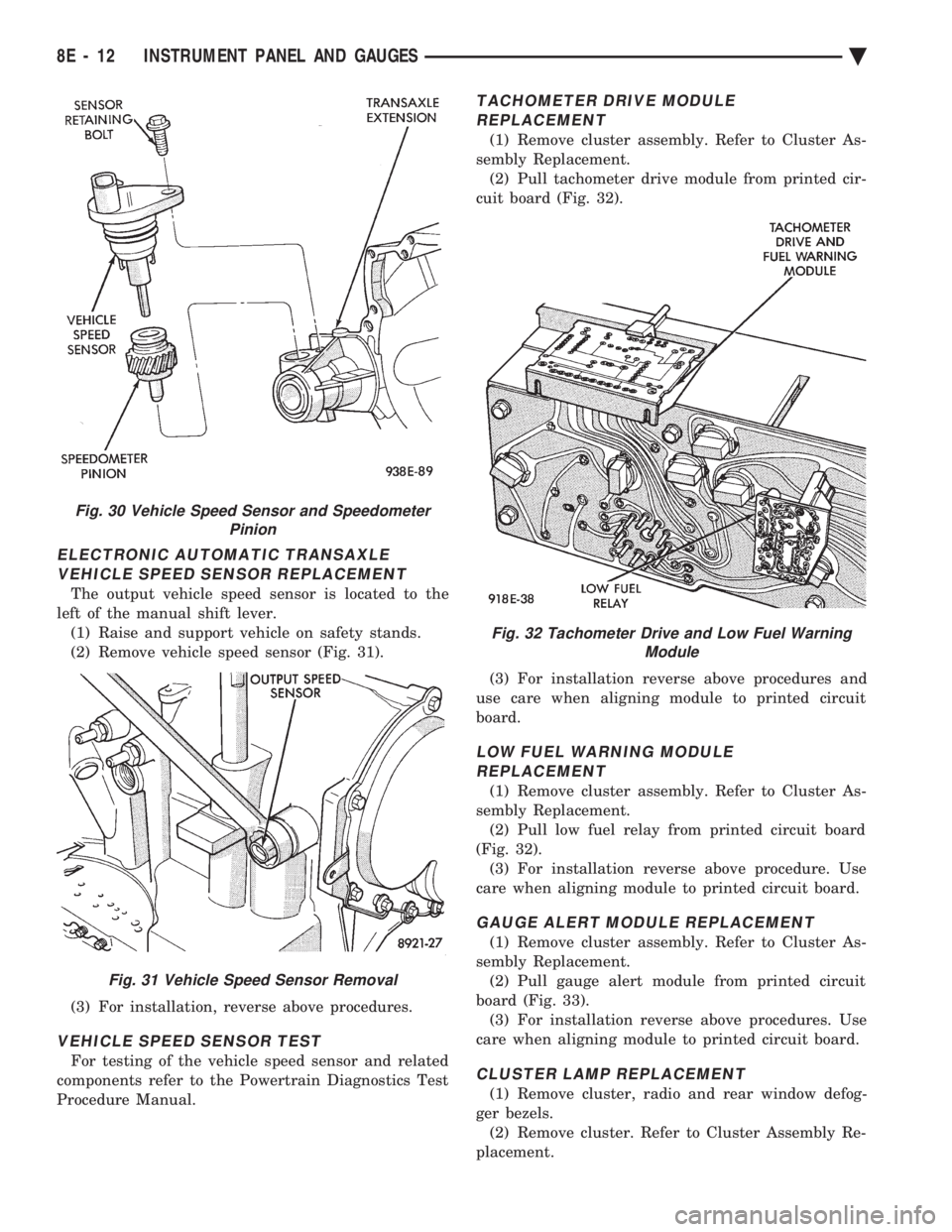
The output vehicle speed sensor is located to the
left of the manual shift lever. (1) Raise and support vehicle on safety stands.
(2) Remove vehicle speed sensor (Fig. 31).
(3) For installation, reverse above procedures.
VEHICLE SPEED SENSOR TEST
For testing of the vehicle speed sensor and related
components refer to the Powertrain Diagnostics Test
Procedure Manual.
TACHOMETER DRIVE MODULE REPLACEMENT
(1) Remove cluster assembly. Refer to Cluster As-
sembly Replacement. (2) Pull tachometer drive module from printed cir-
cuit board (Fig. 32).
(3) For installation reverse above procedures and
use care when aligning module to printed circuit
board.
LOW FUEL WARNING MODULE REPLACEMENT
(1) Remove cluster assembly. Refer to Cluster As-
sembly Replacement. (2) Pull low fuel relay from printed circuit board
(Fig. 32). (3) For installation reverse above procedure. Use
care when aligning module to printed circuit board.
GAUGE ALERT MODULE REPLACEMENT
(1) Remove cluster assembly. Refer to Cluster As-
sembly Replacement. (2) Pull gauge alert module from printed circuit
board (Fig. 33). (3) For installation reverse above procedures. Use
care when aligning module to printed circuit board.
CLUSTER LAMP REPLACEMENT
(1) Remove cluster, radio and rear window defog-
ger bezels. (2) Remove cluster. Refer to Cluster Assembly Re-
placement.
Fig. 30 Vehicle Speed Sensor and Speedometer Pinion
Fig. 31 Vehicle Speed Sensor Removal
Fig. 32 Tachometer Drive and Low Fuel WarningModule
8E - 12 INSTRUMENT PANEL AND GAUGES Ä
Page 505 of 2438
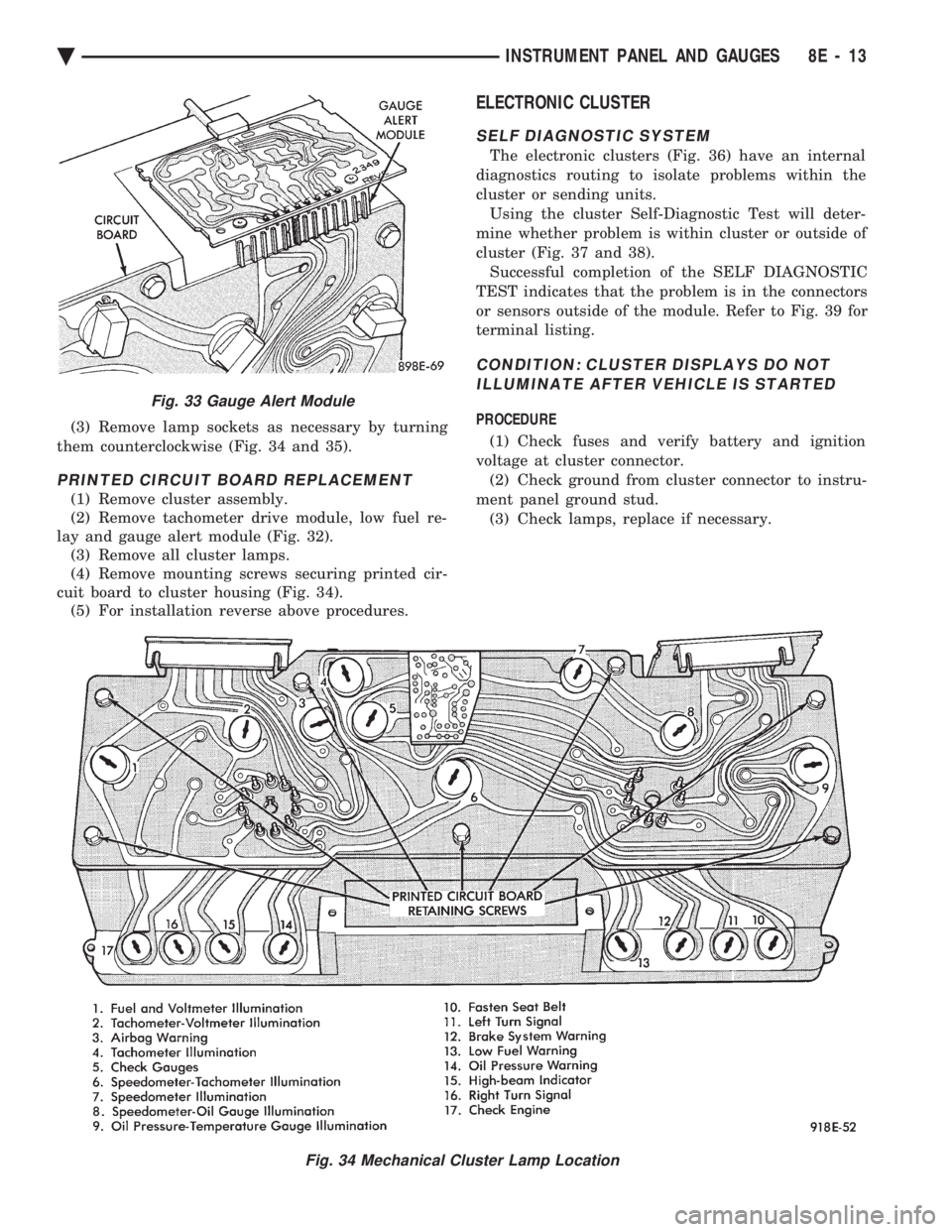
(3) Remove lamp sockets as necessary by turning
them counterclockwise (Fig. 34 and 35).
PRINTED CIRCUIT BOARD REPLACEMENT
(1) Remove cluster assembly.
(2) Remove tachometer drive module, low fuel re-
lay and gauge alert module (Fig. 32). (3) Remove all cluster lamps.
(4) Remove mounting screws securing printed cir-
cuit board to cluster housing (Fig. 34). (5) For installation reverse above procedures.
ELECTRONIC CLUSTER
SELF DIAGNOSTIC SYSTEM
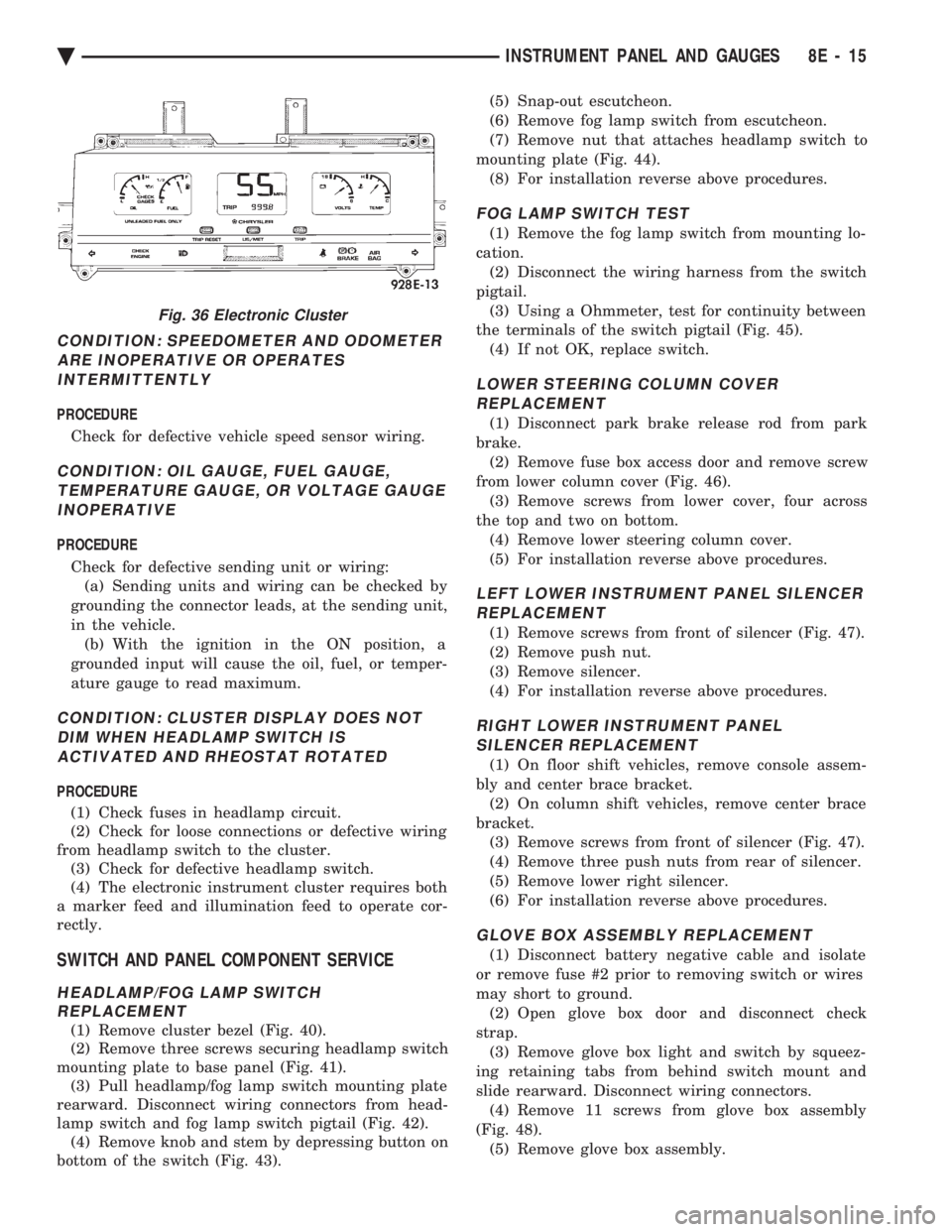
The electronic clusters (Fig. 36) have an internal
diagnostics routing to isolate problems within the
cluster or sending units. Using the cluster Self-Diagnostic Test will deter-
mine whether problem is within cluster or outside of
cluster (Fig. 37 and 38). Successful completion of the SELF DIAGNOSTIC
TEST indicates that the problem is in the connectors
or sensors outside of the module. Refer to Fig. 39 for
terminal listing.
CONDITION: CLUSTER DISPLAYS DO NOT ILLUMINATE AFTER VEHICLE IS STARTED
PROCEDURE
(1) Check fuses and verify battery and ignition
voltage at cluster connector. (2) Check ground from cluster connector to instru-
ment panel ground stud. (3) Check lamps, replace if necessary.
Fig. 34 Mechanical Cluster Lamp Location
Fig. 33 Gauge Alert Module
Ä INSTRUMENT PANEL AND GAUGES 8E - 13
Page 507 of 2438
CONDITION: SPEEDOMETER AND ODOMETER ARE INOPERATIVE OR OPERATESINTERMITTENTLY
PROCEDURE
Check for defective vehicle speed sensor wiring.
CONDITION: OIL GAUGE, FUEL GAUGE, TEMPERATURE GAUGE, OR VOLTAGE GAUGEINOPERATIVE
PROCEDURE
Check for defective sending unit or wiring: (a) Sending units and wiring can be checked by
grounding the connector leads, at the sending unit,
in the vehicle. (b) With the ignition in the ON position, a
grounded input will cause the oil, fuel, or temper-
ature gauge to read maximum.
CONDITION: CLUSTER DISPLAY DOES NOT DIM WHEN HEADLAMP SWITCH ISACTIVATED AND RHEOSTAT ROTATED
PROCEDURE
(1) Check fuses in headlamp circuit.
(2) Check for loose connections or defective wiring
from headlamp switch to the cluster. (3) Check for defective headlamp switch.
(4) The electronic instrument cluster requires both
a marker feed and illumination feed to operate cor-
rectly.
SWITCH AND PANEL COMPONENT SERVICE
HEADLAMP/FOG LAMP SWITCH REPLACEMENT
(1) Remove cluster bezel (Fig. 40).
(2) Remove three screws securing headlamp switch
mounting plate to base panel (Fig. 41). (3) Pull headlamp/fog lamp switch mounting plate
rearward. Disconnect wiring connectors from head-
lamp switch and fog lamp switch pigtail (Fig. 42). (4) Remove knob and stem by depressing button on
bottom of the switch (Fig. 43). (5) Snap-out escutcheon.
(6) Remove fog lamp switch from escutcheon.
(7) Remove nut that attaches headlamp switch to
mounting plate (Fig. 44). (8) For installation reverse above procedures.
FOG LAMP SWITCH TEST
(1) Remove the fog lamp switch from mounting lo-
cation. (2) Disconnect the wiring harness from the switch
pigtail. (3) Using a Ohmmeter, test for continuity between
the terminals of the switch pigtail (Fig. 45). (4) If not OK, replace switch.
LOWER STEERING COLUMN COVERREPLACEMENT
(1) Disconnect park brake release rod from park
brake. (2) Remove fuse box access door and remove screw
from lower column cover (Fig. 46). (3) Remove screws from lower cover, four across
the top and two on bottom. (4) Remove lower steering column cover.
(5) For installation reverse above procedures.
LEFT LOWER INSTRUMENT PANEL SILENCER REPLACEMENT
(1) Remove screws from front of silencer (Fig. 47).
(2) Remove push nut.
(3) Remove silencer.
(4) For installation reverse above procedures.
RIGHT LOWER INSTRUMENT PANEL SILENCER REPLACEMENT
(1) On floor shift vehicles, remove console assem-
bly and center brace bracket. (2) On column shift vehicles, remove center brace
bracket. (3) Remove screws from front of silencer (Fig. 47).
(4) Remove three push nuts from rear of silencer.
(5) Remove lower right silencer.
(6) For installation reverse above procedures.
GLOVE BOX ASSEMBLY REPLACEMENT
(1) Disconnect battery negative cable and isolate
or remove fuse #2 prior to removing switch or wires
may short to ground. (2) Open glove box door and disconnect check
strap. (3) Remove glove box light and switch by squeez-
ing retaining tabs from behind switch mount and
slide rearward. Disconnect wiring connectors. (4) Remove 11 screws from glove box assembly
(Fig. 48). (5) Remove glove box assembly.
Fig. 36 Electronic Cluster
Ä INSTRUMENT PANEL AND GAUGES 8E - 15