change time CHEVROLET EPICA 2006 1.G Owners Manual
[x] Cancel search | Manufacturer: CHEVROLET, Model Year: 2006, Model line: EPICA, Model: CHEVROLET EPICA 2006 1.GPages: 368, PDF Size: 2.24 MB
Page 2 of 368
GENERAL MOTORS, GM, the GM Emblem,
CHEVROLET, and the CHEVROLET Emblem are
registered trademarks; and the name EPICA is a
trademark of General Motors Corporation.
This manual includes the latest information at the time
it was printed. We reserve the right to make changes
after that time without further notice. For vehicles
first sold in Canada, substitute the name “General
Motors of Canada Limited” for Chevrolet Motor Division
whenever it appears in this manual.
Keep this manual in the vehicle, so it will be there if it
is needed while you are on the road. If the vehicle
is sold, leave this manual in the vehicle.
Canadian Owners
A French language copy of this manual can be obtained
from your dealer or from:
Helm, Incorporated
P.O. Box 07130
Detroit, MI 48207
How to Use This Manual
Many people read the owner manual from beginning to
end when they first receive their new vehicle. If this
is done, it can help you learn about the features
and controls for the vehicle. Pictures and words work
together in the owner manual to explain things.
Index
A good place to quickly locate information about the
vehicle is the Index in the back of the manual. It is
an alphabetical list of what is in the manual and
the page number where it can be found.
Litho in U.S.A.
Part No. 06EPICA A First Printing
©2005 General Motors Corporation. All Rights Reserved.
ii
Page 36 of 368
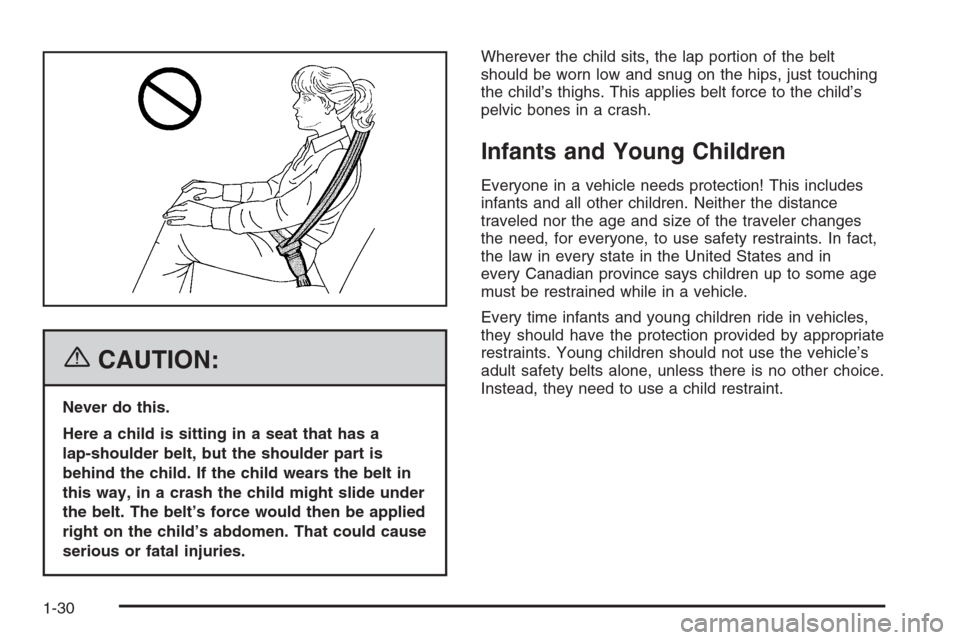
{CAUTION:
Never do this.
Here a child is sitting in a seat that has a
lap-shoulder belt, but the shoulder part is
behind the child. If the child wears the belt in
this way, in a crash the child might slide under
the belt. The belt’s force would then be applied
right on the child’s abdomen. That could cause
serious or fatal injuries.Wherever the child sits, the lap portion of the belt
should be worn low and snug on the hips, just touching
the child’s thighs. This applies belt force to the child’s
pelvic bones in a crash.
Infants and Young Children
Everyone in a vehicle needs protection! This includes
infants and all other children. Neither the distance
traveled nor the age and size of the traveler changes
the need, for everyone, to use safety restraints. In fact,
the law in every state in the United States and in
every Canadian province says children up to some age
must be restrained while in a vehicle.
Every time infants and young children ride in vehicles,
they should have the protection provided by appropriate
restraints. Young children should not use the vehicle’s
adult safety belts alone, unless there is no other choice.
Instead, they need to use a child restraint.
1-30
Page 75 of 368
Press the button again to unlock all of the doors. The
hazard lamps will flash twice to indicate that unlocking
has occurred and the theft-deterrent system will
deactivate.
If the door is not opened or if the engine is not started
within 30 seconds after unlocking the doors with the
transmitter, all of the doors will automatically lock and
the theft-deterrent system will re-activate.
V(Trunk):Press and hold this button for
approximately one second to unlock the trunk. The horn
will chirp twice to indicate that the trunk is unlocked.
The LED light on the transmitter will flash when
the buttons on the transmitter are pressed.
The buttons, on the remote keyless entry transmitter,
will not operate and the theft-deterrent system will
not activate while the key is in the ignition. See
Theft-Deterrent System on page 2-14for additional
information.
Matching Transmitter(s) to
Your Vehicle
Each remote keyless entry transmitter is coded to
prevent another transmitter from unlocking your vehicle.
If a transmitter is lost or stolen, a replacement can
be purchased through your dealer. Remember to bring
any remaining transmitters with you when you go to
your dealer. When the dealer matches the replacement
transmitter to your vehicle, any remaining transmitters
must also be matched. Once your dealer has coded the
new transmitter, the lost transmitter will not unlock
your vehicle. Each vehicle can have a maximum of
two transmitters matched to it.
Battery Replacement
Under normal use, the battery in your remote keyless
entry transmitter should last about two years.
You can tell the battery is weak if the LED light fails to
light or if the transmitter will not work at the normal
range in any location. If you have to get close to your
vehicle before the transmitter works, it is probably
time to change the battery.
2-5
Page 89 of 368
Starting the Engine
Move your shift lever to PARK (P) or NEUTRAL (N).
The engine will not start in any other position — that
is a safety feature. To restart when you are already
moving, use NEUTRAL (N) only.
Notice:Shifting into PARK (P) with the vehicle
moving could damage the transaxle. Shift into
PARK (P) only when your vehicle is stopped.
1. With your foot off the accelerator pedal, turn the
ignition key to START. When the engine starts,
let go of the key. The idle speed will go down as
the engine gets warm.
Notice:Holding your key in START for longer
than 15 seconds at a time will cause your battery
to be drained much sooner. And the excessive
heat can damage your starter motor. Wait about
15 seconds between each try to help avoid draining
your battery or damaging your starter.
2. If the engine does not start within 10 seconds,
hold your key in START for about 10 seconds
at a time until the engine starts. Wait about
15 seconds between each try.When your engine has run for about 10 seconds
to warm up, your vehicle is ready to be driven.
Do not race your engine when it is cold.
If the weather is below freezing (32°F or 0°C),
let the engine run for a few minutes to warm up.
3. If your engine still will not start, or starts but then
stops, it could be flooded with too much gasoline.
Try pushing your accelerator pedal all the way to
the floor and holding it there as you hold the key
in START for about three seconds. If the vehicle
starts briefly but then stops again, do the same
thing. This time keep the pedal down for five or
six seconds to clear the extra gasoline from
the engine. After waiting about 15 seconds,
repeat the normal starting procedure.
Notice:Your engine is designed to work with the
electronics in your vehicle. If you add electrical
parts or accessories, you could change the way the
engine operates. Before adding electrical equipment,
check with your dealer. If you do not, your engine
might not perform properly. Any resulting damage
would not be covered by your vehicle’s warranty.
2-19
Page 101 of 368
Mirrors
Manual Rearview Mirror
While sitting in a comfortable driving position, adjust
the mirror so you can see clearly behind your vehicle.
Grip the mirror in the center to move it up or down
and side to side. The control at the bottom of the mirror
is the day/night feature that allows adjustment to the
mirror so that the glare of headlamps from behind
is reduced. Push the control for daytime use; pull it
for night use.
Automatic Dimming Rearview Mirror
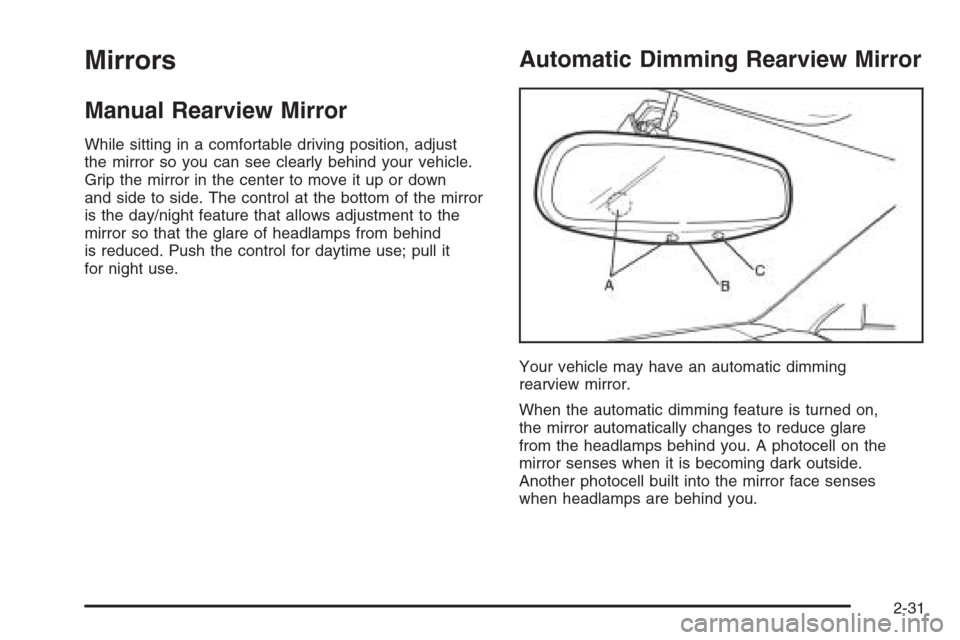
Your vehicle may have an automatic dimming
rearview mirror.
When the automatic dimming feature is turned on,
the mirror automatically changes to reduce glare
from the headlamps behind you. A photocell on the
mirror senses when it is becoming dark outside.
Another photocell built into the mirror face senses
when headlamps are behind you.
2-31
Page 102 of 368
At night, when the glare is too high, the mirror will
gradually darken to reduce glare. This change may
take a few seconds. The mirror will return to its clear
daytime state when the glare is reduced.
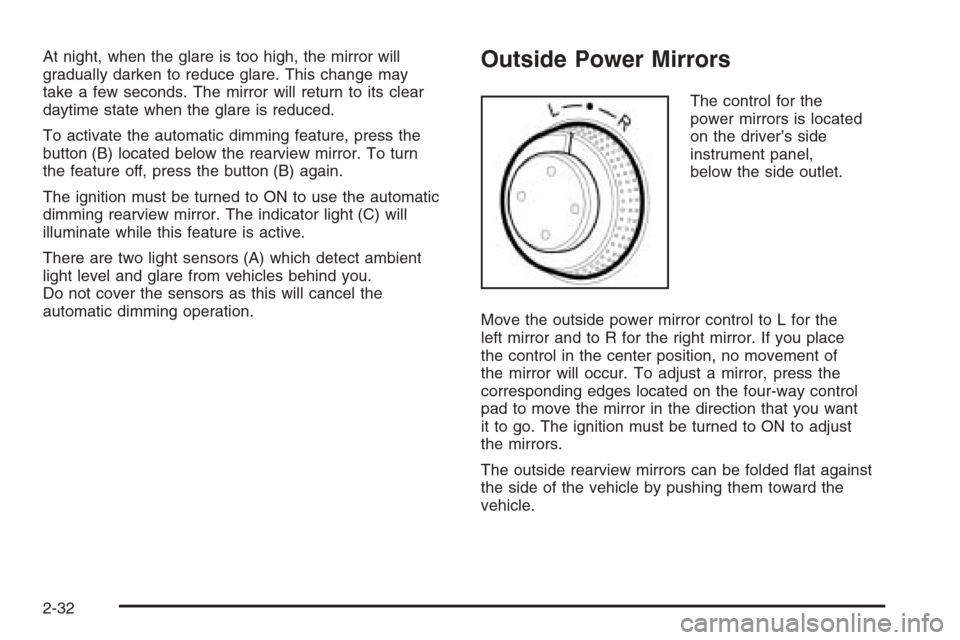
To activate the automatic dimming feature, press the
button (B) located below the rearview mirror. To turn
the feature off, press the button (B) again.
The ignition must be turned to ON to use the automatic
dimming rearview mirror. The indicator light (C) will
illuminate while this feature is active.
There are two light sensors (A) which detect ambient
light level and glare from vehicles behind you.
Do not cover the sensors as this will cancel the
automatic dimming operation.Outside Power Mirrors
The control for the
power mirrors is located
on the driver’s side
instrument panel,
below the side outlet.
Move the outside power mirror control to L for the
left mirror and to R for the right mirror. If you place
the control in the center position, no movement of
the mirror will occur. To adjust a mirror, press the
corresponding edges located on the four-way control
pad to move the mirror in the direction that you want
it to go. The ignition must be turned to ON to adjust
the mirrors.
The outside rearview mirrors can be folded flat against
the side of the vehicle by pushing them toward the
vehicle.
2-32
Page 107 of 368
Instrument Panel Overview...............................3-4
Hazard Warning Flashers................................3-6
Other Warning Devices...................................3-6
Horn .............................................................3-6
Tilt Wheel.....................................................3-6
Turn Signal/Multifunction Lever.........................3-7
Turn and Lane-Change Signals........................3-7
Headlamp High/Low-Beam Changer..................3-8
Flash-to-Pass.................................................3-8
Windshield Wipers..........................................3-8
Windshield Washer.........................................3-9
Cruise Control..............................................3-10
Exterior Lamps.............................................3-12
Headlamps on Reminder................................3-13
Daytime Running Lamps (DRL).......................3-13
Fog Lamps ..................................................3-14
Instrument Panel Brightness...........................3-15
Dome Lamp .................................................3-15
Entry Lighting...............................................3-16
Map Lamps .................................................3-16
Accessory Power Outlet(s).............................3-16
Ashtray(s) and Cigarette Lighter......................3-17
Clock..........................................................3-18Climate Controls............................................3-19
Climate Control System.................................3-19
Automatic Climate Control System...................3-22
Outlet Adjustment.........................................3-27
Passenger Compartment Air Filter...................3-28
Warning Lights, Gages, and Indicators............3-29
Instrument Panel Cluster................................3-30
Speedometer and Odometer...........................3-31
Trip Odometer..............................................3-31
Tachometer.................................................3-31
Safety Belt Reminder Light.............................3-32
Safety Belt Reminder Tone............................3-32
Airbag Readiness Light..................................3-32
Passenger Airbag Status Indicator...................3-33
Charging System Light..................................3-35
Brake System Warning Light..........................3-36
Anti-Lock Brake System
Warning Light...........................................3-37
Speed Sensitive Power
Steering (SSPS) Warning Light....................3-37
Traction Control System (TCS)
Warning Light...........................................3-38
Section 3 Instrument Panel
3-1
Page 108 of 368
Traction Control System
Active Light..............................................3-38
Traction Off Light..........................................3-39
Hold Mode Light...........................................3-39
Engine Coolant Temperature Gage..................3-40
Malfunction Indicator Lamp.............................3-40
Oil Pressure Light.........................................3-43
Cruise Control Light......................................3-43
Highbeam On Light.......................................3-44
Daytime Running Lamps (DRL)
Indicator Light...........................................3-44
Door Ajar Light.............................................3-44
Trunk Ajar Light............................................3-44
Fuel Gage...................................................3-45
Low Fuel Warning Light.................................3-46Audio System(s).............................................3-46
Radio with CD
(Single Display, Base Level).......................3-48
Radio with CD
(Single Display, MP3).................................3-52
Radio with CD
(Double Display, MP3/WMA).......................3-59
Radio with Six-Disc CD
(Double Display, MP3/WMA).......................3-67
Trunk-Mounted CD Changer...........................3-75
Audio Steering Wheel Controls.......................3-78
Radio Reception...........................................3-79
Care of Your CDs.........................................3-80
Care of the CD Player...................................3-80
Backglass Antenna (Sedan Models).................3-80
Integrated Windshield Antenna
(Hatchback and Wagon Models)..................3-81
Section 3 Instrument Panel
3-2
Page 150 of 368
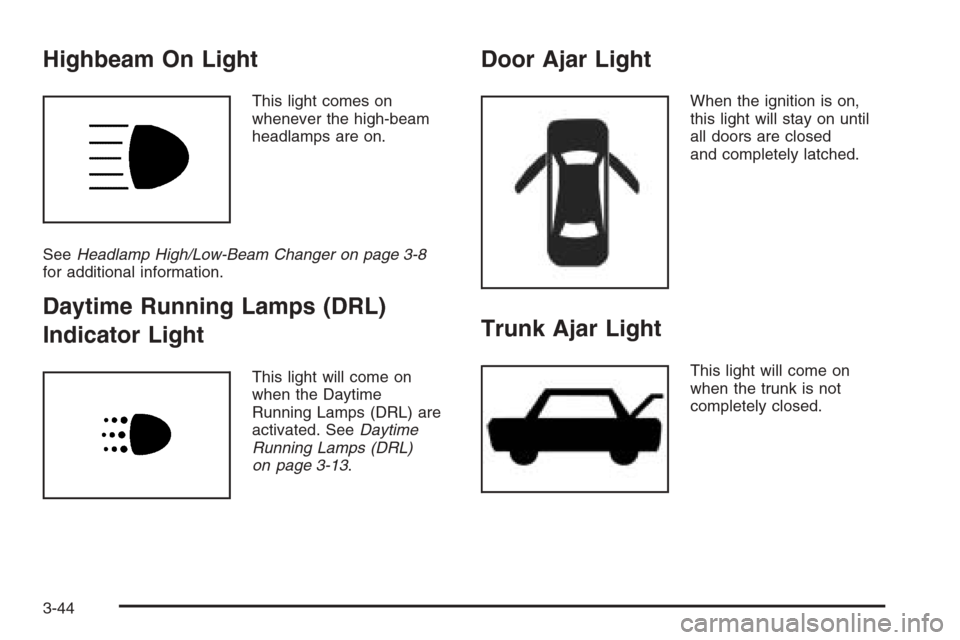
Highbeam On Light
This light comes on
whenever the high-beam
headlamps are on.
SeeHeadlamp High/Low-Beam Changer on page 3-8
for additional information.
Daytime Running Lamps (DRL)
Indicator Light
This light will come on
when the Daytime
Running Lamps (DRL) are
activated. SeeDaytime
Running Lamps (DRL)
on page 3-13.
Door Ajar Light
When the ignition is on,
this light will stay on until
all doors are closed
and completely latched.
Trunk Ajar Light
This light will come on
when the trunk is not
completely closed.
3-44
Page 171 of 368
Playing an MP3/WMA
With the ignition on, insert a CD partway into the slot,
label side up. The player will pull it in, Loading, then
Filecheck, and then MP3 or WMA will appear on
the display. The CD should begin playing. You cannot
insert a CD with the ACC off.
As each new track starts to play, the track number,
and the song name will appear on the display.
If the ignition or radio is turned off with a CD in the
player, it will stay in the player. When a CD is in
the player and the ignition is turned on, the radio
must be turned on before the CD will start playback.
When the ignition and radio are turned on, the CD
will start playing where it stopped, if it was the
last selected audio source.
The CD player can play the smaller 3 inch (8 cm)
single CDs with an adapter ring. Full-size CDs and
the smaller CDs are loaded in the same manner.
If playing a CD-R, the sound quality may be reduced
due to CD-R quality, the method of recording, the
quality of the music that has been recorded, and the
way the CD-R has been handled. There may be
an increase in skipping, difficulty in finding tracks,
and/or difficulty in loading and ejecting. If these
problems occur, check the bottom surface of the CD.If the surface of the CD is damaged, such as cracked,
broken, or scratched, the CD will not play properly. If the
surface of the CD is soiled, seeCare of Your CDs on
page 3-80for more information.
If there is no apparent damage, try a known good CD.
Do not add any label to a CD, it could get caught in the
CD player. If a CD is recorded on a personal computer
and a description label is needed, try labeling the top of
the recorded CD with a marking pen instead.
Notice:If you add any label to a CD, insert more
than one CD into the slot at a time, or attempt to play
scratched or damaged CDs, you could damage the
CD player. When using the CD player, use only CDs
in good condition without any label, load one CD at a
time, and keep the CD player and the loading slot free
of foreign materials, liquids, and debris.
If an error appears on the display, see “CD Messages”
later in this section.
All of the CD functions work the same while playing an
MP3/WMA, except for those listed here. See “Playing
a CD” earlier for more information.
SCROLL (MP3/WMA Mode Only):Press the SOUND
button for longer than two seconds. The song title or
other available information of a song will scroll on/off.
The offset is scroll on. The scroll mode can be changed
only when the SOUND button is pressed for longer
than two seconds.
3-65