engine CHEVROLET EPICA 2006 1.G Owner's Manual
[x] Cancel search | Manufacturer: CHEVROLET, Model Year: 2006, Model line: EPICA, Model: CHEVROLET EPICA 2006 1.GPages: 368, PDF Size: 2.24 MB
Page 108 of 368
Traction Control System
Active Light..............................................3-38
Traction Off Light..........................................3-39
Hold Mode Light...........................................3-39
Engine Coolant Temperature Gage..................3-40
Malfunction Indicator Lamp.............................3-40
Oil Pressure Light.........................................3-43
Cruise Control Light......................................3-43
Highbeam On Light.......................................3-44
Daytime Running Lamps (DRL)
Indicator Light...........................................3-44
Door Ajar Light.............................................3-44
Trunk Ajar Light............................................3-44
Fuel Gage...................................................3-45
Low Fuel Warning Light.................................3-46Audio System(s).............................................3-46
Radio with CD
(Single Display, Base Level).......................3-48
Radio with CD
(Single Display, MP3).................................3-52
Radio with CD
(Double Display, MP3/WMA).......................3-59
Radio with Six-Disc CD
(Double Display, MP3/WMA).......................3-67
Trunk-Mounted CD Changer...........................3-75
Audio Steering Wheel Controls.......................3-78
Radio Reception...........................................3-79
Care of Your CDs.........................................3-80
Care of the CD Player...................................3-80
Backglass Antenna (Sedan Models).................3-80
Integrated Windshield Antenna
(Hatchback and Wagon Models)..................3-81
Section 3 Instrument Panel
3-2
Page 126 of 368
?(Recirculation):This mode keeps outside air
from coming in the vehicle. It can be used to prevent
outside air and odors from entering your vehicle or
to help heat or cool the air inside your vehicle more
quickly. Press this button to turn the recirculation mode
on or off. When the button is pressed, an indicator
light in the button will come on. Using the recirculation
mode for extended periods may cause your windows
to fog. If this happens, select the defrost mode.
A/C (Air Conditioning):Press this button to turn the
air conditioning compressor on and off. When A/C
is pressed, an indicator light in the button will come on
to let you know that air conditioning is activated.
On hot days, open the windows to let hot inside air
escape; then close them. This helps to reduce the time
it takes for your vehicle to cool down. It also helps
the system to operate more efficiently.
For quick cool down on hot days, do the following:
1. Select the vent mode.
2. Select the highest fan speed.
3. Press the A/C button.
4. Select the recirculation mode.
5. Select the coolest temperature.Using these settings together for long periods of time
may cause the air inside of your vehicle to become too
dry. To prevent this from happening, after the air in
your vehicle has cooled, turn the recirculation mode off.
The air conditioning system removes moisture from
the air, so you may sometimes notice a small amount of
water dripping underneath your vehicle while idling or
after turning off the engine. This is normal.
Defogging and Defrosting
Fog on the inside of windows is a result of high humidity
or moisture condensing on the cool window glass.
This can be minimized if the climate control system is
used properly. There are two modes to clear fog or frost
from your windshield. Use the defog mode to clear
the windows of fog or moisture and warm the
passengers. Use the defrost mode to remove fog or
frost from the windshield more quickly.
Select one of these available modes from the right knob.
É(Defog):This mode directs most of the air to the
windshield and the floor outlets. A small amount of air
is also directed to the outboard outlets for the side
windows and to the instrument panel side outlets.
When you select this mode, the system runs the
air-conditioning compressor. To defog the windows
faster, turn the temperature control knob clockwise
to the warmest setting.
3-20
Page 127 of 368
0(Defrost):This mode directs most of the air
to the windshield and the outboard outlets for the
side windows. A small amount of air is also directed
to the instrument panel side outlets. When you select
this mode, the system runs the air-conditioning
compressor. To defrost the windows faster, turn
the temperature control knob clockwise to the
warmest setting.
Do not drive the vehicle until all windows are clear.
Rear Window and Outside Mirror
Defogger
Your vehicle has a rear window and outside mirror
defogger. This feature will only work when the ignition
is turned to ON.
The rear window defogger uses a warming grid to
remove fog or frost from the rear window. Before
using this feature, clear as much snow from the rear
window as possible.
button is located below the audio system. An indicator
light in the button will come on to let your know that
the feature is activated.The rear window and outside mirror defogger will turn
off about 10 minutes after the button is pressed.
The defogger can also be turned off by pressing the
button again or by turning off the engine.
Notice:Do not use anything sharp on the inside
of the rear window. If you do, you could cut or
damage the warming grid, and the repairs would
not be covered by your warranty. Do not attach
a temporary vehicle license, tape, a decal or
anything similar to the defogger grid.
Front Heated Windshield
Your vehicle may have a heated front windshield
which can be used to defrost it. This feature will
only work when the ignition is turned to ON.
There is a heated element along the bottom of the
windshield used to heat the windshield.
system. An indicator light in the button will come on
to let your know that the feature is activated.
The front windshield heater will turn off about 10 minutes
after the button is pressed. It can also be turned off
by pressing the button again or by turning off the engine.
3-21
Page 130 of 368
For quick cool down on hot days, press the AUTO
button and the system will automatically enter
recirculation mode and the temperature will be at
the full cold position for maximum cooling.
Using these settings together for long periods of time
may cause the air inside of your vehicle to become too
dry. To prevent this from happening, after the air in
your vehicle has cooled, turn the recirculation mode off.
The air conditioning system removes moisture from
the air, so you may sometimes notice a small amount
of water dripping underneath your vehicle while idling
or after turning off the engine. This is normal.
Outside Temperature:To display the outside
temperature, press the temperature control knob.
Pressing this knob again will cancel the outside
temperature display, otherwise the display will return
to the temperature inside of the vehicle after about
five seconds.
The outside temperature sensor is located near the
front bumper, so the displayed temperature may
be affected by road or engine heat while the vehicle is
idling or traveling at slow speeds. For this reason,
the displayed temperature will be most accurate at
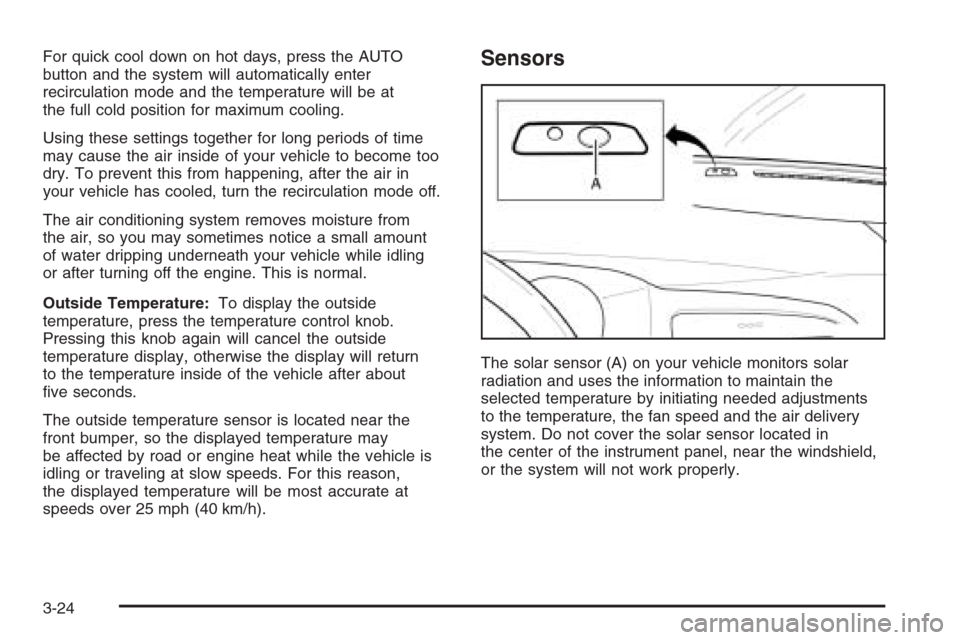
speeds over 25 mph (40 km/h).Sensors
The solar sensor (A) on your vehicle monitors solar
radiation and uses the information to maintain the
selected temperature by initiating needed adjustments
to the temperature, the fan speed and the air delivery
system. Do not cover the solar sensor located in
the center of the instrument panel, near the windshield,
or the system will not work properly.
3-24
Page 132 of 368
1(Defrost):Press the defrost button to select the
defrost function.
Pressing this button directs the air to the windshield and
the outboard outlets for the side windows.
To help clear the windshield quickly, do the following:
1. Select the defrost mode.
2. Select the highest temperature.
3. Select the highest fan speed.
Do not drive the vehicle until all windows are clear.
To cancel defrost, press the MODE or AUTO buttons.
If you press the AUTO button, the system will operate
automatically.Rear Window and Outside Mirror
Defogger
Your vehicle has a rear window and outside mirror
defogger. This feature will only work when the ignition
is turned to ON.
The rear window defogger uses a warming grid to
remove fog or frost from the rear window. Before
using this feature, clear as much snow from the rear
window as possible.
button is located below the audio system. An indicator
light in the button will come on to let you know that
the feature is activated.
The rear window and outside mirror defogger will
turn off about 15 minutes after the button is pressed.
The defogger can also be turned off by pressing
the button again or by turning off the engine.
Notice:Do not use anything sharp on the inside
of the rear window. If you do, you could cut or
damage the warming grid, and the repairs would
not be covered by your warranty. Do not attach
a temporary vehicle license, tape, a decal or
anything similar to the defogger grid.
3-26
Page 133 of 368
Front Heated Windshield
Your vehicle may have a heated front windshield which
can be used to defrost it. This feature will only work
when the ignition is turned to ON.
There is a heated element along the bottom of the
windshield used to heat the windshield.
system. An indicator light in the button will come on
to let you know that the feature is activated.
The front windshield heater will turn off about 10 minutes
after the button is pressed. It can also be turned off
by pressing the button again or by turning off the engine.
Outlet Adjustment
Use the lever located in the center of each outlet
to change the direction of the airflow. Use the
thumbwheel located above the side outlets to turn
them on and off.
Operation Tips
•
Clear away any ice, snow or leaves from the
air inlets at the base of the windshield that
may block the flow of air into your vehicle.
•Use of non-GM approved hood deflectors may
adversely affect the performance of the system.
•Keep the path under the front seats clear of
objects to help circulate the air inside of your
vehicle more effectively.
3-27
Page 134 of 368
Passenger Compartment Air Filter
Your vehicle has a passenger compartment air filter.
It is located on the passenger side at the base of
the windshield and can be accessed through a
removable panel under the hood of the vehicle.
The filter traps most of the pollen from air entering
the module. Like your engine’s air cleaner/filter,
it may need to be changed periodically.
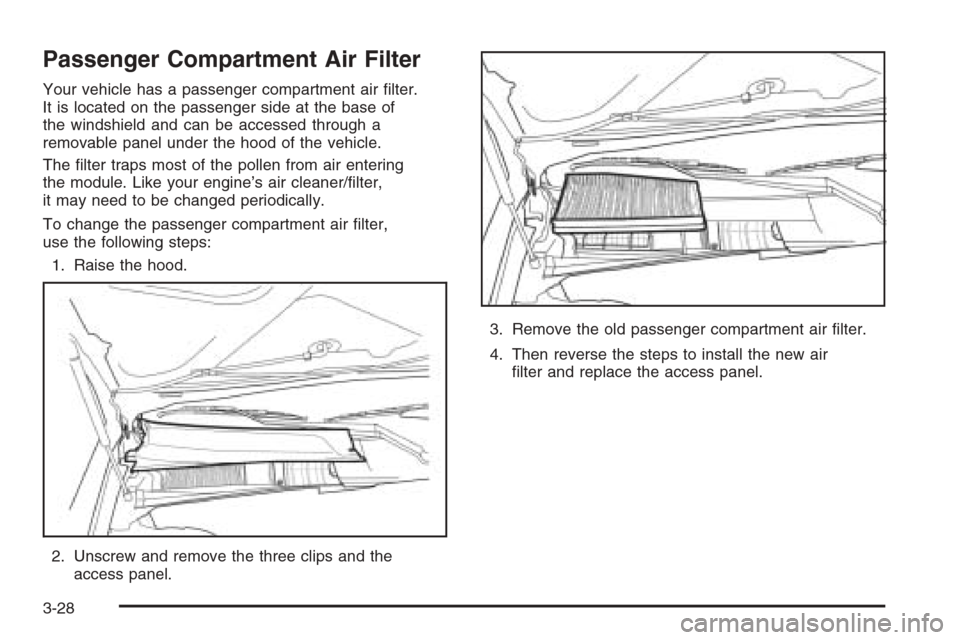
To change the passenger compartment air filter,
use the following steps:
1. Raise the hood.
2. Unscrew and remove the three clips and the
access panel.3. Remove the old passenger compartment air filter.
4. Then reverse the steps to install the new air
filter and replace the access panel.
3-28
Page 135 of 368
Warning Lights, Gages,
and Indicators
This part describes the warning lights and gages
that may be on your vehicle. The pictures will help
you locate them.
Warning lights and gages can signal that something
is wrong before it becomes serious enough to cause
an expensive repair or replacement. Paying attention
to your warning lights and gages could also save you
or others from injury.
Warning lights come on when there may be or is a
problem with one of your vehicle’s functions. As you
will see in the details on the next few pages, some
warning lights come on briefly when you start the engine
just to let you know they’re working. If you are familiar
with this section, you should not be alarmed when
this happens.Gages can indicate when there may be or is a problem
with one of your vehicle’s functions. Often gages
and warning lights work together to let you know when
there’s a problem with your vehicle.
When one of the warning lights comes on and stays
on as you are driving, or when one of the gages shows
there may be a problem, check the section that tells
you what to do about it. Please follow this manual’s
advice. Waiting to do repairs can be costly — and
even dangerous. So please get to know your warning
lights and gages. They’re a big help.
3-29
Page 137 of 368
Speedometer and Odometer
Your speedometer lets you see your speed in both
miles per hour (mph) and kilometers per hour (km/h).
Your odometer shows how far your vehicle has
been driven in kilometers.
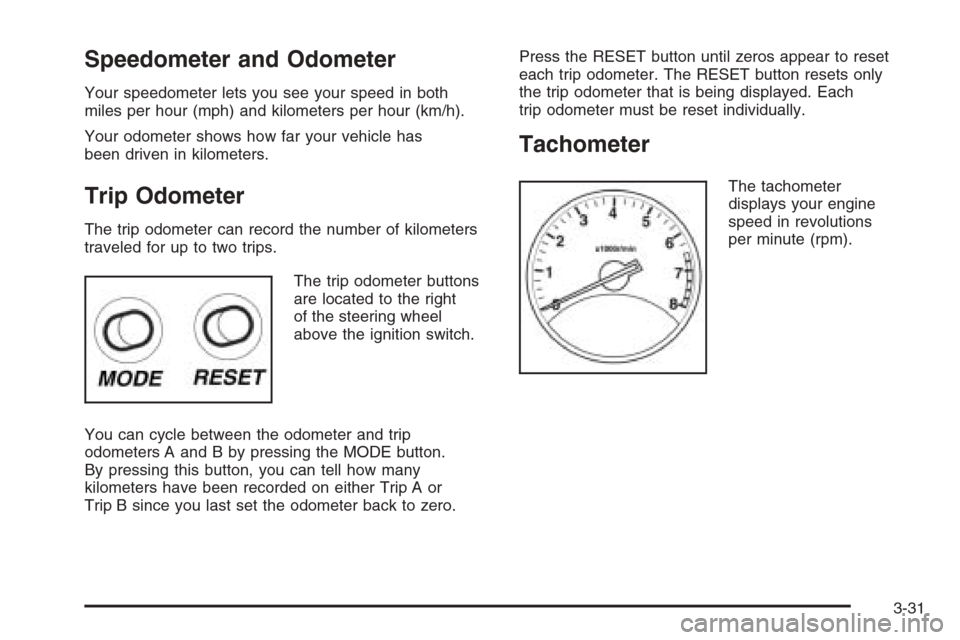
Trip Odometer
The trip odometer can record the number of kilometers
traveled for up to two trips.
The trip odometer buttons
are located to the right
of the steering wheel
above the ignition switch.
You can cycle between the odometer and trip
odometers A and B by pressing the MODE button.
By pressing this button, you can tell how many
kilometers have been recorded on either Trip A or
Trip B since you last set the odometer back to zero.Press the RESET button until zeros appear to reset
each trip odometer. The RESET button resets only
the trip odometer that is being displayed. Each
trip odometer must be reset individually.
Tachometer
The tachometer
displays your engine
speed in revolutions
per minute (rpm).
3-31
Page 141 of 368
{CAUTION:
If the airbag readiness light in the instrument
panel cluster ever comes on and stays on,
it means that something may be wrong with
the airbag system. If this ever happens,
have the vehicle serviced promptly, because
an adult-size person sitting in the right
front passenger’s seat may not have the
protection of the frontal airbag and side
airbag (if equipped). SeeAirbag Readiness
Light on page 3-32for more on this,
including important safety information.
Charging System Light
The charging system light
will come on briefly when
you turn on the ignition,
and the engine is not
running, as a check
to show you it is working.
Then it should go out when the engine is started.
If it stays on, or comes on while you are driving, you
may have a problem with the electrical charging system.
Have it checked by your GM dealer. Driving while this
light is on could drain your battery.
If you must drive a short distance with the light on,
be certain to turn off all your accessories, such as the
radio and air conditioner.
3-35