sensor CHEVROLET EQUINOX 2007 1.G User Guide
[x] Cancel search | Manufacturer: CHEVROLET, Model Year: 2007, Model line: EQUINOX, Model: CHEVROLET EQUINOX 2007 1.GPages: 492, PDF Size: 2.62 MB
Page 349 of 492
Engine Air Cleaner/Filter
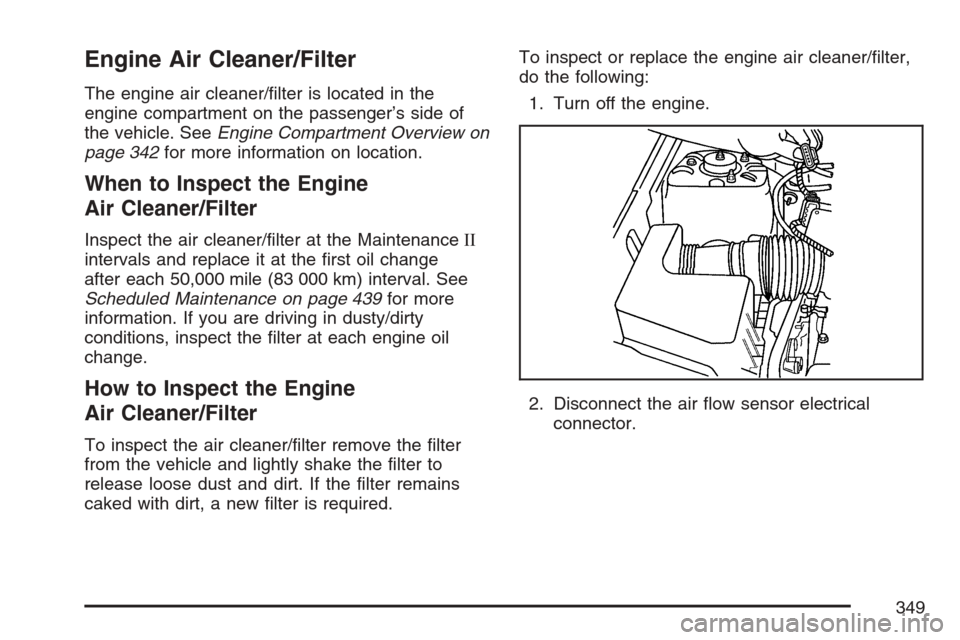
The engine air cleaner/lter is located in the
engine compartment on the passenger’s side of
the vehicle. SeeEngine Compartment Overview on
page 342for more information on location.
When to Inspect the Engine
Air Cleaner/Filter
Inspect the air cleaner/lter at the MaintenanceII
intervals and replace it at the rst oil change
after each 50,000 mile (83 000 km) interval. See
Scheduled Maintenance on page 439for more
information. If you are driving in dusty/dirty
conditions, inspect the lter at each engine oil
change.
How to Inspect the Engine
Air Cleaner/Filter
To inspect the air cleaner/lter remove the lter
from the vehicle and lightly shake the lter to
release loose dust and dirt. If the lter remains
caked with dirt, a new lter is required.To inspect or replace the engine air cleaner/lter,
do the following:
1. Turn off the engine.
2. Disconnect the air ow sensor electrical
connector.
349
Page 351 of 492
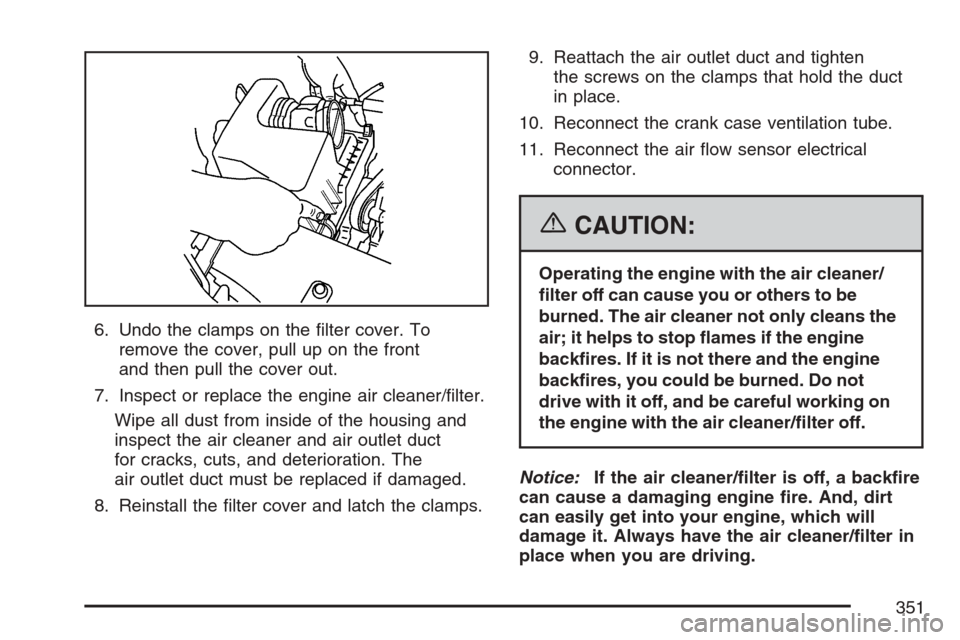
6. Undo the clamps on the lter cover. To
remove the cover, pull up on the front
and then pull the cover out.
7. Inspect or replace the engine air cleaner/lter.
Wipe all dust from inside of the housing and
inspect the air cleaner and air outlet duct
for cracks, cuts, and deterioration. The
air outlet duct must be replaced if damaged.
8. Reinstall the lter cover and latch the clamps.9. Reattach the air outlet duct and tighten
the screws on the clamps that hold the duct
in place.
10. Reconnect the crank case ventilation tube.
11. Reconnect the air ow sensor electrical
connector.
{CAUTION:
Operating the engine with the air cleaner/
lter off can cause you or others to be
burned. The air cleaner not only cleans the
air; it helps to stop ames if the engine
backres. If it is not there and the engine
backres, you could be burned. Do not
drive with it off, and be careful working on
the engine with the air cleaner/lter off.
Notice:If the air cleaner/lter is off, a backre
can cause a damaging engine re. And, dirt
can easily get into your engine, which will
damage it. Always have the air cleaner/lter in
place when you are driving.
351
Page 391 of 492

How to Check
Use a good quality pocket-type gage to check
tire pressure. You cannot tell if your tires are
properly inated simply by looking at them. Radial
tires may look properly inated even when they
are under-inated. Check the tire’s ination
pressure when the tires are cold. Cold means your
vehicle has been sitting for at least three hours
or driven no more than 1 mile (1.6 km).
Remove the valve cap from the tire valve stem.
Press the tire gage rmly onto the valve to
get a pressure measurement. If the cold tire
ination pressure matches the recommended
pressure on the Tire and Loading Information
label, no further adjustment is necessary. If the
ination pressure is low, add air until you reach the
recommended amount.
If you overll the tire, release air by pushing on
the metal stem in the center of the tire valve.
Re-check the tire pressure with the tire gage.
Be sure to put the valve caps back on the valve
stems. They help prevent leaks by keeping out
dirt and moisture.
Tire Pressure Monitor System
Your vehicle has a Tire Pressure Monitor
System (TPMS). This system uses radio and
sensor technology to check tire pressure levels.
TPMS sensors are mounted onto each tire
and wheel assembly, except for the spare tire.
The TPMS sensors monitor the air pressure
in your vehicle’s tires and transmit tire pressure
readings to a receiver located in the vehicle.
Each tire, including the spare (if provided), should
be checked monthly when cold and inated to
the ination pressure recommended by the
vehicle manufacturer on the vehicle placard or tire
ination pressure label. (If your vehicle has tires
of a different size than the size indicated on
the vehicle placard or tire ination pressure label,
you should determine the proper tire ination
pressure for those tires.)
391
Page 393 of 492

When a low tire pressure condition is detected,
the TPMS will illuminate the low tire pressure
warning symbol on the instrument panel cluster,
and at the same time a message to check
the pressure in a specic tire will appear on the
Driver Information Center (DIC) display. The
low tire pressure warning symbol on the instrument
panel cluster and the check tire pressure
message will appear at each ignition cycle until
the tires are inated to the correct ination
pressure. Using the DIC, tire pressure levels can
be viewed by the driver. For additional information
and details about the DIC operation and displays
seeDIC Operation and Displays on page 193
andDIC Warnings and Messages on page 198.
The low tire pressure warning light may come on
in cool weather when the vehicle is rst started,
and then turn off as you start to drive. This may be
an early indicator that the air pressure in the
tire(s) are getting low and need to be inated to
the proper pressure.
A Tire and Loading Information Label, attached to
your vehicle, shows the size of your vehicle’s
original equipment tires and the correct inationpressure for your vehicle’s tires when they are cold.
SeeLoading Your Vehicle on page 315, for an
example of the Tire and Loading Information
Label and its location on your vehicle. Also see
Ination - Tire Pressure on page 390.
Your vehicle’s TPMS system can warn you about a
low tire pressure condition but it does not replace
normal tire maintenance. SeeTire Inspection and
Rotation on page 396andTires on page 382.
Notice:Do not use a tire sealant if your vehicle
has Tire Pressure Monitors. The liquid sealant
can damage the tire pressure monitor sensors.
The TPMS will not function properly if one or more
of the TPMS sensors are missing or inoperable. If
the system detects a missing or inoperable sensor,
an error message SERVICE TIRE MONITOR
SYSTEM will be shown on the DIC display. If you
have replaced a tire/wheel assembly without
transferring the TPMS sensors, the error message
will be displayed. Once you re-install the TPMS
sensors, the error message should go off. See your
dealer for service if all TPMS sensors are installed
and the error message comes on and stays on.
393
Page 394 of 492
TPMS Sensor Matching Process
Each TPMS sensor has a unique identication
code. Any time you replace one or more of
the TPMS sensors or rotate the vehicle’s tires, the
identication codes will need to be matched to
the new tire/wheel position. The sensors are
matched, to the tire/wheel positions, in the
following order: driver side front tire, passenger
side front tire, passenger side rear tire, and driver
side rear tire using a TPMS diagnostic tool.
See your dealer for service.
The TPMS sensors may also be matched to each
tire/wheel position by increasing or decreasing
the tire’s air pressure. When increasing the tire’s
pressure, do not exceed the maximum ination
pressure indicated on the tire’s sidewall.
You will have two minutes to match each tire
and wheel position. If it takes longer than
two minutes to match any tire and wheel position,
the matching process stops and you will need
to start over.The TPMS matching process is outlined below:
1. Set the parking brake.
2. Turn the ignition switch to RUN with the
engine off.
3. Using the DIC, press the vehicle
information button until the TIRE LOCATIONS
PRESS
VTO LEARN message displays.
4. Press the set/reset button to allow the system
to learn the tire positions. The horn will sound
twice to indicate the receiver is ready, and
the TIRE LEARNING ACTIVE message
displays. The TPMS system is ready for the
sensor matching process to begin.
5. Start with the driver side front tire.
394
Page 395 of 492
6. Remove the valve cap from the tire’s valve
stem. Activate the TPMS sensor by increasing
or decreasing the tire’s air pressure for
ve seconds, or until a horn chirp sounds. The
horn chirp, which may take up to 30 seconds to
sound, conrms that the sensor identication
code has been matched to the tire/wheel
position. To decrease the tire’s air-pressure
use the pointed end of the valve cap, a
pencil-style air pressure gage, or a key.
7. Proceed to the passenger side front tire,
and repeat the procedure in Step 6.
8. Proceed to the passenger side rear tire,
and repeat the procedure in Step 6.
9. Proceed to the driver side rear tire, and
repeat the procedure in Step 6.
10. After hearing the conrming horn chirp for the
driver side rear tire, the tire learning process
ends. Turn the ignition switch to LOCK.
11. Set all four tires to the recommended air
pressure level as indicated on the tire and
loading information label.
12. Put the valve caps back on the valve stems.Federal Communications Commission
(FCC) and Industry and Science Canada
The Tire Pressure Monitor System (TPMS)
operates on a radio frequency and complies with
Part 15 of the FCC Rules. Operation is subject
to the following two conditions:
1. This device may not cause harmful
interference.
2. This device must accept any interference
received, including interference that may
cause undesired operation.
The Tire Pressure Monitor System (TPMS)
operates on a radio frequency and complies with
RSS-210 of Industry and Science Canada.
Operation is subject to the following
two conditions:
1. This device may not cause interference.
2. This device must accept any interference
received, including interference that may
cause undesired operation of the device.
Changes or modications to this system by other
than an authorized service facility could void
authorization to use this equipment.
395
Page 397 of 492
Reset the Tire Pressure Monitor System. See
“TPMS Sensor Matching Process” under
Tire Pressure Monitor System on page 391.
Make certain that all wheel nuts are properly
tightened. See “Wheel Nut Torque” under
Capacities and Specications on page 434.
{CAUTION:
Rust or dirt on a wheel, or on the parts to
which it is fastened, can make wheel nuts
become loose after time. The wheel could
come off and cause an accident. When
you change a wheel, remove any rust or
dirt from places where the wheel attaches
to the vehicle. In an emergency, you can
use a cloth or a paper towel to do this;
but be sure to use a scraper or wire brush
later, if needed, to get all the rust or dirt
off. SeeChanging a Flat Tire on page 404.
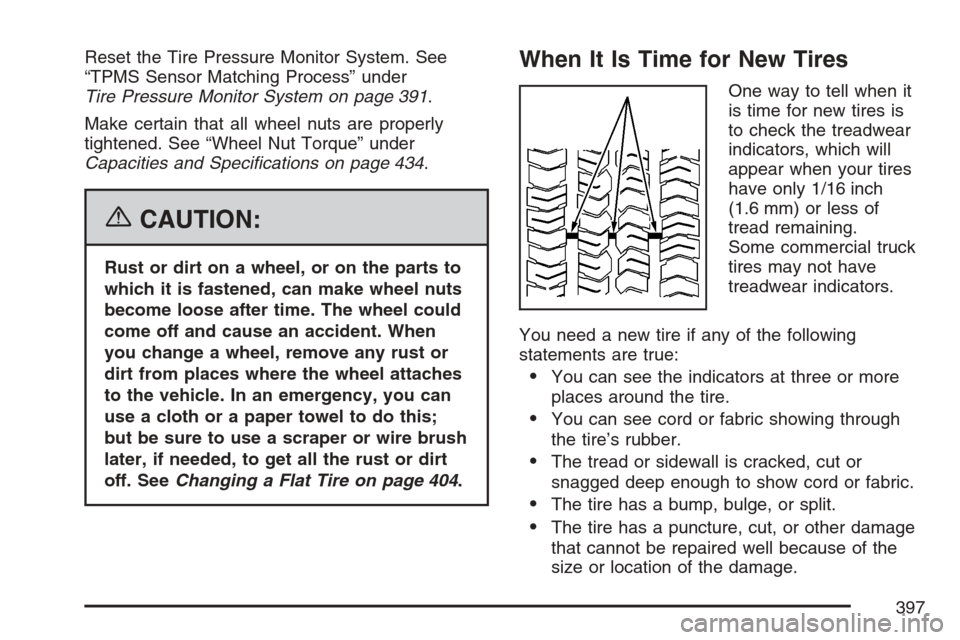
When It Is Time for New Tires
One way to tell when it
is time for new tires is
to check the treadwear
indicators, which will
appear when your tires
have only 1/16 inch
(1.6 mm) or less of
tread remaining.
Some commercial truck
tires may not have
treadwear indicators.
You need a new tire if any of the following
statements are true:
You can see the indicators at three or more
places around the tire.
You can see cord or fabric showing through
the tire’s rubber.
The tread or sidewall is cracked, cut or
snagged deep enough to show cord or fabric.
The tire has a bump, bulge, or split.
The tire has a puncture, cut, or other damage
that cannot be repaired well because of the
size or location of the damage.
397
Page 432 of 492
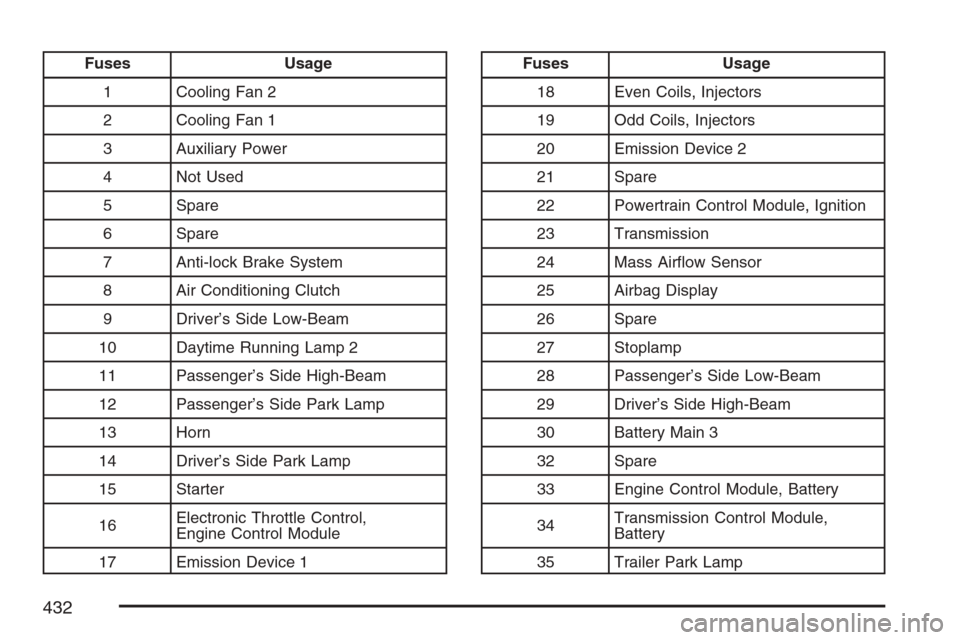
Fuses Usage
1 Cooling Fan 2
2 Cooling Fan 1
3 Auxiliary Power
4 Not Used
5 Spare
6 Spare
7 Anti-lock Brake System
8 Air Conditioning Clutch
9 Driver’s Side Low-Beam
10 Daytime Running Lamp 2
11 Passenger’s Side High-Beam
12 Passenger’s Side Park Lamp
13 Horn
14 Driver’s Side Park Lamp
15 Starter
16Electronic Throttle Control,
Engine Control Module
17 Emission Device 1Fuses Usage
18 Even Coils, Injectors
19 Odd Coils, Injectors
20 Emission Device 2
21 Spare
22 Powertrain Control Module, Ignition
23 Transmission
24 Mass Airow Sensor
25 Airbag Display
26 Spare
27 Stoplamp
28 Passenger’s Side Low-Beam
29 Driver’s Side High-Beam
30 Battery Main 3
32 Spare
33 Engine Control Module, Battery
34Transmission Control Module,
Battery
35 Trailer Park Lamp
432